

 Come together with the global Drupal community in Rotterdam, 28 Sept – 1 Oct 2026. Sessions, contribution, connection, and Early Bird savings until 8 June.
Problem/Motivation
Follow-up to #2307647-43: [Follow-up] Allow manual override of required image alt text in the Text Editor image dialog when appropriate to prevent it from getting derailed on wording.
Alt text is important for accessibility, but not everyone understands it's purpose or value. Even if they do, it can be hard to write good alternate text.
The W3C provides a comprehensive set of guidelines for writing alternate text at http://www.w3.org/TR/html-alt-techniques/
***
Note that we're currently specifically talking about the alt text in editor.module (due to #2307647: [Follow-up] Allow manual override of required image alt text in the Text Editor image dialog when appropriate being filed against editor.module), but there is lots of alt-text textfields with different help text (see #1885732: Documenting alt and title tags on image fields) so we could decide to increase scope.
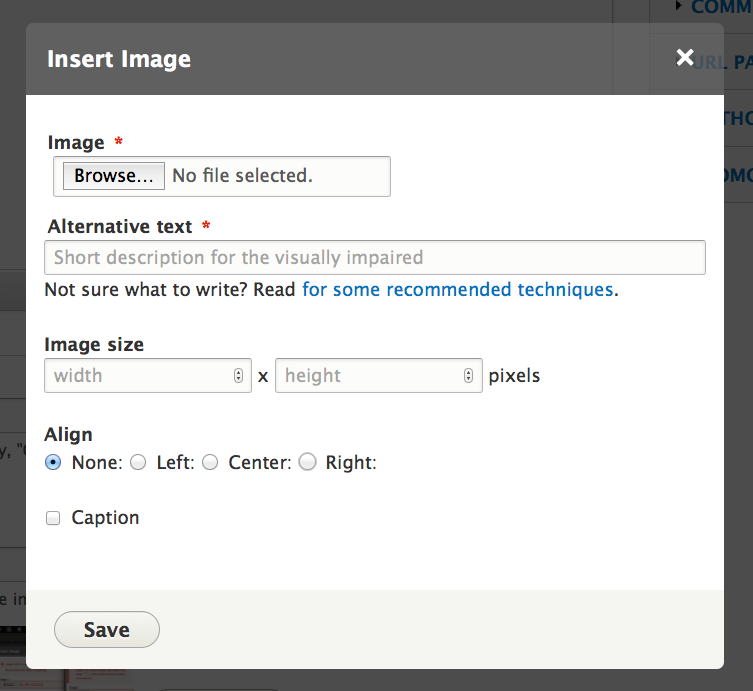
I've attached @Wim Leers' screenshot from #2307647-41: [Follow-up] Allow manual override of required image alt text in the Text Editor image dialog when appropriate to show which alternate text field we want to add help / description text to.
Proposed resolution
We should improve the "Alternate text" field's help text to succinctly explain the purpose and value of alternate text. We might want to link to the W3C's guidelines too.
Bikeshed warning: This issue may generate a lot of discussion as we discover the best way to word it.
Remaining tasks
- Decide on good help text.
- Decide where to change it (currently just editor.module).
- Write a patch.
- Review and RTBC.
- Commit.
- Discuss backporting.
User interface changes
Add help text ('#description' text) to the CKEditor "Insert Image" form's "Alternative text" field.
API changes
None.
| Comment | File | Size | Author |
|---|---|---|---|
| #14 | placeholder-description.png | 70.43 KB | mgifford |
| #11 | 2320111-11.patch | 916 bytes | wim leers |



Comments
Comment #1
wim leersNow that #2307647: [Follow-up] Allow manual override of required image alt text in the Text Editor image dialog when appropriate has landed, I think we can do this one.
Having read http://www.w3.org/TR/html-alt-techniques/#intro_alt again, I propose something like this:
… as the
placeholderattribute on theinput[type=text](which makes sure we don't negatively affect the UX: this doesn't consume screen real estate, and it goes away as soon as the user enters alternative text).I know it's not only for visually impaired users. But that's the primary audience, I think, and most likely a good way to help convince the author to provide a good text alternative.
Comment #3
Bojhan commentedI really like the idea of putting more of these texts in the placeholder. However I am not yet sure about committing to this as a standard for core. I imagine CKEditor is a good place to try it out though.
I do think that placeholders should have like a max of characters related to the input size. Because it should really be scanned VERY quickly, and not be information that is required to fill it out properly (e.g. information about using should never be in a placeholder) - since it is removed as soon as you enter something. In the many usability tests I saw placeholders, it was very hard for users when this held any critical help text and they often do not know how to get placeholder information back.
For the help text I propose making it shorter, for example:
Alternative image text
[Description for visually impaired]
Comment #4
wim leersSo Bojhan proposed changing the placeholder text from
to
I'm fine with "as short as possible", but I think is less clear than . I also think it's important to stress that it should be a short description. So what do you think about the following?
Comment #5
wim leersOr better yet:
Let's see how that stacks up against translations (length-wise):
I think that works pretty well? :)
Comment #6
mparker17@Wim Leers, "Short description for the visually impaired" sounds like good placeholder text to me!
Comment #7
mparker17Is it worth also adding a
'#description'that links to some techniques for people who aren't sure what to write? Or should we file this as a separate issue?I'm thinking of something like:
Some possible resources are:
... I went with WebAIM's article in my suggestion above because it feels more "friendly" for non-technical people than the W3C's article.
Comment #8
wim leers#7: No, please don't add a
#description. Not here, nor in another issue. Sites can do that if they want through a custom (or contrib) module. Core shouldn't do that, because it deteriorates the UX. That's why I wrote what I wrote in #1.Comment #9
anandkp commentedI love @mparker17's idea in #7. I feel it meets the needs of ALL Drupal users regardless of experience level (i.e. whether they know PHP, HTML, just how to use a WYSIWYG editor or none of the above).
Comment #10
mgiffordWe don't have a pattern for help links at this point.
I do think it would be worth having a link in the ui to a d.o page we can control with information to help users understand this better.
A short placeholder is definitely important, but we can't put links in there. The text there is fine, though.
Having the link in somewhere like here would be ok - #2308515: Document accessibility features in CKEditor
Understand the concerns of cluttering up the UI.
Comment #11
wim leersReroll, with #3/#4/#5 implemented.
Comment #12
mgiffordI am trying to see if we can achieve a balance here. I don't know if any other CMS's have patterns we can borrow from.
Alt text really is the low hanging fruit of accessibility, but even here there are complications and mis-understandings. Having a gentle reminder of what meaning a user gets out of an image is important and regularly overlooked.
If #1971222: Incorporate longdesc into image support gets in at some point, it will also need to be clarified with regard to screen readers.
There is a good use case for this being an exception and having descriptive text with a link here should be seriously considered.
Comment #13
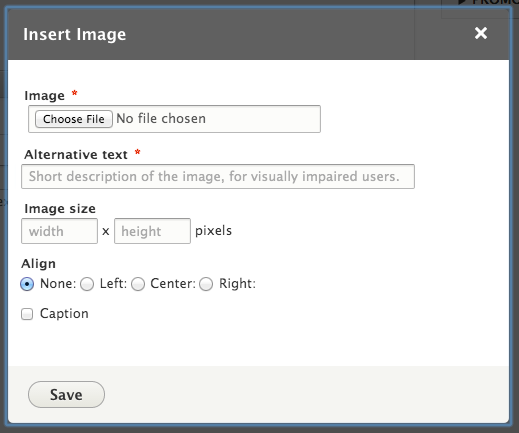
wim leers#12: I'm not sure what you're saying? Are you advocating for having a link in the dialog (the one in the screenshot in #11) to a lengthy explanation of what constitutes good alternative text?
Comment #14
mgiffordBasically yes. I do think something like this would be better for accessibility.

I do understand the problems with cluttering up the UI, but do think that providing help text to a page like https://www.drupal.org/node/2324781 could provide users with more clarity about how to write more accessible content.
Many less technical users are going to get stumped about what alt text is and how to provide something in here for a type of user they've never considered before.
Comment #15
wim leersI don't think it's Drupal's responsibility to teach end users best practices. It's Drupal job to encourage, and insofar as reasonably possible, enforce compliance with standards.
IMHO #11 already encourages users in a gentle way to enter meaningful alternative text. It may not provide a full explanation of how to write optimal alternative text. But any empathic user will want to learn that and find it for him/herself. Any user who doesn't want to bothered with this will just ignore any recommended techniques and will just enter .
The more Drupal tries to do "the right thing" like #14 proposes (because in theory, it is the right thing!), the further it moves away from the "great UX that doesn't get in your way" that Drupal's been trying to move towards. This moves us in the opposite direction of medium.com and the like.
That's my view. I understand where you're coming from, but I'd really like to avoid
#descriptions if possible, for the sake of showing only the essential in the UI (i.e. nothing that's mentally taxing or distracting). I think it's possible to keep it as simple as #11 here. With #11, everything is clear, no explanations necessary.So… do you think the
#descriptionin #14 is absolutely essential? At the cost of a worse UX?Comment #16
Bojhan commentedSorry, stepping in a little here. For the sake of progress, lets get this patch in now.
From a usability perspective its still somewhat icky - but far less than loads of help text to describe a unexplainable usecase. Lets not spend another few weeks going back and forth on another description.
Lets create a proper followup, were we discuss to what extend we should follow ATAG and what constitutes as "help on writing accessible content" Drupal should provide and "help on writing accessible content" people should get from other sources. I don't think its a good strategy to make that decision in this issue, and its important to focus on the high-impact parts not introduce this kind of help half-assed on less impacting stuff like image descriptions. I don't think people write completely useless descriptions, so we can get this in now without the additional description.
Comment #17
mgifford@Wim Leers & Bojhan - do really appreciate this discussion between accessibility & usability.
Ultimately, what the Drupal Community has agreed to is WCAG 2.0 AA. For this reason I'm marking this (patch #11) RTBC as it doesn't break WCAG & does gently encourage folks to put in alternative content.
When ATAG 2.0 is finalized the Drupal community can decide if this is a goal that we can formally adopt, but at the moment I think all we can do is lean in and consider where it makes the most sense.
I'm not sure where the best place to have a follow-up discussion about ATAG & the CKEditor implementation might be.
Having descriptive text as an option in D8 could be quite useful #1558068: Configure Alt Text Description.
But we should also have patterns that are consistent for this across the board in Core #1885732: Documenting alt and title tags on image fields
Comment #18
mparker17The spectrum of users might not be as polarized as that:
I think it is especially important to consider these two groups of users given that we're proposing a change to the WYSIWYG editor, which is often (mis)interpreted to be "exactly like Microsoft Word" and is therefore more likely to be used by a wider spectrum of users: commenters/forum posters (e.g.: this issue queue), volunteers with no prior Drupal / web training, people who only update their website occasionally, experienced developers who simply don't remember every best practice, and, people who don't care (and write "sadfafasf").
The alt text field was made a required field in a separate discussion, meaning it's already getting in people's way.
My goal when I requested the
#descriptiontext was to provide a quick and easy solution for making it less-in-their-way: a link that points someone (who cares enough to not write "sadfafasf", but doesn't know what to do) to the most-relevant information about how to fill in that required field.I'm basing my argument for the inclusion of
#descriptiontext on the assumption that users would be happier if a bit of clutter helped them to solve their problem (ideally without bothering someone else) than a clean interface that doesn't give them any clues about how to solve their particular issue. I put effort into making the text as short as possible so it wouldn't have a big impact on the clutter.Comment #19
wim leers#17: Thank you for your understanding!
#18:
Comment #20
mparker17Thanks for your reply. I will go with whatever the community decides. Sorry to trouble everyone with my request.
Comment #21
wim leers#20: You didn't trouble anybody! These are the kinds of discussions we must have! We just have to weigh all the needs here, which is why Bojhan and I are arguing against your initial proposal. But we are implementing a light version of it, are we not? :)
It'd really be a shame if we'd lose your excellent input. Please continue to do so. But since this is an open source project, we always have to try to convince each other, and build consensus. Sometimes that's easy, sometimes it's hard. I hope to see you again in the Drupal core issue queue in any case :)
Comment #24
wim leersBack to RTBC per #17. (Was NW due to a random testbot fail.)
Comment #25
alexpottCommitted f7532d7 and pushed to 8.0.x. Thanks!