

 Come together with the global Drupal community in Rotterdam, 28 Sept – 1 Oct 2026. Sessions, contribution, connection, and Early Bird savings until 8 June.
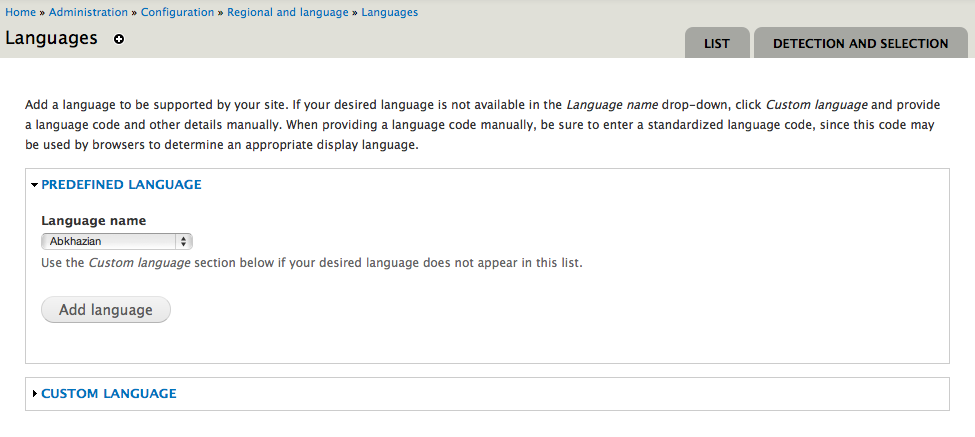
As part of #1260860: Rework language list admin user interface, we explored moving the add language operation inside the language list overview for ease of use / inline operation, just like on the field UI (or user role setup) screens. Because in the 80% of cases (if not more), users set up one of the predefined languages, all they'd need to do is to select a language from a dropdown and hit submit and get back to the same page with the language in there. Applying the pattern people got used to with fields UI + less operations to get it to work. Here is a screenshot from there from when we had a partially working patch. No patch here yet, since we need to drive #1260860: Rework language list admin user interface home first before we can do this. It touches the very same code.

Parent
#1260690: META: Improve multilingual user experience in Drupal 8
| Comment | File | Size | Author |
|---|---|---|---|
| #2 | AddLanguage.png | 72.22 KB | gábor hojtsy |
| InlineLanguageAdd-1.png | 95.91 KB | gábor hojtsy |


Comments
Comment #1
Bojhan commentedI would consider this a wont fix, I never liked this pattern (and on the roles page it is also somewhat confusing) there are few to no clear wins other than the position.
Comment #2
gábor hojtsyHaha! Interesting. Users I've talked to found this appealing, but I've obviously talked to people knowledgeable in language matters. Problem is that the Add language page looks like this, and most of the time what you do is you pick an option from a select box and hit submit (and get back to the language list, where if you need to add more languages, need to click add language again, and do this again):
This is not a huge thing obviously, just trying to explore how to make this easy and applying the existing fields UI/role pattern seemed like fitting. Its the same type of thing, you pick from a list and submit and usually don't need to do configuration beyond that.
Comment #3
yoroy commentedHmm, personally I've always found this a very awkward pattern. In Field UI I only found out by accident after a looong time that I can drag it around (before saving). It being a non-differentiated part of the table is the main offender there I think.
Also, strategically I don't think it's advisable to follow patterns from a UI that we *know* has big big usability issues and needs work. I'd rather look into evolving the '+ Add stuff' to have a select list variant?
Comment #3.0
yoroy commentedFix image path.
Comment #4
gábor hojtsyAll right, I don't have a strong feeling either way, just trying to make adding a language an easier operation. We discussed keeping the Add language page in Montreal and making changes to that instead. So marking this postponed for figuring our an inline select box pattern for "+ Add" or figuring out how to make the in-table addition work better for users, and opened #1296566: Improve usability of add language screen for the add language page usability.
Comment #5
gábor hojtsyTagging for base language system.
Comment #5.0
gábor hojtsyAdd parent
Comment #6
mgifford@Gábor Hojtsy any thoughts on how we're going to get this? "figuring our an inline select box pattern for "+ Add" or figuring out how to make the in-table addition work better for users"
Just want to know what we're postponing this issue on.
Comment #8
gábor hojtsyWell, the in-table addition pattern was removed from field UI since then due exactly to the UX problems it posed, so its not a viable pattern to follow anymore. The inline 'add' select box as part of the actions would be an entirely new UI widget/element, that we don't have at all (and I am not sure we should have BTW). I think the concrete title/task outlined in the summary is a won't fix now that we got rid of inlining addition in tables. Generally improving the language addition flow may be a good case though, not sure if this issue should be repurposed or a new one opened, either works.
Comment #9
gábor hojtsyComment #24
drummCorrecting input format