After searching far and wide the web community for an event filter between two dates I decided to write this tutorial to help others like me who had a little challenge finding how to do it.
It is tempting to believe that using the "is between" on a date fields will work. However, this option is used only in the case of events "Starting" on a rage of date.
This module (https://www.drupal.org/project/views_between_dates_filter) is used to filter evenst on ONE date and NOT a range of date (as the image suggest).
The following conversations have guided me to this tutorial.
https://www.drupal.org/node/1302940
http://drupal.stackexchange.com/questions/36380/drupal-7-views-filter-be...
This tutorial requires that you already have a content type with a date field . It is not necessary to have two fields to adjust an "end date" for the event, only a date field with the "Collect an end date."
This part (which seems "logical" to start - but it is not so much) is the basis of this discussion.
Take for example this figure, based on the discussion of https://www.drupal.org/node/1302940
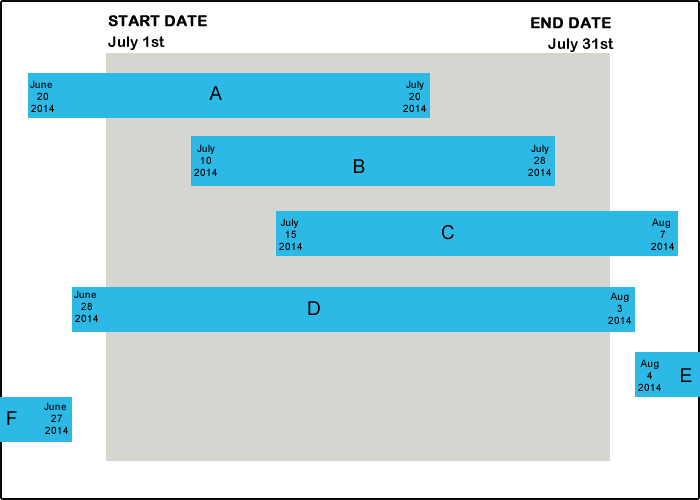
A search filter between the 1th and 31th of July should provide us the events A, B, C and D (shaded area), and Exclude E and F.
If we have a filter with a Date field (based on the Start date) using the option "is between" will only show B and C since their "start date" is between those dates, but will exclude events A and D since their "start date" is before the desired search . This is not the desired result, we want to include them in the results.
The following conversation https://www.drupal.org/node/1302940 explains:
event end date >= user start date
AND
event start date <= user end date
Following this, we must swap the "Start date" and "End date" to the users. Users will not notice but it is crucial to obtaining the desired results.
To include events A and D in this search, we will need two filters exposed to our Views (again: based on the same field and not two separate fields)
In this order:
1. Date - end date (field_dates:value2)
2. Date - start date (field_dates)
In " Date - end date (field_dates:value2)", Select popup as form element,
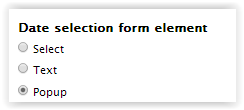
Next window:
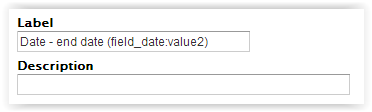
Exposed this filter to visitor
Even though this label says "End date", we are going to make believe this is the "Start date", so change this label to "Start Date" instead.
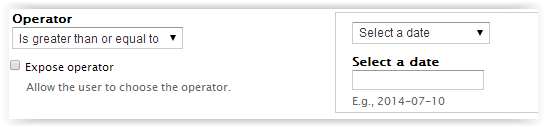
Change the operator to "Is greater than or equal to", leave the "Select a date" as is. (event end date >= user start date)
Do the same to the second filter:
Date - start date (field_dates)
- change this label to "End Date",
- Select popup as form element,
- Exposed this filter to visitor
This time Change to operator to "Is less than or equal to", leave the "Select a date" as is. (event start date <= user end date)
Last suggestion: Make sure that you have "AND" between those two operators.

Save everything, Enjoy...
Hope this helps someone along the Drupal mystical path.. Sorry for any typo or grammatical mistake, English is not my native language.
Feel free to comment or correct me, I'll adjust.







Comments
Comment #1
aniket.mohite88 commentedHi Mory,
Thanks. Absolutely grateful to u. This was exactly what I needed. Seriously, needed a solution to my need.
This even works with the Facet API search build up.
Note: The first image helped to understand my scenario quickly.
Thanks a lot agian.
Comment #2
karibel commentedGreat, I'm happy it helped someone, because it took me a long time to figure it out :-)
Comment #3
pmoz commentedThanks for the write up, but I'm still trying to get this to work in our use case.
I think where I am getting tripped up are dates that don't have an end date.
Any ideas?
Comment #4
karibel commentedpmoz,
I'd say that this method will also give you events that don't have an end date, because this show you ALL events happening BETWEEN those 2 dates. It doesn't need an end date to appear in the results.
Comment #5
pmoz commentedThanks for the input Mory.
This is what worked in our case:
Start Date <= Y (changed exposed filter label to End Date)
and
End Date >= X (changed exposed filter label to Start Date)
or
End Date is Null
The null was wreaking havoc on us.
Don't know if it matters, but we are filtering a civicrm date.
Comment #6
nikitas commentedgreat! thank you!
Comment #7
umberto. commentedThank you!!!
Comment #8
aniket.mohite88 commentedHi pmoz,
May be u can add a default end date, with respect to the start date that you enter.
Please refer below resources
Or may be you can write a custom code for your node-form to work this way using hook_form_alter()
Comment #9
darvanenExcellent documentation, thank you.
Now how do we get it included in the module documentation instead of the issue queue? I can edit existing pages but not create new ones.
Comment #10
cafuego commentedI think you create a new book page via https://www.drupal.org/node/add/book and then ask someone on the doc team and ask them to move it under the Site Building Guide - Date/Calendar.
Comment #11
karibel commentedThank you cafuego I just did. I learned something today, Yay
https://www.drupal.org/node/2507601
Comment #12
cafuego commentedNice work! :-)
Comment #13
aniket.mohite88 commentedNice. Helpful.
Comment #14
caspianroach commentedThe swap around part blew my mind. It made everything so easy! And to think I was ready to start hacking at the filters to produce nested filter groups...
Comment #15
awolfey commentedA comment on pmoz's situation: A Date module date field will set the end date to the to date when you don't explicitly set it to something else. I'm not sure what the civicrm field does.
Comment #16
aruuska commentedThanks for article.
I have strange issue here. End date exposed form field granularity looks like "month" even I change it to any other options. When I select date in popup calendar in field show up e.g. "2015-09"
When I printed out form in _form_views_exposed_form_alter function, end date field looks like this:
field_event_date_value (Array, 2 elements)
#tree (Boolean) TRUE
value (Array, 10 elements)
#title (String, 0 characters )
#type (String, 10 characters ) date_popup
#size (Integer) 20
#default_value (String, 10 characters ) 2015-09-30
#date_format (String, 5 characters ) d.m.Y
....
Do I miss something here? Any ideas how I can get date selected in end date as well? :)
EDIT:
Sorry about this :) I'm new developer in project and there is override for date field format in some form_alter.
Thanks again for great article.
Comment #17
karibel commentedaruuska,
In your Exposed filter "Parameter" (The end date parameter) do you have "day" selected as your Granularity?
Comment #18
aruuska commentedmory,
Yes, everything was okey, but there was custom override code in one module. :) so, problem was "project specific" :)
Your post was very helpful for me, thanks!
Comment #19
rcodinaAnyone knows how to do this on Search API views? Sadly, module "Views between dates filter" doesn't work on Search API views...
Comment #20
priyanka12chavan commentedThis is really very helpful!! Thank you. It hardly took 5 minutes to set it right. You saved my day.
Comment #21
RomainD commentedHello there ! Thank you so much for this tutorial, it helped a lot.
However one point is missing : what if I have an event that starts the first of july to the 15th and I only want to see the last 7 days of July.
Then I will make a filter from the 24th to the 31th for example.
But my event will appear because his end date is greater than 15 and is start day is less than 31 while is not inside the frame that we have set.
Or maybe I am missing something !
Any idea to fix this ?
Comment #22
giupenni commentedGreat tutorial, save me a lot of time!
Comment #23
sunil khan commentedHello Everyone,
I need a little help. Please someone help me
My issue is that i have many news of different Month. I want to create one content type and many views and want to apply filter on date So that every news is place in their relavent month folder. Here a example
News (page)
2016
December
Nov
Oct
.
.
.
2015
Dec
.
.
.
so on
if i click on dec under 2016 then news of dec2016 opens.
Please comment if anyone have some idea.
Comment #24
karibel commented@sunil khan
Take a look a this conversation, it should help you.
https://www.drupal.org/node/388140
Comment #25
aniket.mohite88 commentedHi Sunil Khan,
For your requirement, I think you should use calendar module.
You can refer the following tutorial for your month view of results -
Drupal 7 Calendar Module - Daily Dose of Drupal Episode 155
Basically for you, the catch will be the following -
You will have to create a static block (admin/structure/block/add) by yourself where you create links months wise, as per your requirement.
Example- siteurl/calendar/month/2016-02 for FEB 2016, siteurl/calendar/month/2016-01 for JAN 2016, siteurl/calendar/month/2015-12 for DEC 2015 & so-on
You can then place this block on your configured URL pattern in pt.1 - i.e. siteurl/news/* or any other page
I think, this is what you are actually looking for. Hope this helps.
Regards,
Aniket Mohite
Comment #26
agilman commentedThe original tutorial worked like a charm. No additional modules to install. It all makes sense as you're configuring it.
Comment #27
aris.rep commentedmorybel your post was very clear and helpful, thanks!
Comment #28
joekersThanks for this great tutorial - it really helped a load!
Comment #29
jason@blaze commentedThanks a bunch for this, saved me a ton of time. =)
Comment #30
nor sairi commentedthanks , help me a lot
Comment #31
othermachines commentedWow, a 3-year-old D7 tutorial just helped me get a date range filter up and running on D8 in about 5 minutes. Not a bad start to the day.
Thanks tons, @morybel!
Comment #32
Grooo commentedThanks so much.
A very helpful explain.