

Further development of this module has been stopped in favor of the Protected Submissions module. We strongly recommend to use Protected Submissions module instead.
This light-weight module enables opting in of any text field or text area of nodes, webforms and comments for validation against the pre-defined undesired regular expressions to automatically deny anonymous submissions when such strings are detected. The Block Anonymous Strings module is the most efficient and the least intrusive anti-spam tool without having to rely on third-party services.
The Block Anonymous Strings module also supports Drupal's native site-wide and users' personal contact forms.
How it works
If an anonymous user tries to post a webform, node or comment with a text field or a text area value that contains an undesired string, then the submission is declined giving a preset error message. Admins can opt any of the node, webform or comment text area or field for validation against the regular expression strings defined on the module's configuration page.
Similarly, the name, subject and message fields of site-wide and users' personal contact forms are protected by default.
Alternative modules
You might also consider using other such anti-spam modules as, for example, Honeypot, AntiSpam, CAPTCHA or Spam, which are good alternatives depending on your needs. However, note that compared to the Block Anonymous Strings module, the listed modules rely on third party services, are too intrusive or have heavy and large code-base. The Block anonymous links module protects only comments' body field.
Installation
- Download the recommended version of the module from https://www.drupal.org/project/block_anonymous_strings to your website's modules directory, go to the Modules page (/admin/modules) and enable the Block Anonymous Strings.
Alternatively, just run
drush -y en block_anonymous_stringscommand on CLI. - Go to the Block Anonymous Strings' settings page on
/admin/config/content/block_anonymous_stringsand set the error message text and the undesired regular expressions as shown on the following screenshot: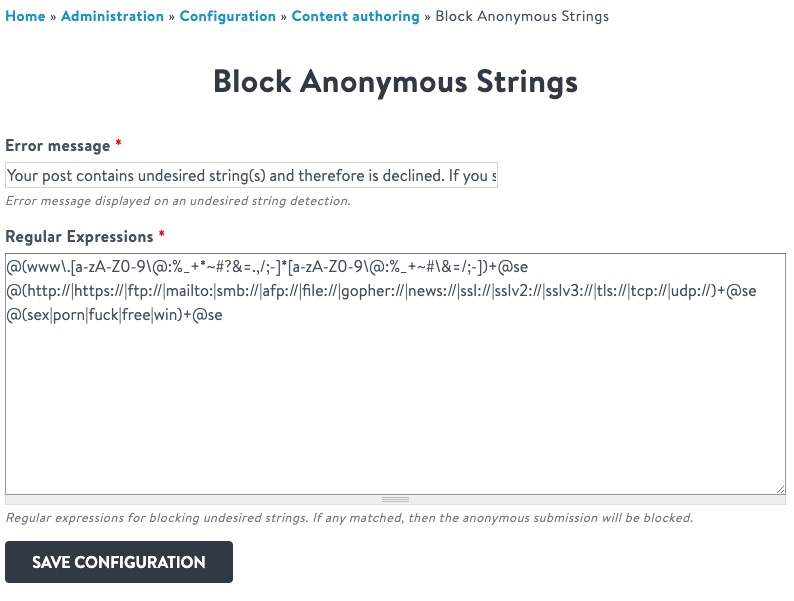
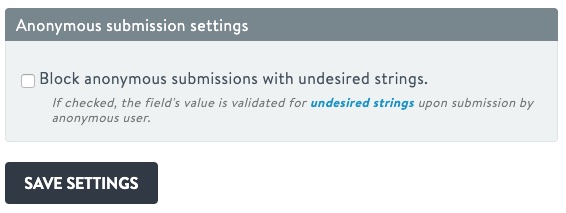
- Go to any text area's or text field's (of node, webform or comment entities) configuration edit page and opt in for anti-spam validation as shown below:
Troubleshooting
Report any problems found on the module's issues page.
Project information
 Minimally maintained
Maintainers monitor issues, but fast responses are not guaranteed. No further development
No longer developed by its maintainers.- Project categories: Content editing experience, Site structure, Security
 23 sites report using this module
- Created by altagrade on , updated
 Stable releases for this project are covered by the security advisory policy.
There are currently no supported stable releases.


