

 The 2026 Drupal Business Survey is open. Your response will help shape the future of the Drupal business ecosystem.

One Tab to Understand All Your Content
Content editors shouldn't need five different modules with five different UIs to understand how their content is performing. Analyze puts SEO data, readability scores, AI insights, link health, and traffic stats in a single tab: consistent, scannable, and actionable.

You need Analyze if
- Your content tools are scattered across different modules with inconsistent interfaces
- Editors waste time switching between tabs and admin pages to understand content performance
- You want a single entry point where all content insights live, from word count to AI analysis to search rankings
- You're building custom analysis tools and need a framework that handles the UI so you can focus on the data
How It Works
Analyze adds an "Analyze" tab to every content entity. Enable the analysis plugins you want per content type, and editors immediately see summary gauges and tables, with full reports one click deeper. No custom theme work, no per-module configuration UIs to learn.

What Plugs Into It
| Module | What It Shows | Key Metrics |
|---|---|---|
| Basic Content Info* | Fundamental content stats | Word count, Image count |
| Node Statistics* | Traffic from Drupal's statistics module | Total views, Today's views |
| Google Analytics* | GA data per page | Page views, Views per user, Bounce rate |
| Search Console | Google Search performance per page | Clicks, Impressions, CTR, Position |
| PostHog Analytics | Product analytics per page | Pageviews, Visitors, Bounce rate, Conversions |
| Broken Links | Link health for every page | Healthy %, broken count, status codes |
| AI Brand Voice | Brand alignment scoring | Voice alignment (-1.0 to +1.0) |
| AI Sentiments | Multi-dimensional content tone | Trust, Objectivity, Audience, Reading level |
| AI Marketing Audit | Content marketing effectiveness | Usability, Actionability, Business value |
| AI Security Audit | Sensitive data leak detection | PII risk, Credentials exposure |
| SEO Analysis | Traditional SEO scoring | 12 checks: title, meta, headings, alt text, links, Schema.org |
| AI Optimization Analysis | AI answer engine readiness | 8 checks: headings, JSON-LD, semantic HTML, FAQ patterns |
Getting Started
- Enable the Analyze module and any analysis submodules you want
- Go to Configuration > Content > Analyze Settings and toggle which analyzers run on which content types
- Open any content entity and click the Analyze tab. Your data is there
Drush CLI & AI Agent Support
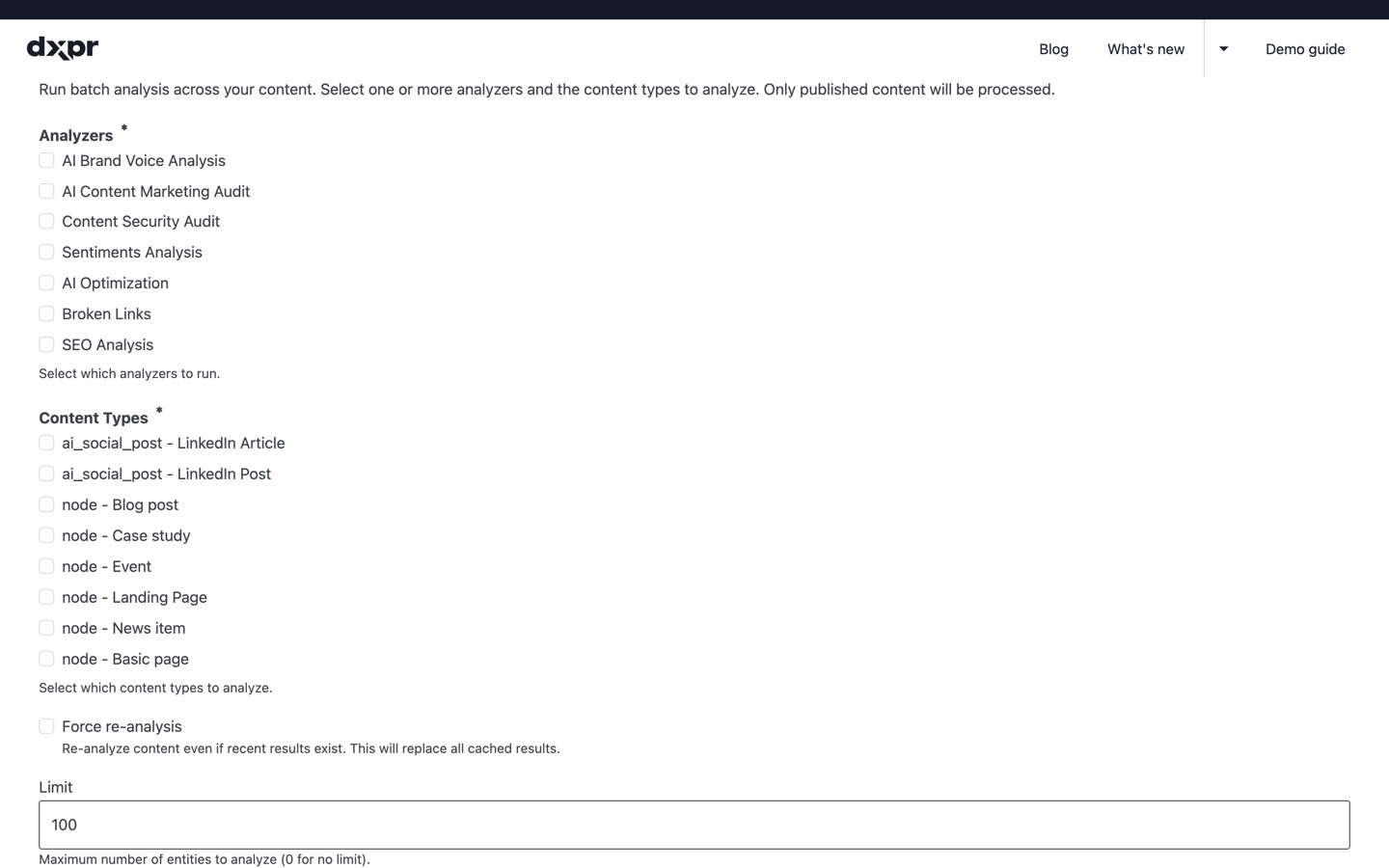
- Centralized Batch Processing: Run any
combination of analyzers across all content from the admin
UI ordrush analyze:batch. Filter by analyzer,
content type, and entity count.
- AI Agent Integration: Supports the
Agent Skills standard
for AI coding assistants (Claude Code, Codex, Gemini CLI,
Copilot, Cursor). Run
drush analyze:setup-aito install skill
files.
AI Coding Assistant Integration
The Analyze module includes a built-in
Agent
Skills file that teaches AI coding assistants how to run
content analysis through natural language. Run
drush analyze:setup-ai to enable, then ask
naturally:
- "Run sentiment analysis on all articles"
- "Analyze brand voice consistency across the site"
- "Check all pages for broken links"
- "List available analyzers and which content types they
cover" - "Re-analyze the last 50 published nodes with all
analyzers"
Compatible with Claude Code, Codex CLI, Gemini CLI, GitHub
Copilot, Cursor, and other tools supporting the
standard.
For Developers: Build Your Own Analyzer
Create a plugin in src/Plugin/Analyze/, extend AnalyzePluginBase, implement renderSummary() and renderFullReport(). The framework handles routing, tabs, access control, and per-content-type configuration. See the included example plugin for a working reference.
Two display components are available: analyze_gauge for spectrum-based scores and analyze_table for key-value metrics.
Analyze is included in DXPR CMS, a Drupal distribution that ships the full Analyze suite alongside DXPR Builder and DXPR Theme so content teams can start auditing content quality out of the box.
FAQ
- How many analyzers can I enable at once?
-
All of them. Each analyzer can be toggled independently per content type on the settings page, so you can enable only the ones you need or turn them all on. The Analyze tab groups every enabled analyzer's output into a single summary view with gauges and tables, and full reports are one click deeper.
- Do all analyzers require an AI provider?
-
No. Several analyzers are fully deterministic and run without any AI provider: Basic Content Info, Node Statistics, Google Analytics, Search Console, PostHog Analytics, Broken Links, and SEO Analysis. Only the AI-prefixed analyzers (Brand Voice, Sentiments, Marketing Audit, Security Audit) and AI Optimization Analysis require an LLM provider via the AI module.
- Does Analyze work with custom entity types?
-
Yes. Analyze works with any content entity type in Drupal, not just nodes. The settings page lets you configure which analyzers run on which entity types, so you can analyse taxonomy terms, media items, commerce products, or any other content entity your site defines.
- Can I build my own analyzer plugin?
-
Yes. Create a plugin class in
src/Plugin/Analyze/, extendAnalyzePluginBase, and implementrenderSummary()andrenderFullReport(). The framework handles routing, tab placement, access control, and per-content-type configuration automatically.Two display components are available:
analyze_gaugefor spectrum-based scores andanalyze_tablefor key-value metrics. See the included example plugin for a working reference. - How do I run analysis across all content at once?
-
Use the batch processing feature from the admin UI or run
drush analyze:batchfrom the command line. You can filter by analyzer, content type, and entity count. The batch system handles rate-limit backoff for AI-powered analyzers automatically, so large sites can process thousands of entities without hitting provider limits.
Related modules
Analyze plugins: these modules register @Analyze plugins that appear in the Analyze tab:
- AI Brand Voice Analyzer - Brand voice consistency scoring via AI
- AI Sentiment Analyzer - Multi-dimensional content tone analysis via AI
- AI Marketing Audit - Content marketing effectiveness scoring via AI
- AI Security Audit - Sensitive data leak detection via AI
- SEO Analysis - Deterministic SEO scoring across 12 checks
- AI Optimization Analysis - AI answer engine readiness scoring
- Broken Links Analyzer - Link health monitoring per page
- Search Console Analyzer - Google Search performance per page
- PostHog Analytics - Product analytics per page via PostHog
Data sources used by bundled submodules:
- AI - LLM provider for AI-powered analyzer plugins; the batch system handles rate-limit backoff
- Statistics - Provides page view counts to the bundled Node Statistics analyzer
- Google Analytics Reports - Provides per-page GA data to the bundled Google Analytics analyzer
Supporting organizations:
Sponsoring
Project information
- Project categories: Accessibility, Administration tools, Artificial Intelligence (AI)
- Ecosystem: Drupal CMS SEO Tools, Drupal CMS Accessibility Tools
 129 sites report using this module
- Created by jurriaanroelofs on , updated
 Stable releases for this project are covered by the security advisory policy.
Look for the shield icon below.

