This project is not covered by Drupal’s security advisory policy.
There is an open security issue: OpenAI API key stored in exportable Drupal config (security)
AI Webform Generator
CONTENTS
- Introduction
- Features
- Requirements
- Installation
- Configuration
- Usage
- Security notes
- Recommended modules/libraries
- Similar projects
- Supporting this module
- Community documentation
- Maintainers
INTRODUCTION
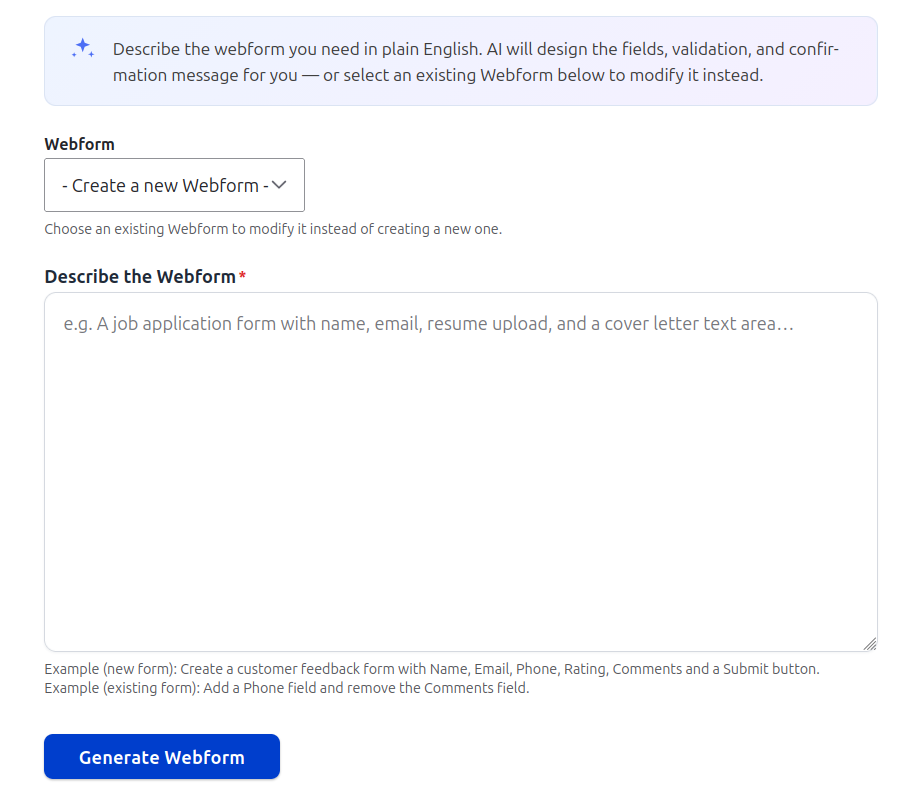
AI Webform Generator allows site builders and administrators to create and modify Drupal Webforms using plain English instructions.
Instead of manually building forms field-by-field, users can describe what they need (for example, “a customer feedback form with name, email, rating, and comments”), and the module uses the OpenAI API to generate a complete Webform structure automatically.
The module can also update existing Webforms using natural language instructions such as adding fields, removing fields, or modifying validation rules without recreating the form.
FEATURES
- Generate complete Drupal Webforms from natural language prompts
- Update existing Webforms using AI instructions
- Automatic mapping of AI JSON to Drupal Webform elements
- Validation of AI-generated responses before applying them
- Support for common form elements (text, email, number, select, radios, checkboxes, etc.)
- Optional CAPTCHA integration for spam protection
- Configurable OpenAI model, temperature, and token limits
- Structured prompt engineering for consistent output
- Secure API key configuration via admin UI or Key module
Use cases:
- Customer feedback forms
- Event registration forms
- Surveys and questionnaires
- Job application forms
- Support request forms
REQUIREMENTS
-
Webform module:
https://www.drupal.org/project/webform - OpenAI API key (paid service)
Optional:
-
CAPTCHA module:
https://www.drupal.org/project/captcha -
Key module:
https://www.drupal.org/project/key
INSTALLATION
- Install via Composer:
composer require drupal/ai_webform_generator
- Enable the module:
drush en ai_webform_generator -y
- Clear cache:
drush cr
CONFIGURATION
- Enable the module
-
Go to:
/admin/config/services/ai-webform-generator - Configure OpenAI API key and model settings
- Adjust temperature, max tokens, and timeout
- Assign permissions:
- Generate AI Webforms
- Administer AI Webform Generator
USAGE
Navigate to:
/admin/structure/webform/ai-generator
Creating a new Webform
- Select “Create new Webform”
- Enter a natural language description
- Submit
- The module generates and saves a Webform automatically
Updating an existing Webform
- Select an existing Webform
- Enter modification instructions (e.g. add/remove fields)
- Submit
- The Webform is updated in place without changing its ID
Supported field types:
- textfield
- textarea
- tel
- url
- number
- date
- datetime
- checkbox
- checkboxes
- radios
- select
- hidden
- password
- range
- managed_file
- CAPTCHA (if enabled)
SECURITY NOTES
- API key is stored in Drupal configuration
- Use Key module for secure storage in production
- Only trusted roles should generate Webforms (cost control)
- Flood protection limits excessive API usage
- Webform edit permissions are still enforced
- Secrets are never logged
RECOMMENDED MODULES / LIBRARIES
SIMILAR PROJECTS
- Webform module (manual form builder)
This module is unique because it introduces AI-driven form generation and modification directly into Drupal Webform workflows.
SUPPORTING THIS MODULE
Contributions, issues, and feature requests are welcome via the project page.
COMMUNITY DOCUMENTATION
MAINTAINERS
Chaitanya R Dessai
Supporting organizations:
| Attachment | Size |
|---|---|
| ai_webform.png | 94.36 KB |
| config.png | 52.63 KB |
Project information
- Project categories: Artificial Intelligence (AI)
 2 sites report using this module
- Created by chaitanyadessai on , updated
 This project is not covered by the security advisory policy.
Use at your own risk! It may have publicly disclosed vulnerabilities.