
Downloading a patch file
This documentation needs work. See "Help improve this page" in the sidebar.
Downloading a patch file from a merge request
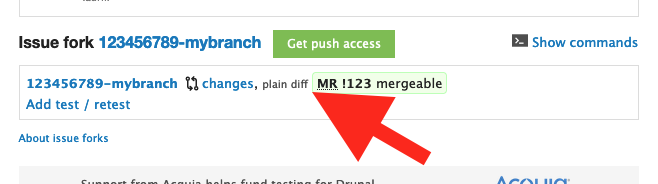
You can download a patch file directly from an issue. Under the "Issue fork" heading below the issue summary, above Comments, click the plain diff link.
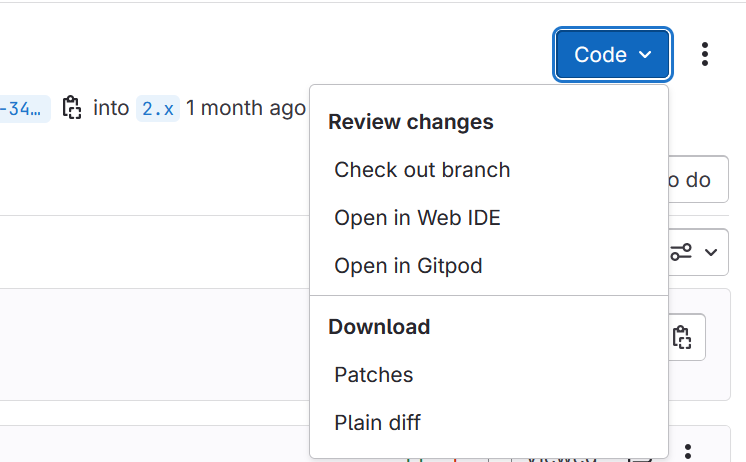
Or, on the associated merge request on GitLab, use the Plain diff option in the Code menu:
You can also get a patch file for any merge request by appending .patch or .diff to the end of the merge request URL. For example, if this is your merge request:
https://git.drupalcode.org/project/drupalorg/-/merge_requests/17add '.patch'
https://git.drupalcode.org/project/drupalorg/-/merge_requests/17.patchor add '.diff'
https://git.drupalcode.org/project/drupalorg/-/merge_requests/17.diffto get a URL to download the patch. Even if you are applying patches with composer, download the patch file, do not use the patch or diff URL directly; read the warning below for more information.
.patch versus .diff
The patch file resulting from using the .patch URL has separate changes for each commit. With the .diff URL, the result is a simpler patch file, with each changed file only appearing once but containing consolidated changes for the whole merge request. If the MR is long and has several changes to the same files, including file renames, patch files downloaded from .patch URLs may not be usable.
Note: If more commits are added to the merge request, the patch that you can download from that URL will change. You must re-download the patch file and save it locally.
Patch files for use with Composer
Composer can only get patch files applied to the code and can't deal with commits from forks without extra burden. Luckily, GitLab provides patches both for single commits and for Merge Requests.
Patch files are also useful if you use bash patch -p1 < file or git apply patch
Patch files can be obtained for both single commits and Merge Requests. There are two methods for getting the patch file:
- By appending .patch at the end of the url displayed in GitLab when viewing a commit or a Merge Request.
- By using the Email Patches option in the Gitlab UI.
An example using method 1:
If you're looking at a merge request, for example https://git.drupalcode.org/project/drupal/-/merge_requests/20 you can append .patch to the url to obtain a patch file like so: https://git.drupalcode.org/project/drupal/-/merge_requests/20.patch
More details on method 2 through the Gitlab UI:
To get a patch file for a single commit navigate to the commit page, click on Options and select Email Patches:

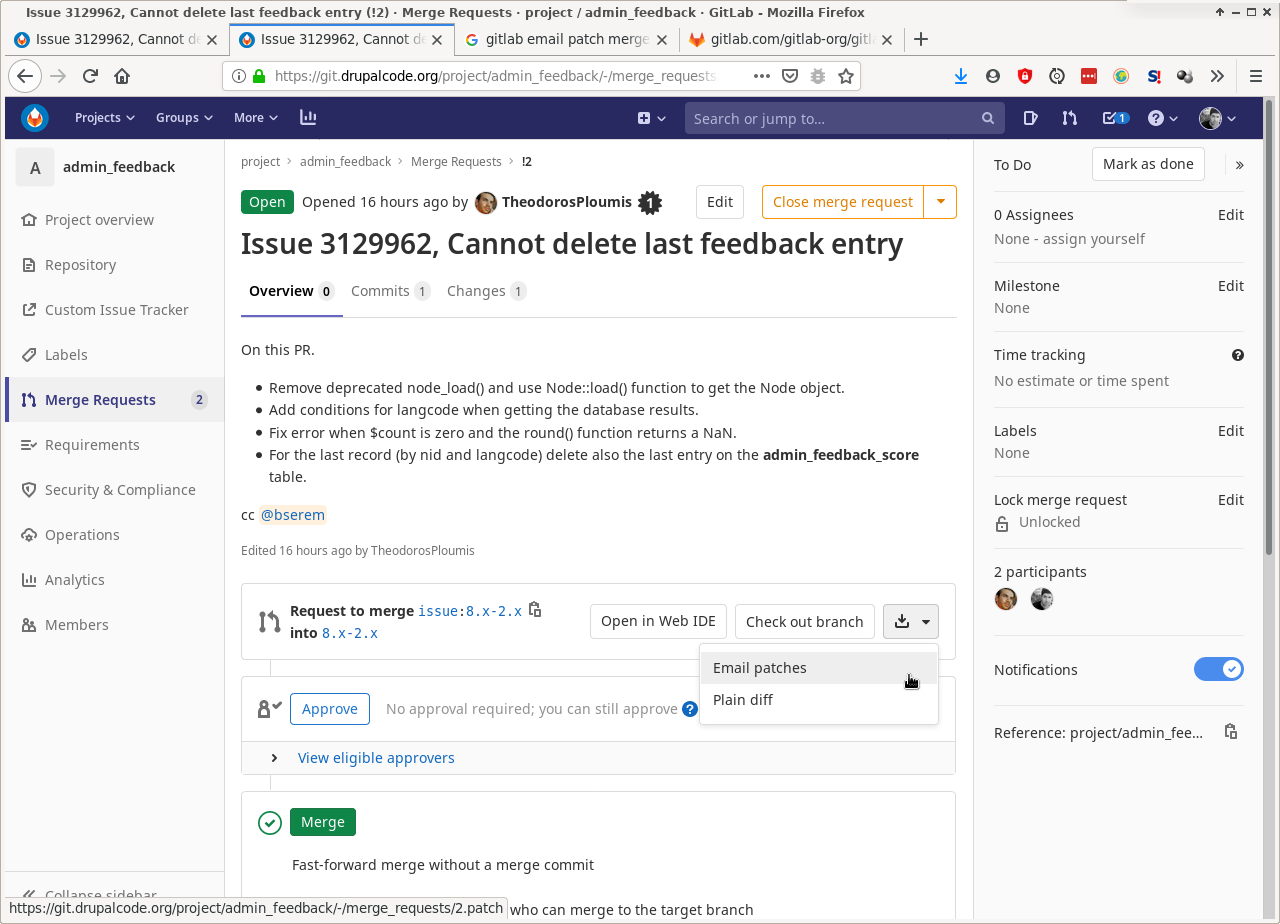
To get the patch for a Merge Request that consists of several commits navigate to the overview of the MR, click on the "arrow down" icon and then click Email Patches:
In both cases, download the patch file to your site’s codebase and add the path to your downloaded copy of the patch file to your site's composer.json file.
See Composer-Patches: The Dependency You Never Knew You Needed for a tutorial on how to add a patch to your composer.json file. The "Local patches" section includes an example of how to place and reference a local patch file.
Use downloaded patch files
The contents of merge request patches on GitLab will change as commits are pushed!
If you use the URL to the GitLab MR patch file directly, your codebase will change without warning, as work on the merge request continues. This poses a security risk (and non-security functionality risks), because any new commit to the issue’s branch will be automatically applied to your site, any time composer update runs, not just when you first add the patch to your project.
It's strongly recommended to lock the patch file versions on production sites. To do so, you must either download the patch file and use it in composer from a local directory, or use version 2 of cweagans/composer-patches with its patches.lock.json file in conjunction with declaring your patch checksums in your patches.json file. cweagans/composer-patches version 2 aborts noisily if it fetches a patch which does not match the checksum specified in the patches.json file.
Creating a patch file of a Merge Request for an older stable release
Most Merge Requests will target the latest version of Drupal that is under active development, while a different version is the recommended stable version for a production site (eg, such as 11.x under development while 10.2.x is the latest stable branch). In many cases, the patch will still apply, but sometimes you may come across a conflict. In this case, if you want to create a patch of the Merge Request that applies to 10.2, you need to git cherry-pick all the commit IDs in the branch into the target version of Drupal and resolve the conflicts.
For example:
git clone DRUPAL-GIT-REPO folder-name
cd folder-name
git remote add drupal-ISSUE-NUMBER https://git.drupalcode.org/issue/drupal-ISSUE-NUMBER.git
git fetch drupal-ISSUE-NUMBER
git checkout -b PATCH-BRANCH-NAME refs/tags/STABLE_RELEASE
git cherry-pick FIRST-COMMIT-ID-IN-BRANCH..LAST-COMMIT-ID-IN-BRANCH
git diff refs/tags/STABLE_RELEASE > PATCH-FILENAME-HERE.patch
Note here that everything in all capital letters should be replaced.
Help improve this page
You can:
- Log in, click Edit, and edit this page
- Log in, click Discuss, update the Page status value, and suggest an improvement
- Log in and create a Documentation issue with your suggestion

