
On this page
Core version compatibility fixes for modules with unmerged changes
This documentation needs review. See "Help improve this page" in the sidebar.
Sometimes a module languishes in a state of perpetual incompatibility because it is abandoned or infrequently maintained. It's impossible to install an incompatible module with composer and apply a compatibility patch afterwards. Even though the module, after patching, will be compatible with the new version of Drupal Core, it will still have a composer dependency for the previous version. Because of this, you would need to do one of four things:
- Maintain the patched module in a /modules/patched folder in your codebase. This is problematic because the module could be picked up by maintainers in the future and your local version won't benefit from regular Drupal security policy scans. You would also have to have identical copies of this code in every site your organization manages.
- Maintain a remote repo with forks of the module. Although this would preclude the need for having copies of the module in all of your sites, you'd still be out of the loop regarding updates to the module over time.
- Use an issue fork. You can pin your composer.json file to a drupal.org issue fork where the upgrade changes have been committed for community review and future merging. Even if the maintainer never merges the code into a release branch, the issue fork branch should remain. There is some risk involved here because others could push to this branch. What's more, the branch will remain pretty much in perpetuity. It's not like a patch which will alert you when it no longer applies. You'll still be a bit out of the loop when it comes to future development on the module. The instructions for this method are detailed below.
- Use the composer-drupal-lenient package. This allows you to flag certain modules to ignore their drupal/core requirement for the time being. This allows you to patch the module's earlier version. Later, if the code is merged into the version you are using or if a new major version is made available, this is the easiest method to undo. The instructions for this method are also detailed below.
Using Issue Forks
Since issue forks are branches it's possible to install the module using that branch. There are two ways of settings this up: one is installing the drupal-issue-fork plugin and then using it with the branch URL:
composer require chx/drupal-issue-fork
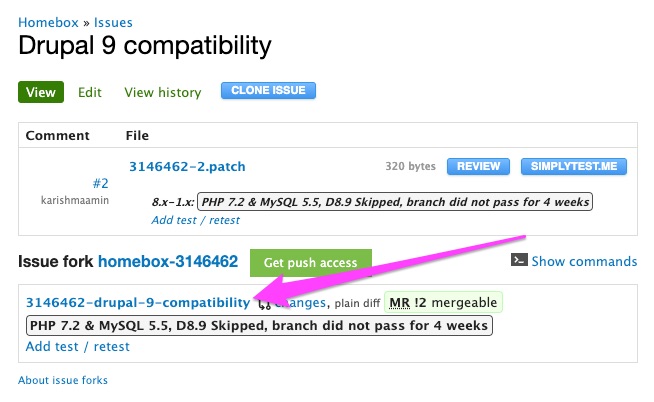
composer drupal-issue-fork https://git.drupalcode.org/issue/homebox-3146462/-/tree/3146462-drupal-9-compatibility
You can find the URL by clicking the branch name -- see first screenshot below -- and copying the URL from the browser. Make sure your composer.json is version controlled before using this plugin. Later when the issue fork has been merged
composer drupal-issue-unfork homeboxwill undo the changes and set composer.json to use the latest version of homebox.
It's also possibly to do this manually. In order to do this we need to do 3 things.
Under the repositories section where the composer source is listed we need to add an exclude key for our module that we're trying to install using the issue fork. In my example I'm trying to install a issue for the Homebox module.
{
    "type": "composer",
    "url": "https://packages.drupal.org/8",
    "exclude": [
        "drupal/homebox"
    ]
}
JSON object notation version.
"drupal": {
    "type": "composer",
    "url": "https://packages.drupal.org/8",
    "exclude": [
        "drupal/homebox"
    ]
}
Next up we need to add the specific git URL to our repositories section. You can find this URL under the "show commands" section of the issue fork.
{
    "type": "git",
    "url": "https://git.drupalcode.org/issue/homebox-3146462.git"
}
JSON object notation version.
"drupal/homebox": {
    "type": "git",
    "url": "https://git.drupalcode.org/issue/homebox-3146462.git"
}
Our complete repositories key is an array that looks something like this now:
"repositories": [
    {
        "type": "composer",
        "url": "https://packages.drupal.org/8",
        "exclude": [
            "drupal/homebox"
        ]
    },
    {
        "type": "git",
        "url": "https://git.drupalcode.org/issue/homebox-3146462.git"
    }
],
Now we can use the composer install command to require the module. Important here is that you need to specify the branch name prefixed with "dev-". So for the homebox example the command would look like this:
composer require 'drupal/homebox:dev-3146462-drupal-9-compatibility'It's possible that for the first time when you execute this you're prompted to allow the ECDSA key fingerprint for git.drupal.org. Just type yes and composer will continue.
If the module you're trying to install does not have a composer.json, you may receive an error message like
[Composer\Repository\InvalidRepositoryException]
No valid composer.json was found in any branch or tag of git@git.drupal.org:issue/homebox-3146462.git, could not load a package from it.
In this case you need to be more verbose. You will use the same url and your branch name as the reference.
{
  "type": "package",
  "package": {
    "name": "drupal/homebox",
    "version": "dev-custom",
    "type": "drupal-module",
    "source": {
      "type": "git",
      "url": "git@git.drupal.org:issue/homebox-3146462.git",
      "reference": "3146462-drupal-9-compatibility"
    }
  }
},
JSON object notation version.
{
  "repositories": {
    "drupal": {
      "type": "composer",
      "url": "https://packages.drupal.org/8",
      "exclude": [
        "drupal/homebox"
      ]
    },
    "drupal/homebox": {
      "type": "git",
      "url": "git@git.drupal.org:issue/homebox-3146462.git",
      "reference": "3146462-drupal-9-compatibility"
    }
  }
}
You'll need the commit hash for the composer command, which can be found by clicking on the linked branch name.
You can copy the commit hash to your clipboard.

The composer command to install the module will be:
composer require 'drupal/homebox:dev-custom#882cde1c71ae8a3c7936c204bb2fe5eeac3cd01c'It's also possible that your composer.json may have a slightly different structure if your repositories key is set up as a key-value object with nested objects of named repositories, instead of as an array. In the following example, the repository is named "drupal/homebox" (on the line above "type": "package"), which matches the package name.
Use the composer-drupal-lenient Package
This method allows you to flag a module to not check its drupal/core version dependency when installing it. This will allow you to simply patch the module rather than jumping through a lot of hoops. This method makes it very easy to recognize when your patched module has finally been merged and re-released by a maintainer, and also very easy to update when that happens.
Note that you still need to patch the module for the new core version compatibility fixes. This package simply tells composer to ignore the core version requirement when installing packages.
Installing:
composer require mglaman/composer-drupal-lenientAdd a module to the list:
composer config --merge --json extra.drupal-lenient.allowed-list '["drupal/my_module"]'You will notice there is a new section under "extra" for your list of lenient modules. Don't add anything in this list unless you actually need it to have a leniency.
    "extra": {
        "drupal-lenient": {
            "allowed-list": [
                "drupal/my_module"
            ]
        },
    }
Now, when you upgrade drupal/core to the most recent version, your patched module will not block the new version of Drupal Core from installing.
Help improve this page
You can:
- Log in, click Edit, and edit this page
- Log in, click Discuss, update the Page status value, and suggest an improvement
- Log in and create a Documentation issue with your suggestion
