

 The 2026 Drupal Business Survey is open. Your response will help shape the future of the Drupal business ecosystem.
Problem/Motivation
The only concern the group had with the instructional modal for adding and installing a module is the fact that Drupal isn’t shipping with Drush by default.
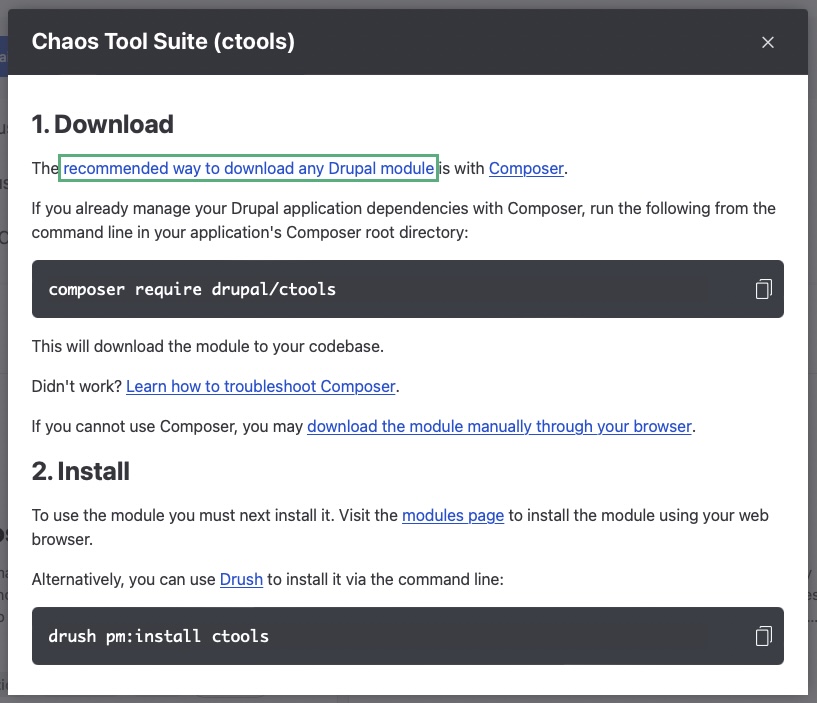
While most people will be using the Package Manager as soon as #3312289: Svelte UI for install controllers lands, the instructional modal will be still in place for sites where the Package Manager module is not installed. Some of those website might have Drush not installed. Then there are also solutions like simplytest.me where you don’t have command line access necessarily. For the former it is at least certain that command line access is available since the installation of Drupal requires Composer.
If you take now a look at the second section in the modal you have a sentence with a visit the module page-link suggesting the user to visit /admin/modules for installing the module. That sentence is visually a lot smaller with a lot less affordance and might go unnoticed compared to the big code block with the line how to install the module with Drush.
For the record the issue was identified and initially discussed during #3312892: Drupal Usability Meeting 2022-10-07. The issue has a link to the recording of the meeting. The attendees were @AaronMcHale, @benjifisher, @narendraR, @rkoller, @shaal, @simohell, @srishtiiee, @Utkarsh_33, and @worldlinemine.
Steps to reproduce
- Go to /admin/modules/browse and click one of the Download buttons
Proposed resolution
- Add an action link button (see the Drupal Design System) that takes the user to the modules page instead of using a simple sentence with a link like currently. To get some design feed back in that regard might be useful.
- Additional steps that were discussed but with not a clear consensus yet.
-
- remove the drush pm code block
- instead of removing the code block add the instruction how to install Drush instead
Review steps
Go to /admin/modules/browse, click one of the Download buttons, and ensure the following concerns from this issue summary and follow-up comments have been adequately addressed:
- The
visit the module pagelink - ...should stand out more, visually
- ...should be a button
- ...should be outside, not inside, of a sentence
- The Drush instructions
- ...should have wording similar to
If Drush is not installed this will add the tool to your codebase. - ...should have the code snippet
composer require drush/drush - ...should have "Drush" capitalized consistently
Remaining tasks
- ✅ File an issue about this project
- ☐ Manual Testing
- ☐ Code Review
- ☐ Accessibility Review
- ☐ Automated tests needed/written?
| Comment | File | Size | Author |
|---|---|---|---|
| #8 | Screenshot 2022-11-02 at 2.05.01 PM.png | 65.66 KB | srishtiiee |
| #6 | Screenshot 2022-10-31 at 2.32.40 PM.png | 78.76 KB | srishtiiee |
| drush.jpg | 119.8 KB | rkoller |
Issue fork project_browser-3315853
 Show commands
Start within a Git clone of the project using the version control instructions.
Or, if you do not have SSH keys set up on git.drupalcode.org:
- 3315853-drush-new-srishti
 changes, plain diff MR !333
 - 3315853-dont-rely-on changes, plain diff MR !298



Comments
Comment #2
rkollerComment #3
rkollerComment #6
srishtiiee commentedComment #7
rkollerThanks for the initial work! A few thoughts. Having an action link button directly within a sentence might be not the best idea. the link isn't underlined and you have more padding before and after the link compared to other regular links in the modal. The idea in the ux meeting was to have an action link instead of a sentence. So maybe combine the two sentence with something like:
To use the module you next have to install it on the modules page. [Modules page]
and have the button after (as drafter with [Modules page]). I'll add the
Needs designtag which I forgot to set when writing up the issue. That was the general consensus during the meeting that it might be a good idea to get some design input how to add and style the button.and in regards of the additional steps we might need some input and opinions by others if the drush pm block should be removed or if it should be kept, and in case if it should be kept we might still need to add the instructions how to install drush.
Comment #8
srishtiiee commentedMade some changes as per the feedback but it still needs design inputs.
Comment #9
rkollerthank you! Moving the link to the modules page out and place it prominently is definitely better compared to keeping it inside the sentence and styling it as an action button. the only thing the moved element should have a higher affordance. at the moment without a hover or focus it looks like a regular link (only difference is an a bit higher font-weight). but it is basically the main CTA of the second step in the modal aka the user should go to the module page and install the module. buttons as well as the action buttons dont have underlined labels in the drupal design system and an action button without an icon, just plain text, has a too low affordance. this part definitely needs some design input.
about the the second part. how about after the
drush pm:install pathautocode snippet add a sentence. something like:If Drush is not installed this will add the tool to your codebase.and then another codesnippet:
composer require drush/drushthat way people unfamiliar with drush don't have to look up the command necessary to install drush.
Comment #10
tim.plunkettComment #13
srishtiiee commentedComment #14
narendrarAll feedbacks are addressed and we are waiting for the designs on this issue which can be done in a follow-up also.
Moving this issue to RTBC.
Comment #15
chrisfromredfinMoving back to NW per Tim's comments / unresolved in the MR.
Comment #17
bnjmnmComment #18
mike.roman commentedComment #19
brianbrarian commentedShould the instructions refer to "the modules page" when both the admin menu label and h1 heading for the page say "Extend"? I suggest making the instructions consistent with the wording of the UI.
Comment #20
mike.roman commentedI agree with brianbrarian, so I am going to set this issue to "needs work". The wording in the issue fork is set in
sveltejs/src/popup.jsline 60, and it is currently:Borrowing heavily from the Installing Modules documentation page, may I suggest:
And be sure to link "Extend" (or "Extend page") to that page.
Comment #21
chrisfromredfinI agree with Mike.Roman's analysis; this would be the preferred wording.
Comment #22
sourabhjainI will work on #19.
Comment #23
sourabhjainComment #25
chrisfromredfinComment #26
chrisfromredfinI have rebased, fixed, and made the popup work again. I've also added a test for the third area we added. Needs review!
Comment #27
chrisfromredfinComment #28
bronzehedwickI tested that the first sentence in the "Show commands" modal's "1. Download" section's language changed to "The recommended way to download any Drupal module is with Composer.", with "recommended way" linked to https://www.drupal.org/docs/develop/using-composer/using-composer-to-ins....
I tested that the first sentence in the above modal's "2. Install" section changed to "Go to the Extend page (admin/modules), check the box next to each module you wish to enable, then click the Install button at the bottom of the page." With "Extend page" linked to https://drupal-project-browser.ddev.site/admin/modules.
Looks good to me, RBTC.
Comment #29
chrisfromredfinComment #30
chrisfromredfinComment #32
chrisfromredfin