Problem/Motivation
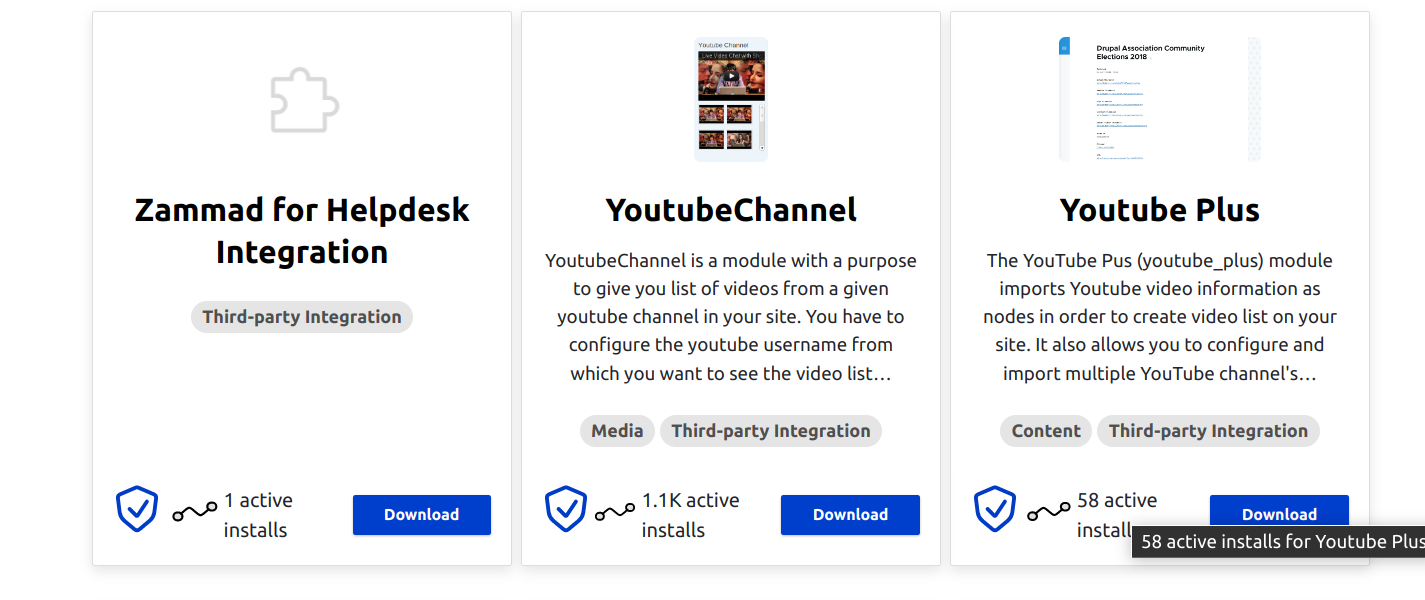
The only difference in data between the card and list views is that the list view shows the active installs. There's really no reason for this, as there is probably room to support "(icon) 4,307" on the bottom of the card.
Steps to reproduce
Install project browser. Toggle between card and list view.
Proposed resolution
Listening sessions indicated that this is one of the primary quality indicators for Drupal projects, and the default sort is by this number, so it doesn't make a lot of sense to hide it from the user, especially if we have the room. We should add a tooltip or some other way to expand the data so that people know what it means (active installs). We could do this in a similar way as we do it with the shield icon, where the title attribute explains it.
Remaining tasks
- ✅ File an issue about this project
- ☐ Manual Testing
- ☐ Code Review
- ☐ Accessibility Review
- ☐ Automated tests needed/written?


 Show commands
 changes




Comments
Comment #2
rkoller+1 for adding the active installs. the information presented should be identical between the two views.
Comment #3
utkarsh_33 commentedComment #5
utkarsh_33 commentedComment #6
tim.plunkettComment #7
fjgarlin commentedFunctionality wise it seems to be there, but not sure if adding the full text "Active installs" makes everything now look a bit cramped.

I think that the idea was just to show an icon with a hover state that mentions the "active installs" bit.
Maybe we can show the icon and the number (icon XXXXX), and then on hover over the icon the full "XXXXX Active installs".
Or even just the icon, and then show the whole thing on hover, like it happens with the security icon.
Comment #8
rkoller+1 to #7
but the icons for the security coverage as well as the installs icon are missing a visual feedback. at the moment the impression could be that the icons "could" be just decorational. a feedback by changing the icon color on hover might be an idea?
plus the text in the tooltip currently states:
Total number of sites using the modulewhy not adjust it and also make it more bespoke. For example for the Chaos Tool Suite (ctools)
649020 currently using the Chaos Tool Suite (ctools)So the number of active installs and the name of the module is reflected in the tooltip?
Comment #9
utkarsh_33 commentedComment #10
utkarsh_33 commentedComment #11
fjgarlin commentedI added a really small and easy comment in the MR, but it'll need re-compiling of the assets.
Comment #12
utkarsh_33 commentedComment #13
rkollerthanks for the updates! i've noticed two things:
1) the first is a nitpick. i would suggest not to capitalize the word

activesince the sentence starts with the number of install s thereforeactiveshould use a small letter2) the output in the tooltip visible for sighted users is sort of invisible to a screenreader user since the alt attribute is set to "project usage". (see project_usage.mp4). but i am not sure if using the same title and alt attribute would be the proper approach?
and in general i am not sure if it would be noticed by sighted users that the installs icon contains information inside its tooltip. there is no indication that there is the number of installs available on hover for that icon.
Comment #14
lucasbaralmComment #15
fjgarlin commentedThis is a design suggestion. Perhaps we can:
* Set the text to a shorter "NUMBER active installs".
* Show the icon with the number in a short format. See this for short format (ie: 1K instead of 1000): https://svelte.dev/repl/b3db3b6801ee4a45b1d204673566c0e9?version=3.25.1 (convert 649020 to 649K)
* Then on hover, show the full text
See the video here: https://www.drupal.org/files/issues/2022-09-28/Screen%20Recording%202022... that illustrates my suggestion.
Screen readers will read the whole thing and the text will also show on hover.
Comment #16
rkolleri like the suggestion in #15. that would mitigate my worries brought up in #13 that sighted users might not notice the information hidden in the tooltip. but i would keep the text announced to the screen reader with "x active installs for [module name]" . imho it is a good idea to provide the context in case the working memory of the person is small. the module name is appended so the screen reader user doesn't have to go through the whole announcement and is able to skip to the next information any time.
the only slight worry i have is the abbreviation for the number of active installs > 1000. it might be mandatory on certain viewports to fit everything in (for example the breakpoint when the layout switches to 3 columns for example), when "active installs" is blended in on hover. but the number with the abbreviation alone might make people think at least about the meaning of the letter K. Also in other languages that abbreviation might not be a single letter. For example for my native language german i had to look up what the correct abbreviation for numbers > 1000 would be. i wouldn't known the short form
Ti only knew the abbreviationTsd.which would be longer than a single letter.Comment #17
leslieg commentedThis requested change definately came up in a lot of listening sessions last week in Prague. I agree with the suggestions above to consider how the information is presented so it is clear and accessible to all users. We need to make any recommended changes to both the grid and list views.
Comment #18
fjgarlin commentedNote that the suggestion on #15 uses javascript locale methods under the hood: https://developer.mozilla.org/en-US/docs/Web/JavaScript/Reference/Global...
I'm fine either way using the abbreviation or not. I only suggested it to "save" some space, but it's not relevant for the main points of #15 (show on hover).
Comment #19
lucasbaralmI agree that only K without being followed by active installs would leave room for other interpretations, such as module size or etc. I believe that, in the future, shortening the number of installations will be a necessity given the order of magnitude of the number of active installations, to prevent the layout from breaking.
Below I use some suggestions from #16 just for viewing, as it still needs some adjustments like modifying the abbreviation suffix according to the language used. I will follow the development of the discussion before committing anything further.
Comment #20
rkollerComment #21
ressaMaybe it has been decided elsewhere to use that phrase, but why not just use "installs" in stead of "active installs"? Is "active" included to emphasize that there are Drupal installations which use modules, but have disabled reporting back to drupal.org?
Comment #22
ressaAlso, in my opinion the
project-usage-icon.svgicon is perfect for List view and looks nice, but not crucial in Grid view, and can be removed to free up space, to allow simply showing "120.000 Installs" next to the Shield icon?After all, the goal is to be able to quickly glance the most important information, and not have to mouse over an icon to see the actual number. Just my 2 cents.
Show number of installs
Comment #23
tim.plunkettActive as opposed to lifetime. "CTools module has been installed 1,000,000,000 times" vs "CTools is running on 1,000,000 sites"
:shrug:
Comment #24
ressaAh yes, that makes sense@tim.plunkett. How about putting the blue "Covered by Drupal Security Team" and "active installs" on separate lines? Something like this, where SEC_ICON is the blue security icon:
In another issue, which I can't find now, it was suggested to add another icon next to the blue "Covered by Drupal Security Team", maybe compatibility? Having active installs on a separate line would allow something like this, where COMP_ICON is a possible future compatibility icon:
Comment #25
fjgarlin commentedRe the COMP_ICON: note that all projects offered by default by project_browser will be compatible with the current installation. We are running that filter before showing anything to the user. In the unlikely event that a project is not compatible (ie: projects coming from another source where we can not query the version), the INSTALL button will say NOT COMPATIBLE and will be disabled.
Comment #26
ressaThanks for clarifying @fjgarlin. I found the icon, and it was the actively maintained icon, which was replaced in #3294608: Consider replacing "actively maintained" icon:

Comment #27
lostcarpark commentedJust wondering could we combine the best aspects of displaying on the card and using a tooltip?
Displaying "NUMBER active installs" seems a little unwieldy, once the user knows what the figure represents.
Would it be sufficient to just display the number (preferably abbreviating it, such as "307K" or "1.1M"), but then have the fully explained version "307,513 active installs" available in a tooltip?
Comment #28
ressaThat's a great idea @lostcarpark. @rkoller and me have been discussing alignment in #3315854: Improve the readability of module cards in grid view, and that it does take:
If the general alignment is left, the Security icon could be placed in the upper right corner (important signal) and the active installs in the lower left (clunky asciidoclive.com mock-up):
Comment #30
lostcarpark commentedHere is my suggested change, showing the abbreviated number, and the full number in the tooltip. "Active Installs" is only shown in the tooltip.
Over 10 million display 53M
Over 1 million display 1.4M
Over 10 thousand, display 27K
Over 1 thousand, display 5.4K
Under 1000 shows the number.
Comment #32
lostcarpark commentedI'm thinking about this issue some more, and I'm wondering is the actual number a very helpful piece of information to users, particularly if they are new to Drupal? Obviously big number means popular, but will 1000 or 100,000 installs tell a site owner anything meaningful? I'm suggesting changing the numbers on the cards with boxes as follows:
Hovering over the indicator will still show the actual number of installs.
Comment #33
lostcarpark commentedComment #34
lostcarpark commentedNote: This issue needs a rebase on the current codebase. I will try to get it done in the next couple of days.
Comment #36
leslieg commentedI think that the use of a number of boxes for range of installations adds another layer of abstraction that will not help our target audience. Would having just 234,456 Installs to the right of the security shield with a tool tip with the text "# of active installs" work? And do the same on list view.
Comment #37
bnjmnm+1 on #36, I don't see much benefit in the boxes.
Using the title attribute to provide additional info is not particularly accessible . Anything that limits information to pointer device user (such as requiring a hover) is not something that would make it through the accessibility gate.
Comment #38
ressaI agree with showing just "234,456 Installs" @leslieg, and suggested the same solution in #22 (see image in the comment).
Comment #39
utkarsh_33 commentedComment #40
fjgarlin commentedReviewed the code and tested via gitpod.
The only weird thing, from a design perspective, is that the size of the text for active installs is bigger than the one of the module's description.
Maybe we could change that while we are working on this component.
See image:

Suggested on the left vs what's there now on the right. Note that this also happens on the "list view", so it was an existing thing.
If you think that this should be a follow-up issue, please mark this as RTBC as the code and functionality are working as expected, but if it makes sense to include it here then I'll mark it as NW.
Comment #41
utkarsh_33 commentedComment #42
fjgarlin commentedThe font-size for the description of the module is set to 15px, whereas the active installs count font-size is set to 16px.
I think the active installs should be smaller, something like 13px (suggested in the MR) or any other value smaller than 15px tbh.
Comment #43
fjgarlin commentedThanks for addressing the feedback. Visual look now:

Marking RTBC.
Comment #47
tim.plunkett