Problem/Motivation
A lot of Drupal 8 sites started with media that used Video Embed Field, so the decision to remove support for video embed field hurt sites that used image-to-iframe capability and can't migrate the media to oembed.
Even if we don't want to place small support for Video Embed Field (the attached patch changes two lines of code and allows Video Embed Field as a source), we should at least allow altering the embed_url and the source type of media.
Steps to reproduce
Create a media type using video embed field as the field source.
Create a media field and set up that media field to use Media Replacement "Image to Iframe".
View page (doesn't set up play and close buttons and instead renders whatever view-mode of the media is selected (which means we can't do poster-field selection).
Proposed resolution
Add a (new?) settings alter immediately after video source info is pulled from the media item and before any additional attributes are called.
Either that or just add the associated patch.
Remaining tasks
Potentially create a patch with a hook.
API changes
Potentially adding a new alter() hook call.




Comments
Comment #2
gausarts commentedYes, rough time last time. I applied Thunder patch at VEF last time, my drush was higher, ended up patching patch. But worked fine.
Blazy 2.x still contains old VEF formatters for manual conversions to Media whenever you have time. Until then VEF should work as normal like 1.x, only now deprecated.
Your patch can be in. Thanks.
Comment #4
gausarts commentedCommitted. Thank you for contribution.
Comment #5
bas123 commentedI succeeded in applying the blazy_video_embed_field.patch in my modules/contrib/blazy folder, however it did resolve the problem that developed with the recent module updates.
Prior to the update I had a Blazy Video Embed field with a limit of 6 video URL's which opened in a colorbox that allowed changing videos with control buttons
All I get now are videos in a colorbox is a thumbnail in the upper left corner! No video is embeded within the colorbox, all of which did so prior to the update.
So, for those of us who have users with Vimeo, Youtube, and Youtube Playlists working in their profiles where I have added the Blazy Video Embed Field, are they now screwed? OR do I need to create a new field for their data to be entered into?
I have been unable to create a media field as when ever I try, it kicks back saying no media type is selected, when there are no options to select from?
Where do we go from here? What are our options?
Comment #6
gausarts commentedI am truly sorry as I said rough time, indeed.
The best option is to stick to 1.x till you have time to figure out potential solutions. And always test breaking or branch upgrades at dev environment to revert without breaking prod.
Important, I don't understand your situations, please clarify:
1. Did you run VEF migration path via drush? Or just update the modules and regular DB updates?
2. Can you still see/ open the original old Blazy formatters for VEF named "Blazy Video (deprecated)" or "Blazy Image with VEF (deprecated)" like before? Or inaccessible?
3. Please screenshot your blazy HTML source via browser Inspections like you did before. I need to see your current HTML what failed it. Also press Console tab, and screenshot if any errors.
Few options, untested, worth trying. Please do it one at a time followed by cache clearing. Report:
1. Remove video_embed_media condition line, clear cache, and see if resolved: https://git.drupalcode.org/project/blazy/-/blob/8.x-2.2/blazy.module#L179
The reason, if you followed VEF upgrade path via drush, it will uninstall VEM required by this check. Your VEF old formatters are intact here:
https://git.drupalcode.org/project/blazy/-/blob/8.x-2.2/src/BlazyDepreca...
This is kept more for manual conversions with 10-50 videos.
2. Install and see https://www.drupal.org/project/blazy_video_embed_field
Comment #7
bas123 commentedI cannot confirm that the patch fixes this issue as I have described in #5 above.
Please see screenshots for a graphical representations before and after Blazy update, even after applying the patch.
Correct as prior to recent Blazy update (YouTube Video rendered in properly sized colorbox [1 of 3])
Following Blazy update (No video, only thumbnail and colorbox is not sized properly)
Comment #8
bas123 commented@gausarts
Update occurred via regular update process using
composer update --with-dependencies. Followed bydrush updb -yComment #9
gausarts commentedYou are right. Looks like the deprecated formatter is broken. This obviously got no love so far :)
BTW, there is an upgrade path to core Media provided by VEF as mentioned at the top of VEF home:
https://www.drupal.org/docs/contributed-modules/video-embed-field/migrat...
Be sure to read #2997799: Include upgrade path from video_embed_field to oEmbed for more solutions.
Until you have time for that, attached at least to make old formatter work with core oEmbed at Blazy side. No need to create a new thread, this one is still relevant, I think.
The old Blazy 1.x formatter is now named Blazy Video (deprecated), and requires VEM since the field type is provided by VEM.
What the patch provides is making VEF work with oEmbed without actual migration.
This does need the previous patch up above to define
type.If you don't want the deprecated one, consider https://www.drupal.org/project/blazy_video_embed_field instead.
But for emergency transitions, this patch should do, hopefully.
Let me know if it works at your end now. Thanks.
FYI:
Last time, ~3 years ago, after making the patch work for my higher drush, IIRC 8 to 9, what I did was:
But the official instructions are different now, do not try what I did in case incorrect, or obsolete.
Comment #11
bas123 commented@gausarts,
I am using Blazy Video Embed Field
There is so much information on this it is making my head spin!
I sent this in a PM a while back, perhaps you did not receive it, so I will repeat it here!
FYI, the Blazy Video (deprecated) does not work at all!
I am looking for a long term solution. If the Video Embed Field is depreciated and or will not receive future support, then to me it makes sense to migrate the data to Core Media, however I have never been able to figure out how to use and/or configure that field in a User's Profile. It won't save the field as it wants a "Media Type", but does not provide any options in order to set that requirement.
I need to clarify that if I migrate the users video data which was configured to view in a colorbox and have the slideshow capability from blazy, will the migration process automatically replace the 'Video Embed Field' with the Media Field in my Users' Profiles, or will I have to find an alternative method for displaying this data?
I just tried to enable the "Video Embed Media - Migrate to core oEmbed" module in a local distribution but when I ran the commands suggested in https://www.drupal.org/docs/contributed-modules/video-embed-field/migrat..., under "#When using Video Embed Media":
IE:
This is what I got after enabling:
So, even if I did decide to migrate the data for my user's videos, the migration module apparently is incompatible anyway!
Comment #12
gausarts commentedLooks like we have several issues here :)
For the regression from 2.1, I have just added the fallback here in the latest DEV, not in the patch here:
https://git.drupalcode.org/project/blazy/-/blob/8.x-2.x/src/BlazyLightbo...
Have you tried the latest DEV?
Let me know if DEV solved your particular issue. If not, I'll see if I can trace back other potential misses.
These are obvious misses found so far to make VEF compatible with core oEmbed:
https://git.drupalcode.org/project/blazy/commit/be6c060#eb5092147910d7d7...
Be sure to switch or use the Blazy Video (deprecated) for now so we can narrow down the issue.
You can switch the formatter just as easily as long as they belong to the same field type, hence video_embed_field.
For other issues, I am sorry, I haven't been able to reply to it properly since the focus of Blazy 2.x is core Media integration.
It hasn't been tested for BC with VEF as proven by the broken VEF integration in the patch. I only put the original formatters just to avoid fatal errors or WSOD.
Comment #13
gausarts commentedI reverted the video checks to 2.1. and also added the autoplay support for those without following VEF to core Media migration at the latest commit:
https://git.drupalcode.org/project/blazy/commit/4efd9a2
I just installed Blazy Video Embed Field myself, and verified worked fine now as well as Blazy Video (deprecated) with the latest DEV.
I am going to release a new hotfix tomorrow, or sooner, if you can confirm they work at your end. If not, we might need to be on the same page again, and postpone the release next week, or so.
Comment #14
gausarts commented> I reverted the video checks to 2.1
Now I see why it is hard to continue supporting VEF at 2.x while our focus is core Media integration :(
It brings more complication to 2.x. The initial intention to branch from 1.x as 2.x was to avoid this as predicted 2 years ago:
#3022743: Create a new branch for core Media
#2999198: Roadmap for core Media integration
The previous change at 2.2 is to support local video within lightbox aside from remote video. This revert obviously breaks the local video logic which was added later at 2.2. As we already knew VEF has no bundles, core Media does. This
bundleserves a more accurate terminology than the oldtypewhich only knows remote_video as video which in terms of core Media is known as local video.This
bundlerefinement consequently broke old VEF which doesn't have bundles, identified by thumbnails being served in place of videos as reported above.Setting this fixed as VEF is already fixed at DEV. I'll just need to revert the revert to put local video back. No big deal.
However feel free to share your findings for just in case I still missed the obvious. In such cases consider a new thread if any different from this particular fix to avoid potential ramifications.
I hope this type of issue makes us wiser, and always stick to the initial plan, if possible at all. Normally initial plans were more clear intuitively.
Thanks.
Comment #15
bas123 commented@gausarts
First off, please understand that I do not understand most of what you have said because of the use of out of context abbreviations, so may I clear up here?
All I know is that all of my users' Profiles had their Demo Videos displaying in a colorbox and could be switched back and forth with a button in the colorbox integration, but when I did a routine composer update which brought Blazy into version 2.0, it all fell apart.
My temporary fix is to change the formatter to "Colorbox Model" so now I get the same thing except each box must be closed in order to open the next video, so that the slideshow feature is now lost!
When you say:
VEF = Video Embed Field, yes?
BC = ???
WSOD = ???
If I am reading the overall concept here, (and please correct me if I am wrong) it sounds to me as if Drupal core has depreciated and stopped support for Video Embed Field in favor of core Media with respect to (among other things) its interaction with Blazy and Blazy Embed Field.
But the difference between the two Video Fields is that Video Embed Field handles remote video (in fact has configurations for Youtube, Youtube Playlists, Vimeo, Dailymtion, and Facebook (another issue of depreciated features), and the core Media field serves Local Videos.
This of course begs the question: Why depreciate the Video Embed Field when Oembed doesn't apply to an individual field but only works within text editor fields?
Anyway when you ask:
If you are referring to: blazy_video_embed_field 8.x-2.x-dev - 19 September 2019
I did so, and the issue of only a small thumbnail rendering in the top left of the colorbox appears persists.
And when you say:
- I repeat again Blazy Video (deprecated) does not work and renders nothing when it is set!
So, I am still trying to figure out my long term solution!
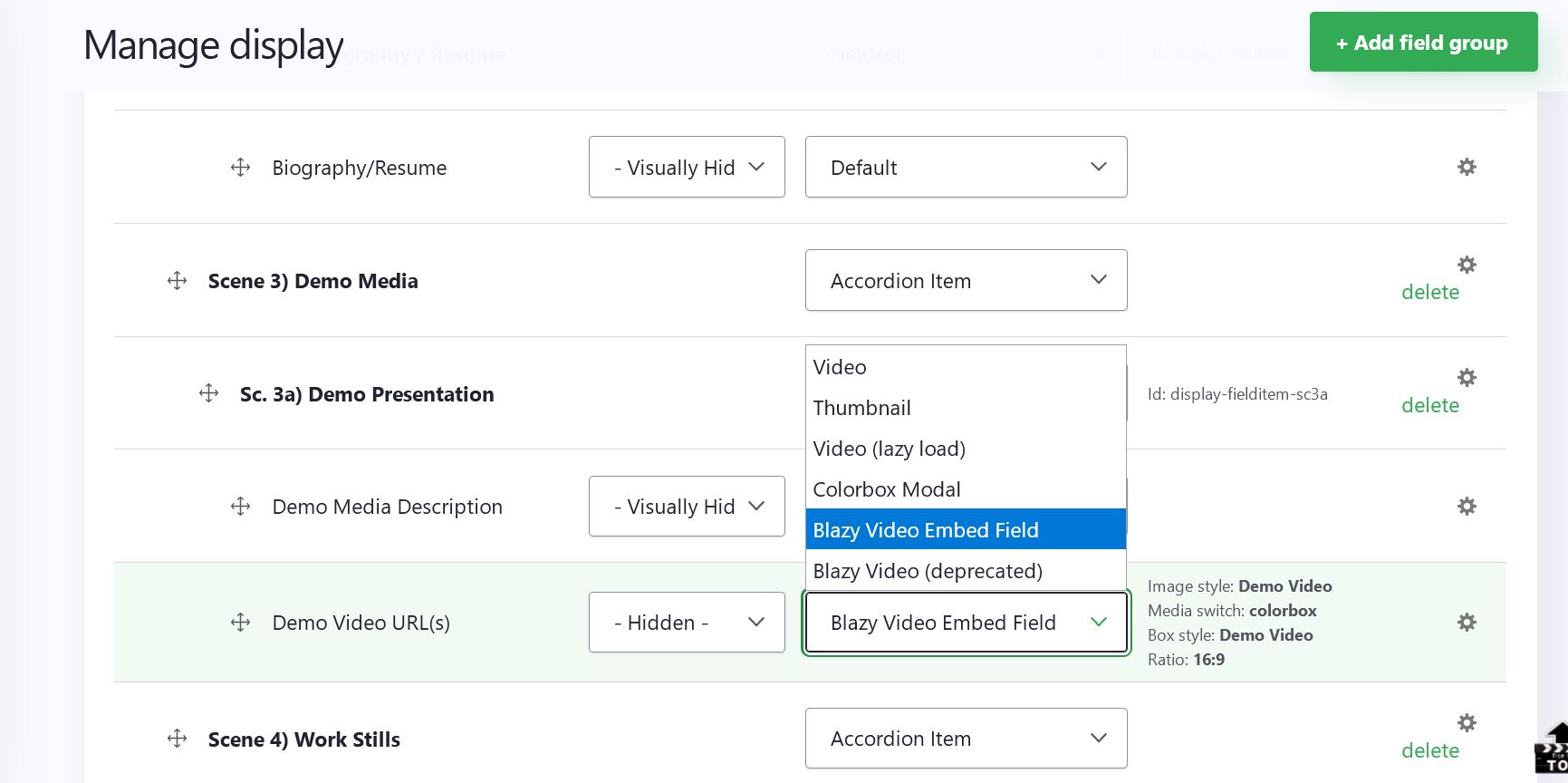
If I migrate to video URL Data from my Video Embed Field (named "Demo Video URL(s)" and set to Format as "Blazy Video Embed Field" with these settings:
mage style: Demo Video
Media switch: colorbox
Box style: Demo Video
Ratio: 16:9
Will the new migrated data appear in a core media field named "Demo Video URL(s)" and follow the same configuration as it did when the data was in a VEF, except as it did before Blazy was updated to version 2.0? (In essence replace the old filed in my configuration?)
It sounds like the answer is no because the URLS are Youtube and Vimeo mostly and all are remote!
Comment #16
gausarts commentedSorry for abbr, including this one :)
Factors are laziness, replying from a cellphone, a non-native like me favors abbreviations to minimize spelling mistakes.
They are backword compatibility and white screen of dath.
There I left the spelling mistakes and don't correct it because that's what I wrote initially. Hope that explains the factors right on the spot :)
About depreciation
I have no capacity to reply, nor am interested in pros and cons. I am a front-ender, more interested in skindeep aka cosmetics than internals or architecture of a body. But in layman terms, I may be wrong, that is fine, deprecation happens when one product was made obselete by another due to being superceded at many levels. VEF is not an entity, Media is -- which is more inline with core direction towards everything-is-entity along with config, block, filter, image style, etc. Being an entity, the first class citizen, Media offers us many benefits of an entity rather than just being a subset of field types with its inevitable limitations.
About providers
Indeed, likely more Media sub-modules, or alters, are needed to support, including to correctly display them which are normally taken care of by VEF sub-modules. AFAIK core only supports Vimeo and Youtube.
About your persistent problem with VEF
I would be happy to figure out solutions, but obviously need your help as I cannot reproduce it with the latest DEV.
Normally when I can reproduce a problem, I would be happy to work on it. So no worries about the commitment. I may be late but I'll try to be there whenever I can.
Please screenshot like mine. You already knew, but for others:
blazy__colorboxlink, the A tag.Hopefully I can see anything obvious.
After a few Linux box re-installs, I haven't got time to bring back my Drupal dev. As seen there, I only have one test node for Drupal 8, and few for Drupal 9. So it is likely I missed anything. My focus now is Android dev which destroys my two machines a few times after failing with initframs > fsck -yf ..., etc.
Comment #17
gausarts commentedThe forgotten screenshot.
Comment #18
gausarts commentedThe latest DEV working fine with VEM via Blazy Video (deprecated) and Blazy Video Embed Field.
We just need to be on the same page, I think.
Do not worry, the mistake might be at my end. So your information to shed me the light on the problem will surely help.
Comment #19
gausarts commentedA comparison of BVEF vs. BV (deprecated) media urls.
The difference is BV (deprecated) is more integrated with core Embed as seen by the generated URL preceded by
/media/oembed/...andhttp://oembed.drupal8.loc/media/oembed/...,meaning Media sub-domain security layer will be respected thanks to the latest patch above, the problem is it was deprecated.BVEF still uses old VEF integration without oEmbed, perhaps it can align with core oEmbed with the above patch, not sure, yet. For VEF users who are interested to take advantage of oEmbed security layer, feel free to patch BVEF based on the above patch as I don't currently work on it any more. Basically adding few more lines as seen in the patch.
Comment #20
gausarts commentedFew checklists:
1. Clear cache or drush cr. See project home Update SOP. Symptons: the module says A, the page says B.
2. Having two blazy modules somewhere? One blazy is updated, and another stale. Might happen on multisite where things might be out of sync due to different locations of a similar yet non-identical modules. Solutions: remove one. Or forgotten git vs. composer at different folders.
3. Corrupt download. Had this issue once back at D7. Solutions: re-download.
Regular drush cr, etc. routines apply except for #1.
Let me know if still an issue.
Comment #21
bas123 commented@gausarts,
Unfortunately, my Acquia Dev Desktop has ceased operating as neither stacks will open in their ports so I cannot currently screenshot or reproduce anything!
Now I am getting alternating:
Process: 'Apache web server' failed to start. Port 8082 didn't open.
Process: 'MySQL database server' failed to start. Port 33066 failed to start
I have taken the steps (based upon what is left of Acquia's online documentation) such as increasing the Apache timeout, and have even tried updating, but 1) They are not supporting anymore and their links are deadends.
The only newer version installation executable I can find crashed after making a backup and just starting to install files.
I will need to revisit this once I have it resolved, unless you or anyone else has any thoughts on my dev desktop issues!
Comment #22
gausarts commentedI am sorry. No reliable idea. Just hunches. :)
Looks like ports are blocked. I did once use aquia desktop at D7, and IIRC there is an option to specify the port. Not sure, though.
If that doesn't exist, terminate processes which may occupy those ports. Last time, Skype blocked my localhost port.
Comment #23
bas123 commentedThanks Gaus,
I have now resolved the problem but it took a good deal of work.
I did try different ports but that somehow created new issues.
I will need to restore the websites in which I was working with Blazy in order to continue with your suggestions!
In case anyone else is having similar problems: I had to uninstall DevDesktop and then reinstall several times as different issues arose.
Ended up using an older version and all seems fine now EXCEPT for the persistent errors with the URL_Embed module especially where I had Facebook links that once rendered cards, but now only the error/notice:
Notice: Undefined index: filter_url_length in _filter_url() (line 468 of core/modules/filter/filter.module), but thta's another issue having to do with the module's maintainers abandoning support for the module and Facebook changing their policy to require Admin keys in order to allow it to function properly!Anyway, before I dive back into this issue, may I ask what system you use for your local development environments? XAMPP?
Comment #24
bas123 commentedBTW Gaus, I have trued all of those steps in #20, this issue exists in several versions of my site which all cannot have the same corrupt downloads, could they?
Besides, all of these Blazy related modules were installed using Composer
Comment #25
bas123 commentedGauz,
Two attached videos.
1) Shows videos set to Blazy Video Field set with settings similar to your screenshot
2) Shows videos alternatively set as Colorbox Modal
Again, setting to Blazy Depreciated, no thumbnails show up (Blank field)
Comment #26
gausarts commented> may I ask what system you use for your local development environments? XAMPP?
When I was a Mac (6-years) and Windows (many-years) user, I did use Acquia Desktop, XAMPP, WAMP, Bitnami. Now LEMP in the last 3 years, or so since I hardly use Windows now, just useless dual boot. Basically any tool available is fine. I tried Lando, Vagrant, etc. but then abandoned due to a few re-installs.
> I have trued all of those steps in #20, this issue exists in several versions of my site...
I am not sure what else could cause the issue. But I am happy to fix it if I could reproduce it. Not sure if you had a distro with dups, says
/profiles/MY_DISTRO/modules/contrib/blazyvs./modules/contrib/blazy. The problem is if Drupal picks up the stale one. I haven't checked which one wins, likely the later.> attached videos.
Could you screenshot the HTML as seen via Inspect element: https://www.drupal.org/files/issues/2021-05-11/bvef-vs-bv-deprecated.png
Hopefully I can see something related to the problem.
Comment #27
bas123 commentedOnly place Blazy is located (local distributions):
C:\Users\..\..\2021-05-16-crew-list.10.1.3\html\modules\contrib\blazy
Same as 'video_embed' and 'video_embed_field' m
I screenshot all available Blazy Video Embed Field configurations with inspector
What is no longer available is the desired colorbox with embedded videos and navigation controls as it was previous to the Blazy update to v2 - see: blazy-videeo-embed-filed-in%20colorbox-correctl.jpg below
Comment #28
gausarts commentedThanks, but still not clear :)
I need to see the element starting from the
Atag identified byblazy__colorboxclass as seen in blue here:https://www.drupal.org/files/issues/2021-05-11/bvef-vs-bv-deprecated.png
You can scroll up and select A tag. If the site is private, you can add a black strip to the main
http://sitename.compart. Be sure the rest are recognizable so I can see potential issues in there including the URL part, classes, attributes, etc.Comment #29
bas123 commentedGaus,
OK, this should give you what you are looking for. These three new images represents the Video Embed Field set to Blazy Video Embed Field and opening in a color box. With the result being only a small thumbnail min the upper left of the colorbox instead of the iframed video.
Comment #30
gausarts commentedThank you. That is clear now :)
I could reproduce it with Blazy 2.2. That branch indeed gave image url while should be youtube url:
https://www.drupal.org/files/issues/2021-05-22/blazy-video-embed-field-c...
The underlying issue was mentioned above, that is, bundle checks.
Once I switched to the latest DEV, youtube url is correctly displayed for both BVEF and BV (deprecated).
The last solution I could think of is explicit DEV requirement if using composer.
If #20 has been done, try running one of the below:
The first is pretty common. If still an issue, please download manually and replace the old one:
https://www.drupal.org/project/blazy/releases/8.x-2.x-dev
Be sure to clear cache, or
drush cr.Using https://github.com/cweagans/composer-patches is recommended, but that requires hunting for proper patch definitions, and understand which ones solved the issues.
The above is the shortcut just for verification purposes.
If still an issue, I am clueless by now.
Once verified okay, kindly update your progress, so I can release a new one confidently knowing this one solved at your end :)
Comment #31
bas123 commentedGaus,
Yes, that solved the issue, with
composer require drupal/blazy:2.x-dev.Not only has the embedded videos returned along with the paging, now the autostarting of the videos is working in both Firefox and Edge (not Chrome).
The only issue that I can see now comes into play is that with videos embedded into the colorbox, the slideshow feature (Play/Pause buttons) seems like it should be disabled as with the videos autostarting, when activated, they just get going and the player pages to the next video.
Thanks!
Comment #32
gausarts commentedGlad you did it :)
> ...with the videos autostarting, when activated, they just get going and the player pages to the next video.
You are right, it was just added here for VEF at DEV:
https://git.drupalcode.org/project/blazy/-/blob/8.x-2.x/src/BlazyLightbo...
To make me easy to point at below:
1. Lightbox does have autoplay feature, known as slideshow.
2. Video has autoplay feature.
"Autoplay" (#1) didn't cross my mind being enabled so far, that is why all lightbox videos have been autoplayed (#2) since Media integration started.
Two reasons IIRC: Feature request at Blazy PhotoSwipe, and saving another click.
But I see the problem.
Perhaps we should remove it again, at least for VEF above?
Comment #33
bas123 commentedGaus,
I assume that means only the slideshow start and pause feature, not the pager buttons for VEF, correct?
Can you advise on how, if one has chosen one of the example colorbox formats in which to serve as the basis of a subtheme (as I have) for Images in a colorbox, how I can use a different stylesheet in for VEF.
In other words is there a separate cascading stylesheet for VEF in a Colorbox, or does it come from the colorbox library?
And how do I set up a different one for VEF? (If posible)
Comment #34
gausarts commented> I assume that means only the slideshow start and pause feature, not the pager buttons for VEF, correct?
It is all or nothing, unfortunately, without extra legs. What do you suggest?
I still have no idea about the legs. Feel free to suggest.
> how I can use a different stylesheet in for VEF.
This reminds of of my first Slick client:
https://git.drupalcode.org/project/slick/-/blob/7.x-2.0-alpha1/sass/comp... (original file)
https://git.drupalcode.org/project/blazy/-/blob/8.x-2.2/css/components/b... (what you need to override)
Yes, you can use regular CSS override, and empty the blazy.colorbox.css file if you don't like it. More detailed sample:
https://www.drupal.org/project/slick/issues/3197933#comment-13997104
https://www.drupal.org/project/slick/issues/2996925#comment-12763042
https://www.drupal.org/project/slick/issues/2823888#comment-11757587
OOT:
FYI, all Blazy code were initially Slick's, everything, including that stupid CSS colorbox styling, 2-years older than Blazy.
Not really stupid, I think. There are questions on how to style videos on colorbox at Colorbox module, IIRC. This serves an example in the least. Along the time, I hardly used Colorbox any more, but noticed random needs, and it was forgotten, hardly given more love.
Slick is a very opinionated module at first, and so Blazy inherits it. IIRC, Slick was created in less than 2 days, including the five unique skins at Slick Extras while building a website in a 2-weeks deadline. It lacks of ponders, highly driven by project needs. You cannot expect anything near perfect in 2 days time, but fair use is fine. And since the needs repeat I left all my initial styling intact to minimize repeating similar fights.
Ponders only happened at initial 8.x devs when I intentionally delayed a few months before starting its porting also I had no idea the 8 landscape then.
Then along the time I did my best to minimize my opinions by splitting it into various modules, including Slick Extras where you see most of initially opinionated styling left intact. That is why you see so many Slick sub-modules, aside to also accommodate a few suggestions :)
Comment #35
bas123 commentedTo be clear, the pager and slideshow buttons cannot be separated, correct?
and no css can be applied to that element either ie:
display: none;, right?Also, The colorbox module is smart enough to remove both when a single video or image is presented, so why not have VEF provide the pager and not the play/pause? I wonder!
Well then, I would say that it is better to leave the slideshow's Start and Pause buttons in if removing them also removes the pager because it should become obvious to those watching videos that the function is useless (I suppose with a large number of videos, it could be considered something of a scanner :)!
But, I do not understand the term "legs" in this application... Can you explain?
Regarding Slick! I loved Slick, but found it complicated and perhaps too extensive to configure. You may recall exchanging many messages with me about my desire to use the KenBurns Effect (zoom-in or out while dissolving), but we couldn't get it working.
Then, your sample pages disappeared and I assumed you had abandoned it, and started experimenting with the much simpler "FlexSlider". Isee they are back :) https://gaus.vip/project/slick/tabs/ So where does the KenBurns stand with the Drupal setup?
Also, I'd consider changing from the colorbox to slick with thumbnail navigation for my user's video demo reels on the bottom, if that could be configured!
I tried that too using the FitVids module for Videos, but just do not particularly like the presentation and find it incomplete for this application that works so well combining Blazy with colorbox!
But I am open!
Comment #36
gausarts commentedI couldn't reply to many questions properly, sorry. But I'll do my best since your questions might be useful to others.
> ..the pager and slideshow buttons cannot be separated, correct?
IIRC there is an option to turn off Colorbox Slideshow. They work together but not a must to co-exist. The pager to navigate manually can exist with multiple slides without Slideshow being turned on. Slideshow with autoplaying videos and also autoplaying slideshow is not UX friendly, pager is.
> and no css can be applied to that element either ie: display: none;, right?
Use
!importantdeclaration to override any stubborn inline style:display: none !important;> Also, The colorbox module is smart enough to remove both when a single video or image is presented, so why not have VEF provide the pager and not the play/pause? I wonder!
Check out the Colorbox settings. Not sure which you refer to. Slideshow has play/pause buttons for sliding, Video has play/pause for playing. The first can be turned off via settings, the later not, unless via CSS override. Sample I could find which represents Blazy video player in lightbox is similar to Colorbox version:
https://www.drupal.org/files/project-images/slick-lightbox-01.jpg
https://www.drupal.org/files/project-images/slick-lightbox-02.jpg
> Well then, I would say that it is better to leave the slideshow's Start and Pause buttons in if removing them also removes the pager because it should become obvious to those watching videos that the function is useless (I suppose with a large number of videos, it could be considered something of a scanner :)!
No, see the first reply here. Otherwise clarify.
> But, I do not understand the term "legs" in this application... Can you explain?
Sorry If I mistook it for something else. What I know "the extra legs": extra efforts outside the known or provided API by Colorbox. Kind of extra workarounds which I have no idea about yet.
> Regarding Slick! I loved Slick, but found it complicated and perhaps too extensive to configure. You may recall exchanging many messages with me about my desire to use the KenBurns Effect (zoom-in or out while dissolving), but we couldn't get it working.
Regarding "complicated":
Might be :) Varies on your mileage. I always strive to keep it "simple but not simpler" at least with a more compact form UI as you have how. As already being warned at docs and project home page: "Slick has gazillion options, please start with the very basic working samples". "Simple" here doesn't mean naively corrupting important, essential or complex features -- lazyload, multi-breakpoint aka RWD, among a few. Simple is not simplistic. Simpler is. Simple is more about representing a complex subject in a more compact form, not about corrupting or taking out those essential features as many implied when saying "complicated".
Regarding "the KenBurns Effect", two problems:
> Then, your sample pages disappeared and I assumed you had abandoned it, and started experimenting with the much simpler "FlexSlider". Isee they are back :) https://gaus.vip/project/slick/tabs/ So where does the KenBurns stand with the Drupal setup?
Yea, things got worse when your machines break a few times. "Abandon" only happened if I marked the module "obsolote" like "Slick Media" or "Slick Video", but not "Slick" module in the long coming future. Rest assured, when it happens, the replacement is always more awesome, hardly void. You meant Splide? With due respects, "FlexSlider" is a bit old school for a modern or updated mind.
> Also, I'd consider changing from the colorbox to slick with thumbnail navigation for my user's video demo reels on the bottom, if that could be configured!
Not clear, sorry.
> I tried that too using the FitVids module for Videos, but just do not particularly like the presentation and find it incomplete for this application that works so well combining Blazy with colorbox!
Not clear, sorry.
> But I am open!
Many open questions you got at a single thread :) Consider a separate thread, the more the merrier :)
Comment #37
gausarts commentedI forgot to mention, I removed the newly added "Autoplay" feature at DEV for VEF within lightbox as mentioned #32 after hearing your problem which implied conflicting with Autoplay colorbox feature:
https://git.drupalcode.org/project/blazy/commit/08f03f0#ab86487c64bd66e0...
Comment #38
gausarts commentedIn case we are not on the same page again like #31.
Be sure to verify your Slick library version by visiting one of these on browsers:
And see your installed Slick version there.
I noticed you had issues which only are valid if using the non-supported version 1.9.0. This is not supported yet due to library breaking changes, likely causing other issues you are having now.
I don't know you site, but pretty obvious from your screenshots. I can identify Slick library internals from clear screenshots. This had been mentioned on my 3 emails, also docs, but you said you didn't receive them. I copied over my emails to your Drupal contact form, but worried this point was buried in the long wall of texts.
That is why I re-mention it here.
Be sure to require the supported versions mentioned at Slick requirements.
This may happen if you don't explicitly specify constraints like Blazy above after you fixed one.
We should use PM, but these are common issues, so fine to mention it here, only OOT :)
Comment #39
bas123 commentedI just ran
composer update --with-dependenciesmy local sites to accommodate a new version of Open Social 'social-8.x-9.15' and 'social 10.1.4' (did Drupal 8.9.16 last week) and noticed that the Blazy modules were updated and then checked the site to find VEF Autoplay feature was gone!!!So, NO (re: #37), I believe we were NOT on the same page! The Autoplay feature was the one new improvement that I found awesome. So that would be the opposite correction (at least for my purposes!)
It was the fact that in Colorbox, I have some user fields as image slideshows and the video fields use the same colorbox settings, so the play/pause (which has nothing to do with the playing of videos but the colorbox slideshow; unless Autoplay is in effect) is still present.
I believe I had said, that if the play/pause could not be removed only for VEF, then that was OK as long as the Videos still autoplayed when the user used the next and previous buttons!
Ultimately, down the line, similar to your two examples in #36, I would be happy to revisit the idea of using Slick except with thumbnail navigation for both images and videos (especially videos), however, I would need to run them (videos AND thumbnail nav) in a lightbox of some sort as they do with colorbox, because they are started from a narrow column in my Open Social setup as well has having teach within an accordion for navigation, so the Videos could be navigated from within the lightbox like they do in the colorbox:
Here is how I have them set up in this application:

Colorbox Image (unlimited) Slideshow Links in Accordion
Colorbox VEF (Limit 6) Slideshow Links in Accordion

Colorbox VEF open (no autoplay)

So, I guess the question is: Can we please restore the Autoplay in VEF?
Comment #40
gausarts commentedWorried a conflict but makes sense. Reverted as requested :)
Comment #41
bas123 commented@Gaus,
Better to have the videos autoplay with a redundant slideshow (almost like a snippet previewer) that the user can avoid, than no autoplaying of the videos at all!
Thanks for responding so quickly :)
Comment #42
bas123 commented@Gaus,
Quick question...
I have my image slideshows stylesheet working as modified in my subtheme using the provided Border Image (in gray).
However, the border of the VEF Colorbox is a blueish color that conflicts with my website's theme which favors highlight colors in green hues.
I cannot figure out which selectors or where the css file that controls the IFrame Border in the colorbox for VEF so that I can style the border in a green color and possible add a border-radius to either the colorbox itself and/or the video.
Can you point to where this styling is controlled? Is it from one of the colorbox samples?
Please help!
Thanks
Comment #43
gausarts commentedNo, this one:
https://git.drupalcode.org/project/blazy/-/blob/8.x-2.x/css/components/b...
Comment #44
bas123 commentedGreat,
I couldn't find the file css/components/blazy.colorbox.css in my system, but I did succeed by copying the selector and modified to taste and then placed that in the bottom of my custom colorbox.css file.
That did the trick, or do you suggest adding the entire blazy.colorbox.css file and adding it to my custom theme?
Comment #45
gausarts commentedI would do what you did :)
Full override only makes sense for 50%+ disagreements.
Comment #46
bas123 commentedOK, final question...
Is there any way to sniff the video's dimensions? and adjust the colorbox size according as is done with images?
Comment #47
bas123 commented@Gaus, One other question that just came up that I was hoping you could answer...
while running
composer update --with-dependencieson a local site, this came up that I have never encountered.While I believe I do have an account there, I have never been asked for this in a terminal:
Can you explain?
Is this something new that I (and others) should be prepared for?
Comment #48
gausarts commented> Is there any way to sniff the video's dimensions? and adjust the colorbox size according as is done with images?
Normally hard-coded at any video embed code, might be available at providers.json, but that normally won't match most designs (think videos at sidebars). So the idea to grab it was abandoned. Instead the dimensions can be customized per field based on image style dimensions named
Lightbox media style:https://git.drupalcode.org/project/blazy/-/blob/8.x-2.x/src/BlazyLightbo...
You can adjust the
Lightbox media styleat regular Image style admin page. To poke around the size forwidthandheight, they are stored within A tagdata-media:https://git.drupalcode.org/project/blazy/-/blob/8.x-2.x/src/BlazyLightbo...
As read here:
https://git.drupalcode.org/project/blazy/-/blob/8.x-2.x/js/blazy.colorbo...
> Is this something new that I (and others) should be prepared for?
I saw it few times likely after Linux re-installs, and disappeared after adding these to my
~./ssh/config:Not sure in your case. Sometimes when hitting github rate limit, too. But can be added similar directives accordingly:
And added git name and email globally as instructed on your terminal.
I forgot about Windows, that was for Linux. You may want to ask uncle goog for definitive solutions :)