

Postponed
Project:
Drupal core
Version:
main
Component:
Olivero theme
Priority:
Normal
Category:
Bug report
Assigned:
Unassigned
Reporter:
Created:
20 Apr 2020 at 11:36 UTC
Updated:
19 Aug 2026 at 09:10 UTC
Jump to comment: Most recent, Most recent file

 Show commands
 compare




Comments
Comment #2
mherchelThis must be a regression. It was working at one point.
Comment #3
hansa11 commentedComment #4
sreenivas bttv commentedBoth in a mobile and desktop active tab showing in the first position only. Might be regression issue in local from @kostyashupenko.
Even though I attached a patch which fixes the tabs-primary active tab order.
Comment #5
kostyashupenkoIt is not regression of my local, you can reproduce it with the following steps:
1. Set Olivero as administration theme
2. Create Article CT node
3. Go to this node page
4. Click on any of the presented tabs (For ex: "Edit" or "Revisions")
@sreenivas-bttv it is bad practice to work on issue when it was assigned to another person 25 minutes ago
Also your patch has an effect to desktop tabs, which is should not. Also this code
can be replaced by only one line with negative order:
order: -1;for active tab.Comment #6
hansa11 commented@mherchel & @kostyashupenko: This still works fine for me, I don't think we'll need any code change here, please have a look at the gif.
@kostyashupenko: I followed exactly the same steps, but it couldn't be replicated.
Comment #7
kostyashupenkoI see.. just understood fully how to reproduce it - load your page in desktop width, then resize your browser window to mobile view, then you will reproduce it
Comment #8
sreenivas bttv commented@kostyashupenko,
It's my mistake. I am in edit mode, I thought I changed assigned to me and so continued to add a patch. Immediately noticed someone assigned the ticket. Through the communication channel, I have informed to assigned user.
I cross-checked in desktop, the active tab rendering on the first position in the DOM of specific ul wrapper. So applied the same. If no change requires then it working as expected.
Comment #9
hansa11 commentedThank you @kostyashupenko, I was able to replicate the issue as mentioned in #7.
The issue exists only when the window is resized from desktop to mobile.
Patch details: Handling this via the
order: 0which is thedefault valueandorder: -1for the smaller screens.Please review.
Thanks!
Comment #10
hansa11 commentedComment #11
sreenivas bttv commentedNoticed in tabs related js (tabs.es6.js) that while initializing tabs the following condition running even on desktop. so it requires js changes.
@hansa11 needs to update js if the active tab position does not require change(first position) for Desktop.
Please check once @kostyashupenko, @mherchel
Comment #12
kostyashupenkoWell,
This code should be executed only when browser has js support enabled, so add
html.jsselector here.Also i think the following js can be removed:
Since we can deal it by
order: -1;for the active tab.Comment #13
hansa11 commentedThank you for your review @kostyashupenko :)
I am gonna take a look at this.
Comment #14
hansa11 commentedPatch details:
1. Added the
html.jsselector, so the code is executed only when the browser has JS support enabled.2. I haven't removed the JS, reason being, the order property is only helping us to change the order of the elements visually but in the DOM, the order would still be the same. If we remove the JS and handle it only via CSS, there is a very high possibility that users with vision impairment will continue to move forward being unaware of some of the previous links. Also, there is very little possibility that someone with vision impairment will ever resize their screen so the issue mentioned in #7 should be fixed via CSS (as suggested by @kostyashupenko ) without making any changes to the JS code.
I'll try to explain this with a gif here.
Please review :)
Thanks!
Comment #15
hansa11 commentedComment #16
kostyashupenkoHm.. make sense @hansa11, you are right. I just checked how it was done in Claro, and it is resolved there by js when browser window got resize. So better to fix this issue on js side only, instead of adding "order: -1";
Comment #17
mherchelYeah, when
orderis implemented, it doesn't change the tabbing order. Which is an accessibility issue (according to the core maintainers).Comment #18
hansa11 commentedI'll take a look at this using JS now.
Comment #19
sd9121 commented@hansa11 Have you already started on it, if not can I take this, I have some bandwidth today. Please let me know on this.
Comment #20
sd9121 commentedComment #21
sd9121 commentedComment #22
sd9121 commentedComment #23
sd9121 commentedComment #24
hansa11 commented@sd9121: I haven't started on it yet, I've been very occupied on client projects since morning today, sure please feel free to pick this up. :)
I'll unassign it.
Comment #25
sd9121 commentedComment #26
sd9121 commented1. On resizing the screen from desktop to mobile the selected tab will move to the top.
2. On resizing the screen from mobile to desktop, all the tabs will move back to their original DOM order.
Please review.
Comment #27
sreenivas bttv commented@sd9121,
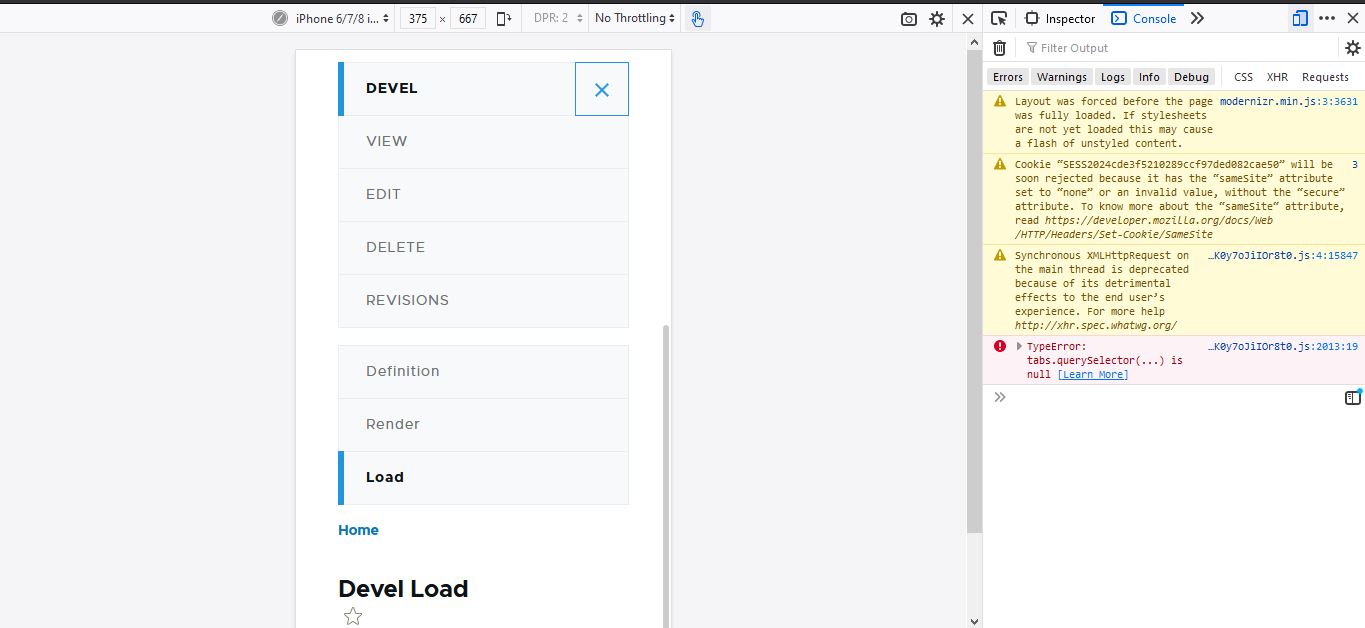
Your #26 patch working well in terms of functionality. But few errors need to correct. While initial DOM loading, still links and their classes were not added to that ul/tabs and those causing 2 javascript errors.
Please check the screenshot for more details.

Also, minor code readability adjustments required in tabs.es6.js file (optional)
@kostyashupenko @mherchel apart from 2 errors, the patch is good to solve the issue.
Comment #28
sd9121 commentedComment #29
sd9121 commentedResolved the above error.
Comment #30
sreenivas bttv commented@sd9121,
Still, the #29 patch does not solve the issues mentioned in #27 comment.
We have majorly two types of tabs are there.
1. Primary
2. Secondary
To produce the error, please navigate to appearance settings (admin/appearance/settings) where we can see both primary and secondary tabs.
As per existing tabs js code,
We are calling clientHeight for all [data-drupal-nav-tabs] through context.querySelectorAll.
But where Button with class name tabs__trigger only available for primary.
(templates/navigation/menu-local-task.html.twig)
So in isTabsMobileLayout clientHeight calling for secondary tabs too. Also, adding addEventListener on null.
So please check all the above scenarios.
Comment #31
sd9121 commentedComment #32
sd9121 commented@sreenivas: Thank you for the review. The design for primary and the secondary tabs is completely different, I don't think we should make the secondary tabs similar to that of primary tabs, it would be bad in User experience, but yes, I have added a condition here if the class tabs__trigger is available only then the JS should be applied, that will fix the error you mentioned.
This patch should fix this error.
Comment #33
sd9121 commentedComment #34
sreenivas bttv commented@sd9121,
Still, #32 patch not fixing errors mentioned earlier. As mentioned in your comment, I am not saying secondary tabs should similar to Primary tabs.
But as mentioned earlier below code runs for both Primary and secondary tabs.
Now the problem is different.
Still, in console, we can notice the null error for insertAfter and window resize functions. Please check the screenshot for more details.
Comment #35
sd9121 commentedComment #36
sd9121 commentedPlease review the updated patch.
Comment #37
pankaj.singh commentedComment #38
pankaj.singh commentedTested the issue, but not able to reproduce the same, it works fine for me. Ther order of menu items are appearing correctly.
However, in the console, we can notice the null error.
After applying the patch given in #36, the null error got fixed.
Comment #39
ambuj_gupta commentedComment #40
ambuj_gupta commentedComment #41
steinmb commentedReading through the comments but I have a little problem understanding. From my understanding is there not a issue with order of menu in latest dev. (the original reported issue) but there are JS warnings that goes away with the latest patch? Not sure how to review it.
Comment #42
sonam.chaturvedi commentedComment #43
sonam.chaturvedi commentedVerified and tested patch#36. Patch applied successfully and looks good to me.
Testing Steps:
1. Install Olivero Theme
2. Set Olivero Theme as Administration theme
3. Create Article CT node
4. Goto this node page on desktop
5. Click on any of the presented tabs (For ex: "Edit")
8. Resize the screen from desktop to mobile
9. Check active/selected tab is not on first position
10. Now click on other tab (For ex: "Revision")
11. Resize the screen from mobile to desktop
12. Check all the tabs do not move back to their original DOM order
13. Now apply the patch
14. Check tabbing order on window resize is fixed
Testing Results:
1. On resizing the screen from desktop to mobile > The selected tab moves to the top.
2. On resizing the screen from mobile to desktop > The tabs move back to their original DOM order.
3. No console error is displayed
4. Accessibility test - Tabbing order is correct on mobile using TAB key
Before Patch:

Comment #44
sonam.chaturvedi commentedAfter Patch:

Comment #45
mherchelThanks for all the work on this. I didn't test this out, but I did review the code and have some thoughts.
1) My understanding is that this issue only happens if the page was loaded on desktop, and then is resized to mobile. If this is correct, is this worth the added technical debt? This isn't an issue that people will run into in real life, and in the event that someone does 10 years down the line, the tabs are still usable.
2) I reviewed the code and have some thoughts. The main issue that I see is that the resize event listener will be added each time the behavior runs.
Correct me if I'm wrong, but won't this add an event listener for each time the behavior is run? I believe this should be outside of behaviors.
I don't believe we need to add the
> 0here.Do we need to pass in
Drupal.debouncehere if we're already pulling in the global Drupal object?Comment #46
sd9121 commentedComment #47
sd9121 commentedThank you @mherchel for reviewing the code.
I have fixed the issue which are mentioned above, Please review my updated patch.
Thanks!
Comment #48
ambuj_gupta commentedComment #49
ambuj_gupta commentedComment #50
manojithape commentedComment #51
manojithape commentedVerified and tested patch#47. Patch applied successfully and looks good to me.
Testing Steps:
1. Install Olivero Theme
2. Set Olivero Theme as Administration theme
3. Create Article CT node
4. Goto this node page on desktop
5. Click on any of the presented tabs (For ex: "Edit")
8. Resize the screen from desktop to mobile
9. Check active/selected tab is not on first position
10. Now click on other tab (For ex: "Revision")
11. Resize the screen from mobile to desktop
12. Check all the tabs do not move back to their original DOM order
13. Now apply the patch
14. Check tabbing order on window resize is fixed
Testing Results:
1. On resizing the screen from desktop to mobile > The selected tab moves to the top.
2. On resizing the screen from mobile to desktop > The tabs move back to their original DOM order.
3. No console error is displayed
4. Accessibility test - Tabbing order is correct on mobile using TAB key.
Comment #52
manojithape commentedComment #53
manojithape commentedComment #54
andrewmacpherson commentedPlease remember to add the "accessibility" tag to issues which discuss the focus order. The accessibility maintainers likely won't be aware without it.
I'm wary of this one. Tagging for a detailed review with before/after regards to WCAG SC 3.2.3. Consistent Navigation and SC 2.4.3 Focus Order.
Please do not commit this without accessibility maintainer sign-off.
Comment #55
mherchelComment #56
mherchelComment #57
mherchelComment #58
ravi.shankar commentedRerolled the patch #47.
Comment #59
mherchelPatch doesn't apply.
Comment #60
kishor_kolekar commentedhere the re-roll patch.
Comment #61
kishor_kolekar commentedComment #62
mherchelThe patch in #61 breaks the functionality, where if you change tabs in desktop mode, and then switch to mobile, the expand button will not work)
Comment #64
mgiffordLinking open issues from the CivicActions Accessibility - VPAT.
Comment #65
mherchelHere's a fresh take on a patch (so no interdiff). This approach will create a clone of the active tab (if its not already the first item), and then show/hide the clone and original via CSS at the appropriate breakpoint.
Tugboat URL: coming soon
Comment #66
mherchelAttached the wrong patch. Correct patch here.
Comment #67
gauravvvv commentedPatch#66 Verified and tested. Patch applied successfully and looks good to me.
Here adding some before and after patch screenshots for reference.
Comment #68
gauravvvv commentedComment #69
lauriiiIt seems like this could benefit from some test coverage. Based on #54, we also still need confirmation from the accessibility maintainers on this issue
Comment #70
mherchelTests added.
Comment #71
abhijith s commentedApplied patch #70 it works fine. Adding screenshots.
Before patch:

After patch:

RTBC +1
Comment #72
bnjmnmI believe this this suggested approach creates problems with WCAG SC 3.2.3. Consistent Navigation, as this changes the tab order depending on viewport size. I also think this exposes a problem with Claro's implementation of this. The current state of these tabs in Olivero is more accessible than anything proposed so far.
I do, however, see the benefits of having the current secondary tab being displayed when the secondary menu is collapsed. I wonder if the confusion comes from this being displayed as a tab, when it's kinda not a tab if it's not adjacent to its sibling tabs. When the secondary tabs are collapsed, this is more akin to a breadcrumb. I think a UX change would be sufficient and less disruptive to site accessibility.
I don't believe this is an accessibility stable blocker, but it could result in a potentially nice UX improvement.
Comment #73
mherchelDiscussed with the UX team at #3208186: Drupal Usability Meeting 2021-04-23 and they also gave the OK to remove this as a stable blocker (at least until a holistic solution is created)
Comment #78
mgiffordI'm just trying to understand why this is an accessibility error.
For it to occur, the browser would need to be resized, right?
Also, the content is still there, but in a different order, right?
So then it would be about consistent navigation. SC 3.2.3 https://www.w3.org/WAI/WCAG21/Understanding/consistent-navigation.html
Just want to make sure before tagging it.
Comment #80
mgiffordComment #82
quietone commentedThe Olivero theme was approved for removal in #3590816: [policy, no patch] Deprecate Olivero and move to contrib.
This is Postponed. The status is set according to two policies. The Remove a core extension and move it to a contributed project and the Extensions approved for removal policies.
The deprecation work is in #3595082: [meta] Tasks to deprecate the Olivero theme and the removal work in #3595085: [meta] Tasks to remove the Olivero theme.
Comment #83
quietone commented