

 Come together with the global Drupal community in Rotterdam, 28 Sept – 1 Oct 2026. Sessions, contribution, connection, and Early Bird savings until 8 June.
Acquia performed a series of user tests around Layout Builder (I'm still working out how to make as much of those results as we can generally available to the community). But universally, this was a huge barrier to folks.
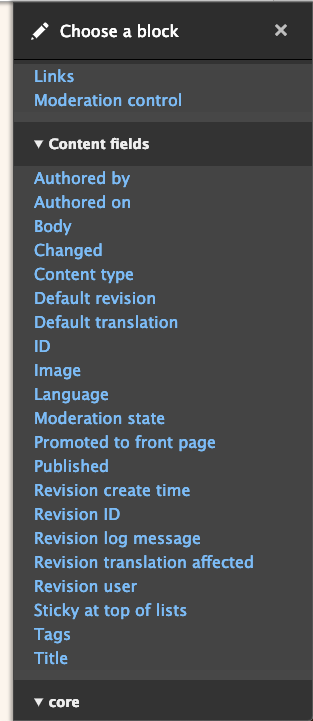
Excerpts from the findings:
Users had difficulty navigating among the many block types available to them. It was unclear how the categories were constructed. One user wanted meta-data versus media types (etc), but saw these types mixed within categories. Users wanted to sort (e.g., alphabetically, chronologically) among block types rather than use the categories provided.
Additionally, this sidebar is basically a never-ending barf of "Drupally words" to an audience of people (content authors) who shouldn't need to know/care that Drupal (or views or blocks or CTools or whatever) is what's powering the interface. Another key quote from the findings:
Users shouldn’t need to speak Drupal to use Drupal!
Indeed. ;)
#2977587: Improve block listing in Layout Builder by hiding uncommon block plugins attempts to solve this so by simply hiding some of the clutter behind a "more" link (not sure this is a great solution; it was more of a quick-and-dirty stop-gap back when we were advocating for this problem to be a stable release blocker for Layout Builder)
I think what we should do in this issue (or maybe sub-issues, but let's try to get a "vision" together here first) is:
- Brainstorm some solutions for this general problem (maybe also investigating into how other CMSes have solved this problem in their page building tools)
- If we stick with categories, come up with a sensible, "human readable" list of categories for blocks to be placed in (bearing in mind contrib will need to put things here too)
- Come up with an "MVP" we can try and get done in relatively short order, so we can ideally try and get something into 8.8 before October.
Thoughts/sketches welcome!
| Comment | File | Size | Author |
|---|---|---|---|
| #18 | Layout Builder Block Listing 2019-08-28 12-16-27.png | 160.5 KB | grasmash |
| #15 | LB Content Groupings 2019-08-27 21-28-14.png | 141.29 KB | grasmash |
| #15 | Export-f980568a-fa03-413a-abce-b7ae9581cf38.zip | 871 bytes | grasmash |
| #13 | gutenberg--blocks.png | 87.98 KB | webchick |
| #12 | squarespace-blocks.png | 254.12 KB | webchick |



Comments
Comment #2
webchickOops, my mistake! #3069446: Layout builder's "Add Block" sidebar menu UX improvements is only changing the "Add new block" button, not touching the categories. (The categories just look so much less overwhelming when they're collapsed like that. ;))
Comment #3
webchickComment #4
webchickComment #5
gábor hojtsyThe default listing should definitely be better.
I heard people using https://www.drupal.org/project/layout_builder_restrictions to limit available layouts and available blocks to aid users. (This is not a replacement for making the default list better, just an addendum :)
Comment #6
effulgentsia commentedFor anyone not familiar with Layout Builder Restrictions, here's the result of what using it looks like...
This is the entirety of the Choose a Block sidebar in Lightning, for the Landing Page content type:

This is the UI that Layout Builder Restrictions provides for configuring that:

Note that it makes no changes to the category labels or which category any given block is in. It just lets you reduce which blocks are available to something "manageable", but that only works if your content editors truly don't need all those other ones. Which is different than the approach in #2977587: Improve block listing in Layout Builder by hiding uncommon block plugins, which retains all of the blocks, but hides the less common ones behind a "More" link.
Comment #7
effulgentsia commentedHere's a thought about what we might want to do. It's just a starting point, please feel free to shoot part or all of it down and suggest something else...
Alternatively, we could just do item 1 in core, keep item 2 out of core, and do items 3 and 4 as feature requests to Layout Builder Restrictions or as a new contrib module that depends on it.
Comment #8
rlnorthcuttI think the issue Angie linked above is a great place to start. It collapses the fieldsets to reduce the overwhelming list, and then this serves to highlight the "search/filter" function. Having LB restrictions in core is certainly interesting, but at least having it in contrib is helpful. I'm not sold on the "more" link idea, but that too is another approach.
Comment #9
effulgentsia commentedAs far as I can tell, neither the proposed resolution in #3069446: Layout builder's "Add Block" sidebar menu UX improvements, nor its latest patch, collapses the categories. The screenshot in the issue summary shows them collapsed, but is that from having some other patch applied or module installed? If we don't have an issue already open for collapsing all the categories, let's open one?
Comment #10
mandclu commentedAt the risk of going off on a tangent, It seems to me that the user intent is different when using layout builder on a content type (when placing fields is likely the primary goal) vs. an individual node (where creating inline blocks and placing views and other blocks is more typical). I know there's a danger of confusion if the same interface is organized differently in two different places, but should we consider optimizing for the different primary goals in each use case?
Comment #11
effulgentsia commentedThanks @mandclu! I don't think it's off tangent at all. I agree that the intent is different between content type layouts and individual content layouts, and that's something that bugs me about the proposal in #3069446: Layout builder's "Add Block" sidebar menu UX improvements, because it would imply that the recommended action is to click the big blue button, but that should not be the primary call to action on content type layouts; as you said, the primary call to action on content type layouts should be to place fields.
I've been thinking about this some more for the past few days, and here's some ideas I came up with...
/admin/structure/block/block-content). I would recommend that the Entity Embed module assign its blocks to this category as well. Maybe the Entity View blocks from Chaos Tools should be in this category as well.Comment #12
webchickSorry, did not realize it had been 9 days since that comment! :O I've been meaning to get back to this.
I think that, rightly or wrongly, the "bar" with which Layout Builder is going to be ultimately measured against in terms of ease-of-use is page building tools (yes, we all know that Drupal is not a page building tool :)) like SquareSpace and WordPress.
Here's how they present their respective block libraries:
WordPress (Gutenberg)
Try it at: https://wordpress.org/gutenberg/
Squarespace
See demo at: https://support.squarespace.com/hc/en-us/articles/206543757-About-blocks... / https://support.squarespace.com/hc/en-us/articles/205809798#toc-2--your-...
Yeah, ok. So what?
So given that these are respectively nearly 30% of the internet (WordPress) and a website building tool that non-technical people actually like using (Squarespace), and given we presumably want Drupal to have some of these same qualities ;) we should figure out what about this makes sense for us to emulate. (As well as what doesn't, so that we're not sacrificing the "structured content" and "super flexible" benefits that make Drupal great.)
Unfortunately, I don't have access to a working 8.7/8.8 install (simplytest.me has been erroring out, and my local is multi-way hosed atm :\) to create a specific "counter-proposal"; I'll try and get that sorted by Monday. (Unless someone wants to be VERY kind and post some screenshots of what the default block listing in Drupal looks like in 8.8 atm.)
Comment #13
webchickOopsie. :P Very wrong image.
Comment #14
mandclu commentedI really like the idea of including some competitive analysis here. Should we also consider the approach of some landing page builders like Unbounce or Instapage? Also, if we're going to do additional user testing, could we test how similar users perform the same tasks on the other platforms? It would be good to understand the degree to which these other approaches are actually measurably better for end users, and where a different approach could have its own pitfalls.
I think it's also worth mentioning that AFAIK none of these other platforms have use case equivalent to laying out the fields for a content type. I do still think that the typical nature of what a user is trying to accomplish will be significantly different for this use case (where placing existing fields is the most common use case) vs. laying out a single node (where placing new or existing content is most common, or lists of content).
Finally, there is promising work underway at #3029830: Provide single field values from multivalue fields as layout builder-friendly blocks. I think the idea of making the node add/edit form a place to make a multimedia copydeck could be a game changer, as a place to assemble all the stuff you want in your layout, and then in a separate step move it all around. That said, it could definitely have implications on what we're discussing here.
Comment #15
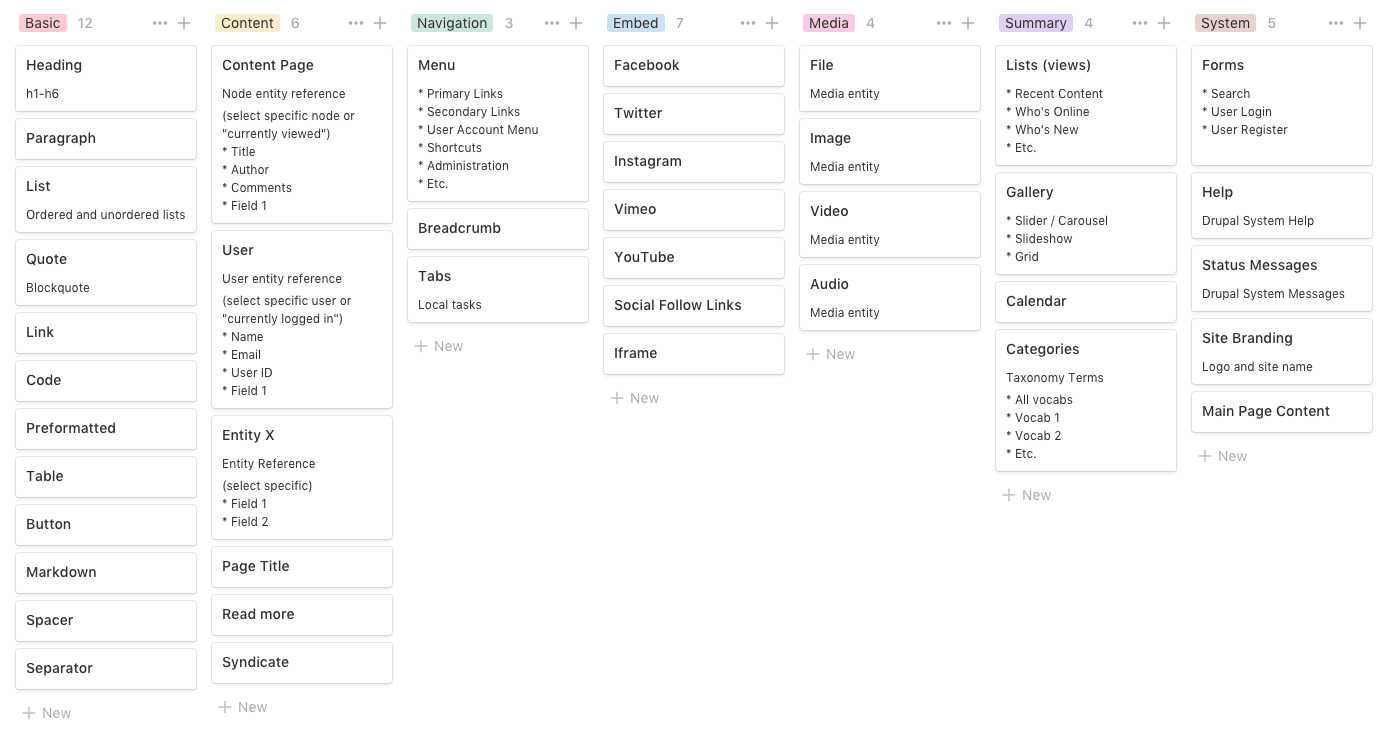
grasmash commentedFollowing @webchick's guidance, I'd like to propose the next iteration. I've also taken some elements of @effulgentsia's suggestions.
A few principles that I'm following:
My methodology:
Right now I have 8 top level categories and a few orphaned blocks. Screenshot attached.
It can also be viewed as a board (which you can duplicate and modify) or a table. I'm continuing to iterate on these so it may be updated since the attached screenshot was taken.
CSV Attached too.
Possible improvements:
Comment #16
webchickOh, wow! That is cool! :D And some really great thinking here, as well.
Some small nits:
- We try not to use "Node" anywhere in content author-facing UI text ("entity reference" is also pretty technical), and instead use "Content." We probably can't do Content > Content so this needs some thinkering. Hm.
- I would make "Uploaded Media" just "Media" personally. I know it's a little confusing with Embed being there too, but it's consistent with other places we use "Media" ("Remote video" should probably be under here too, though that creates some confusion with Embed > YouTube/Vimeo. Hm.)
- "Tabs" are under both Navigation and Layout. Is the idea that Tabs under layout is the "Vertical Tabs" UX pattern?
- I'd rather not introduce a new term "Widgets" here... even "Miscellaneous" or "Other" would be better for this category label, IMO.
Still working on that dev environment so I can counter-propose instead of just critique. :\ I feel like tomorrow will be the day! :D
Comment #17
grasmash commentedThanks for the feedback. I intend to revise based on your comments and repost today.
Comment #18
grasmash commented> "entity reference" is also pretty technical
I think it would be nice to have a novice-friendly title with a drupalist-friendly subtitle. So, we would show "Entity reference" in small gray text or in a tooltip. But, I understand if we'd prefer to use a pattern where we _never_ expose niche language like that at all. What do you think?
> I would make "Uploaded Media" just "Media" personally.
Done. What do you think about just putting Media under the Content category? They're similar in that you're referencing Drupal entities. Conceptually, "Content" would reference Drupal data and "Embed" would reference remote data.
> "Tabs" are under both Navigation and Layout. Is the idea that Tabs under layout is the "Vertical Tabs" UX pattern?
Yes that's the idea. There's a "Tabs, Local Tasks" which shows Drupal links (no custom links allowed) and a "Tabs, Vertical Links" which would let you create your own tabs. Maybe that's too complicated. I think we could just remove the vertical tabs option for now. Thoughts?
> I'd rather not introduce a new term "Widgets" here... even "Miscellaneous" or "Other" would be better for this category label, IMO.
Another option is to label it "System."
I'm posting a revision. One notable change: I've removed the "Layout" column. I _do_ think we will need the ability to add "nestable layout elements" like divs, columns, vertical tabs, etc., but it's to mixed up it the section vs block distinction in layout builder. We should separate consider what to do about that.
It can also be viewed as a board (which you can duplicate and modify) or a table.
Comment #20
digitaltodd commentedIf I can add in. This may or may not be the right place, but I thought it might be relevant. I've just started on 8, from four or so yrs with 7. Love the layout builder, and the thoughts above. Agree with the Acquia tests.
I'll add to the managing custom blocks is really hard theme. If I add a basic block in the builder, I cannot see it in my custom blocks library. And also cannot see it in the custom blocks section of the builder's config space. If I try and add a custom block via structure>block layout > custom block library > add block > basic block, and use the same title in the description, I'm told it is already there. Of course it is, I just cannot see it.
One more, the builder is adding "style=height: fixed px" attributes to my blocks in the builder. This is pretty unresponsive when I resize the browser window making my content collide with other content, regardless of whether the I have multiple blocks/section or one block/section. I do not know why styles are being added in this fashion, but they interfere.
OK one last one, I found a block (content) in the layout builder. I added the page that I was on. It went into a "spin" never loaded. So, cleared caches ... I can view the page, but when I click the layout tab, just get the equivalent of a spinning ball. So the page is no longer editable. Need to toss and rebuild. I likely triggered something recursive, that is now stuck, I get gateway timeouts. "The gateway did not receive a timely response from the upstream server or application."
As my use case, I'm more of a web builder than coder. I use asset injector (css) to override setting and make my site specific. This model has been working great for me, several sites now. I know I can use lots of !mportant(s) in my class attributes, but is that the best way? Every height?
Thanks
PS. for the items above, please direct me to the proper issues and I'll cross post. Having a hard time finding where those might be too.
Comment #22
bkosborneThis seems like it was proposed in #11, but I'd like to highlight it a bit more.
What does everyone think about reversing what was done in #2968500: Change inline blocks workflow in Layout Builder to match mocks as part of this effort? It would essentially "mix in" the custom blocks into the main list instead of separating them with a "create custom block" button. I'll paste in what I wrote in #3069446: Layout builder's "Add Block" sidebar menu UX improvements about this:
Comment #23
donquixote commentedInteresting discussion. Just a tiny comment from me.
I agree with this.
On the other hand, i think a subset of the Drupal architecture should be visible, so that users can form a mental model, and connect the dots if they recognize a concept in more than one place:
- A "field" is something that is configured on a "Manage fields" page. A "view" is something that can be managed in "Structure > Views".
- Some elements are coming from the entity being viewed, some are "global", some are "local" to this layout (which means to this specific node, if it is a single-node layout).
Comment #25
matthiasm11 commentedI agree there should be no difference between inline blocks and other blocks for an editor. An editor does not care what happens under the hood. Reversing the separation is a first step, however I think using a structure as shown in the screenshots of #12 will improve the UX a lot. (with a default icon for blocks which do not have one specified)
Comment #27
chrisgross commentedI agree with the others. Custom blocks need to be moved back to where they were. I will repeat my comments from the other issue here:
I agree that custom blocks need to be moved back to the main blocks list. I have read through the issue that caused this change and still do not see a good reason for said change, but it seems like really, really bad UX. It is confusing to users and unnecessary, as to them, there is no meaningful difference between custom blocks and other types. Also, if you click on "Create custom block" and you want to then go back to the main block list, you can't. The only option is to close the panel and start over. Plus, the search box does not work for custom block types in the current configuration. Please move it back, or provide a simple means for us to do so.
Comment #31
penyaskitoFound this while working on the dashboard initiative, where we face a similar problem (#3351705).
So hopefully in the future the scenarios that need to be solvable are:
1. Editing the layout for a given content type.
2. Editing the layout for a specific entity.
3. Editing the layout for a dashboard.
We considered creating our own block specialization, so we could define specific plugin blocks that are designed specificly for a dashboard. But at the end we should expect people to create views blocks, or reuse their blocks for the dashboards. So that specialization is not the first option, at least for now.
If dashboards get traction, I'd expect more blocks being added to core/contrib/custom with the dashboard in mind, which might make this experience of editing the layout for a given content type or an specific entity even worse.
Comment #32
catchA major problem here is #3043330-95: Reduce the number of field blocks created for entities (possibly to zero).
Comment #34
robbt commentedI looked at this at the DrupalCon usability review event and I don't think there has been an agreed upon solution even if everyone recognizes that this is a usability issue with Layout Builder.
My suggestion would be to differentiate between Content Fields and Content Metadata Fields
This seems like a cleaner distinction than hiding certain fields under "More" which was rejected as a solution.
I think if we differentiated them into Content Fields and Content Metadata Fields
Content Fields
Body
Image
Title
Content Metadata Fields
Authored by
Authored on
Changed
Comments
Comments
Content type
Default revision
Default translation
ID
Language
Links
Menu link
Promoted to front page
Published
Revision create time
Revision ID
Revision log message
Revision translation affected
Revision user
Sticky at top of lists
Tags
Maybe Tags and Comments and Links could be considered Content fields vs. Metadata but certainly most of these aren't typical things that someone would want add to a layout display and so hiding them would reduce cognitive load and overwhelm that was identified by testing.
Comment #35
catchI think we're are very close to an agreed solution to reduce the sheer number of blocks in #3365551: Add the notion of a 'configured layout builder block' to solve a number of content-editor and performance pain points. Once that issue is done, there could still end up being lots of blocks to choose from but it would be from a much lower starting point.