Problem/Motivation
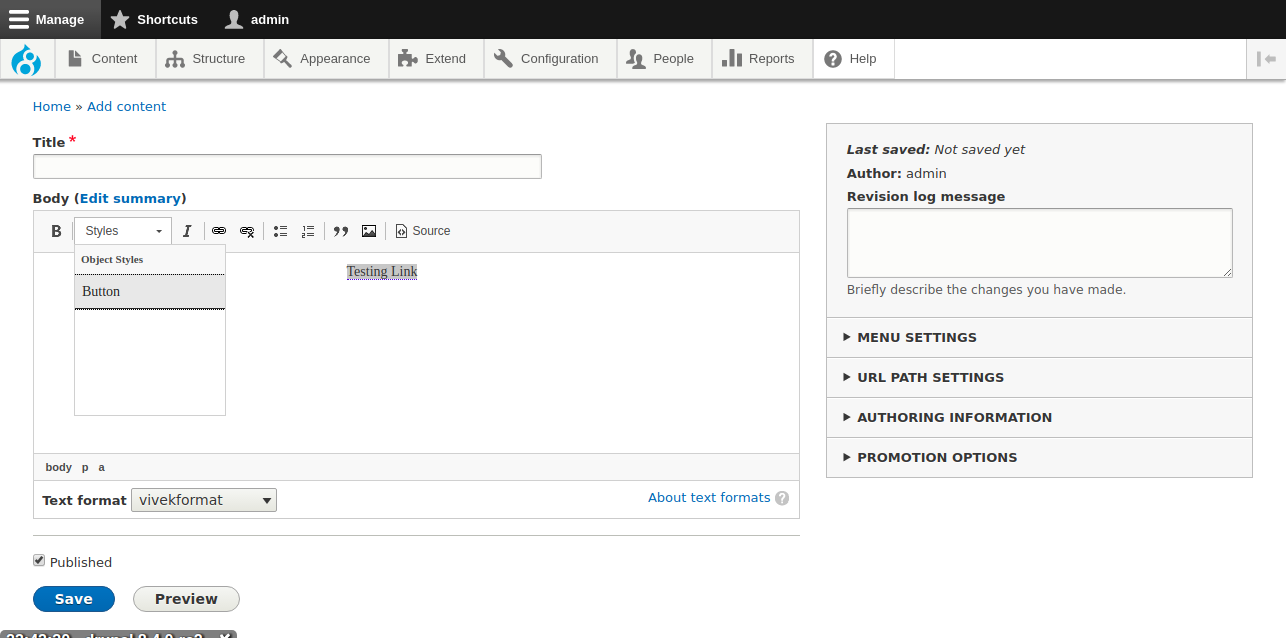
In CKEditor, if you're using the styles dropdown and you define a style for an object element like an "a"-tag (for example "a.button|Button") or a list ("ul.class-name|Custom List"), the style will not be visible in CKEditor when you simply click once on the relevant element and open the styles dropdown, nor when you drag-select the whole element-text.
In case of "a"-tags: The styles *will* be visible if you first double click the link, making the link-options modal appear: when you close the link-options modal, the a-tag styles will be visible. They disappear if you click elsewhere in the text and click on the link again. They only appear right after you double-clicked the link.
Steps to reproduce:
- Edit or create a text format and add "Styles" button to your "Active Toolbar"
- Add this "Styles dropdown" entry: a.button|Button
- Create or edit content with a Body field or other long formatted text field
- Switch fields "Text format" to the format you configured
- Create a link
- Select the link by clicking on it once (so the cursor is somewhere in the link text) or by drag-selecting the whole link text. You'll see that Styles dropdown is enabled (as if there are styles available)
- Open the styles dropdown and see that the "Button" option is not there
- Now double click the link: the link-options modal will pop up
- Close the modal and open the styles dropdown again: the "Button" object style will now be visible
OR (as reported by @segovia94)
- Edit the Basic Html editor /admin/config/content/formats/manage/basic_html.
- Add a Styles button.
- In the Styles Dropdown settings, add a class to an Unordered List ul.class-name|Custom List.
- Save the page and create a new Article
- Add an Unordered list in the editor and select it which will enable the style dropdown.
- The style dropdown will be empty

Findings
- This issue was not present in Drupal <= 4.3.7
- The styles configuration seems to be passed to the CKEditor script: if you define a style for a-tags, the "Styles" dropdown is activated when an a-tag is selected. And if you manually add the relevant classes to the a-tag, the label of the style is shown in the default state of the "Styles" dropdown, but if you click on the dropdown and open it, the label/style is not seen.
- I assume the problem is situated in the CKEditor (v4.7.2) script itself.
- When inspecting the CKEditor script, it appears that in the "onOpen"-method, the currently selected element is simply the "body" instead of the a-tag your cursor is in.


Comments
Comment #2
gillesv commentedComment #3
gillesv commentedComment #4
vivekguptakota commentedI follow all provided step.
I checked with Drupal 8.37, 8.4. But still not able to reproduce this issue.I am able see the "Button" option is there.
Comment #5
gillesv commentedStrange, I just reconfirmed the issue by using https://simplytest.me/ to create fresh Drupal 8.4.0-rc2 install and following the steps I posted in the original post. I tried it using 3 different browsers too (Firefox, Chrome, Edge), and I am not able to see the style for "a"-tags.
@vivekguptakota could you please test my steps via https://simplytest.me/ ?
Comment #6
vivekguptakota commentedI tested your step via https://simplytest.me/ ?
Attaching a screenshot.
Please explain your steps in more details.
Comment #7
gillesv commentedComment #8
gillesv commented@vivekguptakota : thanks for testing. We discovered some new info: it DOES work if you double-click the link (making the link-options modal appear), but not when simply placing your cursor in the link, or drag-selecting the link text. This worked before (and should work). Could you please verify? I also tested on Android now, and the same issue occurs. The other tests were performed under Windows 10.
I updated the original post to reflect these findings.
Comment #9
gillesv commentedComment #10
gillesv commentedComment #11
gillesv commentedCould anyone please verify or refute the issue?
@vivekguptakota : could you please confirm that the adjusted scenario leads to an issue on your end?
If found to be an issue on any installation, I think it will cause quite some annoyances with sites using the styles dropdown to style a-tags (buttons, call-to-actions, etc) when 8.4 launches.
Comment #12
segovia94 commentedThis is definitely still a problem. I created #2913989: Object Styles no longer can be applied in ckeditor's Styles dropdown with the same problem before I found this one. It happens on all Object Styles, not just
atags. We discovered this today when our Behat tests blew up.Comment #13
segovia94 commentedBy the way, the double click trick did work for links, but it doesn't work for items like lists.
Comment #14
gillesv commentedI updated the title and description to reflect the fact that not only a-tags are affected. Merged some info from @segovia94's related issue.
Comment #15
segovia94 commentedSo this is an issue in the Ckeditor library. https://github.com/ckeditor/ckeditor-dev/issues/862
Comment #16
segovia94 commentedThis patch is a FunctionalJavascript test to ensure that the styles can be applied correctly. It passes successfully in 8.3. The only change in 8.4 that I made is the submit button is now "Save" instead of "Save and publish". So this should fail in 8.4. This can be used to test a fix for this problem.
Comment #17
segovia94 commentedHere is the fix that was implemented in https://github.com/ckeditor/ckeditor-dev/issues/862.
Comment #18
segovia94 commentedComment #19
gillesv commented@segovia94, seems to work just fine, thanks!
Comment #20
Saphyel commentedit works ! thanks a lot for the patch! tested on 8.4.0
Comment #21
heikkiy commentedI found one issue still after applying this patch.
I applied the following styles to ckeditor:
a.btn|Button
a.btn.secondary|Button Second
a.btn.tertiary|Button Third
a.btn.quarternary|Button Fourth
I can only see the first button style in the dropdown. I noticed that when you add the styles, Drupal does not update Allowed HTML tags correctly. Previously it added the new class to the allowed tags but now it does not add it. After I added the new classes to the allowed HTML tags the buttons appeared in the list.
Comment #22
xjmThanks all!
This patch appears to be changing JavaScript in a vendor library, which we can't do. It looks like there is an upstream issue for this already in https://github.com/ckeditor/ckeditor-dev/issues/862, so I'm guessing this will be fixed for Drupal once that fix is in a release?
Comment #23
xjmUpdating the summary with the screenshot from the duplicate issue.
Comment #24
xjmComment #25
tstoecklerRe #22, yes, unfortunately this fix is only in CKEditor 4.8, so that #2908864: Update CKEditor library to 4.7.3 will not fix this.
Comment #26
wim leersMarked #2914341: [upstream] CKEditor not populating style dropdown as a duplicate of this. I skipped reading this issue initially because it has a vague title.
Quoting myself at #2914341-3: [upstream] CKEditor not populating style dropdown:
Pinged CKEditor maintainer @mlewand to get a 4.7.x bugfix release out. We don't want to wait for 4.8.x.
Comment #27
wim leersChromium--
Comment #28
segovia94 commentedIf you want to still look at adding the patch from #16, it is just a test to make sure that Drupal's implementation with the library works.
Comment #29
gillesv commentedComment #30
wim leers#28: I realize that, and while it's very cool you wrote that, I'm a bit torn about whether it makes sense to add to our test coverage or not. This is a rare CKEditor regression. We don't need or want to add such tests for every CKEditor feature that Drupal supports by default, because that'd mean duplicating all of CKEditor's test coverage.
Thoughts?
Comment #31
segovia94 commentedYep, I hear you on not wanting to reproduce CKEditor's test coverage. I think my thought process was not to check that ckeditor does what it is supposed to do standalone, but that it does what Drupal asks it to do when integrated. That's a thin line I realize. We already have the functional test
CKEditorStylesComboAdminTest, but it is obviously for the admin interface and never checks to see if what Drupal supplies to CKEditor actually works. I know javascript tests are expensive performance-wise, but I would think it would help to take the extra step to make sure that the final output from a javascript heavy module is as expected. It was a little surprising to me that there weren't more javascript tests in the module.I guess I'm looking at it from my client's side in that if we didn't have the Behat (javascript) tests in place for these things we would have pushed to them a release that they would consider broken. Either way, I'm fine. I'm not familiar enough with what should and shouldn't get coverage in core. At some point we have to assume that a 3rd party's API is going to do what it claims.
BTW, thanks for the work you all do to keep core stable!
Comment #32
dpacassiFor everyone who just updated to 8.4.0 and faces this issue:
One possible workaround is to replace the ckeditor.js with that one from Drupal 8.3.7 (should be version 4.6.2), then everything should work well again.
But let's hope that there's soon a new CKEditor 4.7.x release!
Comment #33
ayalon commentedHere is an patch to downgrade to CKEditor 3.6.2 in composer.json:
Comment #34
acbramley commentedAs a stop gap, #17 still works on 8.4.0. #32 will not work when running via composer.
Comment #35
segovia94 commentedThis is a re-roll of #17 against ckeditor 4.7.3 released with drupal 8.4.1.
Comment #36
cristian100This bug is still happening on Drupal 8.4.2, after trying to use the Styles dropdown, it won't work.
Comment #37
sam152 commentedReroll for 8.4.2.
Comment #38
nvakenLast patch applies cleanly for us on 8.4.2 and fixes our problems. Thanks Sam152. Hope this gets fixed soon.
Comment #39
screon commentedThe latest patch is working for me as well, I'm on D8.4.0. Thanks for this!
Comment #40
vijaycs85Looks like it's been a month and doesn't look like bugfix release on upstream. Is it OK to go with #37 for now to unblock 8.4.x installs?
Update: 4.8.0 is expected to released in a week. I created #2926932: Update CKEditor library to 4.8.0 to follow up.
Comment #41
flocondetoileTemporary patch #37 apply well on 8.4.3 but did not fix the issue.
Comment #42
florianmuellerchAs I found out on my installation (8.4.2) we also defined styles like "a.btn|Button". These never appeared, even when the cursor was set on a link. BUT they appeared as soon as I double clicked on the link, then the Linkit plugin opened (which is also installed), i closed the dialog so that the entire link was still marked, and then the styles would appear in the style dropdown.
So I guess this has to be an issue that the entire HTML tag needs to be marked first for the styles to be available.
Comment #43
matthiasm11 commentedAdded a patch with CKEditor 8.4.0 in the follow up issue #2926932: Update CKEditor library to 4.8.0.
The patch was created for Drupal 8.5.x, but also applies to Drupal 8.4.3.
Styles like "a.btn|Button" can now easily be selected.
Comment #44
timwoodJust ran into this issue too when trying to add theme classes as styles in CKEditor. As a workaround, I was able to target the
<a>object by clicking on the link text in the WYSIWYG and then clicking "a element" from the element tree in the CKEditor footer bar.Which then let me use the appropriate styles for
<a>tags in the styles dropdown.Comment #45
matthiasm11 commentedPlease use the patch from #2926932: Update CKEditor library to 4.8.0.
Comment #46
wim leersI tried to convince core committers to commit CKEditor 4.8.0 to Drupal 8.4.x (#2926932-11: Update CKEditor library to 4.8.0), but they've said this will not happen (#2926932-13: Update CKEditor library to 4.8.0).
Drupal 8.5 will ship relatively soon and therefore Drupal 8.4.x only receives critical bugfixes. This is not considered critical.
So, I'm very sorry — for now the solution will be to apply the patch at #2926932-4: Update CKEditor library to 4.8.0 to your Drupal 8.4 site. Drupal 8.5 will ship with that patch applied.
I'm leaving this issue open until Drupal 8.5 has shipped, to make this more findable.
Comment #47
dead_armI just ran into this, thank you for adding a summary of steps forward.
Comment #48
vijaycs85I don't think we can do anything here as per #46, please upgrade to 8.5.x to fix this problem.
Comment #49
oriol_e9gI can confirm that you can patch with composer, the patch applies to Drupal 8.4.4 and fixes the bug.
Comment #50
grantkrugerI should note that my users also found this problem and it did not get fixed by D8.5 and CKEditor 4.8 as there is a different issue at play for us.
We had this specified for the styles dropdown:
This worked until some unspecified time -- my users are not sure because they only use these styles occasionally, but they think it was working in the fall, so possibly at 8.4. Sorry I can't be more specific. In any event I dug deeper and found that this was caused by the option: Limit allowed HTML tags and correct faulty HTML. The clue was this was turned on for Basic HTML and not for Full HTML and the styles dropdown was broken for the former and working for the latter. Turning this HTML limit option off fixed the problem, but was not a safe solution.
The problem seems to be that the JS on the page automatically adds the following to the allowed HTML tags:
<p class="subhead primary secondary">Sadly this does not seem to work. Changing it to
<p class>fixes the problem and, since I can trust the users who have access to the dropdown, this fixes the problem for us, but possibly not for others. In any event it appears that the JS is creating allowed HTML tags that don't work with the back end code, though I'm not sure if the JS is the problem or the way the allowed HTML tags are interpreted. Either way I thought I'd report that the bug still exists for me and how I fixed it, in case this helps others.Comment #51
grantkrugerComment #52
grantkrugerScratch what I said above. It seems to have been some odd caching issue since after saving it changed my option back to
<p class=" subhead primary secondary">and it works fine. I'm not quite sure what happened since it was broken on my local, dev, test and live, all with caches flushed... and then it wasn't. I'll close this back up shortly.Comment #53
grantkrugerComment #54
firewaller commentedI seem to be having the initial issue on my Drupal 8.5.1 site. I don't see the "a.btn.cta" style until after I double-click the link, dismiss the link modal, and then check the dropdown. is anybody else experiencing this issue?
a.btn.cta|ButtonComment #55
badjava commentedThis is a re-roll of #37 from 8.5.x that addresses the recent CKEditor SA for those that are not able to upgrade immediately to 8.5.x but still need CKEditor 4.8.0 (with security fixes).
Comment #56
mrpauldriver commentedStill seeing this bug with with 8.5.3 but cautious of applying any patches because of the comment about security above (#55).
What is the latest with this?
Comment #57
juhog commentedI had this problem on D8.5.6.
I fixed it by editing the settings of the "Limit allowed HTML tags and correct faulty HTML" feature.
Originally the list of "Allowed HTML tags" was like this:
<a href hreflang> <em> <strong> ...I changed it to this:
<a class href hreflang> <em> <strong> ...Comment #58
rupesh_jagtap commented@juhog - provided solution worked for me. Tried other options but missed very simple thing.
Thank you @juhog.
Comment #59
c13l0 commentedThere should be some type of documentation for this issue. @juhog #57 provided the correct solution.
Custom unordered list class
CKEditor plugin settings
ul.unstyled-list|Unstyled listLimit allowed HTML tags and correct faulty HTML
<ul class type>