

Closed (fixed)
Project:
Admin Toolbar
Version:
8.x-1.x-dev
Component:
Code
Priority:
Normal
Category:
Feature request
Assigned:
Unassigned
Reporter:
Created:
27 Apr 2017 at 07:22 UTC
Updated:
16 Nov 2017 at 16:44 UTC
Jump to comment: Most recent, Most recent file



Comments
Comment #2
flocondetoileThis patch add basic support for keyboard navigation. At least, visually impaired can now use the toolbar menu.
Comment #3
eme commentedMaybe you could work together with #2886151: Make toolbar work with a keyboard ?
Comment #4
smustgrave commented@flocondetoile I feel your solution is much much better than mine. I made a small tweak to enable backward tabbing through the menu items. I'm attaching an interdiff I believe I did this right.
Comment #5
adriancidrerroling against the last dev
Comment #6
adriancidRerroling against the last dev.
Somebody can explain me how can I test this functionality? I tried with tab in the menu but nothing happens, the only think that I see is the menu item in green once you made click in a menu item.
Comment #7
smustgrave commentedI haven't had a chance to test this patch yet. But to test you should be able to tab through all the menu items with the keyboard just as you can with a mouse. With clear indication where the focus currently is.
Comment #8
adriancidHi @smustgrave, for me it doesn't work, I'm not able to use the tab with the menu, can you check this later, please? We are planning to release a new version soon and will be great if we can include this issue.
Comment #9
smustgrave commentedMade some tweaks and it appears to be working for me now. Used Drupal 8.4 core and 8.x-1.20 version of admin_toolbar.
Comment #11
smustgrave commentedI was able to apply the patch cleanly on my local environment. I don't understand the drupal tester well enough to know what the issue was. Apologies
Comment #12
adriancid@smustgrave I'm rerroling against the last dev.
In firefox 56 is not working and is working in chrome 61.
And I'm having the following issue: Try to drag a menu item out of the menu with the mouse and then go with the mouse over another menu item, you will see something like this.
Comment #13
smustgrave commentedI can look into this in a few hours but I can confirm I'm seeing the error you mentioned. As far as FF goes it seems to work for me.
Comment #14
smustgrave commentedHopefully this addresses the issue you saw.
Comment #15
smustgrave commentedComment #17
adriancidStill not working in firefox, what is your firefox version?
Comment #18
smustgrave commentedUsing 56.0.2 (64-bit)
Comment #19
adriancidI have the same version in mac and it doesn't works, let's wait to see if another user can test the patch.
Comment #20
flocondetoileHi adriancid,
I met same issue on FireFox 56.0.2 on Mac OS Sierra.
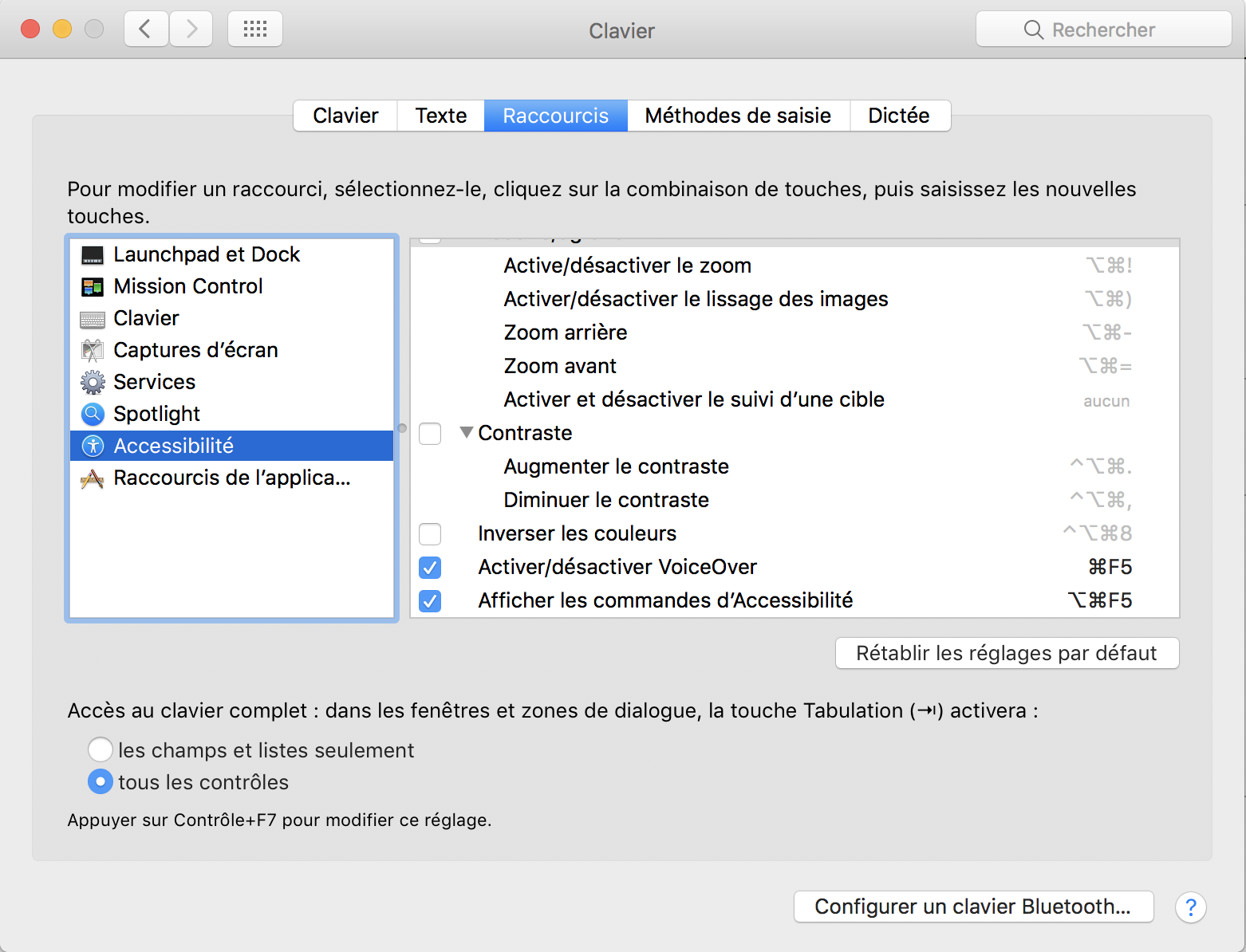
But it's because, by default, the keyboard navigation on OS X is enabled only on textfield (and so all the links are not navigable).
You must enable the keyboard navigation on all the elements in your system preference
System preference >Keyboard > Shortcut and then check the option "All the controls" at the bottom of the pane (see screenshot attached).
With this setting, the patch works fine on Firefox 56 and the lastest Chrome.
Comment #21
adriancidMerci @flocondetoile.
Now the other thing that I think that need a review is the mouse over color. Its fine the green or we need another color for this? I not very skilled in usability.
Comment #22
smustgrave commentedSo the color contrast is perfect. One thing I noticed is say you start tabbing and the focus is on the 'Extend' tab it displays blue as expected. But if you over Structure or another tab that drops down the 'Extend' tab is still blue. I'm not sure if this is an issue, because the focus is still on the 'Extend' tab but the mouse is over something else.
Comment #23
adriancidI see two things.
1-. The menu arrow disappear once the menu is green.
2-. Strange behaviour (blink) when the mouse is in the position (see the image) and you are trying to use the tab to see the menu items.
Comment #24
adriancidComment #25
adriancidComment #26
adriancidComment #27
smustgrave commented1. Have a fix for the arrow disappearing. But this raises the question when the dropdown expands should we use the chevron-down.svg vs chevron-right.svg?
2. I'm not sure I understand the issue you mentioned.
Comment #28
adriancid@smustgrave for:
1-. I think that chevron-right.svg is fine (as I says I'm not a usability expert).
2-. Put the mouse in the position (or near) indicated by the arrow and then use the tab to reach the options in the Structure menu and you will see the menu blinking.
Comment #29
smustgrave commentedAttached the fix for the first issue. Not able to reproduce the blinking issue though.
Comment #30
adriancid@smustgrave works fine, to see the other issue just put the mouse pointer in the position indicated by the arrow and try to use the tab to navigate in the menu, you will see the problem.
Comment #31
adriancidComment #32
smustgrave commentedHopefully this fixes the issue. I decided instead of using the 'focused' custom class just to reuse the hover-intent option that's already there. So when I held the mouse over the 'Comment Types' link or any link and started tabbing I noticed that nested expanded links were no longer showing.
Comment #33
adriancidGreat job @smustgrave, we are planning to revert this commit https://www.drupal.org/node/2908747#comment-12277530 on #2908747: Add a config to disable the hoverintent functionality if we revert the commit this will affect your last patch?
Comment #34
flocondetoileyes. It's now the class
hover-intentwhich is used to permit the keyboard navigation and not the initial classfocusedused. If hover-intent become optional, we have to use a specific class.Comment #35
adriancid@flocondetoile the commit is to allow the hovert-intent to be optional, but we will revert it (so will be by default in the module), in case that we revert the commit this patch will continue working?
I think that yes because you say that you use the hovert-intent and if we revert the commit the hover-intent will be always available, but I just asking the question because I'm not very skilled with jquery.
I just want to know that if we revert the patch that made overt-intent optional this patch will work fine. Maybe I will revert today the patch for the optional overt-intent .
Comment #36
flocondetoileI misunderstood the question. Sorry
So yes, if the hover-intent is always available then this patch will work fine.
So revert back to RTBC.
Comment #38
adriancidWell thanks to @all, this will be available in the next release, maybe for the next week ;-)
Comment #39
flocondetoileYeah! :-) Thanks @adriancid and @smustgrave
Comment #40
smustgrave commentedGlad we were able to get it working! This will go along way to getting this module adopted by government agencies (Which have to be 508).
Comment #41
adriancid@smustgrave What is 508? And I have a question, is not better to use the arrows to move across the menu? If I need to go to the Reports menu I need to use a lot of tabs.
Comment #42
smustgrave commentedhttps://www.dhs.gov/compliance-test-processes
The current rule states that a tab has to be used. Arrows makes sense but it's not what someone with any motor disability would use first.
Comment #43
adriancid@smustgrave do you think that we need to write something about this in the module description? In that case, can you write some words about this?
Comment #44
smustgrave commentedI can fully test it and emailsend you something