Goal
Have an usable CSV parser UI without errors.
The requirements should all be met in order for this issue to be fixed. The optionals should be aimed for, but may be postponed to a follow up issue.
Requirements
-
The user must be able to specify custom sources
Or, in other words, the user must be able to manually put in the column names from the CSV source.
- The user must be able to choose from predefined sources (if there are any)
- The user must be able to remove mappings
- The user must be able to import a simple CSV file without errors when mapping to guid, title, body and a plain text field, using the default configuration
Optional
- The user should be able to remove custom sources
- The requirements should be backed up with automated tests
UI
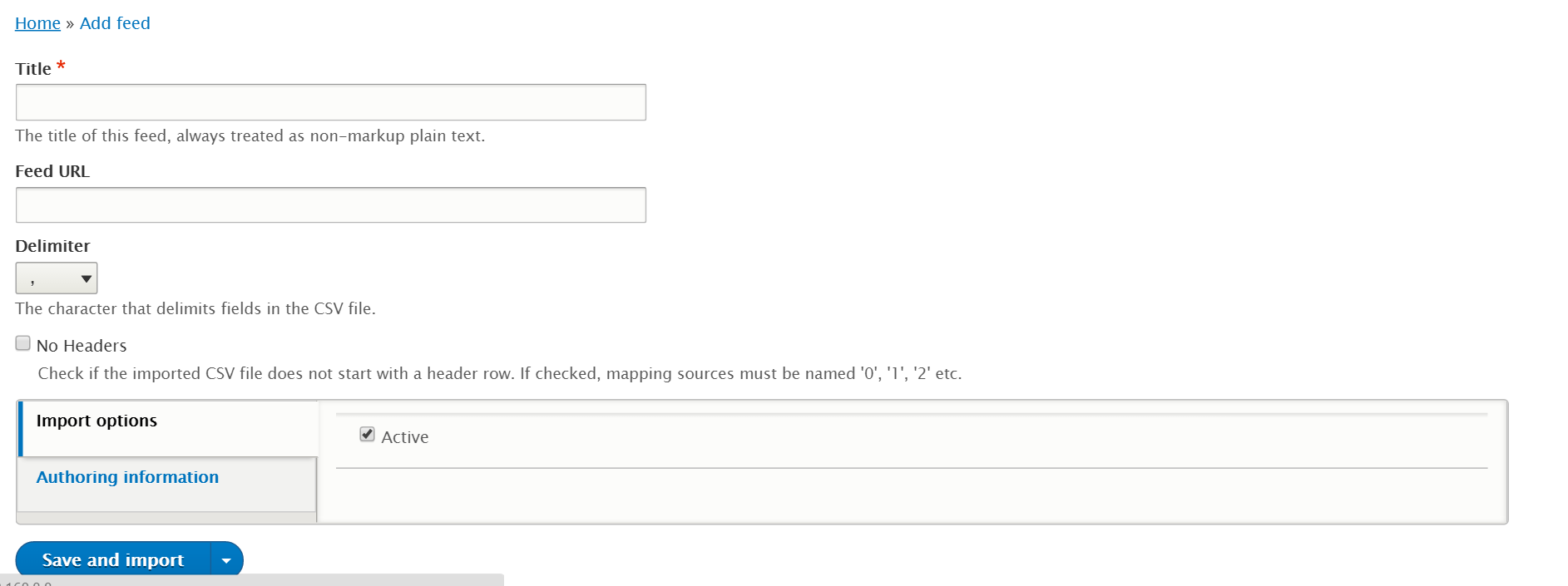
We are currently aiming for the following UI:

For alternative designs, see https://www.drupal.org/node/2917405#feeds-csv.
Sample CSV file
"guid","title","body","alpha"
1,"Lorem ipsum","Lorem ipsum dolor sit amet, consectetuer adipiscing elit, sed diam nonummy nibh euismod tincidunt ut laoreet dolore magna aliquam erat volutpat.","Lorem"
2,"Ut wisi enim ad minim veniam","Ut wisi enim ad minim veniam, quis nostrud exerci tation ullamcorper suscipit lobortis nisl ut aliquip ex ea commodo consequat.","Ut wisi"
Coding
Files related to this issue (the accented ones are likely to need changes, the others are for reference):
-
feeds/src/Form/MappingForm.php
Contains the code for the mapping UI.
-
feeds/src/Feeds/Parser/CsvParser.php
Contains the code that receives the CSV data and creates parser result items from it.
-
feeds/src/Feeds/Parser/Form/CsvParserForm.php
Contains parser configuration form displayed on the feed type form.
-
feeds/src/Feeds/Parser/Form/CsvParserFeedForm.php
Contains parser configuration form displayed on the feed form.
-
feeds/src/Component/CsvParser.php
Loops through the CSV data and parses it.
The automated test
The automated test should be a functional one.
- Add a file called CSVParserTest.php to feeds/tests/src/functional/FeedsParser.
- In this file, add a class that extends the base class for Drupal functional tests.
- Add a method called
test().
-
In the test:
- Make sure that the Feeds module gets enabled (no assertions needed).
- Programmatically create a content type called 'article'.
- Add two fields to this content type: 'body' and a plain text field called 'alpha'.
- Create an user with Feeds admin privileges and login as this user.
- Add a feed type using the UI. Give it a name and a label. Set parser to CSV and content type to 'article'.
- Go to the mappings page and add mappings for guid, title, body, alpha.
- Save the mappings.
- Assert that mappings exist for the feed type.
- Add a new feed using the UI. Provide a source (see Sample CSV file above).
- Save and import.
- Assert that two articles have been created with the expected values.
Remaining tasks
Fix the errors happening during a CSV import.Investigate and fix the test failure.- Implement machine name callback.
- Clean up/document the API additions.
- Add automated tests.



Comments
Comment #2
dagmarSome initial comments:
Trailing spaces.
Trailing spaces.
I think if you don't extend ConfigurablePluginBase you wont be able to export this settings.
Why are you removing this code?
Trailing spaces
Comment #3
megachrizI'm sorry to say, but the CSV sources should not be defined on the mapping form anymore. I know this is how it works in D7, but that caused inflexibilities which I pointed out in other issues. First #2656496: Parser not getting updated should be fixed. The CSV sources need to be defined on the parser settings screen.
Comment #4
josmera01 commentedHello MegaChriz,

You recomendation for configuration the mappeo csv files, should be creation feeds, attached there is an image.
Comment #5
megachrizThe CSV sources should be defined in the parser settings section on the feed type form. This cannot be done until #2656496: Parser not getting updated is fixed, because the parser config form is not loaded when the CSV parser is selected.
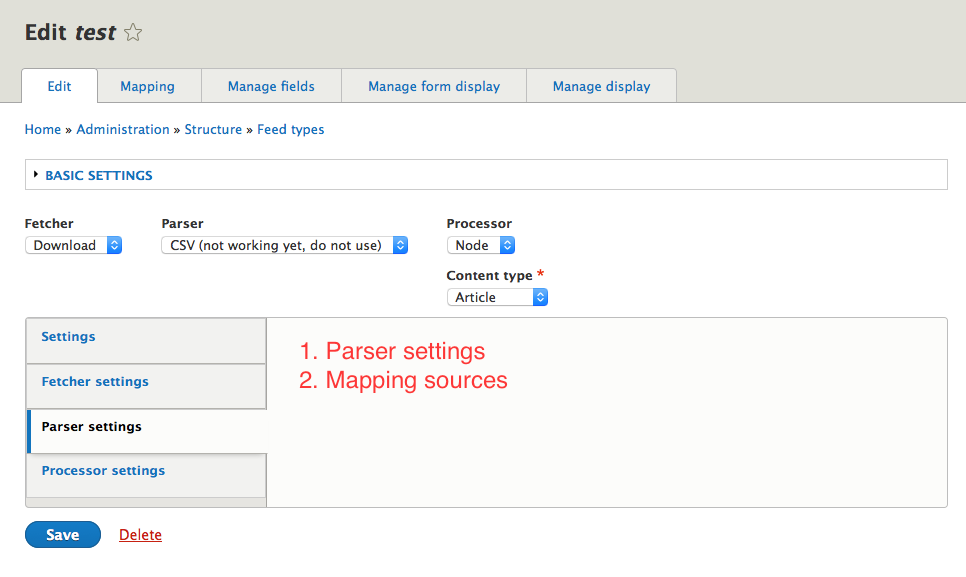
See image:

This is a sketch of how the parser sources could be defined in CSV, but I'm not comfortable with the UI design yet:
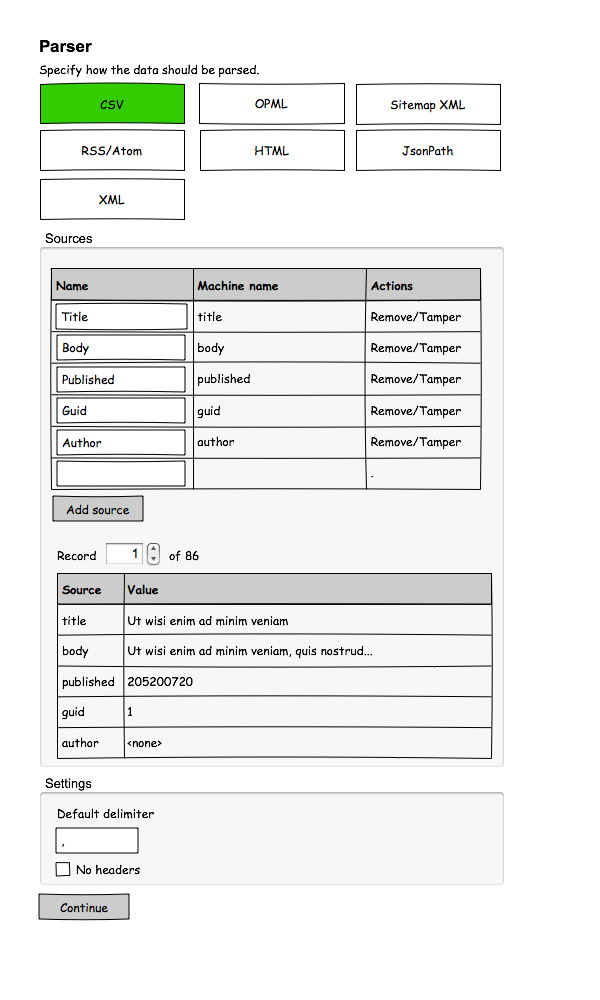
This issue is actually a duplicate of #2443471: Implement configurable parsers., but since that issue is going much further we can keep this one open for now.
Comment #6
Daniel Schaefer commentedHi, just stopping by to see what the progress is on the issue. Can you give an estimate when csv will be ready to use?
Comment #7
Daniel Schaefer commentedWhat is the current state of this? Are there still plans regarding CSV support for the future of this module?
Comment #8
megachriz@Daniel Schaefer
Yes, there are still plans for CSV support in the future. I cannot give any estimates however, as I'm currently not actively working on the D8 version of Feeds.
Comment #9
Daniel Schaefer commentedAre you aware of any possible alternatives? We need to import Drupal 7 nodes, however we did not want to migrate the entire site for the sake of a clean and fresh install.
Comment #10
megachriz@Daniel Schaefer
See my answer in #2696247: Importing nodes alternatives to Feeds?.
Comment #11
RKopacz commentedJust FYI I would I will be reading the threads for csv support. I have a number of instances which are coming up where I need to load bulk content in csv or xml format. I am examining migrate module, but customarily used feeds in 7 for these bulk imports. Use me for testing.
Comment #12
tedwyer commentedI'm with RKopacz. I have a dozen sites that depend on Feeds pulling data from CSV files many times a day. I'm not a coder but anything I can do to help move the CSV function along including testing etc., I'm in. I know you're all busy, but I'm a bit surprised that this features implementation has languished for so long. Would have thought there was more demand for it.
Comment #13
RKopacz commented@tedwyer I just succeeded in importing 138 records to a D8 site from a CSV using the migrate module in core, with the help of the migrate source csv file. I'd be happy to share it in the right place, once I got the YML file sorted it was pretty straightforward. I was even able to import a field with multiple items, but it took me a while to figure it out.
Comment #14
tedwyer commentedThanks RKopack. I'd love to see what you're doing. Not sure what you mean by right place but I'm certainly interested.
Comment #15
tedwyer commentedRKopacz, thanks again. Already had had a look at that CSV module but had another look and I think I can figure it out. Your direction to the yml example will help a lot.
TD
Comment #16
Jeff Burnz commented@RKopacz indeed, I would love to see how you did it, very interested!
Comment #17
Ali Webb commentedI managed to use the latest dev to import a few thousand nodes of varying content types. Some of which have up to 25 fields. I used the patch from #4 here Implement configurable parsers. It was applied manually as things have changed since then.
Not sure if its meant to work right now, but for me it did the job nicely.
Comment #18
RKopacz commentedFor those interested, @Jeff Burnz and @tedwyer the migration module works pretty well with CSV files. This particular example module can be modified to meet whatever needs you have.
https://github.com/heddn/d8_custom_migrate
I had a special need to migrate data to a multiple value field (ie a field which can accommodate unlimited number of items), and after a lot of scratching around, found the solution. I am pasting the Process part of the YAML file which goes in the config/install directory of the custom module, which was adapted from the above code.
Note the field called field_founder_references. Using the explode plugin which is part of the Migrate Source CSV module. One caveat is that that particular module requires the delimiter to be offset in single quotes. I've seen this configuration also without the single quotes, but with Migrate Source CSV you need the single quotes.
All the other fields are straight plain text fields, and the text to the right of the colon for each item are the column labels in the CSV.
I'm going to be attempting more complex fields, such as date fields, image fields, and pulling in taxonomy fields (there is a nice, well documented set of example modules in the Migrate Plus module which gets into it deeper).
I loved using feeds in D7 for CSVs, but it looks like Migrate is the future, and once it gets a UI so that content managers can start doing regular uploads, it should be a great solution.
Comment #19
megachriz#2656496: Parser not getting updated was done, so this issue can be reopened.
Comment #20
ByteJunk commentedWouldn't the patch from #2443471-4: Implement configurable parsers. solve this issue temporarily? There's already a big "DONT USE THIS BITES" label when you choose CSV, I'm guessing there shouldn't be too much trouble with nuking people's importers whenever a definitive solution rolls out.
Just my two cents (since I can't actually help out, probably worth even less), but this still seems like one of the bigger issues with D8 to me right now.
Comment #21
huida commentedHi,
Any one has successfully used this module to import from CSV file to create nodes under Drupal 8?
Eager to do CSV import in my project, but the module setting page says do not use it for CSV.
Thanks.
Comment #22
smartparty commented@huida #21, I am successfully using the patch from #4 on https://www.drupal.org/node/2443471 to import nodes from a D6 site without issue on the latest dev. Images are created, taxonomy terms, etc. There will of course still be some bugs and unfinished work on this module while work is going on. Highly recommended you make a backup before starting.
Comment #23
kumkum29 commentedHello,
I want to import nodes from a csv file, but I don't see how to configure the importer. In the mapping settings, the source list is always empty... How to call the datas of my csv file in this list? It's a little different in comparison to D7 interface...
Can you help me to test this module?
thanks.
Comment #24
trevorbradley commentedJust a side note for those needing a D6->D8 CSV solution today: Over on the D8 Migrate front, the Migrate Source CSV plugin module (https://www.drupal.org/project/migrate_source_csv) is working very well and has a stable release. The YAML configuration is trickier than feeds, but once you get over the learning mountain it's very robust.
I'm still looking forward to a feeds release though.
Comment #25
megachrizI've set a goal to fix this issue during the Global Drupal sprint weekend. I'll be in Amsterdam on Saturday. Who wants to help getting this issue done, join the #feeds channel at https://drupal.slack.com or send me a mail via my contact form.
Comment #26
kumkum29 commented@TrevorBradley
If we want import contents in different languages, the solution with migrate module (& migrate source csv) seems to be not very functionnal... At this moment, there is no valid solution (feeds/migrate) to import multilingual contents...
Comment #27
memoday commentedHi @MegaChriz,
Di you manage to work on this during the Global Drupal sprint weekend? Is there a solution now for CSV import? I hope so. Please keep us updated.
Thanks!
Comment #28
megachriz@memoday
No, during the global sprint weekend in January we did not manage to get this job done. Instead we took a step back to create a survey from which the results can be seen in #2847682: Drupal 8 survey Feeds/Migrate usage and functionality. A few have been working on new UI designs for the CSV parser in #2443471: Implement configurable parsers.. I hope to gather enough energy and time to implement them. Goal for having these finished is the end of June 2017. I hope I can make that, as I'll also be on holiday for two weeks in June (and I'm also trying to finish some stuff for the D7 version of Feeds, which also slows this down). If I can find help from other coders, it should be possible.
Comment #29
megachrizMade a start with a possible implementation. This adds an option "New source..." to the mapping sources select list. It is currently non-functional.
Comment #30
memoday commented@MegaChriz Thanks for the update. I really hope I can help out with the code, but I am not familiar with D8 yet. I hope other coders will jump in and give you a helping hand. Thanks again for your efforts and the great module.
Comment #31
megachrizNot finished yet, but a step closer. This should save the custom entered sources. I haven't tested yet if this makes the CSV parser work with these custom sources. Also some methods need to be added FeedTypeInterface to handle these custom sources.
Comment #33
memoday commented@MegaChriz Thank you so much for the update. Should I install the dev version and test it? Or should I just apply the patch in "interdiff-2669974-29-31.txt"?
Thanks again!
Comment #34
megachriz@memoday
Great that you want to give it try! When testing, it would be best to focus on the UX first in this case, though it would also be helpful to know if custom sources do work with the CSV parser.
Best would be to get the latest dev first and then apply the patch. Interdiffs are meant to see the changes between two patches, see also https://www.drupal.org/documentation/git/interdiff.
Comment #35
memoday commentedHi @MegaChriz,
I have just found out that for some reason, we cannot uninstall 'installed' modules :-(
I deleted the old dev version, uploaded the new dev version and applied the patch, but whenever I go to the "Mapping" tab, I get this error message:
All other tabs are working fine, except for the mapping tab. Any idea?
Comment #36
megachriz@memoday
Clear all caches, if not done before. You can do this at admin/config/development/performance.
If there is still an error on the mapping page after clearing caches, turn on error reporting at admin/config/development/logging to see which error occurs on the mapping page. You can also check the "Recent log messages" (admin/reports/dblog) to see which error occurred.
Uninstalling Feeds is indeed a bit hard to do in D8. You first have to manually delete all feeds at admin/content/feed and delete all feed_item fields. You can see on /admin/reports/fields where the field is used. Hopefully there is an API in Drupal core that provides an easier way of removing these automatically upon uninstall.
Comment #37
caldenjacobs commentedI had to delete all legacy Feeds code in the modules folder, then remove it from the database using 'drush pmu feeds', then composer require the latest dev, followed with applying the patch in #31, which... works!
Is there documentation hiding somewhere for adding Feeds 8.x support to a new target field type? I'd like to get something set up for Address module.
Comment #38
megachriz@caldenjabobs
No, there isn't any official documentation yet for Feeds D8. It would be a good idea to start with that. I have made a list of conceptual differences between the D7 and the D8 version. Maybe I should start with creating a guide for Feeds 8.x-3.x that only contains that (as a start).
If you want to write your own FeedsTarget plugin, you could use some of the existing FeedsTarget plugins in feeds/src/Feeds/Target as example. "link" and "image" would probably be good examples. These FeedsTarget plugins have support for multiple "subfields". For example, for the image field mapping to "ID", "alt" and "title" is all made possible within one FeedsTarget plugin.
Comment #39
caldenjacobs commented@megachriz
That would be really helpful.
Working on the plugin now :)
Hey is that Feeds Slack channel still active?
Comment #40
megachriz@caldenjacobs
I've added a list of conceptual differences between the D7 and the D8 version of Feeds to the documentation:
https://www.drupal.org/docs/8/modules/feeds/conceptual-differences-with-...
The Feeds slack channel is still there, but so far only used occasionally.
Comment #41
kclarkson commented@MegaChriz,
You are a saint sir!
We also heavily relied on feeds in D7 for importing over 100 events per year as well as all of our content.
I have applied the patch and was able to run a CSV import for users so it appears to be working!!!! I repeat we have lift-off and you can import using a CSV file!!!!!
Here are a couple of issues I am seeing.
1. The user processor doesn't recognize the role as a target. You have the status available but no roles.
2. When adding a source during mapping, every time I add a new source I receive the following error:
3. When trying to run the import again to update previous users:
4. After selecting deleting items from the feed it appears to delete all users including, the Admin user 1, even if the csv file does not have the Admin user in it.
Comment #42
megachriz@kclarkson
Thanks for testing!
1. I think the role target hasn't been implemented yet.
2. Thanks for reporting. I'll look into it the next time I continue with this issue (this issue still feels like a mountain to climb for me).
Comment #43
memoday commentedHi MegaChriz,
Sorry for my belated follow-up on this. It was very busy at my end.
I managed to map sources, but for some reason I cannot seem to locate the import page itself. Where is it located? In D7, it's located at www.sitename.com/import/
Where can I find it in D8?
Thanks!
Comment #44
jwineichen commentedAfter creating a feed type at /admin/structure/feeds, you need to create and run the actual feeds at /admin/content/feed.
Comment #45
memoday commentedThanks a million for your support @jwineichen! I managed to import a small tab-delimited file just fine.
This is great progress.
Thanks @MegaChriz for your work!
Comment #46
tedwyer commentedThanks @jwineichen! and MegaChriz. CSV importer works! We import the results of Bing News Search API's for many SoCal news sites many times a day and the importer handled an average .csv with 20 varied fields without issue. Just begun testing and will let the list know of any issues. Again, thanks.
T Dwyer - Indian Hill Media
Comment #47
jwineichen commentedAre we supposed to use this in conjunction with #2443471-4: Implement configurable parsers or is it a separate thing?
Comment #48
megachriz@jwineichen
That's a separate thing.
Comment #49
jwineichen commentedGotcha. Thanks, @MegaChriz.
Comment #50
jwineichen commentedI was able to get everything set up and import content with the #31 patch. I'm getting similar "undefined index" errors @kclarkson got in #41. Everything still works though and I can then use the newly added source for a different mapping without getting the error. I was surprised to find that we can map to paragraphs fields (at least text fields) without any additional work. That's really exciting.
Comment #51
topplestack commentedRunning patch #31.
Using on a content-type instead of users. Not getting the "undefined index" as others have mentioned. I get the following instead:
An AJAX HTTP error occurred.
HTTP Result Code: 200
Debugging information follows.
Path: /batch?id=43&op=do_nojs&op=do
StatusText: OK
ResponseText:
( ! ) Fatal error: Method Drupal\Component\Render\FormattableMarkup::__toString() must not throw an exception in /home/ubuntu/workspace/web/modules/contrib/feeds/src/Feeds/Processor/EntityProcessorBase.php on line 386
Call Stack
#TimeMemoryFunctionLocation
10.0000242800{main}( ).../index.php:0
20.0047728512Drupal\Core\DrupalKernel->handle( ).../index.php:19
30.01111896696Stack\StackedHttpKernel->handle( ).../DrupalKernel.php:656
40.01111896808Drupal\Core\StackMiddleware\NegotiationMiddleware->handle( ).../StackedHttpKernel.php:23
50.01111897304Drupal\Core\StackMiddleware\ReverseProxyMiddleware->handle( ).../NegotiationMiddleware.php:50
60.01121897736Drupal\page_cache\StackMiddleware\PageCache->handle( ).../ReverseProxyMiddleware.php:47
70.01121898624Drupal\page_cache\StackMiddleware\PageCache->pass( ).../PageCache.php:78
80.01121898704Drupal\Core\StackMiddleware\KernelPreHandle->handle( ).../PageCache.php:99
90.01512210648Drupal\Core\StackMiddleware\Session->handle( ).../KernelPreHandle.php:47
100.01732380136Symfony\Component\HttpKernel\HttpKernel->handle( ).../Session.php:57
110.01732381088Symfony\Component\HttpKernel\HttpKernel->handleRaw( ).../HttpKernel.php:64
120.04954352672call_user_func_array:{/home/ubuntu/workspace/vendor/symfony/http-kernel/HttpKernel.php:144}
( ).../HttpKernel.php:144
130.04954352872Drupal\Core\EventSubscriber\EarlyRenderingControllerWrapperSubscriber->Drupal\Core\EventSubscriber\{closure}( ).../HttpKernel.php:144
140.04954353128Drupal\Core\EventSubscriber\EarlyRenderingControllerWrapperSubscriber->wrapControllerExecutionInRenderContext( ).../EarlyRenderingControllerWrapperSubscriber.php:97
150.04954365088Drupal\Core\Render\Renderer->executeInRenderContext( ).../EarlyRenderingControllerWrapperSubscriber.php:124
160.04964365584Drupal\Core\EventSubscriber\EarlyRenderingControllerWrapperSubscriber->Drupal\Core\EventSubscriber\{closure}( ).../Renderer.php:574
170.04964365632call_user_func_array:{/home/ubuntu/workspace/web/core/lib/Drupal/Core/EventSubscriber/EarlyRenderingControllerWrapperSubscriber.php:123}
( ).../EarlyRenderingControllerWrapperSubscriber.php:123
180.04964366040Drupal\system\Controller\BatchController->batchPage( ).../EarlyRenderingControllerWrapperSubscriber.php:123
190.05024463056_batch_page( ).../BatchController.php:55
200.06427884280_batch_do( ).../batch.inc:77
210.06427884592_batch_process( ).../batch.inc:95
220.865011407648call_user_func_array:{/home/ubuntu/workspace/web/core/includes/batch.inc:252}
( ).../batch.inc:252
230.865011408368Drupal\feeds\FeedImportHandler->batchProcess( ).../batch.inc:252
240.865011408464Drupal\feeds\FeedImportHandler->doProcess( ).../FeedImportHandler.php:157
250.865711418576Drupal\feeds\FeedHandlerBase->dispatchEvent( ).../FeedImportHandler.php:266
260.865711418576Drupal\Component\EventDispatcher\ContainerAwareEventDispatcher->dispatch( ).../EventDispatcherTrait.php:37
270.865711418712Drupal\feeds\EventSubscriber\LazySubscriber->Drupal\feeds\EventSubscriber\{closure}( ).../ContainerAwareEventDispatcher.php:111
280.871311902112Drupal\feeds\Feeds\Processor\EntityProcessorBase->process( ).../LazySubscriber.php:92
291.181816087216Drupal\feeds\Feeds\Processor\EntityProcessorBase->entityValidate( ).../EntityProcessorBase.php:135
Comment #52
dhayanandan_k commented@tedwyer @Topplestack Try this module Content Import to import nodes from CSV file to any content type
Comment #53
topplestack commented@dhayanandan_k I saw that The biggest downside of that is having to have the first row have field names, which isn't very user friendly for those that will be importing periodic content. It's also a bit of a pain for the systems exporting the csv files. It will require a user to go in and run a find and replace before performing the import. I think I might be able to use it as a stop gap, but I'd still like to see either feeds continue to be worked on or migrate adopt some of the feeds functionality.
Comment #54
tedwyer commented@dhayanandan_k Thanks for the tip but don't think this works for us. I need to do this programmatically from scripts sourced on the server (not local computer). Need mapping and feeds drush commands is a big bonus.
Comment #55
megachrizUpdated the issue summary: defined the goal and requirements for this issue and the steps to be taken to fix this issue.
Comment #56
megachrizComment #57
irinaz commentedWe are currently working on this issue, feel free to contact me.
Comment #58
sambathbask commentedHi all, . And another issue is by CSV I could upload the file and the error is "CSV (not working yet, do not use)".
I have a couple of issues by Selecting the source in Mapping(None to select the source), Is need to add the source in manually?? kindly refer the image I attached below for more information.
Comment #59
megachrizReverted issue title.
Comment #60
Lea Sky commentedI am waiting for this module. If I can help by testing please let me know.
Comment #61
thomasmurphy commentedComment #62
dman commentedTrialling patch #31 today - it introduces an error in testing:
Investigating to see if this is genuine regression or just the test needing an update now.. I suspect the latter
Comment #63
thomasmurphy commentedI have the same test fail with patch#31, but successfully imported a CSV to nodes without errors. The UI suggests that multiple tag creation can happen on import, but this does not occur, only one tag of the form "tag1,tag2,tag3" is created. Should I create a separate sub issue for that..? @dman suggests using whatever tamper approach we choose overall for this specific purpose.
Comment #64
hughmccracken commentedpatch #31 working ok, successfully importing csv and populating fields as mapped.
Update of existing nodes, took a little tweaking, requiring Feed item / GUID target to be set as unique to work as expected.
Could create a separate issue for that perhaps?
Looking good otherwise
Comment #65
Lea Sky commentedIf I can help with testing, please let me know.
Comment #66
megachriz@dman, @thomasmurphy, @hughmccracken
Thanks for testing the patch in #31 and confirming that the sample source file can be imported without errors. However, the patch as is cannot be committed yet because it breaks tests, it contains undocumented API additions and the machine name callback is not implemented yet.
So the next tasks for fixing this issue are:
Reflected this in the issue summary as well.
@dman
Do you want to fix the test failure?
@hughmccracken
It sounds like you are running into the following bug: #2857692: Update existing nodes fails when not mapping to "Feeds Item: Item URL": This value should be of the correct primitive type.
If you want to help with fixing that bug, that would be great!
@Lea Sky
Thanks for your offer to help on this issue! You could help with trying to reproduce the errors reported in #41 and #51 and then provide the steps here of how they can be reproduced.
Comment #67
dchatryTried the patch in #31 with content import, everything was imported as expected and generally works. I haven't encountered any of the issues listed above.
I just had a slight hiccup with the importer telling me my entity reference title was empty when it was not but the nodes where created and referenced correctly anyway.EDIT: My mistake, nodes where not imported because of a whitespace at the end of the referenced entity title, so everything works as expected!Comment #68
kumkum29 commentedHello,
the patch in #31 seems to enable/activate the CSV parser.
Dou tou think create a next version with this useful parser ?
Thanks.
Comment #69
max-kuzomko commentedI have updated the patch from #31 (https://www.drupal.org/project/feeds/issues/2669974#comment-12107320).
Looks like tests failed because of incorrect line endings in the files:
tests/resources/csvs/newlines.csv
tests/resources/csvs/quotes_and_newlines.csv
Comment #70
megachrizI tried to convert the line endings in my editor, but I had no luck with that since the line endings are already LF with me.
As already reported in #62, I see that the testbot reports the following error:
PHP Fatal error: Call to undefined method Mock_FeedTypeInterface_544eeffa::getMappingSources() in /var/www/html/modules/contrib/feeds/src/Feeds/Parser/CsvParser.php on line 39https://dispatcher.drupalci.org/job/drupal8_contrib_patches/19410/console
You can come there in the following way:
Comment #71
max-kuzomko commentedThank you for your help, MegaChriz!
Looks like \Drupal\feeds\FeedTypeInterface missing getMappingSources() method.
Comment #72
max-kuzomko commentedComment #73
max-kuzomko commentedComment #75
megachriz@max-kuzomko
Great! All test failures have been fixed. If we can tackle the remaining tasks, the patch can be committed!
Comment #76
irinaz commentedGreat news! Does that mean that patch will be pushed to this version https://www.drupal.org/project/feeds/releases/8.x-3.x-dev? Many thanks!
Comment #77
megachriz@irinaz
Ideally, the last three remaining tasks (machine name callback, code cleanup/documentation, automated tests) also get done before commit, but I understand the importance of having an UI for the CSV parser. I'll give it two days to see if these tasks get tackled. Else the patch will be committed as is.
Comment #78
megachrizI'll work on implementing the machine name callback now.
Comment #79
megachrizThis should do the trick for the machine name callback.
Comment #81
megachrizThis adds methods for managing custom sources. To be sure I implemented these methods correctly I added unit tests for these methods. And order to create these unit tests I had to move calls to the global Drupal class (like
\Drupal::service()and\Drupal::moduleHandler) to separate methods. Hopefully this didn't break other things.Comment #83
megachrizA random test failure occurred. Back to "needs review". I will commit it tomorrow if I (or someone else) don't discover any disruptive things.
Comment #84
megachrizI checked all the code changes. About the changes in CsvParser.php I'm not 100% certain yet, these could be verified if we had UI tests. I postpone that to a follow up. I did make two small changes in the code, so that needs one last patch to verify nothing gets broken. One change is the title of the CSV parser (I removed "do not use" text from it ;)) and the other is a small cleanup in the FeedType unit test.
Comment #86
megachrizAlright, committed #84!
I'm going to create the follow-ups now.
Comment #87
megachrizThe followups have been created:
#2938505: Add UI for editing and removing custom (CSV) sources
#2938500: Add UI tests for the CSV parser
Comment #88
kumkum29 commented@MegaChriz
thanks for your work on this module.
I will test shortly the new version.