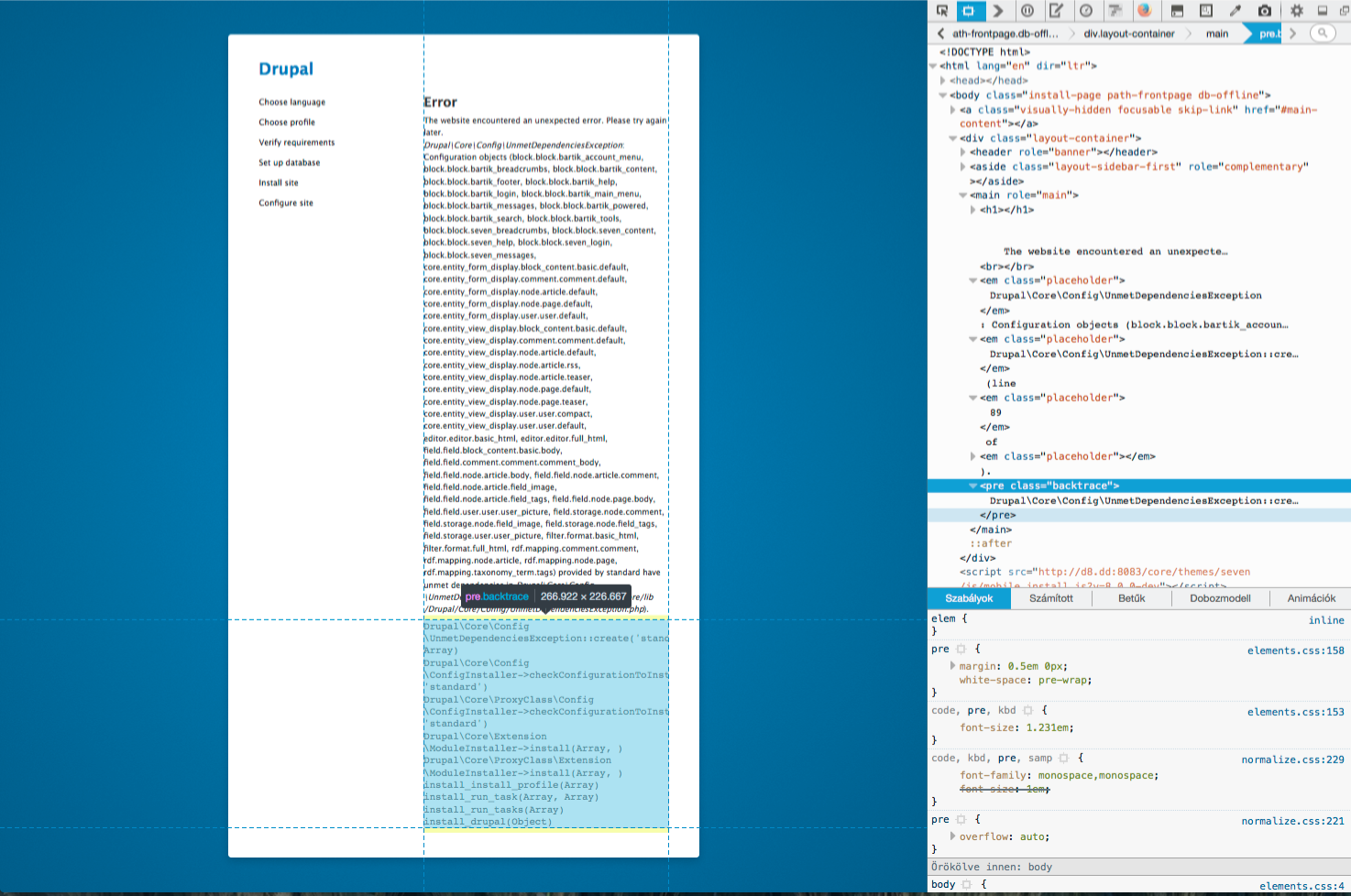
When trying to install D8 on WAMP I get this error.
"Drupal\Core\Config\UnmetDependenciesException: Configuration objects (block.block.bartik_search, core.entity_form_display.node.article.default, core.entity_form_display.node.page.default, rdf.mapping.comment.comment, rdf.mapping.node.article, rdf.mapping.node.page, rdf.mapping.taxonomy_term.tags) provided by standard have unmet dependencies in Drupal\Core\Config\UnmetDependenciesException::create() (line 89 of core\lib\Drupal\Core\Config\UnmetDependenciesException.php).
Drupal\Core\Config\UnmetDependenciesException::create('standard', Array)
Drupal\Core\Config\ConfigInstaller->checkConfigurationToInstall('module', 'standard')
Drupal\Core\Extension\ModuleInstaller->install(Array, )
install_install_profile(Array)
install_run_task(Array, Array)
install_run_tasks(Array)
install_drupal(Object)"
I am running Apache and PHP 5.5.12


Comments
Comment #1
neo0rabie commentedSimilar issue on beta12
Comment #2
cilefen commented#2349581: Drupal 8 install fails in wampserver with PHP 5.5
Comment #3
kswamy commentedWill try to solve this one...
Comment #4
LKS90 commentedCannot reproduce with 8.0.x. Just installed it with WAMPSERVER 2.5, using Apache 2.4.9, PHP 5.5.12 and MySQL 5.6.17 (the defaults), also enabled the mod_rewrite module to fix the warning about clean URLs.
I created an alias and used (some) development settings though.
Comment #5
thamasSame issue with latest head on OSX, latest Acquia DevDesktop and php 5.6.11.
Comment #6
kswamy commentedThis issue also occurs in beta14 and beta13. I think it is while installation of Help module. @LKS90 It would be better in which 8.x version it worked for you since I used the same versions of Wampserver you mentioned.
Also it seems the dependency is more due to search,path and rdf module configurations.
Comment #7
thamasSome more details:
Acquia Dev Desktop
Version: 2
Built: Jul 27 2015 04:10:29
Control panel rev: 032976b
Stack rev: 58529
Error message is attached and also a screenshot.
Comment #8
thamasComment #9
thamasMaybe I should open a separate issue for this…
Comment #10
LKS90 commentedI did, 8.0.x, so the latest latest version. Meaning your problem is already fixed, just have to have some patience so it trickles down to the latest beta release.
Comment #11
thamasI removed the site from Dev Desktop and imported again and I was able to install it. So I do not know what was the problem but it is OK now for me.
Comment #12
vivekguptakota commentedWAMPSERVER 2.5, using Apache 2.4.9, PHP 5.5.12 and MySQL 5.6.17 (the defaults),
Still not able to install. Facing same issue. Any help ??
Comment #13
vivekguptakota commentedAdded following line in settings.php file and Error fixed.
ini_set('xdebug.max_nesting_level', 300);
Works for me.
Comment #14
cilefen commentedComment #15
johnvThis still happens with D8.beta15 on Acquia DevDesktop2 with PHP5.6.11.
(I did manage to install D8.beta14 successfully before)
It happens in the step "Verify requirements "
#13 did not help.
After removing the 'vendor' directory, the installation continues with 'configure site', but then generates the error in #2388139-8: Installation error MYSQL Primary key is null with MySQL 5.7 on block_content_revision
[EDIT] After uninstalling DevDesktop2, reinstalling it, and trying a re-install from a D8beta15 download from the Acquia Distributions list, I managed to get a correct installation without using #13.
Using PHP 5.5.27 this time
Comment #16
LKS90 commentedJust reinstalled (with WAMPServer 2.5) using the latest dev version, still works as expected.
@#13: Consider configuring the max_nesting_level (which has to be at least 256 according to the latest requirements) in the appropriate php.ini instead of overwriting it on install. Basically verify your whole configuration in case there are problems.
Comment #17
constrict0r commentedI was using the beta15 and this issue happened to me because I copied the settings.php file from another functional drupal 8 installation and didn't delete the line $settings['install_profile'] = 'standard';
After I deleted that line and drop/recreate the database the error was gone.
My settings:
Debian Wheezy
apache2 => 2.2.22-13+deb7u6
libapache2-mod-php5 => 5.5.29-1~dotdeb+7.1
mysql-server => 5.5.44-0+deb7u1
Comment #18
saqibmabbasi commentedGood days guys,
Just want to add that this is happening in my install also for Drupal 8 beta 15 on WAMP Server 2.5 (Apache/2.4.9 (Win64), PHP/5.5.12, MySQL/5.6.17)
But just want to add that if i install on a virtual host it gives error but same is successful if done as a sub directory directly under WAMP's "www" folder.
Can you guys help.
Regards,
Saqib
Comment #19
druper commentedI'm having the same problem installing Drupal 8.0.0-rc3 on XAMPP WAMP. Install seems to hang at "Initializing", some DB table get created, ultimately get "Drupal\Core\Config\UnmetDependenciesException:" error
Here's my setup, (complete phpinfo() setup in pdf & xls, attached):
Database server
Server: 127.0.0.1 via TCP/IP
Server type: MariaDB
Server version: 10.0.17-MariaDB - mariadb.org binary distribution
Protocol version: 10
User: root@localhost
Server charset: UTF-8 Unicode (utf8)
Web server
Apache/2.4.17 (Win32) OpenSSL/1.0.2d mod_fcgid/2.3.9
Database client version: libmysql - mysqlnd 5.0.11-dev - 20120503 - $Id: 3c688b6bbc30d36af3ac34fdd4b7b5b787fe5555 $
PHP extension: mysqli Documentation
PHP version: 5.6.14
Have tried all suggestions in this thread. No luck.
Any thoughts?
Error message:
Comment #20
cilefen commentedWhat is your max_allowed_packet value set to in MySQL?
Comment #21
devurandom commentedI also encountered this with Drupal 8.0.0 RC4 and PHP 5.6.14: https://bugs.gentoo.org/show_bug.cgi?id=565848
I tried different values of `max_allowed_packet` (originally: `4M`, currently: `1M`) in my `my.cnf`, without any effect. I also tried to add `ini_set('xdebug.max_nesting_level', 300);` to my `settings.php`, also without any affect - which seems reasonable, as I do not have the Xdebug PHP extension installed.
Comment #22
cilefen commented@devurandom
-- https://www.drupal.org/requirements/database
Comment #23
devurandom commentedI set it to `16M`, dropped the database and recreated it. Still the same issue.
I also had a look at all the other requirements: https://www.drupal.org/requirements
The default config on Gentoo seems to fulfil that.
Comment #24
cilefen commentedComment #25
cilefen commented@devurandom Looking at #17, does your settings.php differ from default.settings.php?
Comment #26
devurandom commentedSame issue.
I copied default.settings.php into settings.php (i.e. reset everything), dropped the database and recreated it, and then ran the setup again. It again failed in the "initialising" step at the very beginning.
Comment #27
cilefen commentedAre you sure max_allowed_packet is set to at least 16M in my.cnf and is in effect? I feel like I had the same issue on another platform with that setting too low.
Comment #28
devurandom commentedBefore I venture forth to the "error site", I also get this information:
(Also mentioned in https://bugs.gentoo.org/show_bug.cgi?id=565848)
Does that help anything in debugging the issue? I'd say it's just a regular warning, but who knows...
Comment #29
devurandom commentedCan't Drupal check whether the MySQL setting is in effect? I know that Phabricator somehow queries various DB settings and gives recommendations on how to adjust them...
I restarted the mysql daemon several times, and according to my.cnf, the setting is correct:
(The 2nd line comes from the `[mysqldump]` section.)
Comment #30
cilefen commented@devurandom
Comment #31
avpadernoComment #32
devurandom commentedComment #33
cilefen commentedIt may be, but we don't know what is wrong with your install yet.
Comment #34
cilefen commented@devurandom The problem goes away based on fixing one of those related issues?
Comment #35
devurandom commented@cilefen: Thanks for this hints! That fixed the issue for me. Weird, that the "error page" contained no hint of the actual error anymore...
Comment #36
druper commentedcilefen, My max_allow_packet was set to 1M. Changed to 16M and was able to run update.php to go from rc3 to 8.0.0.0. Update.php had been exhibiting the same behavior as install, getting stuck at the "initalizing" stage. So, that may well have been the problem in my case but the solution would be limited to my XAMPP install.
I have arrived at the conclusion that my problems were completely ralated to my WAMP stack. I tried a different stack, WAMPserver 2.5. In spite of the fact that it too had max_allow_packet set to 1M, rc3 installed just fine. Major differences between the stacks:
WAMPserver 2.5:
Database server
Server: mysql wampserver (127.0.0.1 via TCP/IP)
Server type: MySQL
Server version: 5.6.17 - MySQL Community Server (GPL)
Protocol version: 10
User: root@localhost
Server charset: UTF-8 Unicode (utf8)
Web server
Apache/2.4.9 (Win64) PHP/5.5.12
Database client version: libmysql - mysqlnd 5.0.11-dev - 20120503 - $Id: bf9ad53b11c9a57efdb1057292d73b928b8c5c77 $
PHP extension: mysqli
PHP Version: 5.5.12
XAMPP:
Database server
Server: 127.0.0.1 via TCP/IP
Server type: MariaDB
Server version: 10.0.17-MariaDB - mariadb.org binary distribution
Protocol version: 10
User: root@localhost
Server charset: UTF-8 Unicode (utf8)
Web server
Apache/2.4.17 (Win32) OpenSSL/1.0.2d mod_fcgid/2.3.9
Database client version: libmysql - mysqlnd 5.0.11-dev - 20120503 - $Id: 3c688b6bbc30d36af3ac34fdd4b7b5b787fe5555 $
PHP extension: mysqli Documentation
PHP version: 5.6.14
In order to get the XAMPP version working in the first place, I simply copied the WAMPserver install of rc3 into a directory withing the XAMPP hosts environment and imported the WAMPserver site DB into the XAMPP MariaDB database.
Running update.php on the XAMPP site thus imported would result in the progress bar being eternally stuck at "intializing" until I took your suggestion of upping the max_allow_packet value. I have not tried running a new install under the XAMPP stack but I will sometime in the next couple of days.
Comment #37
cilefen commentedComment #38
defigo commentedI am having the same issue
Drupal 8.0.2
DEV SERVER: WIN 12-R2
PHP: 5.6.16
IIS: 8.5
DB: MS SQL
Using Driver for SQL Server module to enable SQL connection.
Error
The website encountered an unexpected error. Please try again later.
Drupal\Core\Config\UnmetDependenciesException: Configuration objects (block.block.bartik_account_menu, block.block.bartik_branding, block.block.bartik_breadcrumbs, block.block.bartik_content, block.block.bartik_footer, block.block.bartik_help, block.block.bartik_local_actions, block.block.bartik_local_tasks, block.block.bartik_main_menu, block.block.bartik_messages, block.block.bartik_page_title, block.block.bartik_powered, block.block.bartik_search, block.block.bartik_tools, block.block.seven_breadcrumbs, block.block.seven_content, block.block.seven_help, block.block.seven_local_actions, block.block.seven_login, block.block.seven_messages, block.block.seven_page_title, block.block.seven_primary_local_tasks, block.block.seven_secondary_local_tasks, block_content.type.basic, comment.type.comment, contact.form.feedback, core.entity_form_display.block_content.basic.default, core.entity_form_display.comment.comment.default, core.entity_form_display.node.article.default, core.entity_form_display.node.page.default, core.entity_form_display.user.user.default, core.entity_view_display.block_content.basic.default, core.entity_view_display.comment.comment.default, core.entity_view_display.node.article.default, core.entity_view_display.node.article.rss, core.entity_view_display.node.article.teaser, core.entity_view_display.node.page.default, core.entity_view_display.node.page.teaser, core.entity_view_display.user.user.compact, core.entity_view_display.user.user.default, editor.editor.basic_html, editor.editor.full_html, field.field.block_content.basic.body, field.field.comment.comment.comment_body, field.field.node.article.body, field.field.node.article.comment, field.field.node.article.field_image, field.field.node.article.field_tags, field.field.node.page.body, field.field.user.user.user_picture, field.storage.node.comment, field.storage.node.field_image, field.storage.node.field_tags, field.storage.user.user_picture, filter.format.basic_html, filter.format.full_html, filter.format.restricted_html, node.type.article, node.type.page, rdf.mapping.comment.comment, rdf.mapping.node.article, rdf.mapping.node.page, rdf.mapping.taxonomy_term.tags, taxonomy.vocabulary.tags) provided by standard have unmet dependencies in:
Comment #39
avpadernoI am having the same issue, even if I am not using WAMP. In my case, the installer asks me all the informations, but then it starts again from the beginning, asking me the same information I was asked earlier. It's at that point that I see an uncaught exception, the same other users reported.
Comment #40
HannahMR commentedThanks #17.
I commented out both $settings['install_profile'] = 'standard'; & $config_directories['sync'] = 'sites/default/files/config_....' and for reasons that I don't claim to understand, that worked.
Cheers
Comment #41
kenorb commentedYou need to run:
composer updatein your docroot to install missing dependencies.Comment #42
david_garcia commentedThere might be several reasons for the error in #38 to happen.
I've been debugging a problem with the SQL Server and the error in #38:
This happens when one of the install phases is skipped.
There might be several reasons for this happening, as the step that is skipped is the first one that depends on the BATCH API (install_profile_modules), so anything breaking the batch API will lead to the error.
In SQL Server, the issue was that the nextId() call used to populate que batch ID was returning an initial "0", and this was making the whole step to be skipped due to the usage of loose operators.
Anyways, any other reason that will make the batch part of "install_profile_modules" to be skipped will lead to the error message.
Comment #43
sylvain lecoy commentedCan we improve the error saying UnmetDependenciesException with the actual unmet dependency ?
Without this information the error is useless and I don't see even the point creating a class if not used correctly;
Having the unmet dependency in the error message would help to debug and troubleshoot.
Comment #44
cilefen commentedReopening because of comments on #2621014: UnmetDependenciesException when installing fresh drupal 8.0.. @Sylvain Lecoy: it is ok to close duplicate issues.
Comment #45
sylvain lecoy commentedFor the record I tested on two different computers:
- Windows 10 x64, with Zend Server (Version: 8.5.2 with PHP 5.6) free edition freshly installed, with MySQL5.5.
- Windows 7 x64, with Zend Server (Version: 8.5.2 with PHP 5.6) free edition freshly installed, with MySQL5.5.
Comment #46
sylvain lecoy commentedAdding tag Zend and PHP5.6, maybe related ?
Comment #47
sylvain lecoy commentedIs drupal tested and compatible with PHP5.6 ? I might test with a version of Zend with PHP5.5 and come back to this issue.
Comment #48
sylvain lecoy commentedComment #49
cilefen commentedWhat is your MySQL max_allowed_packet setting?
Comment #50
sylvain lecoy commentedI just installed a fresh version of MySQL contained in the zend package. Let me check that for you, its the default anyway but I will double check in the settings.
Comment #51
Edwin van Dessel commentedAny news on this issue. I am experiencing the exact same problem trying to install 8.0.2 with a (Laravel) Homestead environment within VirtualBox (an environment with Ubuntu 14.04, PHP 7.0, Nginx, MySQL) . See https://laravel.com/docs/5.2/homestead).
Comment #52
jimi commentedFail with 8.03 on mamp pro with php 5.6.10
OK with php 5.5.26
Comment #53
Badlapje commented#42 was right for me. I had to delete the contents of the dbase entirely in order to get the install process to work again (and in the case of one site, i also had to delete all downloaded files and start from scratch again).
Comment #54
avpadernoComment #56
tke5005 commentedI've been experiencing this same issue. I'm using a XAMPP server. and I've gotten the same error using both Drupal 8.0.1 and 7.43, so i'd assume it has something to do with my xampp.
Apache/2.4.17 (Win32) OpenSSL/1.0.2d PHP/5.6.19
Comment #57
cilefen commentedDoes #22 help?
Comment #58
tke5005 commentedOn my my.ini file I've already set it to 64M.
Also, I've downloaded "Installing Drupal 8 on windows with XAMPP" and have made the changes listed in that pdf.
Comment #61
francoud commentedTrying to install Drupal 8.3.2. On windows 10. PHP 5.6.30. Mysql 5.5. Empty database, fresh files from drupal-8.3.2.zip. Several D7 sites are running on that server, so the server itself is properly working.
I tried ALL suggestions in this post.
But, I stil experience the problem. No way to install Drupal 8:
First I receive this error:
(but note that it is the first installation)
Then in the error page, i get this:
NOW I've found that temporarily DISABLING OPCACHE before installing, can avoid this error (it will give a warning about opcache not enabled, but I ignore it for now). Can anybody confirm?
To disable Zend OPCache, in php.ini I inserted opcache.enable=0 in the "[opcache]" section:
Then it works.. but installation keeps hanging at 98%... so again I can't continue installation.
I also solved this using FIREFOX for installing, instead of Chrome.
Pffffff! :)
Comment #62
myDrupal2014_846824658246 commentedHad the same issue after upgrading Acquia desktop.
My solution was to delete the DB directly in phpadmin.
Then set the php version to 7x in acquia desktop and start reinstall again.
The error disappeared and installation went on normal.
Comment #63
owenmck commentedInstalling D8.3.5 in a fresh install of XAMPP on Windows 7.
I eventually could avoid the exception by disabling OPcache before attempting an installation.
Then I install D8, OK. After installing D8 I note that the admin status report still contains that same OPcache warning.
So I enable OPCache via php.ini and viola! the status report gives me the big green tick.
So my workaround suggestion to you if you are stuck at this exception during an install is:
Comment #64
owenmck commentedInstalling D8.3.5 in a fresh install of XAMPP on Windows 7.
I eventually could avoid the exception by disabling OPcache before attempting an installation.
Then I install D8, OK. After installing D8 I note that the admin status report still contains that same OPcache warning.
So I enable OPCache via php.ini and viola! the status report gives me the big green tick.
So my workaround suggestion to you if you are stuck at this exception during an install is:
Comment #66
ravibarnwal commentedI am getting same issue with drupal 8.3.7. Any work around?
Comment #67
myDrupal2014_846824658246 commentedSee comment #64 .. disable opcache
Comment #68
ravibarnwal commentedI checked with disabled opcache. But I am unable to install drupal.
I am getting error on error logs
[Sun Sep 24 17:03:00.255571 2017] [:error] [pid 15413] [client 124.123.58.187:55579] RuntimeException: Failed to start the session because headers have already been sent by "/var/www/drupal/vendor/symfony/http-foundation/Response.php" at line 1171. in /var/www/drupal/vendor/symfony/http-foundation/Session/Storage/NativeSessionStorage.php on line 145 #0 /var/www/drupal/web/core/lib/Drupal/Core/Session/SessionManager.php(163): Symfony\\Component\\HttpFoundation\\Session\\Storage\\NativeSessionStorage->start()\n#1 /var/www/drupal/web/core/lib/Drupal/Core/Session/SessionManager.php(194): Drupal\\Core\\Session\\SessionManager->startNow()\n#2 /var/www/drupal/vendor/symfony/http-foundation/Session/Session.php(181): Drupal\\Core\\Session\\SessionManager->save()\n#3 /var/www/drupal/web/core/includes/install.core.inc(146): Symfony\\Component\\HttpFoundation\\Session\\Session->save()\n#4 /var/www/drupal/web/core/install.php(44): install_drupal(Object(Composer\\Autoload\\ClassLoader))\n#5 {main}, referer:
Comment #70
joshcanhelp commentedI also had the same issue using Homebrew installed PHP 5.6.32, Drupal 8.4.5. I was getting a PHP warning about date.timezone not being set but ignored that. Got to the installation step and was stopped by the original message:
I corrected the date.timezone error (which I don't think was related) by adding this to /sites/default/settings.php (supported timezones), there was already a value in php.ini:
Then I deleted the database and recreated it. Before I did, though, I checked the DB requirements in the install guide and realized I was using the defaults,
utf8andutf8_general_ciinstead of what was recommended,utf8mb4andutf8mb4_general_ci.With those changes, I was able to finish. hope this helps someone.
Comment #72
justinmello32 commentedHumm, experiencing this issue now on Drupal 8.6.13, using XAMPP/PHP 7.1.22. Tried most of the above fixes but still not working. Anybody experience any progress on this?
Comment #73
cilefen commentedIt is actually #3045349: Lazy started sessions with session data are not saved with symfony/http-foundation 3.4.24 lately.