

 Come together with the global Drupal community in Rotterdam, 28 Sept – 1 Oct 2026. Sessions, contribution, connection, and Early Bird savings until 8 June.
https://developers.google.com/speed/pagespeed/insights/?url=https%3A%2F%...
To do:
AdvAgg -
Update to AdvAgg 2.32- Select jsmin+ on the JS Compression page
- Run `drush advagg-jsmin` after deployments to production; or run the batch operation from the UI
- Switch most AdvAgg settings to recommended
Set the AdvAgg bundler to HTTP 2 settings- Enable AdvAgg Critical CSS module
- Add Critical CSS via the Critical CSS page
Other -
- Update nginx rules allowing for a 1 week cache of svg and jpg files under sites/all/themes/* as well as files/drupal-wordmark.svg
- Update apache rules to gzip svg files (see https://stackoverflow.com/a/21533084/125684)
- Get https://github.com/addyosmani/critical/ up and running in a dev/staging environment OR use 3rd party service to generate critical css
Done:
Update AdvAgg to 2.10Aggressive Render CacheEnableadvagg_js_compress advagg_modmodulesMove all inline scripts to the bottom of the execution order & Move all external scripts to the top of the execution orderUpdate to 2.11 for #2499853: Combine CSS files by using media queries caused issues on staging.devdrupal.orgOnadmin/config/development/performance/advagg, 4th checkbox down has the "Use DNS Prefetch for external CSS/JS" checkboxUpdate to 2.13 for #2507737: Theme missing on user profile Commits pagesCombine CSS files by using media queriesEnable advagg_bundler moduleMove JS to the footer - All but what is in the $all_in_footer_list.Update to 2.14Deferred JavaScript Execution: Add The defer Tag To All Script Tags - All but external scripts.Deferred inline JavaScript Execution: Put a wrapper around inline JS so it runs from a setTimeout call.Remove ajaxPageState CSS and JS data if ajax.js is not used on this page.Change CSS bundles from 4 to 2Change JS bundles from 4 to 5Use the connection view from webpagetest.org along with the Bundler and find the optimal number of bundles.Update AdvAgg to 2.15On the admin/config/development/performance/advagg/mod page; under "JS" -> "Optimize JavaScript Ordering" -> "Experimental Settings" check both boxes, " Move Google Analytics analytics.js code from inline to be a file" and "Prefetch stats.g.doubleclick.net/robots.txt".Update AdvAgg to 2.17Set bundler grouping logic to use filesize
| Comment | File | Size | Author |
|---|---|---|---|
| #136 | d.o css.zip | 22.02 KB | mikeytown2 |
| #86 | Analytics drupal.org Site Speed Overview 20150720-20150901.pdf | 192.84 KB | drumm |
| #70 | doc complete.png | 13.14 KB | mikeytown2 |
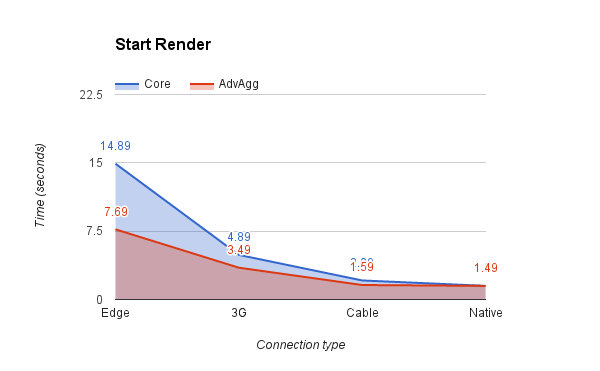
| #70 | start render.png | 13.08 KB | mikeytown2 |
| #61 | Analytics drupal.org Site Speed Overview 20150501-20150720.pdf | 198.09 KB | drumm |





Comments
Comment #1
mikeytown2 commentedComment #2
yesct commentedComment #3
drummYep, we are quite behind on AdvAgg releases. We can upgrade to 2.10 soon.
Comment #4
drummComment #5
drummI'm deploying the upgrade to 2.10 today, it is on https://staging.devdrupal.org now. We can change one or two configurations a day this week.
Comment #6
drummThat upgrade is now done.
Comment #7
drummAggressive Render Cache is now turned on.
Comment #8
drummI'll be enabling this soon. It requires also unchecking "Use cores grouping logic".
Comment #9
drummActually, I will not be doing that. It breaks our CSS quite badly on staging. It will need verification in dev before moving forward.
Comment #10
drummSpecifically, this is what I see:
Comment #11
drummReformatting the issue summary to be a big todo list. advagg_bundler module is a prerequisite to Combine CSS files by using media queries. We can enable that module today.
Comment #12
drummadvagg_bundler is now enabled in production.
Comment #13
mikeytown2 commentedCreated this issue #2499853: Combine CSS files by using media queries caused issues on staging.devdrupal.org
Comment #14
mikeytown2 commentedI've ID and fixed the issue with the "Combine CSS files by using media queries" option.
Patch: #2499853-3: Combine CSS files by using media queries caused issues on staging.devdrupal.org
Comment #15
drummComment #16
drummComment #17
drummI moved Combine CSS files by using media queries down in the list, since it needs a code update. It would be ideal to upgrade to 2.11 when available.
That makes the next configuration JSMin. We need to enable the advagg_js_compress module. It doesn't appear to change anything on enabling. I'll enable it later today when traffic is slightly lower.
The admin interface recommends the JSMin PHP Extension from http://www.ypass.net/software/php_jsmin/. How strong is that recommendation? I'll see what it might take to install on our servers.
Comment #18
mikeytown2 commentedHighly recommend https://github.com/sqmk/pecl-jsmin/. It's a lot quicker than using regex inside PHP. The admin interface should have recommended the github version as I'm assuming d.o runs on php 5.3.10+
Comment #19
drummI moved JS Compression: JSMin further down and added some details on what's needed for that. Specifically, the PHP extension does require us to get moving on PHP upgrades.
Comment #20
mikeytown2 commentedFYI: The next group of settings require the AdvAgg Modifier module.
Comment #21
drummNoted, thanks. We can enable both today.
Comment #22
drummThe modules are now enabled.
Comment #23
mikeytown2 commented2015/06/04 - Here's the new baseline
http://www.webpagetest.org/result/150604_08_18E8/
2015/05/22 - Old one
http://www.webpagetest.org/result/150522_8Y_1AQQ/
Did some searching and found
2015/02/26 - Pre AdvAgg
http://www.webpagetest.org/result/150226_C8_17RN/
I'm going to guess that the next set of changes with the modifer should speed things up by about 100ms. Once we do async css I'm going to estimate that we can hit around 800ms for the start rendering line based off the repeat view; which is dependent on this issue #2396609: Inline critical css.
Another idea we can do is manually move js around via hook_js_alter in order to generate better bundles; thus increasing the browser cache hit ratio as the bundler will be able to generate more optimal groups. This change won't improve a single page view like webpagetest checks but you should see a slight speedup in the GA reports, since browsers will download less bytes as they navigate around. This has to be a manual process as D7 does not know the JS dependency tree (could be automated in D8 due to dependencies being known). I should add on an admin section to the bundler so it can advise on better ordering of CSS & JS; the data is there, just need to pull it out. Edit: created this #2500791: Have an admin section of the bundler offer ordering analysis/advice; build out the core dependencies and create a reorder function/algorithm
Comment #24
mikeytown2 commentedLooking over the latest JS and we should also check the "Move all external scripts to the top of the execution order" box as partner.googleadservices.com/gampad/google_service.js is in the middle of aggregates now.
Comment #25
drummOk, I'll group Move all external scripts to the top of the execution order with Move all inline scripts to the bottom of the execution order, and enable today. It looks okay on staging.
Comment #26
drummThose configurations are now done.
Comment #27
drummBoth "All" and "All but JavaScript Libraries" cause
We use https://www.drupal.org/project/google_admanager to insert script tags inline http://cgit.drupalcode.org/google_admanager/tree/google_admanager.module....
Comment #28
mikeytown2 commentedOK I'll see what I can do. Thanks for the report :)
Deferred inline JavaScript Execution should be reasonably safe. Try that one instead and I'll see what I can do to get admanager working with footer js.
Comment #29
drummThis causes JS errors for the same ads.
This at least white screens https://staging.devdrupal.org/hosting-support
If a better module has shown up to serve DfP ads, that would be okay to switch to, which of course would need some work migrating.
Comment #30
drummThe next most doable thing looks like
What's the rough schedule for 2.11?
Comment #31
mikeytown2 commentedI have 3 bugs and a feature 1/2 done to do before 2.11 can go out. Tuesday is the soonest it could go out.
Feature:
#2501325: Use DNS Prefetching link tag for external CSS/JS - Create checkbox on admin page.
Bugs:
#2500803: Deferred inline JavaScript Execution breaks inline loadCSS function definition. - Have a fix in mind, need to test.
#2500203: advagg should ignore script-tags containing non-javascript content (such as underscore templates) - Need to text non xpath regex before committing; also see if xpath can be a whitelist.
#2502633: JS in footer breaks Google Ad Manager - Reported here so give it a day or so to get the fix out.
Comment #32
mikeytown2 commentedI'll be releasing AdvAgg 2.x-7.11 around noon PST on the 11th (tomorrow) unless another bug report comes in.
Comment #33
mikeytown2 commented2.11 comes with a new feature that should help d.o
On
admin/config/development/performance/advagg, 4th checkbox down has the "Use DNS Prefetch for external CSS/JS" checkbox. This has to do with the 14kb of data in 10 packets Slow-start TCP issue that is found in section 3 of this https://developers.google.com/speed/docs/insights/mobile. Because of the New Relic inline JavaScript, the DNS lookup for partner.googleadservices.com is delayed as that part of the HTML ends up below the 14kb limit.Comment #34
drummThanks, updating the issue summary. I plan to do the 2.11 upgrade this afternoon. It is on staging now.
Comment #35
mikeytown2 commentedHere's more info for slow start on centos: https://ckon.wordpress.com/2013/03/11/centos-6-4-supports-iw10-tcpip-tun...
Comment #36
drummThe update to 2.11 is now in production.
Comment #37
mikeytown2 commentedThese 3 issues should be fixed in 2.11; all having to do with google ad manager.
Move JS to the footer - All. Conflicts with google_admanager.module.
Deferred JavaScript Execution: Add The defer Tag To All Script Tags
Deferred inline JavaScript Execution: Put a wrapper around inline JS so it runs from a setTimeout call.
Comment #38
mikeytown2 commentedCrossed off 2.11 and moved the 3 items that got fixed in the latest version of advagg out of the needs work section.
Comment #39
mikeytown2 commentedI've been looking at the Connection View from the last webpagetest run and right now it seems like we should reduce the number of JS bundles from 4 to 3 as we create a new connection and it only downloads 1 thing, a js aggregate. This will be the final step we do so we can hold off on it for now as the jsmin, footer, and defer might change how many connections to d.o are created.
Also looking at this and there are 2 PNG files that take forever to get
https://www.drupal.org/files/styles/case-4-2x/public/Drupal-case-study-1...
https://www.drupal.org/files/styles/case-4-2x/public/Case-study-image2.p...
https://pngquant.org/ might be a good solution for these 2 files; will need to see if the drop from 24bit to 8bit causes noticeable banding. If you put https://www.drupal.org/modules/image/sample.png through pngquant it always looks awful.
Comment #40
drumm… is now turned on in production.
Comment #41
drummUse DNS Prefetch for external CSS/JS Is also enabled on production now.
Comment #42
mikeytown2 commentedUploaded the 8bit versions of the PNGs. I don't see any banding issues.
Comment #43
mikeytown2 commentedWhen using a slow 3G connection only 5 connections are used for d.o
http://www.webpagetest.org/result/150616_KK_1854/1/details/
When using a fast cable connection all 6 are used and it looks like 2 connections are now only used for JS
http://www.webpagetest.org/result/150616_0E_187Z/1/details/
Found it interesting that the connect speed changed this.
Looking at the DNS lookup times; anyway someone can tell me what bit of JS hits these domains?
securepubads.g.doubleclick.net
ssl.google-analytics.com
pagead2.googlesyndication.com
tpc.googlesyndication.com
tag.perfectaudience.com
pixel-geo.prfct.co
secure.adnxs.com
analytics.twitter.com
ads.yahoo.com
www.facebook.com
p.univide.com
cs.marinsm.com
pixel.prfct.co
ib.adnxs.com
From my local testing I've added these into the latest advagg dev
Looking at this and there must be some settings for GAM and GA that control what domains get hit as ssl.google-analytics.com & securepubads.g.doubleclick.net are related to these 2 modules.
https://developers.google.com/analytics/devguides/collection/protocol/v1...
Comment #44
drummDue to #2507737: Theme missing on user profile Commits pages, I unchecked Bundler is Active.
Comment #45
mikeytown2 commentedBeen playing around with the settings for advagg and I've updated the todo list with the latest changes from advagg. I'll roll 2.12 on monday if the issues are pretty quiet over the weekend
https://www.drupal.org/project/issues/advagg?version=7.x
See anything broken here? https://ci-drupal.redesign.devdrupal.org/
Comment #46
mikeytown2 commentedComment #47
mikeytown2 commentedComment #48
mikeytown2 commentedAdvAgg 7.x-2.12 is out.
Comment #49
mikeytown2 commentedChanged to 2.13 as some bug reports came in today that needed to go out.
Comment #50
drummUpdate to 2.13 is now on production.
Comment #51
drummCombine CSS files by using media queries & Enable advagg_bundler module are now done in production too.
Comment #52
drummNow in production:
Comment #53
mikeytown2 commentedJust released AdvAgg 7.x-2.14. Fixes a hard to repo issue (race condition) with defer js and the opera browser.
Comment #54
drumm2.14 looks okay on staging, deploying shortly.
Comment #55
drummComment #56
drummNow done too:
Comment #57
mikeytown2 commentedhttps://developers.google.com/speed/pagespeed/insights/?url=https%3A%2F%...
Now reports that the google ads js is blocking and drupal css is blocking. When not using google ads the score is a lot better as the blocking js is gone
https://developers.google.com/speed/pagespeed/insights/?url=https%3A%2F%...
So js defer is doing it's job!
Comment #58
drummNow done:
Comment #59
drummThe last item for now is done:
Comment #60
mikeytown2 commentedThanks again for releasing all these changes out :) Is there an ETA for when d.o will move to php 5.3.10+?
Any reports on the before and after frontend performance differences from google analytics and new relic? Always good to verify things are moving in the right direction. I'll play around with connection speeds and see what the optimal bundle size is; 4 is a pretty good number so it might not change.
Comment #61
drummThere is not right now.
I don't see anything that looks like a great report for the whole time in New Relic. Attached is a report as Google Analytics sees it.
Comment #62
mikeytown2 commentedThanks for the PDF. Looks like it only tracks when the page is ready and not when it starts to render and thus starts to become available for user interaction. Thus the only way to improve the Google Analytics metric would be to make the page less complex.
I've ran some tests and here are the results with the start render time being shown below.
d.o homepage: https://www.drupal.org/
Native - Start Render: 0.691s
Cable - Start Render: 1.695s
3G - Start Render: 4.390s
Edge - Start Render: 31.991s
d.o project page: https://www.drupal.org/project/drupal
Native - Start Render: 0.495s
Cable - Start Render: 0.588s
3G - Start Render: 2.290s
Edge - Start Render: 7.992s
When looking at both of these the google page speed advice is pretty spot on from #57. For the homepage the google ad javascript is blocking the page from starting to render. for the project page the css files are blocking the page from starting to render. The faster the connection the less of an issue this is. Once things start to slow down every file that blocks the rendering really starts to make it painfully slow.
#2396609: Inline critical css will speed up the project page and just about any other page that doesn't use google ads (most of d.o). For slow connections like Edge this would start the render around 5.5 seconds (right after the HTML has been downloaded); an improvement of 2.5 seconds of where it's at now. On 3G it would start around 1.5 seconds. The homepage is blocked by the google ad js so my guess is that inlining css will not help on the front page.
Browsers like to use 2 connections for CSS so we could drop the bundles from 4 to 2 in this case; will give us a worse browser cache hit rate when browsing around but it would speed up tests from webpagetest. Overall I think this would be good to try.
JavaScript doesn't seem to have this limitation so I would try 6 or even 8 bundles now that the js is not blocking on most pages. If the homepage is very important then I would keep the bundles below 6 for JS as the blocking ad JavaScript really messes up the benefit from defer. Also noted that if the CSS is non blocking then we might want to increase the bundles for CSS to get a better browser cache hit ratio for CSS.
Right now the next recommendations is to move the css bundles from 4 to 2 and js from 4 to 5.
Comment #63
drummI set that bundle configuration.
Comment #64
mikeytown2 commentedProject Page
3G Start Render: 1.990s
Edge Start Render: 5.598s
Noticeable improvement
Home page
3G Start Render: 5.295s
Edge Start Render: 15.894s
No improvement due to the blocking ad javascript.
Comment #65
mikeytown2 commentedMoved the "connection view from webpagetest.org" item to the done section.
Will investigate if Google Admanager can be lazy loaded. Will also see if Google Analytics "Locally cache tracking code file" helps speed up the page load time.
Comment #66
mikeytown2 commentedLooks like google supports async ads; the https://www.drupal.org/project/google_admanager module does not.
If you go here https://support.google.com/dfp_sb/answer/6033499?hl=en and select async iframe it should generate the correct tags. From here I can see what can be done with the module. The code should look something close to this
https://support.google.com/dfp_sb/answer/1651549#async
Comment #67
mikeytown2 commentedIn terms of speeding up the total page load time I'll be trying to write the async tag instead of using a shim for google analytics. On the project page that holds up the the "Document Complete" timer. I have this working locally, will test on our sites as well as https://ci-drupal.redesign.devdrupal.org/ tomorrow. In the process of fixing the GA 1.4 issue I addressed this as well.
Comment #68
mikeytown2 commentedTest results from https://ci-drupal.redesign.devdrupal.org/project/drupal
Doc Complete 6.431s - baseline
Doc Complete 5.603s - Move GA analytics.js code from inline to be a file
Doc Complete 5.229s - Move GA + Async JS Execution: Group together in the header
Looks like not using js to write the js async tag for GA makes the page load quicker since there isn't a lot of content on the page to get; get a slight improvement on top of it if moving the GA js code to the header since it loads other things after the GA code has ran.
According to https://support.google.com/analytics/answer/2383341?hl=en this change should improve the Avg. Page Load Time (load completion) reported in google analytics.
Comment #69
mikeytown2 commentedDoc Complete 5.078s - Move GA + Prefetch stats.g.doubleclick.net/robots.txt
Moving the async js to the header caused the first js file to not get downloaded till later; not ideal, the Start Render time is slower. By prefetching stats.g.doubleclick.net/robots.txt the connection to stats.g.doubleclick.net is open and thus the request for stats.g.doubleclick.net/r/collect is sped up quite a bit since the Initial Connection & SSL Negotiation where already done and this doesn't seem to effect the Start Render time since the order of what gets downloaded hasn't changed.
So using the latest dev my next recommendation is on the
admin/config/development/performance/advagg/modpage; under "JS" -> "Optimize JavaScript Ordering" -> "Experimental Settings" check both boxes, " Move Google Analytics analytics.js code from inline to be a file" and "Prefetch stats.g.doubleclick.net/robots.txt".Noted that we're using both of these options on our production site without GA issues.
Edit:
Here's a advagg disabled, core enabled snapshot of the
project/drupalpage.Start Render 1.497s; Doc Complete 1.796s Native
Start Render 2.088s; Doc Complete 2.380s Cable
Start Render 4.890s; Doc Complete 7.201s 3G
Start Render 14.888s; Doc Complete 21.808s Edge
Advagg enabled
Start Render 1.490s; Doc Complete 1.830s Native
Start Render 1.588s; Doc Complete 2.002s Cable
Start Render 3.488s; Doc Complete 5.127s 3G
Start Render 7.690s; Doc Complete 14.181s Edge
Comment #70
mikeytown2 commentedMade a graph of the data


Comment #71
drummAdding this to the issue summary todo list:
Comment #72
drummComment #73
drummUpdate AdvAgg to 2.15 is now in production.
Comment #74
mikeytown2 commentedHeads up that rupl created an excellent guide on using critical css; the only downside is it's labor intensive and any change to css would require a regeneration of all the critical css from grunt. From what I can see this would give drupal.org a 25% improvement in the start render time for all connection types except for native, that seems to be CPU bound on webpagetest. Still not ready for prime time but good to know where it's at.
Thoughts on #66 in regards to async google ads?
Comment #75
drummWe do change the CSS decently often, which is scripted via http://cgit.drupalcode.org/infrastructure/tree/vendors/build-bluecheese.sh. If it can be totally automated, that could work.
We've completed our upgrade to the GA 2.1 module, so we no longer need to worry about 1.4.
Comment #76
drumm"Move Google Analytics analytics.js code from inline to be a file" and "Prefetch stats.g.doubleclick.net/robots.txt" are now in production.
Comment #77
mikeytown2 commentedhttps://www.drupal.org/project/drupal
Before
3G doc complete 4.9s
After
3G doc complete 3.5s
I'd guess that this speedup would be noticed in the GA tracking in the next couple of days.
#66 was in regards to the homepage ad and how it blocks the rendering.
Comment #78
drummAh, I see. Yes, async ads would be great if https://www.drupal.org/project/google_admanager supported them.
Comment #79
mikeytown2 commentedI'm getting bad inline js for the drupal.settings only on the project usage pages: https://www.drupal.org/project/usage/drupal
Getting junk like this:
My guess is the regex is barfing big time here; only happens on these pages as well. Quick recommendation is to turn off "Deferred inline JavaScript Execution: Put a wrapper around inline JS so it runs from a setTimeout call" until the bug can be fixed.
Comment #80
drummThanks! Done.
Comment #81
mikeytown2 commentedLooking into this more and I think it's the render cache; Trying to pinpoint the issue but turning the caching from "Aggressive Render Cache" to "Normal" seems to fix it on https://ci-drupal.redesign.devdrupal.org
Comment #82
mikeytown2 commentedCommitted: #2558271: Render cache and Flot module
Looks like this has been an issue for sometime; as this code hasn't changed for a little while. Never was reported because the chart still works.
Comment #83
drummLooks like upgrading to
92df9d7is the way to go, since there are minimal other changes.Comment #84
drummLooks good on staging, and deployed to production.
Comment #85
mikeytown2 commented@drumm
Any chance I could get another pdf of google analytics, like what's in #61? Even better if you can filter out the homepage as the ads prevent further optimizations.
Comment #86
drummI don't see a quick way to filter out the home page. It is 3-4% of our traffic.
Comment #87
mikeytown2 commentedThanks for getting the data. Most interesting difference between the two is the tail end of the browsers average page load time. UC Browser went from 13.3 down to 5.4 seconds. The main graph doesn't seem to show the speedup, my guess is most developers have a fast connection so the average doesn't move because of that. Most of these optimizations only show improvements when the connection speeds are slow.
Can you geo filter? Pick a region that is far away from the d.o server?
Edit: looks like the UC Browser is a pretty good filter for slow mobile connections https://en.wikipedia.org/wiki/UC_Browser
Comment #88
iflexion commentedMost of the drupal website http://www.itransition.com speed optimizations we did were based on an open-source module "PageSpeed" that can be used either with Apache or Nginx servers.
1. After thinking a lot how to deal with render-blocking CSS files in the head of the page we discovered that the aggregation and compression provided by Drupal was not a 100%-decision. We enabled a couple of filters to additionally minify and aggregate CSS and configured that module to inline small CSS files in the web-page.
Comment #89
mikeytown2 commented@iflexion
The start render time is pretty bad on that site, 4.7 seconds before anything shows up and 6.7 seconds until the site is "usable" (important text can be read) when on a 3G connection. The css is still render blocking and now it's not getting downloaded first, thus pushing back the start render time. PageSpeed is deferring the js correctly so that is helping you out. The downloadable fonts are blocking the text from displaying thus the 6.7 seconds until the site is usable statement.
I'm not sure what point you're trying to make, AdvAgg is also open source, but it's built with Drupal in mind and thus can usually get better results than a tool that works with just about anything like PageSpeed. https://fourword.fourkitchens.com/article/use-grunt-and-advagg-inline-cr... shows how to get the start render time down by making the css non blocking; in the case of your site it should make your start render time be in the sub 1.5 second range on a 3G connection. You'd need to install the advagg font module as well so downloaded fonts don't block the text from displaying.
Comment #90
mikeytown2 commentedHeads up that the recent change to d.o killed front end performance. Looks like sync loading of optimizely js.
Before at 3G Speed - Start Render: 1.8s, Document Complete 3.5s
After at 3G Speed - Start Render: 4.4s, Document Complete 6.6s
Comment #91
hestenet@mikeytown2 - sorry for the late reply. We decided a temporary hit was acceptable so we could utilize some A/B testing but we should be able to bring things back to normal with the A/B done.
Comment #92
mikeytown2 commentedThanks for removing the A/B code. I've created this issue in advagg so the dns-prefetch will work in the future if optimizely is used again #2612134: Allow for DNS prefetch to be at the top of the meta headers.
http://www.webpagetest.org/result/151116_DT_1GJW/ - Start Render 3.0s, Document Complete 4.9s.
Looking into the details of this and it appears that the previously used webpagetest server (First Byte Time Grade: F) isn't close to a Fastly CDN. Picking one that is closer (SF) gives better results (First Byte Time Grade: B).
http://www.webpagetest.org/result/151117_EP_8P/ - Start Render 2.6s, Document Complete 4.2s.
Looking into why the start render time is a lot slower in comparison to the previous run from August, I'll take a good look at the 2 css files
Aug 28th css files:
css__AVcEcTVLBLX8vW4CyfA90b53b4fE0NaYtvcPwowjREk__BTnu98PCe61qizCcD6wWemE_JSPA6B5xt9Bk84RTPzA__YnARITFFciBSl3CVzI-UH0Ia2zJaJD5zrWNkdXgi_JU.css - 3.0kb
css__9PvYrtmvYA3RUchwLSbpxZK_SFjh7-JXqavUE0B5ldI__Kl-q_AwS8K1oloJbwp478b5mVE6_mkHYsF8BhFbYRKg__YnARITFFciBSl3CVzI-UH0Ia2zJaJD5zrWNkdXgi_JU.css - 21.8kb
Nov 16th css files:
css__AVcEcTVLBLX8vW4CyfA90b53b4fE0NaYtvcPwowjREk__BTnu98PCe61qizCcD6wWemE_JSPA6B5xt9Bk84RTPzA__OpNX9-nIOED3tKWoeE--Vb5COV1cZHtanu2Cr3kvovc.css - 3.5kb
css__h02uXvYwovBwCRZ9iuLn292GJD1JiuXGUdEX9ZPxYLM__NsY08RzWBltwnp402XKFu4btr2Bxi0I0pCCsfr5CzhY__OpNX9-nIOED3tKWoeE--Vb5COV1cZHtanu2Cr3kvovc.css - 22.7kb
Couple of interesting things. The first file css from Aug and the first file from Nov include the same group of files (first hash) and have the same content (second hash) but according to webpagetest it took an extra 0.5kb. My guess is the extra traffic is due to more headers getting transferred. The second css file is different on all accounts and I'd guess it grew 0.4kb in size. My guess is that this combination with the 0.5kb in headers and 0.4kb in content makes that file take 3x as long to download due to Slow-start TCP; as in the filesize hit a magic number that all of a sudden make the file a lot slower to download. If both css files came in at roughly the same time by having the a similar size in kb the start render time would be right around the 2 second mark. I created an issue to look into solutions for this #2616834: Allow for the bundler to optimize for more even filesize vs file count.
Comment #93
mikeytown2 commentedBoth issues have been taken care of. Would like to test on ci-drupal.redesign.devdrupal.org but it appears that is no longer accessible. What should I use to test this out?
Comment #94
mikeytown2 commentedNew theme is about the same. Still looking like the css files could be better balanced when it comes to filesize (4.3kb vs 23kb).
http://www.webpagetest.org/result/151119_8P_15ER/ - Start Render 2.3s, Document Complete 4.2s.
Comment #95
mikeytown2 commentedPlayed around with this on test and https://www.drupal.org/sites/all/themes/bluecheese/css/styles.css is by far the biggest file and it will end up being its own aggregate. It should end up right around the 20kb mark so this new change should help with Start Render time. It won't help if fastly has a low TCP slow start window value; this post gives me hope that fastly has a good default: https://www.fastly.com/blog/jason-cook-linux-conference-australia-2014
I got enough changes for a new release of advagg next week so I'll be working on getting that out the door. Once that is done I'll ping this issue for the upgrade info and the new settings to use. Hoping for around a half a second improvement for the start render and document complete times.
Comment #96
mikeytown2 commentedNew version of AdvAgg was released today; recommend upgrading to it and changing the bundler grouping logic to be filesize. Also a new submodule included in the release that might be of interest is Subresource Integrity.
Comment #97
drummDrupal.org is now running 2.17 and the grouping logic has been changed.
Comment #98
mikeytown2 commentedLooks like we hit the wall in term of getting the most performance out of the current setup. Results are pretty close to what we had before.
http://www.webpagetest.org/result/151211_97_Z19/ - Start Render 2.6s, Document Complete 4.6s.
Guess the final steps is jsmin with php 5.3.10 or newer, inlining critical css and http 2 #2046731: HTTP/2 on drupal.org (was: SPDY on d.o)
Comment #99
drummComment #100
mikeytown2 commented@drumm
Is it true that d.o is now off of PHP 5.3? If so we should get jsmin going. Side note that I'll be getting AdvAgg 2.17 out the door sometime this week so should probably wait for the update before turning on jsmin.
Comment #101
drummYes. Do you have a preferred way of installing jsmin?
Comment #102
mikeytown2 commentednot really, we just did
pecl install jsminas instructed here https://github.com/sqmk/pecl-jsmin
Comment #103
mikeytown2 commentedLooks like the 2.x version of jsmin has issues with the systems locale setting (#2627468: JsMin: Browser console gives errors like SyntaxError: illegal character). So using the 1.1.0 version is preferred.
pecl install jsmin-1.1.0AdvAgg 7.x-2.18 is out and should be ready to go as long as you don't use JSqueeze for js compression.
Comment #104
drummI'm trying out the AdvAgg 7.x-2.18 update now.
Comment #105
drummAdvAgg 7.x-2.18 has been deployed to production, looks like it is working well.
Comment #106
mikeytown2 commentedAny idea on when jsmin can be installed? Once again the 1.1.0 version is the one to use.
https://developers.google.com/speed/pagespeed/insights/?url=https%3A%2F%...
Comment #107
basic commentedI'll add a story for this to our backlog and pull it up if I have some free time toward the end of this sprint (likely next Friday).
Comment #109
mikeytown2 commentedDecided to test this out again using "Mobile Edge" as the speed limit. http://www.webpagetest.org/result/161114_E9_NY9/
The new d.o theme uses an external font "Ubuntu" which causes all sorts of trouble. Elimination of this would be ideal. If this is a no-go I can come up with a solution that would involve copying the contents of https://fonts.googleapis.com/css?family=Ubuntu:700,400,300 instead of using
@import url(https://fonts.googleapis.com/css?family=Ubuntu:700,400,300);. Going either way (elimination or no import) should drop the start render time from 9.9s down to about 6.5s. If the external font is kept then using the AdvAgg Font module might be a good idea; if the external font is removed then we should expect to see about a 1 second drop in the fully loaded time as well.Also the next version of AdvAgg came out recently; if upgrading to this I'd also Check "Preconnect" under Resource Hints. In theory this will eliminate the Initial Connection & SSL Negotiation times if the browser supports it http://caniuse.com/#feat=link-rel-preconnect. Also support for br compression was added; can be unlocked by using https://github.com/kjdev/php-ext-brotli
Comment #110
drummDone and done. Thanks for the update.
We plan to keep the web font for the foreseeable future.
Copying the contents of https://fonts.googleapis.com/css?family=Ubuntu:700,400,300 makes sense, although I’m not sure how often Google changes that. If it is very infrequent, a more-simple solution might be pulling it in with Sass compilation.
Moving to Google’s standard
<link href="https://fonts.googleapis.com/css?family=Ubuntu:300,400,700" rel="stylesheet">should also be doable, if it helps.Comment #111
mikeytown2 commentedCreated this #2827137: Inline @import statements
Did a quick check and it seems like gzip dropped off with the new version of AdvAgg in this case. The .htaccess files where changed in advagg_css and advagg_js in order to support brotli compression. I have a guess that adding this to the top of the htaccess file will fix it.
If not removing everything between
<IfModule mod_headers.c>and</IfModule>will for sure fix it. Current issue on this #2825530: gzip is failing for js / css filesComment #112
drummDrupal.org does not use .htaccess files. Everything is rolled up into vhost and other more-static configuration. I can see about updating that tomorrow.
Comment #113
mikeytown2 commentedhttp://www.webpagetest.org/result/161117_08_4E9A/
gzip is looking good now, thanks! Start render is 8.497s, down from 9.905s thanks to the Preconnect header. Still working on the advagg_relocate module; not an easy drop-in due to different font file support in different browsers; this makes Sass compilation most likely a non starter. If mod_pagespeed is being used then this filter https://developers.google.com/speed/pagespeed/module/filter-css-inline-g... should work if using the standard google link tag.
Comment #114
drummI actually didn’t have a chance to change anything yet for gzip, and I don’t think anyone else did either. Maybe Varnish’s compression in Fastly kicked in.
Comment #115
mikeytown2 commentedGood job on getting this done! #2046731: HTTP/2 on drupal.org (was: SPDY on d.o)
Looks like browsers are bad at allocating bandwidth for making connections to blocking resources on other domains. https://www.webpagetest.org/result/161214_XQ_BHDR/ Start render went from 8.5s (#113) up to 11.5s; makes the payoff from #2827137: Inline @import statements even better as that would remove the connection to fonts.googleapis.com giving us a start render time under 6s. Before H2 the best we could have gotten was right around 6.5s.
With the change to H2 We could bump the number of CSS aggregates created by the bundler to 4; but in reality it could be 15 for both css and js. I just wouldn't go that high due to H2 support not being good in IE or Safari http://caniuse.com/#feat=http2
AdvAgg has support for sending out the HTTP/2 Push headers but it's wastes a lot of bandwidth on repeat visitors. I'd wonder if this can be used to make the browser better allocate resources for the external connections. Under the Preload link http headers section only enable CSS and have only external checked; that might help but it'd be browser dependent.
Comment #116
mikeytown2 commentedAdvAgg 7.x-2.20 is out. Has a new module called relocate; it will inline external css files from fonts.googleapis.com currently. Targets @import as well as external css. IE8 and lower is not supported by default.
Also ships with http://bitsup.blogspot.de/2016/05/cache-control-immutable.html turned on by default. Currently support in Firefox only https://developer.mozilla.org/en-US/docs/Web/HTTP/Headers/Cache-Control#...
Comment #117
drummwww.drupal.org has been upgraded to 2.20 now. Giving that some time to make sure everything's good and caches recovered before enabling the new module.
Comment #118
drummWhen enabling advagg_relocate on staging, I get a few notices:
Comment #119
mikeytown2 commentedYep see the issue on my side as well... Didn't test the no httprl code path enough. Working on a fix.
Comment #120
mikeytown2 commentedFix is committed: #2842492-3: Throws errors if httprl is not installed
Only commit to dev so far if you wanted to just grab that: http://cgit.drupalcode.org/advagg/log/
Comment #121
mikeytown2 commentedAdvAgg 7.x-2.21 is out
https://www.drupal.org/project/advagg/releases/7.x-2.21
Comment #122
mikeytown2 commentedI'm working on this issue #2862336: Look in themes/THEME_NAME/all/critical-css/urls/page_name for css files to inline
Idea being that you place the critical css in a folder inside the theme, AdvAgg see it and does the correct thing. This would make the long standing goal of having inline critical css be a lot easier.
Comment #123
mikeytown2 commentedAdvAgg 7.x-2.25 is out
Update and install the AdvAgg Relocate; it will inline css from fonts.googleapis.com currently. This will help with the start render time https://www.webpagetest.org/result/170617_MC_3DQ/.
Go to admin/config/development/performance/advagg/relocate and make sure "Enable Inlining CSS Import Statements" and "Enable Inlining External CSS Files" are both checked (defaults).
Comment #124
drummI’m looking at upgrading today.
Comment #125
drummwww.drupal.org is now on 7.x-2.25.
Comment #126
drummEnabling advagg_relocate went smoothly on staging.devdrupal.org.
I noticed there are still
<link rel="preconnect" href="//fonts.googleapis.com">and<link rel="dns-prefetch" href="//fonts.googleapis.com">, which are unnecessary now, right?Comment #127
mikeytown2 commentedYes that is correct. I've never seen it cause any issues so I've never removed it. I've created this issue to address your concerns #2889776: Remove no longer needed dns-prefetch and preconnect link tags
Comment #128
drummadvagg_relocate is now enabled on www.drupal.org.
Comment #129
mikeytown2 commentedResults from today
Before: https://www.webpagetest.org/result/170626_NQ_1HK4/
After: https://www.webpagetest.org/result/170626_S1_1K3C/
Looks like a ~2 second improvement on the start render time! Also a ~1 second improvement on the doc complete time as well.
https://developers.google.com/speed/pagespeed/insights/?url=https%3A%2F%...
Shows what's next on the list. Gzip svg and longer browser caching of said svg files would probably be the easiest to do. Minify JavaScript is a little bit harder to pull off; any word on when the JSMin PHP extension will be enabled? And finally Eliminate render-blocking CSS is the hardest to pull off but offers the best improvement in terms of the Google Page Speed score. There is a free tool for creating the critical css https://www.sitelocity.com/critical-path-css-generator but that's not ideal if the css changes with any sort of frequency.
Comment #130
drummGZipping SVG should be doable - I think just adding
gzip_types image/svg+xml;to our nginx config.I usually don’t run into assets changing without a filename change, but I happened to see it twice last week. Importing the user guide and some DrupalCon theme work. Both of those aren’t ideal for caches anyway. What’s the threshold for “longer” asset caching?
We do have at least PHP 5.4 now, but our production Git servers are still in the old Puppet tree. Theoretically those shouldn’t matter for advagg, but they do serve Drupal over http with regular bootstrapping, and I’ve already run into a PHP 5.5-only function breaking them. So I don’t really want to take chances with them.
I wouldn’t say changes are frequent, but we do have about 3 versions of basic page styles throughout the site, that I’d like to migrate into one. Examples of the 3 are https://www.drupal.org/documentation, https://www.drupal.org/project/drupal, and https://www.drupal.org/8. I’m assuming changes to bring those together would change the critical CSS.
Comment #131
mikeytown2 commentedOne week seems to be the minimum threshold for the browser cache. Default core apache rules is 2 weeks.
Comment #132
mikeytown2 commentedLooking over everything and I see a way to get a 100/100 on https://developers.google.com/speed/pagespeed/insights/?url=https%3A%2F%... once I get #2862336: Look in themes/THEME_NAME/all/critical-css/urls/page_name for css files to inline better tested and then committed.
To get the perfect 100/100 would require svg compression and longer caches; also wonder why https://www.drupal.org/sites/all/themes/bluecheese/images/bg-blue-bluepr... is not cached for more than 24hrs. This would also require jsmin to be enabled but I think I figured out the issue some people where having with it, non UTF-8 encoded file like UTF-16LE. If I can get a dev enviroment for testing advagg I should be able to get the critical css better tested based on the node type or page.
https://www.drupal.org/documentation
https://www.drupal.org/project/drupal
https://www.drupal.org/8
What does Google Analytics say are the top 10 landing pages for d.o? Targeting the top 10 for inline critical css is a good starting point.
Comment #133
drummThe top 10 landing pages are:
Comment #134
drummIs https://www.drupal.org/user/282446/ssh-keys current and correct?
Comment #135
mikeytown2 commentedYes that is current and correct. Thanks for the list; It'll help a lot for just picking the important critical css to inline.
Looks like /dashboard might take some minor work as its a user page and not a node page. The rest of these look like a node type page or the frontpage. Seeing how much they very in the critical CSS will be part of what I'll look at, hopefully very little.
Comment #136
mikeytown2 commentedWas looking for https://www.drupal.org/drupalorg/docs/build/development-environments/dev...
Looks like I get a permission denied (publickey) error when trying to SSH in.
A quick check in https://www.sitelocity.com/critical-path-css-generator of the 10 paths shows that the CSS has some minor changes for the documentation node; nothing major so combining these should be ok as I did here. Also did the same for projects form and node project. The need to be logged in for /dashboard to work means it'll be hard to do with a semi automated tool.
Looking over the different CSS files and it seems like a base file could be pretty useful as a lot of the CSS needed to render above the fold content is the same; this can then be used for pages like /dashboard that would be hard to do well. This is something that I haven't considered but seems like it might be useful if done well.
Comment #137
drummI just added your SSH account. Please confirm you can access the server, then I’ll start the buildout of site.
Comment #138
mikeytown2 commentedI'm out of town this week (post Eclipse vacation), I'll get back to you next week.
Comment #139
mikeytown2 commentedI can access the server.
Comment #140
drummadvagg-drupal.dev.devdrupal.org is building out and will complete in about half an hour.
Comment #141
mikeytown2 commentedStill working on the npm/yarn backend part of critical css so I haven't had a chance to get the dev.d.o really going. Is d.o debian or redhat based?
Good news is with the latest version of AdvAgg js minification can be done via drush/cron/batch-api (drush advagg-jsmin) so it can be pre-computed and then turned on so the chance of a page load stall due to js being minified is now zero; so upgrading to the 7.x-2.28 release would allow for this to be used as the jsmin php extension isn't a requirement now. If using elysia cron it will auto configure to run every 2 minutes.
Comment #142
drummDebian
Drupal.org is now running advagg 7.x-2.28.
Glad to see the drush command for this, we can get that added to our deployment script.
Comment #143
mikeytown2 commentedSteps to install critical. I've tested these on a fresh VM of 16.04, but that doesn't guarantee it'll work.
With critical running locally getting inline critical css is one step closer. What are the steps needed to get this going?
Comment #144
drummWe’ll want to get this all into Puppet. Is it only needed on dev and/or our build pipeline to get the output and then that’s checked into Git?
Comment #145
mikeytown2 commented@drumm
Only needed on dev and/or staging where the new css files can be checked in. As long as the page looks really really close to production (same class and ids) it should be good.
Comment #146
mikeytown2 commentedAdvAgg 7.x-2.29 is out with drush advagg-jsmin support
This should allow for js minification to be used since it can be pre-computed (gets put into the cache_advagg_info bin).
Comment #147
mikeytown2 commentedComment #148
mikeytown2 commentedAlso of note https://developers.google.com/speed/pagespeed/insights/?url=https%3A%2F%... is complaining about a 5+ second page load time
Comment #149
mikeytown2 commentedComment #150
mikeytown2 commentedhttp://www.webpagetest.org/result/171214_AE_340cd22525516ae420b3f625c23f...
The google font css is blocking the start render; it adds 5 seconds to the start render time. Was this turned off?
Comment #151
mikeytown2 commented2.x-2.30 released. Issue with jsmin, deferred js, and jquery.
Comment #152
mikeytown2 commentedHeads up that Google updated it's PageSpeed Insites tools
https://developers.google.com/speed/pagespeed/insights/?url=https%3A%2F%...
Mobile: 3.4s FCP, 3.7s DCL, 60/100
Desktop: 1.5s FCP, 1.8s DCL, 80/100
First Contentful Paint (FCP) measures when a user sees a visual response from the page
DOM Content Loaded (DCL) measures when HTML document has been loaded and parsed
Comment #153
mikeytown2 commentedThinking we should optimize for HTTP2 as almost all browsers support it now. Will update the todo later on this week.
Comment #154
mikeytown2 commentedUpdated top level recommendations. Plan on adding some features and releasing 7.x-2.32 in the near future; recommend waiting till 2.32 is out to do any AdvAgg changes.
The work on the nginx rule and apache rule could be done now though.
Comment #155
mikeytown2 commentedAdvAgg 2.32 is out and with it comes a UI for configuring Critical CSS. I've updated the top but here's the current recommendations for AdvAgg -
https://groups.drupal.org/node/517292 has an overview of all the steps.
Other things that would be nice to have.
Comment #156
drummThe module has been upgraded to 2.32 and bundler set to HTTP 2 recommendations.
These are the changes staging makes when selecting "Use recommended (optimized) settings" on the main configuration screen:
I’m updating production for everything except the first two. We don’t have HTTPRL installed, and I’m not sure about the “Aggressive Render Cache ~ 10ms” → “Render Cache ~ 30ms (recommended)” change.
Comment #157
drummI think this may have been left not fully turned on. The settings under “WHAT IMPORT STATEMENTS SHOULD BE INLINED?” don’t seem to be sticking on staging. Whether I check the “All in …” or “@import url(…”, the status messages are
array ( 'https://fonts.googleapis.com/css?family=Ubuntu:700,400,300' => 0, ) -> array ( ) forand I still see those requests being made.Comment #158
drummLooks like drush will be a good way to get these running. I spot-checked this on staging, and unfortunately something in
Drupal.drupalorgUpdateIssueCreditisn’t compressing well, the Git command is not updating, which is this code:The following code to update the top of the fieldset runs correctly, so the events are firing. I wouldn’t mind converting this to use less jQuery in case that minifies better.
Comment #159
mikeytown2 commentedBack from vacation today. Looks like I could use a test environment again.
Comment #160
drummI started rebuilding advagg-drupal.dev.devdrupal.org. That should complete within 30 minutes.
@mikeytown2 can you confirm that
ssh mikeytown2@wwwdev1.drupalsystems.orgstill works?Comment #161
mikeytown2 commentedYep login still works! I'll take a look at it tomorrow, and thanks again for the support here.
Comment #162
mikeytown2 commentedNo way to run https://developers.google.com/speed/pagespeed/insights/ on a site that uses basic auth so I did most of the tuning via what I saw when running it in https://www.webpagetest.org/
I've committed some code changes to advagg as a result of some small issues I encountered when working on the homepage. That being said I'll be targeting the landing pages listed here https://www.drupal.org/project/infrastructure/issues/2493801#comment-122... in the following days.
You can see all changes here if you're curious https://advagg-drupal.dev.devdrupal.org/admin/config/development/perform... but these are the files that are preloaded
And these are the domains that get looked up
A lot of these domains have to do with advertising.
These can be deployed as a database change or as 3 files in the theme directory. The critical css is for this dev page with the red bar, so it can't be used for production; used https://chrome.google.com/webstore/detail/critical-style-snapshot/gkoeff... to generate it so it's not 100% perfect as well; firefox jumps around a little bit on start render due to the tool being chrome; https://www.sitelocity.com/critical-path-css-generator usually has better results. Also for the homepage I added in this inline css change to make the youtube video thumbnail show up a lot sooner
There's still no good way to auto generate the critical css at this point but doing it by hand doesn't take too long to do.
Here's how it renders on a 3G connection with advagg (most of the loading time is waiting for the youtube iframe to load)
https://www.webpagetest.org/video/view.php?id=180314_3M_da524d191919d20c...
And without but with core aggregation turned on
https://www.webpagetest.org/video/view.php?id=180314_SA_7e6133ef13eb545b...
Comment #163
mikeytown2 commentedLooks like if the
#drupalorg-site-statusparts of the css are removed then this will pretty much look like production if I'm not mistaken.I added the other ones listed in #133 to the
admin/config/development/performance/advagg/critical-csspage. Currently only the front page has been heavily optimized with custom inline css and filling out the Hostnames and Preload lists. Doing the other pages takes about 2 minutes each as they don't need to be crazy optimized like the front page usually does on most sites. These changes can be done as a configuration change in the custom db table or as a file in the theme dir; the UI gives target filenames to make exporting easier.If the URL is an alias (not node/2) then adding on a query string to the "Value to Lookup" section is how to test this in production without exposing it to the world. If I have time I'll probably be bugging you guys on slack tomorrow to go over any concerns and if it looks good I'll push out a new release after doing some more testing on my side.
Comment #164
mikeytown2 commentedAdvAgg 7.x-2.33 is out; only change from Friday was to the readme. You can see on the dev server how I have everything configured; all the sub modules use recommended settings.
Adding in https://github.com/bramstein/fontfaceobserver to the libraries is one thing I haven’t done yet.
Comment #165
drummI upgraded Drupal.org to advagg 2.33 yesterday. And I set advagg relocate to optimized settings a few minutes ago:
Comment #166
mikeytown2 commentedhttps://developers.google.com/speed/pagespeed/insights/?url=https%3A%2F%...
Moving in the right direction!
Before #152
Mobile: 3.4s FCP, 3.7s DCL, 60/100
Desktop: 1.5s FCP, 1.8s DCL, 80/100
After
Mobile: 2.6s FCP, 2.9s DCL, 74/100
Desktop: 1.3s FCP, 1.7s DCL, 85/100
First Contentful Paint (FCP) measures when a user sees a visual response from the page
DOM Content Loaded (DCL) measures when HTML document has been loaded and parsed
Comment #167
mikeytown2 commentedGot relocate working for all the scripts running in https://cgit.drupalcode.org/drupalorg/tree/drupalorg/js/audience-extensi...
Google ads do not work if the ad has css attributes applied to it via inline critical css; something to be aware of.
#2957428: Allow for certain css selectors to not have any critical css
Other issues I'll be working on that should get us closer to having inline css be a smooth process.
#2954723: Allow for critical css to be auto generated via service (local or remote) on detected css change; add drush support as well.
#2954718: Allow for critical css to select file or db if both are present via UI.
Comment #168
rajesh190888 commentedI am using Module AdvAgg
But it is not showing any difference in FCP issue and page loading speed