

Closed (fixed)
Project:
Migrate Tools
Version:
8.x-4.x-dev
Component:
User interface
Priority:
Normal
Category:
Task
Assigned:
Unassigned
Reporter:
Created:
14 Apr 2015 at 14:28 UTC
Updated:
1 Mar 2018 at 18:07 UTC
Jump to comment: Most recent, Most recent file



Comments
Comment #1
mikeryanComment #2
pguillard commentedHere is a patch :
It contains a new route admin/config/migrate/migrations/launch/{migration}
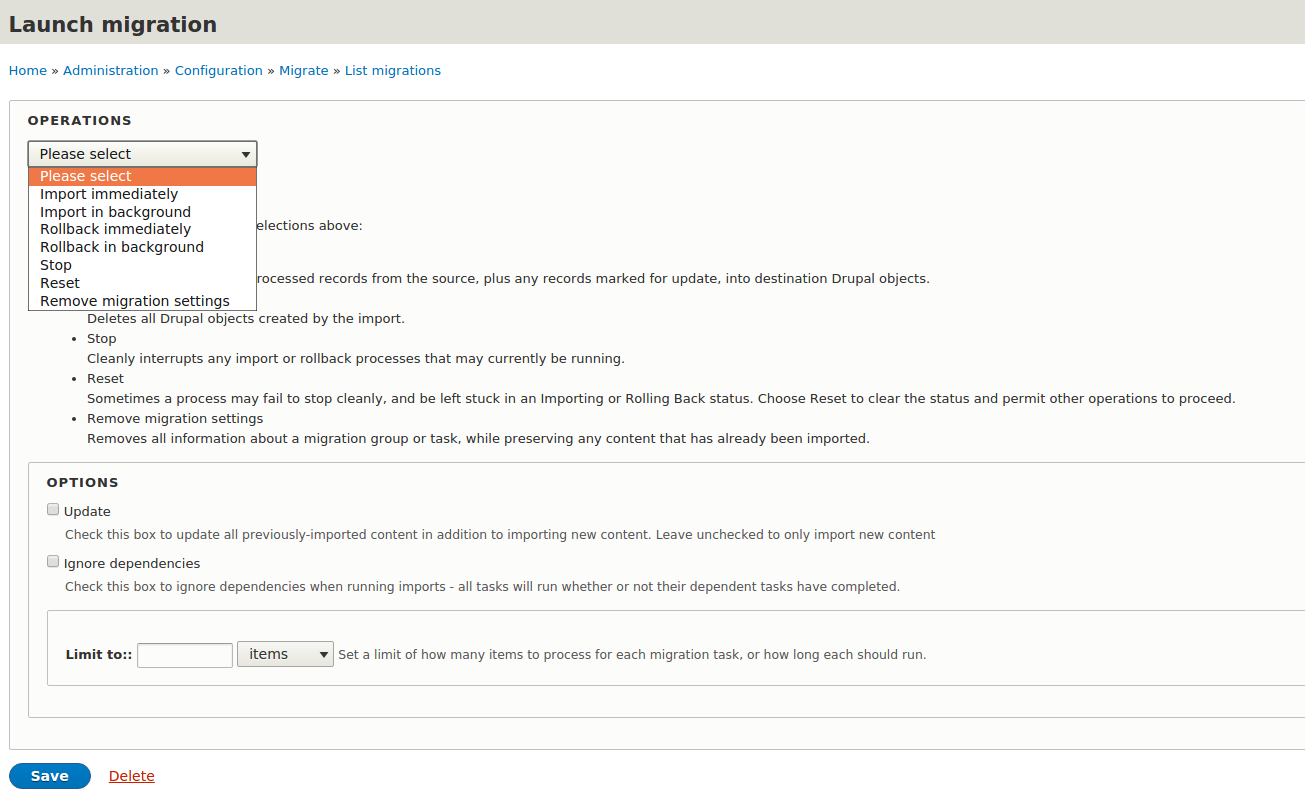
I copied and adapted to D8 the form (From migrate_ui.pages.inc from Migrates D7). It looks like this :

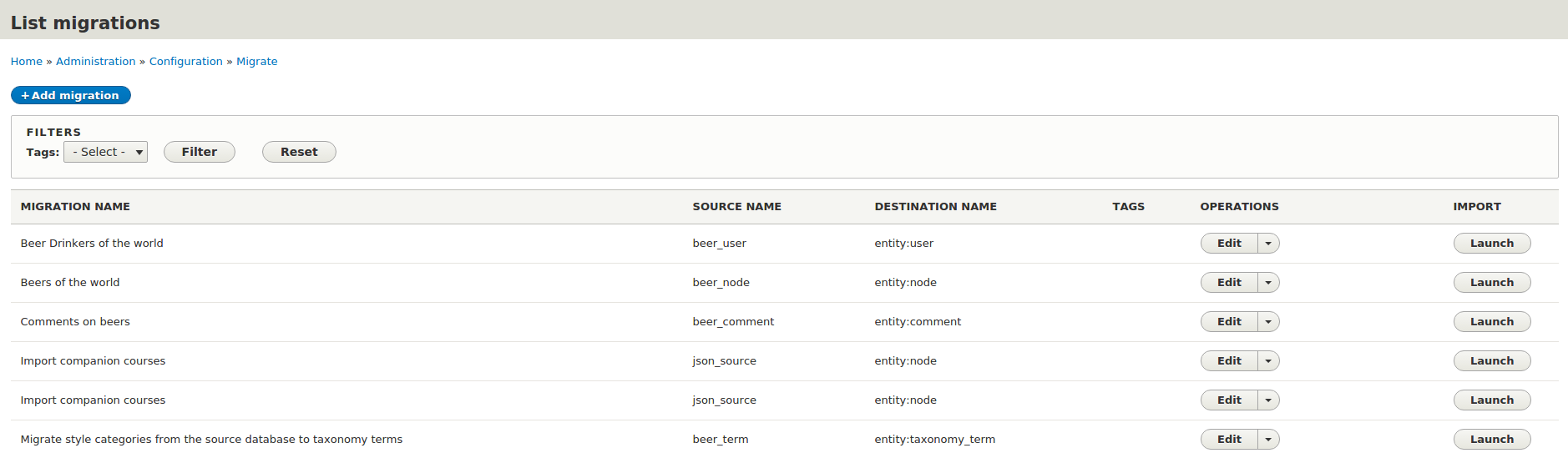
I did not include the top selection part, but I tried to adapt to the new UI with new launch buttons :

The submitForm() function needs to be updated, some D7 code is there. I could not convert it to D8, need to know more about D8 Batch API...
Any Thoughts?...
Comment #3
draenen commentedIs your patch based off (or intended for) the migrate_ui module? The route configuration should be in migrate_tools.routing.yml instead of migrate_ui.routing.yml.
Comment #4
pguillard commentedYes I guess this is migrate_ui stuff. I guess I should move it to migrate_ui project !?
Comment #5
mikeryanMy understanding is that @benjy created migrate_ui to hold the editing UI for migrations (he feels that the editing UI should be separate from the UI for running migrations). I, personally, would love to see your runner patch done against the migrate_tools UI.
Comment #6
arknoll commentedAny more work being done on this patch?
Comment #7
pguillard commentedI had stuck in my old patch, sorry, and it took time to get back...
Here is a patch with the form intended for migrate_tools, this time !
The form will not submit yet, I had troubles to adapt these parts from Migrate D7:
Comment #8
mikeryanLet's not worry about the drush support at this point, that should be a separate followup issue - just take out anything referencing background operations and drush.
Comment #9
pguillard commentedSo I just commented everything concerning drush in the submitForm.
Comment #10
mikeryanFinally took a good look at this - unfortunately, I think it needs to go back to the drawing board. For one thing, this really should be set up for bulk operations - the ability to select multiple migrations and run them at once. Doing it one at a time, and having to go through a secondary form to select the operation and execute the migrations, is simply going to be too tedious. Another thing is that it should not be calling drush functions - it should have its own batch code for executing the migrations.
Comment #11
8ballsteve commentedI made an initial pass at exposing a new route and "run" method on the "process" tab to process these through the UI using the batch API. It works but doesn't utilise the Batch API very elegantly - simply bundles the whole process into a single operation but might be a useful starting point for someone else?
Cheers
Steve
Comment #12
kriboogh commentedHere is a patch against '8.x-3.0-beta1'. It uses the work from both #11 and #9 but doesn't rely on drush code. Still needs work though . On of the issues this has, is apparently the event listeners on postImport are not called when the import is done, making the last migration date not being set.
Comment #13
kriboogh commentedFound the reason the listeners weren't called.
Comment #14
mstrelan commentedI tested the patch in #13 and found the limit doesn't seem to do anything, and the batch seems to import everything at once rather than in batches. Other than that, the Import and Rollback operations appeared to work as expected. Is there anything else still outstanding for this?
Comment #15
kriboogh commentedHaving a really quick glance at the code here, what should probably still need to be done is, implement a MigrationBatchExecutable which extends from the MigrateExecutable class. In there we will need to put some code in place that updates the batch process, probably by copy pasting the code from the MigrateExecutableBase functions (for example the import and rollback functions) and splitting/modifiying those so that the individual row imports can update the batch process.
Comment #16
kriboogh commentedHere is a first run at this. Due to limitations in how migrate core is implemented (executables can not be serialize, because the source or destination might indirectly hold a reference to a database connection), I had to figure out how the original executable can be called, without having to rewrite (copy-paste) the base class code. So what it does now is, a MigrateBatchExecutable extends from the migrate_tools/MigrateExecutable and sets up a (bunch of) batch operations for the current migration. The batch process is then fired and during each run, the executable is re-created and re-initialised. During each run, the core migration deals with the housekeeping of the migration (skipping rows already imported in the previous run), the checkStatus method checks if the amount of items to be processed is reached and terminates the current run. Batch API will see it is not done yet and will initiate the next run. All this time batch context is used to keep track of were we are in the import process.
It still needs some tweaking, such as more useful error tracking in case something goes wrong. Also the batch process is currently sliced into 1% runs. So each batch run will handle (total_items_to_import / 100) items. For small batches this might be to restrict as it will handle 1 item each run, which is a overhead if you can do them all i one run (but then the progressbar won't update until they are all done, so...)
Comment #17
kriboogh commentedchanged to the correct dev version.
Comment #18
kriboogh commentedSmall update that fixes the error notification when broken migrations are present (for example database not available). This caused the overview page not to render.
Also fixed a small update issue on the progress bar of the batch.
Comment #19
Zemelia commentedPatch for 8.x-4.0-beta1 with https://www.drupal.org/node/2825846 changes.
Comment #20
Zemelia commentedPrevious patch is wrong as it was based on 8.x-4.0-beta1, patch for 8.x-4.x-dev applied
Comment #21
Zemelia commentedPrevious patch had duplicates of "migrate_tools.launch" route from previous patch(https://www.drupal.org/files/issues/migrate_tools-migrate_ui-2470882-18....) reroll. Fixed
Comment #22
Zemelia commentedAlso have spotted issue with infinity batch and limit value.
Patch updated with interdiff.
Comment #23
Zemelia commentedAnother issue noticed:
Notice: Undefined index: sandbox in Drupal\migrate_tools\MigrateBatchExecutable->checkStatus() (line 266 of /var/www/html/modules/migrate_tools/src/MigrateBatchExecutable.php)
Patch with interdiff attached.
Comment #24
caldenjacobs commentedHow should we handle additional parameters (such as '--update', '--limit', etc.) in the UI?
Comment #25
edurenye commentedI agree with #2470882-10: Implement running migration processes through the UI this should be done using bulk operations and actions. And '--update', '--limit', etc should be handled in the action form.
Comment #26
kriboogh commentedThanks for finding the infinite issue.
update and limit are supported in the current patch (#23).
(This does not however solve the bulk migrate issue as mentioned in #10, but is does give us at least some ui possibilities to run migrations).
Comment #27
redeight commentedSome ability to run migrations via ui is better than no ability via ui. Is there any reason we can't get this committed now and open a new issue to add batch support and another to add background processing via drush (similar to how it used to be done https://www.drupal.org/node/1958170)
Comment #28
redeight commentedWith the patch in #23 I got the following error
InvalidArgumentException: Malformed UTF-8 characters, possibly incorrectly encoded in Symfony\Component\HttpFoundation\JsonResponse->setData()I also received the following related error
Drupal\Core\Database\DatabaseExceptionWrapper: SQLSTATE[HY000]: General error: 1366 Incorrect string value: '\xB5m fil...' for column 'message' at row 1: INSERT INTO {migrate_message_20170807__processhq_items_custom_upload_csv} (source_ids_hash, level, message) VALUES (:db_insert_placeholder_0, :db_insert_placeholder_1, :db_insert_placeholder_2); Array ( [:db_insert_placeholder_0] => 38aa38535b9c7af8947577caa928006acf5ae44b47e236a70c06cf965d7a3d12 [:db_insert_placeholder_1] => 1 [:db_insert_placeholder_2] => SQLSTATE[HY000]: General error: 1366 Incorrect string value: '\xB5m fil...' for column 'field_line_5_value' at row 1: INSERT INTO {node__field_line_5} (entity_id, revision_id, bundle, delta, langcode, field_line_5_value) VALUES (:db_insert_placeholder_0, :db_insert_placeholder_1, :db_insert_placeholder_2, :db_insert_placeholder_3, :db_insert_placeholder_4, :db_insert_placeholder_5); Array ( [:db_insert_placeholder_0] => 16784 [:db_insert_placeholder_1] => 16806 [:db_insert_placeholder_2] => phq_item [:db_insert_placeholder_3] => 0 [:db_insert_placeholder_4] => en [:db_insert_placeholder_5] => For IS-2002 0.2�m filter line only ) (/home/joshua/public/processhq.com/public/core/lib/Drupal/Core/Entity/Sql/SqlContentEntityStorage.php:777) ) in Drupal\migrate\Plugin\migrate\id_map\Sql->saveMessage() (line 658 of /home/joshua/public/processhq.com/public/core/modules/migrate/src/Plugin/migrate/id_map/Sql.php).The field I'm importing is a plain text field and the source is "For IS-2002 0.2µm filter line only". It doesn't like the µ character.I assume this is due to a discrepancy between encodings in the content I'm migrating and my Drupal site. The only reason I mention it is because this error does not occur when running the same migration via drush so something being done via the UI is different.EDIT: Further testing revealed that this does actually occur in drush migrations. It was due to my client sending me one file as latin1 instead of UTF-8. Always check your clients are sending you the right file :)
Comment #29
edurenye commentedJust rerolled.
Comment #30
edurenye commentedUps, I missed the operation.
Comment #31
joelpittetI love this, even if it's not ideal look, it provides a bit of an easier XDebug session through the UI since my CLI is in a VM.
Comment #32
heddnI'm going to ask for a BTB on this. This is a super important method to run a migration, but we should test it as well.
Comment #33
g089h515r806 commentedimport of #30 works correctly.
Comment #34
heddnThere's also https://www.drupal.org/node/2905437 that has some interesting ideas that could be merged into this.
Comment #35
edysmpI'm testing this and I'm getting a infinite issue when I go to:
/admin/structure/migrate/manage/migration_group_test/migrations/migration_test/process/run/admin/structure/migrate/manage/{migration_group}/migrations/{migration}/launch that is fine.
Comment #36
redeight commentedI'm seeing the same issue as edysmp. Also,
/admin/structure/migrate/manage/{migration_group}/migrations/{migration}/processthrows a whole slew of errors... I don't think it's super critical, but it is accessible from/admin/structure/migrate/manage/{migration_group}/migrations/{migration}so it would be nice if it didn't. The errors appear to stem fromWarning: strlen() expects parameter 1 to be string, array given in Drupal\Component\Utility\Unicode::validateUtf8() (line 689 of core/lib/Drupal/Component/Utility/Unicode.php).as the subsequent errors seems to be render complaining about being handed an array key instead of a renderable element. Could this be because I use multiple chained process plugins on an element?
Comment #37
ressaI just tested the patch in #30 with my migration and it works fine, thanks for the great work! There wasn't any "Import all" button, but I could run all migrations from the "main migration" by adding "sub-migrations" like this:
EDIT: It seems like putting a number in Limit to: is ignored, and everything is imported ...
Comment #38
heddnHere's some tests and some cleanup. Overall, this is in pretty good shape.
Comment #40
heddnComment #41
jdleonardUpon applying #38 and running
drush cr, should I be able to see the migrations shown when runningdrush msat the path "admin/structure/migrate/manage/default/migrations"? I'm not seeing any migrations listed in the UI, but I am via the Drush command.Comment #42
heddnre #41: do the migrations have an assigned migration_group of default?
Comment #43
heddnThis now has an automated test and I've point/click tested it manually. Can we get some other testing done and I'll get this merged ASAP?
Comment #44
heddnThis is super cool. I just took a custom json migration's configuration. Added this patch to simplytest.me and was able to suck in several nodes to a site. The link is good for another 23hrs for the proof: https://du29x.ply.st/node
Comment #45
heddnI'm sure we can do better than what we have here, but let's do that in follow-ups. We have automated tests. I've tested it on local and on simplytest.me. It just works. There's been a fair amount of review over the past couple weeks. I'm about to commit.
Comment #46
edurenye commentedRTBC +1 I tested it manually and works fine.
Lets commit it and as you say then we can create a follow up to discuss how we can improve it.
I still don't like how is working and I would change it to use bulk operations. But this is working just fine and it's better than nothing.
Comment #48
heddnI've opened up #2924298: Add limit to Web UI execution & #2924296: Batch (VBO) functionality for Web UI executions to address the outstanding issues we didn't include in this initial release. Thanks for everyone's patience over the past 2 years. And let's get the follow-ups moving along too!
Comment #49
jdleonard@heddn: Reinstalling my custom migration module resolved the issue I raised. I'm not sure whether it's possible to do some work to avoid that step, but it's not a big deal. Might be worth documenting though. Thanks for the patch!
Comment #50
topplestack commentedI'm getting: Cannot apply patch on #40.
I should mention I've been using #30 and it has been working well.
Comment #51
topplestack commentedIt looks like the update to migrate_tools release this morning and the patch rolled yesterday aren't compatible.
Comment #52
heddnre #50, that's because it is already applied and committed.
Comment #53
ressaI just tried the Beer migration example from Migrate Plus via GUI, and it works just perfectly, great work! Here is a simplytest.me link with the required modules: https://simplytest.me/project/migrate_tools/8.x-4.x?add[]=migrate_plus&a...
Enable these modules:
Now you can run the "Beers of the world" migration from /admin/structure/migrate/manage/beer/migrations
Note: Executing the "Beers of the world" migration will migrate all three migrations, but you need to roll back each migration individually. This simplytest.me link is good for another 23 hours: https://duukq.ply.st/admin/structure/migrate/manage/beer/migrations
Comment #54
heddnAs a final word, we just used the dev branch of this code and imported a bunch of migrate_plus config to migrate data using a json source in a lab/training session at Drupal Camp Lagos y Volcanes. Using the web UI was super important for the training because on simplytest.me, we do not have access to drush. This made setup and training to use migrate super easy and accessible. Thanks to simplytest.me and all those who contributed to this patch. The bar for using migrate in D8 is now lowered.
Oh, and everyone one of the migrations on everyone of the students computers worked first time. Shocking. It just worked (tm).
Comment #56
marcvangendJust posted a follow-up in #2928335: PRE_IMPORT and POST_IMPORT events are triggered for every batch slice.
Comment #57
irinaz commented@heddn, which version of Migrate and Migrated tools I need to have to run migration through web interface?
I have now migrate version: 8.4.5 and migrate_tools Version 8.x-3.0-beta1, but I do not see anywhere an option to run a migration through web interface. What am I missing? The only button I see is "upgrade" on page /upgrade/, but I cannot find anywhere a way to run a migration without drush in section for migrations /admin/structure/migrate/manage/beer/migrations.
Thanks a lot, Irina
Comment #58
ressaOn the front of Migrate Tools it says:
So I would try 8.x-4.0-beta3 (latest official release) and see if it works better.
Comment #59
heddn+1 to #58. Use the latest code.
Comment #60
irinaz commented@ressa, @heddn, thanks!
I pulled dev code directly from module page instead of running update via web interface and I see this magic button "Execute". This is huge step for site builders!!
thanks a lot!
Comment #61
ressaAwesome @irinaz, glad you got it working, and being able to now import via GUI is indeed cool :-)