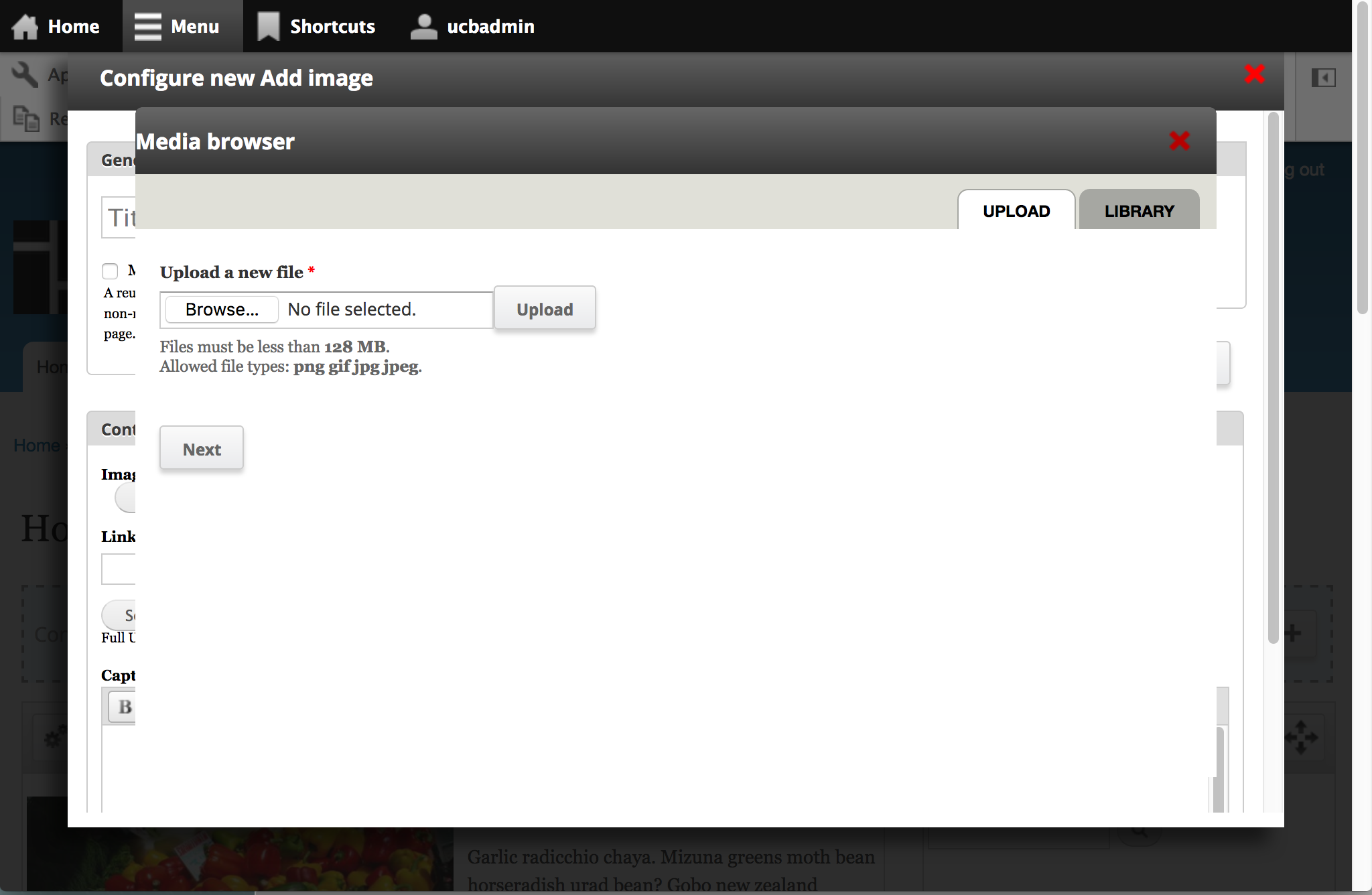
If you are using jQuery Update to get a newer version of jQuery UI on your site (1.10) and then try to open up the media browser from within a Ctools modal dialog (for example, the Panels In-Place-Editor) the media dialog will appear underneath the Ctools module so you can't see it.
Here are some references:
http://jqueryui.com/upgrade-guide/1.10/#removed-zindex-option
http://stackoverflow.com/questions/14954104/why-jquery-ui-1-10-remove-jq...
Whatever behavior used to work to make the media dialog get its z-index automatically set to be the highest index on the page no longer seems to be working for me, so it winds up underneath the Ctools modal dialog.
There's probably a real fix that involves getting the "stacking" referred to in those links working correctly again, but a quick fix is to set the z-index in CSS.


Comments
Comment #1
David_Rothstein commentedHere's a patch. Haven't tested this anywhere else though (e.g. with older versions of jQuery UI).
Comment #2
saltednutYeah, this is a bit of of a showstopper once you update to jquery_update 2.4 or higher so I'm marking it major.
I can confirm the patch is a working fix.
Thanks @David_Rothstein!
Comment #4
aaron commentedCommitted to http://drupalcode.org/project/media.git/commit/4494ac6.
Comment #5
func0der commentedThis is not a good fix. Sorry, but that is not stackable. It would fix the current problem with ctools and media, but not if there are dialogs in dialogs in dialogs or something like that.
We need a more generic fix, please.
jQuery UI changelog entry to this topic: http://jqueryui.com/upgrade-guide/1.10/#removed-zindex-option
Comment #6
MantasK commentedI have same issue. I wrote my solution here: #2384543: Popup goes below ctools modal
of course it is not good fix also, but for me works better that putting manual z-index value as it creates problems in other cases
Comment #7
ptsimard commentedThis commit broke Media browser on our instances because the z-index is putting the overlay on top of everything preventing interaction with the media browser. As soon as I disable that
z-index : 10001 !important;it works again.I suggest reverting this commit.
Comment #8
sylus commentedJust attaching a patch for drush make purposes that reverts this commit and works on 2.0-alpha4.
Comment #9
func0der commentedCheck out the new alpha4. That should solve this problem.
Apply this patch here additionally https://www.drupal.org/node/2316707 and everything should be working fine.
Comment #10
func0der commentedComment #11
elijah lynnComment #12
albert volkman commentedI'm experiencing this issue currently in the 1.x branch, so posting the CSS hacky backport here.
Comment #13
albert volkman commentedMoving this back 2.x since it hasn't been fully fixed there yet.
Comment #14
func0der commentedHave you tried what I have mentioned in #9?
Comment #15
albert volkman commentedThe 1.x branch doesn't have an alpha4, just 2.x. We haven't upgraded to 2.x because the project page clearly states that 1.x is recommended for production.
Comment #16
func0der commentedWe are talking about a 2.x bug here. Not 1.x.
My question was: Is it fixed for the 2.x branch and my instructions from #9?
Comment #17
dave reidI'm confused, does reverting the original fix actually resolve the issue as well? Or do we still have a bug that would need to be fixed?
Comment #18
func0der commentedAs I have said before: the here suggested patches is only A solution, but neither a good one nor the best.
By "suggested patches" I mean all the patches that are uploaded in this issue.
There should NOT be a bug anymore after doing what I have said in #9
Comment #19
dave reidIt doesn't seem to me that the original fix that was committed in 7.x-2.x addressed the concern with using Overlay in https://www.drupal.org/node/2272567#comment-9566535. So right now this is currently considering rolling back the original fix.
Comment #20
func0der commentedOh, yeah. You are right.
I didn't not recognize that the "fix" has actually been committed.
Comment #21
jakeschlachter commentedUnfortunately, the fix entirely breaks the CiviCRM UI, which is also defining the .ui-front selector. As a result of the !important property, all CiviCRM dialog modals are now greyed out and inaccessible, due to being "under" the active z-index. (You can see the window, but are unable to click any buttons.)
Some of us first noticed this using Open Atrium and CiviCRM. The recent 2.43 release of OA pulls in this fix and breaks CiviCRM. I'll file a bug with CiviCRM, too. In the meantime, users of both CiviCRM and the media module will likely need to remove this fix in the media/css/media.css file.
Comment #22
jakeschlachter commentedFrom the CiviCRM team, (related issue CRM-16935) looks like this might need to be fixed in media.
Comment #23
devin carlson commentedI verified that this is no longer necessary now that #2316707: Drupal.settings.media values become an array of when multiple fields are used is fixed. I manually testing adding media inside of a ctools modal and with the Panels IPE and didn't run into any problems.
Reverted.
Comment #26
func0der commentedFinally! Nice!
thank you, Devin.
Comment #27
ravibarnwal commentedI am using media field on form api, panels, panopoly it is still showing media dialog underneath the Ctools modal dialog. I have tested with beta 2 version and dev version both are resulting same. So I need to apply same css again whatever reverted in https://www.drupal.org/node/2272567#comment-10183652.
Comment #28
mlanth commentedAs #27 states, I can also confirm this is still an issue. I have a media field in a ctools content type edit form which has the dialog appearing underneath the ctools modal.
I am pretty sure this issue is because when a media field is added within an ajax generated form, it doesn't apply the media style settings which are supposed to be added.
Comment #29
caschbre commentedI too am having the same issue even with the patch applied from #2316707: Drupal.settings.media values become an array of when multiple fields are used.
Comment #30
fuzzy76 commentedYes, this bug is back. Re-commit the fix? A bit unsure what status is correct for this issue now.
Comment #31
David_Rothstein commentedCould probably add it back but with a more specific selector targeting it to the media dialog only (e.g.
.ui-front.media-wrapperrather than just.ui-front)?I wrote the original patch over two years ago, so I don't really remember if there was a specific reason I didn't do that at the time. Probably not - I probably just saw that some of the other CSS rules in that file aren't media-specific and decided to do the same with mine, without thinking about it much...
Changing the selector to be media-specific seems like it would at least prevent #21. (Not sure about #7 since it's not clear to me which "overlay" that refers to.)
Comment #32
fuzzy76 commented- more specific selector as per #31
- rerolled against head
- tested ok on 7.x-2.0-beta2
I also took the liberty to hide patches from #1 and #8 since this should replace them.
Comment #33
steve hanson commentedI can confirm that #32 fixes the horrible interaction with CiviCRM alluded to in #21 -
Comment #34
philyI'm facing the same problem fixed by using patch in comment #32 but when using Wysiwyg + CKEditor in maximized mode, the media popup close button is badly displayed.
So, here is a new patch which includes #32 and fixes close button.
Comment #37
joseph.olstad+needs reroll
Comment #38
temkin commented@PhilY, thanks for a new patch, but it's better to open a new issue for a close button and submit a patch there, rather than mixing it all together here. Besides, your patch has a reference to adminimal theme that not everyone will have. Therefore I'm hiding it.
As for re-roll, I don't think it's needed. Patch from #32 still applies cleanly to the latest head. I'm marking this as "Needs review", although we had a couple of confirmation that #32 fixes the problem - potential candidate for "RTBC".
Comment #39
cboyden commentedThe patch in #32 works for having media fields in CTools modals, but depending on the theme in use it could be ugly. Unfortunately it's the thing that fixes #21 that makes it ugly: the media dialog is at the top of the stack, but its background overlay is underneath the CTools modal. See this screenshot showing Media 2.0-beta13 plus the patch in use on the latest Panopoly:

This is going to be a problem anywhere there are modal dialogs - or any kind of thing with a z-index - being added by something other than jQuery UI. For example navbar gives its toolbar a z-index of 1002, and admin menu has a z-index of 999.
It might be better to bump up the default z-index for jQuery UI dialogs in
.ui-front, and at the same time bump down the z-index for CTools dialogs. If they are all set to the same number, the source code order of the elements will determine the stacking. This will do the right thing in this case because media dialogs are appended after CTools dialogs when you press the Browse button.CTools sets its z-indexes to 1000 (background overlay) and 1001 (dialog) in the style attribute of the element, which means they can't be overridden by any CSS rules based on selectors. Maybe this needs to be fixed in CTools instead of here.
Comment #40
cboyden commentedThere is a long-standing issue in CTools to switch to using the jQuery UI modal, see #1397370: Make modal.js use jQuery dialog.
Comment #41
joseph.olstad@cboyden , so the related ctools patch works for you in this case?
Comment #42
cboyden commented@joseph.olstad, in my quick test the CTools patch works with a few adjustments. The patch doesn't remove the z-index from the style attribute of the modal div elements, nor does it add the ui-front class. Once I did that, it worked fine. jQuery UI handles the stacking. The only problem was, the CTools modal was positioned in such a way that it was underneath the admin menu provided by navbar. Positioning could be adjusted to fix that, it just needs to be ~20px further down, and be fixed instead of scrolling with the viewport. I'm working on an updated patch.
Comment #43
joseph.olstad@cboyden , looking forward to seeing your patch.
Thanks!
Comment #44
steinmb commentedComment #46
khaldoon_masud commentedAdding the following style to media/css/media.css works for me:
.ui-front {
z-index: 10001 !important;
}
Ctools module setting the dialog z-index to 1000.
jquery ui 1.10 in jquery_update module is setting media dialog z-index to 100.
media module 7.x-2.8 is not setting any z-index.
So we can either ajust the ctools and jquery ui z-index, or add z-index in the media.css file.
Comment #47
joseph.olstadPatch 32 should be committed as-is afaikComment #48
joseph.olstadAh re-read this thread, seems we were waiting on the ctools related issue mentioned above.
It would be nice if we could get some reviews for the ctools issue and rtbc the ctools related issue if possible get that in
Comment #49
Anonymous (not verified) commentedI can confirm #46 worked for me THANK YOU!!!!!
Comment #50
joseph.olstadreview #46
Comment #53
joseph.olstadactually I should have creditted @khaldoon_masud for #46
Comment #54
David_Rothstein commentedHold on, isn't that the exact same patch that I wrote originally for this issue, which got committed in September 2014 but then had to be reverted because it broke things? Doesn't it still cause the same problems?
Comment #55
David_Rothstein commented#32 still seems like it's probably the best fix, although #39 suggests it's not a complete fix. Here's a quick patch (untested) to switch to the approach from #32.
However, if people aren't sure that's correct, then probably the above commit should just be reverted instead, and start from scratch again.
Comment #56
joseph.olstadComment #59
joseph.olstadyes more specific targetting is safer thanks again!
should be good now.