

Closed (fixed)
Project:
D7 Media
Version:
7.x-2.x-dev
Component:
Code
Priority:
Critical
Category:
Task
Assigned:
Issue tags:
Reporter:
Created:
10 Feb 2014 at 17:49 UTC
Updated:
31 Jan 2015 at 17:59 UTC
Jump to comment: Most recent, Most recent file


Comments
Comment #1
jpstrikesback commentedThere wouldn't happen to be a corresponding ctools issue would there?
Cheers,
JP
Comment #2
dddbbb commentedPhew. Just took a peak at latest dev and thought that maybe I'd missed a consensus to remove this button. Glad to hear it's unintended and that you're on the case. Rolls back...
Comment #3
antonyanimator commentedCould someone tell me how to get the version of media 2.x that displays the edit button. I don't know where I can get the module files so I can roll back to an older version.
Thanks
Comment #4
ergophobe commentedWhich version are you using now? The commit that made this change happened on Feb 5, 2014 (see thread cited in the issue summary). So I would think alpha-3 would be fine.
If you want a dev version that's more recent, then you would need to pull something from before that commit.
The problem commit is: http://drupalcode.org/project/media.git/commit/1023f976bdb1d7349eb3ea316...
So the previous version is:
http://drupalcode.org/project/media.git/commit/aed50be25d6655cfa85ef1b28...
So basically, you need to do a git clone of the 2.x branch
git clone --branch 7.x-2.x http://git.drupal.org/project/media.git
And then
git checkout aed50be25d6655cfa85ef1b282788f67b3972301
Comment #5
antonyanimator commentedAny idea of time frame for this issue to get fixed. Unfortunately I have to use the current media dev as older versions are not compatible with, in my context, "manualcrop".
Thanks
Comment #6
ParisLiakos commentedComment #7
schnitzel commentedwe had that issue too and fixed it with this.
It's not 100% done, one issue: if you change the name of the file in the modal window, it's not updated in the preview in the files field, but we can life with that right now.
Comment #9
tchopshop commentedThis patch is not working for me, unfortunately. I only get a browse button to replace the image.
Comment #10
mxtAny news on work in progress on this? We really need this
Comment #11
froboyI was able to apply the patch to the latest dev, but the Edit only works with the Overlay module enabled (yuck) and saving the file often did not return me to the node I was editing previously. This definitely needs more work. I'd recommend reverting to 7.x-2.0-alpha3 for folks who need the edit button. (I need it for focal_point module interaction.)
Comment #12
ergophobe commentedRE #11, I have a similar issue with 7.x-2.0-alpha3+37 which is the version packaged with Panopoly. I mention it because it appears that the code in this patch for dealing with the case where the form is a CTools modal is the same and I think it will have the same problem, namely that saving edits returns you to the page that calls the pane edit modal, rather than returning you to the pane edit modal itself.
#2264187: Edit modal closes other open ctools modals
Comment #13
David_Rothstein commentedReroll of #7 to apply cleanly to the latest 7.x-2.x code.
Comment #14
hefox commentedPatch works but getting a weird javascript error. "fixed" it by removing the path field on the form, since the path to the file entity page doesn't need to be edited for my current use case.
Uncaught TypeError: undefined is not a function VM558:11
Drupal.behaviors.pathFieldsetSummaries.attach VM558:11
(anonymous function) drupal.js?n5u1k8:76
p.extend.each jquery.min.js?v=1.8.2:2
Drupal.attachBehaviors drupal.js?n5u1k8:74
Drupal.CTools.Modal.modal_display modal.js?n5u1k8:285
Drupal.ajax.success ajax.js?v=7.26:400
ajax.options.success ajax.js?v=7.26:164
k jquery.min.js?v=1.8.2:2
l.fireWith jquery.min.js?v=1.8.2:2
y jquery.min.js?v=1.8.2:2
Doesn't happen on edit form on a regular page (e.g. via file listing). We're running enough complicated js/alternations it could just conflict between modules.
Comment #15
amaisano commentedThanks for the patch! I'm getting several errors, but I can't remember if there were there before or not:
Several of these upon "Attach" file:
Two of these upon hitting "Edit" after the "Attach:"
The main page's "Edit" button only works once though. It stops working after the first "Edit" and "Save" of the media entity attached to the node.
Maybe the problem is if the media file type has a nested Media field?
Comment #16
hefox commentedThe second error is same as one, just from redirect and not path. I have an image field attached to images, but uses the core field.
Setting this to needs work based on that.
edit:
Steps to reproduce error
1) Visit form with imagefield (node form in this case)
2) Browse and add an image
3) edit image
If the edit dialogue is used *before* browse (like edit then remove) then it doesn't occur.
The js files are being loaded twice, http://gyazo.com/b0eb073044134883c3294a0f79afae9f, with different timestamps at end it looks like.
Edit: the ajax callback is being called twice
Comment #17
antonyanimator commentedPatch in #13 works for me with current dev of media, and file_entity module
Comment #18
seworthi commentedApplied patch from #13, clean media_dev install, found no issues. Works fine, edit button works, no JS errors. Can not reproduce #16 issues. Not setting to RTBC because I'm only reviewing patches @ sprint.
Comment #19
bradjones1The patch in #13 applies well and works as advertised. I could not reproduce any of the errors reported below that patch.
Marking RTBC to get review from a maintainer.
Comment #20
hefox commentedThe issue happened with two people, so pending revalation that this was an unexpected conflict or more reviews, it seems a bit too soon to RTBC this to me
Comment #21
dsnopekI tried to reproduce the JS problem that @hefox had, but I was unable to.
However, I'm having an additional problem: If you're already in a CTools dialog (like with a Fieldable Panel Pane) and you click "Edit", then it will close the existing CTools dialog and open the edit form in a new one. When you save the edit form, it won't return you to the original dialog you were in. This is pretty much the issue described here: #2264187: Edit modal closes other open ctools modals
Comment #22
ergophobe commentedRE #21 - I opened that issue originally and just made some edits for clarity since it has come up here.
It's not, strictly speaking, a problem with this patch, it's a problem with the Media module that is not fixed by this patch (but ideally would be).
Comment #23
finn lewisThe patch in #13 works for me, thank goodness!
Using the following dev versions:
Comment #24
finn lewisWhile the patch in #13 works for me, I do have an issue that may potentially be an edge case, or may be directly related to how the edit button works with the ctools modal.
The issue for me now is editing translated alt and title fields on the target image.
We have a site with 3 languages, and are using Entity Translation to allow us to translate the title and alt fields on the image bundle.
This works fine if editing the file via the file /en/file/12738/edit/en, we can navigate to /fr/file/12738/edit/fr and edit the french translations of the title and alt fields.
But using the edit button on the image field always shows the default language fields, no matter what language is currently active or what language the source node is in.
I have spent a few hours debugging, and notice that file_entity tries to load the language from the language of the $file entity in file_entity.pages.inc at around line 703 with
The file entity is not translated itself, as we want to use the same file entity on multiple nodes, translating the fields directly. So I have tried changing the $langcode here to that of the current active language, but strangely that does not render the form in the language expected.
I am not sure if this is due to the way that we are loading the file edit form in a ctools modal from a media menu callback, or if this is something else.
Can anyone shed any light or offer any helpful suggestions?
Many thanks!
Finn.
Comment #25
codi commented#13 works for me after a cache clear.
Comment #26
dragos-dumi commentedAny news about this issue?
For me, the patch #13 doesn't work for me on latest 2.x dev (7.x-2.0-alpha3+93-dev) because media.pages.inc file is not in the module anymore.
Codi, what version do you have that is working?
Thank you,
Comment #27
codi commentedHmm. Currently I'm using 7.x-2.0-alpha3+93-dev as well, but have upgraded from previous dev versions. I still have the media.pages.inc file which is why the patch applied cleanly. Anyone from the media team know if media.pages.inc was removed on purpose? I'll dig a bit through some commits when I have some time.
Comment #28
skylord commentedLook at the patch - it creates media.pages.inc from scratch. So it has to be applied to latest dev where media.pages.inc doesn't exist and it applies cleanly - have tested it right now. Also can't reproduce #16 errors. Anyone besides @hefox can?
Comment #29
dragos-dumi commentedskylord you are right, my bad. Thank you, it works ok now.
Comment #30
hefox commentedskylord: me and amaisano experienced the issue. Might both be running some contrib module that is causing it.
No longer on the project that using this patch for
Comment #31
huteb commentedThe patch seems to work OK for me, except when not using the admin theme for the node edit form : the ctools modal load the admin theme css and screws up the page.
To avoid that I just changed the following:
Comment #32
huteb commentedHere's an updated patch.
Comment #34
huteb commentedOpps the file was corrupt. Here's a new version.
Comment #35
rcodinaThe patch on #34 works for me except for "Replace file" feature on edit popup: I have tried this feature many times but only once the uploaded image was replaced by the new one.
Comment #36
loparr commented#34 works, thank you
Comment #37
steinmb commentedDrupal 7.31
Media, file_entity git HEAD
Ctools latest stable
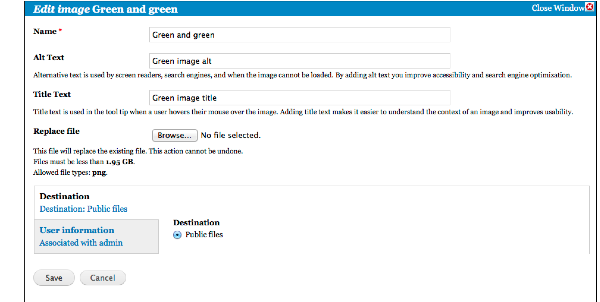
Introduce the button, and yes, it works.
Modal looks OK, all the forms can be altered and is saved/stored.
What does not work
Like noted in #35. Replace file still needs work, that is, if we are to address it here?
Browse.. button bring up your system browser but when the image is selected, it also close the modal, never updates the preview thumbnail in node edit form, tough it actually replaces the image ref. by the node. Saving the node prove this. Editing the node again bring up the correct preview thumb with the title, alt, filename from the file you just replaced.
Comment #38
huteb commentedThe file replacement not working correctly should probably be a separate issue (and not be a beta blocker).
Comment #39
rcodina#38 I think file replacement feature is a basic one and is indeed a beta blocker.
Comment #40
steinmb commentedI think the replacement feature should work though I would create a separate issue where that is addressed but, yes, it should also be a beta blocker.
Comment #41
ergophobe commentedThe patch in #34 works for me with the August 19 Media dev (alpha3+108).
It would be great to commit this, and then open another issue for the Replace File functionality.
Comment #42
fabianx commentedThe reason the thumbnail is not updated, is a browser cache issue as the same filename is used and the browser has the image cached still.
We solved this on a client project by appending ?mtime=[time] to the images, which is not ideal.
We also had the problem with replace file that it was closing the modal, while editors wanted to replace the file and then edit meta data. We solved this by providing a special field group and button, which makes the layout look like:
We also improved the overall UX of the edit button by providing the normal browse button, so it looks like:
-> Select image
'Remove' was only shown when the image was not required.
Both were simple, but effective UX improvements.
Also we noticed that delete permissions, while never deleting any actual files were required to show the Remove button for multiple files, which is probably a bug.
Unfortunately we used mainly JS to add the additional buttons and altered the forms in some way, so its not possible to port the code back to media easily.
That all said, I added #2338233: Fix replace file functionality for 'edit' in media browser so that _this_ issue can continue and RTBC this here as it works great.
Comment #43
steinmb commentedThen I'm also RTBC
Comment #45
aaron commentedCommitted to http://drupalcode.org/project/media.git/commit/f057895.
Comment #47
ergophobe commentedRelated problem here
#2333247: Image and Media upload widgets broken when using Panels