

Closed (duplicate)
Project:
The Better Mega Menu
Version:
7.x-1.0-beta2
Component:
Code
Priority:
Major
Category:
Bug report
Assigned:
Unassigned
Reporter:
Created:
12 Jul 2013 at 06:52 UTC
Updated:
21 Feb 2017 at 23:01 UTC
Jump to comment: Most recent, Most recent file


Comments
Comment #1
khadijamajid commentedIn TB megamenu WHEN click save button to make changes the process bar going but changes not save.kindly help
Comment #2
hai nguyen commentedUnsavable problem happens because using $.ajax.done and done doesn't work in jQuery 1.4 (default of Drupal). It've just been updated to use $.ajax.complete to fix this bug. Please update version 7.x-1.0-alpha4.
Comment #3
justluvgod commentedInstalled the most recent version. Issue still exists on my system. I have cleared all caches and run cron.
The menu will save configuration to group menus but doesn't save the changes to hide the submenu under each group.
- Drupal 7.22
- Omega theme (using context and Delta)( I have disable both context and Delta modules to see if that was the issue and the problem still exists.
- TB Megamenu - 7.x-1.0-alpha4
Comment #4
hungrymind.bb commentedI'm using
Still I couldn't able to save configurations.
When I am selecting a block from the dropdown progress bar appear on the top of the page.
meanwhile Chrome Javascript console dumping following error messages
Please help me to overcome this problem as soon as possible.
Comment #5
hungrymind.bb commentedI found the solution.
It is the problem with clean URL. If your server doesn't support for clean URL, this module getting failed.
So if anyone really want to use this module, please check whether your server is supporting for clean URL(https://drupal.org/node/15365).
Comment #6
scotwith1ti updated from alpha3 to alpha4 and have clean urls and still getting this error. all the work i did setting up this menu is gone now...would like to continue to be happy i chose this module, cuz it was really perfect for a while...don't know what went wrong other than upgrading to the latest version as it was working fine until then.
Uncaught SyntaxError: Unexpected token < , except mine is in main-menu:1
so i disabled, uninstalled, reinstalled and got back to my base menu without the tb megamenu, then i still can't add a sub-menu to one of the links, now i get the same thing, but it's looking at confi?destination=home:1
check out this snapshot of the console in chrome...does this help? http://note.io/13IHP1e
..help!? need my mega menu for this site! this module is awesome and was so stoked how easy it was to configure...
Comment #7
responsiveconsulting commentedSame here...installed everything today with ZEN theme and when I hit Save I see my changes within TB Config, but not on frontpage. When I open TB Config again, changes are gone...I must say I really like this Menu...by far the best I've seen...good job
Using up to date Drupal 7, JQuery 1.7...pretty much everything your tutorial video talked about...it's working, but saving does not work right now
Comment #8
justluvgod commentedTried the new beta 2 version.
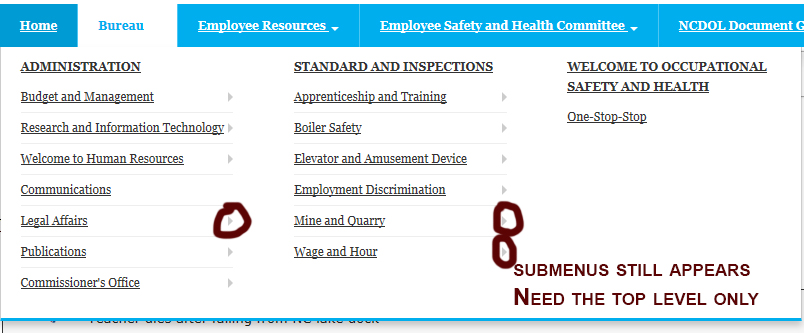
Seems a little better. The submenus still do not hide when selected but at least the submenu items seem to align better(submenus sliding too far to the right previously). Any chance of hiding the submenus? If I could get it to hide the submenus in the menus, I would be happy and use this right away.
Also, I wasn't sure what the purpose of the hide when collapsed option? Any ideas or suggestion would be helpful.
Current config
- Drupal 7.22
- Omega theme 3.x
- TB Megamenu - 7.x-1.0-beta2
I included image to describe my issue.
Comment #9
scotwith1tI still can't get a block to get added to the sub-menu. Getting "Uncaught SyntaxError: Unexpected token <" each time, doesn't matter what block I try and add...
Comment #10
petr illekSame for me. Disabling the submenu from second level can't be saved.
Using TB MegaMenu 7.x-1.0-beta2.
Comment #11
RyanX commentedSubscribe
Comment #12
scotwith1tthis is really bumming me out, cuz i love this module...any help on this would be appreciated...i'm forced to revert to a much more tedious to theme superfish version of megamenus (basically only provides the markup, doesn't do any base css for you)...would much rather incorporate tb mega menus in this project!
Comment #13
justluvgod commentedFinally a patch was posted that resolved this issue for me.
https://drupal.org/node/2024333#comment-7897923
Try it out...
Comment #14
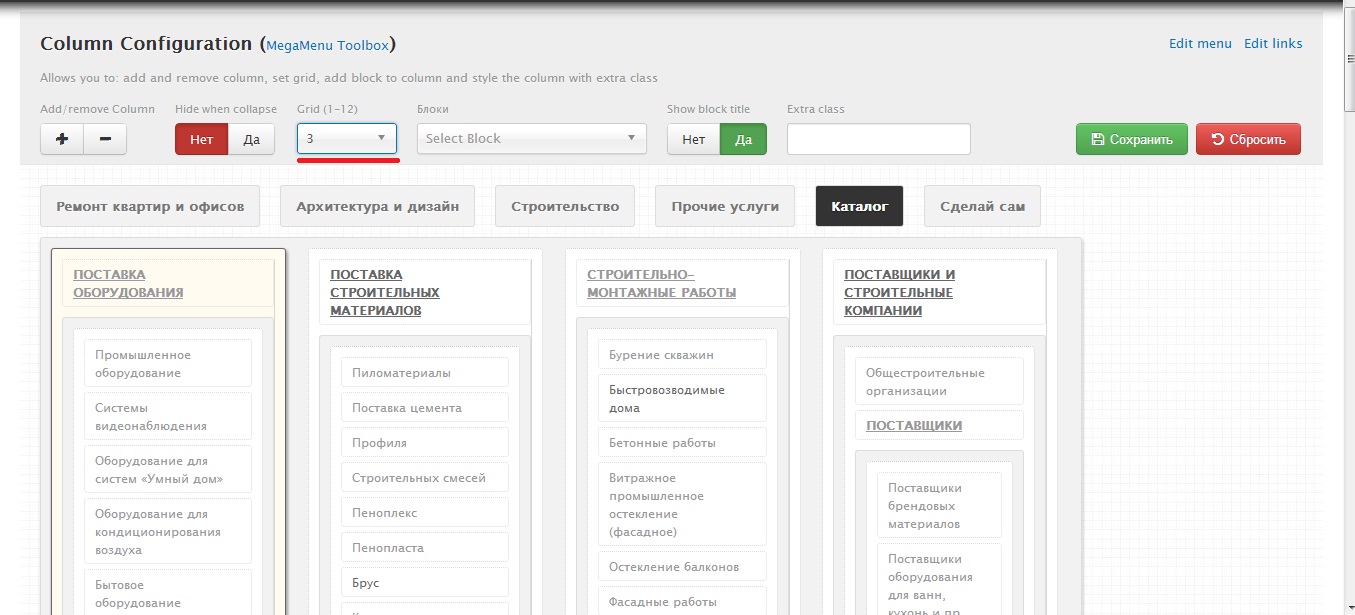
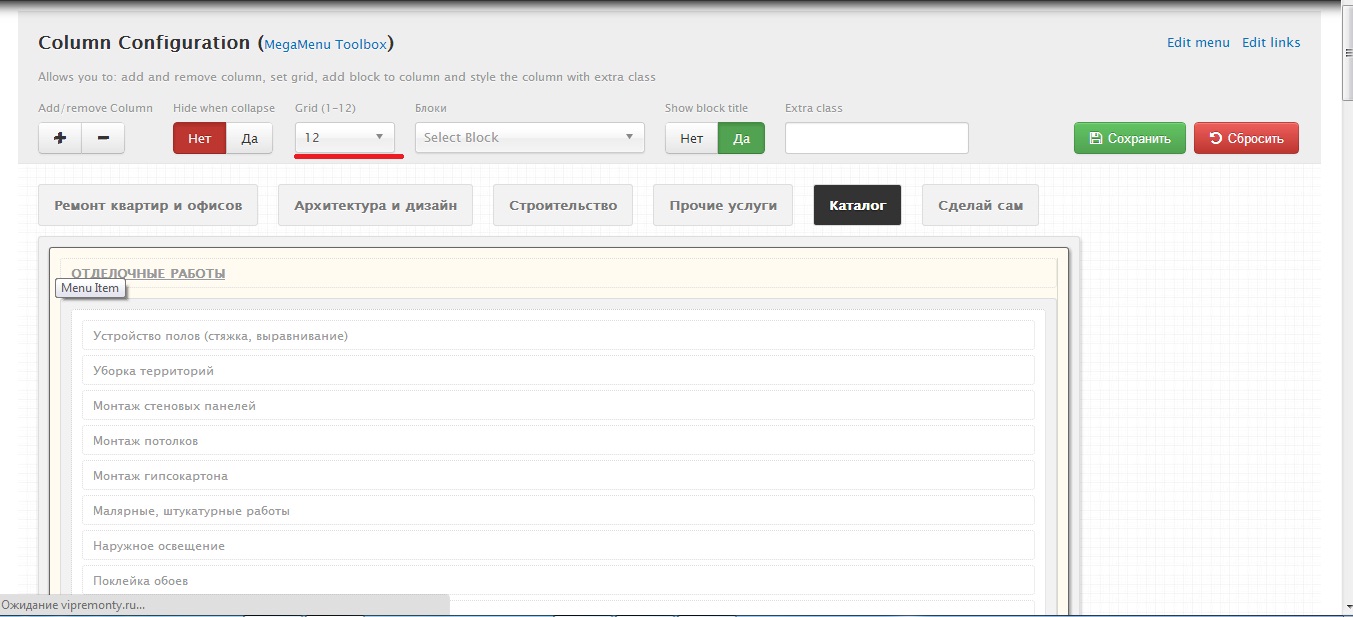
yuriy.sychenko commentedI have not saved the changes Grids (width) of the column, and the delay is not working


I changed the column by 3 grid:
after saving and reloading the page column was again 12 grid:
Comment #15
bombo commentedI second that. Grid of submenu won't be saved, which makes it impossible to add a block aside it. Nice Module though, with grid saving even more flexible. I'm using the development release on drupal 7.24.
Comment #16
ShaunB commentedI tried the patch mentioned in post #13 which didn't work so im still having the same problem with changes not being saved when I click the save button - specifically not having a submenu on secondary nav.
I'm running Drupal 7.22, a subtheme of ZEN 7.x-5.1 and TB Mega Menu 7.x-1.0-beta2.
I have tried using jQuery versions 1.5, 1.7 & 1.8 and running through all the necessary steps when trying to disable submenus on secondary navigation items but the changes never save no matter what version of jQuery I use.
Anybody tried anything else to get this working? Its a key feature that I need to get working otherwise I will have to look elsewhere for another module.
Comment #17
faustof commentedI had the same problem. I was able to fix it by changing the menu_config value from TEXT to MEDIUMTEXT.
Excellent module, thanks for it.
Comment #18
dawid_nawrot commentedthis change in db doesn't work, guys, c'mon it's known bug and because of this it makes this module unusable
Comment #19
wranvaud commentedI've solved it installing jquery update module. Jquery version 1.5 was enough already so just activate the module and be happy https://drupal.org/project/jquery_update
Comment #20
joyv commentedAny resolution? I REALLY need this menu to work!!!
Comment #21
minneapolisdan commentedSeems like this is still an outstanding issue? I can't get the module to save changes either. I get the changes to show in preview, under admin/structure/tb-megamenu/main-menu/, but upon page refresh, everything reverts to the old setup. I've tried jquery version 1.5 and 1.7.
Comment #22
minneapolisdan commentedConfirming that the fix in #17 worked for us
Comment #23
minneapolisdan commentedIt seems to require fix in #17 plus jQuery 1.5 (not 1.7)
Comment #24
paramnida commentedComment #17 references changing the menu_config value. Where is this? Sorry if it is obvious. I'm new to Drupal. :-)
Comment #25
minneapolisdan commentedparamnida, what they are recommending is changing the value of that field within the database (MySQL, MariaDB, or whatever you use). So you'd have to do it outside of any Drupal admin.
Comment #26
paramnida commentedThanks!
Comment #27
GreenMohanraj commentedHello guys i'm using TB mega menu. its sub menus can not drop down probably help me guys
Comment #28
roragok commented#17 worked for me.
Thanks. Does anyone know why that worked?
Comment #29
junixy commentedHello everyone, please help me, I encountered this problem again today, i get the error with firefox control console like this below:
POST http://xxxx.com/admin/structure/tb-megamenu/request [HTTP/1.1 500 Service unavailable (with message) 11976ms]
it seems that it post data failed, any idea with this every body?
Comment #30
junixy commentedI have a large amount of menu items, there are 358 menu items.
I have done a large amount of test and found that if I enabled more than 300 menu items, it will threw this error and can not save it.
If the number of menu items is less than 300, it will be saved successfully.
I have modified the max_execution_time=120, max_input_time=120,post_max_size = 32M in PHP.ini and mysql.connect_timeout =120, but it error still, how do i continue?
I have take much many days with this problem, crying........
Comment #31
jmuzz commentedI had the same problem. Making the change to tb-megamenu-object.js described at #2024333-13: Problem with removing submenus from main navigation menu [patch] worked for me.
Comment #32
logii commentedI managed to solve this issue by going to Devel module settings page /admin/config/development/devel
and unchecked:
- Display page timer
- Display memory usage
What caused this bug?
It was cause by Devel was generating additional markup at the end of the ajax call.
Comment #33
satvision83 commentedI have the same problem with the saving. It's very frustrating.
Some of you has fixed that with #17, but please can you explain where I can edit that "TEXT" and rename to "MEDIUMTEXT"?
P.S. I've also tried with the patch, but it didn't work.
Comment #34
mesho commentedI have same problem as #14 and all solutions presented here do not work for me. I try normal module also devel, various jquery versions, etc. The "DB type" solution may help with big menus only (TEXT = 65,535 (216−1) bytes = 64 KiB and MEDIUMTEXT =16,777,215 (224−1) bytes = 16 MiB; anyway it should be implemented in new version). There must be problem in parsing actually edited menu structure on client side. I like to use this awesome module, but with this bug, this module is useless.
Comment #35
cyperion commentedI have confirmed that this issue still exists in version 7.x-1.0-beta5 and is easy to reproduce. I instrumented the code and verified that the menu column configuration is both saved to and loaded from the database correctly. I do not see how changing the database schema would correct the issue.
After debugging the code, I found the problem on line 295 of tb_megamenu.functions.inc (in version 7.x-1.0-beta5), which reads as follows:
$item_config['rows_content'][$row][$col]['col_config'] = array();This statement appears after a while() loop and blanks out the configuration data ('col_config') for the last column of the menu by setting it to an empty array. It is not clear to me under which conditions this line of code is problematic, but commenting out that line of code fixed the problem for us.
Comment #36
bellyh commentedCommenting out
$item_config['rows_content'][$row][$col]['col_config'] = array();works for me but the columns are not in order.Comment #37
vids commented#32 works perfectly fine for me.
I was trying to solve this issue since 1 week.
I realize I lately install Devel Module. And this issue occurs after I installed Devel module.
So, I just unchecked my Display memory usage in /admin/config/development/devel module.
Thanks!
Comment #38
vids commentedI again encountered with this problem after I installed Omega in Drupal 7 and solved this problem with:
Problem:
I was looking into top menu and I noticed that column's grid was automatically changed from 4 to 12. I changed and saved it so many times but still menu grid was changed from 4 to 12. Because of change in grid some of the item from menu column were pushes down.
I solved it with three steps.
Solution:
Step 1:
I unchecked my Display memory usage in /admin/config/development/devel module as per #32 in this link https://www.drupal.org/node/2040471.
Step 2:
I also changed line as per #13 in this link https://www.drupal.org/node/2024333#comment-7897923
from
if (liitem.find('ul.level'+liitem.attr('data-level')).length > 0) {
to:
if (liitem.find('ul.level-'+liitem.attr('data-level')).length > 0) {
(Note: change was just adding a hyphen after level)
Step 3:
As per #35 in this link https://www.drupal.org/node/2040471
I commented line 289 in tb_megamenu.functions.inc.
$item_config['rows_content'][$row][$col]['col_config'] = array();
And now, my menu grid saved perfectly fine.
Thanks everyone!
Comment #39
michaelngodh commentedPlease update to the latest dev verison to check this problem. Because we fixed and tested on that version. Please reviews it. If you have any issues, please post. We will fix it. Thanks for your ideas.
Comment #40
michaelngodh commentedComment #41
michaelngodh commentedComment #42
Mzambrana commentedVersion 7.x-1.0-beta5
My problem was that I could not save, edit the text type to mediumtext in the field menu_config and now everything works.
Comment #43
yaach commentedI also was able to solve this issue by:
Drupal 7.34
TB Mega Menu 7.x-1.0-beta5
Jquery Update 7.x-2.4 using 1.7
Comment #44
Xrobak commentedThis bug still exist. There is no data (empty table) in table tb_megamenu after I save menu settings, only fake message "Saved config sucessfully!"
I'd tried 7.x-1.0-beta5, 7.x-1.0-rc1, 7.x-1.x-dev and nothing. Also tried to change type from TEXT to MEDIUMTEXT for the field menu_config but this is not help me.
PS: Drupal 7.38, jQuery Update 1.7, PHP 5.4.13, MySql 5.5.42.
Comment #45
mariusm commented#38 it's work for me
at step 3 line is 333 ( with last dev)
Comment #46
Xrobak commentedIt seems like this bug cause some hosting settings or environment. I uploaded my site to other hosting with PHP 5.5.14, MySql 5.0.11 and menu settings saved normally. So, may be goal in MySql version?
Comment #47
doxigo commentedI also have this issue with PHP 5.6.11, MySql 5.0.11-dev on my local environment against the latest dev or rc version.
Comment #48
toby wild commentedI changed the menu_config to "blob" rather than "mediumtext" and it started working for me.
That was on the latest Dev version.
It was infuriating me, I was close to just writing the JSON manually and inserting it in the DB.
Comment #49
doxigo commentedfor those who are looking for a quick fix, you can try this version of megamenus
Comment #50
Xrobak commenteddoxigo, nice module and menu works correct in few languages as it must be. But, that module has other bugs like all submenus opened. And if you have sub menus level 3 or more you would see menu subitems are overlapping each other.
Comment #51
azinck commentedTry #29 in #2024333: Problem with removing submenus from main navigation menu [patch]
Comment #52
tuccio commented#32 fixed the issue I was getting with an "uncaught exception: Invalid JSON" error.
Comment #53
jonnycarter commentedCheck that node is published. I thought it wasnt saving - but it just wasnt displaying the unpublished nodes.
Comment #54
akalata commentedSee #2024333: Problem with removing submenus from main navigation menu [patch].
Comment #55
kevintnguyens commentedthis solved for me due to the site having a huge menu (over 300 items), it tried to write to the menu_config column and there was not enough room. So I set the the property to large_text
Comment #56
mariemThe solution in #17 also worked for me - I'm using the current dev version (7.x-1.x-dev), and have hundreds of menu items.