

 Come together with the global Drupal community in Rotterdam, 28 Sept – 1 Oct 2026. Sessions, contribution, connection, and Early Bird savings until 8 June.
Howdy,
I've been playing around with apachesolr and display suite. I've got apachesolr running correctly and I decided to leverage the ds settings with solr.
I've created a 'search result' display and enabled 'search display' in the search settings. For reasons unknown, there is no 'search display' tab showing on the search results. Also when I set 'search display' as the default result, I get a browser error screen after a search.
The page isn't redirecting properly
Firefox has detected that the server is redirecting the request for this address in a way that will never complete.
This problem can sometimes be caused by disabling or refusing to accept cookies.
Chrome gives a bit more information:
This webpage has a redirect loop
Error 310 (net::ERR_TOO_MANY_REDIRECTS): There were too many redirects.
I'm using a fresh quickstart VM for this (not sure if it has anything to do with it). Both within the VM and from my host browser I get this error.
I also don't see anything in watchdog.
Any ideas?
| Comment | File | Size | Author |
|---|

Comments
Comment #1
danny_joris commentedHmmz... Not sure what I did exactly to fix this, but I think I disabled all search types except apache solr and saved. Then I enabled all the other search types again and now 'search display' works again.
Comment #3
raulmuroc commentedHi,
I think that should not be a valid version. That it worked for a particular case does not imply it works for everybody. ;)
So I re-open it and re-direct to ApacheSolr Search issues because that is a problem of ApacheSolr Search, not of Display Suite or whatever module.
By the way, I have the same problem. It begin just yesterday and it looks it has too many indexed nodes or they messed up in the index.
Thank you.
Comment #4
nick_vhI'm not seeing a clearly defined problem statement here. Please explain how we can reproduce?
Comment #5
raulmuroc commentedWe have installed Apache Solr Search Integration engine to search through Profile types.
Everything just worked fine until we begin to adapt the page to Multilingual adding Spanish and French language besides English. Since that, the search/results just gets to a 'This webpage has a redirect loop (Chromium)' and 'The page isn't redirecting properly (Firefox)'.
I tried to figure out more detailed error but neither the recent logs nor Apache solr Statistics show any.
Hope this can helps. I will move this issue to Major priority because any Social Network, Website based on profiles, etc. Is just nothing useful if the search engine does not work at all.
Comment #6
nick_vhNot major until proven that apache solr is the problem.
Please explain in great depth how someone else can reproduce this issue. I have never seen this happen before, so it could very well be a problem of a different contrib module or a combination of some?
Comment #7
carlos_lopez_trevonio commentedHi Nick_vh,
I'm the project manager in the project RaulMuroc was talking about. First a description about how it happened: Everything was working just fine, we had multilanguage active with two languages (french and spanish) and we kept the language switcher hidden until we had time to finish the translation. We started translating nodes, blocks, ubercart products, etc. and at some point solr started failing with the described error (Error 310 (net::ERR_TOO_MANY_REDIRECTS). In that time we didn't change any module nor installed new modules. The only changes were creation of new profiles by users and the translation.
Some date about our installation, please tell me if you need any extra information:
Drupal 7.1.8
Solr Specification Version: 1.4.0
Solr Implementation Version: 1.4.0 833479 - grantingersoll - 2009-11-06 12:33:40
Lucene Specification Version: 2.9.1
Lucene Implementation Version: 2.9.1 832363 - 2009-11-03 04:37:25
Active modules:
@font-your-face UI
7.x-2.3 Administrative interface for managing fonts.
Requires: @font-your-face (enabled), Views (enabled), Chaos tools (enabled)
Configure
Administration menu Toolbar style
7.x-3.0-rc3 A better Toolbar.
Requires: Administration menu (enabled), System (enabled)
Alternative PHP Cache
7.x-1.0-beta4 Enables the Alternative PHP Cache.
Permissions
Apache Solr Access
7.x-1.0-rc2 Integrates node access and other permissions with Apache Solr search
Requires: Apache Solr framework (enabled)
Apache Solr Multilingual
7.x-1.0-alpha2 Multilingual and non-English search with Solr. This module extends Apache Solr search.
Requires: Apache Solr framework (enabled), Apache Solr search (enabled), Search (enabled), Facet API (enabled), Chaos tools (enabled), Variable translation (enabled), Internationalization (enabled), Locale (enabled), Variable (enabled), Variable store (enabled), Variable realm (enabled)
Required by: Apache Solr Multilingual Confgen (disabled)
Configure
Apache Solr statistics
7.x-1.0-alpha1 Keeps and reports statistics about Apache Solr usage and performance.
Requires: Apache Solr framework (enabled)
Backup and Migrate
7.x-2.4 Backup or migrate the Drupal Database quickly and without unnecessary data.
Permissions
Configure
Better Formats
7.x-1.0-beta1 Enhances the core input format system by managing input format defaults and settings.
Permissions
Configure
Block languages
7.x-1.7 Enables language selector for blocks and optional block translation.
Requires: Block (enabled), String translation (enabled), Locale (enabled), Internationalization (enabled), Variable (enabled)
Catalog
7.x-3.2 Displays a hierarchical product catalog page and block.
Requires: Path (enabled), Taxonomy (enabled), Options (enabled), Field (enabled), Field SQL storage (enabled), Product (enabled), Image (enabled), File (enabled), Store (enabled), Views (enabled), Chaos tools (enabled)
Permissions
Configure
Color
7.18 Allows administrators to change the color scheme of compatible themes.
Required by: Stylizer (disabled)
Comment
7.18 Allows users to comment on and discuss published content.
Requires: Text (enabled), Field (enabled), Field SQL storage (enabled)
Required by: Forum (disabled), Multilingual forum (disabled), Tracker (disabled)
Permissions
Configure
Contact overrides
Custom overrides module for contact personal form
Contact translation
7.x-1.7 Makes contact categories and replies available for translation.
Requires: Contact (enabled), String translation (enabled), Locale (enabled), Internationalization (enabled), Variable (enabled)
Content Access
7.x-1.2-beta1 Provides flexible content access control.
Required by: Content Access Rules Integrations (disabled), LoginToboggan Content Access Integration (disabled)
Permissions
Contextual links
7.18 Provides contextual links to perform actions related to elements on a page.
Permissions
Credit card
7.x-3.2 Enables support for credit card payments at checkout.
Requires: Store (enabled), Payment (enabled), Order (enabled), Product (enabled), Image (enabled), File (enabled), Field (enabled), Field SQL storage (enabled), Rules (enabled), Entity tokens (enabled), Entity API (enabled), Views (enabled), Chaos tools (enabled)
Required by: Test gateway (disabled), Authorize.net (disabled)
Permissions
Custom Search
7.x-1.11 Customize the default search, change labels, default texts, ordering, and display content types and taxonomy selectors.
Requires: Search (enabled)
Required by: Custom Search Blocks (disabled), Custom Search Internationalization (disabled), Custom Search Taxonomy (disabled)
Permissions
Configure
Database logging
7.18 Logs and records system events to the database.
Email
7.x-1.2 Defines an email field type.
Empty Fields
7.x-2.0-rc1 Provides options for displaying empty fields.
Requires: Field (enabled), Field SQL storage (enabled), Field formatter settings API (enabled), Field UI (enabled)
Entity cache
7.x-1.1 Provides caching for core entities including nodes and taxonomy terms.
Facetapi Select
Display search facets as select dropdowns
Requires: Facet API (enabled), Chaos tools (enabled)
Field translation
7.x-1.7 Translate field properties
Requires: Field (enabled), Field SQL storage (enabled), String translation (enabled), Locale (enabled), Internationalization (enabled), Variable (enabled)
Fieldgroup
7.x-2.x-dev Fieldgroup
Requires: Field (enabled), Field SQL storage (enabled), Chaos tools (enabled)
Permissions
File (Field) Paths
7.x-1.0-beta3+4-dev Adds improved Token based file sorting and renaming functionalities.
Requires: Token (enabled)
Filter permissions
7.x-1.0 Provides role and module filters to simplify the user permissions page.
Global Redirect
7.x-1.5 Searches for an alias of the current URL and 301 redirects if found. Stops duplicate content arising when path module is enabled.
Configure
GMap Location
Display location.module information on Google Maps
Requires: GMap (enabled), Location (enabled)
Permissions
Configure
Google Analytics for Ubercart
7.x-3.2 Adds e-commerce tracking to the Google Analytics module.
Requires: Google Analytics (enabled), Cart (enabled), Order (enabled), Product (enabled), Image (enabled), File (enabled), Field (enabled), Field SQL storage (enabled), Store (enabled), Rules (enabled), Entity tokens (enabled), Entity API (enabled), Views (enabled), Chaos tools (enabled)
Google Fonts API
7.x-2.3 @font-your-face provider with Google fonts.
Requires: @font-your-face (enabled)
Insert Block
7.x-1.x-dev Inserts the contents of a block into into a node using [block:module=delta] tags
jQuery Update
7.x-2.2 Updates jQuery to jQuery 1.5.2 and jQuery UI 1.8.11.
Configure
Language Switcher Dropdown
7.x-1.5 Provides a dropdown select to switch between available languages.
Requires: Locale (enabled)
Configure
Legal
Display Terms and Conditions statement on the registration page.
Permissions
Lightbox2
7.x-1.x-dev Enables Lightbox2 for Drupal
Permissions
Configure
Localization update
7.x-1.0-beta3 Provides automatic downloads and updates for translations.
Requires: Locale (enabled)
Location Apache Solr Integration
Allows location entities to be picked up by apache solr (location).
Requires: Location (enabled), Apache Solr framework (enabled)
Location Entity
Provide information about Location field to Entity module.
Requires: Location (enabled)
Location taxonomize - Location
Enables Location Taxonomize to use Location module as a source.
Requires: Location taxonomize (enabled), Taxonomy (enabled), Options (enabled), Field (enabled), Field SQL storage (enabled), Location (enabled)
LoginToboggan
7.x-1.3 Improves Drupal's login system.
Required by: LoginToboggan Content Access Integration (disabled), LoginToboggan Rules Integration (disabled), LoginToboggan Variable Integration (disabled)
Configure
Media: Vimeo
7.x-1.0-beta5 Provides Vimeo support to the Media module.
Requires: Media Internet Sources (enabled), Media (enabled), File entity (enabled), Field (enabled), Field SQL storage (enabled), File (enabled), Chaos tools (enabled), Image (enabled), Views (enabled)
Menu Block
7.x-2.3 Provides configurable blocks of menu items.
Requires: Menu (enabled)
Required by: Menu Block Export (disabled)
Configure
Menu Per Role
7.x-1.x-dev Allows restricting access to menu items per role.
Requires: Menu (enabled)
Permissions
Menu Token
7.x-1.0-beta3 Provides tokens in menu items (links).
Requires: Menu (enabled), Token (enabled), Chaos tools (enabled)
Permissions
Configure
Menu translation
7.x-1.7 Supports translatable custom menu items.
Requires: Internationalization (enabled), Locale (enabled), Variable (enabled), Menu (enabled), String translation (enabled), Translation sets (enabled)
Mini panels
7.x-3.3 Create mini panels that can be used as blocks by Drupal and panes by other panel modules.
Requires: Panels (enabled), Chaos tools (enabled)
Permissions
Module filter
7.x-1.7 Filter the modules list.
Permissions
Configure
MultiBlock
7.x-1.1 Allows the creation of multiple instances of blocks
Multilingual content
7.x-1.7 Extended node options for multilingual content
Requires: Content translation (enabled), Locale (enabled), Internationalization (enabled), Variable (enabled), String translation (enabled)
Required by: Multilingual forum (disabled)
Permissions
Configure
Nodeblock
7.x-1.2 Enables use of specified node types as custom blocks.
Page manager
7.x-1.2 Provides a UI and API to manage pages within the site.
Requires: Chaos tools (enabled)
Required by: Chaos Tools (CTools) Plugin Example (disabled), Page manager redirect (disabled), Page manager redirect examples (disabled)
Permissions
Panel nodes
7.x-3.3 Create nodes that are divided into areas with selectable content.
Requires: Panels (enabled), Chaos tools (enabled)
Permissions
Configure
PayPal
7.x-3.2 Processes payments using PayPal Website Payments Standard, Website Payments Pro and Express Checkout.
Requires: Payment (enabled), Order (enabled), Product (enabled), Image (enabled), File (enabled), Field (enabled), Field SQL storage (enabled), Store (enabled), Rules (enabled), Entity tokens (enabled), Entity API (enabled), Views (enabled), Chaos tools (enabled)
PHP filter
7.18 Allows embedded PHP code/snippets to be evaluated.
Permissions
Profile2 Apache Solr Integration
Allows profile2 entities to be picked up by apache solr.
Requires: Profile2 (enabled), Entity API (enabled), Apache Solr framework (enabled)
RDF
7.18 Enriches your content with metadata to let other applications (e.g. search engines, aggregators) better understand its relationships and attributes.
Redirect 403 to User Login
7.x-1.5 Redirect anonymous users from 403 Access Denied pages to the /user/login page.
Configure
Reports
7.x-3.2 Provides reports about your store's sales, customers, and products.
Requires: Order (enabled), Product (enabled), Image (enabled), File (enabled), Field (enabled), Field SQL storage (enabled), Store (enabled), Rules (enabled), Entity tokens (enabled), Entity API (enabled), Views (enabled), Chaos tools (enabled)
Required by: Tax report (disabled)
Configure
Roles
7.x-3.2 Assigns permanent or expirable roles based on product purchases.
Requires: Product (enabled), Image (enabled), File (enabled), Field (enabled), Field SQL storage (enabled), Store (enabled), Order (enabled), Rules (enabled), Entity tokens (enabled), Entity API (enabled), Views (enabled), Chaos tools (enabled)
Permissions
Rules UI
7.x-2.2 Administrative interface for managing rules.
Requires: Rules (enabled), Entity tokens (enabled), Entity API (enabled)
Scrollable Content
7.x-1.1 Displays your content in a scrolling layout (content slider).
Search customizations
7.x-1.0 Search customizations for Happyhamlet project developed by Crononauta
Requires: Search (enabled), Apache Solr framework (enabled)
Shortcut
7.18 Allows users to manage customizable lists of shortcut links.
Permissions
Configure
SmartCrop
7.x-1.x-dev Crops low-entropy parts of the image.
Requires: Image (enabled), File (enabled), Field (enabled), Field SQL storage (enabled)
Solr search
7.x-1.0-rc1 Offers an implementation of the Search API that uses an Apache Solr server for indexing content.
Requires: Search API (enabled), Entity API (enabled)
Statuses Pathauto
7.x-1.0-unstable4+9-dev Integrates Pathauto with Statuses.
Requires: Statuses (enabled), Views (enabled), Chaos tools (enabled), Pathauto (enabled), Path (enabled), Token (enabled)
Statuses Rules
7.x-1.0-unstable4+9-dev Integrates Rules with Statuses.
Requires: Statuses (enabled), Views (enabled), Chaos tools (enabled), Rules (enabled), Entity tokens (enabled), Entity API (enabled)
Statuses Tags
7.x-1.0-unstable4+9-dev Converts @usernames to themed usernames and #hashtags to themed taxonomy terms on Statuses.
Requires: Statuses (enabled), Views (enabled), Chaos tools (enabled)
Token Filter
7.x-1.1 Allows token values to be used as filters
Requires: Token (enabled)
Transliteration
7.x-3.1 Converts non-latin text to US-ASCII and sanitizes file names.
Configure
Ubercart cart alter
A module to alter the form cart to have a custom layout.
UC Restrict Qty
7.x-1.x-dev Restrict the quantity on specified products so that only specified quantity may be purchased at a time.
Requires: Cart (enabled), Order (enabled), Product (enabled), Image (enabled), File (enabled), Field (enabled), Field SQL storage (enabled), Store (enabled), Rules (enabled), Entity tokens (enabled), Entity API (enabled), Views (enabled), Chaos tools (enabled)
Update manager
7.18 Checks for available updates, and can securely install or update modules and themes via a web interface.
Configure
Views content panes
7.x-1.2 Allows Views content to be used in Panels, Dashboard and other modules which use the CTools Content API.
Requires: Chaos tools (enabled), Views (enabled)
Views Field View
7.x-1.0 Embeds a view inside a view as field
Requires: Views (enabled), Chaos tools (enabled)
Views PHP
7.x-1.x-dev Allows the usage of PHP to construct a view.
Requires: Views (enabled), Chaos tools (enabled)
Views Slideshow: Cycle
7.x-3.0 Adds a Rotating slideshow mode to Views Slideshow.
Requires: Views Slideshow (enabled), Views (enabled), Chaos tools (enabled), Libraries (enabled)
Views Slideshow: Galleria
7.x-3.1 Provides integration between the Galleria plugin and Views Slideshow.
Requires: Views Slideshow (enabled), Views (enabled), Chaos tools (enabled), Libraries (enabled)
Views Slideshow: JCarousel
7.x-1.x-dev Adds a jCarousel option to views slideshow
Requires: Views Slideshow (enabled), Views (enabled), Chaos tools (enabled), Libraries (enabled)
Views UI
7.x-3.5 Administrative interface to views. Without this module, you cannot create or edit your views.
Requires: Views (enabled), Chaos tools (enabled)
Configure
Comment #8
carlos_lopez_trevonio commentedI just noticed two things Nick,
- We met in Drupalcamp Barcelona 2010 (we did a couple of projects with Ateneatech). So nice to see/read you again.
- The second is that I forgot to describe the project (shame on me). Our site is a social network. Users create profiles (profile 2 module) and the main purpose of the solr is to index the profile2 profiles and their addresses (location module).
Comment #9
nick_vhHi there again! :)
I noticed that you forgot to mention the exact version of the Profile2
Also I can see you are using
"Solr search
7.x-1.0-rc1 Offers an implementation of the Search API that uses an Apache Solr server for indexing content.
Requires: Search API (enabled), Entity API (enabled)"
You should never use both modules on the same site unless you have an explicit reason for it? Could you try and see if disabling that helps? I can also not see which version of apachesolr you are using? (and if it is -dev, update to the latest one)
Comment #10
raulmuroc commentedHello,
We deactivated Solr Search and Search API (both not used, it is Apachesolr directly used). Flushed caches, re-indexed, cron, updated Apache solr search integration module to the latest stable release... And still gives the same error.
From my point of view: It is looking everything began when the site was made to be multilingual but cannot confirm that :S
More information:
We were indexing a Location Field inside Profile2 type nodes on Multilingual site. So it is needed:
Apachesolr Search integration + ApacheSolr Multilingual + Apachesolr Profile2 + Apachesolr Location
Perhaps some of these modules just has broken down? (Note: ApacheSolr Location is still under dev).
Comment #11
carlos_lopez_trevonio commentedMore info, nick
Profile2 is 7.x-1.3
and solr is:
Solr Specification Version: 1.4.0
Solr Implementation Version: 1.4.0 833479 - grantingersoll - 2009-11-06 12:33:40
Lucene Specification Version: 2.9.1
Lucene Implementation Version: 2.9.1 832363 - 2009-11-03 04:37:25
Comment #12
raulmuroc commentedComment #13
nick_vhWas this resolved already somehow? Looks like a very specific error that is not easily reproduced?
Comment #14
raulmuroc commentedI just recovered a very old backup. It works and that's it. Hope is not again this loop problem.
I am almost sure this happens when: Apachesolr + APC (Alternative Pages Cache). Somehow Apachesolr indexes non-existing nodes which they are in cache and so on makes an infinite loop.
I discovered this because when recovered backup, it broke again with same error. Then I recovered again backup but without APC (I was thinking there should be problem) and now it works perfectly :)
Thank you!
Comment #15
raulmuroc commentedThe solution exposed above:
Nicely works!
Comment #16
acrazyanimal commentedI have the same redirect issue. So far all I can pinpoint it to is that I disabled all of the other search types. I however, do not want the other types enabled. Is there a way to resolve this without enabling other search types?
Comment #17
acrazyanimal commentedOh, forgot to mention that this only happens when I go to the solr search path search/site. So no search criteria yet. That leads to the loop.
I'm also using the 7.x-1.0-rc4 version of the apache solr module.
Comment #18
acrazyanimal commentedAppears that the issue is panels related. When I disable all the non-solr search types a redirect loop happens when I try to enable a panel for search/site. If I disable the panel then the url works as is should and no redirect happens. Only, no panels. :/ Weird. Anyway, ignore my comments in this issue as I don't believe its solr's fault.
Comment #19
he0x410 commentedLet me guess, you were trying to apply panels on page like search/blabla using Page Manger?
Comment #20
webby7097 commented#17 - I have the same issue. All is well unless I try to load search/site directly with no keyword; I get the redirect loop if I do. No panels, no page manager for the search page, it's the default 'in code' page from ApacheSOLR.
Comment #21
he0x410 commented@webby7097 That is because of drupal search module. Look at search_view funtion, if you will comment drupal_goto there - it will fix it.
Comment #22
webby7097 commentedx610, I tested your suggestion in my sandbox and it does indeed fix it; however, it requires hacking a core module. Can anyone suggest how to implement this fix without hacking the core search?
Comment #23
he0x410 commentedwebby7097, I assume you can just disable core search, no?
Comment #24
webby7097 commentedUnfortunately, no; the core search module is required by Apache Solr.
Comment #25
David_Rothstein commentedIn my case I fixed this by editing the Apache Solr version of the core search page (/admin/config/search/apachesolr/search-pages/core_search/edit) to change its path from "search/site" to "search/basic" (thereby getting it out of the way), then used Page Manager to build a new version at search/site and used that.
I get the feeling different people are experiencing this bug in different ways, though.
Comment #26
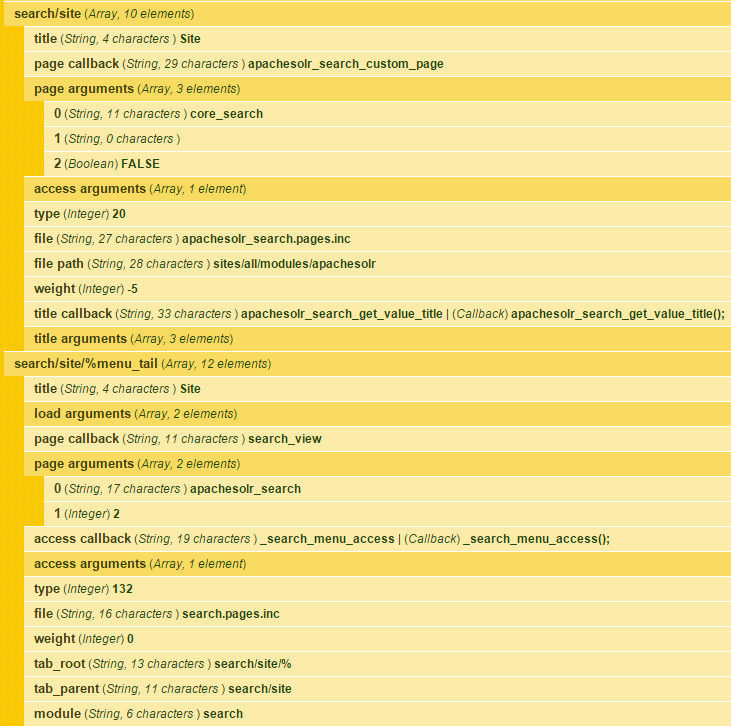
scottshipman commentedAS best I can tell, this is still an issue. Is it because drupal core search calls a seach_view function that looks for all modules that hooks search and in the case of apache_solr, hits this function below:
Which always returns attributes for core_search and its corresponding panel, regardless of what page you have configured to be the default. So you get search/site runs hooks on search, which always returns search/site as the override.
So, my question is, rather than always pass in core_search, should it look to see what page is configured as the default and use its machine id instead? Otherwise, you traverse into another function
But even though it loads all pages, it will only deal with the ones passed in (core_search). Where is the default configured page handled?
Comment #27
darvanenThis is definitely an active issue - though it may be a Chaos Tools issue rather than one for this module (?)
To reproduce this error on a brand new site:
This resulted in a redirect loop and caused the following error:
The use-case here is any attempt to have Panels render the Apache search page when Apache is the only active search module. In fact, this happens even when the other search modules are active. I do not think this is a particularly narrow use-case.
#25 is a reasonable work-around though it leaves the secondary search page active (in that comment the example given of "search/basic")... unless you want to use facets, because the facet panels provided by the facet API redirect the user to the apache search page.
EDIT: The workaround probably works with facets if you set your secondary search page to 'default'. I haven't tried it.
Comment #28
darvanenOk, I have tracked this down to this module, not Chaos Tools, because apachesolr_search is only changing the page argument for /search/site/%menu_tail and not /search/site when it creates a path.
The "core_search" argument gets passed to Page Manager when a user tries to access /search/site and because it is disabled Page Manager gets caught in a loop.
I'll come back to this tomorrow and see if I can figure out how to make apachesolr_search affect the path that contains no keywords, and whether that is a good idea, or not.
Comment #29
darvanenFound a few things:
$path/%menu_tailwhich, funnily enough, tricks Page Manager into allowing users to override the included 'core_search' path (but not others).$path/%which page manager knows nothing about and doesn't try to overrideI tried changing a few things at the apachesolr end and everything broke.
I was successful in making some very minor changes to the ctools search plugin that break the 'node' search but otherwise seems to work for this use-case.
WARNING: This patch breaks normal Drupal core search.
NOTE: This patch is for Chaos Tools, not Apache Solr. I am sharing it as a work-around for those that wish to use Apache Solr Search as the ONLY search type and render the page using Page Manager.
I think the next step will be to try and create a working plugin for Chaos Tools within this module to avoid breaking core search.
Comment #30
ReBa commented#29 worked for me.
Although I enabled my page in the page manager, the default results page was rendered. So my enabled Site page was never reached.
Only if I went to /search/site in stead of /search/site/!keyword, I got the redirect loop error (firefox, chrome, safari).
As I see it, the work (and research) of Darvanen really adds up with my problem. I've been looking into the code and everytime I got to the search.inc file (around line 216), but I am using the stable 7.x-1.7 version.
Comment #31
jenlamptonThank you @Darvanen for the patch in #29. I'd love to work on this more since I now have several sites suffering from it. Have you posed this over in the ctools queue, bychance?
Also a note to others suffering from the problem, the patch above does not make the page manager handler for Apache Solr work, it does just the opposite. It stops page manager from trying to take over the Apache Solr search page like it does for all the other search pages. If you actually want Apache Solr to work with panels, you'll need to choose a different URL for your search pages. (See the README in the Apache Solr Panels module for more info on that)
Comment #32
darvanenHi Jen,
I have not done so as it breaks normal core search to fix a problem with a specific use-case (solr). I think it would need a lot more work to undo the discrepancies between ctools and core when it comes to handling the menu-tail.
There may even be significant reasons they chose to go down that path, I'm not sure.
I would certainly welcome the change though. I am no longer in charge of any sites using solr so I may not be able to assist as much with testing as I would like, happy to help however I can though, best of luck!
--I was able to use panels to render my solr search page (and the facets) using this patch, perhaps it is not complete?
Comment #33
mpaler commentedTwo years on...and I am still observing this behavior. Not sure if any fixes to this issue have been stitched into this module or ctools or what, but here's how I fixed it without patching anything...