

 Come together with the global Drupal community in Rotterdam, 28 Sept – 1 Oct 2026. Sessions, contribution, connection, and Early Bird savings until 8 June.
Problem/Motivation
From #2962110-102: Add the Media Library module to Drupal core:
Grid vs. table? Why do we still have both? Seems like a stable blocker to unify this, but not a blocker for beta.
This was replied to in #2962110-115: Add the Media Library module to Drupal core:
From accessibility/UX review we found that the table is always going to be preferred for users using screen readers that can better parse table markup, and for more technical users that want to show more metadata than the Grid is able to nicely handle. We could make this configurable and only show the Grid by default on new installs in a follow up, if showing both isn't desirable.
Let's get this hashed out.
Proposed resolution
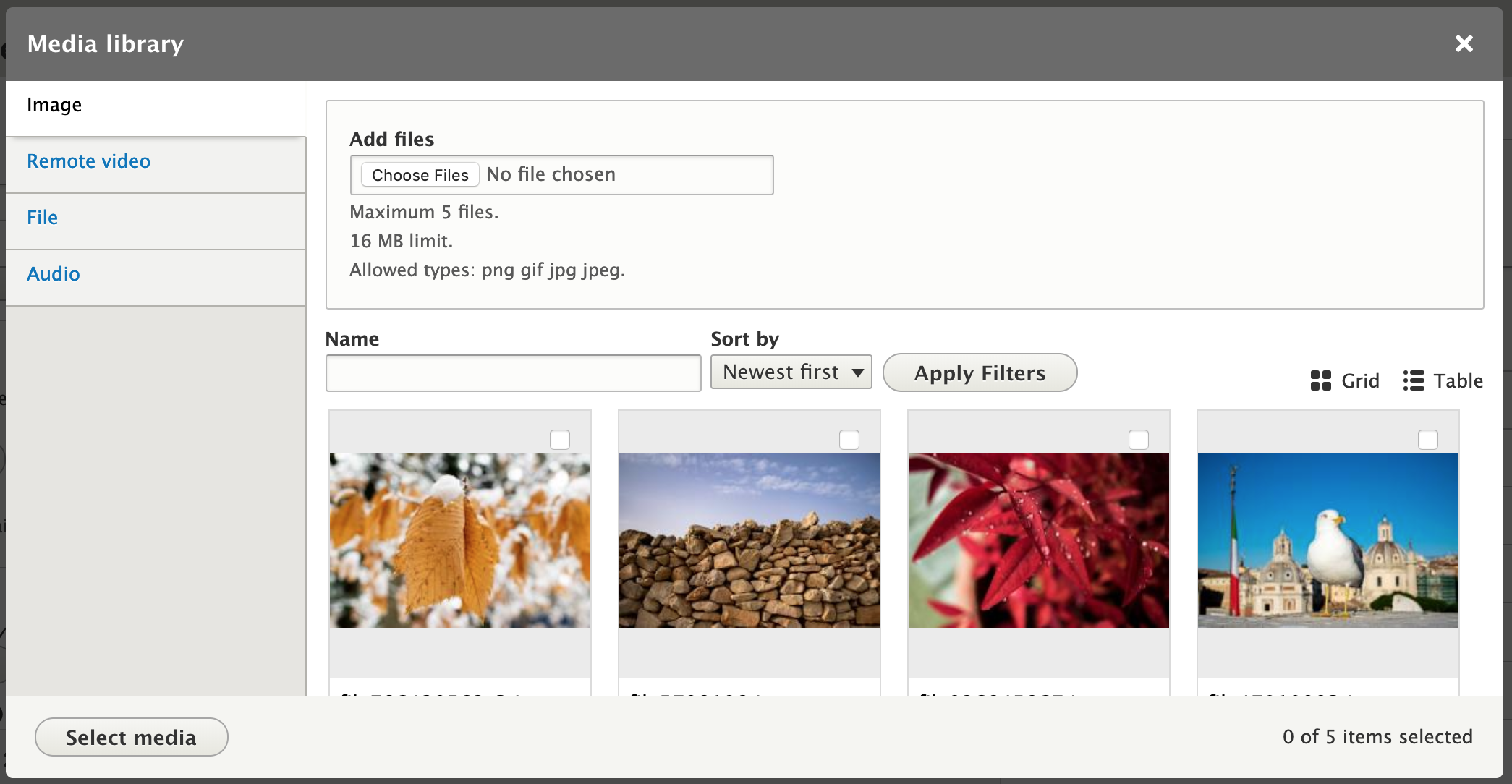
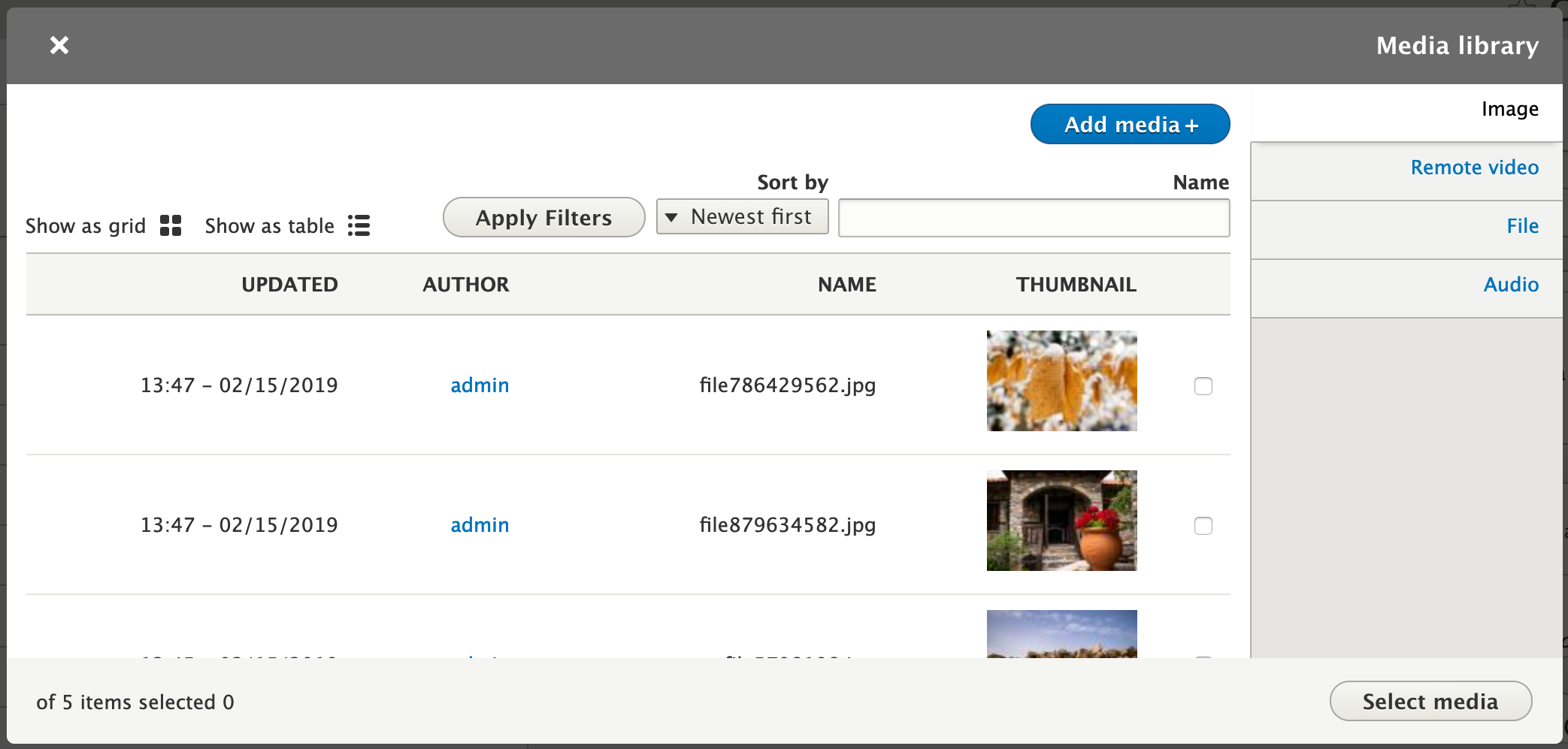
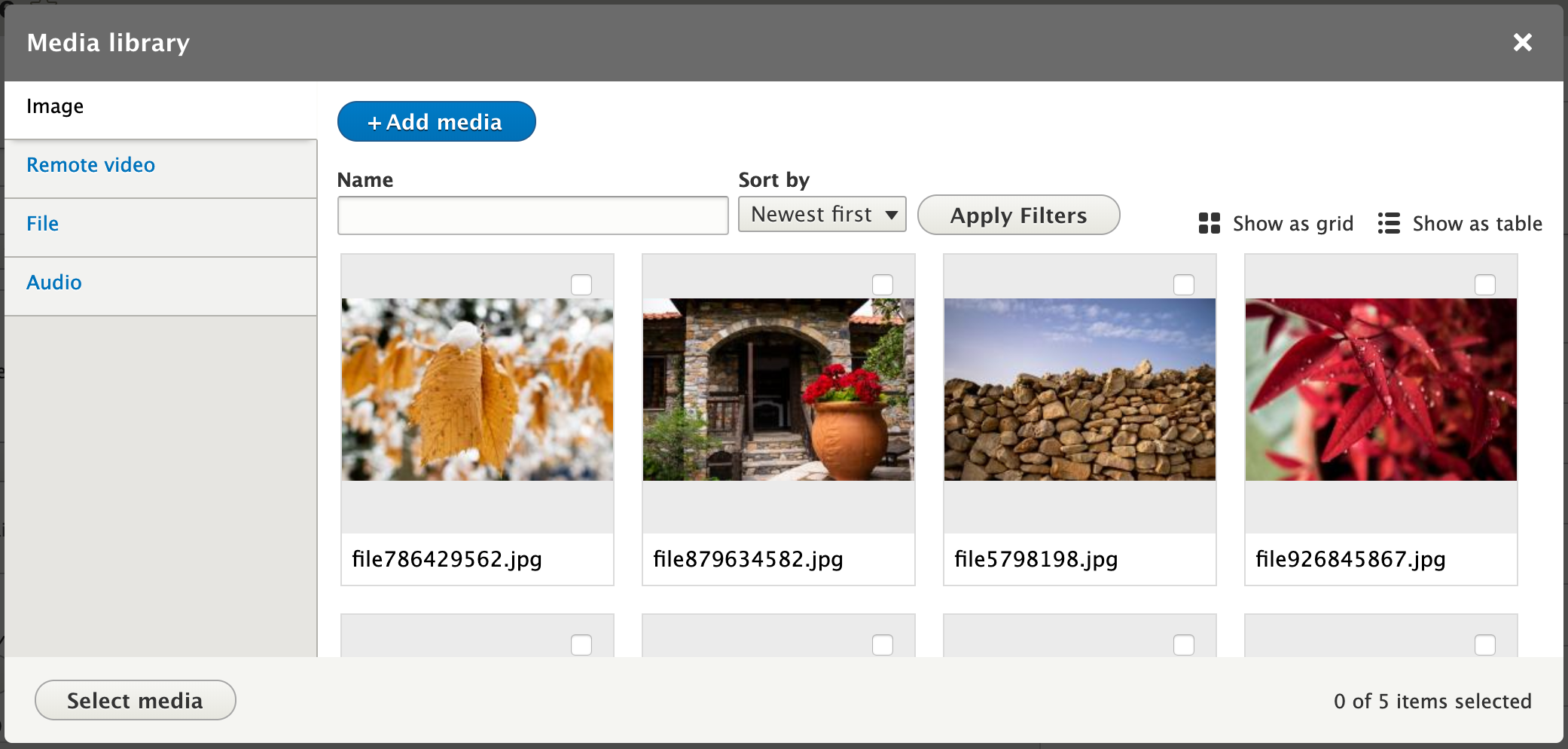
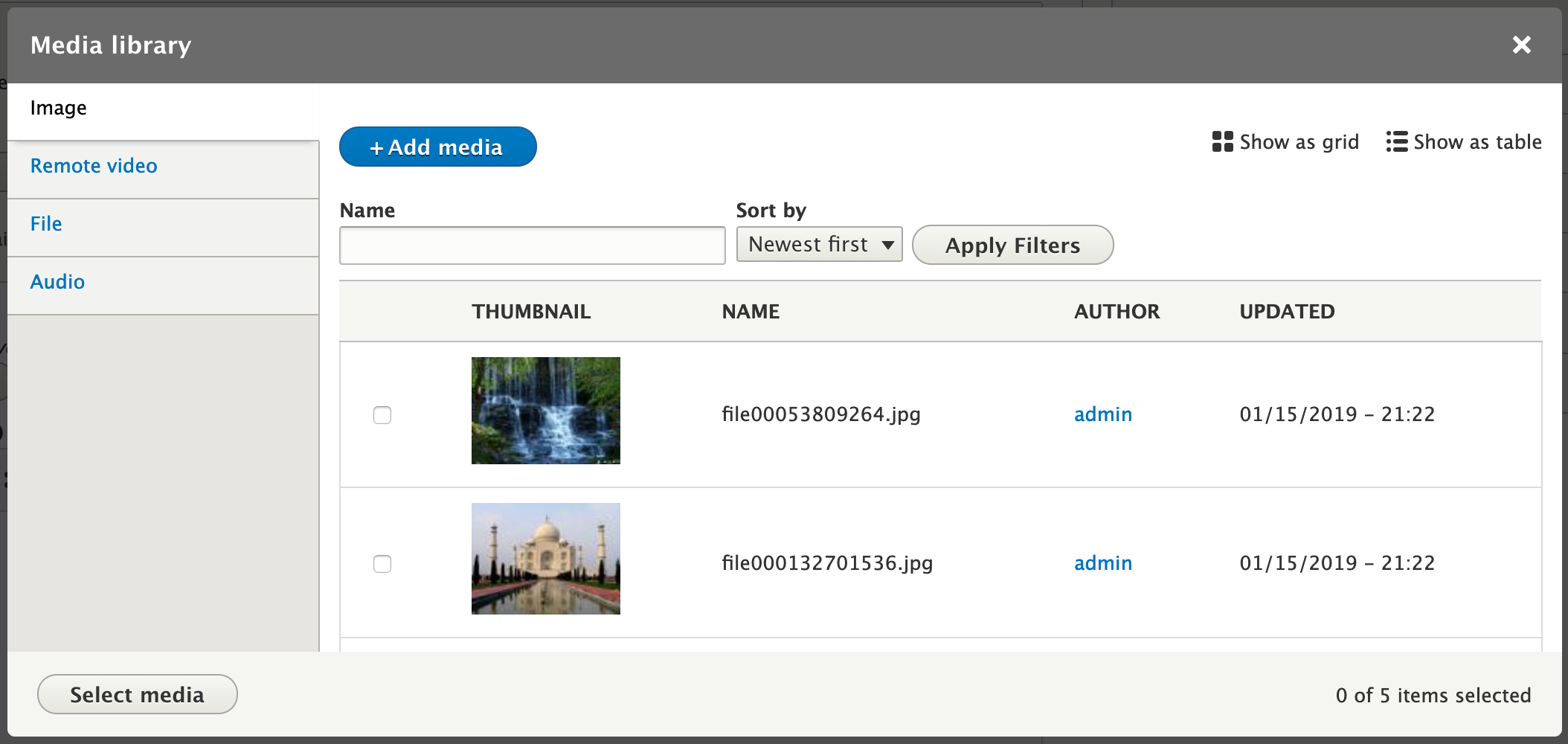
Allow users to switch between the grid and table display of the media library results.
Use the new views area plugin for display links added in #3025657: Add views area plugin to display a link to another view display within the same view.
Remaining tasks
Review patch.
Commit.
User interface changes
Screenshots and video of #66:
https://www.drupal.org/files/issues/2019-02-27/media-library-grid-table-...
Grid display
Grid display (RTL)
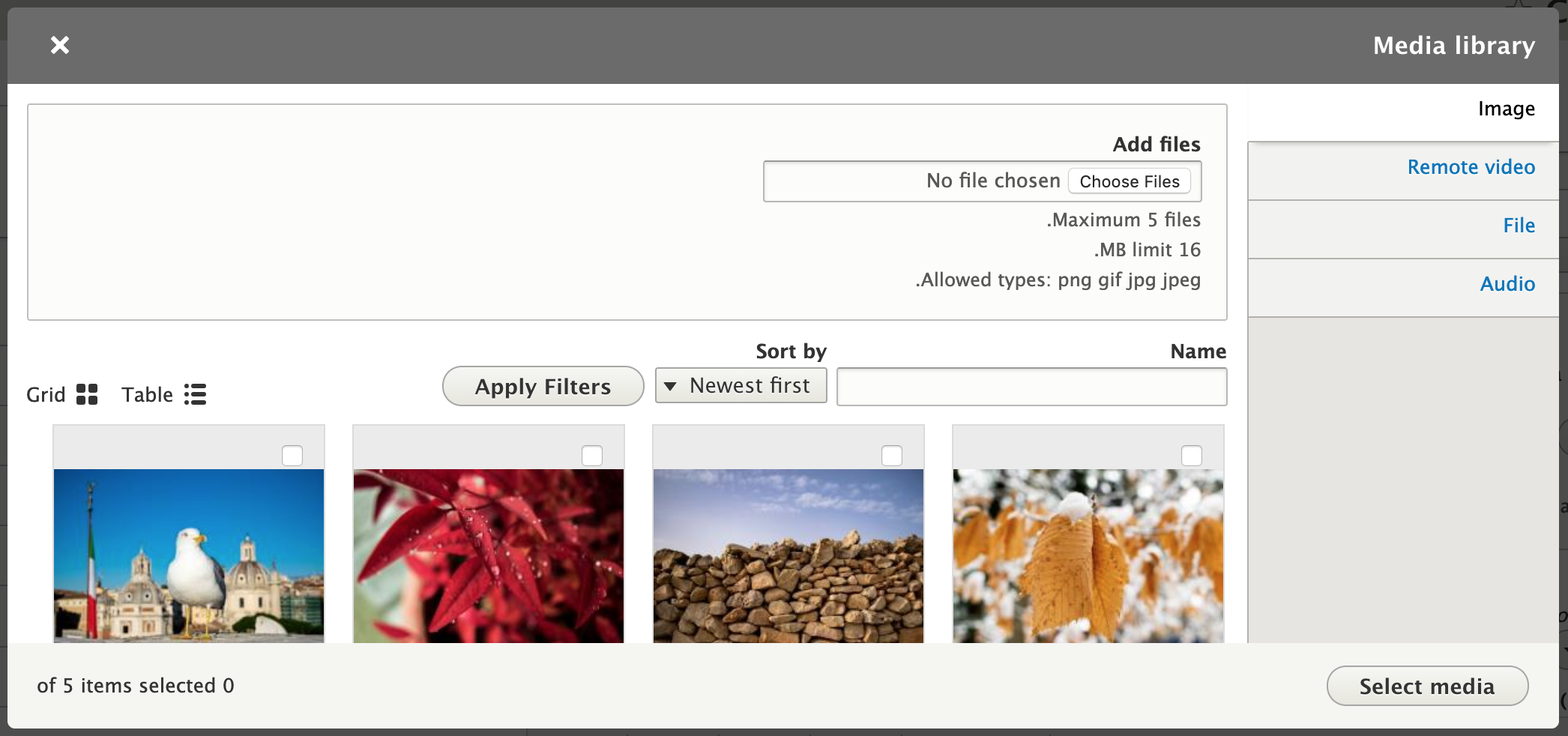
Table display
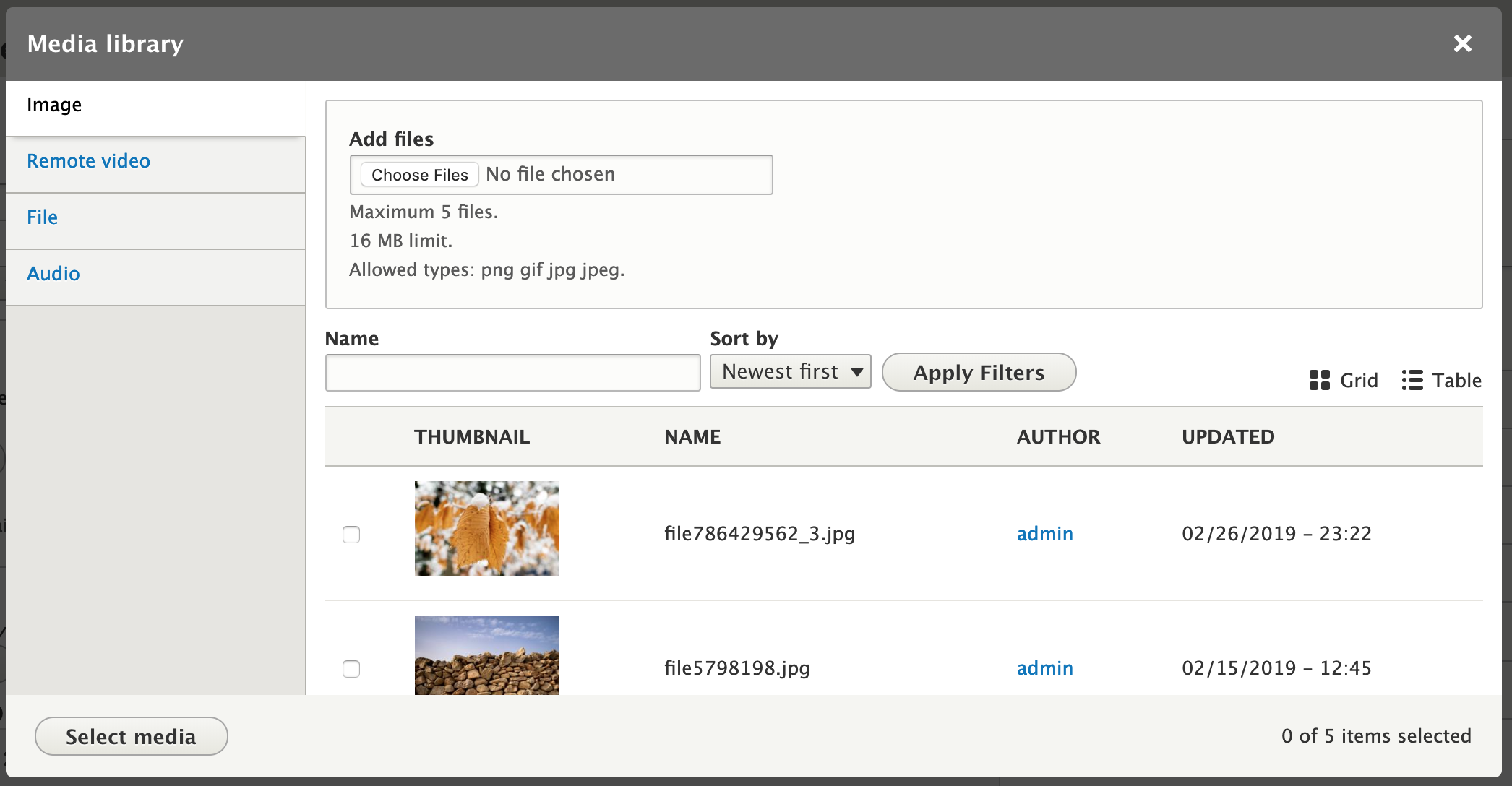
Table display (RTL)

API changes
None.
Data model changes
None.
| Comment | File | Size | Author |
|---|---|---|---|
| #82 | 2981044-77-reroll.patch | 100.73 KB | seanb |
| #77 | 2981044-77.patch | 100.72 KB | seanb |
| #77 | interdiff-69-77.txt | 8.74 KB | seanb |
| #69 | 2981044-69.patch | 100.77 KB | seanb |
| #69 | interdiff-68-69.txt | 404 bytes | seanb |














Comments
Comment #2
phenaproximaThe blocker is in.
Comment #3
phenaproximaCopying relevant accessibility feedback from #2962110-127: Add the Media Library module to Drupal core:
Comment #4
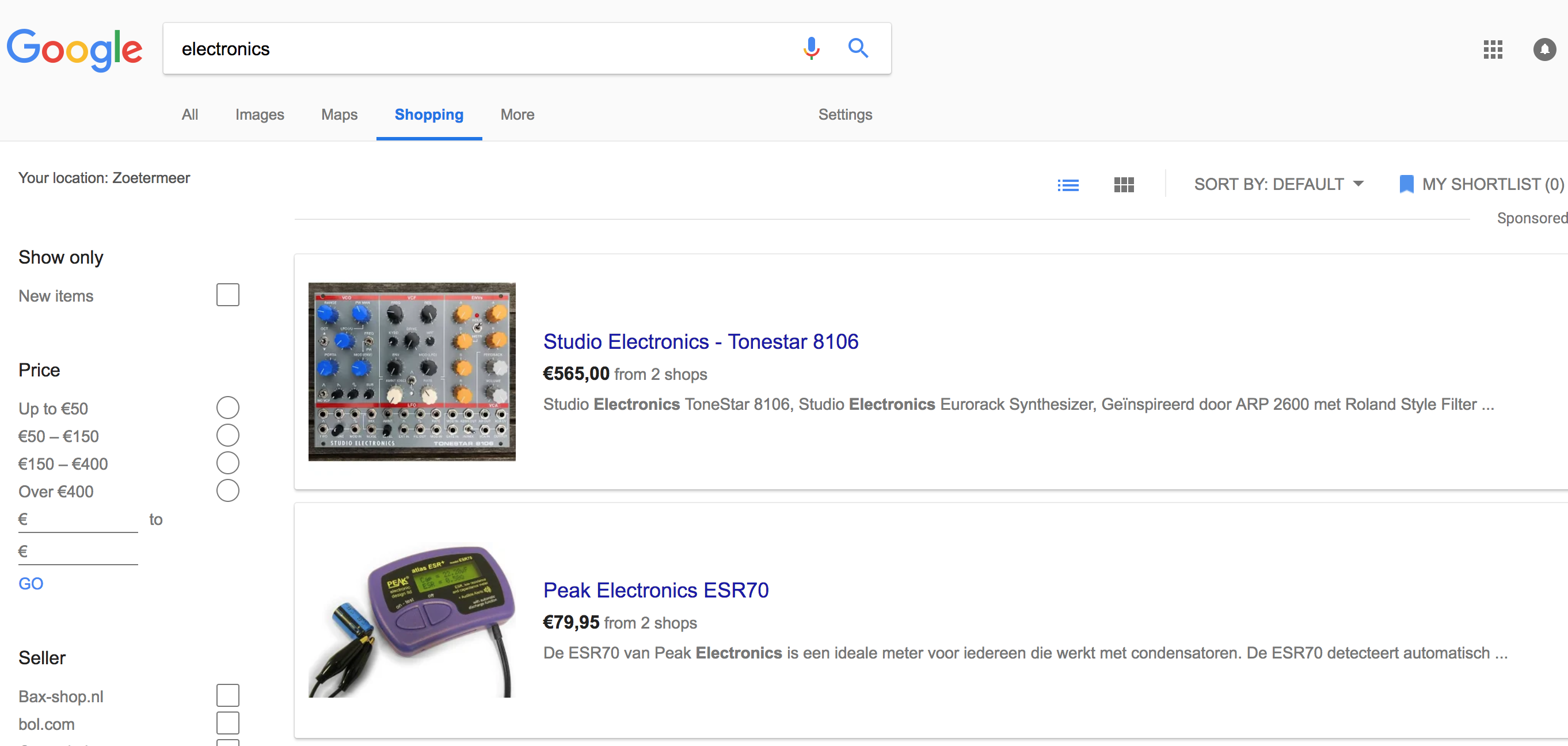
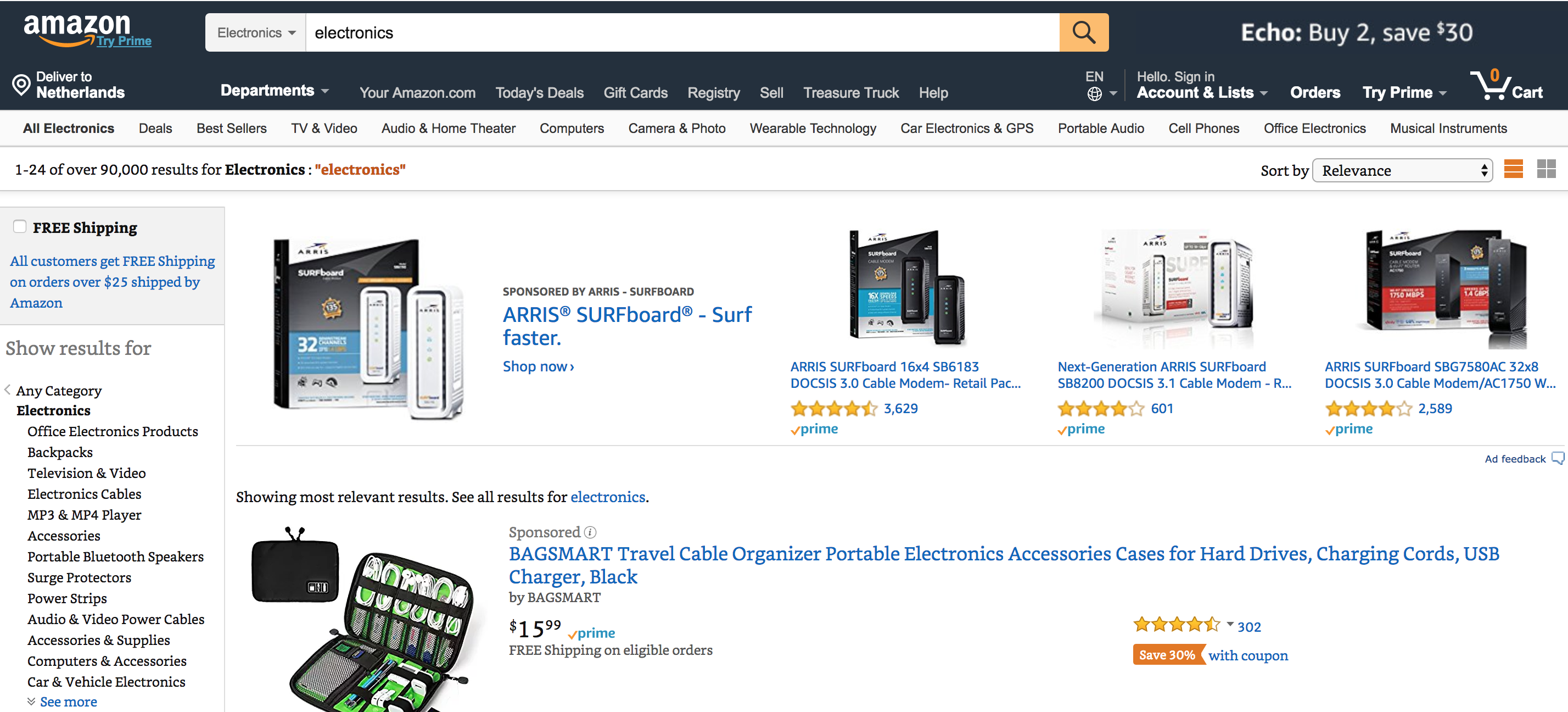
seanbIt would be nice if you could link 2 views displays as a grid/table display and handle this through views in a generic way. There are a lot of views besides the media library that could benefit from this. Below are some examples from major shopping sites.
The media library view is now separate from the regular media overview. That might be a problem, but I guess in the future it would make sense to merge the 2 views together.
Comment #5
marcoscanoAs per the accessibility feedback received above, it looks like having both options available by default is a good solution (which I personally agree with). In this case, is there anything else this issue is trying to solve?
#4 mentioned the fact that the two views are separate right now, but I don't really see an issue with that. If we want to avoid the tabs as a mechanism to toggle between grid/table view, we can easily add a Text area header to both views, containing the two links, and style them to look like the toggle icons that users are familiar with (such as in the screenshots above). But I'm not sure there is a strong need to remove the tabs, IMHO.
Is anything else needed here?
Comment #6
phenaproximaGood question; marking for usability review so we can get a canonical answer here.
Comment #7
phenaproximaOh, and accessibility review.
Comment #9
seanbJust closed #2973162: allow users to toggle between the media library grid and the old table-based list as a duplicate. This is a copy of the IS that contains important information from @andrewmacpherson.
----------------
Problem/Motivation
Follow-up from comments #80 and #97 in #2834729-87: [META] Roadmap to stabilize Media Library.
Misc benefits...
Proposed resolution
Provide a way to swap between the table and card-grid views of the media library.
MVP could just be a pair of views displays configured using the secondary tabs functionality.
A more advanced approach could preserve filters and bulk-operations selections when switching displays.
Comment #10
andrewmacpherson commentedComment #11
seanbJust discussed this with phenaproxima and lendude on slack. We came up with the following solution.
We are going to create a new area plugin where you can link view displays together. We only allow a display to be linked if:
We render links to the other displays in the view area and pass the filters/arguments/pager when a link is clicked. This would mean you get the exact same result, but showed differently.
Comment #12
andrewmacpherson commentedRe: #11...
To clarify, does this mean:
What problems would arise if they:
For bulk operations selections, can a user have selections spanning more than one page's worth of results?
I can imagine that a table (with small thumbnail images) may be able to accommodate more results in a page/viewport than a card-grid (with larger images). It depends on the particular dispay settings, but in principle I don't see why a listing couldn't swap between a 4-column grid of 20 results per page, and a table of 50 results per page. That may be the feature that makes switching displays useful to a user.
Comment #13
phenaproximaYes. Same plugin and configuration. If they use a different plugin on the other display, or change the settings, we will simply not render the link, and we'll display or log an error/warning about it.
Comment #14
seanbWhile I agree that a table display is suited to show more results, what should happen when a user navigates to page number 3 and the displays are showing a different number of items? The first/top result for those displays would be different and probably confusing.
The only way we can guarantee both displays are showing the exact same results is when the filters/arguments and pager settings are equal.
Core currently doesn't support that.
Comment #15
seanbCreated #3025657: Add views area plugin to display a link to another view display within the same view and this is blocked on that issue for now.
Comment #16
phenaproximaComment #17
seanbThis is a first patch to add the views display and the header links based on #3020716: Add vertical tabs style menu to media library and #3025657: Add views area plugin to display a link to another view display within the same view.
Comment #18
dwwnit: @see https://...
Otherwise, all looks good to a quick skim. I haven't applied locally and tested manually, but the screenshot looks nice. ;) Good to have code for the original use-case in core for #3020716: Add vertical tabs style menu to media library.
Thanks,
-Derek
Comment #19
phenaproximaThe blocker is in! We can have this with or without vertical tabs, so let's get 'er done.
Comment #20
phenaproximaNow that #3020716: Add vertical tabs style menu to media library is in, I've queued the patch for re-testing. I think we can get this done.
Comment #22
phenaproximaOkay, then!
Comment #23
seanbRerolled, plus the following changes:
Interdiff is probably not super helpful but added it anyways.
Updated and added screenshots to the IS.
Comment #24
seanbComment #25
phenaproximaWhy is this only applied to the table display?
Do we also need RTL styles for these?
Why are we bothering to check the display ID? I would imagine we'd want to run this logic on all displays of the media library.
Can we put a
$options = &$variables['options']at the top of this function, for readability?Same here -- why bother checking the display ID?
I'm pretty sure the display_link plugin we added allows us to set a CSS class, can't we use that functionality instead?
Same here?
Comment #27
seanb#25
1. I don't think it is?
2. Fixed. We do :). Screenshots in the IS.
3. We only want this for the media library widget displays, not for the admin/content/media display in the same view.
4. Fixed.
5. See 3.
6. That can only be done via a template. And we can't add templates to seven for the media library yet :(
7. See 3.
Also think I fixed the tests.
Comment #28
seanbComment #29
seanbFixed a small RTL issue and webchick noticed I somehow managed to use the grid icon for the table link and vice versa. Should be fixed now. Also updated screenshots in the IS.
Comment #30
dwwMinor quibble: since the grid is responsive, I've found that multiples of 12 are best for these sorts of things, since that's evenly divisible by 1, 2, 3, 4 and 6. :) As you view at different widths, you basically always get full rows of items. 25 is only evenly divisible by 5, so there's only 1 magic width where you see a "full" grid. What do y'all think about standardizing on 24 for both of these displays? If you have 24 items, and you happen to be at the 5-wide width, you still get a mostly-full last row, and all the other possible widths always give you full rows.
Thoughts?
Thanks!
-Derek
Comment #31
seanbWhile working on a demo, I noticed the
.media-library-itemclass used to style the grid was also applied to the table. We shouldn't do that, so added a separate class for the table. Also made sure the JS uses thejs-*class.Regarding #30: I totally agree! Not sure why this hasn't come up before? Let's do this in a follow up though, since this should get UX sign-off, front-end FM sign-off, and an update path + update path tests.
Also found another issue with the views DisplayLink plugins. Created #3033404: Views DisplayLink area plugin tries to use non-existent theme hook for that.
Comment #33
dwwRe: #31: Follow-up at #3033442: Use 24 items per page for better responsive grid behavior
Thanks!
-Derek
Comment #34
seanbFixed the tests. Also simplified the CSS selectors a bit and made sure the links are close to the view. That makes a lot more sense.
Updated the screenshots in the IS and added a video.
Comment #35
seanbReroll now #3023802: Show media add form directly on media type tab in media library has landed.
Comment #36
phenaproximaI don't know if I like the use of 'widget' in the display ID or label. I think we should probably just call these 'grid' and 'table', respectively, and have the labels be "Grid" and "Table". However, I'd say this is follow-up material.
I'm not sure we should be using the 'thumbnail' image style here, now that we ship with our own dedicated one.
It seems like just calling this .media-library-select-all is a good idea.
Isn't it possible to assign a class to the view using Views itself, rather than a preprocess function? I seem to recall this was possible at some point, if not still...
This is awkward, but there's no other way to do it. I think it could benefit from a comment, though.
This almost seems like strpos() would be better here.
Comment #37
seanb#36
1. Since the view also contains admin/content/media (and maybe the table display for that as well), I guess having the widget prefix is good to differentiate between the displays.
2. Fixed.
3. Afraid not, the 'select all' checkbox should only be hidden in the widget, not on admin/content/media.
4. We need to force this ID on the view to make AJAX work for the grid/table links. We can only use ID as a selector.
5. Fixed.
6. Fixed.
Also removed
media_library_views_post_render(). This code breaks the previews in the views UI, and doesn't really do anything anymore since we have theMediaLibraryUiBuilderusingMediaLibraryState.Comment #39
seanbWhoops. Removed just a little too much.
Comment #40
phenaproxima"Author" is a strange term for a media item. How about "Creator" or "Created by"?
How about "Last updated" as a label here?
I wish we didn't have to go by display ID to create these selectors. Is there some way we could have a generic .media-library-view-display class to assign to both widget displays?
This could use a comment explaining where the #view_id and #display_id properties comes from. Also, why not use strpos() to check if the display ID begins with 'widget', rather than rely on a hard-coded list of displays?
Can we add a @see to the relevant code in the DisplayLink plugin?
Same question here about strpos().
Confusingly, strpos() takes its arguments in the order of haystack, needle -- which means this call's arguments are in the wrong order. The fact that we didn't catch this makes me wonder if a test (a kernel test would be fine) is needed.
We should bail out of the function if, for some reason, the view is gone. Either that, or we should give the view an enforced dependency on the media_library module.
This could use a comment.
This comment seems like it's missing a word or two.
What is this method testing? It seems like it's confirming that the Views override system works correctly.
Comment #41
seanb#40
1. The view from the media module also uses 'author'. The media edit page uses Authoring information and 'Authored by'. I think we should for now copy what we already have. Maybe a followup to discuss if this should be changed?
2. Same as 1.
3. Fixed. Added an extra CSS class to the grid/table displays.
4. Fixed.
5. Fixed.
6. Fixed.
7. Fixed. Added a test to verify the 'Apply filters' button is not added to the button pane of the dialog for the grid/table displays.
8. Fixed. Added a message to inform users they will probably need to reinstall the module of the view is deleted. I think we should have a followup to remove delete access for this view (and probably the displays as well!).
9. Fixed.
10. Not sure what happened there :p
11. Fixed. In a previous version, the update hook assumed the pager and sorts were still using the default, so they were not updated. Users could have manually overridden the grid display pager/sort settings. In this case we need to verify that the widget_table display copies its settings from the widget display (and does not use the settings from the default display). Added some comments to explain this a bit more.
Besides that, added
aria-live="polite"to the views container to make sure the new content is announced when clicking a display link.Comment #42
phenaproxima+1 for this, but I think the addition of this attribute could use a comment.
Reading the documentation for hook_post_update_NAME(), I'm wondering if this should not be an UpdateException. Do we consider this an error condition? (I'd say yes.)
Nit: Should be 'JavaScript'.
Comment #43
seanb#42 Fixed 1 and 3. I think throwing an exception is not the best solution here, since we would also stop other updates from running. This could potentially leave the sites in a state where they are not able to fix the problem. A missing view is not worth doing that imho.
Comment #44
phenaproximaMinor stuff, then this is ready for manual testing and (probably) RTBC after final review by Lauri. Tagging him in to review the CSS and JavaScript changes here.
Do we have a similar media-library-item-grid class on the items of the grid display? If not, maybe we should just stick with media-library-item here.
I wonder if this should not actually be moved into a method of the MediaLibraryState object, to keep things well-encapsulated. We could make it something like this:
A lot of the code in this method is kind of hard to read. Can we (should we?) add variables like
$grid_prefix = "display.widget"and$table_prefix = "display.widget_table"and use these repeatedly in the test?Same here?
I'm not sure we should have 'article' as part of this selector.
These can be $page->clickLink() for readability. Mink is smarter now and will throw exceptions, rather than die with fatal errors, if the links don't exist.
Comment #45
andrewmacpherson commentedThis issue just changes the content of the MediaLibraryWIdget, right? Is there another issue to do this to the page view at admin/content/media?
Review of manual testing of patch #41, with and without a screen reader.
That's way too overblown. This attempts to read the entire content of the view! Confusingly, the first thing it reads is the pair of buttons. one of which was just pressed. Then it reads everything else in the view. The attached screenshot shows the extent of the ARIA live region, using the browser's dev tools layout overlay highlight feature.
Think about what you actually need to convey:
If a blind person asked you "what just happened?", how would you answer in one short sentence? Study the way the toolbar module informs the user of a change in orientation; it doesn't read the entire toolbar.
You can fix this in one of two ways. Both involve ditching the CSS which controls the visual position:
WCAG technique C27: Making the DOM order match the visual order has further info about this.
Comment #46
seanb#44
1. Fixed. We should probably have a special
media-library-item--gridandmedia-library-item--tableclass. This would also make the CSS a lot more clear since was a little confusing that themedia-library-itemclass adds only grid specific styles.2. I don't think we should do that. Same reason we decided the dialog options don't belong in the state.
3. Fixed.
4. Fixed.
5. Fixed.
6. Fixed.
#45
1. Fixed. Removed the aria-live attribute and added Drupal.announce() messages.
2. I've added @todo messages to fix this when the media library is stable, since we can't override the views template from a module. We also can't add a template to seven for a experimental module. It will be either a UX / design issue or an a11y issue. Not sure what to do now?
3. The media library widget doesn't work without JS, but technically the displays are page views that work outside of it. Leaving this for now.
Comment #48
andrewmacpherson commentedRe. #46
Focus order:
Hmm, I understand the issue with templates, but that gives us a chicken-or-egg problem. Focus order issue is a WCAG level A problem, and that's a blocker for the accessibility gate. We can't mark it stable.
The other approach is to remove the CSS which hacks the visual order. Do the table/grid buttons really have to appear after the filters in the visual order? I don't think it matters a great deal which one is above the other, but the focus order jumping up and down isn't good.
Announcements:
Getting there, but these are still a bit verbose. The outcome message is over twice as long as the button text. Can you think of a shorter message?
Also, what exactly does "content" mean here? I thought these buttons just changed the presentation. This message might be misinterpreted, as meaning that different media items are being shown.
This message is useless. In what situations does it get used?
+ Drupal.announce(Drupal.t('Loading media library content.'));This is vague. What situation is it for?
This comment makes it sound like an awkward workaround. Can we use the new AnnounceCommand here, and keep the message logic on the server side?
Comment #49
andrewmacpherson commentedManual testing of patch #46:
TODO: It will be better if focus remains on the button that was just pressed. It seems the view filters and display buttons are all replaced as well as the view results, so it will need some way to remember the button which was pressed, and restore focus to it programatically. Aside, we could do with a generic method to say which element get focus after AJAX responses.
Overall, these messages are OK, but we should aim to reduce the verbosity. When they add up, it's overkill. We hear the phrase "media library" three times as a result of one button press.
The "loading" message is the one that bothers me most. If the response comes quickly, say within a second, the "loading" message isn't needed, and possibly annoying. But if the response is slow, the message tells the user something is happening. That sounds great in principle, but we aren't doing this for AJAX requests anywhere else. For example, when pressing "apply filters" we don't have any similar "loading" message for screen reader users.
For now, leave the loading message in place. It's a bit out of place compared to the rest of our AJAX UI, but we can clean it up after we have a generic approach. (Elsewhere, there is an issue to convey AJAX progress messages to assistive technology. I'll dig that out, it has a patch I think.)
Comment #50
andrewmacpherson commentedThe generic AJAX progress accessibility issue is #2973140: Convey AJAX progress messages to assistive technology..
That's would be a good issue to treat as could-have for Media Library, so I'll add it to the roadmap. By my count there are 3 ajax behaviours in the media library widget that can benefit from this: changing tab, changing filters, changing to grid or table.
In any case, we can update the patch here with a @todo before the "Media library content is loading" message, to change it after the generic approach is ready.
Comment #51
panchoJust a comment to the possible followup:
I know that for now we settled with Author, which is ok for the moment. However, from the fact that someone uploaded a media item we can‘t infer the user is also the author or creator of the media.
Now you might say that the same argument holds for text content as well. True, however less so. Finally, we‘re providing tools to create new textual content, while our tools don‘t support actually creating AV media. So the chances someone else is the actual author/creator are infinitely higher. Furthermore, the level of originality tends to be higher for AV media.
Therefore, the correct term for media might be „uploader.“
Comment #52
seanb#48 / #49 / #50
I'll leave it up to product managers to make a decision on what to do. We already have stable blockers that can only be fixed after/when the module is marked stable. If we need to fix it now, we need to have a new design for the placement of the links until we mark the module stable.
1. Changed the messages to 'Changed to X view'. Hope this helps.
2. Showing a default message if the data attributes are missing might not be helpful at all, so removed it. Site builders can technically add more display links and not add a data attribute with a message, but that might be their responsibiity.
3. Changed the messages a bit and added the todo's.
4. We have #3026636: Allow AJAX links to replace a specific selector to add support for more advanced use cases to AJAX links #3033150: Add feature parity for consistency between AJAX links and the Form AJAX API. Until then we have to do our own thing, since improving the AJAX system in general is not a direct priority. Implementing a custom controller for this to do everything server side adds a lot more complexity, and should ideally not be nessecary.
Comment #53
seanbI think this strongly depends on the context, but I can see how this can be confusing to users. What we actually mean is "user that created the media entity". This is not necessarily an upload (for example, Youtube videos are added via URL). I think the generic term for users that create something in Drupal is currently 'Author'. Introducing different term for different entity types is probably not the best idea. If we want to change this, I think we should look at generic terminology for "user that created an entity" and change it everywhere to avoid confusion.
Comment #54
andrewmacpherson commented#52...
The @todo for #2973140: Convey AJAX progress messages to assistive technology. only relates to the loadingAnnouncement I think?
Comment #55
andrewmacpherson commented"Loading grid view. Changed to grid view." and "Loading table view. Changed to table view."
Those are much better messages, call that part done :-)
Comment #56
seanbYou are right! New patch attached.
Comment #58
seanbForgot to pull into the branch when making #56. Here is a reroll of that exact patch. Interdiff of #56 is the only change since #51.
Comment #59
seanbMentioned in #45.2 and #48.
The response in #46:
Either we fix the DOM order when the library is stable, or we fix the design when the library is stable and implement a different design until then. I think we need a product manager to make a final decision on that one. We unfortunately can't have both.
Comment #60
phenaproximaThe code looks pretty good to me, honestly. Only a couple of questions remain, then this can go to through the various sign-offs it needs.
I'm surprised we even have drop buttons in the grid view. Can this get a comment?
Isn't this stuff part of #3023801: Allow newly uploaded files to be deleted from the media library without saving them?
I wonder if these attributes might not be better named 'data-ajax-*-announcement', to clarify that they are specifically there for the AJAX system to use.
This should be elseif.
Comment #61
seanbFixed #60 and some code style things. Also added extra asserts for the announcements.
Comment #62
seanbRerolled #61.
Comment #63
lauriiiLet's add a comment that these properties are for LTR.
We can override the background-position without overriding the image.
This needs RTL styles.
We should ensure these IDs are unique.
There's a regression in the spacing of the field widget grid.
The remove button positioning is not correct in the field widget.
There's sideways scroll on the dialog.
Removing the tag but I'll keep my eyes on this 🧐
Comment #64
phenaproximaWe went over this in the UX call today, and we have a bunch of useful feedback! Generally, it was well-received, but for a couple of things:
Firstly, the double use of the phrase "Show as" is repetitive. We can just have those links say "Grid" and "Table". @andrewmacpherson agreed that this is okay from an accessibility standpoint ("brevity is good"). Additionally, this keeps the links consistent with the local tasks that are already present at /admin/content/media.
Regarding the tabbing order snafu: this is a tricky chicken-and-egg scenario, and we discussed it with @andrewmacpherson and the product managers. Having the tab order match the visual order is A-level WCAG criteria, but we cannot actually fix this for realsies until Media Library is stable and can therefore add an accessible template to Seven. Although it's an important problem, it doesn't render the media library unusable for users who rely on assistive tech; it just makes it frustrating. So here's the plan: we will commit this issue as-is, but first we will open a postponed major follow-up to add an accessible template to Seven, after Media Library is stable. That issue may become a release-blocking critical for Drupal core, since it addresses a A-level WCAG criteria. @webchick OKed this plan, so I'm removing the "Needs product manager review" tag.
Comment #65
andrewmacpherson commentedYep, the follow-up template plan from #64 has accessibility maintainer sign-off, but I'd like to clarify that we first need to know that the follow-up is actually feasible.
So it would be a good idea to develop the patch in the follow-up issue, while this issue is still being worked on. That way there could be something ready to go as soon as the module is stable, and minimize the chance of encountering a gotcha after marking media library as stable.
I'll add a note in the roadmap issue, about the special handling of the accessibility gate for this issue.
Comment #66
seanbUpdated screenshots and video in the IS.
#63
1. Fixed.
2. Fixed.
3. Fixed.
4. If we do that, the IDs will not be the same after the view has loaded and the focus will not be set back on the link. So I guess that is going to be a problem.
5. Fixed.
6. Fixed.
7. Fixed. This was caused by the label for the checkbox having a table display and visually hidden class.
#64 / #65 Changed the link labels and created #3035994: Add a Media Library views template to Seven theme to change to order of the views header and exposed filters
Also added back code in
media_library_views_post_render()that I removed in #37. Turns out I was wrong and we need that code when you apply filters and/or sorts. We apparently had no tests that filter a view, select some media from the filtered results and inserts that to the widget. So I added this to make sure this doesn't happen again.Comment #67
phenaproximaLooks like we have all the required sign-offs and approvals. So all we gotta do is fix these code nits, and I'm ready to call it RTBC.
Can we get a comment as to what this is targeting, and why?
For consistency, can the LTR styling use 'left 0' for background position, so that the RTL styling echoes that?
Should be "The AJAX link replaces..."
This isset() call should probably also check for the existence of $variables['element']['#display_id']. To make this more readable, we could add a line above this like
$element = &$variables['element'].Should be "The AJAX link replaces..."
Can we rephrase the second sentence a bit? How about "This view must exist for the Media library module to work properly."?
Let's add a @see ::updateWidget() here so it's clear where the view is being used elsewhere in this class.
Why were these removed?
This might make more sense with $assert_session->elementsCount().
The comment should come before the elementExists() call.
This should be $assert_session->linkExists().
All of these wait* methods return NULL if the thing they are waiting for does not show up. So we need to wrap these calls in $this->assertNotEmpty().
Should be $assert_session->linkExists().
These also need to be wrapped in assertNotEmpty().
Can this also use elementsCount()?
linkExists()
I think this can just be $button_pane->pressButton('Select media').
Comment #68
seanb#67
1. Fixed, removed it. I honestly don't know why it was there. There is no primary button in the view anywhere, could be a copy/paste thing from #3023797: Let users choose what to do after selecting and/or adding items in the media library (where we introduce primary buttons).
2. Fixed.
3. Fixed.
4. Fixed.
5. Fixed.
6. Fixed.
7. Fixed.
8. Closing the dialog does not start an AJAX request.
9. We want to now if the page contains the table display, isn’t checking for it’s existance clearer than checking of the number of elements with that class is a certain number?
elementNotExistsis also slighly more optimized.10. Fixed.
11. Fixed.
12. Fixed.
13. Fixed.
14. Fixed.
15. See 9.
16. Fixed.
17. I guess in this case we can, but we use
$assert_session->elementExists('css', '.ui-dialog-buttonpane')->pressButton('Select media');9 more times in the test. Maybe consistency is a little bit more important here?Comment #69
seanbWhoops! Found 1 minor code style thing (somehow CSS Comb adds this newline constantly).
Comment #70
phenaproximaOkay, that interdiff satisfies me just fine.
I've now read this patch multiple times; it has been demoed to the UX team more than once; @lauriii has signed off on the CSS and JavaScript; we have expanded test coverage; @andrewmacpherson has given extensive accessibility feedback and we have a solid plan in place, with the blessing of the product managers, to address the DOM ordering issue (with a triaged critical follow-up once this module is stable). I don't think there's anything else to do but land this thing.
Comment #71
larowlanThis is looking good, really nice UX...raises the bar for Drupal admin experience.
is there a performance cost here...not sure its as bad as on a link (story for another day) - but we should profile this - I think a lot of form elements will end up going through this hook.
looking at
\Drupal\views\ViewExecutable::buildThemeFunctionsit adds theme suggestions based on tags on the view - can we explore that?And yep, I know
\Drupal\views\Element\View::preRenderViewElementis a pita in so far as it adds the 'container' theme wrapper. (our current starter theme at work includes alter stuff to get rid of that by default, because it naffs flexbox and other things)I guess first step would be to profile the impact this has before we go too far
oh..speaking of links and performance. This is almost certainly a performance hit - that we need to profile - this runs for every menu link...and on big sites...is a huge drain in my experience
Options I think we have here -
1) we could add 'class' and 'id' support to the existing plugin, but it wouldn't help with the announcement data attributes
2) we could add custom area plugins just for media (and extend from the existing display link)
3) we could add a new alter hook in display link - ie. more specific than 'link_alter'
Thoughts?
Comment #73
phenaproximaI installed Blackfire tonight and did some light profiling of this patch.
The machine in question was my personal MacBook Pro, which has 16 GB of RAM. I did this using the
drush rsweb server on PHP 7.3.2 using a SQLite database. I installed Drupal cleanly with the Standard profile after altering my settings to completely disable caching, as per the instructions at https://www.drupal.org/node/2598914. For good measure, I also uninstalled the big_pipe, page_cache, and dynamic_page_cache modules, and then installed admin_toolbar in order to artificially increase the number of links on the page. Then I logged in as admin (so I'd see the toolbar) and ran two profiles.The first one was without Media or Media Library installed: https://blackfire.io/profiles/e653480b-b9c5-480a-830f-0bbd20feafdc/graph
The second was with this patch applied (minus the rejected hunks, which were just in tests), plus Media Library (and therefore Media) installed: https://blackfire.io/profiles/e27cd020-a164-4587-a6f1-8798b0cffe9a/graph
Here's a comparison of the two: https://blackfire.io/profiles/compare/73be5658-0733-4001-8e47-98f0d16ca0...
TL;DR: I'm very new to profiling, so I don't quite know what to make of this, but one thing that leaps out at me is that the second run took a full .4 seconds longer than the first. If this is the fault of the hook_link_alter implementation, then that seems like something that could very likely cause serious performance problems at scale, if it had so dramatic an effect with a rinky-dink nothing site like the one I tested with...
Tentatively removing the "Needs profiling" tag.
Comment #74
phenaproximaIf this does turn out to be a performance regression (I leave such judgments to the experts), I want to state for the record that my preferred option is:
To me, this is the least disruptive thing we could do: we just gotta add a new, internal plugin with some hardcoded extra goodies -- don't even need additional tests, since we're basically just changing implementation details -- and do another round of profiling to prove the regression is gone. Sounds pretty good to me.
Comment #75
seanbEven though custom area plugins for media would probably be the quickest way to solve this, I'm not sure if users configuring views would understand why they have 2 plugins doing basically the same thing.
I think a custom alter hook for display links would be a better solution. Added #3036694: Add hook_views_display_link_alter() to allow modules to alter view display links. for that. It would also make it easier to target the display links.
The important question now is. Is it really a performance issue at the moment an are we blocked on #3036694: Add hook_views_display_link_alter() to allow modules to alter view display links.?
We are doing 1
isset()call for each link with 2 variables, we could optimize and split them up so we check 1 variable at a time and return faster for most links? That would already make it a bit more efficient.According to https://phpbench.com/ an
isset()call takes 0.01 milliseconds. If ahook_link_alter()that for 99% of the links only does anisset()call is a performance issue, I guess we should definitely document this better on the hook and discourage its use.Comment #76
phenaproximaI discussed the problems with @seanB in Slack. Lo and behold, we came up with solutions!
Comment #77
seanb#76
1. I tried, but we can't do that because we only control the rendering the first time. After changing filters, sorts etc the view is not rendered by the media library. Also added the ID to the views container in JS now, since the only reason we need that in the first place is because #2821793: Replace #ajax['wrapper'] with #ajax['wrapper_selector'] has not yet landed.
2. Done. We are using classes as selector in a way we normally don't, but I think for now this is fine until we can alter the links properly via #3036694: Add hook_views_display_link_alter() to allow modules to alter view display links..
Comment #78
seanbComment #79
phenaproximaWell, damn. Okay. I think these are acceptable workarounds. This issue is too much of a major usability and accessibility improvement for us to block on limitations of Views (which hails from a whole 'nuther galaxy of crazy) or the AJAX system.
Comment #81
phenaproximaSigh.
Comment #82
seanbLet's reroll again now #3035434: Improve name of MediaLibraryWidget dialog landed.
Comment #83
phenaproximaThe JavaScript workarounds make sense to me. It's really too bad that Views and the AJAX system are forcing our hand in this way, but that's life in Drupal core, I guess. At least we have follow-up and related issues in which to improve things.
Back to RTBC.
Comment #84
tim.plunkettFixing tags
Comment #85
larowlanThe JS workaround is acceptable to me until such time as we resolve the follow-ups (#3036694: Add hook_views_display_link_alter() to allow modules to alter view display links. and #2821793: Replace #ajax['wrapper'] with #ajax['wrapper_selector'])
But I think we need the front end framework manager to sign off on the new JS, so adding that tag - I'll ping @lauriii for another look.
Comment #86
lauriiiThe JavaScript workaround is acceptable to me as well. Hopefully, we will be able to make this nicer after resolving the follow-ups.
Nitpick: could this be changed into
widget_grid? It would make the class names more verbose.Comment #87
seanbThe widget display was already in the view for existing sites (added in 8.6). Renaming that could break customisations in existing sites (css, alter hooks etc). I don't think there are a lot of sites that did that, but I'm not sure if this is worth it.
Comment #88
phenaproximaI agree with Sean. We could open a follow-up to look into renaming, but it’s out of scope here and the risks far outweigh the benefits at this stage in the 8.7 cycle. Back to RTBC!
Comment #90
gábor hojtsySuperb, thanks all. I believe the overall visual coherence of this window needs work (relative placement, visual weights, etc.) but we can refine that later on as well, especially once the dropzone for uploads lands as well.
Comment #91
phenaproximaOpened #3037666: Consider renaming the grid display of the media library and #3037668: Improve visual coherence of the media library to address Lauri and Gábor's feedback.