

Closed (cannot reproduce)
Project:
WordPress Migrate
Version:
7.x-2.x-dev
Component:
User interface
Priority:
Normal
Category:
Support request
Assigned:
Unassigned
Reporter:
Created:
23 Apr 2012 at 20:56 UTC
Updated:
29 May 2012 at 15:14 UTC

Comments
Comment #1
mikeryanI cannot reproduce a problem here using either Firefox or Chrome on Mac OS X. In the Chrome inspector, when I click the IMPORT SOURCE radio button back and forth, I see that style flip between display:none and display:block, as it should. Is there anything else in your environment that might explain what you're seeing?
Comment #2
danny englanderI tried a few different admin themes with the same result. Perhaps I'll try running update again but I did clear cache. Not a major big deal. This only started to happen since I upgraded this module and Migrate. Thanks. You can probably close this one.
Comment #3
mikeryanLet's hold it open for now, in case someone else runs into it.
Thanks.
Comment #4
wingsss commentedIt probably the same issue as i run into with IE9.
It is ok when i switch to FF.
http://drupal.org/node/1560218
Comment #5
mikeryanFor problems with the form refreshing when clicking one of the radio buttons in IE, see #557284: AHAH/AJAX bindings do not work on checkbox or radio in IE6/7/8 (and now IE9).
Comment #6
mikeryanSee also #1568310: Where to specify file to import?. Unfortunately, I can't reproduce it, or figure out a reason for it when looking at the code...
Comment #7
mikeryanQuestion for those seeing this - what version of Drupal are you on?
Thanks.
Comment #8
clayhaus commentedI have moved from http://drupal.org/node/1568310#comment-5977112 to here.
I'm running Drupal 7.8. I don't understand where exactly highrockmedia is seeing that display:none.
suggestions?
Comment #9
danny englanderWhen this happend to me I was running 7.12 but now I am on 7.14 but do not have the module enabled anymore as I imported my WordPress blog fully and then disabled the module. I can run some tests but essentially I got rid of the
display: nonein Firebug and then proceeded to import the content just fine.Comment #10
clayhaus commentedSorry highrockmedia, but I'm not sure where exactly you are seeing the display: none. Is this on the page that features the Import From buttons? If so, I'm not seeing any display: none on that page.
Comment #11
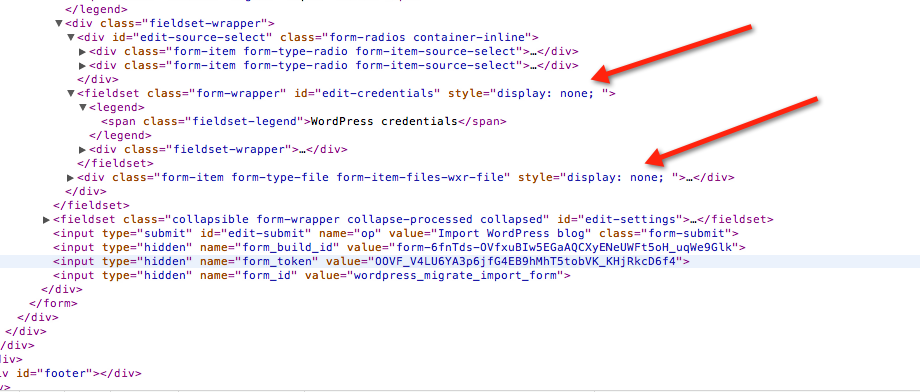
danny englander@clayhaus, see my screen capture in my initial post above.
Comment #12
clayhaus commentedi did, but I still don't understand what form/file for which you are viewing the source code
Comment #13
clayhaus commentedAny new thoughts? I still don't understand what @highrockmedia was looking at when he/she captured the screen shot above. Any further thoughts / suggestions would help
Comment #14
danny englander@clayhaus, the issue was on /admin/content/wordpress -- I did not see any options at all under "Import source", both were hidden with "
display: none;", thus my screen capture from the code on that page which clearly shows I was having an issue -- as top why, I will never know.I had disabled the module, upgraded to Drupal 7.14 in the meantime and now just re-enabled WordPress Migrate once agian and the options were now visible so I really don't know what happend. I had cleared cache as well at that time in the past.
Comment #15
clayhaus commentedokay...i think I get it now. However, my problem is that I DO see the options. And, regardless of whether I select the URL or From File option there is a brief flash of another window and then I get the error message: "The file could not be uploaded, most likely because the file size exceeds the configured limit of 8 MB." My understanding was that if I select the From File option a browse window should then open. That does not happen. I had assumed that the module wants to import from the configured private files directory and that is where the file has been placed. But that does not seem to be the issue...at least as far as i can tell.
Comment #16
danny englander@clayhaus - it sounds like you have an entirely different issue than the one I opened this for so you may want to open a new one.
... after I did this I should have added that my Wordpress blog imported fine with no other issues.
Comment #17
clayhaus commentedI originally did open a new ticket http://drupal.org/node/1568310#comment-5977112, but was suggested to move here...I'll repost again in the other ticket...thanks!
Comment #18
mikeryanLet's stick to this one ticket. You are both seeing the same thing - the radio buttons are present, but the associated form for each radio button does not appear beneath them. When you go to the page, the credentials button is selected, and the credentials form should be visible immediately beneath it, but you have nothing there. When you click the File radio button, the credentials form should be replaced by the file upload form, but you still see nothing.
There's not much I can do about this if I can't reproduce it - it must have something to do with the AJAX support, but I don't see anything wrong in how it's implemented, or in how it works for me. If we can figure out what's different in your two environments compared to mine, that may be a clue. Maybe a different admin theme? I'm got Bartik as my admin theme.
Comment #19
clayhaus commentedI am using the Bartik Plus theme as the default
Comment #20
danny englanderNote that my issue was solved by disabling anything related to Migrate, upgrading to Drupal 7.14, re-enabling Migrate and WordPress Migrate. After that, I no longer had this issue at all...
Comment #21
mikeryanWhere can I find Bartik Plus? All I've found is an empty sandbox project.
Comment #22
clayhaus commented@highrockmedia: I am running version 7.8
@mikerynan: It wasn't sandbox when I installed it last year
Comment #23
mikeryanTracked down Bartik Plus to http://deltup.org/download.php?view.6 - it doesn't seem to change anything, though.
@clayhaus: I recommend upgrading to the latest version of Drupal core - always a good idea at least for the security updates anyway. And once you get past this issue, you'll run into trouble with the Migrate file handling if you have less than Drupal 7.12.
Comment #24
clayhaus commentedI just switched to Bartik theme and tried and that did not work. In other words: same problem
Comment #25
clayhaus commentedsounds like I need to update the Drupal core.
Comment #26
mikeryanNo further information - best guess is that this was a problem with earlier versions of Drupal 7 core.
Comment #27
clayhaus commentedYes: I migrated core to 7.14 this past weekend and the import options now appear and I have successfully migrated 50+ posts from Wordpress. My thanks to you and @highrockmedia for your help.