

Closed (fixed)
Project:
Views Slideshow: Dynamic Display Block
Version:
6.x-1.1
Component:
Miscellaneous
Priority:
Normal
Category:
Support request
Assigned:
Unassigned
Reporter:
Created:
28 Jul 2010 at 04:08 UTC
Updated:
12 Aug 2010 at 15:40 UTC
Jump to comment: Most recent file

Comments
Comment #1
ppblaauw commentedcan you enable the debug lines in the views style settings page for the slideshow and attach the result here.
Comment #2
Minna commentedThanks for quick response.
Debug lines:
* The view news_items has been saved.
*
Pager Settings => array (
'delta' => 1,
'debug_info' => 'drupal',
'output_type' => 'view_fields',
'pager' => 'custom-pager',
'pager_container' => '.custom-pager-item',
'pager_event' => 'click',
'pager_position' => 'bottom',
'pager2' => 0,
'pager2_position' =>
array (
'slide' => 'slide',
'pager' => 0,
),
'pager2_pager_prev' => 'prev',
'pager2_pager_next' => 'next',
'pager2_slide_prev' => '',
'pager2_slide_next' => '',
'slide_text' => 1,
'slide_text_info_button' => NULL,
'template' => 'vsd-upright40',
'custom_template' => '',
'view_name' => 'news_items',
'view_display_id' => 'block_1',
)
*
View - name => 'news_items'
*
View - display_Id => 'block_1'
*
Number of slides => 3
*
Imgcache_slide => NULL
*
Content first slide => stdClass::__set_state(array(
'nid' => '2050',
'node_title' => 'Catholics Come Home',
'node_data_field_pager_item_text_field_pager_item_text_value' => 'First Story',
'node_type' => 'ddblock_news_item',
'node_vid' => '2194',
'node_data_field_pager_item_text_field_slide_text_value' => 'Story teaser goes here. Story teaser goes here. Story teaser goes here.',
'node_data_field_pager_item_text_field_image_fid' => '1799',
'node_data_field_pager_item_text_field_image_list' => '1',
'node_data_field_pager_item_text_field_image_data' => 'a:2:{s:3:"alt";s:0:"";s:5:"title";s:0:"";}',
'node_revisions_body' => 'Full story text.',
'node_revisions_format' => '3',
'node_created' => '1280204521',
))
Comment #3
ppblaauw commentedYour template.php seems to be ok.
Do you have the content permissions module enabled (submodule of CCK)?
Can you have a look at the permissions page if permissions are given for the image_field?
Comment #4
Minna commentedContent Permissions module is enabled.
admin and anonymous user have permissions for view field_image, view field_pager_item_text , and view field_slide_text.
admin has permissions to edit the above.
Comment #5
Minna commentedThe news-item nodes display the image:
http://beta.diosav.org/node/2052,
http://beta.diosav.org/node/2051 and
http://beta.diosav.org/node/2050.
Comment #6
Minna commentedI noticed in the source code
<img src.....>is never called. Does that mean anything?here is a snippet:
Comment #7
ppblaauw commentedCan you clear the cache at administer > site configuration > performance
Comment #8
Minna commentedI cleared the Cache data again.
Comment #9
ppblaauw commentedHow is the slideshow theme structure?
Can you have a look at the issue http://drupal.org/node/863886
It is for the ddblock module but maybe you have the same issue for the views_slideshow_ddblock module.
Comment #10
Minna commentedTheme structure
in sites/all/themes/newtheme_diosav_org/
custom/
-modules/
--views_slideshow_ddblock/
---views_slideshow_ddblock-cycle-block-content-[slideshow-theme-name].tpl.php
---views_slideshow_ddblock-cycle-pager-content-[slideshow-theme-name].tpl.php
---images/
---[slideshow-theme_name]/
----views_slideshow_ddblock-cycle-[slideshow-theme-name].css
When I add
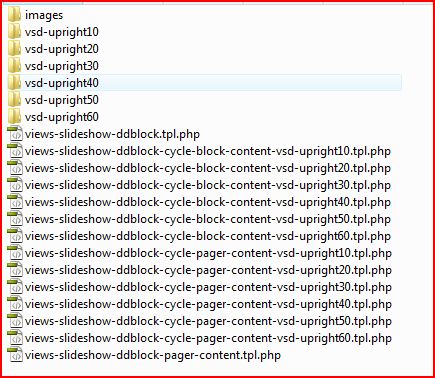
<img src="...">(using firebug) the image displays in that slide.Comment #11
Minna commentedsorry, I have an image (attached) of the theme structure in sites/all/themes/newtheme_diosav_org/custom/modules/views_slideshow_ddblock
Comment #12
ppblaauw commentedRunning out of suggestions.
Can you try the other upright themes?
Comment #13
Minna commentedI've tried upright 10 and upright 50. No luck.
I can try 6.x-2.x-dev. What do I uninstall / remove from 6.x-1.1?
Comment #14
ppblaauw commentedok,
Delete the module.
Delete the custom folder with the slideshow themes from the overall template folder.
Delete the preprocess functions from version 1.1 in the template.php file.
Install module version 2.x.
Enable the views_slideshow_ddblock module and the example module.
Install the slideshow themes for version 6.x-2.x-dev.
Clear the cache when everything is installed.
Place one of the example blocks in a region.
This version should be a lot easier to setup.
Have a look at the readme.txt for installation steps.
Hope this helps you further.
Comment #15
Minna commentedI think I figured out what caused the images to not display. I already had enabled 'CCK - Image Field' as I had tried another slideshow.
While installing 6.x-2.x-dev, I disabled the 'Image Field' and enabled it in the order listed in the instructions. Everything worked perfectly.
Now I just need to get the theme for a landscape style.
Thanks for your help. This is an excellent module.
Minna
Comment #16
Minna commented