

Needs work
Project:
Views Slideshow: Dynamic Display Block
Version:
6.x-2.x-dev
Component:
Miscellaneous
Priority:
Normal
Category:
Support request
Assigned:
Unassigned
Reporter:
Created:
23 Apr 2010 at 13:48 UTC
Updated:
22 Jun 2010 at 07:44 UTC
Jump to comment: Most recent file


Comments
Comment #1
ppblaauw commentedWhen you applied the patch in http://drupal.org/node/777184 you should be able to select the theme directly in the template selectbox, instead of selecting custom and then add it in the custom template field.
Hope this helps you further, please let me know.
Comment #2
Overburn commentedHello,
ok thanks. Just forgot to put the theme it's own directory. (the documentation is a little confusing).
The pager still isn't showing.
Where do I need to put the css-file?
Comment #3
ppblaauw commentedMaybe I don't understand your issue.
For the views_slideshow_ddblock module there is a slideshow package available with six example slideshow themes. One for each type of pager. You can download the slideshow theme package from http://ddblock.myalbums.biz/download. (make sure you have the right version)
You can use these example themes as an example to create your own themes.
Which and where is the documentation confusing, so I can improve it.
For the pager: did you enable the pager in the configuration page.
Do you have a link to the slideshow on your Drupal site?
Comment #4
Overburn commentedHi,
I followed your tutorial for setting up the ddblock: http://ddblock.myalbums.biz/node/1788 and downloaded the files for dev2.
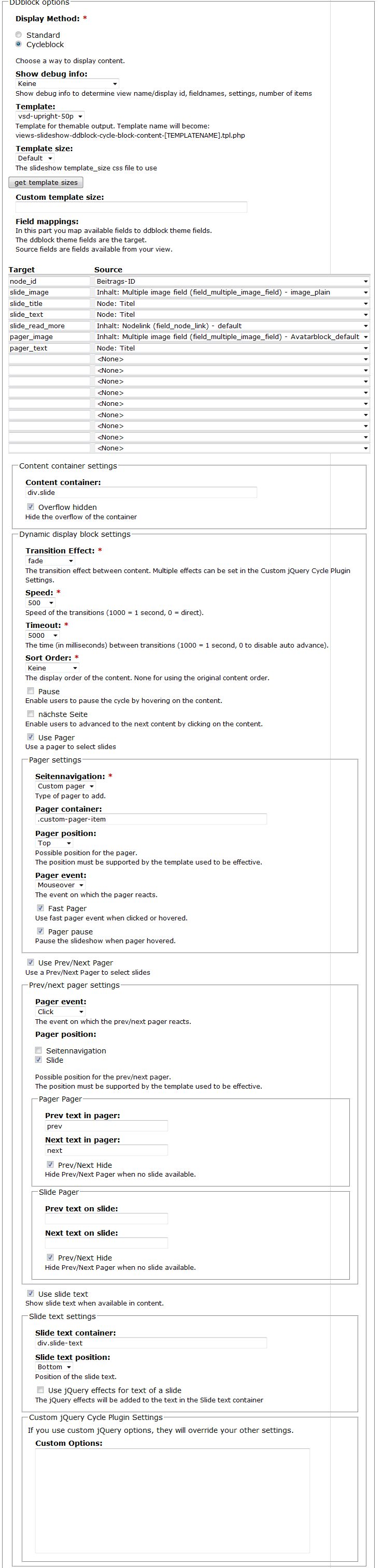
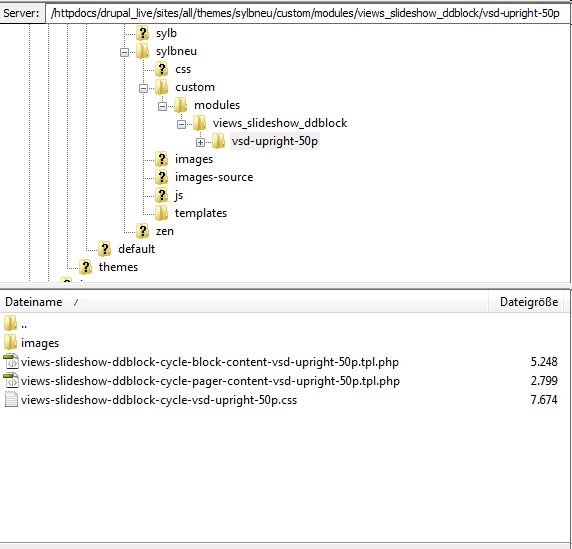
I attached the settings and how the files are place on the ftpserver.
In the documentation, it is not mentioned, that the files have to be placed in a subdirectory. i also find the filepath custom/modules/.. not very comfortable.
Comment #5
ppblaauw commentedThe views-slideshow-ddblock-cycle-vsd-upright-50p.css file needs to be in the:
custom\modules\views_slideshow_ddblock\vsd-upright-50p directory
so it becomes:
What directory would you suggest to put the views_slideshow_ddblock slideshow themes?
Maybe could add a setting in the config where the slideshow themes are placed, so users can decide themselves where to place them. (but would need AHAH for this again, so first issue http://drupal.org/node/762164 needs to be solved)
Hope this helps you further, please let me know.
Comment #6
Overburn commentedThe CSS-file is placed in the right directory (see screenshot).
Here is the Debuginformation I get:
I also attached the slideshowblock. Don't mind the Blackparts, I had to insert them because of copyrightreasons.
The plan is, that the pager (as in the screenshot on the modules page) shows below the big picture.
Comment #7
ppblaauw commentedDid you enable the pager in the display block configuration page?
You also need the files:
in your template, otherwise the template files
can not be found by the drupal theme system.
You make it yourself difficult by not using the vsd-upright-10p - 60p template package.
Hope this helps you further, please let me know.
Comment #8
Overburn commentedI used the template package you provided on your side. :)
But as i metioned, the documentation doesn't provide the information the set this up properly.
Comment #9
Overburn commentedFinally!
It works!
Here is how I did it:
1. I renamed the files
to
and placed them under my main theme directory.
2. I placed the cssfil under the custom/modules/.... -directory.
And now everything works fine.
for me, the whole stuff with the different is way to complicated. its much more easier when you only got to files to take care of.
thank you for module and your help. :)
Comment #10
ppblaauw commentedYour solution works, but...
With you solution you override the views-slideshow-ddblock.tpl.php and views-slideshow-ddblock-pager-content.tpl.php files which come from the module. You would only be able to have one slideshow theme on your site.
With using the candidate template files like: views-slideshow-ddblock-cycle-block-content-vsd-upright-50p.tpl.php you can have multiple slideshow themes on your site.
Will have a look at the documentation in the readme.txt and the tutorial to find out what is not clear and make adjustments.
Would be helpful when I get feedback what is not clear from others also.
It's not always easy to write clear documentation for first time users as a developer of a module.
Comment #11
Overburn commentedI know that. I'm a developer myself, and users are strange people. ;)
I just need one Tempalte for my site, so that solution fits perfectly for me.
Comment #12
ppblaauw commentedPlease provide some information what is not clear in the readme.txt and the tutorial for implementing the theme package vsd-upright-10p - 60p.
Comment #13
johsve339 commentedI can't get the themes to works either.
Does the dev 2 version need the preprocess files?
Here's what I got:
sites/all/modules/contributed/views_slideshow - version 6.x-2.0
sites/all/modules/contributed/views_slideshow_ddblock - version 6.x-2.x-dev
sites/all/themes/[MY_THEME_NAME]/custom/modules/views_slideshow_ddblock - version from vsd-upright10-60-V2-2.zip
Do I need to modify template.php in my theme?
All the ddblock theme upright10-60 are available in the view configuration for the slideshow.
Comment #14
ppblaauw commentedNo, there is no need for preprocess functions in your template.php file.
You could try to clear the cache at administer > site configuration > performance
Hope this helps you further, please let me know
Comment #15
johsve339 commentedI tried to clear the cache, but still no luck. I updated a few modules to never versions.
Then the slideshow started, but the theme is not applied. It looks the same with vsd-upright-10p, as well as vsd-upright-60p.
Comment #16
johsve339 commentedNo it works...
The problem was the file system access to the files. Applied a chmod 755 to the folders and then it worked.
Comment #17
OpenChimp commentedFor the directory structure of the custom themes (vsd-upright10-60-V2-2.zip) ... I agree that custom/modules/views_slideshow_ddblock is a little confusing. Why can't it just be placed at sites/[site-folder]/themes/[theme-folder]/views_slideshow_ddblock?. The "custom/modules" part of the path does not seem necessary and makes one think that it should be in some kind of modules directory.
Great work on this module by the way .. I love having ddblock integrated with views_slideshow ... very powerful combination!
Comment #18
ppblaauw commentedcustom/modules/[module_name] is the way I do all my theme customizations per module, so I can easily find my customizations back and can easily upgrade my overall theme, by saving the custom folder and the template.php file.
Will probably make a path setting in the configuration page so users can choose where to place the slideshow theme files.