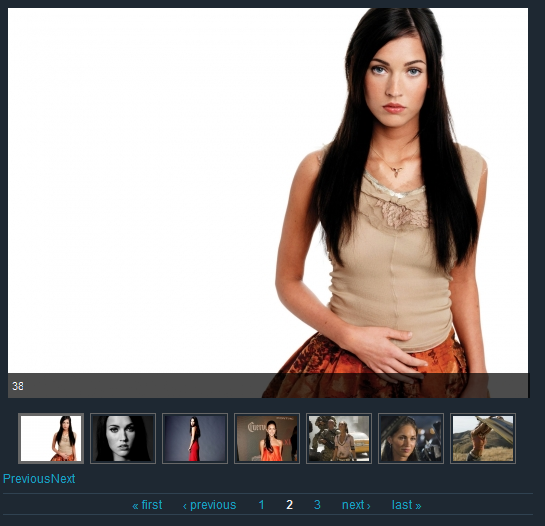
I have created a slideshow with thumbnailhover mode where next/prev control enabled at the bottom. And at the view level I have this:

Items to display:7
Use Pager: Yes
use Ajax: Yes

View shows me multiple pages since I have more than 7 items.

My question is, can I disable the views pager and make the slideshow to go to next page when I click 'Next' of slideshows control once I am at the last item of the previous page?

CommentFileSizeAuthor
#2 slide1.png303.67 KBchandrabhan
#2 slide2.png236.01 KBchandrabhan

Comments

redndahead’s picture

Status: Active » Postponed (maintainer needs more info)

Pager and ajax doesn't work in views slideshow. You need to use the controls built into the views slideshow settings. Are you asking that when you are on the last slide you would like next to be enabled so when clicked it goes back to the first slide.

chandrabhan’s picture

StatusFileSize
new236.01 KB
new303.67 KB

Hey, it does work actually. I mean I can still go to the next/last/prev/first page using View's Pager. My scenario is, if I allow only 7 images per page then I get multiple pages as shown by Views pager. Since I enabled Slideshow Control too, I do get the Next and Prev links. However, these links only allow me to navigate within a page. If I keep clicking Next, it moves from 1st image to 7th but it stops after that.

What I wanted was, if I click on Next of slideshow control when I am on the 7th slide of the page, it should go to the 1st slide of the second page.

Attaching a screenshots.

slide1: As you can see there are two rows of controls. Slideshow created the ones just below the thumbnails. And Views created the bottom one. Now, I can click 'Next' of slideshow control 6 times to go to the last slide but it just stops there. Even if I click Next again it does not go to the next page.

slide2: However, if I click on Next of views pager, it does go to the next page.

I wanted Next of slideshow control to go to next page too.

chandrabhan’s picture

Status: Postponed (maintainer needs more info) » Active
redndahead’s picture

Status: Active » Postponed (maintainer needs more info)

Ok let me see if I understand this.

You have a view of nodes.
There are images attached to those nodes.
You want to make a slideshow of the images attached to the single node.
So when you click next a new slideshow will start.

So if so here are a few things.

1) Using an ajax pager won't work. This is because views won't reload the slideshow settings when you do this.
2) I'm not sure how to do this. You would probably have to create a block for the slideshow. Then use view_embed_view to embed the slideshow view. You would add this in the views-view-row-blah.tpl.php file. You would have to follow the instructions here also: http://drupal.org/node/823056

If anyone else has any other ideas it would be nice if you could offer them.

chandrabhan’s picture

Status: Postponed (maintainer needs more info) » Active

It is a view of list of Image nodes and not images in a single node. I am putting my views export also here.

When Slideshow 'Next' button is clicked I dont want a new slideshow to start. It should just go to the next page of the same slideshow.

Views first/next/prev/last does work (as i have shown in the attachments in my previous post).

Also, I have added the view in node.tpl.php in the following manner

$view = views_get_view('image_list_image');
print $view->preview('Block_image');

Export of the view

$view = new view;
$view->name = 'image_list_image';
$view->description = 'images in a node - image';
$view->tag = '';
$view->view_php = '';
$view->base_table = 'node';
$view->is_cacheable = FALSE;
$view->api_version = 2;
$view->disabled = FALSE; /* Edit this to true to make a default view disabled initially */
$handler = $view->new_display('default', 'Defaults', 'default');
$handler->override_option('fields', array(
  'image_image' => array(
    'label' => '',
    'alter' => array(
      'alter_text' => 0,
      'text' => '',
      'make_link' => 0,
      'path' => '',
      'link_class' => '',
      'alt' => '',
      'prefix' => '',
      'suffix' => '',
      'target' => '',
      'help' => '',
      'trim' => 0,
      'max_length' => '',
      'word_boundary' => 1,
      'ellipsis' => 1,
      'html' => 0,
      'strip_tags' => 0,
    ),
    'empty' => '',
    'hide_empty' => 0,
    'empty_zero' => 0,
    'link_to_node' => 1,
    'image_derivative' => 'preview',
    'exclude' => 0,
    'id' => 'image_image',
    'table' => 'node',
    'field' => 'image_image',
    'relationship' => 'none',
    'override' => array(
      'button' => 'Override',
    ),
  ),
  'title' => array(
    'label' => '',
    'alter' => array(
      'alter_text' => 0,
      'text' => '',
      'make_link' => 0,
      'path' => '',
      'link_class' => '',
      'alt' => '',
      'prefix' => '',
      'suffix' => '',
      'target' => '',
      'help' => '',
      'trim' => 0,
      'max_length' => '',
      'word_boundary' => 1,
      'ellipsis' => 1,
      'html' => 0,
      'strip_tags' => 0,
    ),
    'empty' => '',
    'hide_empty' => 0,
    'empty_zero' => 0,
    'link_to_node' => 0,
    'exclude' => 0,
    'id' => 'title',
    'table' => 'node',
    'field' => 'title',
    'override' => array(
      'button' => 'Override',
    ),
    'relationship' => 'none',
  ),
  'image_image_1' => array(
    'label' => '',
    'alter' => array(
      'alter_text' => 0,
      'text' => '',
      'make_link' => 0,
      'path' => '',
      'link_class' => '',
      'alt' => '',
      'prefix' => '',
      'suffix' => '',
      'target' => '',
      'help' => '',
      'trim' => 0,
      'max_length' => '',
      'word_boundary' => 1,
      'ellipsis' => 1,
      'html' => 0,
      'strip_tags' => 0,
    ),
    'empty' => '',
    'hide_empty' => 0,
    'empty_zero' => 0,
    'link_to_node' => 0,
    'image_derivative' => 'thumbnail',
    'exclude' => 0,
    'id' => 'image_image_1',
    'table' => 'node',
    'field' => 'image_image',
    'override' => array(
      'button' => 'Override',
    ),
    'relationship' => 'none',
  ),
));
$handler->override_option('filters', array(
  'type' => array(
    'operator' => 'in',
    'value' => array(
      'image' => 'image',
    ),
    'group' => '0',
    'exposed' => FALSE,
    'expose' => array(
      'operator' => FALSE,
      'label' => '',
    ),
    'id' => 'type',
    'table' => 'node',
    'field' => 'type',
    'relationship' => 'none',
  ),
));
$handler->override_option('access', array(
  'type' => 'none',
));
$handler->override_option('cache', array(
  'type' => 'none',
));
$handler->override_option('use_ajax', TRUE);
$handler->override_option('items_per_page', 7);
$handler->override_option('use_pager', '1');
$handler->override_option('style_plugin', 'slideshow');
$handler->override_option('style_options', array(
  'type' => 'ul',
  'mode' => 'views_slideshow_thumbnailhover',
  'views_slideshow_singleframe-prefix' => '',
  'views_slideshow_singleframe' => array(
    'timeout' => '5000',
    'delay' => '0',
    'speed' => '700',
    'start_paused' => 0,
    'fixed_height' => '1',
    'random' => '0',
    'pause' => '1',
    'pause_on_click' => '0',
    'remember_slide' => 0,
    'remember_slide_days' => '1',
    'controls' => '0',
    'pager' => '0',
    'pager_type' => 'Numbered',
    'pager_hover' => '1',
    'pager_click_to_page' => 0,
    'image_count' => '0',
    'effect' => 'fade',
    'sync' => '1',
    'nowrap' => '0',
    'advanced' => '',
    'ie' => array(
      'cleartype' => 'true',
      'cleartypenobg' => 'false',
    ),
  ),
  'views_slideshow_thumbnailhover-prefix' => '',
  'views_slideshow_thumbnailhover' => array(
    'main_fields' => array(
      'image_image' => 'image_image',
      'title' => 'title',
      'image_image_1' => 0,
    ),
    'breakout_fields' => array(
      'image_image_1' => 'image_image_1',
      'image_image' => 0,
      'title' => 0,
    ),
    'teasers_last' => 1,
    'timeout' => '0',
    'delay' => '0',
    'speed' => '300',
    'start_paused' => 0,
    'fixed_height' => '1',
    'random' => '0',
    'pause' => '1',
    'pause_on_click' => '0',
    'remember_slide' => 0,
    'remember_slide_days' => '1',
    'pager_event' => 'click',
    'controls' => '2',
    'image_count' => '0',
    'effect' => 'fade',
    'sync' => '1',
    'nowrap' => '1',
    'advanced' => '',
    'ie' => array(
      'cleartype' => 'true',
      'cleartypenobg' => 'false',
    ),
  ),
));
$handler->override_option('row_options', array(
  'inline' => array(),
  'separator' => '',
  'hide_empty' => 0,
));
$handler = $view->new_display('block', 'Block_image', 'block_2');
$handler->override_option('style_options', array(
  'type' => 'ul',
  'mode' => 'views_slideshow_thumbnailhover',
  'views_slideshow_singleframe-prefix' => '',
  'views_slideshow_singleframe' => array(
    'timeout' => '5000',
    'delay' => '0',
    'speed' => '700',
    'start_paused' => 0,
    'fixed_height' => '1',
    'random' => '0',
    'pause' => '1',
    'pause_on_click' => '0',
    'remember_slide' => 0,
    'remember_slide_days' => '1',
    'controls' => '0',
    'pager' => '0',
    'pager_type' => 'Numbered',
    'pager_hover' => '1',
    'pager_click_to_page' => 0,
    'image_count' => '0',
    'effect' => 'fade',
    'sync' => '1',
    'nowrap' => '0',
    'advanced' => '',
    'ie' => array(
      'cleartype' => 'true',
      'cleartypenobg' => 'false',
    ),
  ),
  'views_slideshow_thumbnailhover-prefix' => '',
  'views_slideshow_thumbnailhover' => array(
    'main_fields' => array(
      'image_image' => 'image_image',
      'title' => 0,
      'image_image_1' => 0,
    ),
    'breakout_fields' => array(
      'image_image_1' => 'image_image_1',
      'image_image' => 0,
      'title' => 0,
    ),
    'teasers_last' => 1,
    'timeout' => '0',
    'delay' => '0',
    'speed' => '300',
    'start_paused' => 0,
    'fixed_height' => '1',
    'random' => '0',
    'pause' => '1',
    'pause_on_click' => '0',
    'remember_slide' => 0,
    'remember_slide_days' => '1',
    'pager_event' => 'click',
    'controls' => '0',
    'image_count' => '0',
    'effect' => 'fade',
    'sync' => '1',
    'nowrap' => '1',
    'advanced' => '',
    'ie' => array(
      'cleartype' => 'true',
      'cleartypenobg' => 'false',
    ),
  ),
));
$handler->override_option('block_description', '');
$handler->override_option('block_caching', -1);
$handler = $view->new_display('page', 'Page', 'page_1');
$handler->override_option('path', 'megan_gallery');
$handler->override_option('menu', array(
  'type' => 'none',
  'title' => '',
  'description' => '',
  'weight' => 0,
  'name' => 'navigation',
));
$handler->override_option('tab_options', array(
  'type' => 'none',
  'title' => '',
  'description' => '',
  'weight' => 0,
  'name' => 'navigation',
));

chandrabhan’s picture

Any update please? Kindly let me know if you need any more information.

redndahead’s picture

Status: Active » Postponed (maintainer needs more info)

I really don't understand your request. I will say that rendering a slideshow in a tpl.php requires some extra work. You can see how to do that here. http://drupal.org/node/823056

chandrabhan’s picture

Status: Postponed (maintainer needs more info) » Active

Hi, is it not evident from the screenshots that I have attached that I am able to see the slideshow (#2)? I have also provided the view and the way I am embedding it in my template.

Let me try this.

1) I have created a view which returns a list of image nodes (around 25)
2) I have set the Items To Display as 7
3) Views shows an ajax pager with 3 page links as you can see in the screenshots
4) I have also enabled Slideshow Control which shows next and previous links as you can see in the screenshots
5) Now if I keep clicking Next of Slideshow Control I eventually reach 7th image on the page.
6) Once I reach 7th image, if I click Next of Slideshow Control again it does not go the 8th image returned by the Views.

Let me know if you need any more information.

redndahead’s picture

Status: Active » Postponed (maintainer needs more info)

If you set the number of items to 7 why would there be an 8th one?

chandrabhan’s picture

Status: Postponed (maintainer needs more info) » Active

Because the view that I have created returns 15 image node items and "Items to display" parameter of Views just restricts numbers of items "per page" only. Thats why I have mentioned "3) Views shows an ajax pager with 3 page links as you can see in the screenshots".

redndahead’s picture

Status: Active » Closed (won't fix)

Using the pager in views will not work for views slideshow. Views slideshow has it's own pager and will only work if all the items are already loaded on the page. This makes it so views pagers don't work. So you must show all 15 items or whatever you want to show. If you only want to show 7 then the best I can tell you is set it to random so it shows a random 7 of the 15. But it will still only show 7.