

 Come together with the global Drupal community in Rotterdam, 28 Sept – 1 Oct 2026. Sessions, contribution, connection, and Early Bird savings until 8 June.
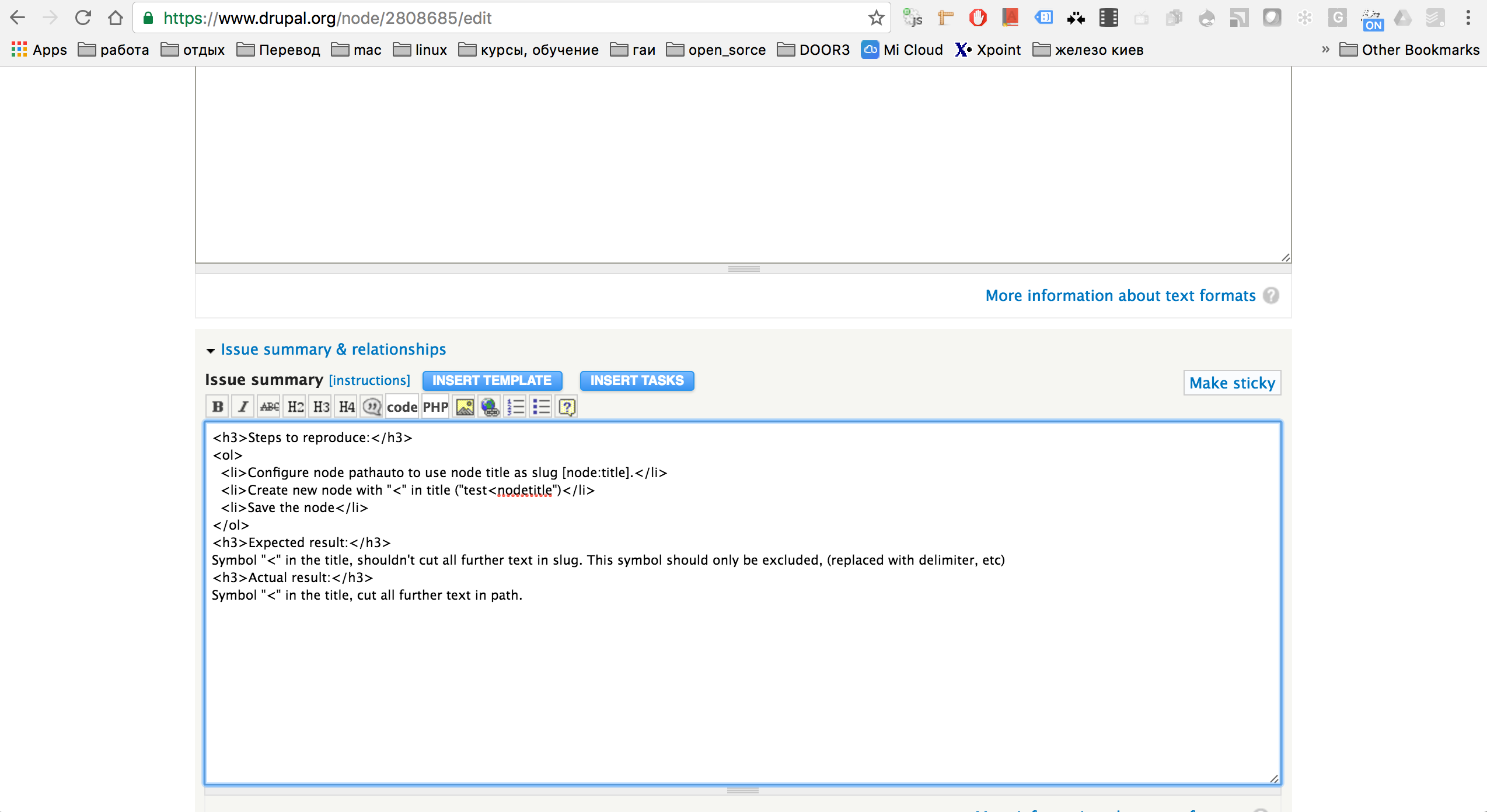
Steps to reproduce:
- Configure node pathauto to use node title as slug [node:title].
- Create new node with "<" in title (
test<nodetitle) - Save the node
Expected result:
Symbol "<" in the title, shouldn't cut all further text in slug. This symbol should only be excluded, (replaced with delimiter, etc).
The main condition to reproduce is that after '<' must be no other symbols or spaces, but juts a letters.
Actual result:
Symbol "<" in the title, cut all further text in path.
| Comment | File | Size | Author |
|---|---|---|---|
| #2 | Symbol______Less-than_sign__in_the_title_cuts_all_further_text_in_slug___2808685____Drupal_org.png | 227.28 KB | dstorozhuk |

Comments
Comment #2
dstorozhukWOW. Something wrong with Drupal. Check this issue input and output.
Probably the Drupal has same issue, or pathauto user drupal functionality which cuts off the text after "<".
Comment #3
dstorozhukComment #4
lpsolit commentedI cannot reproduce your issue. Are you sure you configured Pathauto to remove < or to replace it by a separator? Check the list of special characters at admin/config/search/path/settings. The "<" character is near the end of the list.
Comment #5
dstorozhuk@lpsolit, if you will take a look on ticket description display and ticket description text in edit form - you will see that it is different.
#2 in steps to reproduce.
The text is also cute after '<'.
The main condition to reproduce is that after '<' must be no other symbols or spaces, but juts a letters.
Looks like it is Drupal core text function issue whic also used in in pathauto module.
Comment #6
dstorozhukComment #7
dstorozhuk@lpsolit, i reopened the issue, but if still "can't reproduce" - it is ok.
Comment #8
lpsolit commentedAh, I added a space after '<' (foo < bar) which is why I couldn't reproduce. Sorry! If I type "foo<bar", only "foo" is returned.
The reason is that AliasCleaner::cleanString() wants to remove HTML entities from strings:
// Remove all HTML tags from the string.
    $output = Html::decodeEntities($string);
    $output = PlainTextOutput::renderFromHtml($output);
PlainTextOutput::renderFromHtml() is the one removing HTML entities so that you can safely use $output without risking XSS vulnerabilities. Imagine if someone types:
Foo <script>alert('bar')</script>
then without PlainTextOutput::renderFromHtml() and if the admin didn't correctly ask to remove special characters, then you would inject JS code into your page, which could lead to security issues. Not sure what to do in your specific case, but I would say that security matters more than the few cases where someone types <bar>. @Berdir: any idea?
Comment #9
lpsolit commentedAnd of course, the end of my first line was removed. :) I typed:
Sorry! If I type "foo<bar", only "foo" is returned.
Comment #10
berdirWondering if that really makes sense, though. An alias is not HTML and it will never be executed as HTML. And we actually remove < characters anyway.
This is a direct port of the 7.x code:
// Remove all HTML tags from the string.
$output = strip_tags(decode_entities($string));
And it was added *a long* time ago in #167786: Strip HTML tags from raw tokens.
Happy to try and remove that and see what happens. Who knows how pathauto actually worked back then.
I guess one argument for this is that when a token is used that actually contains HTML, like rendered fields or so, then we want to strip that. Try with a [node:some_field] token, for example, pretty sure that will be a mess then.
Comment #11
berdirComment #12
dstorozhuk@Berdir, are you talking about this pice of code in
src/AliasCleaner.php:228??
Comment #13
pflora commentedI've come across this problem while working on this issue.
My understanding of the logic used in AliasCleaner isthat we call Html::decodeEntities($string) passing the $string variable and then call PlainTextOutput::renderFromHtml(). But renderFromHtml() just calls Html::decodeEntities() again, but passing as the argument " strip_tags((string) $string) " . So the problem here is with the strip_tags() method that will remove anything after a "<" character, preventing strings like "this
In regards to what @Berdir said in #10, I woudl like to avoid using PlainTextOutput::renderFromHtml(), or at least avoid using strip_tags(). Maybe we could use Html::escape() ?
tags? Because I think we could handle that with a simple regex (or maybe there is another simpler way).As for what @LpSolit mentioned in #8, are we only worried about the
Comment #14
mably commentedComment #15
mably commentedClosing as duplicate of #3256303.