I want to install Node.js on my Drupal 8 server to set up instant messaging.
I installed Node.js on Ubuntu 16.04 with the following command :
    # curl -sL https://deb.nodesource.com/setup_8.x | sudo -E bash -
    # apt-get update
    # apt-get install nodejs
My site is installed with "Composer" in `/home/www.domaine.com/public_html/web`
And entered the following commands :
(in `/home/www.domaine.com/public_html`)
    # npm install drupal-node.js
    # npm install pm2 -g
and :
    # cd node_modules/drupal-node.js
    # cp nodejs.config.js.example nodejs.config.js
    # nano nodejs.config.js
Here is my file `nodejs.config.js` :
    settings = {
      scheme: 'http',
      port: 8080,
      host: 'localhost',
      resource: '/socket.io',
      serviceKey: 'test',
      backend: {
        port: 443,
        host: 'domaine.com',
        scheme: 'https',
        basePath: '/web',
        messagePath: '/nodejs/message'
      },
      debug: true,
      sslKeyPath: '/etc/letsencrypt/live/www.domaine.com/privkey.pem',
      sslCertPath: '/etc/letsencrypt/live/www.domaine.com/cert.pem',
      sslCAPath: '',
      baseAuthPath: '/nodejs/',
      publishUrl: 'publish',
      kickUserUrl: 'user/kick/:uid',
      logoutUserUrl: 'user/logout/:authtoken',
      addUserToChannelUrl: 'user/channel/add/:channel/:uid',
      removeUserFromChannelUrl: 'user/channel/remove/:channel/:uid',
      addChannelUrl: 'channel/add/:channel',
      removeChannelUrl: 'channel/remove/:channel',
      setUserPresenceListUrl: 'user/presence-list/:uid/:uidList',
      addAuthTokenToChannelUrl: 'authtoken/channel/add/:channel/:uid',
      removeAuthTokenFromChannelUrl: 'authtoken/channel/remove/:channel/:uid',
      toggleDebugUrl: 'debug/toggle',
      contentTokenUrl: 'content/token',
      publishMessageToContentChannelUrl: 'content/token/message',
      extensions: [],
      clientsCanWriteToChannels: true,
      clientsCanWriteToClients: true,
      transports: ['websocket', 'flashsocket', 'htmlfile', 'xhr-polling', 'jsonp-polling'],
      jsMinification: true,
      jsEtag: true,
      logLevel: 1
    };
I installed the "Node.js integration" module on my site :
(in `/home/www.domaine.com/public_html`)
    # composer require drupal/nodejs
    # drush en -y nodejs_watchdog
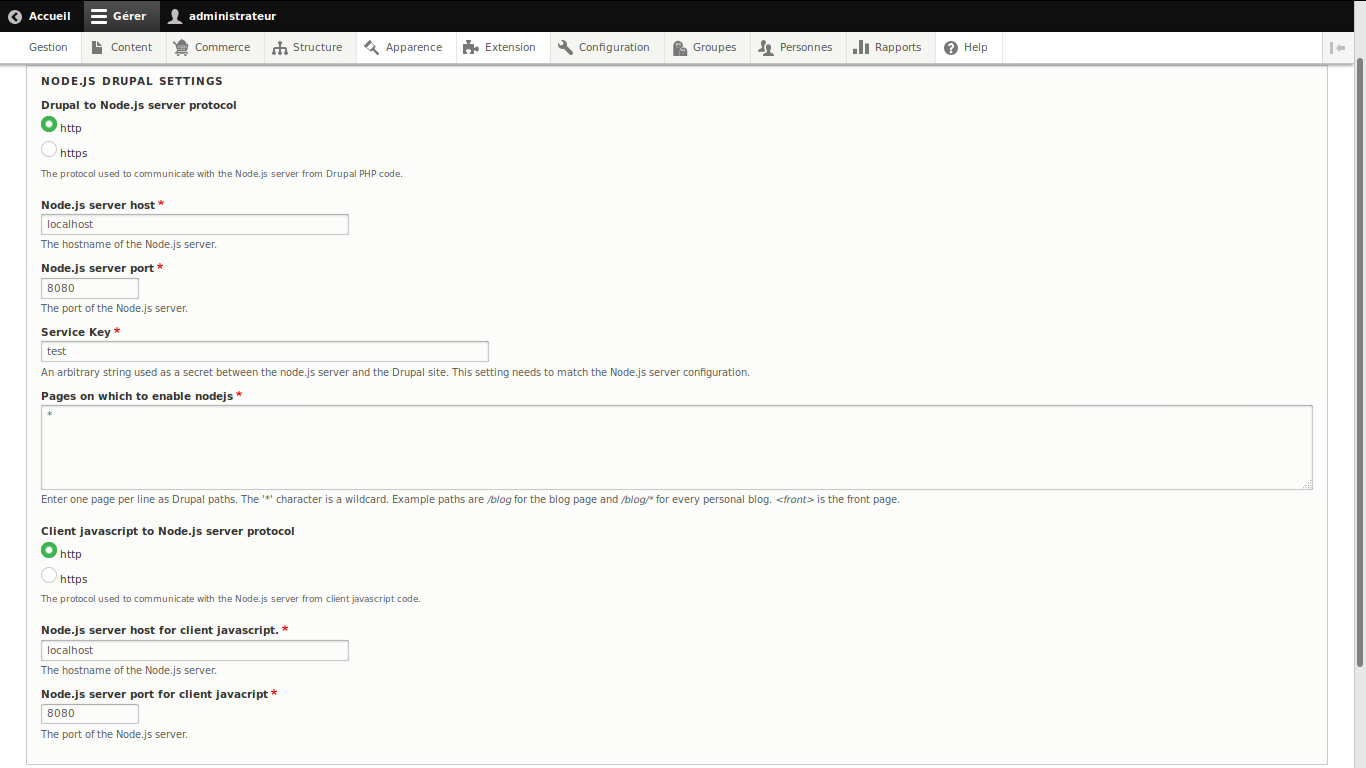
Here is the configuration of the module :
image1
I then enter the following commands and I clean the drupal cache :
(in `/home/www.domaine.com/public_html/node_modules/drupal-node.js`)
    # pm2 start app.js
    # pm2 logs
image2
drupal-node.js starts, but nothing works.
To cause a 404 error, I enter the address bar of the browser `https://www.domaine.com/shjsdhdshsd` The terminal displays :
publishMessageToContentChannel: The channel watchdog_dblog does not exist
that I simulate a 404 error or notification, the message is always the same.
image3
The module "Node.js integration" looks completely dead, same for the module "Private Message".
There is absolutely nothing on Drupal 8 to exploit the Node.js technology
What solution is there to set up instant messaging on Drupal 8 ?
Here is the configuration of my firewall :
    #!/bin/sh

    # Réinitialise les règles
    iptables -t filter -F
    iptables -t filter -X

    # Bloque tout le trafic
    iptables -t filter -P INPUT DROP
    iptables -t filter -P FORWARD DROP
    iptables -t filter -P OUTPUT DROP

    # Autorise les connexions déjà établies et localhost
    iptables -A INPUT -m state --state RELATED,ESTABLISHED -j ACCEPT
    iptables -A OUTPUT -m state --state RELATED,ESTABLISHED -j ACCEPT
    iptables -t filter -A INPUT -i lo -j ACCEPT
    iptables -t filter -A OUTPUT -o lo -j ACCEPT

    # ICMP (Ping)
    iptables -t filter -A INPUT -p icmp -j ACCEPT
    iptables -t filter -A OUTPUT -p icmp -j ACCEPT

    # SSH
    iptables -t filter -A INPUT -p tcp --dport 4829 -j ACCEPT
    iptables -t filter -A OUTPUT -p tcp --dport 4829 -j ACCEPT

    # DNS
    iptables -t filter -A OUTPUT -p tcp --dport 53 -j ACCEPT
    iptables -t filter -A OUTPUT -p udp --dport 53 -j ACCEPT
    iptables -t filter -A INPUT -p tcp --dport 53 -j ACCEPT
    iptables -t filter -A INPUT -p udp --dport 53 -j ACCEPT

    # NTP (horloge du serveur)
    iptables -t filter -A OUTPUT -p udp --dport 123 -j ACCEPT

    # HTTP
    iptables -t filter -A OUTPUT -p tcp --dport 80 -j ACCEPT
    iptables -t filter -A INPUT -p tcp --dport 80 -j ACCEPT
    iptables -t filter -A OUTPUT -p tcp --dport 8080 -j ACCEPT
    iptables -t filter -A INPUT -p tcp --dport 8080 -j ACCEPT
    # HTTP Caldav
    iptables -t filter -A OUTPUT -p tcp --dport 8008 -j ACCEPT
    iptables -t filter -A INPUT -p tcp --dport 8008 -j ACCEPT

    # HTTPS
    iptables -t filter -A OUTPUT -p tcp --dport 443 -j ACCEPT
    iptables -t filter -A INPUT -p tcp --dport 443 -j ACCEPT
    # HTTPS Caldav
    iptables -t filter -A OUTPUT -p tcp --dport 8008 -j ACCEPT
    iptables -t filter -A INPUT -p tcp --dport 8443 -j ACCEPT

    # FTP
    iptables -t filter -A OUTPUT -p tcp --dport 20:21 -j ACCEPT
    iptables -t filter -A INPUT -p tcp --dport 20:21 -j ACCEPT

    # Mail SMTP
    iptables -t filter -A INPUT -p tcp --dport 25 -j ACCEPT
    iptables -t filter -A OUTPUT -p tcp --dport 25 -j ACCEPT
    iptables -t filter -A INPUT -p tcp --dport 587 -j ACCEPT
    iptables -t filter -A OUTPUT -p tcp --dport 587 -j ACCEPT
    iptables -t filter -A INPUT -p tcp --dport 465 -j ACCEPT
    iptables -t filter -A OUTPUT -p tcp --dport 465 -j ACCEPT

    # Mail POP3
    iptables -t filter -A INPUT -p tcp --dport 110 -j ACCEPT
    iptables -t filter -A OUTPUT -p tcp --dport 110 -j ACCEPT
    iptables -t filter -A INPUT -p tcp --dport 995 -j ACCEPT
    iptables -t filter -A OUTPUT -p tcp --dport 995 -j ACCEPT

    # Mail IMAP
    iptables -t filter -A INPUT -p tcp --dport 993 -j ACCEPT
    iptables -t filter -A OUTPUT -p tcp --dport 993 -j ACCEPT
    iptables -t filter -A INPUT -p tcp --dport 143 -j ACCEPT
    iptables -t filter -A OUTPUT -p tcp --dport 143 -j ACCEPT

    # Anti Flood / Deni de service / scan de port
    iptables -A FORWARD -p tcp --syn -m limit --limit 1/second -j ACCEPT
    iptables -A FORWARD -p udp -m limit --limit 1/second -j ACCEPT
    iptables -A FORWARD -p icmp --icmp-type echo-request -m limit --limit 1/second -j ACCEPT
    iptables -A FORWARD -p tcp --tcp-flags SYN,ACK,FIN,RST RST -m limit --limit 1/s -j ACCEPT
and the configuration of my server :
    <IfModule mod_fastcgi.c>
        AddHandler php7-fcgi-www.domaine.com .php
        Action php7-fcgi-www.domaine.com /php7-fcgi-www.domaine.com
        Alias /php7-fcgi-www.domaine.com /usr/lib/cgi-bin/php7-fcgi-www.domaine.com
        FastCgiExternalServer /usr/lib/cgi-bin/php7-fcgi-www.domaine.com -socket /run/php/php7.1-fpm.www.domaine.com.sock -pass-header Authorization

        <Directory "/usr/lib/cgi-bin">
            Require all granted
        </Directory>
    </IfModule>

    <VirtualHost 137.94.174.65:80 [2001:41d0:0102:2100:0000:0000:0000:4741]:80>
        ServerAdmin contact@domaine.com
        ServerName domaine.com
        ServerAlias www.domaine.com

        RewriteEngine on
        RewriteCond %{HTTPS} !on
        RewriteRule (.*) https://%{HTTP_HOST}%{REQUEST_URI}
    </VirtualHost>

    <IfModule mod_ssl.c>
    <VirtualHost 137.94.174.65:443 [2001:41d0:0102:2100:0000:0000:0000:4741]:443>
    SSLEngine on
        SSLCertificateFile /etc/letsencrypt/live/www.domaine.com/cert.pem
        SSLCertificateKeyFile /etc/letsencrypt/live/www.domaine.com/privkey.pem
        SSLCertificateChainFile /etc/letsencrypt/live/www.domaine.com/chain.pem
        SSLProtocol all -SSLv2 -SSLv3
        SSLHonorCipherOrder on
        SSLCompression off
        SSLOptions +StrictRequire
        SSLCipherSuite ECDHE-RSA-AES128-GCM-SHA256:ECDHE-ECDSA-AES128-GCM-SHA256:ECDHE-RSA-AES256-GCM-SHA384:ECDHE-ECDSA-AES256-GCM-SHA384:DHE-RSA-AES128-GCM-SHA256:DHE-DSS-AES128-GCM-SHA256:kEDH+AESGCM:ECDHE-RSA-AES128-SHA256:ECDHE-ECDSA-AES128-SHA256:ECDHE-RSA-AES128-SHA:ECDHE-ECDSA-AES128-SHA:ECDHE-RSA-AES256-SHA384:ECDHE-ECDSA-AES256-SHA384:ECDHE-RSA-AES256-SHA:ECDHE-ECDSA-AES256-SHA:DHE-RSA-AES128-SHA256:DHE-RSA-AES128-SHA:DHE-DSS-AES128-SHA256:DHE-RSA-AES256-SHA256:DHE-DSS-AES256-SHA:DHE-RSA-AES256-SHA:AES128-GCM-SHA256:AES256-GCM-SHA384:AES128-SHA256:AES256-SHA256:AES128-SHA:AES256-SHA:AES:CAMELLIA:DES-CBC3-SHA:!aNULL:!eNULL:!EXPORT:!DES:!RC4:!MD5:!PSK:!aECDH:!EDH-DSS-DES-CBC3-SHA:!EDH-RSA-DES-CBC3-SHA:!KRB5-DES-CBC3-SHA
        Header always set Strict-Transport-Security "max-age=15768000; includeSubDomains; preload"
        Header always set X-Content-Type-Options "nosniff"
        Header always set X-XSS-Protection "1; mode=block"
        Header always set X-Frame-Options "SAMEORIGIN"
        Header always set X-Download-Options "noopen"
        Header always set X-Permitted-Cross-Domain-Policies "none"
        Header always set Content-Security-Policy "default-src https: data: 'unsafe-inline' 'unsafe-eval'"
        Header set Set-Cookie HttpOnly;Secure

        ServerAdmin contact@domaine.com
        ServerName domaine.com
        ServerAlias www.domaine.com
        DocumentRoot /var/www/www.domaine.com/public_html/web/

        <Directory /var/www/www.domaine.com/public_html/web>
            Options FollowSymLinks MultiViews
            AllowOverride All
            Require all granted
        </Directory>

        <IfModule mod_fastcgi.c>
            <FilesMatch ".+\.ph(p[345]?|t|tml)$">
                SetHandler php7-fcgi-www.domaine.com
            </FilesMatch>
        </IfModule>

        ErrorLog /var/www/www.domaine.com/logs/error.log
        CustomLog /var/www/www.domaine.com/logs/access.log combined
    </VirtualHost>
    </IfModule>
Has anyone managed to make Node.js work with Drupal 8 ?
If I update to the dev version, it does not work :
image4


Comments
Comment #2
Pls commented@zenimagine, thanks for documenting your work. I am also looking into NodeJS and instant messaging on Drupal 8. Let me know if you are able to solve it. Have you tried current -dev version of 8.x?
Comment #3
zenimagine commentedI did not move forward with NodeJS.
You can test the following instant messenger :
https://github.com/jez500/Private-Message-Messenger
Comment #4
Pls commented@zenimagine, Maby you could give us update as in other issue you mentioned that you managed to install with Node JS server? Really interested in how you managed to do it. Cheers!
Comment #5
zenimagine commentedHere is a tutorial hoping it helps :
https://github.com/jez500/Private-Message-NodeJS/issues/4
Comment #6
sealionking commentedneed a usable nodejs
Comment #7
imclean commentedThe NodeJS module for Drupal 8 works fine for notifications. Documentation for installing nodejs and configuring websockets and firewall rules is probably out of scope for this project but the tutorial by @zenimagine looks useful.
Once the nodejs module and nodejs_notify modules have been installed and are working with broadcast events you can then set up your own events. Using the existing message handling it's possible to send any kind of data to your custom javascript callbacks. The documentation for this is helpful: https://www.drupal.org/node/1728396
Comment #8
sealionking commentedthanks,I will try to setup them
Comment #9
imclean commentedAlso check the issue queue. For example, SSL may be problematic: #2783703: Client Socket.io doesn't switch to HTTPS
Comment #10
Anonymous (not verified) commentedComment #11
Anonymous (not verified) commentedComment #12
Anonymous (not verified) commentedComment #13
zenimagine commented