After updating to 7.x-2.0-alpha4 and File Entity 7.x-2.0-beta1, the Media Browser has stopped working.
When I click the "Browse" button in overlay mode (editing my content), nothing happens appearently. If I inspect the HTML code, I can see that Media Browser is loaded, but somehow has CSS property "display: none". Changing this in real time to "display: block", I can see the Media Browser dialog at the bottom of the page.
I have realized that with JQuery 1.5 Media Browser is working properly, but it isn't with versions 1.7 and above.
UPDATE: I've realized too that Media Browser only fails to open after using the "Remove" button for an Image already attached to the content. Whenever I use the "Remove" button, all the "Browse" media buttons on the page stop working. After reloading the page, the "Browse" buttons work fine again, until I use the "Remove" button.
Using:
- Drupal 7.31
- Media 7.x-2.0-alpha4
- File Entity 7.x-2.0-beta1
- JQuery Update 7.x-2.4
Thank you.


Comments
Comment #1
srobert72 commentedTry to disable media_youtube module if you have it enabled.
Comment #2
grinxols commentedThank you srobert72.
I do not have media_youtube installed. I've disabled Media Internet Sources, but with the same result.
I've realized that Media Browser only fails to open after using the "Remove" button for an Image already attached to the content. Whenever I use the "Remove" button, all the "Browse" media buttons on the page stop working. After reloading the page, the "Browse" buttons work fine again, until I use the "Remove" button.
I'm gonna update the issue description with this info.
Comment #3
grinxols commentedComment #4
grinxols commentedComment #5
srobert72 commentedOK I see. I thought you have never this Media Browser popup. That's why I tell you that.
If it's after using "Rmove" button then I have same problem too.
I confirm, same problem with same version : Media 7.x-2.0-alpha4 + File Entity 7.x-2.0-beta1
Comment #6
steinmb commentedThink this is a duplicate of #2352333: JQuery update break Media Browser
Comment #7
grinxols commentedThanks steinmb but I think these are two different issues.
In my case, I don't get any console message, and neither disabling Youtube Media (which I don't have installed) solves my problem.
The Media Browser is loaded, but somehow is hidden and I can't see it. This only happens after using the "Remove" button.
Thank you so much.
Comment #8
steinmb commentedCould you try and verify this running the latest media and perhaps file entity —dev?
Comment #9
djween commentedI click on the browse link and the popup doesn't appear. I am using: 7.x-2.0-alpha4. I also tried: 7.x-2.0-alpha4+4-dev. Dev works when I lower the version of JQuery update from 1.10 to something lower.
Comment #10
srobert72 commentedI have Media 7.x-2.0-alpha4 + File Entity 7.x-2.0-beta1.
I checked again JQuery configuration.
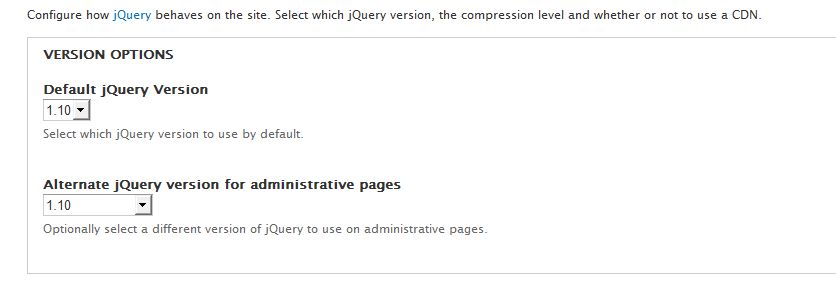
I had JQuery v1.10 as Default and v1.5 for Admin.
Report status tell : jQuery 1.5.2 and jQuery UI 1.8.7
==> it doesn't work
I changed for JQuery v1.10 as Default and v1.10 for Admin.
Report status tell : jQuery 1.10.2 and jQuery UI 1.10.2
==> it works
Comment #11
steinmb commentedUnable to reproduce this on the latest media 7.x-2.x and file_entity and jQuery 1.10.x. Anyone else that can?
Comment #12
srobert72 commentedI think this issue is now fixed with the correction given for #2352333: JQuery update break Media Browser.
Edit a node works now with latest version of JQuery Update.
But I think there is still a problem on Media Admin page (/admin/content/media).
With JQuery Update for Admin setted to 1.10 the "add file" popup appears but incomplete.
With JQuery Update for Admin setted to 1.8 it works perfectly.
I tested both with MediaYoutube activated and disactivated, the result is the same.
Comment #13
bneil commentedI seem to have the opposite of this, where I'm running jQuery update 1.5 on admin pages, if I remove an image from the field then click on the browse button, the library does not load. Setting to 1.7 and above it works as expected. Latest dev versions of media, file_entity, and media_youtube.
Comment #14
saltednutThis showed up randomly today for us. If I adjust css in the browser I can bring it back to the front with a z-index. I'm also seeing ui-dialog buttons on the bottom of the modal. Very awkward.
Comment #15
peri22 commentedHi,
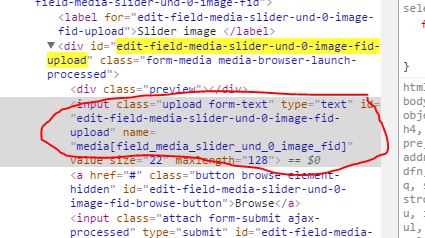
the problem is we have 2 same ID attributes (like edit-field-media-slider-und-0-image-fid-upload, check the attached image ). One for the wrapper div and one for the input. Some cases the media.js working with wrong element.
I have attached a patch with a solution.
Comment #16
peri22 commentedThe attachment is missing.
Comment #17
peri22 commentedComment #20
joseph.olstadcurious.
Comment #21
joseph.olstadIs this still an issue for anyone on any of the recent releases ?
I'm going to tag a beta6 release.
Comment #22
joseph.olstadComment #23
steinmb commented