

Closed (works as designed)
Project:
Inline Entity Form
Version:
8.x-1.x-dev
Component:
Code
Priority:
Normal
Category:
Feature request
Assigned:
Issue tags:
Reporter:
Created:
30 Jan 2018 at 17:31 UTC
Updated:
28 Jul 2021 at 18:47 UTC
Jump to comment: Most recent, Most recent file


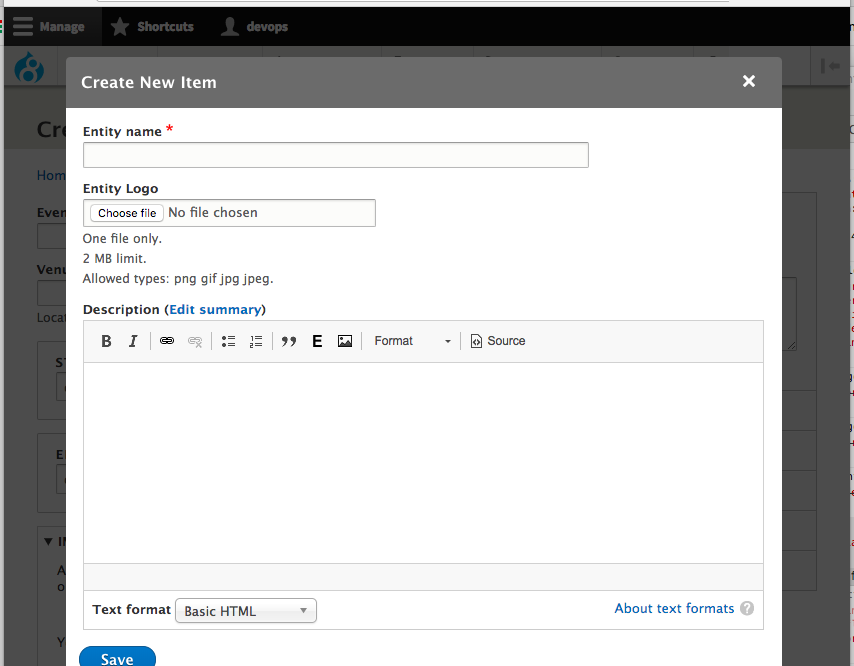





Comments
Comment #2
rfmarcelino commentedComment #3
rfmarcelino commentedComment #4
rfmarcelino commentedComment #5
rfmarcelino commentedComment #6
landsman commentedgreat idea! but where is "existing" button?
Comment #7
benjifisherWhen choosing the widget:
It makes sense, when there are just two IEF options, to put "Simple" before "Complex". Now that there are three options, I think I prefer alphabetical order.
Comment #8
yoroy commentedThanks for sharing your design work! IEF is very much an "Outside In" type of module, letting you do things in-place instead of having to go somewhere else. Providing a good UX here is time and effort well spent :)
For the items in the select list: It will be hard for people to understand what the difference between the three options is. Is there a way to make that choice in the next step? So in the select list only choose that you want to use IEF, and then in a next screen show the three options in a way that makes it easier to understand how they are different so that I can be more confident in which one I choose to use. (We're putting too many cryptic labels in these select lists in general)
The "Create new node" label at the bottom of the autosuggested list does not look clickable. Make it look like a button?
Do I have to type something before the list of suggestions and the link for "new" is shown?
Based on the previous two remarks I can imagine that the "new" task is potentially buried too deep.
Avoid using the word "node" in UI labels and text (see under "wording" onhttps://www.drupal.org/docs/develop/user-interface-standards/interface-text)
Comment #9
rfmarcelino commentedThanks for your feedback.
You're right. The three IEF option is not user-friendly. One possible solution could be, as you said, to simply have Inline Entity Form that would use a default widget. It then could be changed on the settings cog, where a description of the differences between then would appear.
Regarding 'Create new node', IEF let the user change it. I just left it like that on the mockups, because I think it's currently the default wording, but it's also a good opportunity to change it.
I'll update the wording and make it a button.
Yes, the intention is that the user should search if there's already a similar piece of content before adding a new one.
Comment #10
yoroy commentedThat last point is tricky. As I understand it you have to start a *search* for the *create* option to even show up? Not sure it's a good approach to force people into a search behaviour even in cases where they know they want to create a new thing.
Stepping back a bit: it *is* called Inline Entity *Form*. Should this particular tool (compared to things like entity browser) really put such a strong emphasis on re-use over creating new items? Difficult question and it's not easy to find the right balance but I worry this approach pushes the "create" scenario to far into the background. Maybe there's feedback or data that can help with finding the balance?
Comment #11
rfmarcelino commented@yoroy is right. It wouldn't be really 'Inline'.
I took a few steps back, with the feedback I received, and created a mockup for a new module altogether.
Embedded Entity Form?
I'm closing this ticket, since it will be a new project, but feel free to comment.
The link will be added here later on for future reference.
Comment #12
rfmarcelino commentedComment #13
carolpettirossi commentedHi rfmarcelino, I wonder if you have found a module to do something similar to the feature you proposed above.
Comment #14
b_sharpe commentedFor any looking, there is an implementation of this here: https://www.drupal.org/project/entity_reference_widgets