

Closed (won't fix)
Project:
Drupal.org infrastructure
Component:
Other
Priority:
Critical
Category:
Bug report
Assigned:
Reporter:
Created:
22 May 2008 at 11:26 UTC
Updated:
21 Aug 2014 at 21:00 UTC
Jump to comment: Most recent, Most recent file


Comments
Comment #1
pwolanin commentedseeing the same:
Comment #2
damien tournoud commentedLooks like a firewall configuration issue.
Comment #3
pwolanin commented@Damien - do you mean the firewall at OSUOSL?
Comment #4
Freso commentedJust wanted to "ditto", since I'm going to subscribe anyway. ;)
Comment #5
damien tournoud commented@pwolanin, yes, sorry, I mean the firewall at OSUOSL.
Comment #6
rooey commentedsame here haven't been able to connect to CVS at all this afternoon.
Comment #7
jmiccolis commentedJust confirming, it seems to still be down :(
Comment #8
Shai commentedOne more report that CVS is not accessible, via the command line at least. I note that the cvs browser at http://cvs.drupal.org seems to be working.
Comment #9
pwolanin commentedmarked duplicate: http://drupal.org/node/261553
Comment #10
nancydrusubscribing
Comment #11
drummCVS over SSH works okay. (Core committers have extra security.) CVS done locally works fine and quickly, but has the same issue on shell.drupal.org. The load on the machine is slightly high with Apache processes, which seems okay.
I am guessing this is some sort of network issue on that machine, unless local CVS optimizes around using the network.
Comment #12
nnewton commentedFull points to whoever guessed firewall. Somehow a rule was lost, I'm tracking down how, but the issue is fixed temporarily as of now.
--Narayan
Comment #13
nnewton commentedThis is fixed, the copy rule for the firewall has been added back. Thanks for reporting.
Comment #14
Anonymous (not verified) commentedAutomatically closed -- issue fixed for two weeks with no activity.
Comment #15
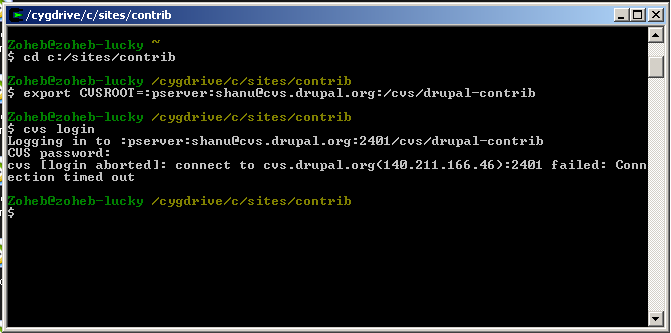
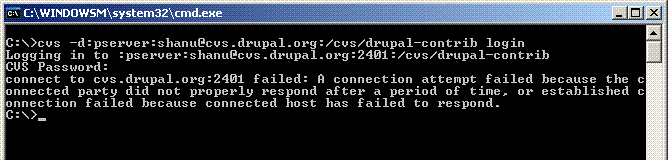
Shanu commentedI'm not able to login to cvs, I'm getting error while using cvs commandline client or tortoisecvs.
Image is attached for further details, please resolve this as I'm short of releasing my first ever theme, I already created project named "Shanu Blue Theme", my cvs username is "Shanu".
Thanks!
Shahnawaz
http://nawaznet.co.cc
Comment #16
gerhard killesreiter commentedI can access the cvs server just fine. Are you behind a firewall?
Comment #17
Shanu commentedI disabled my winxp firewall, but same result.
I'm Frustrated.
Any successful help?
Comment #18
nnewton commentedCan you get to the webcvs repo? http://cvs.drupal.org
Comment #19
Shanu commentedFrom web browser, yes I successfully get to the repo.
Or you mean from CVS itself, I telnet to cvs.drupal.org 2401, but it could not connect.
I'm not able to release my theme for download. In the meantime I provide download from my website.
I installed cygwin package on my windows XP box, and tried again with the help of cvs hanbook on Drupal.org, but getting same connection time out error.
Screen-shot is attached.
I also tried TortoiseCVS, but can't succeeded.
Please come up with valid solution.
Thanks!
Shahnawaz
http://nawaznet.co.cc
Comment #20
pasqualletry:
and show us the result..
Comment #21
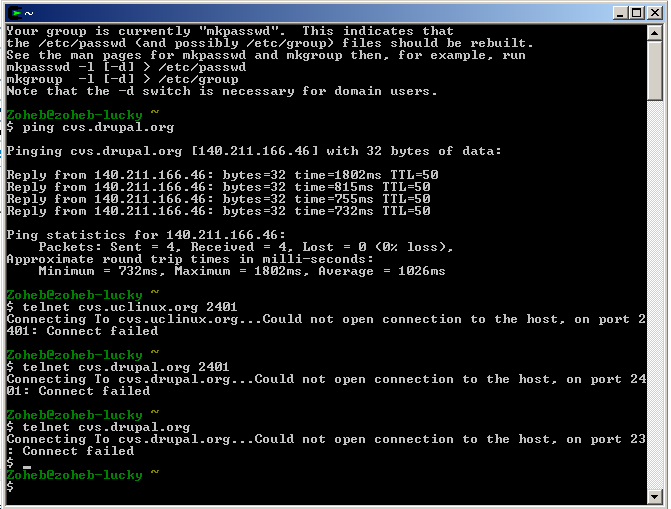
nnewton commentedI don't need to see the output of ping. If you can get to port 80 on cvs.drupal.org and not port 2401 that is very likely an egress firewall on your side. We don't ever block IPs specifically by port. Can you try this:
telnet cvs.uclinux.org 2401
and post the output here.
Comment #22
Shanu commented@Pasqualle
@Narayan Newton
I tried what you've suggested, and showing the results [See Attached Image].
Comment #23
nancydruAs suggested, it sounds like a firewall issue. BTW, even the ping results are very slow. I just did it with a 93 ms average (which is slow for most sites for me).
Comment #24
nnewton commentedYes, if you can't get to cvs.uclinux, I'm afraid I can't help you. This is not an issue with the server or routes to the server. There is a firewall that is blocking your connections out. You should double check your router and see if its doing something to prevent this.
Comment #25
Shanu commentedOk, I'll see.
One question, can i use SVN[TortoiseSVN] instead of CVS?