Come together with the global Drupal community in Rotterdam, 28 Sept – 1 Oct 2026. Sessions, contribution, connection, and Early Bird savings until 8 June.
Image Field Zoom provides a field formatter that allows you to apply it to your image field.
Install
- Download the jQuery Zoom plugin from here: https://github.com/jackmoore/zoom (latest version), unzip the file and place the jquery.zoom.min.js file so that its path is: /libraries/jquery_zoom/jquery.zoom.min.js
- Install and enable the module.
Usage
- Add an image field to your content type/entity type.
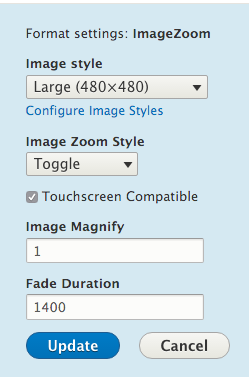
- On the "Manage Display" setting page, select the "Image Zoom" field formatter.
- Click the gear on the right to configure how you want the Image zoom to work. You can learn more about each option here: http://www.jacklmoore.com/zoom/
- You'll see the zoom in action when the images are rendered on the node/entity pages.
Notes
You can use this image field formatter on your views image fields the same way as well.
Roadmap
- Support responsive image styles.
Supporting organizations:
Project information
 Minimally maintained
Maintainers monitor issues, but fast responses are not guaranteed.- Maintenance fixes only
Considered feature-complete by its maintainers. - Project categories: Content display, Site structure, Developer tools
 211 sites report using this module
- Created by utsavjshah on , updated
 Stable releases for this project are covered by the security advisory policy.
Look for the shield icon below.