

Active
Project:
ImageCache Actions
Version:
7.x-1.x-dev
Component:
Miscellaneous
Priority:
Normal
Category:
Feature request
Assigned:
Unassigned
Reporter:
Created:
9 Aug 2008 at 16:17 UTC
Updated:
11 Feb 2015 at 02:11 UTC
Jump to comment: Most recent, Most recent file


Comments
Comment #1
dman commentedThere's no reason why not, although there may be better, dedicated methods to do so.
But we could try with overlays like you say. I'd try a big image that includes the corner and two sides. If you use PNG you can do transparanies. Then two more corners if you want.
... In the long run it would be best to come up with a new action to just do this - so you can define offset, blur and colour. Whoever wants to make that would be cool.
Comment #2
psicomante commentedi would like to code this action, but i haven't so much time. I add this to the todo list :)
Comment #3
mariuss commentedThat would be useful, just tracking this issue.
Comment #4
Djamu commentedDrop shadow is easy:
there's 2 ways:
A map based ( that I used )
Several > Define canvas
Prerequisites: > larger then your maximum size transparancy shadow map ( 8 bit alpha ) 32( 24+8 ) bit png is easiest
mine is a 1600x1600 png made in photoshop
top/left have a 1 pixel border
bottom/right a 3 pixel border
The map is overlayed twice to frame the whole picture.
I use a 2 / 4 / 2 / 4 setting on Define Canvas to add an additional 1 pixel white border ( shadow on map is 1/3/1/3 )
my settings ( low to high weight )
Scale And Crop width: 194, height: 194 weight -10
Define Canvas left:2 right:4 top:2 bottom:4 Transparent weight 0
( use the relative size option, this makes the canvas a little bigger to hold the shadow )
( make sure to select the "Resize canvas under image (possibly cropping)" )
Overlay: file image to canvas (watermark) shadow1600x1600.png x:left, y:top alpha:100% weight 1
( underlay would be more appropriate but that doesn't seem to work on my rig )
( this overlays a much larger map starting from left top corner, I'm using the same map for my full size images ... )
Overlay: file image to canvas (watermark) shadow1600x1600.png x:right, y:bottom alpha:100% weight 2
( overlay for the other 2 sides starts @ right bottom )
Change File format Convert to : jpg
( this can be handy to make sure the result gets saved as a -no transparency- jpg )
Alternatively this can be done using several Define Canvas actions:
for example
Scale And Crop width: 194, height: 194 weight -10
Define Canvas left:1 right:1 top:1 bottom:1 RGB:[64, 64, 64] #
Define Canvas left:1 right:1 top:1 bottom:1 RGB:[128, 128, 128] #
Define Canvas left:1 right:1 top:1 bottom:1 RGB:[208, 208, 208] #
Change File format Convert to : jpg
this will add a 3 pixel all-around shadow
or
Scale And Crop width: 194, height: 194 weight -10
Define Canvas left:1 right:1 top:1 bottom:1 RGB:[64, 64, 64] #
Define Canvas left:0 right:1 top:0 bottom:1 RGB:[128, 128, 128] #
Define Canvas left:0 right:1 top:0 bottom:1 RGB:[208, 208, 208] #
Change File format Convert to : jpg
this will create a 1 pixel frame with 2 pixel shadow on the right / bottom side ....
I'm having some issues with ImageMagick, for some reason this only works with the GD2 library.
Imagemagick plays nice with other modules, but not with Imagecache ( Only scale & crop works )...
So if someone can shed some light on this I'll be gratefull...
( Version: ImageMagick 6.3.7 02/19/08 )
the result can be seen on my site > http://3d.uk.to
Comment #5
dman commentedThat approach with borders is not nice enough.
We need an algorithm/process that can give a nice, offset, blurred shade effect.
I won't be building it until I need it myself, but anyone can contribute code. imagcache actions are all modular...
Comment #6
skilip commentedHere's a little module which adds a drop shadow action to imagecache. It's quite simple. Hopefully someone finds the time to add the offset, blurred and opacity configuration options mentioned above.
Comment #7
Djamu commentedI wanted to test it,
but it depends on the Array module, which I don't seem to be able to find on Drupal.org
Comment #8
skilip commented@Djamu
The module I've posted is for D6. Sorry for your inconvenience!
Comment #9
dman commentedThis does a job, using just currently available tools.
I'ts not efficient or very configurable however, and makes other effects hard to layer. Something that basic should be done in CSS.
(Overlay - source image to canvas was disabled from DRUPAL-6--1 because I'd forgotten why it was there. It's back now in dev, and should still be there in D5)
Comment #10
maksimk commentedJust have used your module but seems there is bug
when width > height then it does not work correct right side is always black
Comment #11
maksimk commentedyou have issue
imagefilledrectangle($canvas, 0, 0, $height_canvas, $height_canvas, $background);
need to change it to
imagefilledrectangle($canvas, 0, 0, $width_canvas, $height_canvas, $background);
but it works great thanks !
Comment #12
halver commentedSkilip, you rock. Thanks for the module. Just what I was looking for.
Comment #13
sinasalek commentedsubscribed
Comment #14
bkmatwa commentedAwesome job 'skilip'! Works perfectly in 6.14 and ImageCache 6.x2.0beta 10. Thank you.
Comment #15
traceelements commentedThanks for the module, Skilip! It works great.
Comment #16
mcurry commentedsubscribe
Comment #17
traceelements commentedSkillip, does your drop shadow module only work for square images?
Comment #18
cybis commentedGreat stuff!
I took the liberty to modify it a bit:
-corrected a bug with imagefillrectangle (replaced it with imagefill)
-corrected a bug with imagecopyresample where the image was incorrectly positioned on the canvas
-change the way the shadow images are positioned on the canvas to get rid of the border line around the image and created new shadow images without border in PS
-added a transparent background if the image type is png (creates opaque background if not)
I recommend creating different shadow images for thumbnails and full size pictures. A couple things to note when creating shadow images:
-top and bottom should be 1px wide
-left and right should be 1px high
-corner shadow images should extend along the sides until the pattern matches those of the top, right, bottom and left images. (see sample in the image folder)
Let me know if it works for you and double check my mods (not an expert here).
Comment #19
cyberwolf commentedSubscribing.
Comment #20
Anonymous (not verified) commented@skilip & cybis: Thanks you guys! Great job on a simple, but very useful module.
If you want to see it in action I used it on our association's site for the bloggers pictures in the blocks. One day very soon, my own Drupal-fu and coding skills will be strong. I will then contribute many things to the community, lol.
www.thecfaa.com
Comment #21
cybis commentedVery cool. Looks great!
Comment #22
WebNewCastle commentedI am impressed. This is very nice. I would love to see this added to the module - I think many people would make good use of it.
Comment #23
joostvdl commentedsubscribing
Comment #24
cybis commentedSee http://www.lucbusquin.com/portfolio for an example of what this action can do. The drop shadows on this page were generated on the go.
edit: drop shadows at the link now created with ImageCache Scale-9 Actions.
Comment #25
meecect commentedCan someone explain more about how the shadow images are to be constructed? In particular, I would like to be able to change the dropshadow angle. So, instead of a shado to the bottom and right, I would like to be able to specify a uniform shadow around the edges (as if the light was 'head-on;) I'm not sure if that should be accomplished with the shadow images or by changing the code.
Also, I think this should be in drupal contrib. If no one minds, I can create an module in the Drupal repository for this.
Comment #26
skilip commented@meecect: The images can be created in Photoshop. Regularly you just draw a square to which you add a drop shadow filter. After that you use the crop tool to get the 10 images.
I guess you should not create a separate module for this. IMO it belongs to the module this issue is created for (Image Cache Actions). So we should convince the maintainer to commit this ;).
Comment #27
cybis commented@meecect,
You'll need to create the drop shadow outside drupal with an application like Photoshop. In the drop shadow effect in Photoshop, set distance to 0 px to obtain a uniform shadow around all edges. Also see post #18 for more details. If you need a more step by step set of instructions, I'll be glad to help.
Comment #28
glasswool commentedFantastic plugin! Cybis, when used with views slideshow I cannot get rid of the background, it shows opague. I guess this is because I am using jpegs for images. What do I do to set the background transparent?
Comment #29
dman commentedHas anyone tried http://drupal.org/project/imagecache_scale9actions instead? That's a good one.
Anyway, yes, jpegs don't do transparency. As per the usual instructions in imagecache_actions you must either
- flatten it onto a solid color (using define canvas or alpha-flatten) OR
- use the file format switcher to save as PNG
Saving a jpeg as PNG will inflate your file size badly, and we haven't found a good fix for that.
Sometimes dropshadow borders are simply done better by using css overlays. ... if you need transparency as well as large jpegs
Comment #30
paul@poetsma.nl commentedWill the dropshadow be added to ImageCache Actions?
Comment #31
dman commentedI've looked at the code, and it's fine, but imagecache_scale9actions is already providing this "overlay 8 image slices" approach. And doing it pretty well. So I'd endorse that solution - if you wanted to keep on the path of making all the images yourself.
When making all the images yourself, this imageslice approach is actually quite a bit more powerful than just dropshadows, so the name may not be right.
OTOH, when someone just wants 'dropshadows' it should be possible for them to blur and adjust some widths and colors without remaking a bunch of images.
So although it's a good little action that does its own thing well enough, I don't think it's the solution for the long-term.
I think folk can continue to use the module as packaged in the zip here. It does work. Or hey, make your own project.
Sorry, but I can't get into maintaining this exact solution.
Comment #32
mo6#24 awesome!
Comment #34
cybis commentedPosted a recipe to create drop shadows with imagecache_scale9actions here #952792: Drop Shadows.
Thank you dman for pointing it out.
Comment #35
mrP commentedAny chance this could be revisited with D7?
Comment #36
fietserwinWhat's wrong with CSS3 drop-shadow (including a filter: progid:DXImageTransform.Microsoft.Shadow for older IE versions?
Comment #37
mrP commentedYou're absolutely right. I came to the same conclusion within 15 minutes of my post.
See http://www.w3schools.com/cssref/css3_pr_box-shadow.asp
Comment #38
IanVS commentedSorry if I seem dense for asking this, but how would I create an image style using CSS3 as suggested above? My site is generating PDF files of user-uploaded images using TCPDF. I cannot just use straight CSS3 since I am not displaying on a browser, but image styles do work. If I understand correctly, the code in this thread will only work with Drupal 6, whereas I am using D7. Does anyone have a suggestion for a complete Drupal noob?
Comment #39
gregglesScale-9 Actions isn't supported for Drupal 7.
CSS solutions work if you are displaying the image in an html context, but doesn't work if you are pushing the image somewhere else (e.g. pdf as in comment #38 or if the resulting image is being syndicated to sites where you don't control the css).
I think this issue should be revisited for ImageCache Actions for 7.x.
@dman, @fietserwin - do you have a strong feeling if you do/don't want to include this feature in the 7.x branch of the module?
Comment #40
dman commentedNo objections from this end!
It's just that
* one approach was better done using Scale-9 actions at the time, so it was fine to bounce them to that,
* and we had/have no code that would provide proper blur, offset and color settings I'd want to have to do it algorithmically.
(Ideally I'd like it to support irregular shapes and transparency, but realise that's a trickier challenge)
If someone want's to contribute that, it's welcome here.
Shame Scale-9 actions isn't happening. We could adopt that also if anyone wants to try porting it.
Comment #41
gregglesOK, great to know. I'm not sure exactly when I'll get to this but knowing the options is good :) It's possible the right path would be to upgrade/adopt Scale-9.
Thanks!
Comment #42
dman commented@greggles
I'm shifting this to a new dedicated issue #2423941: Adopt Scale9 custom corners and borders effect
Join us over there if you are still interested in having a go at this.
Comment #43
dman commentedIf anyone is following this thread for true, algorithmic drop-shadow effects, WE ARE ALSO STILL INTERESTED in seeing code for that.
Please cross-reference with
https://www.drupal.org/node/564036#comment-1992406
I want to see a process that can produce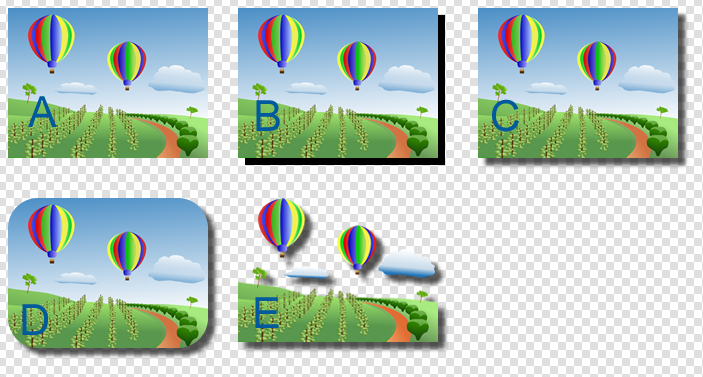 - without taking shortcuts. Initially just to support rounded corners properly, but once you've done that, then true masking is not far away.
I know it will be processing-expensive, but I also imaging the algorithm can't be too bad - especially if you break it down into simpler steps (desaturate/recolor, flatten, blur, underlay with offset)