

 Come together with the global Drupal community in Rotterdam, 28 Sept – 1 Oct 2026. Sessions, contribution, connection, and Early Bird savings until 8 June.
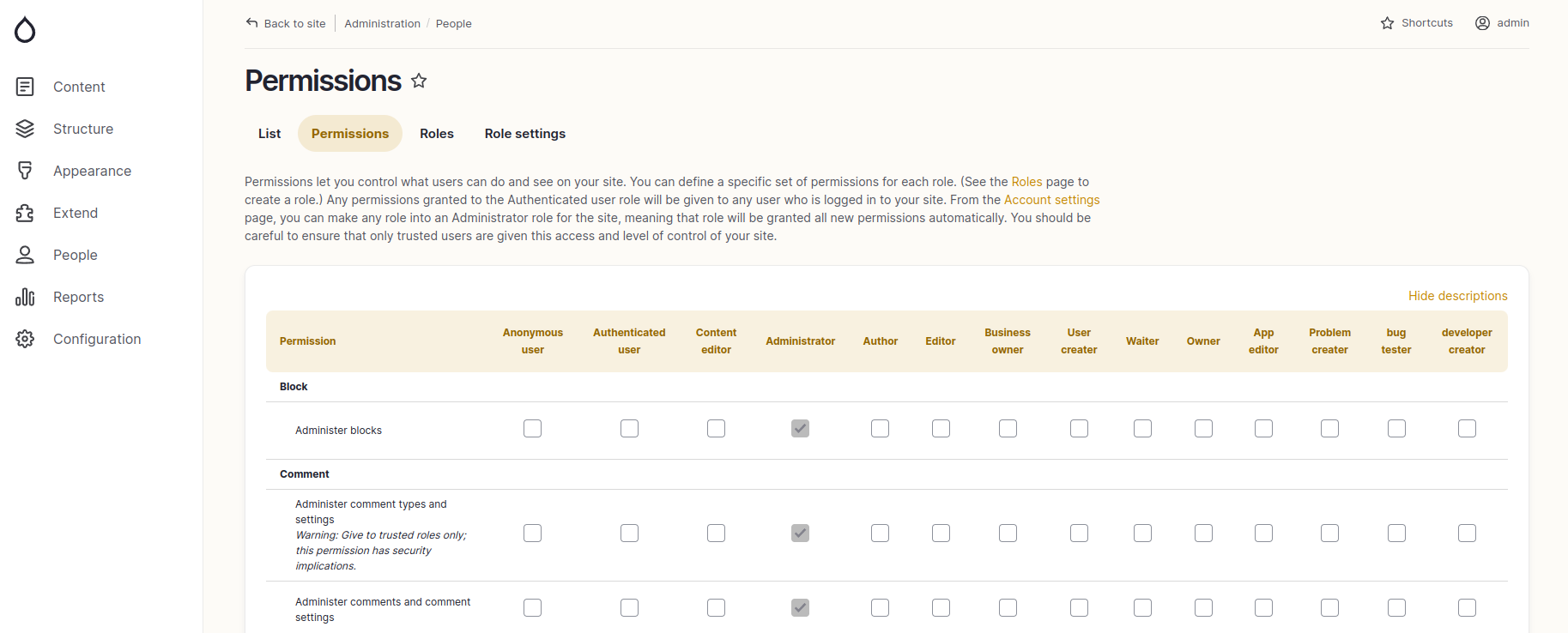
Table header gets overflow on the permissions page (/admin/people/permissions) while there is multiple users exists.
steps to produce :
1. Create multiple user role from here (admin/people/roles)
2. Go to url path (/admin/people/permissions)
Here you can see the bug.
| Comment | File | Size | Author |
|---|---|---|---|
| #85 | ksnip_20240604-200922.png | 194.42 KB | david.qdoscc |
| #75 | gin-table-header-sticky--3447517-1.patch | 732 bytes | ambot112 |
| #69 | Screenshot 2024-05-01 at 09.18.13.png | 111.64 KB | bram.velthoven |
| #69 | Screenshot 2024-05-01 at 09.14.23.png | 142.42 KB | bram.velthoven |
| #63 | gin-roles-horizontal-scroll-relative-fix-2.png | 697.43 KB | hebl |
Issue fork gin-3293369
 Show commands
Start within a Git clone of the project using the version control instructions.
Or, if you do not have SSH keys set up on git.drupalcode.org:
 changes






Comments
Comment #2
tarun chauhan commentedComment #3
shyam_bhattComment #4
shyam_bhattI have fixed this issue by reducing the font size if the table column is more than 10. Please check the patch.
Comment #5
shyam_bhattComment #6
kmontyI've also encountered this issue, but I don't think this patch is the correct approach. For example, I have a site with 25 roles, so this patch still has the issue.
I'd suggest the fix is to ensure the Table Select sticky header continues to horizontally scroll after you've vertically scrolled down the page.
Comment #7
amin.ankitComment #8
saschaeggiComment #9
tea.time commentedThis seems related?
Comment #10
abelassSee also https://www.drupal.org/project/gin/issues/3338209#comment-14945131
Comment #11
Vinayak.Ambig commentedI have fixed this issue by adding overflow-x auto to table parent div wrapper. Please check the patch. Also attached video.
Comment #12
Vinayak.Ambig commentedComment #13
Vinayak.Ambig commentedComment #14
santosh_verma commentedComment #15
santosh_verma commentedI have tested #11,

getting warnings "warning: 2 lines add whitespace errors."
Issue is fixed after applying patch
before

after

Comment #16
santosh_verma commentedComment #18
saschaeggiI've opened MR !244 for a more elegant solution.
Please review
Cheers!
Comment #19
dieterholvoet commentedThis doesn't quite fix it yet. It makes the table horizontally scrollable, but the table header isn't right yet. It creates a duplicate sticky header which still overflows the screen, without removing the old header.
Comment #20
saschaeggi@DieterHolvoet I'm moving this back to needs review as the MR fixes the described issue here. The permissions page does not have a sticky header btw. Are you using maybe a module which alters this page? Let's keep them separate. Free to open an issue for that module in combination with the permission page.
Comment #21
dieterholvoet commentedI can reproduce it on another project with this patch applied as well. No modules are altering the permissions page. No other Gin patches except for this one, applied to dev-3.x. The duplicate header only happens if the permissions table has horizontal overflow, if not it works fine (but it's sticky either way).
Comment #22
dieterholvoet commentedSomething else:
$variables['attributes']['id']doesn't seem to always be set. Onadmin/config/development/mail_safetyusing the Mail Safety module it's not set.You should probably also remove the
var_dump().Comment #24
sakthi_dev commentedFixed on scroll header sticky. Please review.
Comment #25
saschaeggiLGTM, just needs a community review
Comment #26
dieterholvoet commentedThe issues as described in #19 are still present.
Comment #27
lokesh jamadar commentedComment #28
lokesh jamadar commentedComment #29
saschaeggi@DieterHolvoet sorry for the issue hopping but can you test the MR in #3344925: Sticky header for non views tables? Will this address your issue?
Comment #30
dieterholvoet commentedNo, after applying that MR to a project no sticky header appears anymore on the permissions page. I also can't apply both that MR and the one here since they give conflicts.
Comment #31
saschaeggi@DieterHolvoet that is strange, the other MR enables sticky headers. Did you clear the cache? As it has a template change it most likely won't work without a CR.
Comment #32
dieterholvoet commentedYes I did! I added a
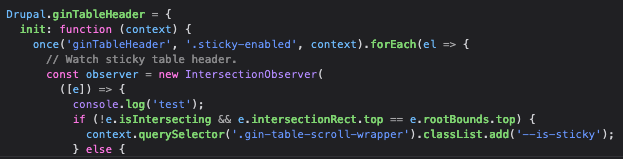
console.logto the JS to make sure the new one is picked up and it is, 'test' is logged exactly once.The new
.gin-table-scroll-wrapperelement is also present.Comment #33
saschaeggi@DieterHolvoet I pushed a fix, as there was an issue in Chrome and a bug in FF. Can you try it again? Thanks!
Comment #34
dieterholvoet commentedNow it works, except if the table header overflows the page horizontally. In that case the header appears sticky immediately and never disappears:
Comment #35
saschaeggiWhich this issue is actually for, so we're good to go on the other one I guess 😉
Also does this overflow issue happen in Claro, too?
Comment #36
dieterholvoet commentedOn Claro the page overflows horizontally, but both the normal and sticky headers are in the correct position when scrolling horizontally:
Comment #37
paul121 commentedExperiencing the same when there is overflow horizontally. Happy to test when something is ready!
Comment #38
lamp5Comment #39
swatidhurandhar commentedHi,
I applied patch #38, it makes the table horizontally scrollable and all roles are visible. But once we scroll vertically, sticky header gets attached to table which doesn't show all user roles. It also creates extra space on right side of the page.
Thanks
Comment #40
phjouUnfortunately, I couldn't apply the patch on latest RC (with patch of issue below) or the dev branch.
It might be due to this ticket that has been merged and also affect sticky tables: #3386007: Table sticky header appears when table not in viewport
Comment #41
saschaeggiComment #42
francois-p-peloquin commentedI've created a simple patch that listens to the scroll position of the table wrapper and scrolls the sticky table headers over proportionally.
Comment #43
djsagar commented@francois-p-peloquin I have checked the #42, with gin as admin theme.
Steps to reproduce the issue:
1. After user logged in, go to People > Roles
2. Add multiple roles
3. Go to People > Permissions
the patch #42 applied successfully but there is an issue which need to be fixed this is same as claro.
Comment #44
djsagar commentedComment #45
arantxioSo when using 10.2 we also got introduced to a new issue with the header, due to the change from #3362276: Use position: sticky for views sticky table header, we now use position: sticky on the header instead of creating a separate table with the header inside of it.
This causes the header to not stick to the top anymore, this is due to the 'overflow: auto' we use on the "gin-table-scroll-wrapper" class.
Removing the overflow: auto resolves the issue of it not sticking to the top anymore, but obviously this makes the permissions go out of bounds of the wrapper that we are using, which creates another problem on its own.
Due to the change from #3362276: Use position: sticky for views sticky table header we now have a 'position-sticky' class instead of the 'sticky-enabled' class, which also needs some rewriting I suspect.
I don't know if its better to put this into another issue or change up this issue a little bit to fix both of the issues that now revolve around the header.
Comment #46
anybodyIndeed I can confirm #45! Thanks for the quickfix!
TBH without the "overflow: auto;" (on
.gin-table-scroll-wrapper) it behaves 'more' correctly to me. The column labels are always positioned correctly then and the table header is sticky.Comment #47
guilhomI also have the same issue on the webform list page "admin/structure/webform" where I have 3 different webforms, but in very particular browser height and depending on the page content, our first webform is inaccessible/hidden on scroll.
Removing the overflow: auto; also seems to solve the issue.
Comment #48
mortona2k commentedThe patch is adding a scroll event listener. Would it be more performant to use intersection observer?
Comment #51
saschaeggiI've created a new branch with a complete new approach and for me it seems to work locally, but I'd love to gather some more feedback.
Can somebody please test the branch https://git.drupalcode.org/project/gin/-/merge_requests/404?
You can generate a patch to use against the latest dev with https://git.drupalcode.org/project/gin/-/merge_requests/404.diff
Thank you in advance!
Comment #52
anybodyThanks @saschaeggi just a note for you and the others: There's a Tugboat link for the MR that can be used for manual testing this easily: "View live preview!"
Great to see progress here, thank you so much! :)
Update: Looks fine in tugboat!
Comment #53
arantxioI've tested this on one of our sites, but I noticed that with a lot of roles, it creates loads of blank space next to the permissions wrapper div.
Adding the css: "table-layout: fixed;" kinda fixes this problem, however now everything gets cramped together which is also not wanted.
Comment #54
saschaeggi@Arantxio
Can you share a screenshot?
For this as well. Thank you.
Comment #55
saschaeggiI've setup some artificial roles in the linked Tugboat of the MR and can't reproduce the whitespace, see https://mr404-tvh4mpqiaqdfkkufdvfcc1xmmqdtjaxd.tugboatqa.com/admin/peopl... (admin/admin)
Comment #56
arantxioHere are some screenshots:
The cramped layout:

The whitespace:

Comment #57
arantxioI've even tried it on tugboat and here i can also see the whitespace.
Comment #58
saschaeggi@Arantxio I was able to reproduce it in Chrome. I've pushed a fix.
Comment #59
saschaeggiPushed another change to switch to use
scrollsyncto avoid some of the jerkyness when positioning an element with JS within overflow.Testers wanted 👀
Comment #60
anybodyTugboat is sadly broken (Failed) but the fix works great for me so far, thank you Sascha!
Comment #61
saschaeggiTugboat preview is fixed, can be tested at:
Comment #62
hebl commentedHey @saschaeggi,
The table scrolls horizontally as expected both when in sticky mode and not in sticky mode. So that's all good.
However, I'm experiencing a horizontal scroll outside of the table too. I'll upload a screen recording showing what I mean. [gin-roles-horizontal-scroll.mp4]
Macbook 15", Chrome.
Comment #63
hebl commentedNot sure whether this is the best fix, but setting the position attribute of the table to be "relative", before it's then set to "sticky" appears to remove the unwanted horizontal scroll for me in Chrome. See screenshot attached.
Comment #64
saschaeggi@Hebl I pushed a fix for Chrome 👀
Comment #65
hebl commentedThanks @saschaeggi, I've tested the update and fix is applied. :)
Comment #66
arantxioI can confirm that it also works properly on our site now.
Comment #67
robcarrI've applied MR404 mainly to address sticky headers on the permissions page (lots of related - closed - issues), but I actually see 2 sets of table headers with the patch applied. The upper header obscures the 'filter' box on permissions on page load, but is the header that remains sticky when I scroll down.

Comment #68
saschaeggi@robcarr I can't really reproduce this, can you provide steps how to reproduce this, Browser & which Drupal version you're using. Also does it happen only on a single instance (so potentially another module is interfering?)
Comment #69
bram.velthoven commentedHi i've tested the patch. And i've found that there are still some things that can use adjustments. On viewport 959px and smaller it prints the sticky header twice, so it seems. Furthermore there seems to be an issue regarding the z-index with the Dropbuttons (operations) having a larger z-index than the sticky header causing overlap.
Comment #71
robcarr@saschaeggi - it's a complex D10.2 site but the issue seems to be down to the
margin-bottomvalue calculated in js > tableheader.js updateTableHeader function by the line:tableHeader.style.marginBottom = `-${el.querySelector('thead').getBoundingClientRect().height + 1}px`;In my instance the THEAD has a height of 54px, so the marginBottom value should be 55px, but the JS implements this as in inline style value -54px in the enclosing table. If this value is changed to 20px then the 2 table headers are visible, but the upper, sticky header is above the system 'Filter' input box and it's at least usable.
For the moment I'm just going to use some hacky CSS in sites/default/files/gin-custom.css to get around this. Will probably break something else...
(Sorry about the !important value. I know)
Comment #73
saschaeggiComment #74
saschaeggi@robcarr how can I reproduce your scenario?
As using your overrides will certainly break it for the general implementation.
Comment #75
ambot112 commentedThe #47 works for minimal item of roles.
Comment #76
saschaeggi@brian.flores@codeandtheory.com #47 is not a solution we can move forward with. Please test the branch instead 👀
Comment #77
jackfoust commentedMR404 has resolved a lot of the issues I was having on various Webform tables.
Comment #78
saschaeggiLet's get this in! 🎉
Comment #80
saschaeggiThank you all so much for collaborating on this one! Good things take time! 😅👏🧡
Comment #81
anybodyThank you very very much @saschaeggi, great work!
Looking forward to the next release :)
Comment #82
david.qdoscc commentedSorry, but testing this on the latest 3.x-dev@dev, I see two header rows on the permissions table (one of which is sticky)
and no means of scrolling horizontally to roles that overflow the right of the container.Realised that I can actually use Shift+mouse wheel to scroll horizontally on the table!Comment #83
selwynpolit commentedI'm seeing the same. Two header rows but at least the sticky works!
Comment #84
saschaeggiCan you share some more information like for example which Drupal version you're using and can you share a screenshot please?
Comment #85
david.qdoscc commentedI'm using Drupal 10.2.6 and PHP 8.2.12. Gin 3.x-dev@dev.
Comment #86
jackfoust commentedLatest Gin, Drupal 10.2.6, PHP 8.2.18 - Not able to replicate the double row headers some folks are seeing. Tested with left and top toolbar.
Comment #87
saschaeggi@david.qdoscc I'm unable to reproduce this just yet. Did you clear the cache(s)? I would need steps to reproduce this and if there are any other community modules involved which potentially could interfere here.
Comment #88
david.qdoscc commentedI've found it! Module Filter is to blame.
Comment #89
saschaeggi@david.qdoscc can you open an issue so we can track it there? TY!
Comment #90
david.qdoscc commentedSure. Here it is: #3452725: Permissions table header is misaligned when using Gin Admin Theme
Comment #91
saschaeggi@david.qdoscc @selwynpolit
I moved the issue to the Module Filter project as the root cause is within that module -> https://www.drupal.org/project/module_filter/issues/3452725