

 Come together with the global Drupal community in Rotterdam, 28 Sept – 1 Oct 2026. Sessions, contribution, connection, and Early Bird savings until 8 June.
Hi,
Love this module, but I can't for the life of me work out how to add, say, a PDF file to a node if FlashVideo is turned on - it seems that once FlashVIdeo is activated, no attachment types other than video are possible. Is this correct? Can you suggest a way round this?
Regards,
- Paul
| Comment | File | Size | Author |
|---|---|---|---|
| #24 | flashvideo_filefield_warning.png | 52.62 KB | attheshow |
| #15 | FlashVideo_with_FileField.png | 117.82 KB | attheshow |


Comments
Comment #1
sethx commentedCan confirm this issue as well.
My upload settings are fine.
All content types which do not use flashvideo have the "attachment" field ok and working.
The ones using flashvideo, simply dont have it.
I use flashvideo to manage videos on some pages, but its hardcore for me to have to set up 1000 content types to have support for attachments.
Comment #2
chiebert commentedLikewise. Running Drupal 5.7 and Flashvideo 5.x-2.7: as soon as flashvideo is enabled for a node type, no other attachments are available. Other than 'allow attachments', no other 'attach' types are enabled for the problematic node types - in other words, for me, 'attach audio' and 'attach image' are disabled for the node type(s) in question. As soon as flashvideo is enabled for a type, we lose the ability to attach other kinds of files.
Comment #3
Steve Dondley commentedSame problem here. This would be solved by making the video field a cck type field like the audio module does.
Comment #4
celston commentedHaving same issue here. Best I can tell, flashvideo overwrites the form['attachments'] fieldset created by the upload module. Seems to me it should be a sub-fieldset and a separate one. The two modules should be independent on the form.
Comment #5
dubitable commentedUsing version 6.x-1.3, same issues. I've also realized--it took me forever to figure why this was happening, and is the reason I finally ended up here--that this seems to have the disastrous byproduct of breaking uploads that happen with secondary modules like the YUI Editor, which uses the upload functionality (rather than creating a new image node, like image assist) to attach images to a story, for example--the files are uploaded onto the server, but the images get wiped on the next cron run. Then you get a bunch of broken images in a story post, and the user is deeply perplexed. This is a pretty deadly bug!
UPDATE: I think I'm wrong about the other implication (image files disappearing). I thought I'd traced it to this, but it clearly is still happening without the video associated with the other node type, so...back to the drawing board. Sorry about that.
Still, it'd be handy to be able to attach other things to nodes when flashvideo is enabled for that node...
Comment #6
travist commentedI apologize that I have been away lately. Things, and you probably already know, have been crazy busy for me and have taken priority (like having a new son).
I will try to allocate some of my time shortly to resolve as many of these issues as I can. In the meantime, I am very much willing to accept any help that anybody has to offer with resolution of these issues. You will be acknowledged.
Thanks,
Travis.
Comment #7
kevinquillen commentedThe video attaching itself should be isolated from File uploading fieldgroup in my opinion.
Comment #8
sethx commentedcongratulations on having a sun, travist!
wish you all the best
Comment #9
travist commentedComment #10
attheshow commentedWhen I was at the Lullabot Do It With Drupal conference last month, everyone there seemed to emphatically say "Don't use the core Upload module!" I'm wondering if we should consider moving FlashVideo to where it depends on the CCK FileField module since this seems to be the new standard for Drupal 6.
This change would also theoretically correct the problem mentioned above and allow multiple attachment types to a node.
Comment #11
travist commentedI agree with you, atttheshow. I think this might be my next big undertaking with FV. I was thinking of pulling out the Upload module functionality into a plugin' (maybe add some more hooks), and then add the FileField CCK plugin' thereafter.
This will probably be a version 6.x only enhancement.
Comment #12
attheshow commentedOk, I was starting to work on this a little bit in my spare time. I'll post any patches or code here so that we can stay in communication on this.
Also, does this need to be a plugin? I was thinking this would be a reworking of the basic module code that hooks into Upload. Then, as long as there's an upgrade path for current users, people shouldn't need to use the Upload module for this any longer. Thoughts?
Comment #13
travist commentedMark (attheshow),
I am not sure how the FileField works as far as hooks are concerned, but we don't want to create a FileField dependency on the core FlashVideo module. This can be done one of two ways.... either sprinkling the code with "module_exists", or by building a plugin module that can only be enabled if the dependency module has been enabled. I prefer the later simply because it forces good coding practice by extracting all common functionality into support "plugin" modules. However, by building the FileField functionality into the core functionality will definitely be a great first start, and extracting code into a separate support module is a trivial process. I will let you decide what is the best approach for this, Mark. Thank you so much for the efforts.
Comment #14
attheshow commentedOk, that sounds good to me. That approach will probably make the upgrade path easier for users as well.
Comment #15
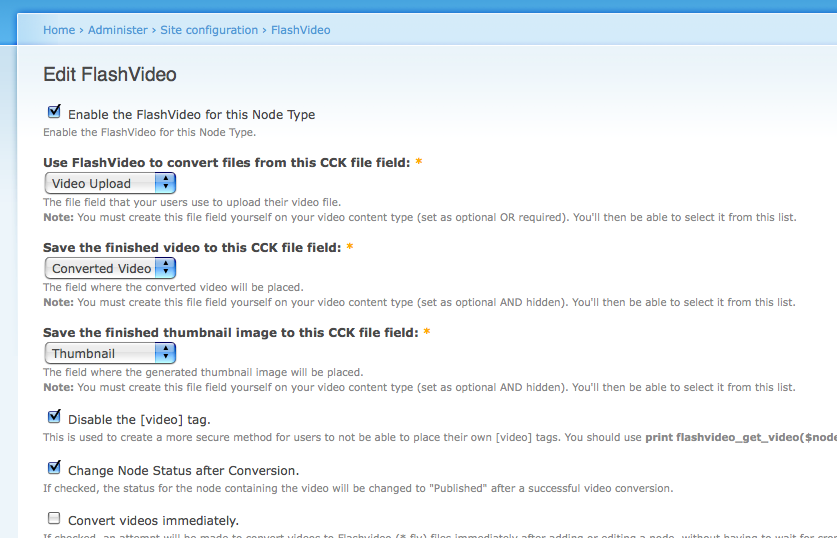
attheshow commentedJust a status update. I'm just working in my local environment. I've got the administrative interface for the node types updated so that it asks you for the name of your fields (see screenshot). I've also just gotten the _flashvideo_update_files function updated to work with FileField. Functions that I still need to update:
Comment #16
attheshow commentedIssue title adjustment.
Comment #17
attheshow commentedJust committed first round of changes to the dev release. Anyone/everyone please let me know if you get a chance to test out the FileField integration!
Comment #18
travist commentedSeriously, Mark.... can I tell you enough how much you rock!?
Thanks again for your efforts. Things have been crazy for me lately and I am very thankful that you have stepped up when I have been unavailable. I am looking to kick back into this project soon once I finish this project I have been working on (ahem... new Drupal book).
Comment #19
attheshow commentedThanks Travis. I just hope someone can help on testing this with me so that we can make sure that it works out for everyone.
Oooh, Drupal book. Nice! Keep me posted on that. :)
Comment #20
strangeluck commentedi have downloaded this latest dev release however i see no options on the administration screen similar to those in the screenshot. do the cck field names need to match those used in your setup? i have filefield installed and file upload cck fields created for the node type i wish to use with flashvideo yet i can find no option to enable flashvideo to use these fields. additionally, in a somewhat unrelated issue, the flashvideo views integration seems to be broken in this dev release; when attempting to add flashvideo fields to a view there is no longer a flashvideo group present under which to select them. i have attempted to use this release on both an existing drupal installation (6.8) as well as a fresh installation (6.9) with the same results.
Comment #21
attheshow commentedDear strangeluck,
Awesome, thank you so much for testing this with me. So in the new "Universal Settings" section of FlashVideo, I decided to add a checkbox so that you have to specifically choose to use the CCK FileField module with FlashVideo. After you check the box and return to your FlashVideo content type settings, you should see settings similar to the screenshot I posted above.
I'm not sure if it should permanently stay like this, but I didn't want to be too forceful about this change. In other words, I wanted everyone to have the option of sticking with the core Upload module if they wished. What do you think? Good/bad idea?
Would you mind creating a separate issue in the queue for the other issue you mentioned? I might take a look at that this evening.
Comment #22
strangeluck commentedno need to thank me, without the work of you and your fellow developers creating and troubleshooting excellent modules such as this my workday would be far more arduous and far less interesting.
thanks for pointing out the location of the check box, it did not even occur to me to explore that page in order to enable filefield support. having now enabled it i can confirm that the module seems to be playing nicely with filefield. i'll continue to test it out as i upload more content and report back if i encounter any issues.
i have noted one minor thing that may or may not be worth mentioning; when enabling filefield support, it seems to enable flashvideo support globally - that is for all content types. this is not really an issue as one must then manually select the destination filefields for flashvideo support to function (as i'm sure you are aware). i just think some helper text explaining that one needs three distinct filefields - one for upload, one for conversion, and a third for thumbnail be present and enabled for flashvideo filefield support to funtion. if any one cck field is not present and selected while the checkbox is enabled under universal settings flashvideo fails to function. this should all be common sense (and indeed it must be, because even i managed to figure it out) but it could potentially cause some confusion....
(i'll submit an issue regarding the views integration shortly. now if only we could get the mp4 support mentioned in http://drupal.org/node/233995 fully integrated i might shed a tear or two of joy)
Comment #23
attheshow commentedInteresting. I'll try to investigate and figure out how to account for the situation you mentioned above about FlashVideo being enabled universally. That sounds like an unintended side-effect to me and not something that we want to be happening.
Comment #24
attheshow commentedstrangeluck,
I've tried to duplicate the issue you mentioned about FlashVideo being automatically enabled for all content types after FileField support is enabled, but I'm unable to replicate this. When I visit /admin/settings/flashvideo, it still says that FlashVideo is enabled only for the two content types I've specifically enabled it for. Am I missing something there? Or am I just not understanding you correctly?
In regards to the issue of assisting users with this slightly more difficult FileField setup, I've just committed a change that will supply a warning message on the node creation page, if the administrator hasn't configured things correctly (see attached screenshot). Hopefully this should help people a bit.
Comment #25
strangeluck commentedyou're right, it was likely user error on my part. i must have accidentally enabled flashvideo globally before activating your fielfield integration. sorry for the confusion. however, once fielfield support is enabled i can no longer make changes to the global settings page as it is now required to select destination filefields - which are present in my flashvideo nodes being as i created them - but there are no global filefields to select so any changes will not save.
Comment #26
attheshow commentedGood catch. I obviously hadn't tested that part of it yet. Hmmm...this is going to take some thought. We might not be able to use the Global Settings any more if we're using FileField. I'll have to think about it and see if I can come up with any options for this.
Comment #27
strangeluck commentedupon installing the module on my primary server i get the following message when attempting to convert a video:
user warning: Table 'community-cms.sandbox_files' doesn't exist query: SELECT n.nid, n.type, f.*, fv.flags FROM sandbox_files AS f LEFT JOIN sandbox_flashvideo AS fv ON f.fid = fv.fid LEFT JOIN sandbox_node AS n ON fv.nid = n.nid WHERE (n.type = 'film') AND (fv.oid = fv.fid) AND (fv.status <> 1) AND ((fv.status = 0) OR (fv.flags > 0)) in /modules/flashvideo/flashvideo.module on line 1186.
i've looked at my sql database and indeed there are no sandbox tables present. any ideas? i also get the "video not available" image when using the [video] tag, perhaps this is related.
Comment #28
butler360 commentedThat is the exact same message I get. I've already put in a support request for it, but no responses yet. Glad to hear it's not just me, though.
Comment #29
attheshow commentedThe "sandbox" issue was a bug in the code. That should be fixed in the next dev package. #362367: No video or thumbnail, PHP error in logs
Comment #30
attheshow commentedDoes anyone have any winning ideas on how to do the FileField integration, but still allow Global Settings to work? I've tried to think of a good idea, but haven't come up with anything yet.
It worked ok with the core Upload module because that field didn't change from one content type to the next. It was always the same. With FileField though, the fields are always going to be different from one content type to the next.
My thinking is that we might need to disable Global Settings when FileField is enabled. Any other ideas?
Comment #31
attheshow commentedJust committed a change that disables the "Global Settings" when FileField integration is enabled.
Comment #32
butler360 commentedMaybe I'm doing this wrong, but when I go to disable FlashVideo for a node type, I still get:
* Use FlashVideo to convert files from this CCK file field field is required.
* Save the finished video to this CCK file field field is required.
* Save the finished thumbnail image to this CCK file field field is required.
And so it doesn't let me save the changes. I'm using the version from today (24th).
Comment #33
attheshow commentedDear butler360,
Thanks for finding and reporting that issue. I just committed a fix for that. I removed the "required" attribute on that form for those three fields. The original intent was obviously to make sure that users filled out those fields, but you now get a notice on your node add form if you don't have the fields properly configured (this was added in a day or two ago), so the requirements on this configuration form really aren't too necessary at this point. And, as you pointed out, they were also causing interface problems.
Comment #34
butler360 commentedThanks for the quick response. But, while I now see Global Settings is gone, I still get the same error when I try to disable FlashVideo on all of my other content types. It requires the same three fields.
Comment #35
attheshow commentedbutler360,
Are you downloading the latest content directly from CVS? I'm not sure if the 1.x-dev version has the latest code yet. I know it's supposed to repackage the content from CVS about every 12 hours.
When you have the latest code, you should not be seeing the asterisks that mark these three fields as required, and you should be able to submit the form and disable FlashVideo for any content type.
Comment #36
butler360 commentedYep, that was the problem. Just learned how to access modules via CVS. Sorry for the confusion. Drupal told me there was a new version so I figured it was already in there.
Comment #37
attheshow commentedComment #38
rogueturnip commentedOnce the CCK FileField is set how do you disable the "Download Video" link under the video? Is there anyway that this could be moved to a CCK Field so it can be assigned to roles for use?
Thanks!
Comment #39
attheshow commentedDear rogueturnip,
To disable the "download video" link that you mention, this is a CCK setting. You'll need to edit your field and change the "Default list value:" to "Hidden". That should keep it from being downloadable.
Also, can you please rephrase your second question? I didn't quite understand what you were asking there.
Comment #40
rogueturnip commentedThanks for the reply so quick. I tried the "Hidden" field on the converted CCK and the upload CCK but the Download video link continues to appear.
What I was trying to say with my second question was, is it possible to have the Download Video link only appear for users that are granted certain roles. I thought this would happen because it was a CCK and I used the content permissions to disable it for all users but the on in my "Basic" role but the field appears for Anonymous and Authenticated too.
Thanks again!
Comment #41
rogueturnip commentedFigured the first one out. If you have set the Download video prior to turning on CCK then it will be there no matter what you do (bug?) but the CCK Hidden still doesnt' show or hide the link. It's only off now.
Comment #42
attheshow commentedrogueturnip,
Sorry, I'm having trouble understanding the setup you mentioned on comment #41. Can you please post step-by-step instructions on how to duplicate the error? If I can duplicate the issue on my setup, perhaps I can fix the problem.
Comment #43
rogueturnip commentedI'll try my best here.
WHen I initially had Flashvideo set up it was without the CCK FileField set up. I had the check box for "Download" selected and this worked fine to turn it on and off. Once I set CCK FileField there was no way to remove the Download Video option. I turned off the CCK Filefield option and unselected teh Download box and the link vanished. From this I then started playing with the CCK set up as you suggested
1. as you suggested setting the CCK for convert to List and nothing showed up for Download
2. Did the same for CCK for upload and nothing showed up for Download
Using the CCK Filefield I can't get the Download Video to come back.
Thanks
Comment #44
attheshow commentedrogueturnip,
Thanks so much for clarifying. I think I've fixed that bug now, in my latest commit to the dev version. Please let me know if you come across this error again.
Comment #45
rogueturnip commentedAwesome. I'll keep playing and probably finding more bugs.
ALso I found out why the Hidden List element wasn't working for me. I am using a custom tpl for the node type and I forgot to add that CCK item into it. Oops :)
Comment #46
strangeluck commentedthis has been working great so far, i'm just curious if there's any way to have the thumbnail save to an imagefield instead of a fielfield. between imagefield and imagecache i'd have greater flexibility in terms of how my thumbnails are sized and displayed depending on the needs of my design.
Comment #47
strangeluck commentedfilefield integration no longer present in current dev release dated 2009-Feb-08
Comment #48
attheshow commentedstrangeluck,
Thanks for pointing that out. Bad file management on my part. I think I mistakenly checked in the 1.4 files. That should be fixed by today's commit.
-Mark
Comment #49
attheshow commentedComment #50
gcassie commentedJust a note that I get hundreds of "MySQL server has gone away" warnings if I have the dev version of Flashvideo and the core Update module enabled at the same time.
Comment #51
attheshow commentedComment #52
NPC commentedI can't get the link to converted video to display on the node page.
The tickbox for "Allow download of original video" disappears if CCK integration is on (though it is there if using regular file attachments), and setting the CCK field properties to include it in the file list, as well as setting in "Display fields" screen to show the URL to the file in the full node view doesn't change anything - neither for existing nodes, nor for the newly created ones.
Do I need the dev version for this? From the above discussion I gather that something was fixed before the latest stable version came out, so I assume that fix is included - but I can't get it to work at all. I will appreciate any help.