

Closed (fixed)
Project:
Filebrowser
Version:
7.x-3.2
Component:
Directory Listing Pages
Priority:
Normal
Category:
Bug report
Assigned:
Unassigned
Reporter:
Created:
2 Nov 2016 at 12:33 UTC
Updated:
9 Jun 2017 at 13:39 UTC
Jump to comment: Most recent, Most recent file


Comments
Comment #2
clivesj commentedThe solution:
'style' => 'width:1%; min-width:18px;'was a bit of a hack and I never had time to think of a better solution.What happens is: due to the width of the other columns the icon column was squeezed such that it became invisible. So,
min-width:18px;should guarantee that the column should remain wide enough to show the icon.I don't have a Mac at the moment, so if anyone else can look at this and supply a patch would be nice.
Comment #3
clivesj commentedComment #4
fuzzy76 commentedAs the issue says, this problem is present in Google Chrome as well (all platforms), so you do not need a Mac to debug it. I am taking a look at it now and will report my findings.
Comment #5
akashkrishnan01 commentedcan you give me some pointers to start with it?
Comment #6
fuzzy76 commentedThis one was weird, and only happens for some CSS frameworks.. Foundation CSS framework (and probably others that uses the same kind of trick for responsive images) sets max-with: 100%; for all images. And the markup you generate for icons are inside a TD that is too narrow for the content. So you rely on the image to "force out" the dimensions. But the Foundation CSS prevents this from happening.
I would guess that the correct way of fixing this would be to set correct icon dimensions on the img tags in _filebrowser_thumbnails_generate() in filebrowser.common.inc. It could also be that removing "width:1%;" from the td would fix it. I don't get why that is there at all.
The dirtier approach I opted for was inline CSS on the return statement:
return theme('image', array('path' => $icon, 'alt' => 'alt text', 'attributes' => array('style' => 'max-width: none;')));Comment #7
fuzzy76 commentedActually, just removing the styling completely from the table cell in filebrowser.theme.inc seems to do the trick without side-effects. Attaching patch against 7.x-3.x
Comment #9
clivesj commentedAccording https://www.drupal.org/node/132100 the solution for this is to add a minimum width to the icon column to prevent it to be squeezed down. One way or the other this change never made it to the repository.
I have added it now to today's dev version.
Please report back if this solves the problem
Comment #10
fuzzy76 commentedIt does not, as stated in the issue description. It either looks like the max-width on the image gets calculated before min-width is applied, or that width overrides min-width. In any case, the images disappear. Can be reproduced with this theme: https://www.drupal.org/project/zurb_foundation
Comment #11
clivesj commentedThanks Fuzzy76. At least I can reproduce it now.
I have checked it with a lot of other themes but not Zurb.
Please have a look at the padding that is added to tr and td in Zurb. That padding is squeezing the image. In all other themes padding td does not affect the IMG in that table column. When I set padding to 0 in Zurb the IMG will show, however still shrinking the img to 20X20 i.s.o 22X22.
Unless we can replicate this in other themes my idea would be that this is a problem in Zurb. I would gladly troubleshoot further otherwise. Thanks.
Comment #12
fuzzy76 commentedI can't change the layout of table cells in 20+ deployed sites to fix this. What I don't get is why you need to set width:1%; on the column to begin with. That is clearly not the real width you intend it to have?
Comment #14
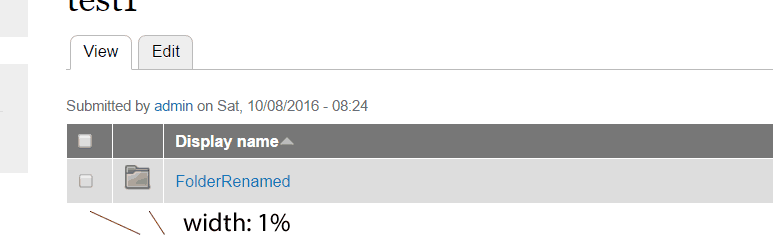
clivesj commentedIf you have a listing that is not using a lot of columns the icon container stretches and makes the table look ugly.
See the attached graphics, with and without the restriction. The 1% prevents the icon to stretch.
So I can not remove the width:1%, for a lot of people the display would look different than they are used to.
But I found out that Foundation adds max-size:100% to the icon image.
I have changed that to max-size:none and it looks the icons are presented correct in Zurb now.
Can you have a look and let me know.
Comment #15
clivesj commentedComment #17
clivesj commented