

 Come together with the global Drupal community in Rotterdam, 28 Sept – 1 Oct 2026. Sessions, contribution, connection, and Early Bird savings until 8 June.
Problem/Motivation
This has come in in passing in various places. Drupal core's Update manager now knows if a recommended release is compatible with your currently-installed version of Drupal core or not. See especially #3102724: Improve usability of core compatibility ranges on available updates report.
The d.o case is harder, since we don't know what the currently installed version of core is going to be for any random visitor. So we can't actually say "Compatible" vs. "Not compatible" nor can we filter/prune the ranges based on only showing future updates (which is what Update manager does). But we can do something.
Proposed resolution
Add something about core compatibility on d.o release nodes.
At the bare minimum, we can print out the Composer semver library constraints that are present in the release history feeds, e.g.:
Core compatibility: ^8.7.10
Core compatibility: ^8.8 || ^9
...
Better yet, translated into human-speak:
Compatible with Drupal core: 8.7.10 and up
Compatible with Drupal core: 8.8.0 and higher for 8*, or any version of Drupal 9
...
(approx)
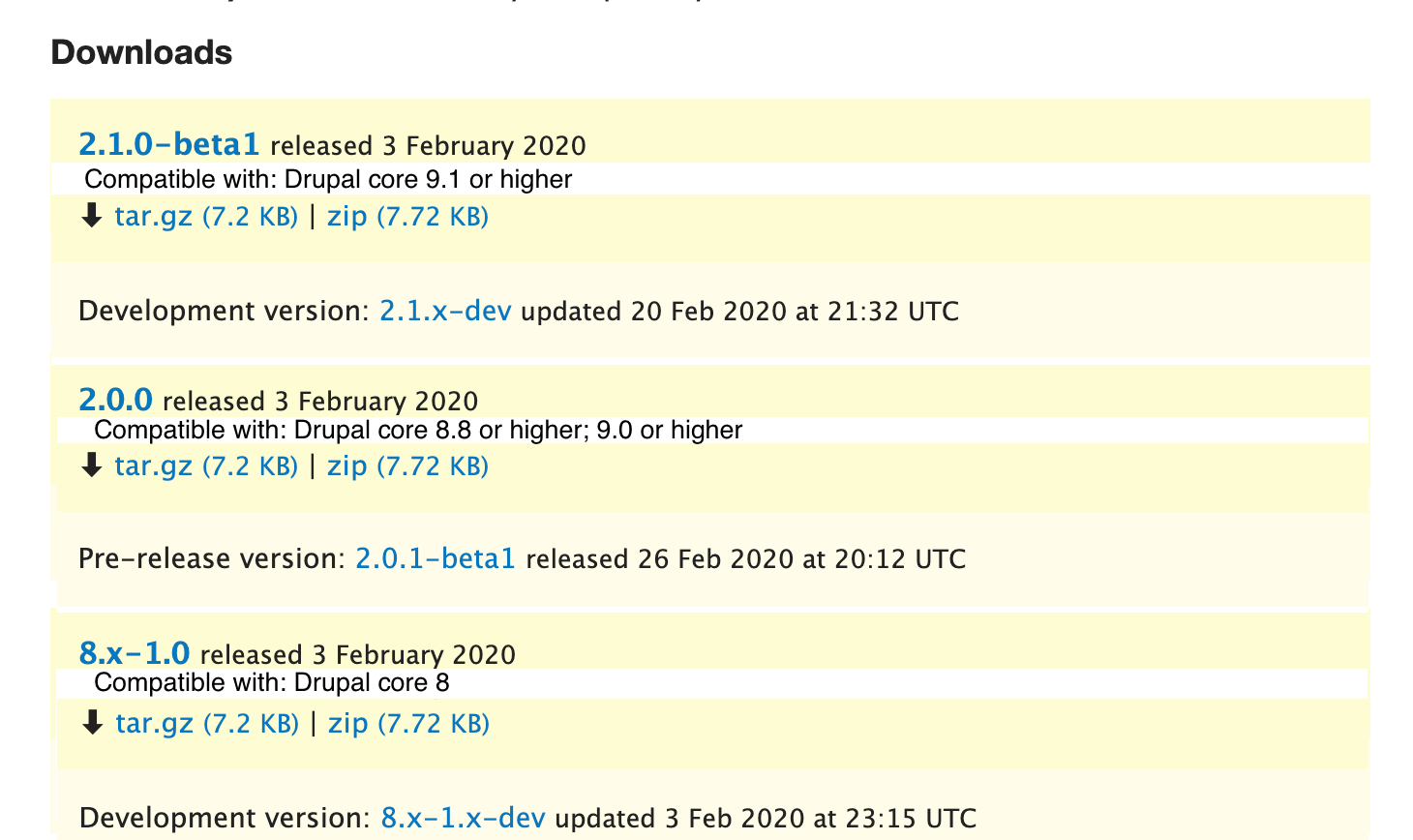
@xjm mocked this up:
Remaining tasks
- Decide exactly what this should look like.
- Implement.
- Review/test.
- Commit
- Deploy.
User interface changes
TBD.
API changes
Probably none.
Data model changes
Probably none.
Release notes snippet
N/A
| Comment | File | Size | Author |
|---|


Comments
Comment #2
gábor hojtsyI think an initial rollout with the composer compatibility info would be good. We suggest people use composer so having more UI elements that direct them towards that / rely on that fact is not a problem IMHO.
Comment #3
catchComment #5
gábor hojtsyCrediting @xjm for mockup lifted from #3054376-30: [META] Changes/additions on drupal.org preparing for Drupal 9's release, removed Drupal core screenshots as they made it more confusing than useful IMHO.
Comment #6
xjmSo for now there are three ways now that modules specify core compatibility:
system.moduleI think this will need to handle both 1 and 2; i.e., if they have
core: 8.xthen we need some generic language for that. 3 is more a nice-to-have and hopefully only needed during the transition.Comment #7
hansfn commentedMaybe off-topic, but wanted to mention it:
Comment #8
markhalliwell@dpi just shared this in https://www.drupal.org/project/drupalorg/issues/2681459#comment-13531965:
If we're going to parse info files, extracting the PHP version shouldn't be too difficult either at that point.
As far as the rest of it, specifically the support and timelines... I wonder if that's something we could add easily enough to the
/edit/releasestab on projects? Maybe have an option to "follow core's EOL" schedule or an "Other".Useful information for any project and would be nice to have it across the board instead of relying on maintainers to implement it manually.
Comment #9
drummThis really should start with what shows on an individual release page. That has the most surface area to show more information. We can then bubble that up to the “All releases” listing and/or the project page’s Downloads.
We’re doing 1 & 2 for search indexing. We currently have the raw data from those
.info.ymlkeys easily accessible in the DB. The search indexing is doing a rudimentary check - if a project has a release compatible with Drupal9.9999.9999, that “works with Drupal 9.” (We can add in a more thorough check if we see projects setting maximum version numbers, but that’s unlikely for all releases for a single project.)We actually already show the release series that are supported by the project maintainers. That can be multiple 7.x or 8.x versions. #3111408: Make sure semver releases can show on project page is the issue which changed that. For example, https://www.drupal.org/project/twig_tweak currently has 3 releases supported:

That is off-topic. Briefly - what would that compatibility filter look like? A release isn’t really compatible with “Drupal 8” or “Drupal 9.” Dependencies are on ranges of version numbers, like you see in the mockup in the issue summary. If I have a Drupal 8.7.12 site, a release compatible with 8.8.3 or later isn’t immediately useful. So do we do a dropdown of all core releases? Or type in your core version? And what about the rest of the dependencies on other modules and libraries? Drupal.org’s web UI is not going to be as good of a dependency manager as Composer.
#2998285: Add information on later releases to updates.drupal.org got into this a bit. Core has support windows hard-coded. That could come from a Drupal.org API, which could be available to all projects. We’d need to figure out the data model first.
Comment #10
drummComment #11
drummFor release pages, the easiest place to add this information is along with “Install with Composer”:
But I’m thinking this really should go in the sidebar under “Release info,” which is actually a little View for some reason, so it isn’t completely straightforward to put in data that Views knows nothing about.
Comment #13
damienmckennaThis looks great! I think having it up at the top makes it easier to find, the release info gets overlooked.
Nitpick: I'd suggest rewording it so that it says "Requires: Drupal @core_requirement", to make it easier to read. It might be worth doing a follow-on to parse core_version_requirement to improve it too, so that e.g.
^8.8 || ^9turns into8.8 or 9.Comment #14
drummI couldn’t find any library that translates Composer version requirement strings into human-readable English.
^8.8 || ^9is interpreted by Composer as(>=8.8.0 <9.0.0) || (>=9.0.0 <10.0.0). The library we use to parse constraints (https://github.com/composer/semver/blob/master/src/Constraint/MultiConst...) does “optimize” these, so>=8.8.0 <10.0.0is as far as it could get us.“8.8 or 9” leaves some room for misinterpreting whether 8.9 is supported or not, and doesn’t capture the 10.0.0 upper bound. Until there’s something that reliably makes passable summaries of all types of version constraints, https://getcomposer.org/doc/articles/versions.md#writing-version-constra..., I’d rather show it verbatim than do a bad or incomplete job.
Packagist.org displays the verbatim constraints, https://packagist.org/packages/guzzlehttp/guzzle, interpreting version constraints might effectively be required learning now.
Comment #15
drummOn punctuation - I went with “Requires Drupal:” because this is only the core requirement, not all requirements; and following how requirements are shown on Packagist.org, like https://packagist.org/packages/guzzlehttp/guzzle, a little more closely.
Comment #17
drummThis is now on release nodes, along with a minor spruce up of the sidebar, bringing in some of the work from the all-releases listing:
https://www.drupal.org/project/bootstrap_barrio/releases/8.x-4.28 is a D9-compatible example.
Comment #18
damienmckennaThat's fair.
Thanks Neil.
Comment #19
gábor hojtsyLooks good for this stage IMHO. Is there a way to get it on the release list on project pages too so people can pick which one to click for compatibility with which core? Thanks!
Comment #23
drummThis is now in the project page downloads now too.
Comment #24
gábor hojtsy@webchick raised this concern (similar to above):
I opened #3137879: Improve display of Drupal core requirement versions on releases and project pages.