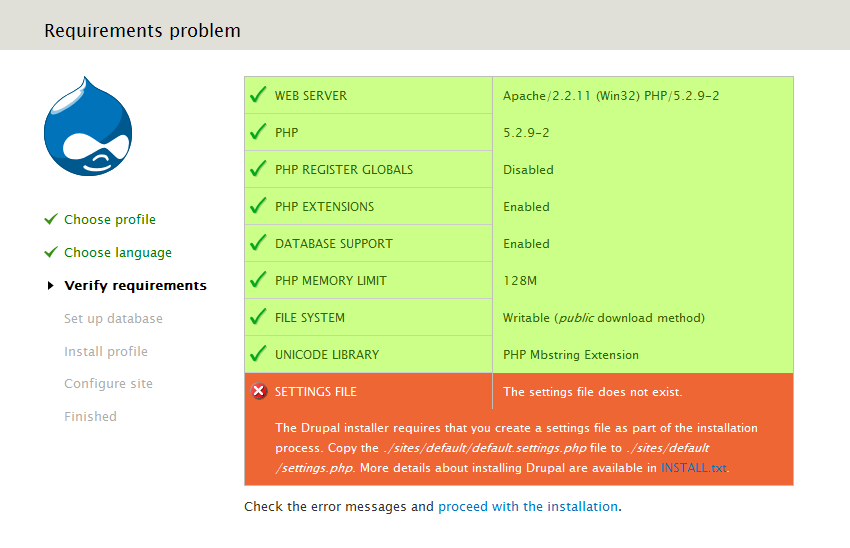
I just created an issue about an error that occurred during installation: #753754: Error message when settings file does not exist should be hidden. That will probably get fixed, but it made me see how ugly that page is when there are errors on it. See the attached screenshot.
First of all, the combination of the deep orange background of the error message with the pale green and pink of the requirements overview is really ugly. (Aren't those green/pink colors leftovers from the Garland days?)
Second, the two statements on the bottom of the page will even make the toughest Drupal ninja say "WTF?":
Check the error messages and proceed with the installation.
Check the error messages and try again.
Yes, you have seen that right: two completely opposite statements, linking to the same page.




Comments
Comment #1
marcvangendHmm, the screenshot wasn't uploaded properly.
Comment #2
marcvangendComment #3
marcvangendThe problem of the two statements was solved when #753754: Error message when settings file does not exist should be hidden was fixed.
Here is a patch that makes the colors of the system status table match the colors of Seven's messages. IMHO this looks much better and is more consistent. I'm attaching screenshots so you can see how these colors look during installation (compare with the screenshot in #1) and on admin/reports/status.
Comment #4
Bojhan commentedActually, the colours on the install are the proper one. The ones on the reports page shout, way to much. However, since we where in UI freeze - I am unsure if this is worth fixing.
Comment #5
aspilicious commentedI like it as it is...
Comment #6
marcvangendaspilicious, this is not just about liking colors or not, this is also about being consistent with the use of color throughout the UI. Also - I can't imagine that you actually like the combination of colors in the screenshot in #1.
Anyway, now that the duplication of "Check the error messages" statements has been solved, this issue has in fact become a duplicate of #665790: Redesign the status report page. Marking it as such, I'll continue over there.
Comment #7
David_Rothstein commentedHm, I'm not totally convinced that #753754: Error message when settings file does not exist should be hidden solved the root cause of the duplicate error messages you were seeing, perhaps just the immediate symptom. Any other drupal_set_message() early enough in the installer will trigger it again.
The duplicate error messages are coming from http://api.drupal.org/api/function/theme_install_page/7. The code looks like this:
I'm really not sure most of that is serving any purpose anymore - is it? I think it might be left over from the days before Drupal had a nice status report in the installer, as it seems to be trying to do the same thing. I bet we can just delete most of that.
Comment #8
marcvangendIMHO the logic of displaying status and error messages during install is quite a mess. I also noticed that in #641008: Duplicated text in install error message and I don't really know how to solve it properly. Maybe I'm wrong (I hope I am), but to get it right, we may have to wait till D8 and rewrite a lot of code. In this stage of D7 development, I'm afraid there's not much we can do besides curing symptoms.
Comment #9
amc commentedPer #8.
Comment #10
David_Rothstein commentedThis was fixed as part of #807396: Remove old error handling from theme_update_page() - note that there were two commits in that issue (the first one is the one that directly fixed this). The above-referenced code was causing other bugs as well, so we simply deleted it and that was that :)
Sounds from #6 like the rest of the original issue here is being handled in #665790: Redesign the status report page, so marking this one as fixed.
Comment #12
deixadilson commentedI tryed to make an update of a module and I get I message saying there was some issues to resolve.
I couldnt resolve these issues. But drupal dont give me an iption to cancel de installation. It only says to resolve the issues and continue. If I try to open my website home screen it returns me a Server error!
Comment #13
marcvangenddeixadilson, you're posting in an issue that has been fixed and closed for almost two years, and which is completely unrelated to your situation. The error message in your picture seems pretty clear to me: you need to install version 7.x-2.x of the Variable store and Variable realm modules (http://drupal.org/project/variable).
Please do not reply here but open a new support request in an appropriate issue queue if you need more help.
Comment #14
deixadilson commentedI cannot install any version of any module because the drupal update.php crashed my website.
Any other url I try to open returns me a "Server Error" screen.
I can only open update.php and it only have a link to refresh the page.