

 Come together with the global Drupal community in Rotterdam, 28 Sept – 1 Oct 2026. Sessions, contribution, connection, and Early Bird savings until 8 June.
When opening overlay dialogs the JAWS screen-reader can unexpectedly, and undesirably, enter "Application mode". Application mode is the mode invoked by JAWS when interacting with certain ARIA (accessible rich internet applications) widgets. The common mode for JAWS when browsing the web is Virtual Buffer, or Virtual PC Cursor mode.
The behavior is not easily reproduced, however I have experienced this approximately 6 times myself using Firefox 3.6 and JAWS 11. I cannot explain how to reproduce the behavior, and don't know the cause, however, my suspicion would be one or more aria properties in the overlay.
| Comment | File | Size | Author |
|---|---|---|---|
| #327 | issue-716612-remove-aria-2.patch | 1.11 KB | Everett Zufelt |
| #325 | issue-716612-remove-aria-1.patch | 1.07 KB | Everett Zufelt |
| #323 | overlay-a11yng4.patch | 14.16 KB | casey |
| #283 | overlay-skip-visible-by-default.png | 8.61 KB | Jeff Burnz |
| #277 | 716612-overlay-accessibility-276.patch | 16.73 KB | attiks |


Comments
Comment #1
Everett Zufelt commentedTagging
Comment #2
mgiffordsubscribe!
Comment #3
casey commentedjquery ui dialog add an aria attribute (http://code.google.com/p/jquery-ui/source/browse/tags/1.7.2/ui/ui.dialog.js):
This attribute isn't ok?
Comment #4
Everett Zufelt commented@casey
I tested this also with the NVDA 2009.1 screen-reader and Firefox 3.6, and it consistently does the following.
1. Select Content from Toolbar.
2. Overlay dialog loads
3. NVDA speaks "Content dialog heading"
4. User cannot navigate with arrow keys.
5. User presses tab
6. User can navigate with arrow keys.
I know very little about how the DOM is altered to create the dialog and I only know of the one aria- property that is being used. I wonder if there are more aria- properties being used, as I cannot imagine aria-labelledby causing these problems.
I would also say that ARIA 1.0 is still a draft W3C recommendation that is supported differently by different assistive technology and browsers. I do not believe that we should be using aria- markup in core at this time, even if injected by jQuery.
Comment #5
Everett Zufelt commentedD7 currently using jquery UI dialogy 1.7.2. Will check to see if there are known aria issues with 1.7.2 or 1.8rc-? in coming days.
Comment #6
Everett Zufelt commentedModified title to reflect that there is ore than one screen-reader affected. JAWS 11 and NVDA 2009.1 affected on Firefox 3.6. VoiceOver 10.6 not affected on Safari 4.0.4 (note: VoiceOver does not have an 'application' mode, so cannot be affected).
Can be reproduced with some consistency on http://www.thewhyandthehow.com/jquery-modal-dialog/ which also implements jquery ui modal dialog.
Comment #7
Everett Zufelt commentedResource: jQuery UI - Demos & Documentation
: Dialog
http://jqueryui.com/demos/dialog/
Note: there are times when it is desirable to have a screen-reader enter into application mode and be 'sandboxed' within a dialog, for example a confirmation dialog with Ok and Cancel options (see Confirmation example at above demo page. However, this behavior is not desirable when the UI is more complex as in the pages of content presented in the overlay.
Related issue #717810: Some screen-readers do not respect overlay as 'modal' dialog
Comment #8
Bojhan commentedThis is indeed not favorable for this UI, does anyone have a fix?
Comment #9
Everett Zufelt commentedI began an upstream discussion of jQuery UI Modal Dialog accessibility at http://groups.google.com/group/jquery-a11y/browse_thread/thread/3b59aa35...
Comment #11
Everett Zufelt commentedTwo more resources for accessible ARIA modal dialogs:
http://www.w3.org/TR/wai-aria-practices/#modal_dialog
http://dev.aol.com/dhtml_style_guide#dialogmodal
Note: that these are the best practices that are currently available online, but as some conversations in the discussion at http://groups.google.com/group/jquery-a11y/browse_thread/thread/3b59aa35... suggest, they may not be sufficient for ensuring a reasonably accessible experience to users of all screen-readers / AT.
Comment #12
Everett Zufelt commentedChanging title and marking related issue #717810: Some screen-readers do not respect overlay as 'modal' dialog as duplicate.
Comment #13
Everett Zufelt commentedCorrected spelling
Comment #14
Everett Zufelt commentedAfter discussions on the jQuery accessibility mailing list at http://groups.google.com/group/jquery-a11y/browse_thread/thread/3b59aa35... I conclude that:
1. It is not possible to make a dialog modal for NVDA, JAWS or VoiceOver, although inconsistent techniques can be used to increase the likelyhood that users will not leave the dialog. These include the tab key handler that is native to jQuery UI dialog and using the ARIA role="application". In my opinion neither of these techniques is reasonably sufficient to increase user experience (i.e. keep people in the dialog).
2. Some screen-readers, like NVDA, will enter into application mode and others, like JAWS, will not with the jQuery UI modal dialog. This is because these two screen-readers handle ARIA role="application" differently. Application mode increases the chance that users will stay in the dialog, but can significantly decrease the commands that users have available to navigate within the dialog.
3. Using application mode on any UI that contains text (other than labels and descriptions directly related to a focusable UI component is a bad practice, as users have less commands available to allow them to navigate within the 'application'.
Final thought is that it is not possible at this time for a screen-reader user to have a consistent experience with a modal dialog. Depending on the necessity and importance of the information communicated in the dialog there needs to be a relatively easy way for the dialog to be disabled. As far as I know overlay is the only jQuery UI modal dialog currently in core. It is not critical, as screen-reader users can with some effort learn how to use the overlay, even if it degrades user experience for some or many. It would perhaps be ideal to.
1. Provide documentation for screen-reader users about the experience they can anticipate with the overlay.
And,
2. Provide an installation profile that is the same as the default, but without the overlay. Or, To have overlay disabled in the default profile.
Comment #15
ksenzeeI think overlay in the default profile is pretty important, but if we can't get it to work for AT users, we at least need to make it easy to disable quickly. Lots of web applications detect whether you have Firebug enabled, and add a suggestion in a ribbon at the top of the page like "Firebug is known to cause performance problems with this app. Why not disable it?" Maybe we could do something similar.
Comment #16
Everett Zufelt commented@ksenzee
Great suggestion, AFAIK it's impossible to implement.
I wish that there was a way that we could detect assistive technology from client-side-scripting and offer the optin that you have suggested (recognizing that as with all power this would need to be used wisely).
The short answer is that AFAIK there is no reliable way to detect AT. I'm not sure how Firebug is detected, but I would imagine that the JS on the page finds some injected Firebug JS and if present displays the warning / option.
I agree that an option to easily disable the Overlay would be desirable, perhaps for more than just AT users, but we won't get into that here :)
Comment #17
David_Rothstein commentedCould the proposed ribbon just be displayed inside a div that has the "element-invisible" class added to it? (Assuming the accessibility issues discussed here are limited to screen readers...) Or does that cause issues for others since by definition a link (focusable element) would probably have to appear inside the ribbon.
Also, to the extent that this is an issue with jQuery UI dialogs specifically, note that there is an open issue at #668640: Overlay shouldn't be based on jQuery UI Dialog already being discussed for other reasons. Not sure if that would help, or how easy that patch would be to write :)
Comment #18
Everett Zufelt commented@David
Good questions:
Could the proposed ribbon just be displayed inside a div that has the "element-invisible" class added to it? (Assuming the accessibility issues discussed
here are limited to screen readers...) Or does that cause issues for others since by definition a link (focusable element) would probably have to appear
inside the ribbon.
* The message / option for disabling Overlay for users of screen-readers is an excellent idea, and I think that your suggestion is great. Unfortunately there is no way to use JS to detect if a user is using a screen-reader, so we would have to include this markup to everyone who visits a page with Overlay enabled. IMO this is a bad design practice. I would prefer a profile option without overlay at installation. Or, to brainstorm other more suitable alternatives.
Also, to the extent that this is an issue with jQuery UI dialogs specifically, note that there is an open issue at
#668640: Overlay shouldn't be based on jQuery UI Dialog
already being discussed for other reasons. Not sure if that would help, or how easy that patch would be to write :)
* The accessibility problems are not jQuery UI based, but about the ability of screen-readers to interact with modal dialogs on the web in general.
Comment #19
Everett Zufelt commentedRegarding modal dialogs and accessibility for screen-reader users. I have written a blog article Can a modal dialog be made to work properly for screen-reader users on the web?. The short answer is kind of, but not really. I would have posted the entire article here, but it is a lttle to long for that. It explains the objective problem, as well as the subjective experience.
Comment #20
casey commentedIs there a way to identity screen-reader users using javascript?
If so we could disable overlay for those users. After all, overlay just provides visual distiction between the actual website and administrative tasks.
Comment #21
Everett Zufelt commented@Casey
Unfortunately there is no way to detect a screen-reader user using Javascript. Good idea if it was possible.
Comment #22
casey commentedHow about CSS @media selectors (http://www.w3.org/TR/CSS2/media.html#at-media-rule)? Is there one that does identify normal users but not screenreader users, or in reverse?
If so, I think we could make this work.
/edit what if we make the overlay only work for devices matching the media type "screen" but not the media type "speech"?
Comment #23
casey commentedhttp://cssmedia.pemor.pl/
Comment #24
Everett Zufelt commentedI haven't tested media types, but my gut feeling is that they are poorly supported by AT. This would also mean that AT users who have AT that support media types and who want to use the overlay will not be able to. Universal design would say that one solution should work for all. Of course what we are seeing here is an example where that won't work.
Option 1: research a complex and possibly impossible way for AT to ignore the overlay.
Option 2: facilitate an easy way for the Overlay to be disabled when Drupal is installed, and after Drupal is installed.
Comment #25
casey commentedRegarding option 1; maybe we should ask us the question what use the overlay has for AT users.
Regarding option 2, you mean something like this: #659480: Per-user setting for the Overlay?
Comment #26
Everett Zufelt commented@Casey
I don't think that it is usually a good idea to ask the question of what value a particular function has for AT users, outside of the broader discussion of what value th function has for all users. I don't value the overlay, that isn't to say that many other AT users won't value the overlay. Some AT users may find it useful enough to be worth the annoyances, or may be using different, or in 6 months from now newer AT that better supports dialogs.
As for disabling the Overlay there needs to be:
1. A way to install the default profile without overlay enabled.
2. An easily accessible way to disable overlay if it is enabled.
3. And, yes, I think that the ability to disable the overlay for any particular user is incredibly important
Comment #27
mgiffordI don't see why the Overlay module is enabled by default. There are lots of modules that aren't enabled by default and Overlay is going to be a harder adjustment for people when they upgrade from D6.
If it is going to be enabled by default, why not just set it up as an option in the install process that is easily disabled by unchecking it before the module is actually installed? It's just another check box. Could possibly be included in a set of advanced options on install that were collapsed so it didn't add too many options.
Why should everyone's overlay be disabled because it blocks access for just a few? Seems like a nice way of introducing a problem for admins where there doesn't need to be one. Of course per user options for Overlay are needed.
Comment #28
David_Rothstein commentedIt's not turned on automatically for people upgrading from D6, just people who do a fresh D7 installation with the Standard profile.
I think that as long as the Overlay remains in core (and that itself is still up for debate), it should be on by default in the Standard profile. The reason is that the Standard profile seems to be evolving into something that highlights the "major" features of core. Almost by definition, the Overlay is a major feature - so if this is going to remain in core, it would seem to be a little strange to have this thing hanging around in there but then essentially hide it by default.
Comment #29
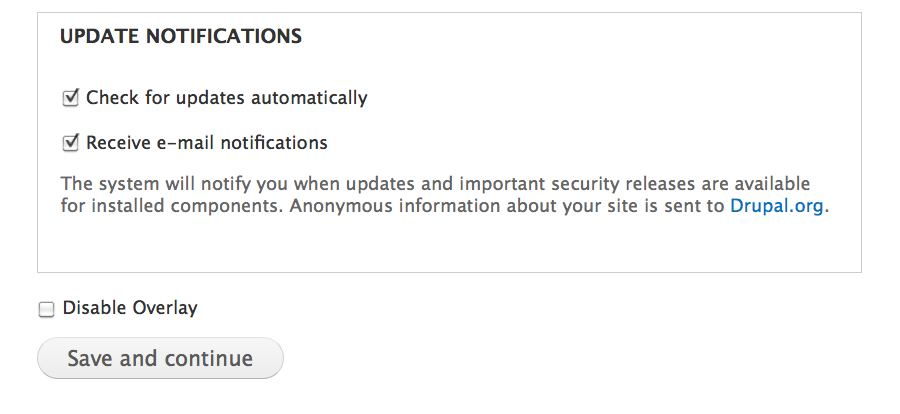
mgiffordI'd like to see Overlay in core. I've attached a screen shot of one way to disable this from the install page (mind you it's just visual for now, doesn't actually work), but if we add in a checkbox like:
Admins can hide the overlay by default. Could even set it up so that this checkbox is invisible if there was controversy about adding another visual element to the install page. This would make it much easier for blind admins to install.
Mike
Comment #30
Bojhan commented@mgifford We are not going to have that in the installer (no module is), and honestly should such a suggestion not be in this topic. This is about fixing accessibility issues with the overlay, disabling is not fixing it.
Comment #31
Everett Zufelt commented@Bojhan
I would generally tend to agree with you that disabling isn't fixing. However, in this particular case, where fixng may indeed be impossible at the time, disabling fixes the accessibility problem, while not fixing the accessibility of the module.
Comment #32
Bojhan commentedSo, honestly - its no solution. So lets work on this "impossible" thing.
Comment #33
mgiffordWell, lots of different ways to approach this. Could go back to my initial concerns about iframes and accessibility:
http://drupal.org/node/610234#comment-2282334
Would be great if Overlay was built with tools that could be easily supported by screen readers. I do think it's a bit late to be rewriting overlay to use something else.
So we're back to setting up "the ability to disable the overlay for any particular user." So maybe we can just set it up as a checkbox in /user to be enabled/disabled. Or perhaps as a cookie as we've done for Drag/Drop.
A link hidden to everyone but screenreaders that sets a cookie? If the cookie is true then the Overlay isn't loaded?
Comment #34
Bojhan commentedWhatever I now said enough times, that an option should not be a possibility. And that we should instead focus on addressing at least some of the accessibility issues, I am very sadden by the lack of initiative to actually work on this.
For example the navigation of the tabs, and navigation from and too the overlay? Why wouldn't we be able to fix that, ie using the skip to content link as a way to navigate towards the overlay. And making sure you can navigate back to the toolbar. Where as close should preferably close the overlay?
Comment #35
Everett Zufelt commented@bojhan
I know you have read my article, but here is the quick breakdown.
1. Overlay is a complex UI component.
2. the functionality of Overlay does not map to any xhtml semantic markup.
3. ARIA 1.0 is still a draft W3C recommendation and is very inconsistently supported by browsers and assistive tech.
4. ARIA will someday be able to make overlay accessible, to users of newest technologies, but today cannot.
5. There is no way to consistently and effectively convey information about the role and properties / state of the overlay to assitive tech.
I am not saying impossible because I am not interested in trying, I have participated in discussions with individuals with more knowledge of RIA accessibility than myself and have concluded that at this time the Overlay experience cannot be made reasonably accessible in a consistent way for screen-reader users. Until someone else offers evidence to contradict this position it is the position I will continue to hold. So, let's start talking about disabling Overlay, preferably a technique that does not require overlay itself to disable overlay.
Comment #36
jhodgdonThis may have been mentioned before... but I think the "solution" also involves a bit of documentation/UI text:
If we are going to leave the overlay module as part of the standard profile, and if these problems cannot be fixed, then the help text you see when choosing install profiles at install time should warn you that it includes the overlay module, which may have accessibilty issues for screen reader users.
We should also put this note in the overlay.info file's description, so it shows up on the modules page, so someone doesn't enable the module and then not be able to visit the modules page to disable it again.
Comment #37
EvanDonovan commentedThis is another reason why I think that it might be best, although difficult, to follow the course of action I laid out in the most recent comments on #659488: Properly test the overlay to determine if it belongs in core or contrib.
If Drupal 7 shipped with 3 install profiles, instead of 2, there could be a "middle-ground" one between Standard and Minimal, which didn't have Overlay enabled. That way, people could still have Overlay out of the box, if they wanted, but there would be a more accessible option also, which still had most of the D7UX usability improvements in it.
The "middle-ground" profile would essentially be a clone of the standard profile minus Overlay, so hopefully not too hard to make...
Comment #38
EvanDonovan commentedMore specifically, the comment in question was http://drupal.org/node/659488#comment-2780012. But I'm thinking that the middle ground profile wouldn't actually have to disable Toolbar or even Edit-in-Place probably. They don't seem to have near the same # of issues.
Comment #39
Bojhan commentedComment #40
David_Rothstein commentedHere is a starter patch for testing purposes - all this does is remove the ARIA-related properties that @casey noted in #3, i.e. these:
(Side question, but perhaps important: Why does jQuery UI use "role: dialog" here... based on everything I've read above and elsewhere, shouldn't it be "role: application"?)
It would be useful if anyone could test this patch and see where it's at with various screenreaders (this won't fix everything, but it would be nice to know where it leaves us). For a real patch, we wouldn't plan to hack jQuery UI of course - probably would aim to replace it as per the previous suggestions, since the overlay isn't really a traditional "dialog" anyway.
The various problems with screenreaders not handling focus correctly are not yet fixed by this. Note that we have a massive amount of code in overlay-parent.js that plays around with the focus (along the lines of http://www.geedew.com/2010/02/25/jquery-ui-dialog-accessibility/ which Jody Lynn linked to in another issue, but a bit different). There could very well be a bug in there - I think there is, since I don't appear to have any way to even tab to the toolbar when the overlay is open; seems like another accessibility problem? It would be useful to know exactly what happens (where focus goes to and when) when a screenreader (a) opens the overlay, (b) clicks on a link within the already-open overlay to load a new page, and (c) tries to tab to new elements after already being in the overlay. I would assume this is possible to fix.
Finally, the one remaining accessibility issue I know of is that the underlying page text is not actually hidden from screenreaders - apparently you can still read it. jQuery UI uses z-index to prevent e.g. clicking on the links in the underlying page, but apparently we'd need something more. If we need a hack to solve this (we might) then I wonder if we can still come up with one. For example, Everett showed me the other day how we do things like put invisible text that says "active tab" next to the current selected local task (elsewhere in Drupal) so that screenreaders know which one is selected. Maybe we can explore similar hacks in the overlay parent window, to indicate to screenreaders that (somehow) find their way in there that they should leave and tab back to the overlay.
Comment #41
David_Rothstein commentedThis is "needs review" because it needs testing - but otherwise certainly needs work.
Comment #42
Everett Zufelt commentedDialog is defined at http://www.w3.org/TR/wai-aria/roles#dialog AFAIK it is a specific instance of application.
As for the effect of removing the ARIA attributes from the Overlay, it would result in the Overlay being appended to the bottom of the DOM, but getting no special treatment by AT.
Example...
Page title
Page content
Page footer
Overlay title
overlay content
overlay footer.
In order for a screen-reader to ignore the page title / content / foot it would all have to be wrapped in a block with display:none; Not sure what the screen-reader response to this would be.
Comment #44
dmitrig01 commented[Edit: first part removed]
David, first of all, huge props for trying to help by writing some code.
How would removing the ARIA attributes help the situation?
Also, the current reason we have text under the overlay is so we get that nice overlay effect where it's partially transparent. It is very possible to hide/remove this text completely while the overlay is present and that is something to explore. I did think of some problem with this but it's late and I can't remember
Comment #45
develcuy commentedATM There are 9 critical issues related to accessibility and this one in particular seems to be most important. I've spent a couple of hours checking a bunch of them, have to say that is so exciting to know that D7 might be the most accessible ever!
Great initiative so far @Everett Zufelt, keep pushing!
Comment #46
eigentor commentedIs what Everett Zufellt proposes technically possible? (putting the overlay in the footer, marking it display:none and probably unchecking the display:none via Javascript)
Comment #47
Everett Zufelt commented@eigentor
Just to clarify, it is not putting the Overlay in the footer, it is leaving the overlay where it is now, which is appended to the DOM after the footer. Doing display:none on all non-overlay content is to provide clarity to screen-reader users about what content is actually part of the overlay.
Comment #48
cliffIn #44, @dmitrig asked:
Simple: The reason the Overlay is failing to work with certain combinations of common browsers and screen readers is that the specification for ARIA 1.0 is still draft, so there is not yet a consensus on how to apply this code and respond to it. So we (and by "we" I mean "not I") have two possible paths to success:
And at that point the best we could say about Drupal 7 would be, "Accessible with Safari 12.0, FireFox 8.3, or IE2012 ;-) and NVDA 5, JAWS 15, or VoiceOver 7." (Note that I used arbitrary version numbers to represent future versions. Only the version number used for IE is hopelessly optimistic.)
That's how.
Comment #49
eigentor commentedSo trying to get my head around this: The basic problem seems to me that with the overlay, there are actually two pages rendered, with header, body, and footer, and the screenreaders cannot distinguish which one is the relevant one.
As we load all admin pages into an iframe and everything has to work, it is hard to imagine to keep both pages visible that can be accessible.
Things that come to my mind is adding extra classes (like adding an extra class "admin-overlay" to every relevant element inside the overlay like headings, blocks, divs so they are at least distinguishable while not breaking the routing. Not sure how to build on those classes. Might be one nightmare of code-creep, but might not.
But hiding all content behind the overlay contradicts the idea of the overlay altogether, because then you could just as well go to a page and keep the starting point in the frontend in a =direction variable to go back in the end.
Does the order of the rendering of the two pages matter? What everett proposes (if I get it right this time) is to put overlay conent first, so this would need a clear indication if you are still in the upper page, or in the lower. I imagine if I just jump to the next h2 element, I might just as well end up in the non-overlay content which is the problem.
If I am still completely on the wrong track, please explain further.
Comment #50
Everett Zufelt commented@eigentor
You're on the right track.
With or without ARIA the majority of screen-reader users will be presented with the main page of content, followed by the overlay page of content. I don't think that switching the order (overlay then main page) will make this any better.
We could add a class to all elements in the overlay, but this would not be helpful, since classes are not meant to, and do not, provide semantic information to assistive technology. ARIA will be a good solution to this problem when a. it is finalized and implemented by browser and AT vendors completely and consistently, and b. users are all (or mostly) using this newer technology.
Thanks for working on this.
Comment #51
eigentor commentedSo - one page overlaying another can never be accessible unless we hide one of both.
But as the concept of the overlay _is_ that the background page is still visible, this appears unsolvable to me by design.
Boils down to a choice between person with eyesight vs a person without such ability to me. One likes to have the context of the underlying page, the other has a hard time making sense of the two DOM Trees.
Comment #52
Everett Zufelt commented@eigentor
I think you have it right, but I wouldn't use the term "never". This type of thing will be possible once the WAI-ARIA W3C draft recommendation becomes a final recommendation and is properly and consistently implemented by browser and assistive technology vendors.
Comment #53
tstoecklerEverett Zufelt in #50:
Could you elaborate on that?
I think it was proposed above that the main page content could be hidden via CSS and then reappear via JS for all sighted users.
And screenreader users would get the page in the overlay as if it were the only one (right?), because the main page comes afterwards and is "display: none;". That way a sighted user would see no difference to how it is now, and the screenreader user just "thinks" (this is not meant in a pejorative way, I just don't know any better word) there is only one page.
Yet you indicate, that this wouldn't really solve the problem.
Comment #54
David_Rothstein commentedThat doesn't work because screenreaders use JavaScript also, and apparently there is no "browser-sniffing" that can detect the presence of a screenreader.
However, to be honest I'm not sure why we would want to hide it from screenreaders. Part of the point of the overlay is that there are two pages on the screen at the same time. I don't think we want to pretend to screenreader users that that isn't true. What we need to do instead is to find a way to communicate it to them. As per #40, I don't see why we couldn't do that via some kind of a hack (e.g., text that explains what is going on, placed inside an "element-invisible" div at the top of the underlying document). Again, we already use similar hacks elsewhere in core, where ARIA would be used in the future. I don't see why this is different - we just need to think of the appropriate way to organize the page and to communicate it.
Comment #55
tstoecklerRe #54: All right. So instead of switching the whole main page/overlay around, there could be a "Skip to Overlay" link (similar to the "Skip to Navigation" we have now) and perhaps some explanation on what the overlay is or what is going on in general?!
Comment #56
eigentor commentedSounds o.k.
We take for granted that this will be mainly for people that run their own site and thus are admins. For non-sighted non-admin users that are allowed to create content, I think we can presume the scenario that the overlay is switched off.
So we can expect from a site admin to get used to a skip link or whatever - keeping in mind this is only until the ARIA stuff gets out of draft state.
This entire ARIA Problem will not only affect drupal, so we should be good not to be the No1 most accessible system and score at No. 4.
Comment #57
owen barton commentedI have been pondering this one, and I think having an element-invisible link at the top of the page is the best workaround for now (barring removing or significantly reworking overlay). The advantage of a link is that in addition to setting the focus appropriately it would also allow us to trigger some javascript. This could do things such as disable problematic Javascript (from reading Everett's description it seems the issue is more than just the focus) or even set a cookie to disable the overlay for that session or user.
Comment #58
cliff@David_Rothstein, in #54 you said:
I thought the whole point of having the overlay is so a sighted user will understand the context of the changes being made. Letting them see the page where the changes will be applied behind the floating window where they enter the changes is the proposed way to provide that context. (And isn't that still subject to usability testing?)
The whole point of accessibility is to give people with disabilities — in this case, people with visual disabilities — comparable access to and experience with the information. So we don't need a method that makes available to them all the content from the affected page; we just need some kind of label, flag, or hook that lets them confirm where the change they are making will take effect.
And, come to think of it, in this interface we who can see don't need the html for the content being changed, either. We just need something that helps us keep track of context. Right now, Overlay is rendering the affected page in html behind the active window, but a background image produced from that rendered page would work just fine for anyone who can see it. That approach should not require ARIA and would not create confusion for people who use screen readers.
I don't know how hard it would be to make that happen, but it's at least worth considering.
Comment #59
eigentor commentedProducing a background image is out of scope for sure.
To me the aim must be to find a compromise between sighted and non-sighted people.
A benefit of the overlay that also non-sighted people will benefit from a lot is that once you close it, you are still on the page you started from.
So the point should be: how to make it clear which part of the page is the underlying page and how to make it not confuse Screenreaders. To not render it at all, not displaying the text or whatever won't really help since the page elements like Header, Footer, content will still be there.
If they are not there anymore, the underlying page does not look like the page you came from anymore and it leads the entire concept into not making sense anymore.
So what kind of flag, skip, mark or whatever can help seperate the two pages?
To get the entire thing less abstract:let's try it out. I found this as an extreme example http://www.webaim.org/simulations/screenreader.php to show us what a badly coded web page sounds like ;)
Also there's Fangs for Firefox https://addons.mozilla.org/de/firefox/addon/402?src=api that renders the Screen Reader as text.
Maybe you have some more tools to test that that you can point us at?
Comment #60
Everett Zufelt commented1. To confirm, there is no way to determine if a screen-reader is accessing a page.
2. The skip-link is an interestng idea. But, you need to remember that screen-reader users access the page in a serial / linear manner. This means that there is no good way to ensure that they are anywher near the skip-link when the overlay opens.
3. Not to be discouraging, I like the ideas that have been generated here, but there really is no good way to make the use of overlay clear and easy to the majority of screen-reader users. This is a paradigm shift and really can'nt be part of a users first impression of Drupal 7 after installing.
4. There is a method to hide content from the sighted, but to make it available to screen-readers, but it doesn't work the other way around.
Comment #61
tstoecklerRegarding:
Can't we set focus via JavaScript when the overlay opens? We could focus on the top of the overlay, which would make the flow for a non-sighted user pretty normal (I would think???) e.g. if he/she clicks a link (that opens an overlay) he/she lands at the top of the target page (in an overlay). Then there would still be the need to somehow communicate that, in fact, you are in something called 'overlay' and there's also something called 'main page', but I guess the actual workflow would not be entirely corrupted as I think (!!!) it is now.
I'm probably missing something obvious but I wanted to put this out there...
Comment #62
cliff@tstoeckler, unfortunately there are so many facets to this issue that the discussion isn't confined to this queue. For more background, you might want to read Why Overlay should be disabled by default in all Drupal 7 profiles.
Comment #63
David_Rothstein commented@tstoeckler, the existing code already sets focus similar to the way you describe. However, see Everett's blog post from above - apparently not all screenreaders are respecting that. It's not totally clear why... One of the points of the patch in #40 is to see if removing the ARIA role might fix that (in addition to the other problems it fixes), because other than that I'm not sure why screenreaders wouldn't be handling the focus correctly when other browsers do.
(And we also need to allow the focus to move to the toolbar/etc, although that shouldn't be too hard.)
But fixing the focus isn't enough - the short explanation being that screenreaders have other ways to move/jump to a different section of the page. I'm not familiar with all the ways they can do that, so I don't quite understand the best way to organize the page to address that, i.e. whether something like what Owen suggests in #57 would work or not. In the worst case, I don't see why we couldn't just saturate the underlying (parent) page with screenreader-only text all over the place. This overall feels more like an annoying problem than an unsolvable one.
Comment #64
Everett Zufelt commentedHope this comment from http://groups.drupal.org/node/63123#comment-193493 helps a bit to understand the problem
Let me clarify a common problem when talking about progressive enhancement.
The most popular understanding of progressive enhancement is to ensure that base functionality works without client-side scripting or proprietary plugins,
and then to enhance the functionality with these technologies. This ensures that the functionality will work for all, regardless of the web technologies
supported. This is of course very important.
A less common understanding of progressive enhancement, particularly from the accessibility perspective, is to ensure that functionality works with assistive
technology, which may or may not support client-side scripting and proprietary plugins. The problem lies when enhanced technologies are supported in the
user agent and by the AT, but that the functionality implemented by these enhanced technologies is not accessible.
Take for example a flash object designed without accessibility used on a site to perform a progressive enhancement of function X. For users without flash
installed in their browser function X is still available without flash, for those with flash installed in their browser the standard function X is replaced
with the flash version. Although those without flash can use function X and those with flash can use function X, some AT users with flash cannot use function
X (whereas without flash installed they would have been able to use function X).
Applying this concept to javascript, and talking only about AT users. If I am logged in as a user with permission to use Overlay and do not have JS enabled
in my browser, I as a screen-reader user can still use the functionality of the admin pages of Drupal 7. With JS enabled in my browser I cannot. This is
not because JS is inaccessible, it is because the implementation of JS for the particular function creates accessibility barriers.
Taking this further, to the current Overlay discussion, I don't see a way where two documents (one 'inactive' (origin) and one 'active' (overlay)), can
coincide in the same page without quite a bit of confusion for some AT users. The overlay is, by definition, a complex UI component, and there is currently
no well supported way to provide semantic information (role, properties, state) about the UI component to AT. This will change when ARIA is better supported.
Whether we define the overlay as a dialog, or as some more abstract UI component, it still is a UI component with a role, properties and state. This information
is, I hope, implicitly communicated to sighted users through visual presentation, in the same way that an unordered list of links (without semantic markup)
is through style alone implicitly understood to be a tabstrip with a selected tab. Providing hidden annotation "(selected tab)" on the selected tab was
a relatively simple way to ensure that some semantic information was available to AT users about the role and state of the UI component. Providing hidden
annotated information rich enough to convey the semantic role, properties and state of the overlay, in my opinion, is not a possibility. Firstly, the amount
of hidden annotation required would be significant. Second, the reason that "(selected tab)" was a workable solution is that it is a commonly accepted
and understood method for conveying, in a textual form, the semantic information available through the style, or visual affordance. I really don't think
that we will be able to find a commonly accepted and understood method of communicating, in a textual format, the semantics of the overlay. Third, even
if we did find a commonly accepted and understood method of providing this information, we still have a barrier in dealing with behaviour. That is, the
overlay information and the original document information need to be separated, or jailed, in some way from each other. There is no way to do this type
of separation of information without ARIA. Although using headings and skip-links are partial solutions, they still place cognitive burden on the screen-reader
user to understand where they are, a burden that is not placed on a sighted user.
Comment #65
David_Rothstein commentedI took a look at the unpublished comments and decided to republish them. They aren't really unrelated per se (even though that part of the discussion has now mostly split off to the separate issue at #775084: Allow users to opt-out of the overlay during installation for accessibility), but rather I think they reflect the history of how this issue evolved, and it seems like some of them contain important information.
In general I don't think comments should be unpublished unless they really truly are off-topic (spam, ranting, etc) :) Hope that's OK.
Comment #66
casey commented@Everett Zufelt, so a screenreader totally cannot distinguish accessibly between a document and a document inside a iframe? If there is a way to that, I think we can make overlay accessible...
And what about role="document"?
Or even (http://www.w3.org/TR/wai-aria-practices/#make_modal):
If such an apprach still isn't accessible, what if (i already suggested it before in another issue) overlay only kicks in when the user matches the CSS media selector "screen" (or one that leaves screenreaders out)? After all overlay is just an iframe which provides visual distinction between admin pages and the actual site (a screenreader user has no benifits).
In that issue you said there might be screenreader users that still want to use the overlay. But overlay isn't accessible, so if we disable it for everything but screen users, drupal is accessible again...
Comment #67
Everett Zufelt commented@casey
1. iFrame, no. Some screen-readers will say 'iframe' and the title at the beginning of the iframe, but this is no more useful than saying 'heading 1' and the title. The burden is still on the user to separate the two pages of content.
2. role="document" and the WAI-ARIA best practices are both poorly supported at the time. More specifically, all elements are implicitly role=document.
The best practice for this would be to do the following:
This tells AT that on the page is a document. Within that document is an application or dialog, within that application / dialog is a document. This means that the user is 'ideally' jailed in the second document from the first. The user, when in the overlay, is in a document element that is in a separate (application) element from the main page content.
So, the only way to move forward with this (using ARIA) is to code that up, and test it with all major browser / AT solutions in the past 3/5/7 years, whatever we decide is appropriate. But, it won't work, as 3/5/7 year old browsers and AT solutions don't know about ARIA roles.
Comment #68
dmitrig01 commented@David - fine with me, just wanted to get this fixed and reduce noise.
Comment #69
dmitrig01 commentedEverett, what would the point of coding it up be if it won't work?
Comment #70
Everett Zufelt commented@dmitrig01
There would be no point in coding up an ARIA-based overlay and having it enabled by default. I suppose I should have been more clear in what I was trying to say. The approach I laid out * may * work well for some modern browsers / AT, but not for older technologies.
Conceptually, as jQuery dialog does, ARIA will provide separation of the two documents, but in practice it isn't implemented consistently (yet). So, a non-ARIA solution is desirable. However, without ARIA the cognitive burden is placed on the user to separate the two documents. We can provide some affordances to ease the cognitive load (headings, iframe, hidden markup), but I think that the load is still unreasonable, especially for a user who is new to the concept (new to D7) or has lower proficiency working with their assistive technology.
Comment #71
ksenzeeEverett, right now we have code that's supposed to be forcing focus to stay within the overlay. In FF, without a screenreader, when I tab through the overlay and get to the end, it forces me back to the start of the overlay, instead of the start of the parent document. I'm assuming screenreaders are ignoring that right now. Is there any chance we could get screenreaders to respect that code or something like it? It seems like that would essentially make the parent document "invisible."
Comment #72
Everett Zufelt commented@ksenzee
Excellent question.
On Windows, most, if not all, screen-readers don't navigate the page in the browser. They grab the DOM from the browser and create a virtual document for users to navigate. If users were to navigate the virtual document with the tab key alone they would likely be subject to the same focus jailing as you are without a screen-reader. However, there are two problems here:
1. If users were to navigate a document through the tab key alone they would only have access to content with a tab index, or focusable content.
2. More importantly, users generally don't navigate web pages through the tab key alone. In JAWS, which is likely the most used screen-reader, users can use up and down arrows to navigate by line, CTRL + up and down arrows to navigate by paragraph, H and Shift+H to navigate by heading, and many other keystrokes to navigate the page. None of these keystrokes are, or to the best of my knowledge can be, jailed by the JS methods used in jQuery dialog, or recommendations by the W3C ARIA best practices for a modal dialog. The primary reason that these keystrokes cannot be detected / behavior modified by JS is that they are captured by the screen-reader and not sent through to the browser / JS.
Comment #73
ksenzeeThanks, Everett. From what I'd read upthread I was afraid that was the case, but wanted to clarify. At this point I'm going to focus on #775084: Allow users to opt-out of the overlay during installation for accessibility. :(
Comment #74
webchickBefore we go adding more options to the installer, something we've spent the past 18 months *removing* options from, not to mention totally non-sensical ones to anyone who's new to Drupal 7, and by proxy adding even _more_ special-casing to Overlay in core (in case you can't tell, I'm not a fan of this at all... :P~), can we please talk through a few other possible options?
1. Only trigger Overlay from Contextual Links, not from the Toolbar. The Overlay is solving the problem of "I just need to quick go edit this content|ban this user|delete this spam|configure the title on this block|etc." and be able to jump right back into the site context when it's done. VS. when you start digging through the admin panel, you are likely in a "I need to set up my site structure|turn on and configure functionality|configure my site's appearance|etc." i.e. a "Site building" context, where Overlay is less appropriate. We could then add the hidden class (if it doesn't already exist) on contextual links for screen-readers, and they would not be confronted with this at all.
2. Add some sort of "minimize/maximize" button for the Overlay, to allow you to break out of it on specific pages without having to navigate all the way to the modules page and disable it whole-sale. Like the shortcut bar on/off toggle, we'd store this setting in the session so it would persist across page loads. Not sure where to put the on/off toggle -- maybe in the toolbar -- and of course we'd need some design work done around this. But this would allow select advanced admins to turn the feature off for them while keeping it for their content editors, for whom it's more useful.
Comment #75
casey commented#74 those arent solutions to the accessibilty problem.
I see two options:
Comment #76
David_Rothstein commentedLet's remember here that accessibility is a continuum...
We can absolutely make significant improvements to the accessibility of the overlay, which is the goal of this issue - to get it to something that is usable (even if not 100% perfect) for screenreader users. Then they can decide for themselves individually if any possible benefits (e.g., the close button) outweigh any possible confusion - keeping in mind that the confusion will tend to decrease with time and experience, but the benefits, such as they are, probably won't.
***
Everett, I have read through this thread a couple times the past weeks:
http://groups.google.com/group/jquery-a11y/browse_thread/thread/3b59aa35...
And it mostly makes sense, but can you clarify, from your discussions there, does it seem like there any short-term changes that the jQuery UI team is thinking of making to its particular use of ARIA in the jQuery UI dialog, in order to make it work better with today's browsers and screen readers - or are they comfortable with it in the short term and only thinking about long-term improvements? I couldn't quite tell from that discussion where they left that - i.e., is it basically their position that the Drupal overlay is using the dialog for things it was never intended for and therefore it's our problem to deal with?
I've also noticed (for example) recommendations at http://www.w3.org/TR/wai-aria-practices/#kbd_layout_impact that suggest using a mix of different ARIA roles in different places in a document, which is not currently being done - but it also seems from your tests that there is at least one screen reader (was it Voice Over?) where even that would not help.
Otherwise this issue seems partially blocked, since we are either waiting for:
(a) changes to jQuery UI itself
(b) #668640: Overlay shouldn't be based on jQuery UI Dialog
However, in the meantime, it would still be great to see tests of the patch in #40 (which removes ARIA from the equation altogether) to see exactly where we're at - especially if we're definitely confident that an ARIA-less solution is the only way to go.
Comment #77
webchickEverett, is there by chance a place to get semi-reliable usage statistics on screen reader versions? In Drupal 8, for example, we will definitely drop support for IE6, which was formally EOLed on Feb 2009 (if we'd known that Drupal 7 wouldn't ship until at least mid-summer 2010, it's conceivable we could've dropped support for it in D7 too...). We don't go out of our way to support older versions of more "fringe" browsers such as Opera and Chrome. I'm curious how pervasive these browsers are that lack ARIA support.
Comment #78
casey commentedI opened a seperate issue for suggestion 2 in #74: #786576: Maximize/minimize button
Comment #79
Everett Zufelt commentedI've done my best to answer recent questions to the best of my ability. Please let me know if you require any clarification.
@webchick
1. I would be in support of having Overlay only triggered by contextual links. is there a per user mode option to enable / disable contextual links?
2. Also in support of the on / off for Overlay as a link. can Overlay be used without toolbar? we just need to make sure that the on / off s somewhere that can be accessed by everyone. Also, are toolbar links available when Overlay is loaded? It's been a while since I used overlay as you can tell ;)
@casey
1. agreed, we should make sure that overlay is as accessible as it can be.
2. We do need to make sure that there is a way for users to opt-out of overlay, or disable it in some way, that doesn't require using the overlay. But, AFAIK, media types are not well implemented by screen-readers, we would have to do a lot of testing of this, which I imagine would likely fail. Also, it is possible to avoid the overlay CSS (if our tests of media types don't fail) but not the JS.
@David_Rothstein
1. I am not aware of any work to change the jQuery UI dialog, it was meant to be used for dialogs, not for floating windows.
2. . By default elements have the role document. We can Set the overlay to role application and have nested in that a div with role document. this would give us a document (original page) containing an application (overlay, good for separation), containing a document (content of the overlay, good for screen-reader navigation). But, again, this is all dependent on ARIA being a well supported / implemented technology. So, although we can discuss improving the accessibility of Overlay, we also need to discuss disabling the Overlay for those who cannot benefit from ARIA.
3. Testing Overlay without ARIA is something that can be done. But, I can't do it, as I am way too familiar with how it works. It needs to be real usability testing and the crux of the problem is whether there are enough textual / semantic affordances to help the user understand the separation between the origin and overlay pages. There are visual affordances to let sighted users understand the separation of content, primarily that the majority of the content from the origin document is hidden by the overlay document, screen-reader users don't get the advantage of this affordance. I would argue that Overlay would have never made it into core if it was not possible to hide the majority of the origin document under the overlay document, that is if the overlay document simply appeared as a second document appended to the origin document and sighted users could see all of both documents, having to scroll to get to the overlay.
@webchick
1. As far as I know no good usage data for screen-reader versions. There is the WebAIM screen-reader survey, but the results aren't valid, as there was no control parameters for participants. But, since even some new screen-readers (VoiceOver on OS X Snow Leopard) don't support ARIA very well at the moment then it really isn't a issue to look back in time at the moment.
Comment #80
ksenzeeEverett, I don't suppose it would make any difference to have overlay be inserted into the DOM above the page content, instead of below?
Comment #81
Everett Zufelt commented@ksenzee
In short, I don't know. Since Overlay has never been tested with screen-reader users, that I know of, I can't really say. Would it improve the situation, my subjective opinion is yes, slightly. Would it make it work well enough to mitigate all other problems, my gut instinct is no. But, without any real usability testing we don't know and should therefore rely on my gut ;)
Comment #82
moshe weitzman commented"Only trigger Overlay from Contextual Links, not from the Toolbar. "
This sounds very useful to me. It will relieve a lot of the stress that overlay causes. I really like David's statement "Let's remember here that accessibility is a continuum..."
Comment #83
casey commented@Everett Zufelt, do screenreaders allow javascript to move the focus?
Comment #84
Everett Zufelt commented@Casey
Let me rephrase the question for clarity:
Are screen-readers able to follow focus changes performed with Javascript?
Yes, AFAIK, all modern screen-readers are able to follow the focus when it is changed by Javascript. However, this does have some problems in implementation, depending on the screen-reader. That is to say, sometimes it works and other times it doesn't, I'm not sure what the x-factor is.
Comment #85
casey commentedAlso are there DOM events being triggered when navigating through a document? Just focus/blur on focusable elements (like links and inputs) or also on for example the header/paragraph being read?
(could I talk to you on irc for a moment?)
Comment #86
Everett Zufelt commented@Casey
Good question
This would require a bit of research to confirm. My first thoughts are.
1. This depends on if you are using a screen-reader that interacts directly with the DOM (like VO / Orca) or that builds a virtual document from the DOM (like JAWS).
2. With JAWS I would say that you are only triggering events when in forms mode, interacting directly with form fields. This is because any other time you are interacting witha virtual document and not the DOM / browser itself.
Comment #87
casey commented@Everett, could you test attached html page if it correctly traps the focus?
Instead of just moving the focus back to the overlay iframe, we could also move the focus to a message inside the overlay iframe that say something like:
Comment #88
tstoecklerI found a rather comprehensive article, where someone tested different ways of setting focus in screenreaders (in German, sorry): http://www.protofunc.com/2009/10/11/der-grose-screenreader-focus-test/
They tested:
JAWS 8/9/10
Cobra 8.1
Webformator 2.4c
NVDA 0.6p3.2
in IE7/8/FF3.5
From looking at the WebAIM survey it seems at least Window-Eyes and VoiceOver are missing from that list, but I guess it's a start.
I found the following quite relevant:
Only JAWS 8/9 seem to have problems following the focus on newly inserted DOM elements.
The author mentions two workarounds for making focus change work in JAWS 8/9.
I'm sorry if this has been mentioned before, I just jumped into this issue rather late.
Comment #89
Everett Zufelt commented@casey
Using JAWS 11 the overlay never opens.
Using VO / Safari on OS X 10.6.2 and NVDA 2009.1 / FF3.6 the focus is not trapped.
Thanks for trying this out.
Comment #90
David_Rothstein commentedHm, #87 doesn't seem to handle focus correctly for me without a screenreader either... there may just be something wrong with the code?
I should have been a little more clear above, by the way - one of the reasons I thought it might be useful to test out #40 again was to see if the ARIA stuff (in addition to the known problems it causes) was also interfering with the focus behavior in some way. But looking a little more closely, it seems that is not so likely to be the case.
Also see @casey's patch at #786394: Improve overlay keydown handler (TAB-navigation) which tries to improve the focus behavior when the overlay is open so you can TAB to (e.g.) the toolbar also.
Comment #91
Everett Zufelt commentedYes, so it would appear to me that using focus handling to keep someone in the overlay when not using aria won't work.
With ARIA:
Those screen-readers that support 'application' mode will pass all keystrokes to the browser, and they can be handled.
Without ARIA:
Many screen-readers use a virtual document and don't pass all keystrokes to the browser, as they are used for interacting with and navigating the virtual document.
Comment #92
casey commentedArticles that might be usefull
Comment #93
Everett Zufelt commented@Casey
Thanks for providing the links to the articles. Although the information was interesting, I don't think it will be useful for solving our problem.
Redefining the problem:
1. Some screen-readers interact poorly with dynamically changing content, as pointed out by the articles above. Many screen-reader users know how to accommodate this problem, however the techniques in the articles may be worth investigating.
2. Extra cognitive burden is placed on a screen-reader user who must parse the separation of two completely separate documents (one inactive and one active) within a single browser window. There are visual affordances to mitigate the cognitive burden for sighted users. Textual affordances for screen-reader users would be incredibly difficult, but not necessarily impossible to implement. Full usability testing with screen-reader users would be necessary to assess this, as we are testing the affect of textual affordances on usability, and not an objective technical solution.
3. ARIA can be used to define document regions which can relieve the burden in (2), however, ARIA is a draft recommendation and is not fully supported and consistently implemented by browsers and assistive technology, and will not be implemented at all by older browsers and assistive technologies.
Comment #94
Everett Zufelt commentedMoving forward...
I appreciate all of the thought and effort everyone has put into this issue thus far. To follow-up on my above comment, I think we need to look at a few decisions we will need to make.
1. Will we use ARIA in the overlay or not?
Pro: Good for some modern (possibly), and future technologies.
Con: Bad for older technologies and modern technologies that inconsistently implement ARIA.
2. Will we investigate, including usability testing, the use of textual affordances to reduce cognitive load on screen-reader users?
Pro: We would rock if we solved this problem.
Con: I don't think we can solve the problem and it would take a lot of resources.
3. Will we provide methods to:
a. Disable overlay during installation.
b. Disable overlay on a per-user basis?
c. Disable Overlay from launching from the Toolbar, but use it only with contextual links?
Comment #95
eigentor commentedAhem, reading #81 and as all kind of real user-testing appears to be poorly lacking for the overlay:
Everett, Cliff, as you appear to be the specialists: It would put some flesh to the bone if you could test the thing with some real-life Screenreader users. We need real data, and this might give the discussion a more focused direction.
Or maybe you know some blind or sight-restricted people that other people could work on tests with?
Comment #96
tstoecklerI opened a new issue for 3b: #788556: Open Overlay from Contextual Links but not from Toolbar
Comment #97
EvanDonovan commented@eigentor: I think that is a great idea. I wish I knew how to do user testing myself, as it seems like that would be the best way to proceed at this point.
@Everett: Your most recent comment is a great summary of the issue, I think. I hope we can find a good solution to this critical problem.
Comment #98
casey commentedAnother useful article: JavaScript and screen readers. I am starting to understand how these screenreaders work.
Comment #99
casey commented@Everett would you test these too?
Comment #100
casey commentedThis one might even be better.
Comment #101
bowersox commentedsub
Comment #102
Everett Zufelt commented@Casey
Testing from #99 and #100
#99
Test 1 with JAWS, JAWS announces dialog and then goes into application mode. Switching back to virtual document mode could not find the overlay
Test 2 with JAWS, same as test 1, but no application mode.
#100
Same result as Test 2 above.
Comment #103
cliff@eigentor: With respect to #95, Everett does use a screen reader. I know the theory and practice, but he also lives it. I'll try to seize any opportunities I can get to test with others. I hear that the students at San Francisco State University are interested in doing just that type of testing. Finding the users and getting the resources is a challenge, but let's see what they come up with. I understand they were really pumped after DrupalCon.
Comment #104
Everett Zufelt commentedIt's been a while since we've been working on this issue. I'm wondering if we can pull together a consensus that the concept of overlaying one document on another in the same DOM is not accessible. If we were to build a consensus perhaps we could move efforts to requirements for disabling / setting user options for overlay?
Comment #105
yesct commented#668640: Overlay shouldn't be based on jQuery UI Dialog got committed and it might have fixed/effected this issue.
Comment #106
Everett Zufelt commentedTested Overlay today with JAWS 11 and FF 3.6, for the first time since #668640: Overlay shouldn't be based on jQuery UI Dialog was committed. JAWS no longer opens the overlay at all, it isn't appended to the end of the DOM, it just simply never appears. Tried updating the JAWS virtual buffer with no success.
So now nothing available only through overlay is available to JAWS. This obviously needs further testing to confirm what I have experienced.
Comment #107
aspilicious commentedAnd with other screenreaders everett?
Comment #108
Everett Zufelt commented@aspilicious
NVDA Moves focus to the iframe and sandboxes the user inside. VoiceOver Does not move focus, but recognizes the iFrame appended to the original DOM.
JAWS does not seem to move focus or recognize the iframe appended to the DOM.
This was very quick testing with the three screen-readers. Interestingly, but unrelated, NVDA, the open source screen-reader, is the one that is performing as expected.
Comment #109
Chas BelovThe focus seems to be on screen readers, but what of people who can see but need to use the keyboard only?
Odd that I don't see any discussion here of the onClick event. If the onClick is only set off by an actual click, and activating a button or link via the Enter key does not trigger the onClick event, then wouldn't Drupal simply be able to check whether the action was triggered by onClick or not? If it was triggered by a click, then use the overlay on the reasonable assumption that if you clicked into it, you can click out of it. If it was triggered by the keyboard, don't use the overlay on the reasonable assumption that if you didn't click into it, you might not be able to click out of it.
There is the unfortunate possibility that a blind person could accidentally activate the click mechanism on their laptop, so this may not be the ideal solution, but it would seem to be a possibility. The other downside is possible disorientation on the part of folks like me who switch back and forth between pointing and keying to activate buttons and links, in that the UI would change back and forth between overlay and non-overlay.
Comment #110
webchickHm. That's an interesting suggestion! Thanks, Chas.
casey, Everett, et al... what do you think?
Comment #111
casey commentedOw wait its a suggestion... So you suggest to only open the overlay when a link is clicked using a mouse?
The "click" event is always triggered when opening a link: also when using the Enter key. I am not aware of any browsers allowing to disable this, or are there?
Instead of the "click" event we could use the "mouseup" event, which only fires when the user releases the mouse button. I am not sure however if this will be consistent for all browsers (combined with screen readers).
I don't think it's a good idea though: sighted keyboard only users are currently perfectly able to use the overlay, using the "mouseup" event would remove that ability.
Also, Everett suggested a couple of times screen reader users should be able to decide whether or not to use overlay (Using the "mouseup" event would only allow mouse users to use the overlay). I don't necessarily agree with this though: overlay actually provides not much more than a visual indication of the context from which admin pages are opened. There are however also partially sighted screen reader users, so Everett might be right after all.
Comment #112
casey commentedI opened a separate concrete issue for #108: #837602: some AT's don't recognize overlay being opened.
Comment #113
Bojhan commented@casey I think we need to choose a trade off somewhere. Its true sighted keyboard only users are currently perfectly able to use the overlay but if this fixes the problem for all non-sighted keyboard users I would hardly argue that is not a good tradeoff.
I dont see why screen reader users should decide not or to do use the overlay, when its inaccesible? I mean we don't give any user the posiblity to use or not use the overlay - other then disabling it?
I really like this posiblity and I feel we shouldn't rush to trowing it down. There are ineavibilty trade offs to be made if we want to keep overlay as a enabled by default module - as clear we can't do it on accesiblity, but sadly we can if needed for user experience of sighted keyboard-only users.
Comment #114
ksenzeeThis is the most promising suggestion I've heard on this issue in a while. Thanks Chas. I agree it could be annoying for sighted hybrid keyboard/mouse users, but a) it's a bit of an edge case; b) it's just an annoyance, not a barrier, since they can easily see what's happening either way; and c) it would be easy to fix in contrib by adding the click event back in. Let's throw a mouseup patch together and see what happens in screen readers. I'll try to do it today unless casey beats me to it.
Comment #115
David_Rothstein commentedIt wouldn't just be annoying, it would be broken - and not just for "hybrid" users, but for all sighted keyboard users, no?
What would the experience for keyboard users be? You turn on the overlay module expecting to get an overlay, but no matter what you do, no overlay appears? Maybe I'm just not getting something here.
Comment #116
webchickTo my understanding, it would work like this:
1. If Overlay module is enabled, and you use the mouse to click on, for example, "Modules", you would get the Modules page in an overlay.
2. If Overlay module is enabled, and you tab to the "Modules" link and hit enter (or space or whatever it is), you would just get the page, no overlay.
3. If Overlay module is disabled, you can click whatever links you want, and never get the overlay.
Screen reader users would always get the second behaviour (no overlay) since they're presumably not using a mouse to navigate around, or else they wouldn't be using a screen reader (correct me if I'm wrong?).
Keyboard-only users would always get the second behaviour (no overlay) since they only trigger keyboard behaviour.
The only people who would find this annoying is if they clicked the mouse either purposely or accidentally to trigger the Overlay opening, and then tried to navigate around with the keyboard, I guess. That seems like a significant enough edge case that a "overlay_keyboard_trigger.module" in contrib could deal with it.
Comment #117
David_Rothstein commentedSo even though the overlay works basically fine for sighted keyboard users now, we'd be choosing to remove their ability to use it, in order to make things less broken for screen readers? I can see how that is an improvement in the extreme short-term (in that apparently the admin experience is totally broken on at least one screen reader right now), but overall that really seems like one-and-a-half steps forward, one step back :) I would personally still consider this a critical bug even after a change like that was made. Turning on the overlay module should do what it says it does - put the admin interface in an overlay - or otherwise the module doesn't actually work.
I think that what this issue desperately needs at the moment is an issue summary... there are a lot of tangents here, and a lot of recent changes since #668640: Overlay shouldn't be based on jQuery UI Dialog went in. I will try to write one up later (if not today, then tomorrow).
Comment #118
ksenzee1.5 steps forward and 1 step back is still a net gain of .5 steps, which is a lot farther than we've come on this issue to date.
Comment #119
Everett Zufelt commentedAbsolutely not
1. A screen reader user might for some reason prefer the broken nature of the overlay to no overlay.
2. The next version of (insert screen-reader here) might work perfectly with overlay.
3. A current or future screen-reader might not be fooled so easily by the click / keydown event.
4. Keyboard only users
Solution
1. Provide an option for admins to install without overlay enabled (using default profile)
2. Provide a way to fully disable (exists by disabling the module)
3. Provide a per user method of disabling the module (that does not require use of the module)
4. Document appropriately.
Comment #120
Bojhan commented@Everett
1. Well, thats a bit wierd to optimize core for
2. Right, but we dont know?
3. Right, but we dont know?
4. Tradeoff?
Eitherway, if this is not a solution fine - but somewhere we need to make a tradeoff. As much as you might not like it, I dont think any of us truely like it. But sometimes we have to keep moving forward, we can't wait for screenreaders to get better and we can't sacrifice on user experience like we did with drag-and-drop - this is far more impacting, as it will confuse people in the installer. As pointed out solution 1,2,3 will sacrifice on UX, in that 3 will sacrifice the least.
Comment #121
webchickFeedback on Everett's solutions:
1. Absolutely not. We're not presenting an extra, confusing option during installation that will make no sense to anyone who is coming to Drupal 7 for the first time (which is the entire population of the earth, with the exception of about ~800 core developers/reviewers).
3. Maybe. But requires some work on design, and has met resistance from the usability team. The option I like best of those proposed is a "full screen" mode whose state is set in a session cookie, like the shortcut bar collapse state.
I completely don't understand your first reason for not going this approach, other than maybe to be argumentative? :P If people liked the existing behaviour, we wouldn't have a months-old critical issue about Overlay's lack of accessibility, now would we? ;) 2 and 3 are reasonable objections. I'm basically finding myself in the "let's cross that bridge when/if we get to it" camp at this point, though.
4 could be solved by a contrib module. I get David's frustration that we've spent a lot of time trying to make Overlay work across the board, even for sighted, keyboard-only users, and we'd be throwing away some of this work.
But I don't know. This issue is incredibly frustrating. I'm open to discussing further options, to a point, but we need to wrap this sucker up in some way that fixes the 'critical' part of the critical bug (an important segment of users can't do anything at all in the admin panel whatsoever).
Comment #122
Everett Zufelt commented@Bojhan
Then we quite simply disagree.
Comment #123
tstoecklerWhat if we use the 'keyup' trick in install.php to detect if someone is a keyboard-only/screenreader-user and conditionally display the option to enable overlay on install. That would have a few pros:
Comment #124
casey commented@Everett were you by the way suggesting in #108 that overlay is accessible (enough) in NVDA?
Comment #125
bleen commentedMy thoughts go all the way back to #15 & #17 in this thread ...
I don't see why we cant do this:
Screen readers will see this link and be able to act on it. And so will keyboard-only users if they need/want to. AND so will sighted users! This link does not cater to any specific type of AT ... it just does what it says, for everyone.
...And if that doesn't pass UX muster then the link can be an invisible link.
Aren't we overcomplicating this now that we have concluded that with current AT the overlay cannot be made accesible yet...
In fact, if we word it and style it correctly, there is no reason this couldn't be a visible link... an equal opportunity link to disable overlay.
Comment #126
eigentor commentedWell if so this should be an invisible link. Else I can see a lot of people disabling the overlay on a first impression without really having tried it. Sighted users can have another option that is a bit easier than having to find out they have to go to the modules page to disable it.
Comment #127
Everett Zufelt commentedI have not used overlay enough with NVDA to know if someone may or may not find it usable, but it does work reasonably well from my limited testing.
The trade off argument is ridiculous to me.
Give all users the option to decide for him or her self if overlay does or does not improve user experience.
Give all admins installing the system a method of disabling Overlay globally, or on their admin account, without having to use Overlay.
Don't tell a keyboard only user that they are not allowed to use a new feature because it doesn't work with some major screen-readers.
Using a keydown approach is just wrong and I will not be part of testing that approach. It is trying to autodetect users with disabilities to enable / disable features. It might sound hypocritical, since this is essentially what we are doing with .element-invisible, but from a rights based perspective I cannot accept this as a good thing for our community to promote. I'm not even sure it is possible, from a technical standpoint. Imagine if we started autodetecting users based on race, or gender identity? I understand that the argument is hyperbolic, but I imagine that I have made my point, even if it is not shared by the majority.
Comment #128
tstoecklerOther than it being (#127), which I don't find to be a very good argument*, nobody has yet commented on #123, which I still think would solve all of webchick's concerns in #121.
* I think this argument is unfair to make, because we are not actively trying to segregate our user-base, we just have to cope with the fact that some of our users simply have a different experience because of e.g. technical limitations of current screen-reader software. That's not something we choose, but we have to live with it. And if the best solution is to present exactly those users, which have a degraded/unusable user experience in the overlay an option to disable the overlay, which for others is superfluous, then we're not harming anyone's rights.
Comment #129
Bojhan commented@tstoeckler On #123 imagine the many users who tab through the installer. Its likely not to be a good solution, and the reason most responses didn't go there because we are still arguing whether we want to disable overlay based on people using their keyboard.
@Everett
So we dont offer the possibility to turn off user experience parts because that would turn the installer and the whole experience of Drupal into a mess - disabling should just be done by disabling the module.
So the only way you argue is to make this work is to offer a checkbox ( which will be terribly confusing, but apparently that trade off is less worse?) - which will just allow users themselfs to make the decision whether their screenreader accepts the overlay, without knowing we have an overlay or without knowing if their screenreader accepts it? I hope you understand why we don't get why its a better solution.
So I guess keydown is shot down, to bad - looked promising.
Onto your hyperbolic argument I think it is unfair and you know thats not what we are trying to do. We are just exploring options.
Comment #130
Everett Zufelt commented@tstoeckler
Regardless of the justification, we are trying to segregate the user base, by treating some users differently than others. Perhaps it is a good type of segregation, but it is segregation all the same.
@bojhan
I understand that the ability to disable the overlay on a per user basis comes with some confusion, but it is an equitable option. Those users who prefer the overlay 'Floating administration pages that may not work with all assistive technology' can use overlay, those who do not prefer this can disable it for their account, or as the administrator for the entire site by disabling the module.
Comment #131
David_Rothstein commentedI don't have the issue summary I promised written up yet, because in addition to the summary I'm trying to work on a new patch :) I'll have something to post tomorrow.
Everett's argument is, as he says, a bit hyperbolic, but I think his main point is that we should not be deciding for certain users that they are not allowed to use the overlay - it is not our decision to make. Especially not in the case of a class of users (sighted keyboard-only users) for whom the overlay currently works fine. Also, the proposed solution involving mouse-up events really doesn't seem like it would work well technically. There are the edge cases mentioned above, but here is an example that is less of edge case: Suppose I don't use a mouse but work in an organization with people who do. Someone emails me a link to an admin page on our website, e.g. http://example.com/#overlay=admin/content. When I click on that link in my email, the overlay will pop up no matter what - there is no way for Drupal to tell that I used a keyboard to get there.
Also, I hate to say it but this issue is complicated enough as it is - can we please move discussion of various ways to allow people to avoid or turn off the overlay to other issues (e.g. #659480: Per-user setting for the Overlay or #775084: Allow users to opt-out of the overlay during installation for accessibility or elsewhere)? The only way those comments are relevant for this issue is that they might allow the priority of this issue to be lowered from critical to normal. They don't actually make the overlay itself any more accessible, which is what we should be focusing on here.
Comment #132
webchickIf we move discussion about disabling overlays inline to another issue, we might as well "won't fix" this one; we're at a stalemate. I'd prefer not to do that; it sends the totally wrong signal, since we very much do want to fix this, and there is valuable discussion here among all the people who need to be involved. I'd prefer to come up with an agreed-upon (or at least a "can live with") plan here and then branch off into issue X.
This hyperbolic stuff though has got to go, and is completely poisoning and derailing this discussion. Let's be very clear here: we are trying to come up with a solution to a technology problem, not a people problem. If there was some browser.isScreenReader JavaScript property, to properly identify a screenreader browser as opposed to Firefox or IE, we would've put this in the can months ago.
So adding options during install is a no-go. Basing behaviour of the overlay on mouse behaviours rather than keyboard behaviours also sounds like a no-go. Sounds like the only other option left to us is some kind of "get rid of the overlay on this screen/for this user" button type of thing?
Bojhan, yoroy, et al, can you elaborate on your specific objections to this approach? And propose an alternative?
Comment #133
Chas BelovAt risk of complicating the interface, overlays could come with a default footnote:
Press Escape to dismiss this overlay. Press [some key combination] to turn off overlays altogether. [checkbox] Don't show this note again.
This assumes screen-readers will read this text.
Comment #134
bleen commentedre #133: I believe that #668640: Overlay shouldn't be based on jQuery UI Dialog removed the ability to use 'esc' to close overlay ... and I think that #655388: Many ways to lose data on form input in the overlay needs it that way.
But fundamentally I think this is the correct approach until we have a better way to detect if a user is using AT
Comment #135
kaakuu commentedIMHO, this option should be at the install only beacuse :
Comment #136
Bojhan commented@webchick So I am somewhat sad I am the only person who argues for not allowing an because-we-cant-fix-it-option. But I am pretty sure others are with me on this one.
We have worked incredibly hard to remove any option pollution from the installer, since people just want to get the installer done and don't want to worry about making to many decisions before they actually see Drupal.
Adding an option that is basically saying, we didn't know how to fix this. Means that its good enough for Drupal to sacrifice on user experience because we cant fix an issue. So let me explain why we are sacrificing, at first we are adding an option that will be confusing - this because any new user won't know what overlay or administrative modal, or whatever wording we use, it will be unclear why one would need this option. To be quite frank the option is: [] Make Drupal accessible. Secondary I can not justify adding an option for the sake of a bug, the bug should be fixed not a workaround.
So with that in mind, we can't find a solution for the bug? I guess we should wait for more people to chime in and hope they have a solution. Obviously we dont have a better alternative, otherwise we would have offered that a long time ago.
@kaakuu Its easy to give up on user experience because accessibility is a binary equation. But to be honest your arguments are wrong.
1. Its not a language? You are putting every option there is on the same line.
2. It might seem like a small option but please remember the story where the factory reduced the sesame on the bun one by one over time to reduce costs ending up with no sesame? The same principle applies here, we might just be adding one option - but its short-term thinking if you don't see the larger problem by doing that. .
3. Somewhat agreed - not common in CMS but in apps sure, but if no user knows it how can he make a choice on it?
Comment #137
avpadernoI think the principle is called Law of diminishing returns.
Comment #138
bleen commented@bojhan in #136: I dont think that webchick is advocating for adding an option to the installer. In fact she says so explicitly:
I think she is saying (and i agree) that because we are dealing with a technological limitation that the most promising option is to add a link or button (which is accessible to screen readers) to disable the overlay when the overlay is opened (not during install). This way screen-reader users will not be stuck with no way to administer a D7 site. Webchick:
--------------
This issue can be summed up simply... either we can (a) make the overlay accessible to screen readers (and other AT) as they exist now or (b) if that is impossible, we *must* provide a way for users of AT to easily disable the overlay so that they can administer their sites.
So far, no one has come up with a viable solution for (a) ... that leaves us with (b)
The options that have been proposed are:
Am I missing any other proposed solutions? I'll happily add them to this list...
Comment #139
webchickYes, bleen is correct. I feel as strongly about adding an option to disable the overlay during installation as Everett and David do about removing overlay behaviour for keyboard-only users. In other words, neither of those are acceptable fixes.
But we need a middle ground here, and some sort of "get the overlay out of my face for a sec" mechanism is not only a very frequently-requested feature, but it would also resolve this release-blocker, from what I can tell. So can we discuss this option a bit more, Bojhan et al?
Comment #140
Bojhan commented@webchick Sure, I just don't see how an in-your-face function - is not adding more clutter. But I mean sure, we can discuss it. I am really lost what Everett is condoning other then the no-go UX wise, I am out of solutions - I hope you guys have some.
Comment #141
casey commentedI have 2 ideas:
Drawback here is that you have to use TAB twice for all admin links on a page.
Issue here is that there seems to be few available/usable keycombinations.
An disable-overlay-module-at-install option seems silly to me. I can however perfectly imagine an AT user getting tired having to read every admin link twice/use another key to open an admin link. Combining one of these solutions with a per-user option to disable admin links being opened in overlay at all (#659480: Per-user setting for the Overlay) does make sense to me.
Comment #142
eigentor commentedSo it might come up to a kind of ribbon or Message on the top (top right?) of the overlay giving two options:
O Disable Overlay for this page
O Disable Overlay permanently
O Don't show this message again.
Three options already. Ouch.
Still there is a question when to show this.
Showing this every single time you open the overlay is a UX no-go.
Opening it just for, say the first five times someone opens the overlay after having enabled the module might be equally unsatisfactory.
So thera are two extremes:
- Make the message un-intrusive - People might overlook it
- Make it shout loud - it gets on your nerves quickly and can only be shown for a limited count of times.
People might disable the overlay just to get rid of this silly nag-screen.
So maybe someone has better ideas how to do this...
Comment #143
webchickAnother idea is to make it an "expand" icon, next to the "close" icon. Please excuse my awful excuse for graphic skills:
In my mind, this would then make the Overlay swoosh away and it'd be just the normal page without the frame. The question then would be how they get back. Maybe a little bar appended to the Toolbar, much like the Shortcut bar..? And if the toolbar weren't there, just a bar along the top of the screen?
Anyway, just throwing around some ideas. :)
Comment #144
bleen commentedIf the consensus is to move forward with a "click here to disable the overlay" option, then I suggest we close this issue and move forward with the work being done at #659480: Per-user setting for the Overlay, mark that issue as critical and tag it for UX & accessibility.
EDIT: in truth we should postpone this issue (not close) until such time as we can make the overlay accessible to screen-readers... but my proposal still stands
Comment #145
eigentor commented+1 for bleen18's proposal.
This issue pretty much got stuck at the point that from Everett and other's accessibility specialists experience, the overlay cannot be fully accessible with current screenreaders. So this would have to be revisited when the technical basis changes.
On the other issue we would at least get some movement into this.
Comment #146
casey commented@webchick: #786576: Maximize/minimize button
@Everett: what do you think of #141?
Comment #147
Bojhan commentedSo as I expressed quite a few times before (@webchick Sorry but it has been proposed before), exposing another button will add an incredible amount of clutter and I don't know if users will understand the concept of minimizing but not actually minimizing - but rather removing overlay? Its very much counterintuitive to how your application works and its a way bigger trade off we will impose on all of our users then doing anything in the installer.
We have gotten so many design ideas, but only so very few indepth technical ideas - maybe we are looking in the wrong realm.
Comment #148
ksenzeeBojhan, I'm not sure what you mean by looking in the wrong realm, but if you mean we need to keep banging our head against the wall looking for a technical solution that makes overlay accessible, I don't think that's realistic. D7 is barreling toward release, and we are running out of time and resources. We need to accept that barring a miracle, D7 is going to release with an overlay module that is not accessible to screen reader users. The question at hand is what we can do to let those users opt out.
Comment #149
Bojhan commented@ksenzee Well, I agree. I still feel we are giving up on UX.
Comment #150
Everett Zufelt commented@Casey
141.1 This seems a little hackish and we still face the problem of users not knowing what Overlay is.
141.2 It would be very hard to make a key combination work, because of how most screen-reader trap keys.
Comment #151
David_Rothstein commentedHere, as promised, is the issue summary and patch I've been working on. I'll keep the summary to the minimum required; I'm interested in getting the patch itself tested out. Everett's summary in #94 is worth reading as well and still mostly a good description of where we're at, but a couple things have changed since then.
Issue summary:
The attached patch:
It would be wonderful to test, with this patch applied:
Comment #152
Bojhan commentedSo Everett said he would take a look at it tomorrow. And we discussed the possibility of a UX trade off by considering some kind of option to turn off the overlay (not in the installer) - anyways lets explore that some more tomorrow, without pursuing an in your face element.
Comment #153
moshe weitzman commented@ksenzee (#148) - One option you omitted is the one that Everett started with: overlay module should be disabled by default in all core install profiles. The justification is that we were unable to make overlay accessible to screen readers and we are unwilling to release D7 as inaccessible out of the box. IMO, this is our best option. And yes, I do think this is the right issue to mention this resolution.
Comment #154
David_Rothstein commentedAnd yet another option is to just remove overlay from core altogether... there may wind up being other reasons to do that anyway. But that one I really don't want to talk about in this particular issue :)
The reason I think we should not be discussing all these other options here is that they complicate the issue. We already have over 150 comments and it's very hard to follow; we would probably have less than half that if we just focused on trying to improve the accessibility of the overlay itself. I have a patch in #151 which I would like to see reviewed, but I'm afraid that instead it will be buried behind 20 more comments debating back and forth the best way to avoid the overlay.
Also, it seems that a lot of people in this issue have formed the opinion that the overlay is impossible to make accessible; I have no idea what justifies that opinion. Most of the accessibility issues listed above are pure bugs that are possible to fix - and there is no reason not to fix them, regardless of what else happens. The only remaining issue that could put this into the "impossible" category is the difficulty of communicating the page-on-top-of-a-page scenario to screen reader users. Everett has stated that he personally believes that might not be possible to do, but also says it should be subject to actual user testing - his opinion is tainted because he is already familiar with the overlay :) As far as I see it, while it may be technically impossible to completely hide the underlying page in all screen readers, there is no reason that should be a requirement given that we don't do that for other users either. We provide visual cues (dark, transparent background) that it is not the part of the page we want to draw people's eyes to, but nothing prevents a sighted user from reading the underlying page if they want to. What we discussed above (and now implemented in #151) is providing a similar experience for screen reader users via textual affordances and correct placement of the overlay within the HTML document. There is plenty of room to easily tweak that approach also. In #151 I took the approach of absolutely saturating the underlying document with these textual affordances - there should pretty much be no way a screen reader user can miss them in the event they keep reading past the end of the overlay. Just like we have previously adjusted the opacity of the overlay background based on how hidden we want the underlying page to look, we could do the same thing with the frequency of textual affordances for screen readers. (By the way, we could additionally do something like disabling all links in the underlying page so that they can only be read - not clicked - I didn't do that for now, though, because I'm not sure it's necessary.)
Comment #155
mgifford@David_Rothstein Thanks! I applied your patch and tested it in my sandbox http://drupal7.dev.openconcept.ca
If folks want access, please sign up with a password & I'll authorize you as an admin.
I am only testing in Safari with VoiceOver so it certainly isn't going to address the questions about Jaws.
With Safari it was rough but workable with Overlay.
There are two Skip to Main links in the page which isn't very useful. Not sure if there is a way to bring the Overlay's Skip to main up to the first link & just replace the old one but it's just annoying.
The link to close the Overlay doesn't say "Close window" it says 'updates' on the Available updates page. This changes to 'settings' if you click there.
I didn't see the enhanced iframe titles.
Comment #156
kaakuu commentedIMHO this is because the concept of overlay itself is a bug because
- there is already a separate admin theme
- there is no such thing in existing CMSes and this breaks normal user expectancy
Some people have "formed opinion" that overlay is not needed.
And some people do have "formed opinion" that overlay is needed indeed, for reasons which are at best flimsy because it was not 'demanded' by users from user tests nor by users feedback in issue lists or forums.
If Drupal continued with single default theme for admin and non-admin use as in D5 or D6 which was NOT broken and continued to offer ease to admins to see what pages actually look like to users instead of toggling to and fro, there would have been some justification on using overlay ( like lightbox to those who could use it if wanted)
But now we have "three" screens by default to combat - the overlay, the admin, the regular theme.
This is NOT very usable either :) Tackling Views or Panels within overlay on an admin theme and then testing how those pages look like in the regular site theme actually makes things MORE cumbersome.
Comment #157
ksenzee@kaakuu, you're off-topic in this issue. Take it to #659488: Properly test the overlay to determine if it belongs in core or contrib, please.
Comment #158
casey commentedI've installed JAWS 10 and it looks like I can get overlay pretty accessible for that screen reader; for a keyboard only user/AT user it is just like they are visiting the overlay page on its own.
I managed to get this working by adding the presentation role to all elements of the parent document when the overlay is being opened.
Still testing though... I hope to post a patch tomorrow.
Comment #159
Everett Zufelt commentedIMO we should test overlay with
JAWS, Window Eyes, System Access, NVDA, Orca and Safari, this is at the very least. We should also go back several versions, depending on the screen-reader tested. I would say 3 major versions or 3 years, but that is arbitrary and conservative, we likely should go further back then that. We also need to test browser / screen-reader combinations. So JAWS 10 and FF3, JAWS 9 and IE 7, etc.
Comment #160
webchickWell, what we do with browser compatibility in the rest of core is testing in all versions of whatever the biggest marketshare is (IE 6, 7, 8) and then the latest release in the rest, based on the subset of browsers that jQuery supports (FF, Chrome, Safari, and Opera). If there's a glitch in Opera from three years ago, or in any version of Konqueror, that doesn't hold up a bug fix (though can be fixed in a follow-up).
So it seems we need a similar scale for screen readers, and we should document this in the handbook. http://www.webaim.org/projects/screenreadersurvey2/#demographics looks like it has some useful information in this regard:
So to be complete, we probably need to test in the last 5 years' versions of JAWS on IE 6, 7, 8, and Firefox/Safari 3, and then whatever the most recent version is of NVDA and the rest. I don't see Orca listed here, so it's probably lumped under "other". Unless someone knows of a more definitive source for this sort of demographics, WebAIM's stuff looks like it might be a good place to start basing our own best practices on.
In terms of an initial commit to deal with the "criticalness" of this critical bug, though, I'm comfortable with a much smaller subset of screen reader/browser combinations, and fixing more esoteric ones in a follow-up.
Comment #161
kaakuu commentedMay be slightly OT but not irrelevant, since there has been some statistical display of facts above...
How about doing some stats about the Overlay itself as by now many users have already downloaded D7 and that Overlay has been made somewhat "accessible" so far, taking it to "new" non-biased users giving them also the option of the MOST downloaded and used Admin module ?
So lets have a stats ( based on respondents' survey perhaps like the above graphs)
- how many think overlay is accessible and usable?
- what percentage has put it off
- what percentage has put it off and using Admin module instead ? (stats of this is available in d org)
That should be logical unless we follow logic only in case of stuffs like browsers or screen readers and follow our "hearts" only in case of Overlay.
Comment #162
bleen commented@kaakuu ... except that one of the main issues that is being discussed here is that a screen-reader user has no easy way to disable the overlay as it stands in HEAD right now.
Comment #163
kaakuu commentedSo how do we choose screen readers ?
The issue title was changed in #151 much after and sort of arbitrarily as "accessible" has a broader meaning in terms of usability, comfort as well as takes many other browsers and OS such as those in mobile and handheld systems.
We choose screen readers according to stats ?? and what we choose that for, we do not follow any stats??
Comment #164
Bojhan commented@kaakuu Can you please stop derailing the discussion - any discussion regarding usage and viability of the overlay should be in #659488: Properly test the overlay to determine if it belongs in core or contrib .
webchick's argument was that we should focus on fixing the critical bugs for the primary and secondary technology first and focus on the edge cases with more specific followups. For more on that see http://www.webchick.net/please-stop-eating-baby-kittens , fyi for UX I had to get used to this too.
@Everett I am trying to test with JAWS now, it seems to work fairly oke with the newer version - but having trouble finding older versions.
@casey looking forward to your patch.
Comment #165
casey commentedShort comment on what I've been testing/came up with.
Best ARIA solution to hide the parent page is to wrap its content in a div with role="img". This is semantically correct as this is what the parent page actually is; the parent page is a visual indication of the context the overlay is opened from.
According to the ARIA roles documentation the children of role="img" should be considered presentational and thus not be added to the accessibility tree. Unfortunatey, FF nor IE implement this correctly.
Another semantically correct solution would be adding the "presentation" role to all elements of the parent page. This appears to work for both FF and IE8. We could combine this with patch of David for browsers that don't support ARIA; David's solution would work as a fallback.
Drawback of this solution (David's patch has the very same drawback) is that we have to traverse the whole DOM on opening/closing the overlay to add/remove the presentation role.
I'll try to post my patch today.
Comment #166
David_Rothstein commented@casey: Yup, that sounds great. If those two approaches can be merged, then we get the best of both worlds :) I was wondering about the DOM traversal a bit. I think compared to some of the other things that go on when the overlay is opened, that is not adding much overhead? On the other hand, I haven't really tried it out with a large, complex page underneath the overlay.
@mgifford: Thanks for setting up the demo site. Regarding the issues you noticed:
Yeah, I had noticed that too, but forgot to file a bug :) I created #841184: "Skip to main content" link doesn't work correctly in the overlay now. I think it can probably be a separate issue, although maybe in the end we will wind up having to merge a fix for that into here.
Patch here which should hopefully fix that: #841194: Overlay close button doesn't have a title in screen readers
The titles appear as the title attribute of the iframe element itself, i.e.
<iframe title="some title">. Those titles were already there (all my patch did was change the wording). AFAIK, they were put there originally so that screen readers could access them and get some information about what the iframe contains, but it's not something I've ever tested personally.Comment #167
casey commentedInitial patch (still have to merge David's patch).
I tested overlay in FF3.6/IE8 using JAWS 10 and NVDA. Both browsers seem to work fine.
Expected behavior for aria supporting browsers when opening overlay:
Expected behavior for aria supporting browsers when focusing the close button:
Expected behavior for aria supporting browsers when the overlay is being closed:
Comment #168
casey commentedCombined with David's patch.
David's patch added a link to the underlying page messages. It is however not possible to combine this with aria; the links can't be removed from the accessibility tree of aria supported browsers. Therefor I removed those links.
Comment #169
David_Rothstein commentedLooks interesting!
However, I think we also need to merge in the part of my patch that moved the overlay up near the top of the HTML document (underneath the toolbar). The reason is that for screen readers which do not respect ARIA, we need to ensure that they can read through the page in a sensible order. They should not hit the "underlying page" stuff until after they have gotten past the overlay.
Comment #170
kaakuu commentedJust curious to know : has the overlay got any significance to screen reader users? Is it useful or helps in any way? Does it make things complicated or easy if overlay is accessible? If it complicates, it defeats "accessibility".
http://zufelt.ca/comment/22#comment-22
Comment #171
ksenzee@kaakuu, I will ask you again to please stop commenting on this issue unless you have a concrete suggestion for making overlay more accessible. You're essentially trolling at this point.
Comment #172
Bojhan commentedOk can anyone whip up a patch to address #169.
@Everett Is it possible to test the then created patch? Or just general feedback on the chosen approaches?
Comment #173
cliff@webchick regarding #160, because NVDA is free and such a new player, I agree that we need to test only the latest version. But it's also an incredibly huge player, given how new it is to the scene. NVDA wasn't available before 2007, so in two to two and a half years — WebAIM's survey was done in October 2009 — NVDA has gone from being used by nobody to being used by 26 percent of all respondents. That rapid growth is likely to continue, because NVDA is free.
Based on NVDA's growth rate, I think we absolutely have to be sure that Overlay is accessible with it. (Fortunately there aren't as many OS combinations to consider — NVDA is available for Windows only.)
Comment #174
casey commentedReroll with #169 in mind.
Comment #175
mgiffordI tested the patch above in VoiceOver and captured it in Screenr:
http://screenr.com/1NR
We need to get similar versions for Jaws & NVDA for sure. However, I was able to navigate through Overlay effectively.
There are still problems with Skip to Main Content. Likely some other issues too.
Sadly Screenr isn't accessible so people wanting to listen to this who are blind won't be able to hit play. Anyways, I expect most of them can see this themselves.
It is presently applied here http://drupal7.dev.openconcept.ca/
Comment #176
eigentor commentedFascinating to see this. So are you navigating by hitting Tab button again and again? What appeared most irritating is that you always had to start at the first Button of the browser itself and tabbing all the way down.
But I guess Screen reader users are used to this? The computed voice is so hard to understand...
Comment #177
mgiffordIt is certainly interesting to watch it if you've never tried to browse the web without a mouse. It's a useful exercise. Yes, I was just using tab or shift-tab to navigate through the page. There are also ways to jump between the headers which is why they are important.
The Skip to Main link should be the first think that the browser tabs to. Without Overlay it zips right down to the body of the page and cuts out a lot of effort to tab across it. With Overlay it's just broken.
There is progress on this however.
Although most folks who use screen-readers can get used to listening to the page be read much faster than it was in the demo, it is a problem (and not one that folks just adapt to). It's also not just for screen-readers. This is a video of a friend of trying Drupal out for the first time:
http://www.youtube.com/watch?v=NyIHtNHYroM
It's pretty old, but without the Skip to Main links working it still holds.
Comment #178
David_Rothstein commentedThis assumes that the overlay always belongs between the "page top" region and the rest of the underlying page, but depending on the content of the page top region that might not be the case - it might be intimately connected to the rest of the page, and not something that should be interrupted.
The original code I had addressed this issue by looking for overlay displaced regions (like the toolbar) within the page top region before using it in this way. Was there something wrong with that approach?
Comment #179
David_Rothstein commentedHere's a reroll that addresses that issue, but still limits us to putting the overlay no lower on the page than underneath the "page top" region (which my earlier patch did not do).
All I did was change the above-quoted code to this:
Otherwise this is the same as #174.
Comment #180
David_Rothstein commentedThe "Close overlay" text still doesn't actually display to screen readers AFAIK, since it's being hidden by
display: none. It should useelement-invisibleinstead. I already did this in #841194: Overlay close button doesn't have a title in screen readers but if we're touching this code anyway we could just merge that in and fix it here too. Wary of turning this into a mega-issue, though :)Comment #181
mgiffordDavid, the patch in #179 is an improvement again for #VoiceOver.
I've applied the patch & the element-invisible discussed in #180 here http://drupal7.dev.openconcept.ca
Please let me know if you can test this with other AT.
Comment #182
mgifford@David_Rothstein - Here's a report on using Overlay Windows 7, IE8 & JAWS 11 and Window-Eyes 7.
The summary of @jkiss' experience is:
"the few times that things went smoothly, links and functionality seemed to be clear and work well enough in JAWS 11 and Window-Eyes 7.2, but these instances were indeed few in number"
From the Accessibility IRC discussion earlier in the week it seems that the very minimum that we need to do to address accessibility concerns is provide a means for users to easily disable overlay #659480: Per-user setting for the Overlay and continue working to implement improvements in Overlay's accessibility even though we have to accept that it may never be compliant for even the most recent versions of JAWS, Window-Eyes, NVDA & VoiceOver.
There certainly should be more done to make Overlay more accessible, but at least for D7 I don't think that it will be accessible enough to be a mandatory module.
Comment #183
David_Rothstein commented@mgifford, from quickly skimming that report I don't get the impression that the overlay was tested with any of the patches in this issue, or at least with any of the recent patches. Was it?
(In particular because of this sentence: "focus nonetheless goes to the non-administrative page underneath and I need to navigate through that page before getting to the overlay iframe". The overlay iframe is no longer at the end of the document with the latest patches posted here, so that should really be impossible I think.)
Comment #184
mgiffordI set up Overlay on my dev server here with the patches you provided -> http://drupal7.dev.openconcept.ca/
I just took a diff of modules/overlay to compare it to the patch that you provided in #179. Although not identical, that element is the same.
The only areas that are different are that I have also applied patches from #659480: Per-user setting for the Overlay & #841194: Overlay close button doesn't have a title in screen readers however those don't affect the iframe issue.
Screen readers are working with same standards based guidelines that browsers are. Sadly, we can't assume that they will play by a common set of rules.
Comment #185
casey commented@mgifford, I tested latest patch in JAWS 10/NVDA using both FF3.6 and IE8 and get results as outlined in #167. Don't you?
Comment #186
mgifford@casey - I didn't do this test, but another accessibility guy did.
Please test as per #167 on http://drupal7.dev.openconcept.ca/
Would be good to know if your results still work.
Full result of the test is posted here:
http://drupal7.dev.openconcept.ca/node/107
Comment #187
casey commentedComment #188
mgifford@casey, can you describe your patch? Should I replace the one I have on my sandbox with yours & get people to re-test it in Windows-Eyes & Jaws?
Did you have similar experiences in my sandbox as I'd described?
Comment #189
casey commentedYes, please replace the patch. I will create a screen capture afterward.
Comment #190
mgiffordYour new patch is applied here - http://drupal7.dev.openconcept.ca/
I also attached class="element-invisible" to the overlay.tpl.php file so that close wasn't hidden from screen readers.
Comment #191
jasonkiss commentedAfter more comprehensive testing again of the overlay implemented at http://drupal7.dev.openconcept.ca, here are some more, and in some cases slightly better, results:
IE7 and IE8
JAWS 11 in IE8
JAWS 11 in Firefox 3.6
Window-Eyes 7.2 in IE8
Window-Eyes 7.2 in Firefox 3.6
Hope this helps.
Comment #192
Everett Zufelt commented@jasonkiss
Thanks for the review. As a note for those for those unfamiliar with Window Eyes and JAWS, the versions tested both have some degree of support for ARIA.
Comment #193
casey commentedUnfortunately the patch is pretty heavy on performance.
In IE it may cause "script slowing down your browser" messages (like @jasonkiss experiences in #191). Although not that extreme performance in other browsers is also affected.
When opening/closing the overlay, the patch traverses through the whole DOM of the parent document. The larger the parent document is, the slower the script gets. This is necessary for both my and Davids approach (#151).
We might optimize the patch a bit, but I think it keeps being a performance hog.
Comment #194
David_Rothstein commented@jasonkiss, thanks for testing! So yeah, it sounds like most (all?) of those issues are performance-related? It's hard to say. I also wonder if there is some kind of race condition going on, since we are doing the performance-heavy stuff in a setTimeout()....
@casey, do you know if it's really required to add the "presentation" role to every single element - i.e., no way to make it inherit? The text I added does not require traversing the entire DOM by itself - for that we could do something like
$elements = $('a, address, h1, h2, h3, h4, h5, h6, p, li, td, th')and then loop through those, which is not blazing fast, but I assume would be a lot faster than traversing every DOM element one-by-one. Do you know if there is any way to take a similar shortcut with the ARIA role?Comment #195
casey commented@David_Rothstein, see #165; I don't think so.
Comment #196
casey commentedOptimization seems to be working miracles however.
Comment #197
casey commentedComment #198
avpadernoWhat are the differences between the patch in #196, and #197?
Comment #199
casey commentedXP/FF 3.6/JAWS 10: Video of testing
Comment #200
casey commentedTests on WinXP:
Comment #201
mgiffordCasey, so patch 200 is working for you in your tests with Jaws 10. Why Jaws 10?
Thanks for posting the videos.
Is this mostly about performance improvements to the script?
Comment #202
casey commentedBecause I only have JAWS 10 (and NVDA) installed.
Yes mostly performance. I also fixed the skip-link.
Comment #203
mgiffordPerformance improvements are good for everyone. Thanks for doing this.
I haven't done an exhaustive review, but thought I should contribute a screenshot with VoiceOver at the very least. http://screenr.com/PCX
There are problems with the Skip to Main links not going where they should, but think that boils down to:
http://www.communis.co.uk/blog/2009-06-02-skip-links-chrome-safari-and-a...
http://www.russback.com/javascript/fixing-anchor-focus-in-safari-and-ope...
http://stackoverflow.com/questions/2292016/is-there-a-workaround-to-safa...
Not sure how much we can do to fix that. Apple's got to work on Mac's accessibility a bit more perhaps.
Comment #204
casey commentedChasing HEAD...
@Everett, could you give this one more review? At least for ARIA supporting browsers I think overlay is quite accessible now. It is almost like you're just opening a normal link. Does opening admin links behave differently when using the overlay compared to without the overlay? Could you outline those differences? Maybe things that normally are being said by the AT and, when using the overlay, is not?
Overall I think this is an improvement to the current behavior.
Comment #205
mgiffordHey, you've been making performance enhancements. This works for everyone. I'm tagging this for performance as surely this should benefit everyone.
Comment #206
David_Rothstein commentedIf I'm not mistaken, the main performance enhancements in this patch actually only affect code that the patch itself added... so the overall effect might still not be a performance improvement, just less of a performance hit than otherwise would be :)
I looked through the code quickly and it looked pretty awesome but haven't had time for a full review of the latest patch.
Comment #207
mgifford@David_Rothstein - thanks for the clarification.
Comment #208
bleen commentedremoving performance tags as per #206
Comment #209
ksenzeeSo as of today this is the only item in the critical queue for the overlay module! Reviewing the code I think casey has done fabulous work. It looks like there's some more optimization that can be done in the traverse() function, which I'm kind of itching to work on, so I'll take a look at that today. But as long as we can keep applyARIAPresentation() from slowing things down too noticeably, this is just fine from a code perspective.
I'm a little concerned that we haven't heard from Everett in a month. Everett, are you out there? :)
Comment #210
Everett Zufelt commentedI am not sure what else I can add that I haven't already said. This method does not make Overlay accessible to screen-reader users, it may make it accessible to some users using the newest technologies.
Comment #211
David_Rothstein commentedEverett Zufelt: The patch contains a fallback for screen readers that don't have ARIA, so it is intended to produce noticeable improvements in all cases.
***
While I'm writing here, I noticed this a while ago while looking over the patch but it wasn't worth a separate comment to point out :)
Should be "little", not "less".
The last time I looked at this patch I thought it was fine otherwise - I worked on it too much to RTBC it and I'm not sure the current state of testing with various screen readers, but it seems like it will really lead to some big improvements. So we should probably try to get it in soon and leave further improvements for (non-critical?) followups.
Comment #212
ksenzeeI disagree that this should go in as is - it's a perceptible performance hit, at least for me. I guess I should have moved it to needs work, so I'll do that now. Fortunately, there are perfectly reasonable improvements that can be made. For example, we have an inline function being called recursively. That is probably not wise - it's adding the closure to the scope chain, and there's no need for it. We also need to test whether the regular expressions are necessary. I'm guessing an object with properties for each tag name will be faster. At any rate, I should have an updated version posted today.
Comment #213
David_Rothstein commentedYes, that is what I meant by "we should probably try to get it in soon" :)
(In other words, talking about not making additional accessibility changes here; continuing to improve the performance is different.)
Comment #214
ksenzeecontinuing to improve the performance is different
Whew. I feel better. :) And yes, I agree we should go ahead and add this, and make further accessibility improvements in a follow-up issue.
The attached patch removes most of the inline closures. It also moves a call to updateARIABuffer() from inside an event handler, so it only gets called once on overlay close.
The performance cost on overlay open is negligible (about 35 ms). Overlay close is harder to time, because of the event handlers, but to me it feels quite zippy. @casey, it would be good if you would look this over and test it again, to make sure I didn't miss anything in my mad closure-killing quest.
Comment #215
Everett Zufelt commentedHas anything been added to this patch to allow users to clearly understand how they can easily disable the overlay?
Although I haven't tested the patch recently, I believe that it will likely be an improvement for users of the most recent versions of some browsers and assistive technology. However, since the point of this issue is that Overlay isn't accessible to all users, I think we need to finish the job here. Alternatively, I can open a follow up critical bug for the work that will remain.
I am very thankful for the time and effort that all have contributed to attempting to solve this unique accessibility issue. However, I am certain that there will be users of older technologies who face an unreasonable cognitive load when attempting to work with the two document within one page paradigm.
Comment #216
Bojhan commented@Everett Yes, you are able to disable it easily on your user profile. As discussed in #659480: Per-user setting for the Overlay , we accepted that functionality exactly for your described reasoning to make it possible to disable for any of anyone who's despite our optimization it still doesn't work for.
Comment #217
Everett Zufelt commented@Bojhan
Thanks, I was following that issue as well. Now if we can just make a connection between the overlay and the ability to disable the overlay.
Imagine a first time user who finds the overlay to difficult to work with, how will they know that it can be disabled on the user profile page?
Comment #218
Bojhan commentedIn the other issue you said :
I mean, unless you have a solution for that particular issue - I honestly feel the best thing to do now is to let this optimization go in.
So we already knew in #659480: Per-user setting for the Overlay that it wasn't a particularly easy to find setting for new users. But the alternative would be a right-up-in-your-face-setting which is bad in terms of UX for the people who have no difficulty with it? I mean unless you have a solution that doesn't do that, I think we should let this optimization in.
I am somewhat saddened that you didn't chime in on the other issue, when we where asking for your feedback if it actually fixed the accessibility issue regarding the point your making - apparently it isn't.
Comment #219
Everett Zufelt commented@Bojhan
There needs to be a pointer, some method of getting users from Overlay to user profile. I am content with the solution to #659480: Per-user setting for the Overlay, but now we need to find a way to inform users experiencing difficulties that the option exists.
Comment #220
casey commentedWe could add a link with class "element-invisible" next to the overlay close link reading something like "Overlay user-preferences" and linking to /user/{id}/edit/#{overlay-fieldset-id}.
But lets focus on this issue first. I'll retest patch later today.
Comment #221
Bojhan commented@Everett Can you join us in a line of thought of finding a solution that does such a pointer? I would love something "element-invisible" as casey suggests, since a message saying "You can disable the overlay on the user settings page" is obviously a bit obnoxious.
Comment #222
Everett Zufelt commentedWell, we shouldn't use element-invisible, since this is a focusable element. But, perhaps doing something similar to how skip links in core themes are shown only on focus.
Not really sure of the best language to use, I would like to test Overlay w/ this patch with some screen-reader users. I have a few willing users (not techies) but need to find time / energy to do testing.
Comment #223
Everett Zufelt commentedI applied the patch in #214 to a clean checkout of head.
Using:
Windows XP Pro SP2; Firefox 3.6.8; JAWS 11.0.756.
1. Activate the "People" item from the toolbar.
2. JAWS speaks the page title ("People | apple.d7.zufelt.ca
").
3. Focus remains on the "People" item.
4. It took me about 30 - 40 seconds to find the Overlay frame contents.
5. JAWS does not enter ARIA "Application" mode.
6. The underlying page content is visible to JAWS with annotations ("You have left the overlay and are now browsing the underlying page.").
7. Select the "Permissions" tab.
8. JAWS ARIA "Application" mode is enabled and then disabled.
9. Focus is moved to the "People" item on the toolbar.
10. I must again find the Overlay frame.
Using:
OS X 10.6.3; Safari 4.0.4; VoiceOver.
1. Activate the "People" item from the toolbar.
2. VoiceOver does not speak the new page title.
3. Focus is moved to the end of the toolbar, but there is no spoken indication of this move.
4. I missed the Overlay the first time I attempted to find it. When I tried a second time I did find "Overlay containing the administrative page People frame", which I needed to "interact" with to open (Control + Option + Shift + Down Arrow).
5. VoiceOver does not have an ARIA "Application" mode.
6. Without "interacting" with the Overlay frame (default) VoiceOver was able to see all underlying page content with annotations ("You have left the overlay and are now browsing the underlying page."). Once I interacted with the frame it could not.
7. Select the "Permissions" tab from within the Overlay.
8. Focus is moved to the top of the underlying document.
9. Select "Skip to Main Content" (note: many screen-reader users, like myself, never use these "skip" links).
10. Focus is move just before the Overlay frame. Once again find the frame and interact with it.
Comment #224
casey commentedDuh I missed an essential part of the patch since #204; updating the buffer and moving the focus after opening the overlay... Sorry about that. Could you give it one more try?
Note that overlay does not change to application mode.
Comment #225
kaakuu commentedCannot the overlay go off by default as soon it recognizes the client agent is a screenreader?
[the prized Overlay is there but just hidden to the screen reader, for better accessibilty]
If that is possible, will that be not more user friendly?
[ We had one folk story in our childhood : the earth was full of dust and the mighty king summonned all the pandits and geeks how to prevent the feet from catching dust and getting soiled. There were suggestions and implementations : hose the soil with water, cover the earth with tiles, clean every few seconds etc etc .
Then, a man came forward with the idea/model of "shoes" - that is how you cover your feet only and that is how you had the first shoes! ]
Comment #226
bleen commentedkaakuu: there was a lot of discussion earlier in this thread, and that was eliminated as a posibility because there is no reliable way to know that a user is using a screen reader (in Everett's review in #223 he is using Safari, for example). Also, doing browser sniffing can wreak havok on caching and CDN's, and there were a few other reasons that I cannot remember...
But no, there that is not a viable solution
Comment #227
kaakuu commented@ bleen18
Websites, most of them, continually assess what the 'client' is - examples: conditional css if IE or certain CSS codes for firefox, whether the user is accessing from mobile and redirecting to a mobile theme, providing flash if the client has flash. I am not aware how this causes havok.
If php cannot detect screen reader we may submit an issue to php.net with a long-term goal?
For short term, I find that this solution is being used by many to detect whether the 'client' is a screenreader - see this link and scroll down to "Detecting Screen Readers" - http://webaim.org/techniques/flash/techniques#detecting
Comment #228
bleen commented@kaakuu: conditional stylesheets are handled client side, not server side. The identical markup is delivered to someone using IE6 as someone using chrome4; mobile redirects are exactly that, redirects. What you suggest in #225 would be delivering different markup on a per client basis and CDNs like Akamai need to be specially configured to deal with that.
All that aside, though the problem of detection is still there. And it's not necessarily a php problem. For example, I can use Safari with "voiceover" but as far as every HTTP request is concerned, I'm just using safari - the request does not provide any clue that I'm using voiceover and so PHP has nothing to work with.
The link you provided is interesting, but it clearly says:
This reliance on only the latest software is one of the main sticking points that Everette has been bringing up... and its reliance on Flash is something that isn't going to fly in core I suspect.
As you can see from the loooooong thread, this is not an easy problem to fix. I think the patch in #224 is going to be pretty close to a workable solution
Comment #229
kaakuu commentedThanks. Problems remain but we need to see what satisfies most users. Problems mean NOT we do not tread that path.
So far as " reliance on Flash is something that isn't going to fly in core" the problem is that Overlay itself is MORE "flashy" than Flash itself. When using it we are not sticking to lean, minimalistic, baseline stuffs :)
Comment #230
ksenzeeThe focus of this issue is to make the overlay itself as accessible as we possibly can. Ideas for detecting screen readers (and refutations of those ideas) belong in another issue; please feel free to file one. Let's keep the discussion here on topic so we don't balloon to 300 comments before commit.
Comment #231
Everett Zufelt commentedI tested the patch in #224
With JAWS when I activated the "People" link from the toolbar Application mode was activated (not consistently reproduceable). When I disable application mode I am at the top of the overlay, however, there is still no programmatic separation of the underlying page and the overlay. Activating the "Permissions" tab had the expected behavior of taking me back to the top of the Overlay frame with the new content loaded.
With VoiceOver when I activated the "People" link from the toolbar the focus was moved into the Overlay frame and I was sandboxed in the frame. There is separation here, but I believe that most users, especially new users, would think that they had been taken to a new page and would press the back button to return to the prior page. Activating the "permissions" tab had the expected behavior of taking me back to to the top of the Overlay frame with the new content loaded.
Another note is tht I don't think that it would be clear to users what it means to "Close the Overlay", since I am not sure that users would realize that they were in an "Overlay", or that it was "Open".
Comment #232
casey commented@Everett, thanks for testing!
JAWS activating application mode is pretty weird, as overlay doesn't. And about the separation; looks like the trick used to update JAWS virtual buffer doesn't work for JAWS 11 (it does for JAWS 7 - 10). Overlay adds the presentation role to all elements of the parent page so it really shouldn't be accessible. It works for JAWS 10 at least.
About the behavior in VoiceOver; if the user thinks he's taken to a new page, than overlay is accessible. Overlay is just a visual layer, keeping the last non-administrative page (context) visible in the background. This is what JAWS is supposed to do too.
I agree "Close the overlay" is not easily perceivable. What about "Return to last non-administrative page"?
Comment #233
casey commentedSome more options to force a virtual buffer refresh.
Comment #234
bleen commentedIn #125 I suggested "This form uses Drupal's overlay which can be disabled here."
Comment #235
Everett Zufelt commented@Casey
There doesn't appear to be a problem for me with the virtual buffer not updating. The problem is that the virtual buffer is 'sometimes' disabled when I click on the "People" link in the toolbar.
What is the expected behavior when a user clicks the browser 'Back' button from within the Overlay? My comment about VoiceOver, which is technically performing as expected, is that if I think that I am on a new page, and click 'Back', it * may * take me back to the second to last non-administrative page, and not to the last non-administrative page (hope that makes sense).
@bleen18
I think there are two different issues.
1. Meaningful text for the button to close the Overlay.
"Return to last non-administrative page" seems like it might do the trick, it is at least a big improvement on "Close the Overlay".
2. A UI control with meaningful text to take the user to a page to disable the Overlay.
"This form uses Drupal's Overlay which can be disabled here" is a good start, but what if I don't know a. what the overlay is and b. what functionality (if any) will be lost through disabling the Overlay.
I think a truly meaningful text will be inevitably verbose.
"This page uses Drupal's Overlay for presentational purposes and may not work well wit some assistive technologies. You can disable the Overlay on your User Profile page", with "disable the Overlay on your User Profile page" being the link to the user profile page.
Question: Can Overlay ever be used by anonymous users if the right set of permissions are set? Add Content for example?
Comment #236
cliff"Return to last non-administrative page"?
I would have no idea what that means, and I wouldn't expect the target audience to, either.
Comment #237
Bojhan commented@Everett It can be used by anonymous yes, its merely a permission thing. However that is probably a very unlikely scenario.
Comment #238
cliff@Bojhan, I agree that it's "probably a very unlikely scenario," in part because I am skeptical that Overlay will turn out to be as usable as we seem to have decided it will be. Where's the usability test data that says this proposed solution to the problem of users losing context actually works? ;-)
Comment #239
Everett Zufelt commentedWell, if Overlay can be used by anonymous users how shall we deal with allowing those users to disable overlay for their session on the site?
Also, I fogot that the WebAIM Screenreader User Survey includes data on Popup Windows (a very ambiguous term. However, I would imagine that even if some respondents thought they were respondingto a question about new windows opening the data is still somewhat informative.
Comment #240
cliff@Everett, I consider that WebAIM survey to be overly optimistic. I'll bet that someone who is "highly experienced" with the "pop-up windows" of MS Office would be a novice with a modal dialog, pop-up window, or overlay in a new application.
You've got to learn the lay of the land before you can navigate in the dark, and it's hard to learn the lay of the land when you never get a chance to see it.
Comment #241
casey commented@Everett
I'll try to get my hands on JAWS 11 and to get the patch working for that one too.
The back button is expected to behave like if the overlay doesn't exist. So the behavior you describe is correct. The close button however returns the user to the page from which the overlay was opened.
I'll post a new patch containing a hidden link (but tabbable) next to the close button with the text suggested by Everett. But lets focus on the current patch first.
@Cliff, ok what about "Return to the main website"?
About the WebAIM Screenreader User Survey. The patch tries to make it for ATs (ARIA supporting) look like if the overlay isn't there, as if the user visits a new page. So the overlay shouldn't be considered a popup.
For older (non-ARIA) ATs we use a fallback message, added all over the DOM of the parent page. So if the user traverses out of the overlay he'll encounter those messages. Not pretty but, it might be better than nothing. In this case the overlay could be considered a popup.
@Cliff, forgive me if I am wrong, but I get the feeling you are just trying to be destructive on this issue. Have you even tried overlay using an AT?
Comment #242
Everett Zufelt commented@Casey
I expect that Cliff is attempt ot provide a rational argument, which without empirical data, is the best we can do to assess how this will be received by users in general.
Although I would like this to work well for ARIA supporting technologies, I believe that the most important issue is making it clear to non-ARIA users how to turn Overlay off.
Any thoughts on how an anonymous user can disable Overlay?
Comment #243
Bojhan commented@Cliff I have to agree with Casey here, this is not the right thread for this kind of discussion. We already have that over at #659488: Properly test the overlay to determine if it belongs in core or contrib.
Anonymous users is really really unlikely scenario, sure we can expose a one-time exposed check box linked to a cookie in that case. I mean even if we don't find a solution for it, it shouldn't hold up this issue. Lets focus on the issue at hand, please - casey is doing hard work, lets not waste that on way less important discussions.
Comment #244
kaakuu commented"Any thoughts on how an anonymous user can disable Overlay?"
Overlay, in whatever incarnation it is and in however "constructive" way it is being attempted to be presented is nothing but an annoying pop-up. Sites like Facebook have this, one might say, but these are much smaller and do only a tiny portion of a task and yet motion is building up on them to return to the expected and normal browser behaviors. Thus future versions of Firefox and Opera (if not IE 9 also) will have something like pop-up blocker that blocks all these stupidity.
Currently FF has Page style>No style option and soon the real user ( not the usability dumbo test users) will have neat and nifty ways to block these stuffs.
So in short the answer is: anonymous user will be able to do that at that browser level what Drupal, unduly and without "test" data and favorable public opinion, may forcibly throw on her or him.
Comment #245
Everett Zufelt commented@kaakuu
You have been asked many times not to derail this issue. Please either post comments on topic or not at all. I don't want to file a bug about your comments on this issue being spam, which is what they are. There are other issues, as you have been told before, where you can raise your more general concerns with Overlay.
Thanks
Comment #246
kaakuu commented#244 gave a very specific on-topic answer to #242 - the question is within the quote.
Comment #247
casey commented@Everett, I can't really reproduce the behavior you encountered JAWS 11; I get the same behavior as you described for VoiceOver in JAWS 10 and JAWS 11.
Do you use custom JAWS settings?
Comment #248
Everett Zufelt commented@Casey
No customizations that would be affecting this issue.
Comment #249
casey commentedI have no idea what causes this then.
Comment #250
Everett Zufelt commented@Casey #232 Wrote
About the behavior in VoiceOver; if the user thinks he's taken to a new page, than overlay is accessible. Overlay is just a visual layer, keeping the last non-administrative page (context) visible in the background. This is what JAWS is supposed to do too.
* One comment on this is that the Toolbar, which I believe is active(?) when the overlay is open, is outside of the iFrame, so VoiceOver users, when interacting with the iFrame, are unable to access the Toolbar. This is non-intuitive, since being sandboxed in the iFrame would tend to lead one to assume that the Toolbar is inactive.
Comment #251
casey commented@Everett
Uh VoiceOver handles the iframe as a seperate document you need to open/interact with before it is accessible? That I didn't understand earlier. I thought the presentation roles on the elements of the underlying page where doing their jobs.
And on JAWS: are you still able to access the underlying page while the overlay is open? If so, I am getting totally different results than you.
Comment #252
Everett Zufelt commented@Casey
With JAWS 11.0.756 all of the page content from both the underlying and overlay are in the virutal buffer. The underlying content is annotated with the statement about having left the overlay.
With VoiceOver you need to interact with, or enter into, the iFrame, once you have done that you are sandboxed within the iFrame and its contents, but all of the other information in the DOM is still available if you are not interacting with the iFrame .
If there is a convenient time we can discuss this on Skype and I can share my screen / audio so you have a better idea of what I am talking about, these are difficult things to explain in text. Just send me a message via my Drupal.org contact form
Comment #253
marvil07 commentedI am trying to understand this issue, and I really can not by now.
I am using Debian, GNOME, Orca, Firefox 3.6.8 environment for screen reading, and __I am able__ to navigate through the overlay on all the cases I tried. The "skip to content" works as expected, so I think I am missing something, or maybe it works only in my environment, can someone help me to understand the problem? (I am on the core dev summit sprint)
Comment #254
Everett Zufelt commented@marvil07
The problem is that the Overlay represents application like behavior. There is currently no recommended API for communicating application like behavior to assistive technology. ARIA 1.0, once it is a formal W3C recommendation (and better adopted by browser and assistive tech vendors) will be this API.
Any solution to solve the Overlay accessibility problem between now and then will be a hack, trying to get technology to do something that it doesn't fully support.
Comment #255
Bojhan commentedSo I think we can continue improving accessibility for the overlay (even if its a bit hackish). I applaud caseys work on this, an near heroic effort :)
But lets for the sake of getting this issue fixed, add in the pointer mentioned in http://drupal.org/node/716612#comment-3324218 if thats what needed for this to move forward? (ie towards, somewhat fixed) Everett said it could be a on:focus like the skip link?
Comment #256
Everett Zufelt commentedI would recommend that the link to help users disable overlay be beside the Skipt to link bother of the Overlay and the underlying page. The reasoning for this is that we want to make this as easy to disable as possible for those who can't use it effectively.
Comment #257
Bojhan commentedCan it link to the user profile page?
Comment #258
Everett Zufelt commented@bojhan
I think it should link to the user profile / edit page.
Comment #259
bleen commentedIf we add that link to disable overlay, would it be per session? Per user? Per-manently?
Comment #260
aspilicious commentedIt's an invisible link, like the "skip to content" link if i'm correct?
Comment #261
Everett Zufelt commentedCreated two follow-up issues:
#890284: Unauthenticated users cannot disable Overlay
#890288: Improve Overlay accessibility by using modal dialogs
Comment #262
Everett Zufelt commented@bleen18
This link should ideally point to the user profile / edit page, where there is already a UI to allow users to disable the overlay for their account.
@aspilicious
Yes, the link should be like the "Skip to..." links, only visible on focus or to screen-readers.
Comment #263
David_Rothstein commentedJust cross-linking this to @casey's patch at #885690: Reverse the overlay implementation (put the parent page in an iframe underneath the administrative page) which seems like it has at least some potential for an interesting solution.
Comment #264
cliff@marvil07, assuming you can see, and that you haven't already tried this, might I make this suggestion for helping you understand the issue: Turn your monitor off (or darken it completely) and then try the test. Don't get into overlay and then darken the monitor. Start with the monitor dark and then go through a process that should trigger overlay and see if you can understand everything that is happening. Better yet: Have someone who is unfamiliar with Overlay (if you can find such a person at DrupalCon) do this test for you. See if they can figure out what happens.
Often we don't realize how much we are aided by visual cues until we don't have them. Your results won't be exactly what would happen with a person who depends on a screen reader trying the task, but they will be a lot closer to it than what you may have experienced so far.
Off topic: My wife leads a college group to Lima for several weeks each June. Sometimes I tag along for a week or two. Next time I do, I'll be sure to look you up. I'd love to learn more about the challenges and promise of website development in Peru.
Comment #265
bjcool commentedSubscribe
Comment #266
casey commentedWhile #885690: Reverse the overlay implementation (put the parent page in an iframe underneath the administrative page) could be useful, its definitely not ready/fully tested yet. Thus I think we should continue here first.
Problem is that I get different results than Everett on the underlying page being visible in the accessibility tree in JAWS. The patch adds role="presentation" to all elements of the underlying page to leave them out of the accessibility tree. This seems to be the case for me in JAWS 10 and 11 (and NVDA), but Everett says he can still access them. I can't really identify the cause of the different results. Anyone?
After this patch lands overlay need to add a link next to the close link (hidden, but tabbable) that links to the user profile page so the overlay can be disabled for that user. I'll provide a patch later on.
Comment #267
shunting commented@84
Thank you.
Comment #268
attiks commentedsubscribing
Comment #269
seutje commentedquick stab at it, but I think it's not rly a good idea to add this link using javascript.
it seems to cause the link to be rly late in the tab order, and it doesn't rly look that clean...
perhaps it's a better idea to add the link to the template or have the overlay module implement page_alter and slide the link in that way...
this would also remove the need to have the UID and a checker for clean urls in the Drupal.settings tree (which feels rather nasty)
will post alternative after I have a smoke :)
Comment #270
seutje commentedalternative approach, this one feels a lot cleaner and now it's the second item in the tab order
not sure about the wording though...
Comment #271
attiks commentedMaybe change the wording to 'Disable the overlay' since that's what's used on the user//edit page?
If the wording is alright this is RTBC, unless a real test with a screenreader is required
Powered by Dreditor.
Comment #272
David_Rothstein commentedEr, for starters, what happened to the rest of the patch?
Or if this makes sense as a separate patch, then it's better as a separate issue. Two separate threads going on in an issue that already has 270 comments, that I do not think we want :)
Comment #273
attiks commentedlink is visible for anon users
Comment #274
seutje commentedoh, I'm sorry, I was only told this needed a link to the user edit page, I didn't grind through the entire issue
Comment #275
seutje commentedcombined patch from 224 with 270, added attiks' suggestion and fixed a silly issue I made
Comment #276
Jeff Burnz commentedping the bot
Comment #277
attiks commentedmaybe it's a good idea to only display the link if the users is using overlay?
#273 is fixed
Comment #278
attiks commentedbot
Comment #279
Bojhan commentedEverettt can you try out the last patch and see if its along the line of thinking that you want? The wording probably needs some work.
Comment #280
casey commentedWhy don't you add the link to overlay.tpl.php?
Comment #281
attiks commented#280 now the link is added to the top of the page, so any screenreader sees it way before any popup might open, the link disappears once the user disabled overlay.
Comment #282
casey commentedoverlay.tpl.php is an a template-wrapper around page.tpl.php and is only used when overlay is enabled.
It is just nonsense to pollute html.tpl.php with overlay code.
Comment #283
Jeff Burnz commentedOuch, please no - this can go in overlay.tpl.php not html.tpl.php
Skip link is visible immediately when the page first loads, (I have not tabbed onto this) it appears to be selected so the focus style is kicking in? (this is firefox 3.6) Its is also mis-positioned (gap above), it should sit against the toolbar.
Powered by Dreditor.
Comment #284
David_Rothstein commentedI thought we couldn't use "element-invisible" to contain a link, since it means keyboard users will be able to tab to it but not see it. Probably this needs to use the same mechanism as the "skip to main content" link instead....
This check seems incorrect for a couple reasons - forgetting the first part, shouldn't the rest be more like
user_access('access overlay') && (!isset($user->data['overlay']) || $user->data['overlay'])? That is what is used elsewhere. The current patch seems to have the effect that it only appears when the user has already visited and saved their user account page, which kind of defeats the purpose :)The right way to do this is something more like "Disable the administrative overlay (dismiss this message). You can also change this setting later on your user account page."
Only show the link on
user_access('access overlay') && !isset($user->data['overlay'])- i.e., to people who have not made a choice yet. The "disable" and "dismiss" links would have to go to callbacks (or even AJAX) that saved the user account with $user->data['overlay'] explicitly set to TRUE or FALSE.This is a little complicated but in my opinion is the only reasonable way to do it.
Comment #285
Everett Zufelt commentedAgreed with David's comments in #284
Comment #286
webchickOk, this issue has dragged on long enough. I would like to split it into two.
#1: Fixes for the accessibility of the overlay in modern ARIA supporting screen readers. (this issue)
#2: A way for screen reader users to disable the overlay somehow "in-line" (another issue)
It seems like #1 was just on the cusp of RTBC at one point and we got derailed trying to solve everything remotely related to accessibility and the overlay here. I'd love to mark this issue fixed before we hit #300.
casey, David, are one of you able to split them up? And Everett, would you be able to approve #1 (or state exactly what's wrong with #1 and how we can fix it) quickly so we can move onto #2 in a more focused issue?
Comment #287
Everett Zufelt commented@Webchick
Since the inability to easily get to the page to disable the Overlay is the actual critical issue, I would prefer it stay here and the ARIA enhancement issue go to #890288: Improve Overlay accessibility by using modal dialogs.
As for Aria the content of the Overlay (all elements of the DOM that appear in the Overlay or can be interacted with while the Overlay is active) should go into a container marked as an ARIA application or dialog and the direct descendant container marked as a document. Focus should be placed at the top of the document container.
The result of this will be that for ARIA compliant technology the Overlay will function as a standard web document, within a bound programmatic application dialog, so screen-reader users will be sandboxed from the underlying page. Of course since ARIA is draft mileage may vary from one screen-reader to another and from one browser to another.
For instance, this would have no benefit with VoiceOver / Safari, since the ARIA application and dialog roles are not supported. This is why the ability to disable is the actual critical part of the issue.
Comment #288
Bojhan commentedIts a very difficult issue, I would indeed also love to split this issue into two - lets make sure enough work gets done on #2 though. Everett and me agreed that because 1# isn't near RTBC anytime soon (sorry if you got that impression webchick) we should push for #2 to happen.
For the record we wont go for an "in-line" option but rather link to user profile not to add to much complexity to all this.
Comment #289
webchickSure, either way. Or maybe split both of them off and close this. There were many people at the code sprint who wanted to help with accessibility issues but they got completely and utterly turned around by this thread and couldn't suss out what was done and what was needed. It's a huge problem with a lot of these straggler criticals, but particularly with this one since the proposed solution has turned around 180º at least 12 times.
Comment #290
webchickUnless, of course, someone really feels like we're within 1-2 revisions of a final version. But that's not the sense I get. :\
Comment #291
Everett Zufelt commentedI would say that we need to do 2 things.
1. Provide a clear method to get to the user profile page to disable Overlay when the Overlay is active. This should appear at the top of the DOM and at the top of the Overlay segment of the DOM. * critical
2. Do not mark the underlying document with any annotating text, simply wrap the Overlay in an aria dialog with nested aria document, and set focus to the top of the Overlay. * Major
Comment #292
webchickGreat. Let's do it.
Comment #293
Bojhan commentedI will make an issue for #1. Lets keep #2 here then.
Comment #294
David_Rothstein commentedAs far as I understand, the patch in #224 is technically sound, close to RTBC, and leads to significant improvements in all screen readers. Why would we abandon that ARIA-based approach for a different one?
It seems to me that the only major remaining issue there is what @casey said in #266:
So basically, on @casey's computer the patch in #224 is awesome - on Everett's it is less awesome, but still (from what I understand) a major improvement.
If there's a reason we shouldn't be committing that soon, I don't know what it is?
Let's split the issues as @webchick suggested, but let's NOT repurpose this one after 270 comments, please. If this stays open at all, it should be to discuss #224 or something containing it. Or we can close it completely and move #224 somewhere else.
Comment #295
David_Rothstein commentedI created #896364: Screen reader users and some keyboard only users need a clear, quick way to disable the overlay and marked it critical. And copied @seutje's code/discussion there. That issue will benefit most from a fresh start separate from this one, since it needs usability discussion as much as (or more than) it needs technical accessibility discussion...
This issue we can either leave open to discuss #224, or close in favor of a different one with fewer twists and turns, and move the patch there :)
For now, I think both issues should be marked critical.
Comment #296
Everett Zufelt commentedI did a quick test with NVDA 2009.1 and JAWS 11.0.1147 (latest). NVDA respects nesting a container with role document in a container with role dialog, and performs as expected. Users can navigate the dialog contents like a standard web page and the virtual buffer contains only the content of the dialog. JAWS does not allow you to navigate the contents of the dialog as a web page, but treats it like an application.
@David_Rothstein
I don't agree that the patch leads to improvements in screen-readers. It might lead to some improvements for ARIA compliant UAs, but the method I propose is more sound. Much of this issue we have trie to make the Overlay work for screen-readers. I suggest that we make it possible to disable, and follow best practices for implementing ARIA dialog so that users of supporting technology can get the benefits of the Overlay, while users of non-ARIA technology can disable Overlay.
Comment #297
Everett Zufelt commented@David_Rothstein
ARIA Improvements for Overlay can go to #890288: Improve Overlay accessibility by using modal dialogs or can stay here.
Comment #298
Anonymous (not verified) commentedMaybe run it through this? Web Accessibility Checker : Stanford Online Accessibility Program
Comment #299
Bojhan commentedGuess I dont need to open an issue for #2, David_rothstein could you please make #896364: Screen reader users and some keyboard only users need a clear, quick way to disable the overlay more descriptive? 1. problem. 2.proposed solutions, having code + code review in there is somewhat confusing - for people comming in to see what we are trying to do.
@David I do not consider it working on one tester, not working on another (2 reviews) a solid ground for putting it in core - especially if the other is the maintainer and true user.
Comment #300
Everett Zufelt commented@design_dolphin
Thanks for the suggestion. But an automated accessibility checker can not test te accessibility of a custom UI component. Also, most automated accessibility checker test the html source and not the DOM.
Comment #301
David_Rothstein commentedBojhan:
Good suggestion; I added some further description to the issue.
Everett:
As far as I understand, an ARIA dialog with an ARIA document nested inside of it is basically what we currently have in core, no? And it's not working well. That's why @casey started working on the 'role = presentation' approach.
Conceptually, the overlay isn't really an application/dialog anyway - I think that is one of the things we've learned here. So it seems to me that the 'presentation' approach also makes more sense on a theoretical level. The overlay content is just an HTML page we want people to use, whereas everything else is just there for "presentational" reasons.
The fact that @casey got it working well on his computer is a big accomplishment, and probably not an accident :) I think that is very promising and we should really try to figure out why... There must be a reason for the discrepancy.
Would it help to set up a new (fresh installation) test server with the patch applied, and have everyone test their screen readers against that? This would ensure that everyone is testing the exact same thing, and would rule out various nasty issues (like browser caching, etc) that could be causing differences.
I could probably set that up sometime tomorrow if it would help to have an additional server for this. (I'll be mostly on vacation the week after that though.)
Comment #302
Everett Zufelt commented@David
As far as I understand, an ARIA dialog with an ARIA document nested inside of it is basically what we currently have in core, no? And it's not working well.
That's why @casey started working on the 'role = presentation' approach.
* I have no idea what is in core, but whether it is working or not with any particular screen-reader is inconsequential, we should follow best practice and not try to hack together something that works for technology that doesn't follow the ARIA draft recommendation.
Conceptually, the overlay isn't really an application/dialog anyway - I think that is one of the things we've learned here. So it seems to me that the 'presentation'
approach also makes more sense on a theoretical level. The overlay content is just an HTML page we want people to use, whereas everything else is just
there for "presentational" reasons.
* I would disagree here. The Overlay is semantically a new application window / dialog / whatever we want to cal it, within the current document. Overlay represents a UI component and aria roles can communicate this meaning to compliant UAs.
The fact that @casey got it working well on his computer is a big accomplishment, and probably not an accident :) I think that is very promising and we
should really try to figure out why... There must be a reason for the discrepancy.
* I think that it is good that Casey has gotten this working in one situation, and likely others. I do still think that following best practices is the best idea. I would prefer that we follow the ARIA best practices for a dialog and let anyone with non-supporting technology disable Overlay.
WAI-ARIA Authoring Practices 1.0: 3.3 Making a Dialog Modal
Comment #303
Everett Zufelt commentedJust to provide some clarity on my position...
I have never thought that it would be possible to make the Overlay accessible. I was wrong about this, in that I think that for supporting UAs using the document role within a dialog role will be successful. However, I have never seen much hope for making Overlay accessible to those with non-compliant / poorly compliant UAs, and this hasn't changed.
That being said, I have continued to test proposed solutions, primarily because people were proposing them and I figured it was worth a try to test since others had put time and effort into designing possible solutions. There has, at points in the past, also been some resistance to the option to disable the Overlay for users for whom it will not work, this is no longer the case.
Comment #304
David_Rothstein commentedI've set up a new test server, as mentioned:
http://twomice.org/overlaytest
This has the latest D7 code with the patch from #224 applied. Hopefully having this as a common place to test will be useful to be able to resolve any differences in behavior that different people were seeing.
You can log in with:
Username: test
Password: test
The account has limited permissions, but enough to use the overlay and toolbar, etc, so it should be good enough to be able to test things with.
Comment #305
casey commented@Everett
I am not sure overlay should be considered an dialog. You can look at it the other way around: the admin page inside the overlay being the page being visited and the underlying page being a window next to it showing the context the admin page is opened from.
This is the way #885690: Reverse the overlay implementation (put the parent page in an iframe underneath the administrative page) treats it anyway (although we might use the aria-owns property there to define the parent/dialog relationship).
When using this reasoning, the presentation role currently being used is semantically correct. It also gives more usable results (to me at least) than just the dialog role.
@David
I am currently on a machine without any screen readers available. I'll report back later today.
Comment #306
Everett Zufelt commented@304
JAWS 11.0.1447 (latest) / FF 3.6.8 / WinXP
1. Visit http://twomice.org/overlaytest/
2. Activate "Structure" toolbar item.
3. Focus is moved to top of Overlay frame. Both documents are available in the virtual buffer.
NVDA 2010.1 (latest) / FF 3.6.8 / WinXP
(note: I am by no means an NVDA power user)
1. Visit http://twomice.org/overlaytest/
2. Activate "Structure" toolbar item.
3. Nothing seems to happen.
4. Navigate to overlay frame within virtual buffer.
5. No content appears to be in overlay frame.
6. Press ENTER on overlay frame.
7. I can navigate with tab, but can't seem to get overlay to render in virtual buffer. Tried virtual buffer refresh (NVDA-key + F5) and toggling buffer on / off (NVDA-Key + space), no change.
8. Underlying page is available in virtual buffer.
VoiceOver / Safari 5.0.1 / OS X 10.6.3
1. Visit http://twomice.org/overlaytest/
2. Activate "Structure" toolbar item.
3. Focus is moved to top of overlay frame, VoiceOver is interacting with overlay frame (must stop interacting (control + option + shift + up arrow) to access any content outside of Overlay (toolbar not in overlay frame).
Comment #307
Everett Zufelt commented@Casey
I get what you are saying, both paradigms for looking at the relationship between the underlying page and overlay do seem to be valid.
I have no idea why we are seeing different results.
Note: Tested with JAWS 11.0.1447 / FF 4.0b4, results the same as for FF 3.6.8 Did not test with NVDA / FF 4.0b4 since there is a regression in 4.0b4 that can cause problems for NVDA, should be fixed in 4.0b5.
Comment #308
Everett Zufelt commented1. When I am on http://twomice.org/overlaytest/ and the Overlay is open the DOM shows two iframe elements.
iframe class="overlay-element" role="presentation"
iframe id="overlay-main-content" class="overlay-element overlay-active"
What is the purpose of the first iframe, it doesn't appear to contain any children?
2. If we haven't tried already, can we try setting focus to the overlay skip link anchor, and not the the named anchor id="main-content"? It might help some AT to have a real anchor to focus on and not a named anchor, and should show no regression. Also, using the overlay as dialog paradigm, we will be putting focus on first focusable element (first that is perceivable).
Comment #309
casey commented@Everett how do you check the underlying page being inside the virtual buffer? Just by checking if you can access elements (like forms and headings) of it, right? Just to make sure, note that the toolbar of the underlying page is indeed accessible, but that is supposed to happen.
NVDA is indeed having troubles. This can be fixed however by adding the document role to the body element inside the iframes. Apparently NVDA doesn't use the body tag inside the iframe as a document automaticly, which JAWS seems to do (or maybe inconsistently).
1. Overlay is indeed using two iframes, this is to improve user experience (prevent visual flicker during page load of iframes). The presentation role hides the inactive iframe.
2. Sure this should be possible.
Comment #310
Everett Zufelt commented@Casey
Thanks for the info.
Yes, if after the Overlay frame the screen-reader keeps reading the rest of the page then it is in the virtual buffer. E.g. when I visited David's test site I could read the message about the site having no content etc.
Comment #311
Everett Zufelt commented@Casey
So, here is why role=presentation is a poor choice.
http://www.w3.org/TR/wai-aria/roles#presentation
Comment #312
Everett Zufelt commentedI tested the Overlay in head with NVDA 2010.1 and JAWS 11.0.1447 and FF 3.6.8 (latest releases).
With these combos Overlay seems to perform as expected, with the exception that the toolbar is not present in the dialog. Clearly different results would be present with the older technologies / different AT and browsers. I have only updated to NVDA 2010.1 and JAWS 11.0.1447 recently (within the past week).
If we can put the toolbar in the Overlay and do a final test with ARIA compliant technologies I think we can mark this fixed.
* So why did we spend so much time and effort if we are making a simple change? Because we were trying to figure out if something different would work more universally. (note: this is just for late comers to the issue. I read through all comments the other day and we really did work hard on finding a different solution that might work better for a broader set of users).
Obviously #896364: Screen reader users and some keyboard only users need a clear, quick way to disable the overlay still needs to be fixed.
Comment #313
Everett Zufelt commentedJust to be more clear about why the toolbar needs to be in the Overlay.
As a screen-reader user myself, it is rare that I use the tab key on a site, unless I am filling in a form with which I am familiar. This is not unique to me, some screen-reader users tab around a page a great deal, some use tab rarely.
So, although you can tab out of the Overlay to the toolbar (kind of... see below) many screen-reader users would never do this and would never know the toolbar existed.
* Once you are out of the dialog you are in the virtual buffer for the entire page, so you can tab to anything focusable (even if you cannot activate the link / button / etc. that you have tabbed to).
Comment #314
Everett Zufelt commentedOh, also let's make sure that any iframe that isn't the actual active Overlay has role="presentation" I don't think this is set in head.
Comment #315
Everett Zufelt commentedAnother comment :) Please let me know if I need to be more clear about this. I reread it a couple of times but it isn't necessarily the easiest thing to make clear.
Giving it some more thought, it is kind of strange that you can tab out of the overlay, since you should be within a dialog.
1. Underlying page is implicitly role = document (renderable in buffer.
2. Overlay is role = dialog (and JS should keep tabbing in the Overlay, or in the Toolbar.
3. Content of Overlay is role=document, so it is renderable (meaning that JAWS captures the tab keypress that takes you out of the Overlay instead of passing it to the JS that would force you back in. Since the focus is landing in a segment of the DOM that is also role = document (implicitly) then the next step is to switch the contents of the buffer from the dialog to the underlying page.
If that makes sense to anyone then possibly making the root body element of the DOM role = application, the Overlay role=document, and putting toolbar in the Overlay would solve the problems.
If a user tabs out of the overlay JAWS will still catch the keypress and not pass to JS, but JS can (perhaps does already) catch the focus change and put it back in the Overlay. As it is now the focus is being placed on the focusable element in the buffer that is a representation of the underlying page (unless it is a form field). With role = application the underlying page would not be rendered in the buffer and the focus would actually pass to the focusable element in the underlying page DOM segment, not the buffer.
Comment #316
Everett Zufelt commentedTo sum up my last set of comments with a todo:
1. First body element in DOM: role = application
2. iframe for the active overlay: role = dialog
3. body for the active overlay: role = document
4. Make sure that if an element outside of Overlay receives focus that the user is put back in the Overlay (this may already be how things work).
* We could also try body of overlay = dialog and first div = document, but I think the first suggestion will be correct.
5. Switch text on close button from "Close Overlay" to "Close Dialog". Since we are titleing this the dialog (e.g. "People dialog").
7. Place Toolbar in the Overlay.
8. Test and hopefully celebrate.
note: there * should * be no need to use role = presentation on anything, since the screen-reader user * should * be stuck in the Overlay.
Comment #317
casey commented@Everett you are saving the best till the very last :p
Hmm, that could work. application role ensures we can catch focus at all times...
Moving the toolbar into the overlay is however tricky. We currently allow elements of the underlying page to be on top of the overlay by adding the class "overlay-displace-top" or "overlay-displace-bottom". We have to drop that in total then (it could work however; I have been trying that in #885690: Reverse the overlay implementation (put the parent page in an iframe underneath the administrative page).
Comment #318
Everett Zufelt commented@Casey
I don't see a good method of providing screen-reader users access to the Toolbar when the Overlay is active without incorporating the two. If it isn't in the virtual buffer rendering of the Overlay, then users won't know that it exists.
Only possible alternate solution I can think of is setting dialog -> document on Toolbar and to provide skip links.
In Toolbar area "Skip to Overlay", in Overlay area "Skip to Toolbar". Perhaps not "Skip" as the inference will be that you are skipping somewhere within the current virtual buffer.
Comment #319
casey commentedI finally understand why Everett and I were experiencing different results. I used keys like TAB, h (next heading), f (next form element), etc to browse a page. When using this you won't encounter elements containing the presentation role.
When using the arrow keys (and maybe others) however (while in virtual cursor mode) you will. This is likely what Everett is using.
Comment #320
casey commentedWhich unfortunately means I have been wrong all the time that setting the presentation role on all elements was working... It helps during navigation, but not when using the virtual cursor.
Setting the application role on the body element as suggested by Everett however seems incorrect to me too; a typical Drupal website is not an application. Either way, it doesn't seem to work anyway: even when setting the application role to the html or body element I still can use the virtual cursor mode (using JAWS) and access the underlying page.
I think this concludes (as probably concluded many times before, but not shared/recognized by me) that there is no ARIA way to hide the underlying page from the accessible tree.
For the full picture:
I previously suggested setting the img role to the body element of the underlying page as ARIA specs indicates its children being presentational (http://www.w3.org/TR/wai-aria/roles#img). When doing this however the AT can still read the content of those presentational elements.
The aria-hidden attribute is not usable as browsers don't actually use it to remove elements from the accessible tree; browsers remove elements form the accessible tree if they are actually invisible. I am not aware of any technique to make browsers think an element is hidden but not actually is.
The fallback messages as suggested by David Rothstein is a non-ARIA attempt to direct AT users back to the overlay. Everett however doesn't seem to appreciate that behavior or doesn't consider it being useful, am I right?
I ran out of ideas.
Comment #321
Everett Zufelt commented@Casey
I would like to test this if it isn't too difficult, this is not expected behavior. You should be able to explicitly tell JAWS to use the virtual buffer when application mode is set on the body, but it should by default turn the buffer off.
I think that it is less useful than the user disabling Overlay. I suppose I see it as not hurting, but not adding any value to the experience of a screen-reader user and likely adding confusion.
Comment #322
Everett Zufelt commentedOff topic:
Based on my experience working with Overlay, and the inherent difficulties in developing a robust and accessible modal dialog (Overlay has the behaviour of a modal dialog regardless of what it is called), I have opened an HTML5 bug. Obviously this doesn't help us with this issue, but I thought some who have worked on this issue might be intersted and might want to comment. A native modal in html5 would be good for accessibility, and for the broader development ecosystem.
Bug 10645 – Add a modal element, or attribute, to html5 to indicate a modal segment of the DOM (modal dialog)
http://www.w3.org/Bugs/Public/show_bug.cgi?id=10645
Comment #323
casey commented@Everett,
I came up with the idea of combining the presentation role approach and the img role approach; while elements having the presentation role were still accessible I now wrapped them into a div with role img making them all part of that image. As outlined before, semantic wise you can look at the underlying page as a graphical representation of the context.
I would love if you'd give it a try.
Comment #324
Everett Zufelt commented@Casey
This is an interesting approach, but on my system I can't find the actual overlay dialog. That being said, this approach does a far better job at hiding the parent document content than the annotation approach we tried before.
I'd like to test what wasn't working for you in #320.
"Setting the application role on the body element as suggested by Everett however seems incorrect to me too; a typical Drupal website is not an application."
Forgetting any preconceptions about the meaning of "application" the site is launching a modal dialog (modal region to avoid semantics of "dialog"). IMO, a site that generates a complex UI component / behavior is applicationy.
I am not suggesting that the body of all pages should always be application, but only when it is the parent of an overlay child.
Comment #325
Everett Zufelt commentedThis patch removes the ARIA roles associated with Overlay in Core. This will give us an ARIA-less Overlay.
Reasoning:
1. Overlay needs to be made accessible, but we are working on providing a mechanism to disable aoverlay that will be easy to find and use for new users.
2. Making an Overlay (modal dialog) of the type we are using in Core work well for all users, while not causing significant problems for other users is quite difficult as we can see through looking through the issues here.
3. By removing ARIA from the current implementation we are making it easier for users of transitional technology that partially / poorly implements ARIA to easily deactive the Overlay.
I am not really a fan of this solution, but on the balance of cost vs. benefit I think that for a Drupal 7 release this is the best path to follow. Once this patch is committed we can downgrade this issue to Major as I do not believe that it should be a release blocker. This is obviously contingent on the priority of the issue to provide an easy and clear way for Overlay to be disabled remaining a priority Critical issue.
Comment #327
Everett Zufelt commentedAnd here's a patch that hould actually apply.
Comment #328
catchI'm marking #327 RTBC. Once this is in, we can continue with #323 (maybe in a new, major, issue without a pager).
Comment #329
Everett Zufelt commentedWe can follow-up on WAI-ARIA improvements for Overlay as a Major issue in #890288: Improve Overlay accessibility by using modal dialogs.
Comment #330
ksenzeeAgreed #327 is RTBC.
Comment #331
dries commentedCommitted to CVS HEAD. Happy to continue this discussion as a 'major' issue (vs a 'critical' issue). Thanks for your persistence and hard work on this. We all want to get it right.
Comment #332
bleen commentedWow!! really impressed at how this finally came together. Kudos
Comment #333
Bojhan commentedMajor it is.
Comment #334
owen barton commented@Bojhan - actually I think this one is still critical (for posterity) - the "major" one being referred to is #890288: Improve Overlay accessibility by using modal dialogs
Comment #335
Bojhan commented@David oke :P