

 Come together with the global Drupal community in Rotterdam, 28 Sept – 1 Oct 2026. Sessions, contribution, connection, and Early Bird savings until 8 June.
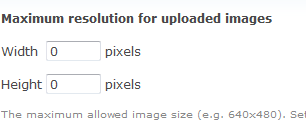
The text to describe the format of your maximum resolution is rather hard to read. Due to tags, this patch removes these tags and turns them into normal text.
Would be even better if we could also change the default value from 0 to 0x0.
| Comment | File | Size | Author |
|---|---|---|---|
| #38 | 523478_width_x_height-38.patch | 5.41 KB | stborchert |
| #31 | 523478_width_x_height-31.patch | 5.5 KB | stborchert |
| #26 | 523478_width_x_height-26.patch | 5.46 KB | stborchert |
| #24 | 523478_width_x_height-24.patch | 5.52 KB | stborchert |
| #20 | 523478_width_x_height-20.patch | 5.57 KB | stborchert |




Comments
Comment #1
damien tournoud commentedNitpicking really, but why not lowercasing those, while you are at it?
Comment #2
Bojhan commentedIndustry standard I think, not sure.
Comment #3
dries commentedThe better solution is probably to use two textfields? Like
[ 640 ] x [ 480 ] pxor something where[ ]is a textfield?Comment #4
Bojhan commentedDoesn't sound as a bad idea, would probably also open the doors for contrib modules to add Percentage/inches stuff.
Comment #5
stborchertHere's a patch with two textfields.
Comment #6
Bojhan commentedWhat about this?
Comment #7
Bojhan commentedwrong patch
Comment #8
Bojhan commentedtry 3
Comment #9
stborchertThe last one don't include upload.admin.css.
Comment #10
Bojhan commentedincluding the right picture now as well
Comment #12
Bojhan commentedFixing tests, removing .css
Comment #13
Bojhan commentedmarking,
Comment #15
seutje commentedwhen trying to apply the last patch it said like 62 was unknown line type, so I remade the patch and looks like a tab was messing things up, change the tab into spaces and made a new patch, tried to apply it and it works
(I didn't change anything to Bojhan's patch aside from the tab)
NOTE: this solution will cause screen readers not to read anything, as the "Maximum resolution ...." label isn't set as the label for any of the 2 fields, so even though this might be a usability improvement, it certainly isn't an accessibility improvement
Comment #16
seutje commentedComment #18
Everett Zufelt commentedIt will be impossible to label two input fields with one label, as the for attribute of a label accepts only one element ID.
Recommendations:
1. use two labels, one for each input field.
2. If necessary hide one of the labels by using style="height: 0; overflow: hidden;", so that it does not display visually, but is available to screen-reader users. This will mean that there is less of a clickable area for the second input field.
Attempting to define a system class to make content invisible in #473396: Defining System-Wide Approaches to Remove, Make Invisible & Push Content Off-screen with CSS
Comment #19
kika commentedComment #20
stborchertHere's another on with floated textfields and a label for each textfield.
Comment #21
seutje commentedI like this solution, but I'm wondering a few things:
do we rly need to t() the 'x' and 'px' and are there any reusable classes we can utilize for the floating?
Comment #22
stborchertHm. Maybe someone like to translate it. Or append "pixels" instead of "px". But it wouldn't bother me if we don't wrap it in
t().I scanned current head for classes that uses
float: left;only and foundin system.css. Nothing to re-use in this issue.
Comment #23
eojthebraveI like where this is going. This patch will make the selection of max width/height for images much more intuitive and user friendly.
Couple of simple code styling fixes.
+ margin-left: .4em;I think this should be 0.4em
+ if (($form_state['values']['upload_max_resolution_x'] != '0')) {and
+ if (($form_state['values']['upload_max_resolution_y'] != '0')) {These both have an extra set of parentheses that are not necessary.
Can we change the
form_set_error()messages so that they are more specific. Something like, "The maximum allowed image height should be entered as a numeric value. Set to 0 for no restriction.", and the other one to "width".+ '#field_suffix' => '<kbd>' . t('x') . '</kbd>'Should have a comma at the end, we always add a trailing comma to large arrays.
Comment #24
stborchertOk, updated the patch according to eojthebrave's notes and removed the useless check if the value not equals '0' around
is_numeric().Comment #25
Bojhan commentedLose the kdb and then I think this is RTBC
Comment #26
stborchertRemoved
<kbd>.Good enough for RTBC? :-)
Comment #27
Bojhan commentedYes. RTBC
Comment #28
dries commentedThe div with upload-max-resolution-y-wrapper seems to be unused? No one declares the class upload-max-resolution-y-wrapper.
Comment #29
damien tournoud commentedAlso, could we use #attributes to set the needed class, instead of adding yet another wrapper div with #prefix and #suffix? It's better to stay away from those as much as possible.
Comment #30
dries commentedLooks like it needs one more re-roll. :)
Comment #31
stborchert@Dries:
upload-max-resolution-y-wrapperis generated through forms api and is used in CSS.In fact the CSS rule didn't had the effect I thought so I modified it a little.
@Damien:
'#type' => 'item'did not have a'#attributes'key. Therefore we couldn't add these classes via'#attributes' => array('class' => 'form-item-wrapper form-item-resolution'),. I tried (in fact forms api is doing its magic even if its not documented) but the classes aren't added to the element.So this has only very minor changes in upload.admin.css.
Comment #32
seutje commented@stBorchert: why not just use 'markup'? because an 'item' with a description just generates an unbound label, and markup allows the use of attributes
perhaps?
Comment #33
stborchert@seutje: 'markup' isn't wrapped into tags so we can't position it and we aren't able to place the fields beneath it.
And (additionally) we wouldn't have a title for this "field group".
Well, the label is unbound but I know no better way to build a structure like the one the last patch is providing.
Comment #34
Bojhan commentedCan we have a screenshot?
Comment #35
stborchertLayout didn't change since comment #20 --> screenshot
Comment #36
Bojhan commentedOke, to me it still sounds rather RTBC then.
Comment #38
stborchertOk bot, here's a new one. Especially for you.
Comment #39
dries commentedCommitted to CVS HEAD. Thanks.
Comment #40
xmacinfoA small follow up issue --> #556138: Error 404 for image toolkit in the File uploads setting. :-)