

 Come together with the global Drupal community in Rotterdam, 28 Sept – 1 Oct 2026. Sessions, contribution, connection, and Early Bird savings until 8 June.
Problem/Motivation
After upgrading a website to version 9.5.0, the following warning appeared in the site's Status report:
Deprecated themes enabled
Deprecated themes found: Classy, Stable.
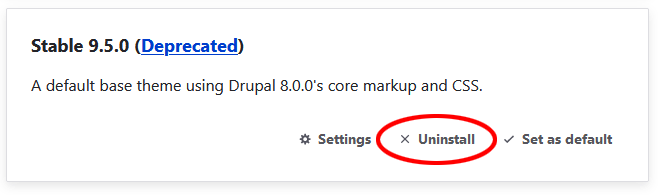
My site is using Olivero as its default theme and Claro as the administration theme. Neither depends on Classy or Stable. I am unable to find a means to disable these unused deprecated themes. They do not appear on the list of themes on the "Appearance" page, where one normally uninstall unused themes. Screenshot:

There is a documentation page about Deprecated and obsolete modules and themes, but it just say that they are deprecated and suggests that one should use Starterkit theme generator instead. It doesn't tell one how to disable them.
The problem only affects legacy websites. A brand new install of Drupal 9.5.0 with Olivero and Claro installed does not get this warning.
I suspect that the reason this happens is that Bootstrap5 version 2.0.5 (which used Classy as its "base theme", which in turn used Stable) in the past was installed as the default theme. However, Bootstrap5 is no longer installed now.
Steps to reproduce
To reproduce, install Drupal 9.5.0 and set Bootstrap5 version 2.0.5 as the default theme. Then uninstall Bootstrap5 and revert to Olivero as its default theme. You shall now get the warning about these deprecated themes being enabled.
Proposed resolution
Determine if there is a dependency on a hidden theme
drush theme-uninstall classy

drush theme-uninstall stable
Workarounds
Method A
Removehidden: true from code>core/themes/classy/classy.info.yml and core/themes/stable/stable.info.yml
uninstall the themes
Add the line back to the files.
Method B
If you are using the config exporter, edit your config/core.extension.yml file and remove the "classy" and "stable" elements under "theme"
Remaining tasks
- There should also be some other indication added to the themes page (visual + text) to view and uninstall themes which have the
hidden: trueattribute (see workaround in #3328016-09: Deprecated core themes cannot be disabled on the "Appearance" tab because they are hidden.
| Comment | File | Size | Author |
|---|---|---|---|
| #30 | interdiff-28-30.txt | 582 bytes | danielveza |
| #30 | 3328016-30.patch | 2.88 KB | danielveza |
| #28 | interdiff-14-28.txt | 2.8 KB | danielveza |
| #28 | 3328016-28.patch | 2.88 KB | danielveza |
| #28 | 3328016-28-test-only.patch | 1.07 KB | danielveza |



Comments
Comment #2
cilefen commentedWhat do you mean by that, specifically? Can you not disable them on the “appearance” UI?
Comment #3
gisleNo. I can not disable them by going to “Appearance” in the administrative UI. Going there:
Under "Installed themes", I see:
And under "Uninstalled themes", I see:
The themes Classy and Stable are not listed at all on that page.
Comment #4
gisleAdded screenshot of "Appearence" page to the issue summary.
Comment #5
cilefen commentedComment #6
spokjeCan confirm this happens when following the steps to reproduce in the IS.
The not-being-able-to-disable bit is indeed because those themes are hidden (they have
hidden: truein their.info,yml.A workaround for now is to remove the that line from both
core/themes/classy/classy.info.ymlandcore/themes/stable/stable.info.yml, uninstall them, and put the line back.Both themes got installed by the dependency in
themes/contrib/bootstrap5/bootstrap5.info.yml:base theme: classy"Interestingly" when doing the same steps on 10.0.x/10.1.x, composer pulls in bootstrap5 versions 2.0.2, which doesn't seem to have the dependency on classy.
Comment #7
cilefen commentedComment #8
cilefen commentedI think this is major priority because it sets up a confusing situation for site owners.
Comment #9
gisleI can confirm that the workaround suggested in comment #6 works. After removing
hidden: truein their.info,yml, they appear on the “Appearance” page and can be uninstalled. After doing so, the Warning in the Status report disappear.Comment #10
gisleDidn't intend to alter Priority.
Comment #11
trolin commented@Spokje, when I set the hidden attribute to false or delete that line entirely, the themes show up in Appearance but there is no uninstall option.
Comment #12
gisleYes there is, at least for me.
Of course, since Classy uses Stable, the "Unistall" link won't appear for Stable until you've uninstalled Classy.
Comment #13
spokje@trolin Here's a Drupal Classic Reply(TM): Did you clear the caches?
By no means trying to be condescending BTW, but since it worked for @gisle, this is the only thing I can come up with that could be the difference between both situations.
INSTA-CROSSPOST-EDIT: And what @gisle said just above me.
Comment #14
tedfordgif commentedHere's an untested patch that shows enabled deprecated hidden themes (that's a mouthful). Ideally there'd also be some other indication added to the themes page (visual + text).
Comment #15
sidgrafix commentedIf anyone runs into issue with no uninstall option for theme "seven" (line hidden: true does not exist) adding it appears to remove it from the installed section.
- it was thee only way I could get it removed!
However, it is still listed on status page as being installed (nothing listed in this thread appears to allow uninstall of seven)
Edit: found issue for my situation "The use of contributed Adminimal theme" once removed uninstall becomes available.. I just switched base theme for adminimal to use claro (dirty but works)
Comment #16
gislesidgrafix,
I think that what you found for your situation is what applies in general: If an installed theme depends on another theme, you shall not be able to uninstall the base theme. This is by design. It is not a bug.
Comment #17
desierto commentedOnce I edit to show the 2 themes in Appearance, I also have no uninstall option on my Stable or Classy. I upgraded Bootstrap5 to the latest 2.0.5 version (and cleared caches) to see if that would help and it did not.
Comment #18
gisledesierto,
that is correct. This is working as designed. See my comment #16 above. Also see the section "Steps to reproduce in the issue summary" and comment #6.
You need to uninstall Bootstrap5 version 2.0.5 if you want to be able to uninstall Classy and Stable. The reason for this is that Bootstrap5 2.0.5 is set up with Classy as a base theme, and it in turn depends on Stable. There is the 3.0.x development branch that tries to fix this, but no stable release. You may want to look at the Bootstrap5 Issue queue for issues affecting the 3.0.x branch. For example, see #3314491: Split D9 and D10 branches as classy removal breaks functionality.
Comment #19
gisleRemoved "Support question" from the issue summary. This is no longer a support request (this was resolved/answered by comment #6).
Comment #20
WebbehAdding next steps (from Needs Work [NW] status change) into Issue Summary (IS).
Comment #21
trolin commented@Spokje, I just realized that I never acknowledged your comment #13. No offense taken, but yes, I did clear caches with no effect. I also tried installing Bootstrap5, then removing it, but Classy and Stable still have no uninstall options.
Comment #22
noah commented@trolin: I had the same issue, and discovered when I tried to uninstall via Drush that one of my installed themes has Stable as its base_theme—maybe that's why you don't see the uninstall option after unhiding?
Comment #23
trolin commented@noah, you win the prize. I'm using theme danland which depends on classy which depends on stable. Thanks for the tip.
Comment #24
xem8vfdh commentedworkaround #6 worked for me.
I also didn't see an uninstall button on Stable noted in #11. Once i clicked uninstall on Classy, the Stable panel shifted and now there was an uninstall button there.
Another way to achieve this, if you are using the config exporter, is to edit your
config/core.extension.ymlfile and remove the "classy" and "stable" elements under "theme"Comment #25
astringer commentedJust reiterating #6 worked for me, if you simply need to get this done now.
Comment #26
boinkster commentedConfirming that #24 worked for me - do a 'drush cim' after the edit.
Comment #27
disparil commentedIn my case I cannot uninstall Classy and Stable, because my custom theme (News+ Lite) is based on Classy .
Time to update my custom theme to a new Drupal9 base theme.
Comment #28
danielvezaUpdated the patch for this and added a test. Happy for opinions on if this is the right approach & the wording of the status message.
Comment #30
danielvezaFixing CCF from my earlier patch. Tests only patch in #28 is unchanged.
Comment #33
bcobin commentedI'm on 9.5.10 and prepping to upgrade to Drupal 10 - I see no uninstall option as shown in #12. I could drush pm-uninstall, I suppose, but I'm using a subtheme of Bootstrap5 2.0.9. So if the following from #18 holds true for 2.0.9...
I'm afraid that I could end up completely borking the site. Any ideas? Suggestions greatly appreciated!
Comment #34
gisleTo prepare for Drupal 10, upgrade from Bootstrap5 version 2.0.5 to version 3.0.9. Then the uninstall link should appear.
Comment #35
bcobin commentedThanks for the quick response!
I installed Bootstrap5 3.0.9 and it seemed to work initially - cleared caches and crashed.
Reading watchdog via Drush I got the following:
Saw this post:
https://designkojo.com/base-theme-stable9-has-not-been-installed
Enabled stable9 using Drush:
drush theme-enable stable9
Site came back up and seems to be working, but I get a DB upgrade warning.
Trying to update DB results in the following:
At least the site seems to be working - any ideas here? Jeez...
Thanks for your help!
Comment #36
bcobin commentedUpdate: Commenting out hidden: true in stable9.info.yml eliminates the DB error - let's see if I can make the transition to Drupal 10 and get rid of the deprecated themes there.
Comment #37
bwoods commentedPatch #30 works for me, thank you!
Comment #38
daveban commentedAs has been mentioned above, if a theme depends on Classy or Stable, then the uninstall for those will not appear, by design.
To find out if you have an unexpected dependency, run the drush uninstall command:
For me, those told me I had a dependency in my main site theme that needed to be looked at, something like:
The base theme stable cannot be uninstalled, because theme site_theme depends on it.Comment #39
joachim commentedThe workaround needs to be detailed on this CR https://www.drupal.org/node/3305674 as otherwise people upgrading from 9 to 10 with Classy or Stable installed can't remove them.
Comment #40
urix commentedThanks, worked for me.
It happens that SimpleBlog theme is dependent on Classy theme, which is strange - because SimpleBlog is compatible with D10.
Comment #41
quietone commentedI summarized the workarounds in the Issue Summary
Comment #42
mariohernandez commentedI was seeing a bunch of weirdly named themes in my site's appearance page and it was cased by this line in my settings.local.php:
$settings['extension_discovery_scan_tests'] = TRUE;I changed it to FALSE and that fixed the issue for me.