In Drupal 9.2.x, multiple jQuery UI libraries were deprecated. They were deprecated in #3113400: Deprecate more jQuery UI library definitions (change record: #3156376).
Previously, if a module required for example core/jquery.ui.dialog, Seven and Claro removed files that were breaking the layout. With above change, this override was removed.
This means that every module that is still depending on these deprecated libraries is possibly broken since Drupal 9.2. Some libraries that were not loaded before, are now loaded again.
The long-term fix is for these modules to not depend on the deprecated libraries. However, these libraries should still be supported until Drupal 10. That means that while the libraries should be marked deprecated, overrides and extensions on them should not be removed until Drupal 10.
Example of broken module: admin_toolbar_search
This was also the original bug report of this issue. When this module is enabled, the views modals have flickering buttons when hovering over them.
Video showing the issue: https://www.drupal.org/files/issues/2021-02-01/20210201_125018647.mp4
Example of broken module: webform
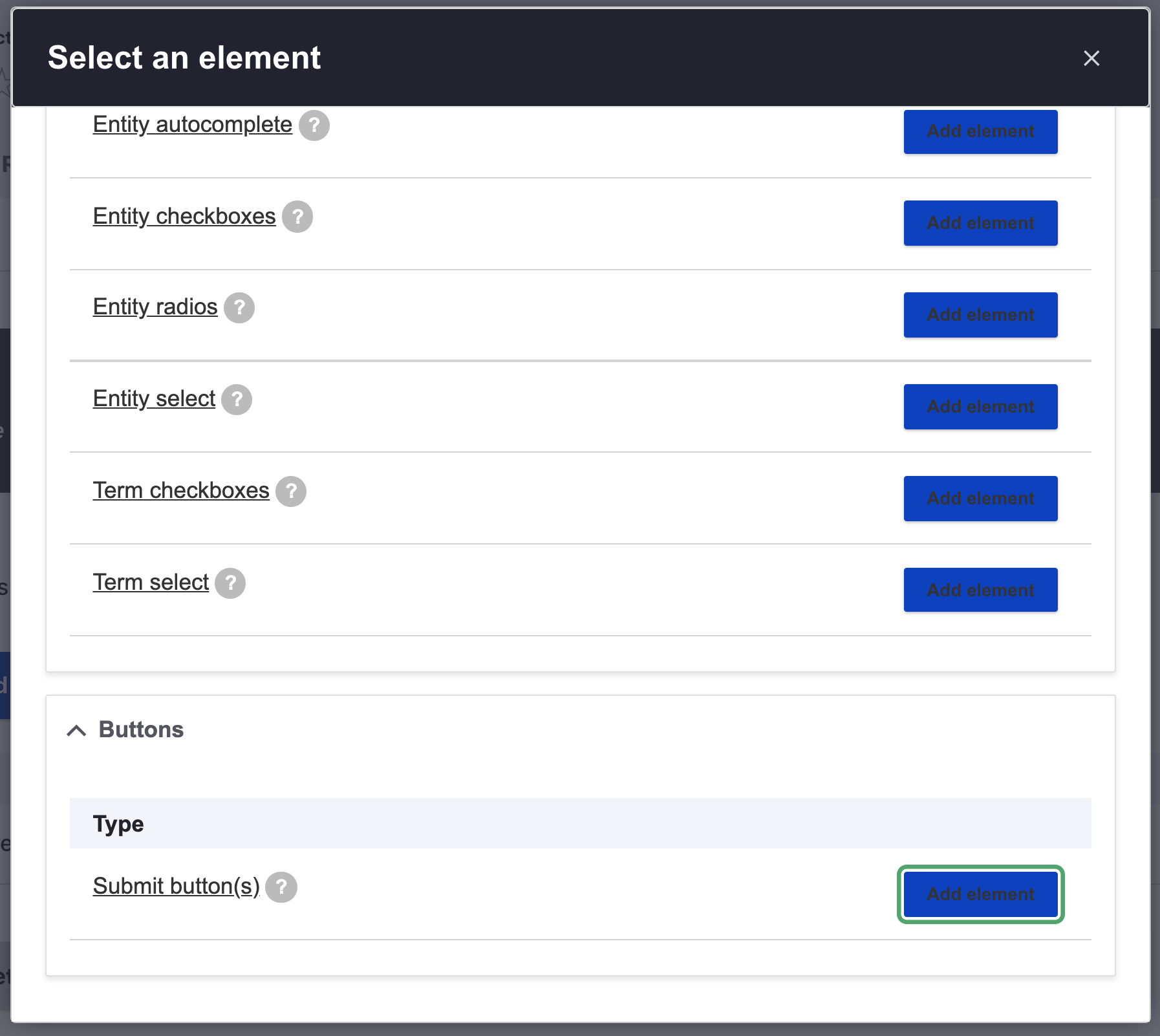
This was originally reported in issue #3225151: Webform button accessibility while Claro theme is enabled. When the webform and webform_ui modules are enabled, the + Add element modal has weird looking buttons, creating an accessibility problem.
Proposed resolution
Revert the part of commit 1c201591 that removes the library overrides and extensions of deprecated libraries. They should not be removed until Drupal 10, when the deprecated libraries are removed.


 Show commands
 changes
Comments
Comment #2
pameeela commented@djsagar what browser and OS did you use to create this screencast? I am not able to reproduce the issue on a Mac in Safari, Chrome or FF.
It looks like something may be wrong with the styles loading in your example, as the font that is rendered in the modal is not 'Lucida Sans' but the fallback 'Dejavu Sans.'
Comment #3
djsagar commentedYes @pameeela i'm using Chrome in OS.
Please watch the video for reproduce the issue.
else
1. Create view.
2. click on add option then popup comes you will see the issue.
Comment #4
djsagar commentedComment #5
pameeela commentedI have watched the video and as I said, the font that renders is wrong which suggests there is a problem loading the styles.
I can’t reproduce this. It does not occur when styles have loaded correctly.
Can you please check the browser console to see if there are any errors?
Comment #6
djsagar commentedComment #7
azinck commentedJust a follow-up here because I've been suffering the same problem and finally had a chance to dive into it. It's caused by the inclusion of assets/vendor/jquery.ui/themes/base/theme.css on the page. The Seven theme attempts to suppress this using libraries-override in seven.info.yml, but it can still make it on the page if you have a module depending on any of the core/jquery.ui libraries. In my case it was the admin_toolbar_search module causing the issue as it has a dependency on core/jquery.ui.autocomplete, but I assume there are other modules out there doing the same.
You can fix this by updating your admin theme to add this to its .info.yml file:
Or, we can hopefully get contrib to use the appropriate drupal versions of these libraries (core/drupal.autocomplete).
Comment #8
azinck commentedHere's a patch to clean things up. It looks like both Seven and Claro need the same modifications. Once contrib stops using these deprecated libraries then these can be removed.
Comment #9
azinck commentedComment #13
bartlangelaanSorry for changing the title & issue summary, but I think the issue is bigger then just the original issue.
Comment #14
bartlangelaanAdding tag from #3225151: Webform button accessibility while Claro theme is enabled as I will close it as a duplicate.
Comment #15
bartlangelaanAnd also changing priority to that of #3225151: Webform button accessibility while Claro theme is enabled.
Furthermore, MR !1362 has reverted the part of commit 1c201591 that has led to this bug, and also removed the deprecation warnings when overriding or extending a deprecated library.
As described in the issue summary, just overriding or extending a deprecated library should not be disallowed - only using the deprecated library should give a deprecation warning.
This MR is passing tests and can be reviewed.
Comment #17
dwisnousky commentedComment #19
socialnicheguru commentedCould we also just use this module for Drupal 8/9, https://www.drupal.org/project/jquery_ui?
Is there a benefit to the above patch over the module approach?
Comment #22
needs-review-queue-bot commentedThe Needs Review Queue Bot tested this issue. It either no longer applies to Drupal core, or fails the Drupal core commit checks. Therefore, this issue status is now "Needs work".
Apart from a re-roll or rebase, this issue may need more work to address feedback in the issue or MR comments. To progress an issue, incorporate this feedback as part of the process of updating the issue. This helps other contributors to know what is outstanding.
Consult the Drupal Contributor Guide to find step-by-step guides for working with issues.
Comment #23
mgiffordI would like a clear explanation about what the accessibility bug here is. Is it a contrast problem without the jQuery UI styles?
Comment #25
bnjmnmThis issue is specific to depending on libraries that were deprecated in Drupal 9, and fully removed in Drupal 10. Drupal 9 is EOL so this will not be addressed. It is unfortunate there wasn't a solution provided during Drupal 9's lifespan, but hopefully the modules impacted by this were able to mitigate the issue without too much hassle.