Problem/Motivation
Modified DE Maintenance Text gets write protected and is replaced with default Drupal Maintenance text.
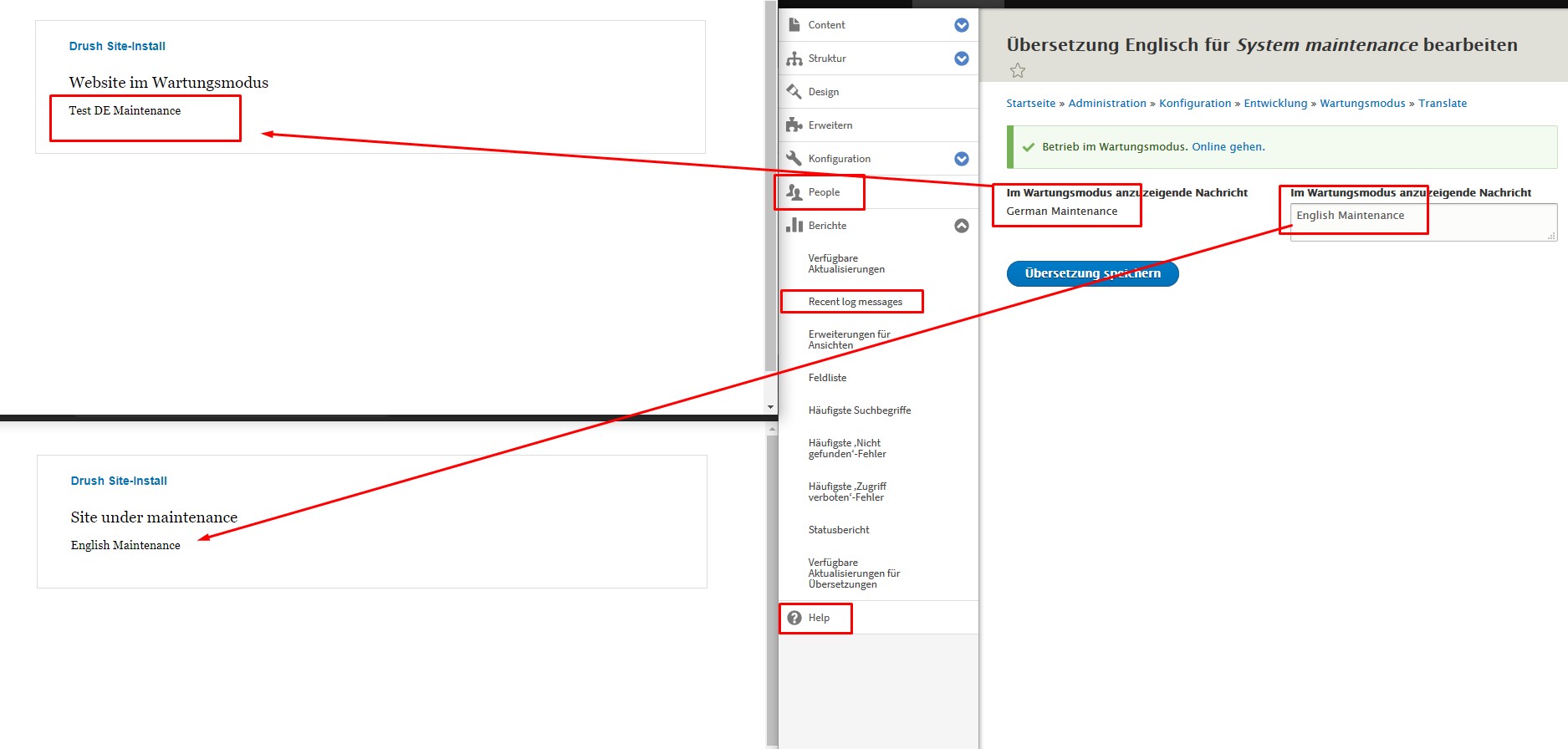
Modified ENG Maintenance translation gets overwritten with D9 default text
In addition the Admin Toolbar Ignores translated Content
Steps to reproduce
composer create-project drupal/recommended-project d9test
Extend modules:
- Configuration Translation
- Content Translation
- Interface Translation
- Language
Add German as 2nd language
Define German as Default language
Under Detection and selection --> URL : remove the de for German prefix
Put site under Maintenance and replace text with "TEST ENG Maintenance"
Translate Maintenance and edit German and replace text with "Test DE Maintenance"
Up till this point Maintenance for DE/ENG show the defined text as expected :-)
Now add AND module ... for ease of use I used recommended "admin_toolbar"
composer require drupal/admin_toolbar
drush en admin_toolbar
This will now Overwrite the Eng "TEST ENG Maintenance" with drupal default text.
Under the /admin/config/development/maintenance/translate
the Language is now shown Switched from "English (Original) to "German (Original)"
Edit German Maintenance and Replace "TEST ENG Maintenance" with "German Maintenance"
This should in Theory overwrite the default.... if checked we still see the write protected "Test DE Maintenance"
now got to /admin/config/development/maintenance/translate/en/edit
Here you can also see the "German Maintenance" Text that gets ignored
Edit English Translation Maintenance and Replace "TEST ENG Maintenance" with "English Maintenance"
The admin toobar still show German translation
do a drush cr and now even the Admin Tool bar is breaking and showing mixed language like
People instead of "Benutzer"
See Screenshot
I also tried to search via ssh ag "Test DE Maintenance" now results found
If searched in mysql for "Test DE Maintenance" these 2 tables show matches
cache_config
config
-------------------------------------------------------------------------
For comparison fresh German install is not showing these issues !!!
--------------------------------------------------------------------------
Composer install Drupal 9.x as German
Install ENG as 2nd Language
Activate: Configuration Translation / Content Translation / Interface Translation
Activate Maintenance mode and alter text for DE/ENG
Install Any module like admin-toolbar
Result Maintenance mode for DE will show correct altered text
Admin Toolbar is translated
Proposed resolution
FIX /Patch to resolve Maintenance De write protection & Mixed Admin_toolbar issues
As many used start with a ENG d9 installs and add German as a second language.


Comments
Comment #2
joachim namyslocomment outdated
Comment #3
joachim namysloComment #4
joachim namysloIssue updated
Comment #5
joachim namysloComment #6
rar9 commentedComment #7
rar9 commentedComment #8
joachim namysloComment #9
cilefen commentedI just checked the priorities guide, and this is major, not critical.
Comment #10
joachim namysloAh glad to see we have it. Asked for it in #documentation on slack some days ago. Thank you cilefen
Comment #11
cilefen commentedI'm glad to hear it. For what it's worth, and for anyone who is wondering, just under the issue "Category" and "Priority" fields above, it reads:
Those link to the respective guides.
Under "Issue tags" it reads:
Comment #12
rar9 commentedany further information required?
Comment #13
rar9 commented@cilefen
Is anyone actually trying to resolve this write protected maintenance ISSUE?
I believe this will apply to ALL installs after having installed second language.
Comment #14
rar9 commentedIf NONE cares to Resolve this I will YET again put this to Critical again.
Its seems as NOBODY cares for this BUG also it has already exists much longer than it was committed.
This CORE BUG makes the Maintenance Page Totally USELESS, as its not showing incorrect text...Come on Drupal Community.
Comment #15
catchThis is a duplicate of #2905295: Configuration language being overwritten during module install and/or #2806009: Installing a module causes translations to be overwritten both of which are critical issues.
Comment #16
rar9 commented@catch so u are telling me then the other 2 issues are related and some of them are open over 4 years and are still not really resolved?
This makes me worry quite a bit that this will not be resolved any time soon.
I just require a fix so that the DEFAULT maintenance screen text is actually showing correctly.
Comment #17
rar9 commentedWe are on DRUPAL 9.18 now and this CORE issue is still present.
With a fresh install with default ENG
Then adding 2nd language (de)
Change both maintenance texts
Switching language from ENG to 2nd Language as DEFAULT will BRAKE the Maintenance screen and overwrite with default Drupal maintenance text.
ANY FIX PATCH or GURU that can help fix this issue?
Comment #18
x0r1x commentedI found a solution to the maintenance Status text problem. Maybe it's not the best solution, because the text is overwritten in 2 places in the database, but it works for me!
The problem is that when saving the original text, it is saved in the 1st row (without lang code), but when requesting the text of the original language, it is requested from the 3rd row (with lang code), where the value was not changed before.