

 Come together with the global Drupal community in Rotterdam, 28 Sept – 1 Oct 2026. Sessions, contribution, connection, and Early Bird savings until 8 June.
Read this to mitigate potential confusion that may occur when reading through this issue: Starting with comment #6 until probably #34, the discussion largely surrounds attempting to use this issue to also address accessibility issues with native datepickers. Over the course of these comments we were able to conclude that it's an important thing to do but out of scope for this issue. The biggest takeaway from that chunk of comments is there are no datepicker/libraries that are sufficiently accessible, particularly when compared to jQueryUI.
Problem/Motivation
jQueryUI is going to be deprecated
As part of this deprecation, the jQueryUI datepicker is among the components that need to be removed/replaced.
see: #3090244: Deprecate jQuery UI datepicker in Drupal 8
As mentioned in the parent issue: #3067261: [Plan] Remove jQuery UI components used by Drupal core and replace with a set of supported solutions
The OpenJS Foundation lists jQuery UI as an Emeritus project in https://openjsf.org/projects/ which is described as:
Emeritus projects are those which the maintainers feel have reached or are nearing end-of-life
How datepickers currently work in Drupal core: When a native datepicker is available, jQueryUI's datepicker is not used. After taking into account supported browsers, this means
1%-5% of Drupal users use jQuery UI's datepicker. The majority of users will not experience any changes to their datepicker experience.
Proposed resolution
Remove datepicker support entirely for browsers that do not support native datepickers (again, this is 1%-5% of users) and replace the fields with text inputs that have additional instructional text describing the date/time format that should be used.
This approach is preferred over finding a new datepicker library polyfill because there are no options available that do not result in significantly diminished accessibility. Introducing a replacement datepicker would result in broken screenreader and/or keyboard navigation (depending on the browser being used). A text field for entering the date, on the other hand, can be made accessible quite easily.
drupal.locale.datepicker will also be deprecated as it exists only to extend the jQueryUI datepicker.
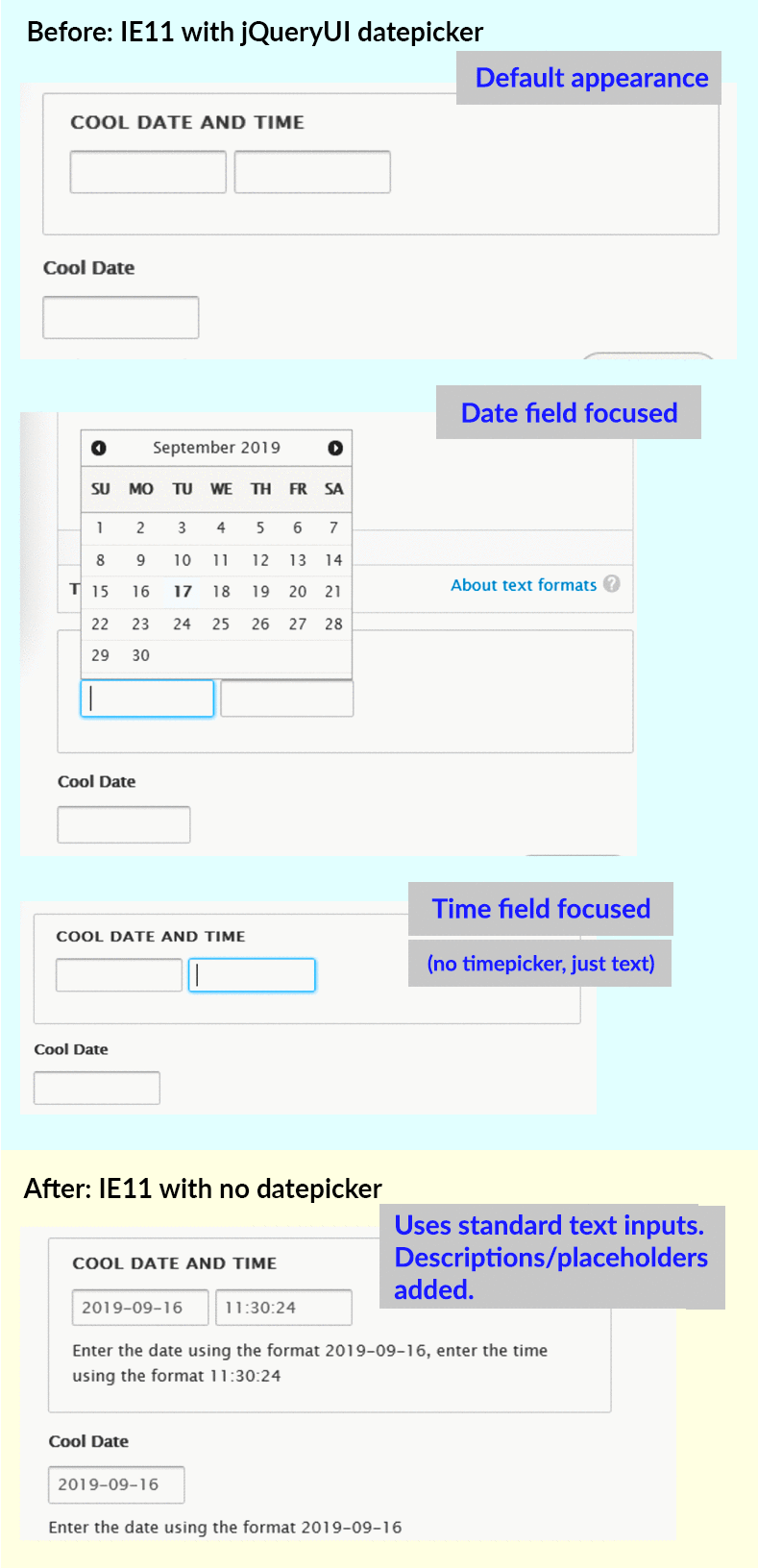
This is what the change will look like in IE11, one of the browsers supported by Drupal that does not have a native datepicker:
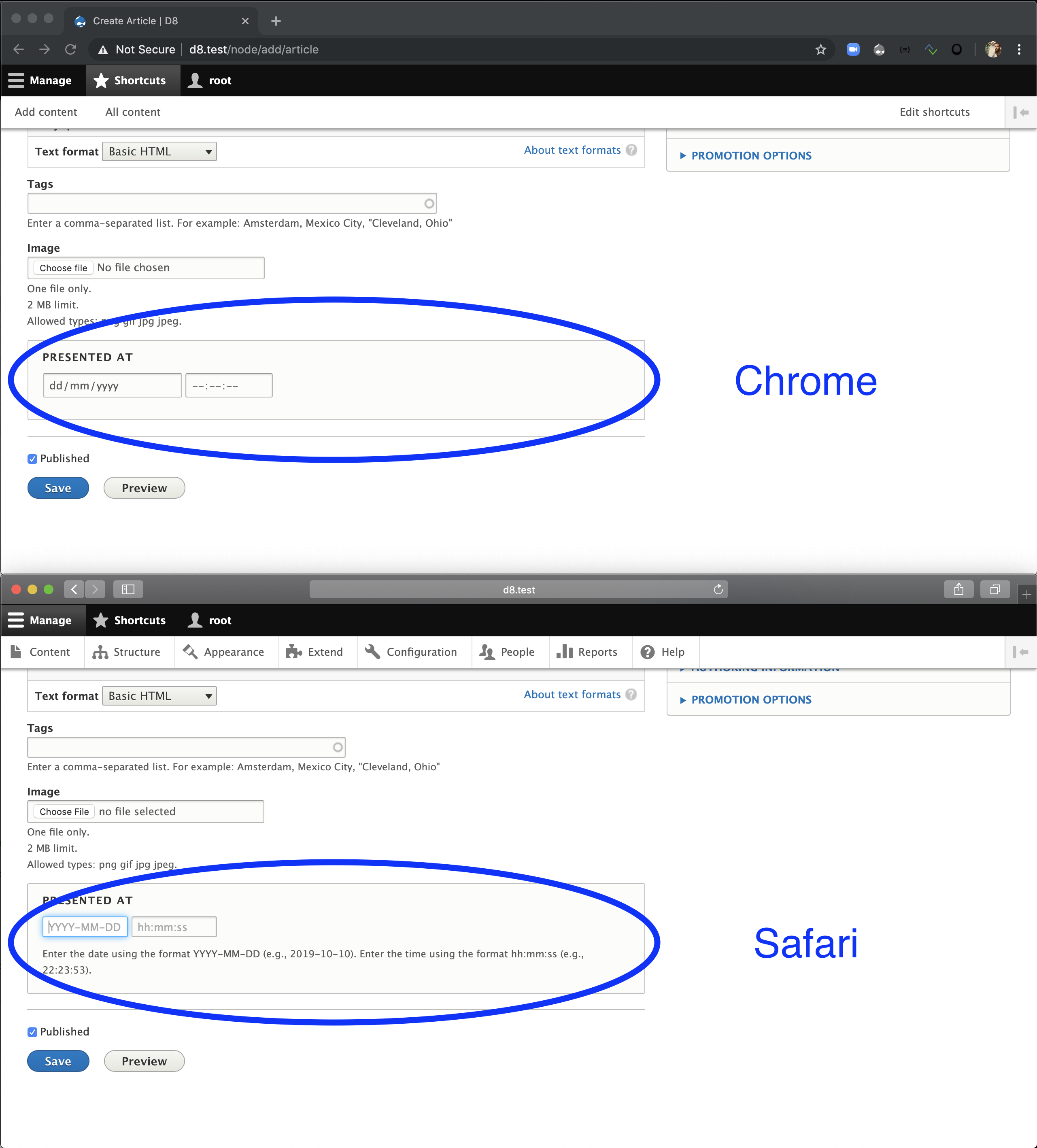
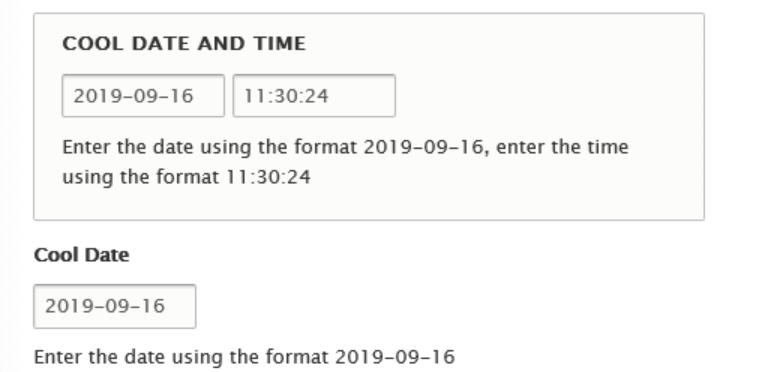
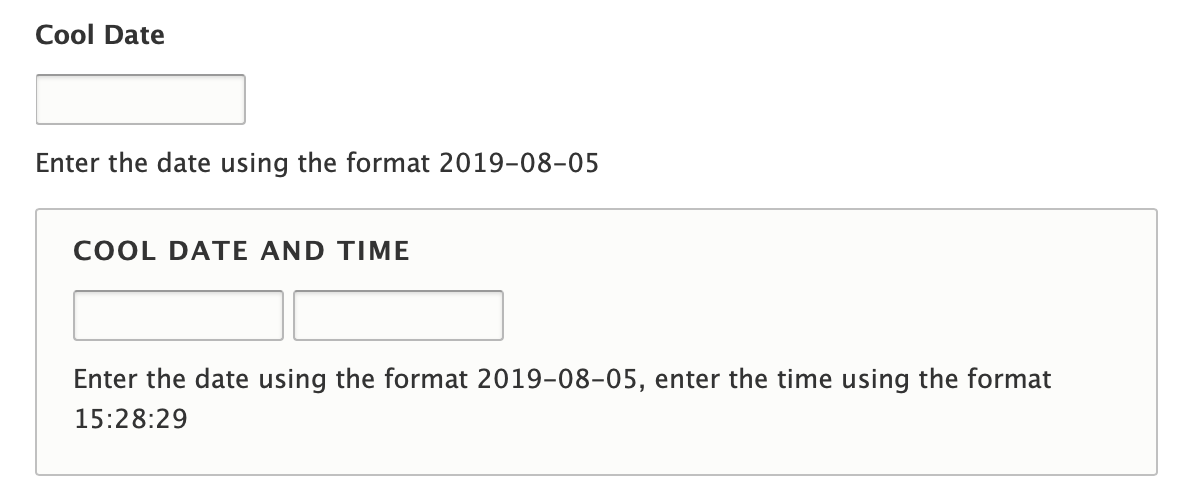
And this shows the visual differences between e.g. Chrome (with native datepicker) and Safari (without native datepicker):
Remaining tasks
Get PM signoff on the approach (#43)
Patch review
Release manager review (#46)
Subsystem maintainer review (#57 + #64)
Accessibility review (#76)
Post follow up issues for further investigation into accessibility improvements for date inputs
User interface changes
No more datepicker for the ~5% percentage of supported browsers that don't provide native datepickers.
API changes
...
Data model changes
N/A
Release notes snippet
Due to jQuery UI's end of life, the jQueryUI Datepicker has been deprecated. Browsers that support native datepickers are unaffected; browsers that do not will instead provide text inputs to enter dates. More information can be found in the change record on Datepicker.
| Comment | File | Size | Author |
|---|---|---|---|
| #113 | interdiff_d8_111-113.txt | 1.15 KB | zrpnr |
| #113 | d8-datepicker-deprecate-113.patch | 2.27 KB | zrpnr |
| #111 | d9-datepicker-remove.patch | 167.7 KB | zrpnr |
| #111 | d8-datepicker-deprecate.patch | 2.29 KB | zrpnr |
| #109 | interdiff_105-109.txt | 1.46 KB | zrpnr |









Comments
Comment #2
bnjmnmComment #3
bnjmnmPolyfill Findings
None of the polyfills I found were sufficient replacements, but perhaps there's still one out there.
date-input-polyfill
ruled out as it breaks the ability to tab navigate to any element that appears after one receiving the polyfill.
Web Experience Toolkit
are accessiblity focused, a big plus, but there is only a polyfill for date, no support for time.
Better Dom/Better Dateinput Polyfill/Better Timeinput Polyfill
It does not allow the date value to be typed into the field, the datepicker must be used. Using the datepicker without a mouse is near (completely?) impossible. While it's possible to move focus via keyboard, it does not do so predictably (left arrow moves back two days at a time, right arrow does nothing, up and down select every sixth day, etc.) . Time input errors out and does not work - this may be addressable with some config changes but not worth investigating further since there are already problems with the datepicker's keyboard navigation.
Patch with a possible approach
The attached patch removes the jQueryUI datepicker library and does not replace it with anything. This has no impact on ~91% of browsers as they already use native datepickers. The remaining 9% (and dwindling 🙂 ) will need to add dates/times into the field as text. Help text has been added to specify the date/time format that should be used. (this help text also benefits sessions without JavaScript, which currently have no date format information until a validation error is triggered )
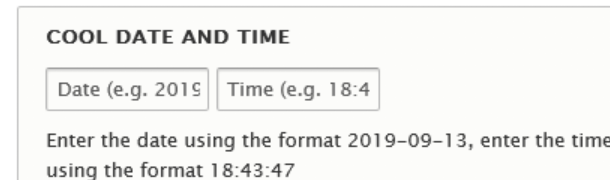
This is what the help text looks like on a browser that does not support native datepickers.

Comment #4
wim leersI had to read this multiple times because it sounds so absurd 😂 Sounds like the author A) has a sense of humor, B) hates keyboards 🤷♂️
EDIT: is this the demo at http://chemerisuk.github.io/better-dateinput-polyfill/? I wanted to experience this absurdity myself, but … it works fine for me. Still deciding whether this is a relief or a disappointment 🤔
Let's dig into that number to see if helps us make a decision:
… I think this means it doesn't really help. Except that I think it makes the consequences of choosing to go with the patch in #3 very clear. The consequences would be:
I personally think we can defend going with the patch in #3 based on those numbers. But I cannot decide this. Let's ask a Drupal product manager for their perspective.
Comment #5
bnjmnmRe #4
The prototype I was testing with used native datepickers when available -- I checked with this demo and it looks like the weird keyboard behavior with better-dateinput is specific to Safari. So 🙂you get the chance to experience the absurdity, but 🙁overall (particularly since I've seen docs specifically recommend Safari for OSX screenreader users)
Comment #6
bnjmnmComment #8
bnjmnmRemoving the [policy, no patch] due to some issues I just discovered - updated IS on the way...
Comment #9
bnjmnmComment #10
bnjmnmComment #11
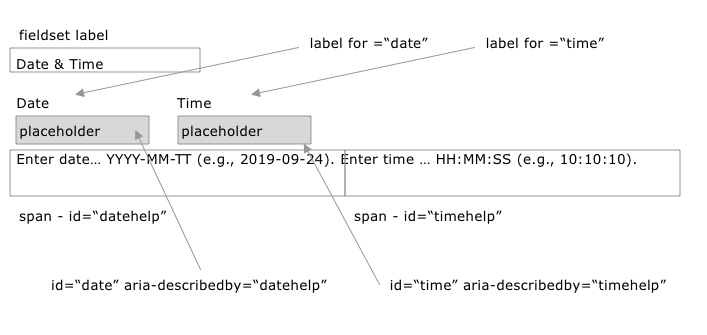
bnjmnmComment #12
wim leersUpdating issue title to match the new proposed scope.
I'm honestly shocked and appalled that accessibility of native datepickers is so incredibly bad 😨 And I did not realize that we only used jQuery UI's datepicker only on browsers that do not support the native datepicker, meaning that 91% of users (who then use a native datepicker) are subjected to this horrible accessibility! 😔
Comment #13
anevins commentedWe need to consider the realistic option of dropping the DatePicker design pattern. Some of these widgets that jQuery UI incorporates like the Accordion and Tabs are real design patterns: https://www.w3.org/TR/wai-aria-practices-1.1/#aria_ex - And that's great. However, the calendar pattern is not on there. That's alarming.
We can tell from the features of the calendar that this was not designed inclusively and it was not well tested against assistive technologies.
We know that the calendar has been around for a while and people are familiar with it, and browsers have adopted it, but that's not a good reason to continue using them.
Comment #14
bnjmnmSome helpful feedback from @andrewmacpherson from the #accessibilty Slack channel
I then asked if the Deque datepicker was an example of a good accessible datepicker (despite relying on jQuery UI). His response:
So although we can't implement the datepicker from Deque, it serves as a good reference for evaluating other options.
Comment #15
bnjmnmReviewed several libraries that were quickly ruled out
An initial review of React-dates from Airbnb did not surface any major accessibility problems so a prototype for that is on the way.
Comment #16
bnjmnmSpent some time on the react-dates prototype, but it's definitely not complete. Continuing would require a nontrivial amount of additional work so I'm going to pause for now and share some of my observations. Perhaps that will help determine if it's worth devoting additional work to this option:
While this can be fixed fairly easily, this problem even being present is a bit concerning.
Comment #17
mgiffordI'm looking around for a solution, but one thing that I come back to is simply having a bit of a smarter form that evaluates information that is being typed in as being the default. Something a little smarter than just PHP's
strtotimeor JavaScript'sDate.parse(). Someone should be able to enter in "Aug 19, 2019" and that might be faster and easier than navigating the widget.Calendars are always handy, but the default when you click in the box could be the assumption that you are going to type in a date. If it is something like 02-03-19, then maybe you should have a means to pick which of the 3 options you're actually talking about. Is it following ISO 8601's format of 2019-08-19?
But yes, calendars are hard to make accessible. Might be useful to have that just be something that you need to activate by clicking the calendar icon beside the box if you want the widget view, but to not make the widget the default action.
EDIT: From this twitter thread useful to note that picking past dates is apparently a real challenge for usability with most date pickers. Also the UK's Design System opted for a pattern like this https://design-system.service.gov.uk/patterns/dates/ which is also worth considering.
Comment #18
bnjmnmBased on the limited datepicker options and an interest in not taking functionality away from users, I took a stab at providing a custom datepicker.
This prototype is based on the Openajax Alliance datepicker, as it was the most accessible non-jQueryUI datepicker I evaluated. This is not available in a repo so the example code was just pasted in then refactored for Drupal (and modern JS, and many other necessary changes).
The refactoring also included changes to make it better resemble the Deque datepicker (which would be a contender if it didn't use jQueryUI). @andrewmacpherson expressed a favorable opinion of Deque's datepicker in the #accessibility Slack channel, and that's an endorsement to be taken seriously.
So while this is definitely a rough prototype (apparently datepickers are complex, who knew?), this is at least evidence that a custom datepicker is in the realm of possibility if other options are not sufficiently accessible.
Things to note about the prototype:
Comment #19
bnjmnmComment #20
wim leersOh, https://design-system.service.gov.uk/patterns/dates/ looks really good! Thanks for that link, @mgifford!
Looks like that was added in an edit to #17. @bnjmnm, what are your thoughts about that approach?
Comment #21
bnjmnmI like the suggested approaches in https://design-system.service.gov.uk/patterns/dates/ looks good and worth pursuing, but while those patterns reduce datepicker use, but do not eliminate it entirely. Based on those recommendations, a datepicker is still needed in some instances, and finding a replacement datepicker would still be necessary (I'd fully support a followup issue to create new input widgets that use the Gov.uk patterns, though)
They mention some use cases that require a datepicker in the "Helping users to pick a date" section
The three use cases mentioned in that quote are the same reasons I'm reluctant to go with any solution that eliminates datepickers.
However... I'm very curious about solutions that satisfy those use cases without a datepicker. One thing that comes to mind is that much of the usefulness of a datepicker comes from being able to see a calendar, not necessarily from it being interactive. This is probably a major UX challenge, but if there were a way to provide a non-interactive reference calendar that isn't mistaken for a datepicker, that could work.
Comment #22
wim leersOkay, so let's get clarity on the current status and next steps.
What do you recommend as the next step, @bnjmnm? It sounds like we need to continue to develop #18. How big of an effort is that?
Comment #23
bnjmnmRe: #22 - the only correction would be item 2
. This prototype is fully usable. Once installed a datepicker-opening "open calendar" button will appear to the right of every date input. The "rough" part is most evident if you look at the code, as much of it should be abstracted to theme functions, the class probably shouldn't be inside a behavior, etc.
It's probably worth one last check with the community to see if there's an overlooked library option that offers good accessibility at a reasonable filesize, but so far the custom datepicker with #18 sounds like our best bet (I'd love to find out differently!) If we go that route, here are some of the next steps that come to mind:
Planning/discussion
Development steps
I'm not exactly sure how to gauge the level of effort within those steps. It would certainly require many dedicated days of development, but it seems like something that could at least be measured in weeks instead of months/years. The actual development would probably be less complex than something like Quickedit or Toolbar, but would require more test coverage.
Comment #24
wim leersOh … I said I hadn't noticed any Drupal integration because I saw only one JS file being added, and I wrongly assumed that this was that OpenAjax Alliance Datepicker. But it's apparently a mix of our own code + their code, in a single JS file.
I didn't realize we'd need this much custom code. That's pretty unfortunate, and relatively risky. I think that needs sign-off from a JS maintainer. (Tagging .) Because like you point out, this will require quite a lot of JS test coverage. Choosing this path means choosing to maintain this for ourselves forever, or at least for the entire Drupal 9 cycle (tagging for that).
Comment #25
zrpnrWe are trying to remove jQuery UI's datepicker, which was added in Drupal 8 as a polyfill for browsers that don't support the HTML5
input type="date".https://www.drupal.org/project/drupal/issues/1835016
It is disappointing that, 7 years later, we can't simply remove the polyfill as suggested in #3.
And it's also discouraging that the native datepickers have their own problems.
I don't think it's within the scope of this issue to provide a better datepicker experience than native.
It would be difficult enough to build or integrate a datepicker polyfill that matches the jQuery UI datepicker for features and is compatible with Drupal translation and - even better if it improves on the localization.
I'm concerned that the poor native datepicker accessibility has derailed this issue, we should be focused on trying to replace the polyfill with something that has feature parity with jQuery UI datepicker. Bonus points if we can make it more accessible or tackle some of the existing datepicker issues at the same time.
If we widen the scope of this issue to also replace all desktop (and mobile?) native datepickers I think it would be unmanageable and unlikely to be completed.
Currently any browser that supports
input type="date"gets a native datepicker.If the native datepicker has a11y issues, that should not be Drupal core's problem to fix.
Alternatively, we could open a follow up feature request that defines a plan for a different input for date fields, if we wanted to build something more custom like suggested in #17, something like this prototype "smart" text field.
Regardless of how quickly or how well browsers are implementing the HTML5 spec, it would be a step back in my opinion to disable native datepickers, especially on mobile.
And to override all the desktop browsers.
I would argue that just getting to the baseline of what mobile native datepickers do now (touch events, voice over, localization) would be a huge effort, let alone improving on them, or fixing the very specific a11y shortcomings.
Currently any browser that does not support the
input type="date"sees a jQuery UI datepicker. I think that should be the scope of this issue- replacing that datepicker for those browsers.I am really impressed with the start @bnjmnm made in #18, not only does it work and look decent, but it simplifies localization.
Take a look at
core/modules/locale/locale.datepicker.es6.jsto see how the jQuery UI datepicker needs to be modified to allow for string translation.I found another datepicker that also is based on the OpenAjax Alliance,
https://github.com/eureka2/ab-datepicker
It also has built in locales including not just translation but date formats. It might be good to start from a project that has more hours already put into it, but if we use any other library we will still need to write custom code like the locale.datepicker js above for
Drupal.t()and any other changes or integrations we need.I was very against the idea of "rolling our own" datepicker calendar until I saw #18.
It might be simpler to write our own versus taking an existing library and working with its API- as long as we limited the scope and don't need to fully replicate the features of jQuery UI datepicker.
Comment #26
wim leers@bnjmnm observed every native datepicker to have terrible accessibility. @bnjmnm then argued that we should take this opportunity to not just keep an accessible datepicker for the 9% of polyfill users, but 100% of users since the native datepickers are so terrible.
I can follow that reasoning if there was a clearly great, low-effort, low-risk datepicker readily available. But per #23/#24 … that is not the case. 😭
I agree. Again, if it would've been low-risk, I would've been fine with it. But we're under a lot of time pressure, and the goal is to "remove jQuery UI risk and not regress", not "remove jQuery UI risk and improve". Let's not forget we're not doing this with the explicit goal to reduce the risk of Drupal 9's external dependencies!
🤔 I'm confused now. It seems the direction of #25 at the start is very different than at the end :D
It sounds like you had concerns (similar to what I wrote in my previous bullet) and then you just got convinced by @bnjmnm's PoC in #18?
Are you saying that you believe we should pursue #18?
Are you saying we should make #18 run everywhere, or only where no native datepicker is available?
Comment #27
zrpnrI was surprised (and impressed) that #18 produced a working datepicker, but I wasn't convinced it should be used instead of a native datepicker.
I think #18 might be a simple way to make a Drupal friendly datepicker that doesn't have any dependencies, and which wouldn't require additional processing- for example to make translations work.
Currently the locale module uses the jquery.ui.datepicker API to override strings, but in #18 Drupal.t() is already part of the code.
Sorry for not being more clear- I am opposed to overriding the native datepicker in any browser, desktop or mobile.
I thought #18 could be a promising polyfill replacement. I didn't do a real code review since it was a prototype, but in #25 I pointed out 2 parts that I disagreed with:
Well said! I found a lot of the a11y research very interesting but I think any broader change to how Drupal treats date inputs is out of the scope of this issue.
Comment #28
wim leersThanks for the clarifying comment. That all makes sense!
I know @bnjmnm will be back from vacation on Monday. Let's see what he has to say :) Hopefully some JS maintainers will also have left feedback by then.
Comment #29
lauriiiI support the idea that we only provide the datepicker as a polyfill. It's great if we can find something that is more accessible than native datepickers. There's nothing preventing us from making it the default in a follow-up.
I'm not too excited about maintaining our own datepicker but if that seems like the best solution, and the JavaScript subsystem maintainers agree on that, we probably should go with that. Any thoughts on marking it as internal so that it's not designed to be an API for the contrib? It's only designed to act as a polyfill for core.
It would be great to get feedback from the product managers on what they think about this. Specifically, the part that the datepicker is used just as a polyfill, and that it's only used by 9% of the users. Comment #4 has a good breakdown of what is in that 9%.
Comment #30
webchickI guess my opinion is it's unfortunate that native datepickers have so many accessibility issues, but I don't really see that this is a "bug" for Drupal to fix. We could always add a "feature/enhancement" to add a library with better accessibility, but I wouldn't throw that in the way of releasing Drupal 9, as long as it doesn't create a regression.
So I think that means +1 to using some other datepicker library as a polyfill (which is the status quo?). It would help a lot though if the issue summary were updated prior to asking for PM sign-off with what the actual proposal is here; I'm going by the few most recent comments...
Comment #31
lauriiiDo we want to provide a polyfill for date inputs to browsers that don't support it natively? This means less than 9% of users globally. Some of these users wouldn't necessarily be able to use the polyfill since 5% out of the 9% are browsers we support. I just want to make it clear, that we are potentially making a significant investment to a fairly small proportion of the user base.
If we choose not to provide date picker polyfill, we could do it gracefully in the sense that we could provide help text that describes how the field is supposed to be filled (similar to what the gov.uk design system has done).
Comment #32
wim leersAh, I wasn't able to compute this number because I wasn't sure about the current browser support policy. I know that was agreed upon in the last few days, perhaps that allows you to compute this now. In any case: a valuable addition to this issue!
+1 to considering this. That means going with the patch in #3, which is what I argued we should consider a month ago, in #4. But in my case, the number was "9% of users affected", but that turns out to now be "5%". Of course, that's assuming that all users tend to have to enter dates, which is not at all true. The true number of negatively affected users is therefore even less than 5%. Probably less than 1%.
Comment #33
webchickI guess to answer that question... what is the user experience of a date/time field for non-HTML5-supporting browsers? It would depend on how passable it is. (Screenshots of Chrome or something vs. _____ would be helpful in making this call.)
If it falls back to 3 text fields labeled "Month / Day / Year" (in some combination) like https://design-system.service.gov.uk/patterns/dates/ does, then that seems passable. If it's a single text field with no guidance as to what format to type in there to meet validation criteria, that's not.
Comment #34
bnjmnmFrom #31
Since there isn't a sufficiently accessible library/polyfill, this is what I'm leaning towards (and provided a patch for in #3). The jQueryUI datepicker has good accessibility support. Replacing that with a different datepicker would result in diminished (or completely broken) screenreader and keyboard navigation support. I think it's better to provide those users with a different UI instead of a less functional version of something they're accustomed to working with. Some of the benefits of datepickers will be lost (day of week, easy way to relate two dates, etc), but that still seems preferable to replacing an accessible datepicker with an inaccessible one.
If the no-polyfill approach is how we proceed, these are the next steps from what I can tell:
(and apologies for any derailment, I'd hoped to find a solution that happened to improve the currently-poor accessibility for date fields, but it clearly introduces too much complexity to be in the scope of this issue)
Comment #35
catchOne question in terms of timing:
Since we don't actually replace this with a new library or deprecate anything, this patch could be fine as a 9.x-only patch, leaving Drupal 8 with the existing jQuery UI datepicker up until it goes EOL in November 2021 - however this would mean a different experience between 8.9.x and 9.x.
The advantage would be that whatever the browser statistics are now, they'll likely be more favourable in June 2020 when 9.0.0 actually comes out.
I'm neutral on this, just thinking through it.
Definitely agreed a follow-up to improve accessibility and keep looking at alternatives would be good to do.
Comment #36
wim leers#34++ (and what you did was not derailment, but due diligence — I'm pretty sure everybody in this issue is very grateful for it!)
#35: Oh that's interesting! Can you confirm that the following two steps are what you are proposing?
core/jquery.ui.datepickertoday (in 8.8), to be removed in 9.0core/jquery.ui.datepickerand add that help text/those instructions for browsers without native datepickersFor step 2: it could even be RTBC today against the 8.8.x branch and we would be required to keep it green & RTBC until the 9.x branch opens, this would ensure it remains readily available.
Comment #37
catch@Wim Leers, yes I'm not saying that's the best option here, we might want to commit the change to 8.8.x or 8.9.x too anyway, but it seems like a viable option to consider.
One issue working against that, is that we'd have to skip the deprecation notice for jquery.ui.datepicker in 8.x (because we'd still be using it ourselves), but that seems relatively minor - we know exactly what we're doing and why with that skip.
Comment #38
wim leersThat all sounds perfectly sensible :)
Comment #39
webchickCan I flag that we still need some screenshots here to understand the UX impact of that suggestion?
Comment #40
wim leersComment #41
bnjmnmUpdated issue summary.
This is the screenshot from #3, with that patch, this is what would appear on browsers that don't have native datepickers.
Comment #42
bnjmnmComment #43
webchickThanks! That's icky, but still usable, so +1 from me on the proposed plan!
Comment #44
bnjmnmHere's an updated version of patch #3 that passes tests.
Comment #45
bnjmnmComment #46
catchUntagging for release manager review.
Comment #47
wim leers🐛 We can't remove this, we can only deprecate it.
🤓 Typo: space before the comma instead of after. :P
placeholderattribute to improve the UX for sighted users?Comment #48
bnjmnm#47.1 curtailed my enthusiasm and deprecated instead of removed. I also did this for
drupal.locale.datepickerin the locale module, and have updated the issue summary to reflect that.#47.2 done
#47.3 good idea. I still think it's good to have the description text below the fields so it's always visible, but additional help is a good call particularly since it isn't the most visually pleasant experience. My first thought was to use the title attribute, which includes formatting information, but that extends the width of the inputs and I'm wary of conditionally messing with widths as those are among the few inputs that can reliably be counted on to be a specific length. This is what it looked like

Instead I wound up going with just Date/Time labels, which aren't anything fancy but particularly helpful for fields that include time - this is what the version actually in the patch looks like
I'm sure it's possible to wrangle more information in there and have it be visible by messing with font size, provided it doesn't impact the native datepicker experience. I'd be interested in opinions on that.
Comment #50
catchI would think the placeholder text should be identical to what a user puts in - i.e. the current date and time with no instructions. If we did this then width of the form elements won't be an issue. The description is still there below.
Comment #51
bnjmnmComment #52
wim leersWhat @catch said :) But #51 already did that, yay!
I could only find nits, so this is now hard-blocked on subsystem maintainer review.
🐛 This will need to point to the change record, not this issue.
(It'd have been a nit before, but now it's a bug, since this is the only thing I could find that would block a commit.)
🤓 Übernit: s/JS enabled/JavaScript-enabled/
🤔 Why these changes?
Comment #53
wim leersActually, a change record is missing, and the issue summary could use an update. It should include before vs after screenshots to make it easier for a core committer to assess.
Comment #54
wim leersI pinged
datetimemodule maintainers to get their input on this: https://twitter.com/wimleers/status/1173990619217371138.(Even though this is technically not part of that module, that module is most strongly affected.)
Comment #55
mpdonadioI was having a related conversation with my UX/UI lead the other day about this. To be really honest, I really question whether there is a true need for a JQuery UI style datepicker in core.
Calendar pickers are nice when you need to pick out a date, such as next Thursday.
Text-based inputs are great when you know exactly what date you want to enter. JS can improve the experience (the inputs on Ancestry.com are probably the best I have used).
I am on board with removing this from core and leaving it to contrib to give users options to fit their need (rather than us guessing). The timepicker issue has lingered forever now; there are so many use cases that it is hard to have something generic enough that is still usable.
Comment #56
bnjmnmIssue summary updated incl. screenshot and change record added (and very open to input on that as I've somehow managed to not have to write one before)
#52.1 done
#52.2 done
#52.3 -- was able to remove the changes to the test by adding an is_array check when retreiving the date/time formats in theme.inc
Also updated the JS to remove an unnecessary variable declaration and use vanilla instead of jQuery.
Comment #57
mpdonadioRe-read the whole thread and the patch again. +1 to the solution. This may also solve #2791693: Remove sample date from date field error message and title attribute at the same time.
Comment #58
wim leers#57: Oooh, that's great and very encouraging! Thanks for making that connection! 🙏
Comment #59
lauriiiWould be great to hear from UX experts whether it's better to show the current date in the format, instead of using an explanation of the actual date format yyyy-mm-dd. I didn't realize that the date was the current date until I looked at the code. 😅 Also, I'm wondering how does it work in edge cases such as 2019/10/10 12:12:12.
Starting a translatable string with a comma might be confusing to translators. I'm also wondering if this causes issues in some edge cases. I tried to see but it doesn't seem like we have any examples of this in core. Maybe these could be rewritten to be individual sentences? We might want to seek for an opinion from someone who is more experienced with string translations.
field--type-datetimeclass is specific to Classy. We should rename this to something more generic. Something likeunsupported-native-datepicker-helpcould be fine.🧐Nit: Let's add file documentation with specific mention to what we are trying to do here.
Is there a particular reason to include
.container-inlinein the selector? It seems like this doesn't work with Claro for example because of this.👍 +1 to adding this to Stable.
Comment #60
bnjmnmThis patch addresses all items in #59 other than item 1, as that will be informed by UX feedback (it does seem like a good idea though)
If we do go with the yyyy-mm-dd approach, is anyone aware of instances where a user would enter a different date format? I think this isn't the case as that's the format stored in the DB, but I wanted to check to see if hard-coding that would be sufficient or if we'd need a means of converting a PHP date format to a string that represents each digit.
Comment #61
lauriiiThe current solution (for browsers without native datepicker support):

However, this could be very confusing depending on what the date and time are:

We could instead use another format of demonstrating the date and time format:

Comment #62
catchI think the yy-mm-dd hh:mm:ss suggestion is OK - it's easy to translate from that to a date. Although hh::mm::ss does not indicate 12 or 24 hour clock (well it does because there's nowhere to put am or pm, but it's only implicit).
Another option would be using a static (or static-ish) date like 25th January 2019 17:30:00 (2019-01-25 17:30:00) which is always unambiguous - could just make it current year.
Comment #63
wim leersI like that suggestion!
But at this point we're just bikeshedding 👨🎨🎨
Comment #64
jhedstromre: #54
I'm totally onboard with removing this.
Comment #65
mpdonadioMy UX lead (she's not on D.O.) suggested the yyyy-mm-dd hh:mm:ss (or similar) as the placeholder text, and tweaking the description to include both the format and an example date/time with more explicit instructions on the hour part b/c Americans, potentially with localization to handle the American issue.
Comment #66
wim leersFor #61 + #62 + #65.
Comment #68
lauriiiThis was talked on the UX call yesterday. Recording can be found on YouTube. The proposed solution is similar to #65. Here's a visualization of that created by @rainbreaw:
We should move rendering the description text from backend to the frontend to make sure that users without JavaScript won't see the description text, and that it won't get called out by screen readers. This could be confusing if the user is using a browser that supports input type="date" without JavaScript.
Comment #69
mpdonadioComment #70
zrpnrThis is surprisingly complicated! From what I understood from the video posted in #68 there are several situations this should improve:
The placeholder text will only appear for 3, 4.
This sounds right to me and I think it is what the consensus from the UX meeting landed on as well, except with all caps.
Another reason in support of this is that the placeholder text is read by screen readers and is more helpful than an arbitrary date.
The help text will appear for 2, 3, 4.
@andrewmacpherson pointed out in the UX meeting that setting the description text to
display: none;wouldn't prevent screen readers from following thearia-describedby,Or another way to look at it, is the help text was not read if there is no matching
aria-describedby.This patch adds that attribute and removes it with javascript when the
drupal-html5-date-inputclass is added to hide the help text.This would be a small improvement for 1, but it would be a poorer experience for 4. It seems like the help text should still exist on the page for browsers that require the user to actually type in the date correctly.
With 1,2 (I tested in Chrome) it's not possible to type the date incorrectly anyway because of the UI the browser adds.
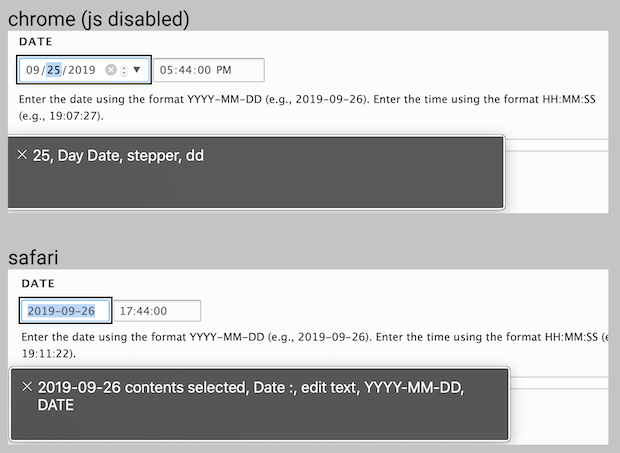
On MacOS with US date formatting in both Chrome and Safari, voice-over read a date the same regardless of formatting,
for example 2019-09-26 was read as "September 26 2019"
I found that Chrome (with and without JavaScript) has additional read-aloud instructions for each "step" of the formatted date.
Month, Day and Year each had their own separate instructions.
This patch updates the help text and placeholder text for date and time, adds the aria-describeby attribute and hides with js.
Comment #72
zrpnrWhen a date only (no time) has description text, the input itself gets an
aria-describedby="edit-field-fieldname-0-value--description"and the div.description has that id.When a date (with time) has description text, the fieldset has an
aria-describedby="edit-field-fieldname-0--description"This failing test is just checking for the aria-attribute on the date only field, but in the patch I'd changed both their ids slightly, not taking into account the help text. Should the description in the wireframe in #68 be the same element as the help text, override it, or be a separate element?
And should there be separate aria-describedby for each input with date and time or just on the fieldset like it is currently?
Comment #73
lauriiiThe reason we agreed on the proposed approach was that the experience is already broken on these browsers. Therefore we wouldn't regress the experience for anyone. Another factor was that we agreed that a wrong description text is just as confusing as a missing description text. Since the vast majority of browsers support input type="date", we should optimize for that.
There should be separate
aria-describedbyfor each input.Comment #74
xjmComment #75
zrpnrThis makes sense, thanks for clarifying.
I'm not sure how to proceed with this however, since I realized the proposed change in #68 conflicts with the current "help" text -which is user editable on the field config page.
Currently, if help/description text is added in the UI on the field config page
Should the new help text be a default for a date field? Then it could be edited or removed by a site builder.
Or should the
aria-describedbypoint to a different element than the default help/description text? If so, should the user description be disabled/removed ?What should be done about the existing description element, especially on the date+time where there could be potentially 3
aria-describedbyattributes?Comment #76
rainbreaw commented@lauriii and @zrpnr, thank you for talking through this with me on a call. It was helpful to make sure I'm not suggesting an approach that is more problematic than what is currently happening.
Here is the solution we discussed:
YYYY:MM:DD hh:mm:ssversion instead of a default date, since using a default date might be more confusingAdditionally: we discussed adjusting the standard (depreciated behavior) to match this behavior for screen readers as a followup. Just making a note of this here for now since it is unclear if that is something we want to do or not. Further review of the standard behavior should probably be done first.
Comment #77
zrpnrThanks for unblocking this @rainbreaw, there were a lot of tradeoffs but this seems like a better solution now.
I rewrote the patch to add the help text with js vs hiding it, now the extra element is removed from the render array.
The text and comes from
theme.incso that it can be translated and no date formatting is needed in js.I used data attributes to make targeting these elements and getting the information easier, and
Drupal.themefunctions so that the help text markup can be overridden.aria-describedby. The fieldsetaria-describedbyis unchanged.Drupal.themeso the markup can be overridden, or styled with the existing class name.Comment #78
wim leers🤔 This
data-attribute sounds very generic. It isn't specific todatetimefields at all. Is that intentional?🤓 WoulddataDatepickerHelpnot be a clearer variable name?🤔🤔🤔 Oh wait, this says "NO … help"! And subsequent code then sets this attribute. To prevent it from being processed again. So this is basically a reimplementation of https://plugins.jquery.com/once/. If I'm reading that correctly, I think this could use much clearer naming.
🤩 Love the elegance!
🤓 Übernits:
Comment #79
zrpnr#78 1., 2. That's correct, I was just using this attribute to prevent the element from being selected again after being processed, that data attribute is part of the selector as
dataDatepickerinThe
:not( ...)ignores it the next time this script runs.I was trying to avoid any jQuery but maybe
once()would be clearer here!Comment #80
wim leers#79: I'm not advocating for using
jQuery.once(), I'm advocating for applying naming similar to that, which would make it much easier to understand :) Something like "processed" in the variable name would make it much easier to understand :)Comment #81
zrpnr#80 That is good feedback, I changed the variable (and attribute) name and also added a docblock for the selector function to explain the purpose.
#78.3 Thank you!
#78.4 Fixed this comment, I was so used to writing
aria-describedbythat it didn't look wrong to me :)Comment #82
wim leersThanks, @zrpnr!
🤓 Bikeshedding now, but … wouldn't
data-datepicker-is-processedbe clearer?🤓 Would "from selection on next run." → "from being processed again." be clearer?
That was based on the patch in #18, which was nearly 60 KB, added an external JS library, plus lots of custom code. The current patch is less than a third of that.
About 25% of the current patch is just the ES5-compiled code of the ES6 source!
Based on this much simpler, far less risky approach, removing those issue tags.
Nevertheless, it's still very important. Fortunately, @rainbreaw did a deep dive in #76 after @lauriii and @zrpnr walked her through their proposal. They agreed on improvements to the patch. Those were implemented in #77.
So, removing that issue tag too 🥳
datetimemodule maintainers @mpdonadio in #55 and @jhedstrom in #64. 👍I think this is close to ready, but it's too late here for me to flip the RTBC switch. There are some silly nits (points 1 + 2), but those would be fine to be ignore. Ideally, this would get reviewed by at least one other person. I'll take another closer look at this on Monday. But we're certainly getting very close :)
Comment #83
wim leers😅
Comment #84
zrpnr#82 1, 2: I'm happy to address this feedback, I agree that these changes make the intent clearer.
It's also significant I think, that this patch reduces page size for browsers that support
input type="date"because the jQuery UI datepicker js and css are still downloaded even though they are not used. (4kb css, 2.4kb locale.datepicker.js and 35.9 of jQuery UI datepicker).With this patch, those are gone and although it adds 1.9kb to date.js (1.5kb --> 3.4kb) and 662b for date.css - it's still a big net positive.
Comment #85
wim leersGood point! Adding a tag to clearly signal that :)
Comment #86
wim leers<input type=date>and<input type=time. Note that this already got accessibility sign-off in #76.Final review:
🤓 Nit: should probably be renamed from
dateTimeto justdate.🤓 Übernit: the first line in the docs should have a blank line after it.
🤓 Übernit: there should be a blank line before the
@returndoc.🤓 Übernit: missing type docs.
Fixed all nits.
Comment #87
wim leersComment #89
lauriiiI tested this on Voice Over with all different variations and I think we have implemented this according to the instructions from @rainbreaw. Good job! 👏
Let's duplicate the class instead of using the div for increasing specificity. This would become
.unsupported-native-datepicker-help.unsupported-native-datepicker-helpas a result.This is not a reliable way to determine if the description element exists. We should inject class that we can reliably use for determining whether this element exists. Additionally, we might want to move this to a static function as we did in messages so that it can be overridden by themes if that's needed.
Let's move to generating this to a theme function so it can be overridden.
Edit: We might want to consider making this a static function instead as well to not make it an explicit API.
Comment #90
bnjmnm#89.1 The rules in date.css are no longer used so I removed the files and updated the libraries to reflect this.
#89.2 Added data attributes to descriptions in datetime_form and fieldsets so they can be reliably identified even if classnames change.
#89.3 Created static functions for this and attachDescription from item 2.
Comment #91
zrpnrThis is a big improvement @bnjmnm, the fix for not relying on the "description" selector led to a quality refactor and removal of some unnecessary code.
#90.1 Removing the unnecessary css reduces the page size even more, also glad to see you entirely removed the locale test which is no longer used.
#90.2 This adds reliability in case of the help text being altered with a different class name.
#90.3 The new function still isn't a theme function but because it is recreating a div to match what Drupal outputs in the datetime wrapper description I think it's ok to not allow it to be overridden here.
It's also important to let it maintain the id it would have to match the fieldset
aria-describedby, which wouldn't be present in a date only field.The new help text elements are still generated with a theme function, so they can be completely overridden.
Switching this statement makes the purpose much more clear and removes the unnecessary body class.
😅 Glad you caught this!
I manually tested again in Chrome and Safari on a mac, using a date only and a date+time field, with and without added help text.
Everything works the same, nothing is added in chrome and the help text and voice over works correctly in Safari.
This was RTBC'd in #86 and this latest patch addresses all the feedback in #89.
Comment #95
andrewmacpherson commentedI have some concerns about this issue, please bear with me while I write them up, and check a few things.
Comment #96
xjmThanks @andrewmacpherson for reviewing this!
Comment #97
xjm@andrewmacpherson, have you had any further chance to review this? It's important to deprecate this library for security reasons if it's at all possible, and our deadline to do so is Nov. 1. So we would like to know soon if there's something that needs to be fixed with the patch. Thanks in advance!
Comment #98
mustanggb commentedI guess this likely constitutes a follow-up, but would be nice if the default non-datepicker format was customizible, for example dd/mm/yyyy rather than yyyy-mm-dd, in the real world (non-devs) the former is more their cup of tea.
Comment #99
andrewmacpherson commentedShort version
The change in this patch is OK, with the conditional help text. I don't see any reason why this shouldn't go ahead. I have one suggestion to improve the patch, see below. Unblocking this now :-)
However it doesn't really come close to addressing the huge problems of the HTML date input, and the datepickers provided by the browsers. The decision to persist with these, and the assumption that any JS library would only be a fallback, is very misguided in my view. There are some ideas about follow-ups, but these don't have a clear direction, so I make my suggestions below.
Sorry I took so long for this - I've been deep in the rabbit hole. Date input accessibility is a convoluted topic, and wanted to make sure my knowledge was up to date.
The conditional help text proposed here is useful. It's kind-of a separate issue from getting rid of jQuery UI datepicker, though. The help text would be useful for any input which you can type an arbitrary text into, regardless of whether there is a pop-up datepicker provided. It's just the awkward conflict between Drupal locale and browser locale that means we have to make it conditional on the Modernizr check, right?
Some observations about the current issue summary
This is a red herring. Browser usage among assistive tech users is notably different from the population as a whole:
Using the UA datepickers over the jQuery UI datepicker results in a significantly diminished accessibility too. It's the most accessible datepicker we've found to date. When D8.0 was released, IE and Firefox got the jQuery datepicker. When Firefox 57 came out, around D8.4, it stopped using jQuery UI datepicker. So in that sense, Drupal 8 has arguably been getting less accessible as a result of the way we've been using Modernizr. The Modernizr test is based on whether the input accepts a parenthesis character; it doesn't take accessibility into account (in fairness, it can't really test much there).
The UA native datepickers are already a broken screenreader experience, particularly on mobile. We're at fault for preferring them over HTML text inputs.
HTML text inputs are a level playing field. Anyone can enter text, using the default text editing methods of their device/OS, including assistive tech.
Using the HTML date input makes things easier for some sighted touch/pointer users, but introduces significant difficulties for nearly everyone else. We're creating inequality by doing so, which is hard to reconcile with our principles and values: Build software that everyone can use.
You can actually have a text input in combination with a datepicker, including the jQuery UI datepicker.
Note however, that with the patch here you don't actually have a HTML text input in IE11. It's still a HTML date field, despite poor UA support and the fact that it failed the Modernizr check. Dragon users are still at a severe disadvantage because it isn't recognised as a text input. (This was explained in Graham Arnfield's test report, linked in #25 here.)
From the comments
#25, @zrpnr:
I think this is very sensible. Many libraries try to be the one-stop solution, and are overloaded with options. We probably don't need all the options.
#50, @catch:
A well-known problem with this is that users mistake the placeholder for an actual value, and think it's already been filled in, so they don't attempt to change it. A default value is OK (e.g. node creation time) but a placeholder can cause confusion.
#25 & #30: These comments contain a big assumption about our responsibility...
#25, @zrpnr:
#30, @webchick:
WCAG expressly says otherwise:
If we persist in preferring the user-agent datepickers, considering the range and severity of the known accessibility problems, then I don't think we can reasonably say that we're following WCAG, or our community values. This is a huge deal.
Manual testing
Comment #25 mentions Graham Arnfield's report, which is recent (this year). I replicated most of Graham's findings, except for the Dragon Naturally Speaking tests. I couldn't get Dragon to work inside a Virtualbox VM.
On Windows, Dragon is a very common choice for speech control. Indeed, it's been the only practical and affordable choice for going on two decades. Graham says Dragon users cannot activate HTML5 date inputs, because they aren't recognised as text inputs, despite looking like them. He notes that you can focus a date field by emulating keypresses with Dragon, but he fails to dictate anything into the date input field. In his assessment this is a substantial blocker.
I managed to find a video from the CSUN 2017 accessibility conference, in which someone demonstrates successfully using a HTML date input with Dragon. First, they demonstrate Dragon with Chrome. Whilst they eventually managed to enter a date, they had to jump through some considerable hoops, with a significant extra cognitive load. It involved emulating keypresses, and figuring out how much to increment a number. Key quote: "Now your forms are forcing me do math!". Next they demonstrate that it is possible to enter arbitrary text into a HTML date input in IE, transferring it from Dragon's dication box feature. It actually worked well, and it seems odd that Graham Arnfield didn't note this in his report. This CSUN '17 video reassures me a little bit; the HTML date input is very problematic for Dragon users, but it isn't a complete game-over blocker for some power users.
Aside: in this CSUN `17 demo the speaker also advocates the date parsing approach to enhance text entry.
I tried operating date fields using the Microsoft Speech Recognition built into Windows 10. With Edge 17, dictating numbers for the day/month/year worked well. On Firefox I succeeded at entering months and years, but failed to enter a year in the intended millenium. I couldn't get it to work on Chrome or IE. I surmise this may be due to it using the UI Automation API (Windows' newer accessibility API), for which Edge is the leading implementation so far. I haven't tested it with the Chromium-based Edge. The Microsoft Speech Recognition + Edge looks promising, but I'm not very familiar with all it's capabilities yet.
Review of patch #90
When the Modernizr test returns false for date input support, we add the help text so users can type the correct format. That's helpful.
However, it's still an
<input type="date">element, despite poor browser support. It accepts arbitrary text, but Dragon Naturally Speaking doesn't recognize it as a text input. As noted in Graham Arnfield's report, Dragon users need to use keyboard or mouse emulation to focus it.When the Modernizr test returns false, can we also change the HTML input type from
type="date"totype="text", so that Dragon users can focus it more easily? Likewise for the time input. I know it still works when you change the input type from text to password, and vice versa, so I'm hoping it's the same for the date and time fields.Where next?
@xjm - You mentioned (in Slack thread, about a month ago) that if there wasn't a suitable replacement for any of the jQuery UI components, then retaining it until we have a replacement was an option. Can you confirm this? I think we are clearly in that situation. Deprecation just means announcing that it won't be available in the future, but that's separate from stopping usign it now.
I think we should consider what @catch says in #35-37, and do this just for D9. We could still backport it to D8 LTS at a later date, if needs be.
There are various mentions of addressing accessibility in follow-ups, but we still need a clear direction for those. Here are my suggestions.
Points 2 and 3 here aren't mutually exclusive. They could both be used at once, or treated as Form API and/or FieldWidget options. They could be developed in experimental modules, like the approach to replacing the jQueryUI autocomplete.
Comment #100
catch@andrewmacpherson thanks for doing that review, this is really useful.
So if we do this, the 8.x version of the patch would be just adding the deprecation to the library definition, and adding the deprecation to the list of suppressed deprecations. This means 9.x and 8.x diverge, but no more than 8.7 and 8.8 will diverge with a full backport of the complete patch here. Seems like a good approach to me.
That issue is #3087685: Remove deprecated jQuery UI components and fork remaining source code into core which forks components for Drupal 9 that we don't think we can replace in time. While it's an option here, it's a desperate option IMO and I would prefer to go ahead with this patch (in 9.x only based on your comments) then have the follow-ups to improve on the 9.x status quo. This has no bearing on continuing to use components in 8.x (especially with this issue, but we're also trying to make autocomplete replacement optional in 8.x via an experimental module).
These are all definitely worth looking at and we should open follow-ups for each, and a meta to link them together, and the 2 + 3 approach could be really nice.
Comment #101
bnjmnmPer #99, the input types are changed to "text" when there is no native date/time input support.
Also interested in seeing some combination of suggestions 2+3 from #99 to improve things overall.
Comment #102
bnjmnmFixed some grammar goofs from #101 and removed some barnacles from the patch that shouldn't have been there.
Comment #103
zrpnr#99
It's correct that the input is still type="date" but IE11, Safari and other browsers that do not support type="date" will fallback to using a text input.
https://developer.mozilla.org/en-US/docs/Web/HTML/Element/input/date
#99
I'm not able to test Dragon either so I can't confirm that this will help but it seems like a good suggestion.
The patch in #102 sets an input type="date" to type="text" for browsers that do not support date.
Tested in both Safari and IE11 with no change in behavior and if this will improve focus in Dragon it is a +1 from me.
Related, do we need to update Drupal's list of supported browsers to include screenreaders, and other assistive software like Dragon?
It would be helpful to have a known list to test against.
Watching this I could understand the frustration with dictation, however just making dication easier with a plain text field may not actually help- the dictated date could fail validation since it might not match the format the input expects.
#99
The implication here is that browser provided datepickers are much worse than the jQuery UI datepicker, or even a plain text field.
I'm not sure that is true, for example in Chrome: the datepicker calendar can be opened with a keyboard (option down arrow on mac) and fully navigated with keyboard, while the jQueryUI datepicker cannot be focused at all that I could tell.
It does respond to some key commands like page up/page down while the input is focused but I wasn't able to "pick" a date with it.
This is an important distinction, Deque used the jQuery UI datepicker as a "starting point" and then heavily modified it.
see: https://dequeuniversity.com/library/aria/date-pickers/sf-date-picker
Additionally, the OSX screenreader reads each "part" of the date in Chrome. For example when selecting just the month. It's not even necessary to open the calendar widget.
I've only tested iphone with voiceover, but the same applies- the datepicker UI only works because of the date attribute.
This was also the experience with the Dragon user in the CSUN video. while incrementing across each part of the date was cumbersome it eventually produced a valid input, unlike a plain text field which doesn't enforce formatting.
The formatting issue was also pointed out in #98. A plain text field does nothing for localization- a big reason we added the additional placeholders and help text.
I think whatever shortcomings browser UI for date inputs has it would be a massive step backwards to replace date and time input types entirely.
I'd support opening a Drupal 9 follow-up to continue that discussion.
#100
This is certainly an option, to just mark
core/jquery.ui.datepickerdeprecated, then move this work to a new D9 issue.I'm in favor of this patch as it is for Drupal 8 since it removes the jQuery UI datepicker usage entirely. I mentioned in #84 this a performance improvement for all the browsers which never use it at all.
For browsers that don't support date inputs this patch also has improvements including placeholder text and additional aria-descriptions which were not in place before.
But- I would be happy to see this patch split up if it means getting the deprecation committed.
Comment #104
catchI was suggesting committing the whole patch to 9.x, but only the deprecation to 8.x - on the basis that we definitely don't want to support jQuery UI datepicker in 9.x and that @andrewmacpherson thinks the patch as it is is fine, just more to do in general.
Comment #105
zrpnrI created a D9 issue #3090244: Deprecate jQuery UI datepicker in Drupal 8
postponed on this issue.
This patch for 8.9.x now has only the deprecation and the deprecation warning suppression.
Comment #106
bnjmnm@zrpnr perhaps the newly created issue and this should trade titles/issue summaries? It would also mean updating the parent issue and maybe a few other clerical steps, but that would allow the 100+ comments here regarding the replacement of jQueryUI datepicker to be on an issue about that topic. It's also quite possible the conversation will continue.
Comment #107
zrpnrI think that makes sense, I updated that new issue #3090244: Deprecate jQuery UI datepicker in Drupal 8
and changed the title for this issue and marked it postponed. I'll post the patch from #105 there.
Comment #108
zrpnrTo get this issue focused here again I closed #3090244: Deprecate jQuery UI datepicker in Drupal 8 as a duplicate.
The patch in #90 was RTBC for 8.x, and some additional accessibility improvements were added in #102 per @andrewmacpherson suggestion in #99.
3090244 #9
If I'm understanding @catch correctly what we need now is a version of 102 for 9.x which includes all the same changes, except removes the deprecated files and mentions of datepicker.
This patch is identical to the one in #102 except rolled against 9.0.x and removes:
core/jquery.ui.datepickerfrom core.libraries.ymlcore/assets/vendor/jquery.ui, including the i18n foldercore/lib/Drupal/Core/Datetime/Element/Datetime.phpandcore/lib/Drupal/Core/Render/Element/Date.phpComment #109
zrpnrRe-reading the previous posts, I think I may have misunderstood how the 8.x patch should look, and that instead of #102 it should be more like #105, with just the deprecation messages and the warning suppression.
In #105 I missed the locale.datepicker asset library in
locale.libraries.yml.This patch fixes that omission and also points the deprecation message to the change record instead of this issue.
Comment #110
bnjmnm@zrpnr could you re-upload the 8.x and 9.x patches so they are in the same comment, and change the filenames so it's clear which version they're intended for? II'm hoping something like that may spare others the type of confusion we ran into in the final stages of this issue.
Comment #111
zrpnrHappy to, I agree this issue is getting confusing!
Patch in #108is meant for Drupal 9.x, renamed to d9-datepicker-remove.patch
Patch in #109 is meant for Drupal 8.x, renamed to d8-datepicker-deprecate.patch
Comment #113
zrpnrPatch in #109 and the copy in #111 failed because of the deprecation warning- I updated the url in the deprecation only but not in
getSkippedDeprecations.Comment #115
catchJust to clarify I would have committed #102 and #105 as-is, with the actual removal happening in a follow-up, but #112 with the removal in 9.x and #113 with the deprecation seems good too.
The reason I got so confused on the other issue is that we need to have the replacement (i.e. the UX improvements in #112) before we deprecate in 8.x, otherwise 8.x is deprecating 'optimistically'.
To maintain the discussion for improving things further, I think a new issue, but with a long issue summary referencing comments here, would probably be clearest.
Moving to RTBC, a +1 would be useful here so I can also commit it (but given this was RTBC for a long time and the changes since are small could probably commit it later anyway).
Comment #116
webchickCool, the patches indeed seem to be split out as desired: the 9.0.x patch removes the library entirely, and the 8.X.x patch notifies people of the deprecation.
Committed and pushed
d9-datepicker-remove.patchto 9.0.x; Committed and pushedd8-datepicker-deprecate-113.patchto 8.9.x and 8.8.x. Whew!! Thanks for everyone's hard work here!Comment #120
xjmComment #121
xjmComment #122
andrewmacpherson commented#100 - I'll open follow-ups for improving accessibility of date and time inputs. I expected "stop using HTML date and time inputs" would be controversial. I don't think we have any other choice, if we're serious about WCAG.
#102 - Thanks, that small change should be a big help for Dragon.
#103:
The combination of IE11 and Dragon is clearly doing something with date inputs, per Graham Arnfield's testing notes, and the CSUN '17 demo video. Whether it's IE11 or Dragon at fault doesn't really matter.
I started writing a response about that, but it was getting a bit long. I've put it in #3093171: Should there be an official list of assistive technology supported by Drupal core?, rather than bury it here at the end of a fixed issue. Short answer: I don't think it's practical; it's a very different situation to browser support.
Comment #124
quietone commentedpublish the cr