

Active
Project:
Drupal core
Version:
main
Component:
layout_discovery.module
Priority:
Major
Category:
Task
Assigned:
Unassigned
Reporter:
Created:
31 Jan 2017 at 23:29 UTC
Updated:
31 May 2023 at 20:18 UTC
Jump to comment: Most recent, Most recent file




Comments
Comment #2
tim.plunkettI think this looks great!
We have no mechanism for this currently, and I'm not sure how I'd go about implementing the "click on an icon" bit. How would it work for keyboard users?
One thing to consider is that layouts can have an entire settings form of their own, which is currently simply added within the fieldset.
Core has no current plan to make use of that, but both DS and Panels do.
We do have core test coverage of it, in the layout_test module.
Another thought was that currently we group layouts by their "category". Right now the "category" corresponds to number of columns they present.
Just wanted to be clear that it was being purposefully abandoned.
Comment #3
yoroy commentedMaybe you can take something from the media library design, which also works with selecting thumbnails. Maybe under the hood these are checkboxes?
Settings forms for layouts: would be good to see examples of that.
On (not) grouping by number of columns: yes, I dropped that intentionally.
Looking at the example in #2660124: Dynamically build layout icons based on well formed config the number of columns is not going to hold as a sensible category. I also had a quick look at how powerpoint, keynote etc. show their slide layouts and there's no grouping there either, nor text labels to describe them so I dropped those as well.
Comment #4
xjmComment #5
xjmBTW #3 looks to me like a beloved video game called Lode Runner I played on my Apple II+, or any number of underground Mario levels. Is that one screen, or several different prototypes for the same screen in one image? :) Hopefully the latter?
Comment #6
yoroy commentedhaha, yes, those are different ways for organising the same set of layouts, my conclusion from that was that organising by number of columns didn't make much sense.
Comment #7
damienmckenna+1 for replacing the selector with a list of the thumbnails & titles.
Comment #8
tim.plunkettImplementing this is not a major or urgent task, but deciding on the UX and flow of this is a blocker for #2822758: Introduce a way to distinguish between different types of layouts, so bumping this for now.
Comment #9
damienmckennaSome themes and distributions, and sites, can end up with twenty or fifty layouts, should they all be listed together or should we retain the notion of a "category"?
Comment #10
pixeliteSo far, we've had a few ideas:
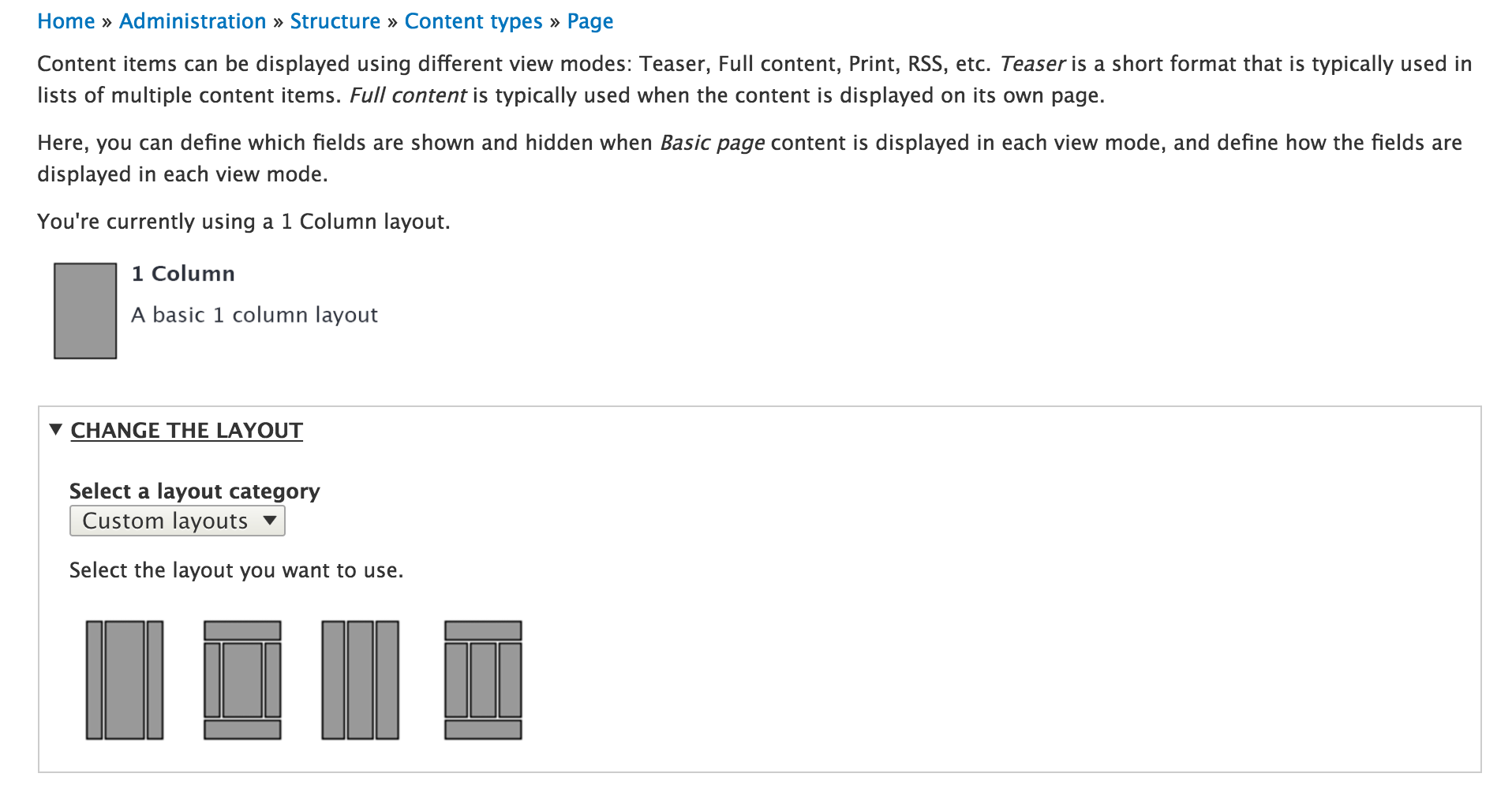
Add a summary of the current selected layout to the top of the manage display interface and move the layout settings to the top of the page to make it more visible.
Organize the layouts by category, using a selectbox above the layouts.
There's a description property that can be defined for each layout. It would be useful to display this below the layout once it's been selected. This will help users differentiate between different layouts with similar names, especially when there are multiple themes or modules providing layouts.
Comment #11
pixeliteHere's a new version of the above image that integrates some feedback:
The title is included for the selected layout, along with the description.
When you click on a layout, the other layouts are displayed in a lighter color to indicate that they are not selected.
Updated title of the details element since layout settings is not descriptive, all you can do is change the layout.
Step 1: You see the current layout in use:
Step 2: You open the 'Change the layout' section and you see the list of layout categories to choose from.
Step 3: You click on the layout you want to use and the name and description appear below with a button to apply the change.
Step 4: You click 'Apply layout' to approve the change, which updates the layout displayed below.
Comment #14
tim.plunkettComment #17
andrewmacpherson commentedSome accessibility notes.
#2:
<button>s. Needs JS to do anything. It might set a hidden input.<input type="image"><label>, along with alt text. Needs no JS.Focus styles are required, obviously.
A more interesting question is how will they work for speech control? Visible text labels are greatly preferred for that because they allow random access in one step. WIthout those, users don't know what to say. So they have to use the 2-step random access method, which is a bit more cognitive load; "show numbers, choose 16".
#3:
Close - radio buttons, since you can only choose one.
#10:
Does the blue outline indicate the "selected" state? Remember that keyboard users will need a visible focus when moving between the layout icons to make a selection. If a blue outline means selected, that collides with the convention for indicating focus. Seven uses a blue halo for button focus, and a blue outline is the default focus style for some browsers. So I think there is a good chance of confusing keyboard users, or at least increasing their cognitive load, by having to tell "selected" from "focused".
#11:
There are several problems with this (most severe first):
I recommend that selection is indicated by an additional shape of some kind; a checkmark or similar, adjacent or overlaid on the icon. If overlaid, it will need to be easily distinguishable from the layout icon beneath it, without relying on colour. We already have a similar thing in media library, which Yoroy noted in #3.
If selection is a checkmark, then that means an outline is available for use as the focus indicator, without conflating the two.
Comment #18
anruetherI believe this is the correct component as field_layout will be removed.
Comment #27
mgiffordTagging for https://www.w3.org/WAI/WCAG21/Understanding/non-text-contrast.html