

Closed (duplicate)
Project:
Drupal core
Version:
10.1.x-dev
Component:
field_ui.module
Priority:
Normal
Category:
Bug report
Assigned:
Unassigned
Issue tags:
Reporter:
Created:
3 Sep 2016 at 19:50 UTC
Updated:
13 Jan 2023 at 16:14 UTC
Jump to comment: Most recent, Most recent file



Comments
Comment #2
cilefen commentedComment #3
chx commentedThat's a great simple patch definitely making it better, thanks! Although translators might disagree. I am not sure what is the policy on strings changing when they are conveying the wrong information?
But I wonder, could we display the labels perhaps of those no longer changeable? Some of them at least? Or is that overkill?
Comment #4
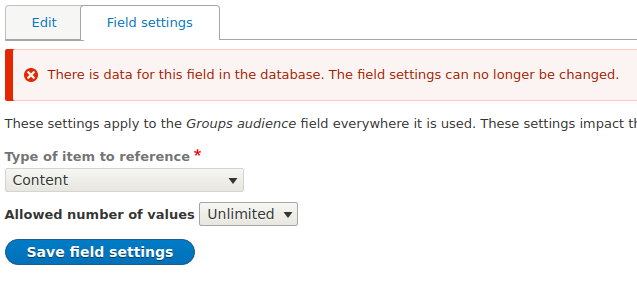
chi commentedThis message is always confusing me. Why is it red? Did something really wrong happen on a site? A user just wanted to check field settings and got scared with this error message.
Can we turn it into warning?
Comment #6
chrisrockwell commentedThis patch makes the error message more accurate and is a welcome improvement. I agree with @chx that it would be nice to know which ones can not be changed.
In my instance (available values for select list / checkboxes) I went ahead and changed values, clicked Save, *just to see* what would happen. Surprisingly, I received a confirmation message and the values were changed.
EDIT: I did more testing. In my case, there were *no* settings that I couldn't change, though I still got this error message.
EDIT 2: After saving some content that uses this field I tried again. I was able to change labels just fine, I couldn't change the keys (which makes sense). I did get a proper warning when I tried to change the keys.
Comment #7
chrisrockwell commentedAdding ux tag
Comment #8
yoroy commentedThanks for noticing this :) We settled on "usability" as the catch-all tag for ux & design related issues, so tagging with that.
Comment #9
wturrell commented- Updated issue summary.
- Tagged as translatable string change.
Comment #10
alexrayu commentedI often end up explaining to my clients, that there is a reason for this - there is data there already, and Drupal can not change some of the settings, or it would break it.
"This field has data in the database. Some respective settings can no longer be changed." Or something like that.
And, possibly, a warning, rather than an error?
Comment #11
yoroy commentedIt's not an error to go to this page so this should probably be a warning indeed.
Although more correct I don't like to use the word "some" in these situations, it shifts the work of finding out *which* to the user. If there’s a way to visually disable those elements that can't be changed that'd be good.
Comment #12
tkoleary commentedDiscussion in the Usability Meeting brought up the following points:
1. Why do we allow users to make an action they should not make? ie. why not disable the select.
2. This issue points to a larger problem with the mental model of field UI not being clear, ie. there is no clear separation of affordances between what is a setting on a base field or a field instance.
On the first question, since the problem here is that it is possible to change the setting but only in one direction—more, not fewer values—then we should disable only options that are not allowed. So if the user had limited the number of values to 3 then another user wanted to decrease it to 2 they would see something like thisomething like this:
The second point about the field UI mental model is something that really requires deeper consideration but perhaps not in this issue.
Comment #13
chrisrockwell commented@tkoleary to complicate things further...in the instance of a List that allows for
<select>,<checkbox>,<radio>we enter values asvalue|label. If there is data already saved, thevaluecannot be changed, but the label can, so we can't disable the entiretextareaComment #14
chrisrockwell commentedProbably outside of the scope of this issue, but I'm attaching a screenshot of how Webform (YamlForm) handles select list. Not only would this, IMO, be easier for a site builder to comprehend but it would allow for disabling the parts that can't be changed.
Comment #15
tkoleary commented@chrisrcokwell
I don't think it's out of scope. It works quite well for that case but could also work in the case of limited/unlimited where, for example, if 'limited' was selected and the limit was 3 you could potentially see a table with:
Entry 1 — Data exists — Remove (x) [disabled]
Entry 2 — No data exists yet — Remove (x) [enabled]
Entry 3 — No data exists yet — Remove (x) [enabled], Add row (+) [Enabled]
In the webform example I don't really see the value of providing a plus button on every row. One 'Add row' button at the end should be enough.
Comment #17
coffeymachine commentedIMO, Drupal could handle this whole use case better.
If a site builder wants to remove values from a field, let them. Have Drupal go ahead and destroy the content (after a stern warning of course). Then maybe you have some entities dangling with empty fields. The next time a user goes to update the entity, they'll have to fix the field before they can save.
In addition to this, could we notify the user of which entities are preventing the field from being modified? For instance, currently if you try to reduce the allowed number of values from 4 to 3, Drupal will give an error message along the lines of:
Instead of this vague error message, could we list the entity(ies) that the error message is referring to? Then the site builder would have the opportunity to review the content in question and decide if they can discard it or not.
Does this make sense?
+1 vote for the Webform style select list by the way. That's an awesome idea.
Comment #21
bramdriesenI agree with #17. Doesn't really make sense to me to block changes to a field, for example if you would have a list field with colours, you won't be able to add/remove anything after you added 1 piece of content with it;
Comment #23
CptCasual commentedCame across this same issue in 8.8.4. Wish the fix would get into core, please?
Comment #27
bernardm28 commentedI agree with #12. A user should not be able to change the field original value if there's data stored.
If they did not care about the data they could create a new field and delete the current one.
I'm not sure a site builder will know the implications their actions until is too late to save any data from backups or otherwise.
I can see #17 #18 perspective but thats more of a developer time saving concern.
if you would have a list field with colours, that could come from taxonomy if is unpredictable how often they will change their options or just add a new field and migrate their current selection to their new list options.
Comment #31
lauriiiThis seems like a duplicate to #2895124: Field storage settings give a scary red warning that they can't be changed when the cardinality is the only thing with restrictions.