

 Come together with the global Drupal community in Rotterdam, 28 Sept – 1 Oct 2026. Sessions, contribution, connection, and Early Bird savings until 8 June.
Task description
Drupal.org has over 100 modules in the "filters and editors" category. Around a dozen of these are editors which modify textareas for easy formatting of posts.
Drupal core does not currently have an editor, and this is often a feature request in the forums, however there's a possibility that one would be considered for core in Drupal 7. In general the community has been unable to find one which is up to scratch, and many users end up trying several different editors before they find one which works for their site.
You should take the following steps for this task:
Find all editors from http://drupal.org/project/Modules/category/63
Install each editor in a Drupal 5 installation* and evaluate it for the following points:
1. Does it have an offical 5.x release?
2. Does it pass coder.module testing?
3. Did you find any bugs?
4. Does it generate valid XHTML
If you find any issues, submit a bug report to the module's issue queue if one does not already exist.
You should also make notes (and ratings if appropriate) for the following criteria:
Ease of installation, settings etc.. Does it require third-party libraries? Does it depend on another drupal module?
Editor usability.
Any functionality you think the module is missing.
These should be presented in a table/chart in a post on the wysiwyg group.
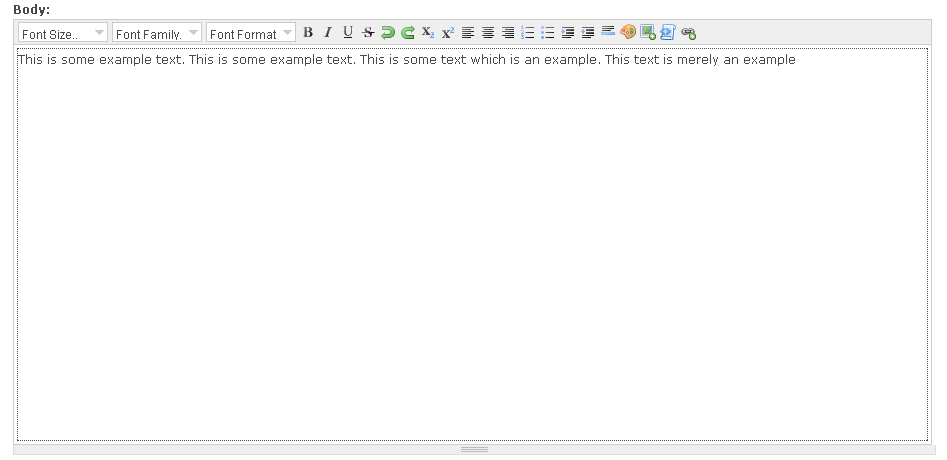
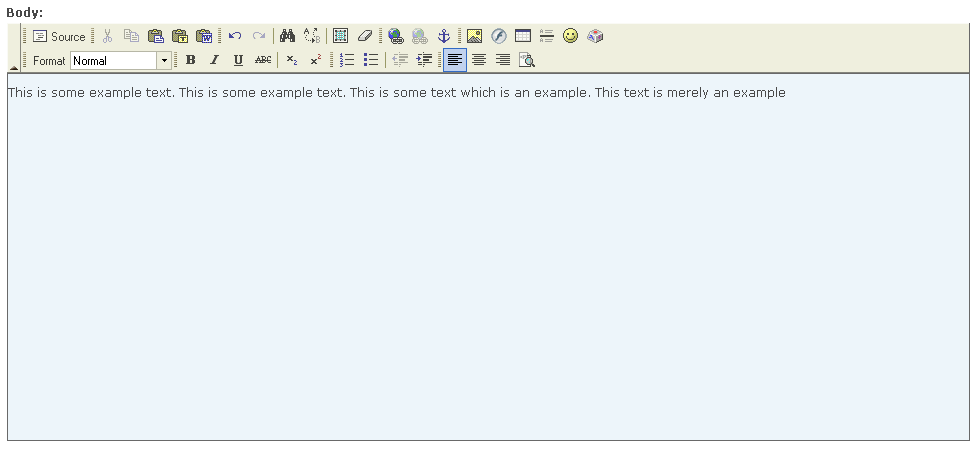
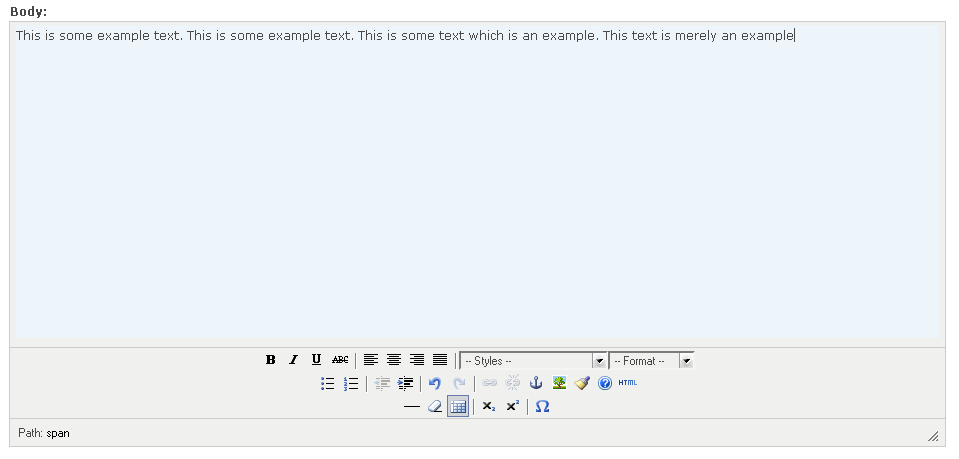
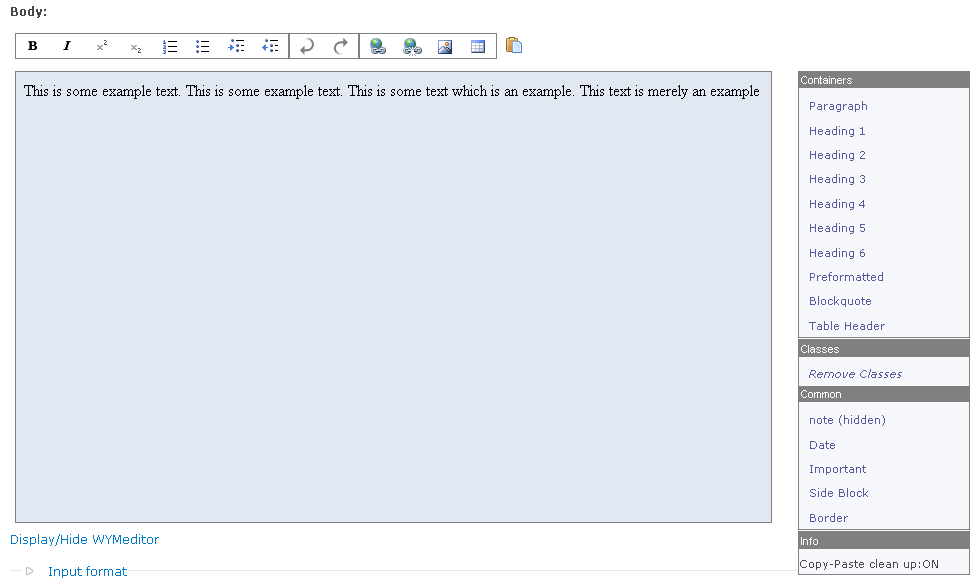
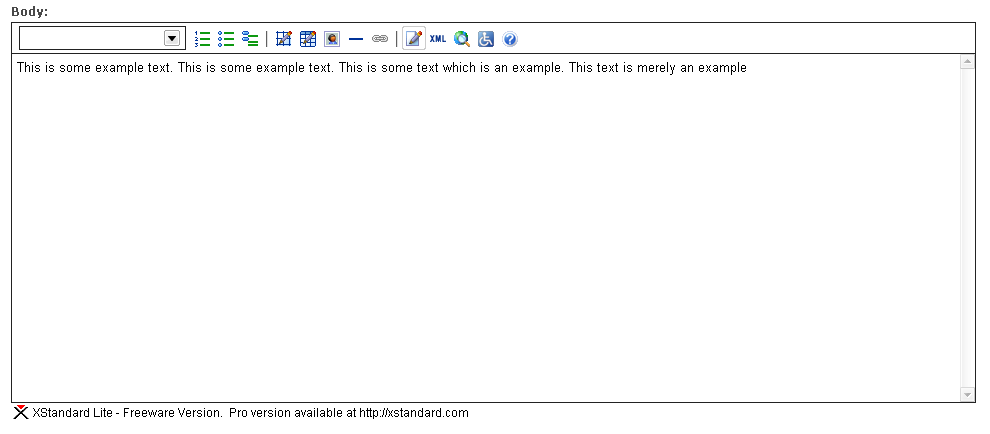
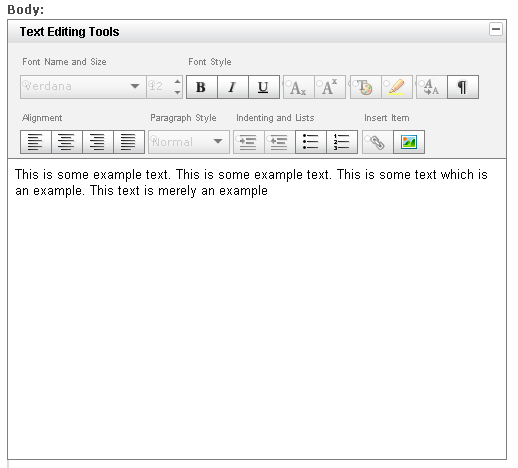
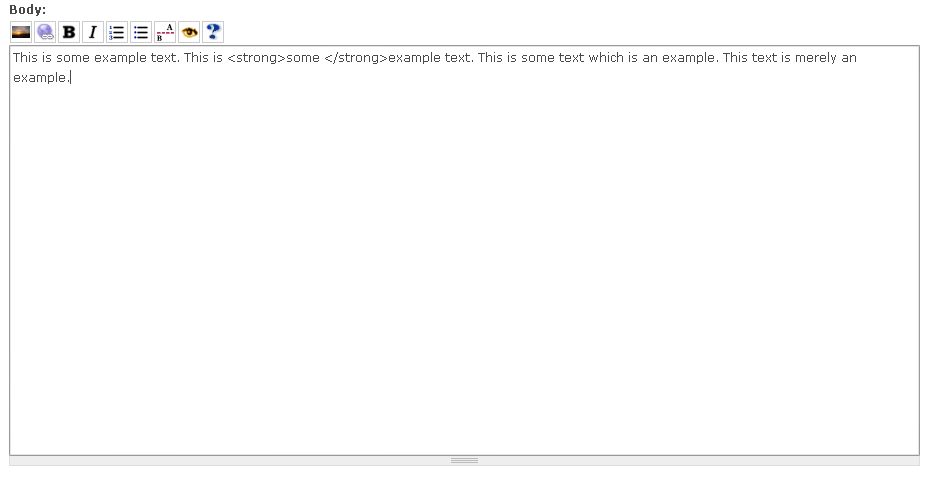
In addition, pick three modules you particularly liked, and write up a longer description of their features, why you liked them, and include screenshots of the editing interface - this should be a separate post in the wysiwyg group.
Once your findings have been reviewed, you should also add them as a Handbook page to complete the task.
Resources
http://groups.drupal.org/wysiwyg
http://drupal.org/project/Modules/category/63
http://groups.drupal.org/node/7048 (Themes review).
http://drupal.org/project/coder
* You will need to enable and disable each module as you evaluate them to avoid conflicts.
| Comment | File | Size | Author |
|---|---|---|---|
| #48 | Problem with table on handbook page | 95.6 KB | WorldFallz |
| #16 | FCKEditor.png | 17.72 KB | DanW |
| #16 | nicEdit.png | 15.35 KB | DanW |
| #16 | TinyMCE.png | 18.37 KB | DanW |
| #16 | Whizzywig.png | 20.66 KB | DanW |




Comments
Comment #1
catchAssociated google issue: http://code.google.com/p/google-highly-open-participation-drupal/issues/...
Comment #2
ezyang commentedA few notes based on my previous experience working with WYSIWYG editors:
While it would be nice if we could fix all of the editors, this is out of the scope for the module maintainer; the issue should be punted to the respective publisher of the WYSIWYG editor itself.
What would be neat if we had a generic editor hook interface so that integrating new editors required writing a minimal amount of glue code that included the necessary JavaScript files and modified the textareas accordingly. This is out of the issue scope, though.
Are tables allowed in posts? (doesn't seem like it here...)
Comment #3
ezyang commentedAssigning to self.
Comment #4
catchKupu editor (in Zope) does xhtml strict - so it is possible (although I don't like Kupu for every other possible reason) - I think at least one editor in contrib claims to do this as well. The idea of asking for that was less about filing issues against projects - more making that information easily available to people who want an xhtml compliant editor - this would also be a condition of any such editor going into core (along with it using jQuery).
Again true, although again it's useful information for anyone looking to install one of these modules.
I count about six rich text, and about six which provide buttons to add tags into a plain text textarea.
With tables - you can get access to that if you join the documentation team.
Thanks for taking it on!
Comment #5
webchicksubscribing
Comment #6
aclight commentedTask passed due date with no response from student, so I'm opening this back up.
Comment #7
sunSubscribing. And:
- Core devs are not convinced of having a wysiwyg editor in Drupal core. In the meantime, I'm not sure either.
- However, having a Wysiwyg API in Drupal core seems like a valuable addition for D7.
- This task could be enhanced to complete the already started comparison about Wysiwyg editor module settings, which would instantly push development of Wysiwyg API to the next level.
Comment #8
catchSun. Just for the record, me neither, I wouldn't want to be misunderstood ;) although the users on our site can't live without a bbcode toolbar and I was shocked to see three or four last time I looked at the modules list. Thanks for the information about Wyswig API, that looks very sane to me.
Comment #9
DanW commentedWell, I'm afraid the holidays were much busier than I had anticipated, and I didn't get very far on this task. I did install all the modules and run them through coder.module (only one of them actually passed), but I haven't been able to go through and try to use all of them and check for bugs or see which one I liked best.
I should be able to get it done this weekend, but I doubt I can do it any sooner. If that's not soon enough, feel free to reopen the task. I"ll just have to try and claim it again a bit later. :)
Dan
Comment #10
catchDanW: if you could post a quick run down of your coder module results (bulletted summary, actual results as a .txt perhaps?) that'd help to keep this task open I think (although I'm not in charge of that)
Comment #11
DanW commentedcoder.module test
You can get the logs of all the errors in coder.txt.
Dependencies
HTML Validation
Overall Impressions
My Top 3 Editors
Comment #12
keith.smith commentedDanW: That's a very interesting assessment -- there are wysiwyg's I've never tried in your list, and I'll go check some of them out on a test site.
In regard to your comments about having to go to a 3rd party site to get the actual editor software, though -- Often the license on the editor portion of the software is not released under the GPL, but perhaps under a similar (or not) license. By policy, Drupal.org only hosts GPL software.
TinyMCE, for instance, is distributed under the LGPL. So, while the drupal.org module that integrates it into Drupal is GPL (and can be placed on drupal.org), the editor itself has to be retrieved from a non-Drupal.org location.
Also, although going to another site can be inconvenient, it does mean that the packaging of the editor software is left in the hands of those most capable to do it -- the authors of it. If Drupal.org hosted all this software in addition to the integrating modules, you have the additional concern of trying to keep the included code "synced" up with its actual code base "across town", so to speak.
Edit: Oops. Forgot a "not" in an important place.
Comment #13
ezyang commentedLGPL contains a "GPL promotion" clause, which basically means you are allowed to redistribute it under more restrictive GPL terms. LGPL versus GPL should not be a problem.
However, I do agree that it's a better idea to leave the packaging of the other library to those developers, so that you aren't left having to upgrade your own package whenever the library is updated.
Comment #14
DanW commentedI do see the point in letting people go to the site in order to get the editor, it's just something I didn't like very much. It would be nice if the module could grab the editor directly from the developer's site without having to make the user do it. That could solve both problems, although it might be harder to coordinate with the developers of the various editors.
Comment #15
webchickIf you still have your testing environment setup by any chance, something that would be very valuable to add are screenshots for each of the editors, so we can get an idea of what type of interface they provide.
Comment #16
DanW commentedSure thing. I've attached screenshots for all of them (with the exception of HTMLArea, which I still can't get working)
Comment #17
sunGreat work! This task looks almost complete now.
Comment #18
DanW commentedThis would be great, but I don't have the permissions to make a table ATM. I did see the comment earlier about joining the documentation team, but I'm unsure about how that would play with Google's GHOP rules. I wouldn't want to disqualify myself to complete a task. ;)
EDIT: I suppose I could just write up the HTML in a separate file and upload it here as an attachment.
Rats. I must've missed it when I went through all those modules. I'll go back and edit the initial post to include that editor once I get it up and running. (I'll add another comment about it so those who subscribe to the issue know when it's done)
I didn't think it did (obviously) ;) but I think I'll wait for webchick/catch to decide before I start on those. :)
Comment #19
DanW commentedDone! I have now added BUEditor to the lists, and added a screenshot with all the others.
Comment #20
aclight commentedDanW: applying to be on the documentation team has no effect whatsoever on your status as a GHOP student. We've already suggested that several other students apply and they have been granted the privileges necessary to use the documentation input format in their handbook pages. I would suggest you do the same, since it will definitely make the handbook pages look nicer. Just post an issue in the documentation project asking to be a maintainer, and post a link to this issue in your explanation why you want to be a maintainer.
Great work so far!
Comment #21
webchickDanW is now a member of the documentation team. :)
Comment #22
catchIn the back of my mind I had bbcode editors (and bueditor which is along the same lines) included here, but their only official representation is in "etc." so I'll leave it up to DanW if he wants to include them or not. Would be nice, but my own fault for not being explicit.
I have 13 kilos of two year old on my shoulder right now, so no time to do a proper review - but the write-up, screenshots and coder module summary are exactly what I had in mind. Nice work!
Comment #23
DanW commentedTell you what. Once I get finished with GHOP #35 (which is officially closed, but I'm still doing some work on it), I'll do the bbcode editors in here. I'd rather not take on too many things at once, lest I start doing some really poor work. :)
I'll start working on the table with all the results right now and post it here when its all finished. :)
Comment #24
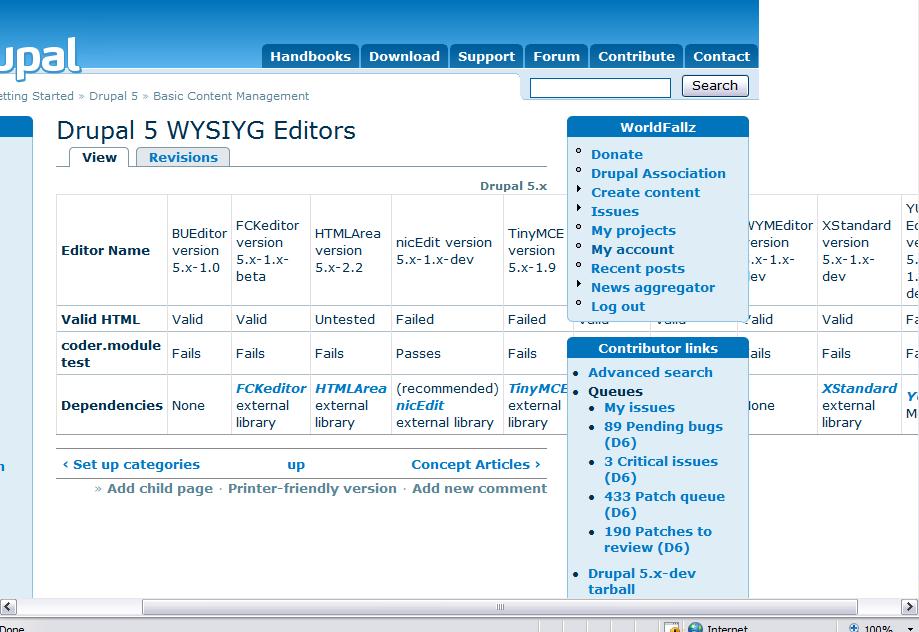
DanW commentedHere's the table with all the data. I do have acouple question before write the rest of it.
1. What category should my handbook page go under? There are a lot more there than I was expecting. :P (My initial guess would be Drupal 5.x -> Basic Content Management, but I'd like confirmation. :)
2. Should the 'overall impressions' be posted in a similar table, or would it be better if I left it as a bulleted list?
Comment #25
keith.smith commentedThe use of the word Dependencies makes me wonder if there should be another row in the table indicating if/where an editor package has to be downloaded from an external site. There are a lot of support requests from people who don't read the documentation and don't know, for instance, that they must download a TinyMCE package from an external (to d.o.) site; perhaps adding an extra line for "External code required" (or something) would be helpful.
Comment #26
catchKeith said what I forgot to - dependency should include both 3rd part libraries that aren't included, and other drupal modules (although I don't think any of these actually depend on another drupal module). You already have that information, so it's just a case of presenting it slightly differently.
Comment #27
morphir commentedok, I'm subscribing to this thread. I see that nicedit is tested to produce invalid markup. But this should be easy to fix...if true. I agree with the arguments that the author behind nicedit makes, so I'm gonna review the nicedit source and provide douggreen with some developer support. Chx made me aware that it should make use jQuery instead of the current standalone js. Let's see if that can be done.
Comment #28
jaharmi commentedFwiw, the dependencies on external modules are also common on the anti-spam modules. Which gives me an idea to propose for a GHOP task …
Comment #29
jaharmi commentedI agree about the Dependencies portion of the table; it would be useful to note the external dependencies on the editor libraries and optionally link directly to their project pages.
In the table you could say "XYZ external library" for external editor libraries and "XYZ module" for Drupal module dependencies. (Make the italicized "XYZ" text a link to the external site or the Drupal module.) This seems generic enough that the same form could be used when writing other documentation, if there were to be similar tasks now or in the future.
Comment #30
DanW commentedHere you are then. I've updated the chart to link to all the external editors they require.
Comment #31
keith.smith commentedI'm not sure about nicEdit. It does have a dependency apparently, you just don't necessarily have to download and install it..
From the nicedit project page:
Comment #32
DanW commentedThanks. I've edited the table to reflect that. :)
Comment #33
hass commentedI'd like to subscribe here...
As side note - it looks like the wymeditor tested here is very very outdated... see http://www.wymeditor.org/ about a newer demo version. I've read about this Editor some weeks ago, while i tried myself to find a JQuery based Editor... and it looks like this is the one and only available. Ok - it does not have the features of an FCKEditor or TinyMCE (last - looks more bad in the Screenshots as is), but it's jQuery based. And isn't this not something we could get in love? :-)
Are we really judging here by coder module!??? Sounds strange... this is really something we could easily fix. So don't hurt me now, please.
Additional - i think we shouldn't keep TinyMCE out of the last "3" or we could make this to the last 4. I don't use this one myself nor any other, while i'm writing HTML directly in the text areas, but don't test the *most* popular Drupal WYSIWYG editor - i don't know if this is a good decision.
Comment #34
DanW commentedWell, I'm not sure how qualified I am to really give you answers, but here goes anyway. :)
Yes, it probably is outdated, but I tested the one inside the Drupal module, which is the one which a very large majority of people who try to use the editor inside Drupal will do.
Sure, why not? If the plan is to include one of the editors inside the Drupal core, it would be a good thing to have the module meet Drupal's coding standards. It may not make the editor better, but if it already meets the standards, it means less work for the core devs cleaning up minor stylistic issues.
Forgive my confusion, but why shouldn't this one be tested along with the others? I hardly think popularity should exclude it. :)
Again, I'm probably not qualified to answer any of these, so I apologize if I'm completely mistaken and/or misunderstanding you somewhere along the way. :)
Comment #35
hass commentedWell, it gives us an idea, nothing more from my point of view - if the current maintainers are working on the d.o. standards or not. It is not the problem to get this mostly minor code style bugs fixed - may takes 1 hour or less to fix one module. But catch requested this and i don't like to confuse your here. It looks like finding a module that fulfill this requirement is nearly impossible and i would say - you shouldn't count much on it. I would say 3% or much less in a final decision...
I'm not the writer of this GHOP task... so it might be the decision of the student who took this task, no problem :-)
Comment #36
keith.smith commentedDanW: just for general fyi and the edification of future generations, can you post additional detail about the steps in the HTML validation tests you ran? I assume (but do not know) that you took a piece of content, applied formatting to it in all editors using the interface, and then examined the output from each editor to see if tags were properly nested, etc.
Do you still have the results from those tests? It would be interesting to see how, and how badly, the tests failed.
(I looked briefly back up through the issue and didn't see this -- if you've already posted it, my apologies.)
Thanks for adjusting that dependency in response to #32.
Comment #37
DanW commentedSorry, I didn't save the results for the HTML Validation. :( I'll just give the steps I went through.
This first thing I did was check to make sure that the Drupal homepage validated just fine. (It did)
Then, I added some basic content with formatting. Each post contained:
Then I took the source of the page, and ran it through the HTML validator. if it came out valid, I listed it as valid. Otherwise, I listed it as having failed.
Comment #38
keith.smith commentedOK. That sounds perfectly reasonable -- good, even.
I'd definitely include the basics of what you just posted as a footnote to "Valid HTML" in the handbook page. That will help explain, for those that are interested what a "Fail" in "Valid HTML" means.
Comment #39
catchHass is right that whether something passes coder.module testing doesn't make it a good editor or not, but it's useful snapshot to have.
The valid html test looks fine to me - I agree an outline should be included in the eventual handbook page to show what exactly caused the failure.
Everything looks sane and this information is useful. Are you still planning to do the bbcode/quicktags editors?
And does anyone have particular places in the handbook where they think this should go?
Comment #40
DanW commentedYes, but I have a couple big projects in school that are due this week which are taking up most of my time at the moment. I may be able to do them later in the week, but I doubt it will be before Thursday.
Comment #41
catchI also found this: http://drupal.org/project/xstandard
which is for a browser plugin, so a bit out of scope, but fwiw.
Comment #42
aclight commented@DanW: Have you created a handbook page for this task yet? If so, I must have missed the link above. But if not, it would be great if you could go ahead and create that so we can wrap this issue up. The parent of the handbook page can be changed at a later time, so don't stress too much initially about which parent to use for this.
Comment #43
GreenJelly commentedWhat about automatic image resizing and image handling. I personally dont need a file browser, I can just see my users deleting files for blogs, stories, etc that they already downloaded.
I just want a image resize. Set the params (somehow) and then when you upload a file bigger then the specifications, it changes the image to meet these specifications. No need for a file browser.
Comment #44
sun@GreenJelly: There are (proprietary) image plugins for some editors, and there are Drupal modules that provide image plugins for some editors. IMHO, outlining these is definitely out of scope, and in Drupal, image resizing and image handling really shouldn't be done by an external, proprietary editor plugin. However, the existing Drupal modules are only compatible to a few editors. This is why I am steadily trying to move Wysiwyg API into spotlight.
Comment #45
Dan-902@drupal.org commentedGreat job - very impressive. Would suggest that version number of module be included in the table - so that we know what module version the documentation reflects as some of these modules change on a regular basis.
Comment #46
DanW commentedLook at the table more closely. I already did this one. :)
Not yet. I'll do that asap.
Sure thing. I'll add that to the table.
Comment #47
DanW commentedHere's the handbook page: http://drupal.org/node/208456
Comment #48
WorldFallz commentedthanks for this most useful of comparisons, I've been painfully trying to review the "wysiwyg" choices for some time now, great job.
seems to be a problem with the handbook page tho... check out the screen shot I attached below. Happens with both FF2 and IE7. Not sure how to fix it though, unless the table orientation is switched.
Comment #49
matt v. commentedSome thoughts I had after checking out the documentation page and the comments above:
# Consider writing an introduction of a paragraph or two to give someone an idea of what the documentation page is about. You can probably borrow from the original task description.
# Consider including the "Overall Impressions" from comment #11 above in the documentation page. That background information could be useful to anyone "shopping" for a WYSIWYG editor.
# The original task description called for a separate post to the wysiwyg group "My Top 3 Editors," but you may want to include the information in the documentation page as well or at least link between the two.
# The screenshots from comment #16 above are also crucial for the documentation page.
# You may want to add Comparison to the title of the page (maybe "Comparison of Drupal 5 WYSIYG Editors") as it's more descriptive and will make it easier to find later.
# Excellent work!
Comment #50
catchMatt V.'s feedback is good.
With the table markup - probably best to make it vertical, so it's just four columns across the top and each editor as a row. The write-ups and screenshots are really good, so I'd put the image and paragraph below the table, and maybe make the project names in the table go to #anchors on the page, with a url to the project in the write-up itself.
Comment #51
DanW commentedSorry I haven't been responding to anything. Apparently my DNS got messed up somehow and drupal.org was adversely affected.
Sure thing. This shouldn't take too long to add. :)
Alright. I wasn't sure if that info was intended to be on the handbook page and erred on the side of caution. :)
Agreed. I mostly just copied and pasted the table to get a start on the handbook page - I had planned on being able to access it over the past few days. :)
Excellent suggestion. :)
Comment #52
DanW commentedAlright, I've made a lot of changes to the handbook page.
I've added catch's and Matt V's suggestions to the page.
http://drupal.org/node/208456
Comment #53
catchThis is looking good! Don't have time to read through properly just this minute, only thing I noticed is the files link back to issue attachments here - if you have permission to upload attachments to handbook pages (do you?) it might make for easier maintenance if they were attached to the handbook page itself. Otherwise I don't see much to complain about, but will take a closer look later on.
Marking back to needs review.
Comment #54
DanW commentedI have the permissions to attach files, but when I try it gives me an unspecified error.
Comment #55
catchI downloaded YUI.png to my local pc, then uploaded it to the handbook page: http://drupal.org/node/208456 - worked fine to me (although loading it via the url on windows gave me a YUI[1].png path which doesn't get resolved properly). Maybe a temporary error?
Comment #56
DanW commentedStill gives me the error. I'm not sure what's going wrong - an "unspecified error" isn't very helpful. ;)
Comment #57
westwesterson commentedwhizzzywig is listed as not having icons... it does allow for icons it just happens not to be well documented on the readme file.
The wysiwyg is also dynamic enough that you can add new buttons via the admin ui and upload icons for them.
Comment #58
catchDanW:
Not fair to have 'unspecified errors" hold you up, so I've uploaded the screenshots to the page myself - they're currently listed at the bottom for easy reference.
If you could fix the links, add a corrective note about whizzzywig (just a sentence like "actually, it does have images available from the external project page, but this wasn't immediately obvious from the documentation"), add quicktags (etc.?) if you're still planning to do it, then as far as I'm concerned this is done, and very well done too. Marking to needs work for those final changes.
Comment #59
westwesterson commentedalso the link to whizzywig is wrong the link says http://drupal.org/project/whizzywhig but it should be http://drupal.org/project/whizzywig
Comment #60
DanW commentedFixed both of the problems. Thanks for uploading the pictures. :)
Oops! Fixed that as well.
Added quicktags and BBCode Editor. I've attatched a screenshot here, since it still doesn't like me uploading them to the handbook pages.
EDIT: I got the screenshot to upload somehow. Yay. :)
Comment #61
catchOK this looks great now. Since you've posted the handbook page first, you could probably just announce this in the wysiwyg group on g.d.o. this is ultra minor, but it's in the original task and I'm not sure how strict we have to be.
Also it looks like a couple of those editors need bug reports in their queues for installation failure etc., if you could do those and link from here that'd be lovely. Apologies for not bringing this up before, just noticed it when re-reading the summary.
Either way I'll mark this back to review in case anyone else has comments, and if no complaints, I see no reason it shouldn't be marked completed.
Comment #62
DanW commentedThis is an odd problem, but i cannot figure out how to put a new posting on the group.
Comment #63
DanW commentedHere's the issue for HTMLarea: http://drupal.org/node/211194
and one for Quicktags: http://drupal.org/node/211197
Comment #64
matt v. commentedDanW,
If you don't already have an account on groups.drupal.org, you'll need to sign up for one first (groups.drupal.org and drupal.org require separate logins). Then, I believe you need to Subscribe to the wysiwyg group before you can post there. You can do that by clicking on the "Subscribe" link in the upper-right corner of the pages within that group. You should then see a new box in the upper-right. Click on "Create Story" and enter your post.
Comment #65
DanW commentedThanks. For some reason I was thinking 'subscribe' was an RSS feed for the group. :)
You can actually use the Drupal.org account by logging in as YourDrupalUserName@drupal.org for the username.
...and here's the post: http://groups.drupal.org/node/8252
Comment #66
aclight commentedI think this was accidentally closed.
Comment #67
DanW commentedOops! Sorry about that.
Comment #68
catchgood stuff. aclight has kindly closed this on google, so I'll mark as fixed here.
Comment #69
westwesterson commentedI know this would not be covered by the ghop portion of this, but what should we do as these modules update themselves? Whizzywig module for instance has made some recent changes (yet to be released in a final form) that will make this page no longer correct in terms of the whizzywig experience (buttons are now to be included). So when this happens and when other modules come along, or are changed how do we update this page?
The reason i ask is this seems like a personal account.
And secondly, the link to whizzywig above the description still goes to http://drupal.org/project/whizzywhig which has an extra h, making it wrong.
Comment #70
catchwestwesterson, every documentation page is a snapshot - that goes for php snippets, module documentation, all of them. Any member of the documentation team can edit this handbook page (and anyone can join the docs team if they ask), so it'll be possible to keep updated if there's interest.
Comment #71
westwesterson commentedunderstood, this particular page however seems to be told more like a first person perspective, thats the only thing that throws me off. But if anyone can update, thats works for me.
Comment #72
DanW commentedVery odd. My computer links it to the correct page. Are you sure you're not loading an old version from your cache or something?
I also thought this was odd (and I wrote it!). When I first wrote it, I wasn't under the impression that the general impressions were for the handbook page, so I wrote it as I experienced it in the first person (which made sense to me at the time). When I put it on the handbook page, I wondered if this would be a problem, but nobody seemed to mind it in the slightest, so I left it alone.
Comment #73
westwesterson commented1) Thats because, I joined the docs team, and fixed the link ;) (you can check the revision log)
2) While not consistent with most handbook pages, the first person account i think works for this page, it just makes updating this page a little awkward.
Comment #74
batsonjayIMHO, I grew to like Kupu quite a bit when I was in the Plone world, before I became Drupal-enlightened. It's a personal mission of mine to find somebody somewhere (inside of Acquia, or not) to port Kupu to Drupal.
It isn't obvious that this will go well.
If somebody takes on a Kupu port project, please contact me. I'll see what I can do to add some form of resources.
Comment #75
Anonymous (not verified) commentedAutomatically closed -- issue fixed for two weeks with no activity.