


This project is not covered by Drupal’s security advisory policy.
Dataflow is a realtime Drupal data sync/export/replication framework. The module allows building flexible data export flows (e.g. dataflows) to any destination, such as 3rd party API endpoints, external database, etc.
Quick Intro
Any entities created, updated or deleted in Drupal could be easily pushed to external endpoints in realtime.
One such example is pushing orders made at the website to the ERP (and further updates of their statuses).
The module is mainly intended to be used with API endpoints but other destinations could be used as well; as an example, there's a successful setup pushing business-critical data to remote MS SQL database with Dataflow.
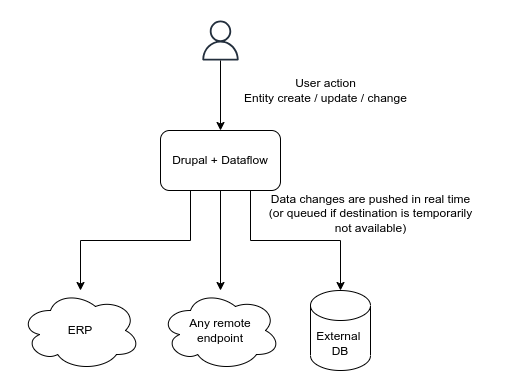
Dataflow not only reacts to entity changes and pushes data, but also keeps track of what and where have been exported, stores remote objects IDs, tracks errors and periodically retries export in case of failures (such as if remote API returns an error or is temporarily unavailable).
The sync process normally happens at request shutdown so it doesn't affect page load time. In the worst case, if the sync failed, it would be retried on cron run.
Features
- Flexible plugin-based setup.
- Possibility to export same entities multiple times.
- Entity references handling.
- Exported items tracking.
- Create, update and delete operations.
- Failure tolerance.
- Best effort (request shutdown) and cron based processing.
- Migrate integration (for two-way sync).
Use Cases
The export (sync) is initiated by Drupal; any creation, deletion or updates made to tracked entities made in Drupal are automatically replicated to the data destination.
Possible usage scenarios:
- Replicating orders made in Drupal to external ERP.
- Syncing bookings, users registrations, form submissions, etc to CRM.
- Exporting content to a different site (either Drupal or other systems).
- Any other cases where data being input in Drupal needs to be sent externally.
Post-Installation
The module does not provide any UI; it is meant to be used programatically. The following steps should be done to start the dataflow:
- Implement Destination plugin (or use the existing one, like SQL destination); this is where you call your remote APIs.
- Implement Sync plugin for your entity type, define fields structure; this is where you provide data for your API..
- Add
hook_entity_insert,hook_dataflow_entity_updateandhook_dataflow_entity_deletehooks withdelayedSync()to a custom module to make data flow.
There's a task to provide a usage example: #3372591: Usage example.
Recommended modules/libraries
A few helper modules (e.g. providing different destination plugins) are available.
Similar projects
- views_data_export provides batch data exporting, but is intended to be used periodically and export data to the file. In contrast, Dataflow pushes data changes in realtime.
- webhooks allows reacting on entity create/update/delete and call remote APIs but does not allow tracking remote IDs and statuses of exported entities, retrying in case of failure etc.
🇺🇦 |
This module is maintained by Ukrainian developers. Please consider supporting Ukraine in a fight for their freedom and safety of Europe. |
Supporting organizations:
Idea and development
Project information
- Project categories: Developer tools, Import and export, Integrations
- Created by abramm on , updated
 This project is not covered by the security advisory policy.
Use at your own risk! It may have publicly disclosed vulnerabilities.

